Cloudflare 502 Bad Gateway: How to Diagnose and Fix It

Sep 16, 2026 · Troubleshooting · 11 min read
A Cloudflare 502 Bad Gateway error means a gateway received an invalid response from an upstream server. Cloudflare may forward the error from your origin or generate it while processing the response. This guide helps visitors report the problem and site owners isolate failures in an origin proxy, application, or Cloudflare Tunnel.
Quick answer: Visitors can retry once and report the URL, time, and Ray ID. Site owners should capture the failing request, compare equivalent public and permitted origin requests, and correlate proxy, application, or cloudflared logs. A failed direct-origin test is meaningful only after accounting for access controls, client authentication, and certificate trust.
Quick Diagnosis: Where Did the Cloudflare 502 Start?
Use the evidence below before changing configuration.
| Evidence | Likely direction | First action |
|---|---|---|
| Cloudflare-branded 502 page | The origin commonly returned a standard 502/504 that Cloudflare forwarded | Check the origin proxy and application logs at the same timestamp |
| Blank or unbranded 502 page | Cloudflare may have generated the response; malformed compression is one documented cause | Inspect response headers and retest origin compression |
cf-error-type or cf-error-origin header |
Cloudflare generated the error page | Use the header value to select the failing layer |
| Equivalent, permitted direct-origin request reproduces the failure | An origin-side issue is more likely after accounting for access controls and TLS | Correlate origin proxy and application logs before changing configuration |
| Only one URL fails | A route-specific upstream or application function is failing | Compare the route with a known-good health endpoint |
| Failure began after a deployment | Host, port, protocol, certificate, or resource configuration may have changed | Review the deployment diff and roll back the smallest suspect change |
| Tunnel reports “Unable to reach the origin service” | The tunnel reaches Cloudflare, but cloudflared cannot reach the local service |
Test the service from the cloudflared host or container |
The page design is a clue, not proof. Custom error pages and other intermediaries can change what visitors see. Save the exact URL, UTC timestamp, status, response headers, Cloudflare Ray ID when present, and whether the failure is persistent or intermittent.
What Does a Cloudflare 502 Bad Gateway Error Mean?
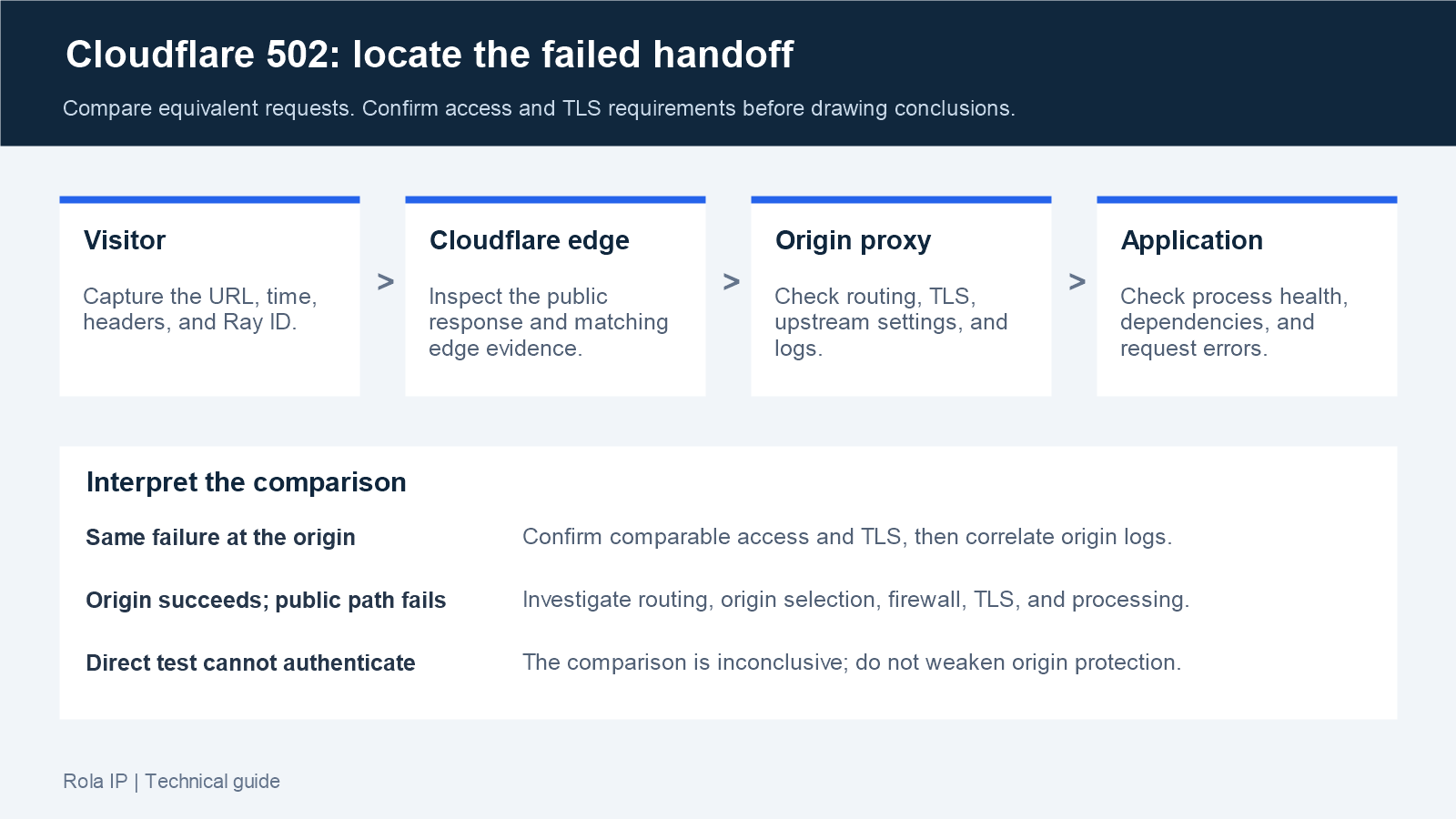
HTTP 502 means a server acting as a gateway or proxy received an invalid upstream response. A common Cloudflare request path is:
Visitor -> Cloudflare edge -> origin reverse proxy -> application -> database/API
Any gateway-to-upstream handoff can fail. Cloudflare may forward a 502 produced by the origin, or Cloudflare may generate the response when it cannot process a valid origin response. Cloudflare’s official 502/504 guidance describes origin-generated errors as the more common category.
Do not confuse a 502 with every other Cloudflare 52x error:
| Status | Meaning | Main investigation |
|---|---|---|
| 502 | Gateway received an invalid upstream response | Reverse proxy, application, protocol, malformed response |
| 521 | Origin refused the connection | Service state, listening port, firewall |
| 522 | Connection to the origin timed out | Network path, firewall, overloaded origin |
| 524 | Origin connection succeeded but the response was too slow | Slow query, long task, resource pressure |
| 525/526 | TLS handshake or certificate validation failed | TLS settings, certificate chain, hostname |
Persistent 502s usually indicate a stopped service, wrong address, or deterministic configuration error. Intermittent errors more often correlate with overloaded workers, unhealthy replicas, deployment churn, connection exhaustion, or request-specific response corruption.
If You Are a Visitor, Not the Site Owner
Reload once, then test the page in a private window or on another network. If the same error appears everywhere, wait a few minutes and report it to the site owner. Include the URL, local time with timezone, screenshot, and Ray ID if shown.
Do not send passwords, cookies, authorization headers, or personal data. Clearing the browser cache rarely repairs a real server-side 502; it only helps when one browser keeps displaying an old page after the service has already recovered.
How to Fix a Cloudflare 502 as the Website Owner
The shell examples below use Linux/bash conventions. Use them only on infrastructure you administer, and replace example domains, service names, ports, and paths with your active configuration. The IP address 203.0.113.10 is reserved for documentation. Keep credentials and real origin addresses private. Start with read-only checks and preserve logs before making changes.
1. Capture the Failing Response
Reproduce the exact URL and save the headers:
curl -sS --max-time 15 -D response-headers.txt -o /dev/null https://example.com/failing-path
Remove Set-Cookie, authorization values, session IDs, and private hostnames before sharing the file. Cloudflare’s diagnostic header documentation explains that cf-error-type and cf-error-origin appear on Cloudflare-generated error pages, not on errors forwarded from the origin. Their absence therefore does not prove Cloudflare is uninvolved.
Compare a failing route with a known-good route. If /health works but /api/report fails, investigate that application route or dependency before global DNS.
2. Use Cloudflare Error Analytics and the Ray ID
In the Cloudflare dashboard, open the affected zone’s HTTP Traffic page. Select Add filter, choose Edge status code or Origin status code, and filter for 502. Cloudflare states that Error Analytics is based on a 1% traffic sample, so an empty chart does not prove the error never occurred.
If your plan provides Log Explorer, search by Ray ID, hostname, path, status, and a narrow time window. Cloudflare’s 5xx error documentation also recommends checking intermediaries such as load balancers, caches, proxies, and firewalls—not only the final web server.
3. Verify the Application and Listening Port
On a systemd-based Linux host, begin with read-only checks:
sudo systemctl status myapp --no-pager
sudo journalctl -u myapp --since "15 minutes ago" --no-pager
sudo ss -ltnp
Confirm that the application is running and listening on the address and port configured in Nginx, Apache, HAProxy, a load balancer, or cloudflared.
For Docker, check container state and the published or internal port:
docker ps --format "table {{.Names}}\t{{.Status}}\t{{.Ports}}"
docker logs --since 15m app-container
docker inspect app-container
These Linux and container commands are diagnostic templates. Adapt service names and network addresses to infrastructure you are authorized to administer.
4. Test Each Hop Separately
Run the first test from the same host or network namespace as the reverse proxy:
curl -sv --max-time 10 http://127.0.0.1:3000/failing-path
curl -sv --max-time 10 -H "Host: example.com" http://127.0.0.1/failing-path
Match each hop’s actual protocol, port, route, and authentication requirements; a redirect or an authentication response is not the same as reproducing the 502. Compare the failing path and a known-good health endpoint separately. If an equivalent application request reproduces the failure, inspect application logs. If it succeeds but the local reverse proxy request fails, inspect proxy routing and logs.
An authorized administrator can compare the public and HTTPS origin paths without changing public DNS:
curl -sv --max-time 15 https://example.com/failing-path
curl -sv --max-time 15 --resolve example.com:443:203.0.113.10 https://example.com/failing-path
Use the same failing path, request method, and required application headers in both tests. --resolve changes the destination address while preserving the URL hostname for HTTP and TLS. Replace the example origin address only in a private session.
Direct-origin testing requires network access and the origin’s TLS and authentication requirements to be satisfied. An origin that allows only Cloudflare traffic, requires a client certificate, or uses an Origin CA certificate that curl does not trust can reject the test even when the application is healthy.
Use the appropriate trusted CA and authorized client credentials where required; do not open the origin publicly or disable verification to force a comparison. For Tunnel-only services, test from the connector’s network instead.
If equivalent requests reproduce the same failure at the origin and matching logs confirm it, investigate the origin proxy, application, and dependencies. If the direct request succeeds while the public request fails, examine differences along the Cloudflare path, including routing rules, origin selection, firewall, TLS, and response processing. Neither result alone identifies the exact failing component.
5. Translate Reverse Proxy Logs Into Actions
Validate Nginx configuration before reloading it:
sudo nginx -t
sudo tail -n 200 /var/log/nginx/error.log
| Nginx message | Likely cause | Next action |
|---|---|---|
connect() failed (111: Connection refused) |
Application stopped or proxy_pass uses the wrong port |
Check the service listener and active Nginx configuration |
upstream timed out |
Slow application, database, or exhausted worker pool | Trace latency and resource pressure before raising timeouts |
upstream prematurely closed connection |
Application crash, reset, or response failure | Correlate the application log and process restart time |
no live upstreams |
Every backend in the pool is unavailable | Check health checks, deployment state, and upstream addresses |
Collect logs and process state before restarting the stack. A restart may restore service while losing volatile diagnostic evidence, even when persistent logs remain available.
6. Check Resource Pressure and Unhealthy Replicas
Compare 502 timestamps with CPU, memory, file descriptors, worker availability, queue depth, database connections, and deployments. If responses alternate between 200 and 502, identify whether failures map to one origin instance or application version.
Increasing every timeout is not a diagnosis. It may hold connections longer and make worker exhaustion worse. Correct the slow operation or add capacity at the constrained layer.
7. Validate Host, Port, Protocol, DNS, and TLS
Review the active configuration, not only the file in source control. Confirm the upstream hostname, port, path, and http:// versus https:// scheme. A service can be healthy on port 8080 while the proxy still targets its former port 3000.
Verify that the Cloudflare DNS record points to the intended current origin. Review origin firewall events for blocked Cloudflare connections. For HTTPS, check certificate validity, hostname coverage, chain completeness, SNI, and the configured SSL/TLS mode. Do not disable certificate verification as a permanent workaround.
8. Isolate Broken Compression
Cloudflare documents malformed gzip data and a mismatched Content-Length as possible causes of a Cloudflare-generated 502. Start by saving headers and comparing identity and compressed responses on the same public path:
curl -sv --max-time 15 -D identity-headers.txt -H "Accept-Encoding: identity" -o /dev/null https://example.com/failing-path
curl -sv --max-time 15 -D compressed-headers.txt --compressed -o /dev/null https://example.com/failing-path
This is an initial comparison, not proof of an origin compression defect. Cloudflare can transform content encoding, and client-to-Cloudflare and Cloudflare-to-origin requests may use different encoding preferences. Check the returned Content-Encoding, status, curl errors, and matching origin logs.
Where direct-origin access is permitted and TLS requirements are satisfied, repeat both commands with --resolve example.com:443:203.0.113.10, using the actual origin address privately. Compare the same path and request settings. If evidence points to origin compression, temporarily disable it in a controlled test with a rollback plan. Repair malformed compressed data and ensure any Content-Length matches the transmitted body before restoring compression.
9. Roll Back the Smallest Relevant Change
If the failure began after a deployment, compare upstream addresses, environment variables, certificates, proxy configuration, health paths, and container networks. Roll back the narrowest suspect change, verify recovery, and preserve the broken configuration for root-cause analysis.
Illustrative 502 Failure and Recovery
A gateway can remain reachable while its configured upstream is unavailable. In an illustrative application, the gateway may return 502 when it cannot obtain a valid upstream response. Once the upstream becomes reachable and returns a valid response, the same gateway request may succeed.
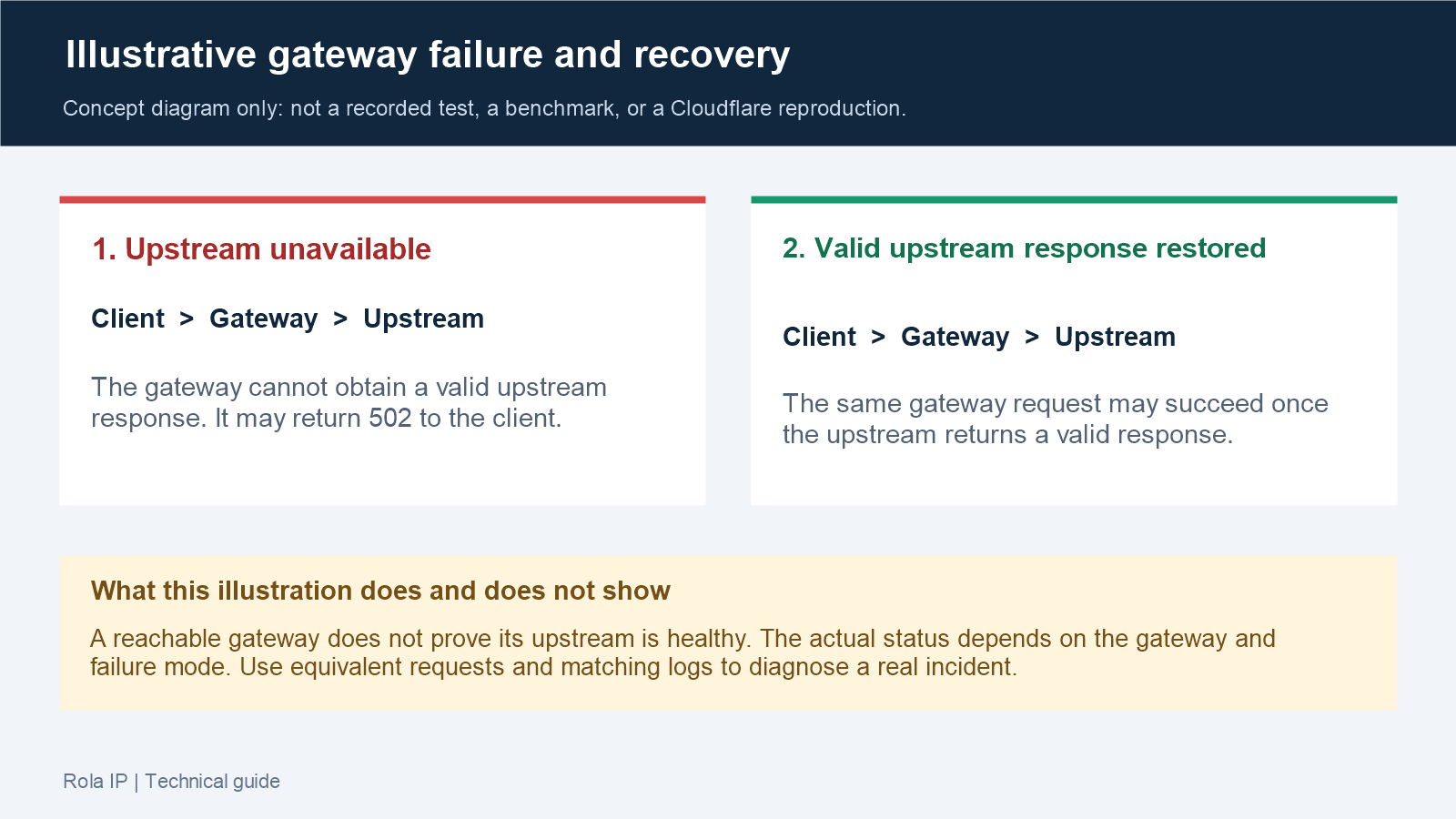
This diagram explains the gateway boundary; it is not a test result or a Cloudflare reproduction. The exact status depends on the gateway implementation and failure mode. A real incident still requires equivalent requests and matching logs to establish the cause.
How to Fix a Cloudflare Tunnel 502
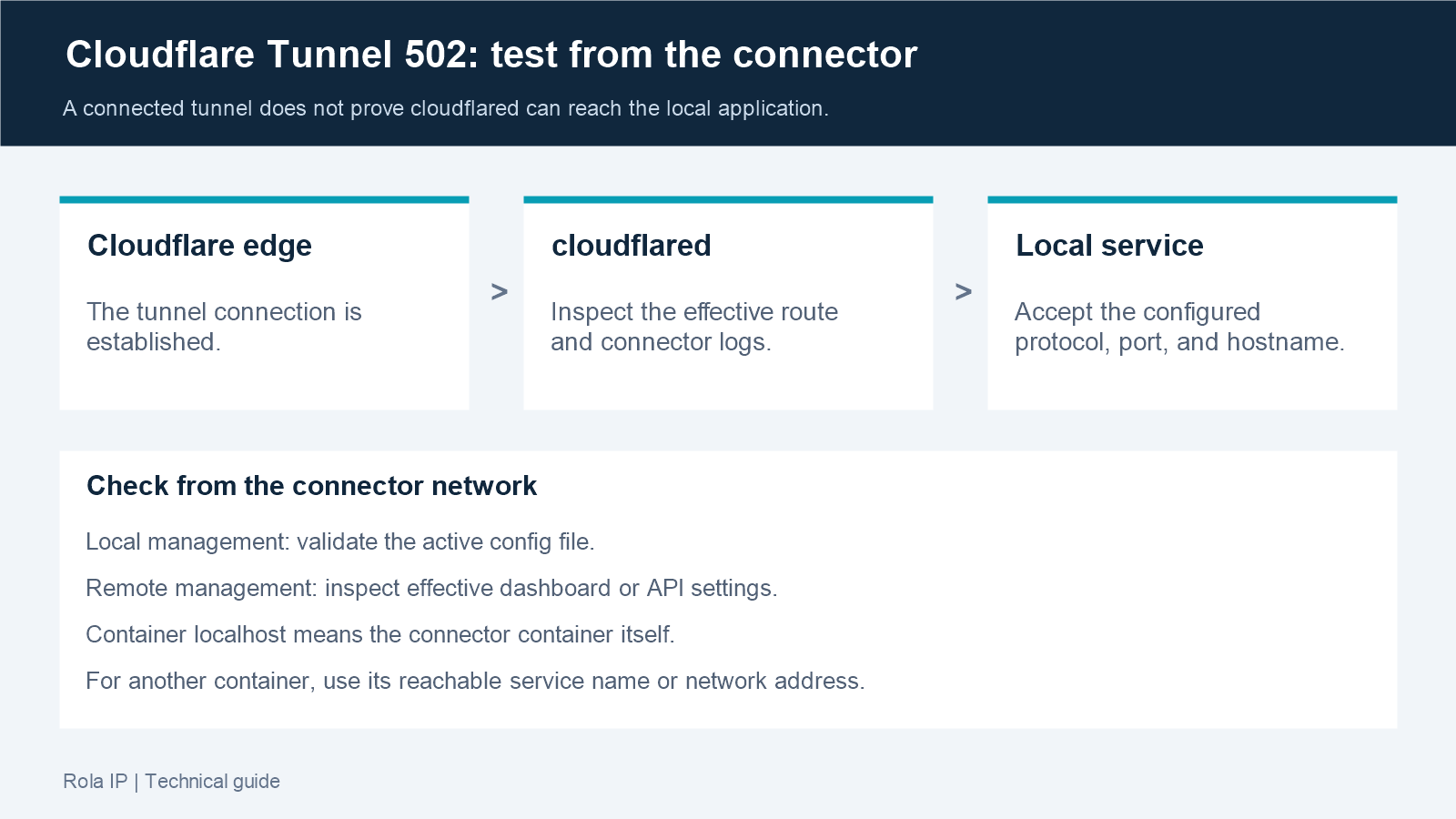
For the message “Unable to reach the origin service,” the tunnel is connected to Cloudflare, but cloudflared cannot reach the service defined in the ingress rule. This is different from error 1033, which means Cloudflare cannot find a healthy tunnel connector.
Record the installed version and inspect logs before changing the route:
cloudflared --version
sudo journalctl -u cloudflared --since "15 minutes ago" --no-pager
docker logs --since 15m cloudflared
cloudflared tail YOUR_TUNNEL_UUID
Use the service manager or container command that matches your installation. For remote log streaming, replace YOUR_TUNNEL_UUID and use an authenticated Cloudflare account with the required access. Review the current release and upgrade through your normal change-control process when the connector is outdated.
Test the actual Service URL from the host or network namespace where cloudflared runs, substituting the failing path and correct protocol and port:
curl -sv --max-time 15 http://localhost:8080/failing-path
Inside a container, localhost refers to that container itself. For an application in another container, use its reachable service name or network address. If the connector container has no curl binary, use an approved diagnostic environment on the same network.
For a locally managed tunnel, inspect the configuration file used by the running connector. If it is in the default location, check ingress syntax and rule matching with:
cloudflared tunnel ingress validate
cloudflared tunnel ingress rule https://example.com/failing-path
For a non-default file, specify its actual path, for example cloudflared tunnel --config /etc/cloudflared/config.yml ingress validate. These commands inspect local rules; they do not prove the upstream is reachable.
For a remotely managed tunnel, inspect the effective Service URL and origin settings in the Cloudflare dashboard or API. Local ingress validation does not validate those remote settings. In either management mode, correlate connector logs with the failing request.
| Tunnel log evidence | Meaning | Fix |
|---|---|---|
connect: connection refused |
Nothing is listening at that address and port | Start the service or correct the ingress port |
malformed HTTP response containing TLS-like bytes |
The route may use HTTP while the service expects HTTPS | Match the Service URL scheme to the origin protocol; the reverse mismatch can produce different TLS errors |
x509: certificate is valid for ... not localhost |
Certificate hostname and Service URL differ | Set the correct Origin Server Name and keep verification enabled |
certificate signed by unknown authority |
cloudflared does not trust the issuing CA |
Supply the correct CA pool or install the CA |
| Host test works, container test fails | localhost points to the container itself |
Use the reachable service name or container-network address |
Cloudflare’s Tunnel troubleshooting guide provides the current error patterns. Treat noTLSVerify only as a short diagnostic last resort; repair the certificate name or trust chain and re-enable verification.
Fixes That Usually Do Not Solve the Cause
- Repeated browser refreshes confirm intermittency but do not repair an upstream.
- Purging every cache does not start a stopped application or correct a port.
- Changing nameservers without DNS evidence adds risk and delays diagnosis.
- Disabling Cloudflare security broadly expands exposure and may hide the signal.
- Raising every timeout can worsen connection and worker exhaustion.
- Disabling TLS verification replaces a visible certificate failure with a security weakness.
- Restarting the entire stack before collecting logs may lose volatile diagnostic evidence.
Verify the Fix and Check Regional Impact
A single successful refresh is not sufficient. Use a small, controlled verification plan:
- For an initial smoke check, repeat the affected URL and a health endpoint 20–50 times at a safe rate appropriate for the application.
- Confirm stable 2xx/3xx responses and expected content, not only status codes.
- Compare P95 latency over a representative monitoring window with the normal baseline; a small smoke-check sample does not establish recovery.
- Confirm no new upstream, application, or Tunnel errors appear in logs.
- Test every origin replica or deployment version involved in the incident.
- Record the change, root cause, rollback path, and monitoring update. Continue monitoring under representative traffic before treating the incident as resolved.
When reports come from one city or network, compare the public path from more than one controlled location. Check the available proxy locations and, where suitable, use a residential proxy for low-volume requests to infrastructure you own or are authorized to test.
Access the What Is My IP tool through the same proxy configuration used for the test to confirm the active exit address. Record the timestamp, status, latency, Ray ID, and sanitized headers. A successful test from one exit does not establish availability for every user in that region.
Regional testing can reveal location-dependent impact; it cannot repair an origin, a Tunnel ingress rule, or malformed content. If only the proxy test returns 502, inspect whether that proxy generated the error before attributing it to Cloudflare or the site.
Escalate to the hosting provider when a permitted, comparable origin test and matching logs indicate an origin-side failure that you cannot resolve. Escalate to Cloudflare when evidence indicates a Cloudflare-generated or regional issue. Include timestamps with timezone, affected URLs, Ray IDs, sanitized headers, relevant /cdn-cgi/trace output, and the public-versus-origin comparison.
Conclusion
To troubleshoot a Cloudflare 502 Bad Gateway, capture the failing request, compare equivalent paths where access permits, and use matching logs to locate the failed handoff. For Tunnel deployments, test from the connector’s network. Verify the repaired route under representative traffic and keep the evidence needed to explain the incident.