Golang HTTP Client Proxy Guide: HTTP, HTTPS & SOCKS5

Sep 16, 2026 · Guides · 9 min read
You may be dealing with this situation: a Go program works perfectly over a direct connection, then becomes inconsistent as soon as proxies are added. Several goroutines need different routes. Some requests appear to keep the original exit IP, some time out, and an occasional response returns 407. The proxy address and credentials are already in place, yet it is still hard to tell whether the problem sits in http.Client, http.Transport, or the environment settings.
Proxy settings belong on the http.Transport used by http.Client. Use http.ProxyURL for a fixed route, or HTTP_PROXY, HTTPS_PROXY, and NO_PROXY when deployment settings should control the route. Current Go supports HTTP, HTTPS, SOCKS5, and SOCKS5H through the same pattern.
This guide starts with a complete authenticated client, then connects configuration, reuse, exit verification, and troubleshooting in one workflow. You can use it to choose a proxy setup for your deployment, confirm that the exit changed, and tell whether a failure comes from Go, the proxy, or the target site.
Configure an HTTP or HTTPS proxy in Go
In Go, http.Client manages high-level request behavior, while http.Transport manages connections, proxies, TLS, keep-alives, and connection pooling. Go’s official net/http documentation recommends reusing clients and transports because they retain connection state and are safe for concurrent use.
The example below builds an authenticated proxy client and makes a test request. Store the proxy address and credentials in environment variables and keep them out of source control.
Before you start, install a supported Go release and have an active proxy endpoint with its required authentication details. Check your installation with go version, then save the complete example below as main.go. It uses only the Go standard library.
package main

import (
    "context"
    "fmt"
    "io"
    "log"
    "net/http"
    "net/url"
    "os"
    "time"
)

func newProxyClient(rawProxyURL, username, password string) (*http.Client, error) {
    proxyURL, err := url.Parse(rawProxyURL)
    if err != nil {
        return nil, fmt.Errorf("parse proxy URL: %w", err)
    }

    switch proxyURL.Scheme {
    case "http", "https", "socks5", "socks5h":
        // Supported proxy URL schemes.
    default:
        return nil, fmt.Errorf("unsupported proxy scheme %q", proxyURL.Scheme)
    }

    if proxyURL.Host == "" {
        return nil, fmt.Errorf("proxy URL is missing a host")
    }

    if username != "" || password != "" {
        proxyURL.User = url.UserPassword(username, password)
    }

    baseTransport, ok := http.DefaultTransport.(*http.Transport)
    if !ok {
        return nil, fmt.Errorf("default transport is not *http.Transport")
    }

    transport := baseTransport.Clone()
    transport.Proxy = http.ProxyURL(proxyURL)

    return &http.Client{
        Transport: transport,
        Timeout:   30 * time.Second,
    }, nil
}

func main() {
    client, err := newProxyClient(
        os.Getenv("PROXY_URL"),
        os.Getenv("PROXY_USERNAME"),
        os.Getenv("PROXY_PASSWORD"),
    )
    if err != nil {
        log.Fatal(err)
    }

    ctx, cancel := context.WithTimeout(context.Background(), 15*time.Second)
    defer cancel()

    req, err := http.NewRequestWithContext(
        ctx,
        http.MethodGet,
        "https://api.ipify.org?format=json",
        nil,
    )
    if err != nil {
        log.Fatal(err)
    }

    resp, err := client.Do(req)
    if err != nil {
        log.Fatal(err)
    }
    defer resp.Body.Close()

    body, err := io.ReadAll(io.LimitReader(resp.Body, 1<<20))
    if err != nil {
        log.Fatal(err)
    }

    if resp.StatusCode < 200 || resp.StatusCode >= 300 {
        log.Fatalf("unexpected status %s: %s", resp.Status, body)
    }

    fmt.Println(string(body))
}
To run the example, open a terminal in the folder containing main.go. Replace the placeholder values with your proxy endpoint and credentials, then use the commands for your shell.
On macOS or Linux with Bash or Zsh:
export PROXY_URL='http://proxy.example:8080'
export PROXY_USERNAME='your_username'
export PROXY_PASSWORD='your_password'
go run main.go
On Windows with PowerShell:
$env:PROXY_URL = 'http://proxy.example:8080'
$env:PROXY_USERNAME = 'your_username'
$env:PROXY_PASSWORD = 'your_password'
go run main.go
These values are placeholders; proxy.example is not a working proxy. Supply credentials through your deployment’s secret management in production. A successful request prints a JSON object containing the public IP observed by the IP-echo service. Compare that value with a direct request from the same machine to check the route.
For an HTTP proxy, PROXY_URL would look like http://proxy.example:8080. For a secure connection to an HTTPS proxy, use an https:// proxy URL if the provider supports it. These proxy schemes are separate from the destination URL: an HTTP proxy can carry a request to an HTTPS destination by using an HTTP CONNECT tunnel.
After url.UserPassword adds credentials, the parsed proxy URL’s string form contains the username and password. Log only the proxy host or a non-secret label.
Why clone the default transport?
&http.Transport{} is valid and starts without several settings from http.DefaultTransport. Clone the default transport to retain Go’s normal dial, keep-alive, idle-connection, TLS-handshake, and HTTP/2 settings, then change only the proxy selector.
Keep normal TLS certificate verification enabled. An error such as x509: certificate signed by unknown authority needs a certificate or network-path investigation. Setting InsecureSkipVerify: true hides that problem and removes server identity verification.
Use HTTP_PROXY, HTTPS_PROXY, and NO_PROXY
If every request in a service should follow the same deployment-level proxy policy, environment variables can be simpler than passing a proxy URL into application code. Go’s default transport uses http.ProxyFromEnvironment.
The complete example above uses PROXY_URL to configure a fixed proxy. It does not read HTTP_PROXY, HTTPS_PROXY, or NO_PROXY for routing. To switch to environment-based routing, replace the newProxyClient(...) call and its immediately following error check at the start of main with this setup:
transport := http.DefaultTransport.(*http.Transport).Clone()
transport.Proxy = http.ProxyFromEnvironment

client := &http.Client{
    Transport: transport,
    Timeout:   30 * time.Second,
}
Keep the rest of main and remove the now-unused "os" import. You can leave the unused newProxyClient helper in place; if you remove it, also remove the "net/url" import. This replacement assumes the application has not replaced Go’s default transport with a different implementation.
Set the routing variables before starting the program. In Bash or Zsh:
export HTTP_PROXY='http://proxy.example:8080'
export HTTPS_PROXY='http://proxy.example:8080'
export NO_PROXY='localhost,127.0.0.1,.internal.example'
go run main.go
In PowerShell:
$env:HTTP_PROXY = 'http://proxy.example:8080'
$env:HTTPS_PROXY = 'http://proxy.example:8080'
$env:NO_PROXY = 'localhost,127.0.0.1,.internal.example'
go run main.go
HTTP_PROXY applies to HTTP destination URLs, HTTPS_PROXY applies to HTTPS destination URLs, and NO_PROXY lists hosts that should connect directly. Lowercase forms are also recognized.
This version does not use PROXY_USERNAME or PROXY_PASSWORD. If the proxy requires username/password authentication, include URL-encoded credentials in the relevant proxy URL, for example http://your_username:your_password@proxy.example:8080. Keep that value out of source control and logs. The sample’s HTTPS IP-echo request uses HTTPS_PROXY unless excluded by NO_PROXY.
ProxyFromEnvironment skips the proxy when the destination host is localhost. That behavior can make a local test look as if the proxy was ignored. A fixed http.ProxyURL configuration does not depend on the environment selector.
Choose a configuration method
- Use a fixed proxy on a custom client when different parts of the same process need different routes.
- Use environment variables when operations or deployment configuration should control the route without a code change.
- In a concurrent program, build separate reusable clients for different routes. Keep process-wide proxy environment variables stable while requests are running.
Use a SOCKS5 proxy with http.Client
Current Go transports accept socks5:// and socks5h:// proxy URLs through the same Transport.Proxy field. Go currently treats the two schemes the same, so you can reuse the helper above and change only the environment value:
PROXY_URL=socks5h://proxy.example:1080
PROXY_USERNAME=your_username
PROXY_PASSWORD=your_password
For the fixed-proxy example, changing PROXY_URL to a SOCKS5 URL is enough. A custom dialer is not required for standard HTTP requests through SOCKS5. If you switched to ProxyFromEnvironment, set the relevant HTTP_PROXY or HTTPS_PROXY value instead.
When do you need golang.org/x/net/proxy?
For a standard HTTP request through SOCKS5, start with the net/http proxy URL. Use x/net/proxy when you need a custom forwarding dialer, per-host routing, or direct control over the dial step.
If you take that route, assign a context-aware dialer to Transport.DialContext. The older Transport.Dial field is deprecated:
The following is a configuration fragment, not a standalone program or a direct replacement for main. Add golang.org/x/net/proxy to an existing Go module with go get golang.org/x/net/proxy, using a dependency version compatible with your Go release. If you are starting a separate project, initialize its module first with go mod init example.com/proxy-demo.
The fragment requires imports for fmt, net, net/http, time, and golang.org/x/net/proxy. Place it inside a function that returns an error, define username and password from your configuration, replace the endpoint placeholder, and use the resulting client to make requests before returning. For a complete runnable program, use the standard-library example above.
forward := &net.Dialer{
    Timeout:   10 * time.Second,
    KeepAlive: 30 * time.Second,
}

dialer, err := proxy.SOCKS5(
    "tcp",
    "proxy.example:1080",
    &proxy.Auth{User: username, Password: password},
    forward,
)
if err != nil {
    return err
}

contextDialer, ok := dialer.(proxy.ContextDialer)
if !ok {
    return fmt.Errorf("SOCKS5 dialer does not support contexts")
}

transport := http.DefaultTransport.(*http.Transport).Clone()
transport.Proxy = nil
transport.DialContext = contextDialer.DialContext

client := &http.Client{
    Transport: transport,
    Timeout:   30 * time.Second,
}
Choose HTTP or SOCKS5
For ordinary web requests, both proxy types can work. Use the protocol offered by your provider and required by your network. The protocol name alone does not guarantee better speed or anonymity.
| Question | HTTP/HTTPS proxy | SOCKS5 proxy |
|---|---|---|
| Best fit | HTTP APIs, web pages, scraping, monitoring | TCP routing where the endpoint or surrounding tooling uses SOCKS5 |
| Go configuration | http.ProxyURL with an HTTP or HTTPS URL |
http.ProxyURL with a SOCKS5 URL; custom dialer only when needed |
| Authentication | Credentials in proxy URL user info | Credentials in proxy URL user info or proxy.Auth |
| HTTPS destinations | Uses an HTTP CONNECT tunnel | TCP connection is established through SOCKS5, then normal destination TLS applies |
One client per stable proxy configuration
Create one client for each stable proxy configuration, then reuse it across requests. Its transport can reuse idle connections and reduce unnecessary connection setup. If your application uses five fixed proxies, create five clients during startup and choose from that small pool for each job.
Keep a transport’s proxy settings stable while requests are running. If a proxy configuration is retired, stop assigning new work to its client and call CloseIdleConnections when you want to release that client’s idle keep-alive connections. Active requests are not interrupted by that method.
You can reuse a Go client when the proxy gateway and credentials remain stable, but this does not guarantee a new exit IP for every request. Requests sent through an existing HTTPS CONNECT tunnel or SOCKS5 connection can retain the same exit. Verify the provider’s rotation behavior with repeated IP-echo requests using the same protocol, session settings, and connection reuse behavior as your application.
Verify the proxy and troubleshoot failures
The sample program requests an IP echo endpoint. Compare its returned address with your normal public IP. Before you run the Go code, use ROLA IP’s proxy checker for an endpoint-level check. It supports HTTP, HTTPS, SOCKS4, and SOCKS5 proxies, authenticated formats, and target HTTP status.
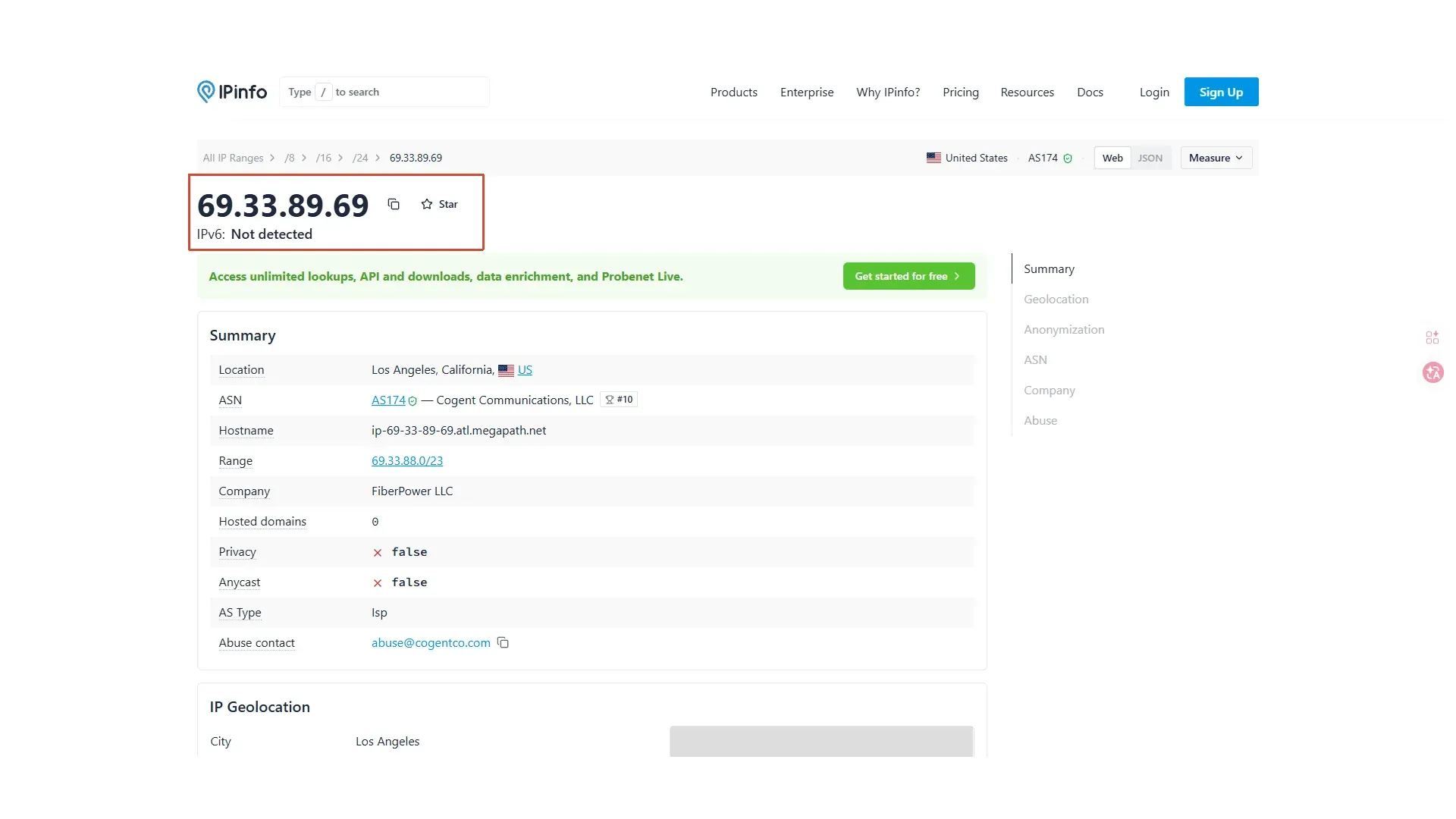
The IPinfo screenshot below illustrates the IP address, location, ASN, and company fields available for an IP lookup. To verify your Go client’s proxy route, compare the IP-echo response from the proxied request with a direct request made on the same machine.
Diagnose the layer that failed before changing code or rotating IPs:
| Symptom | Likely layer | What to check |
|---|---|---|
| Unsupported scheme or missing host | Local configuration | Include the protocol and host:port, and URL-encode credentials by using url.UserPassword. |
| Connection refused, no route, or DNS error | Proxy gateway or local network | Check the proxy host, port, firewall, DNS, provider status, and IP whitelist. |
context deadline exceeded or client timeout |
Network, proxy, or slow target | Measure each hop, test the endpoint separately, and adjust a bounded timeout only after finding the slow layer. |
TLS or x509 error |
Certificate or interception path | Keep verification enabled; inspect the destination certificate and any corporate interception proxy. |
| HTTP 407 or a CONNECT authentication error | Proxy authentication | Check the proxy credentials and authentication rules. For HTTPS destinations through an HTTP proxy, a failed CONNECT can surface as an error from client.Do rather than a response available to your code. |
| HTTP 403 | Proxy, intermediary, or target policy | Inspect the failure stage, response headers, and body to identify which server rejected the request. Do not assume the target generated the status. |
| HTTP 429 | Rate limiting by the proxy, an intermediary, or the target | Identify the limiting service, reduce request volume, and honor Retry-After when present. Avoid retry storms and send only authorized traffic. |
| Public IP did not change | Client selection, routing policy, or exit allocation | Confirm that the request used the intended client. Check NO_PROXY and local-address bypass only when using ProxyFromEnvironment; a fixed ProxyURL does not apply those exclusions. |
Use ROLA IP with a Go HTTP client
ROLA IP presents its rotating datacenter proxies as an option for bulk public-data requests, API checks, and SEO monitoring. The product page describes speed, scale, and predictable traffic costs. Test the network against a small sample of your real targets first. If a target has stricter IP requirements, compare residential or mobile networks as well.
ROLA IP’s dashboard lists the proxy host, port, username, and password. For a datacenter account, the username carries the provider-specific _dc marker. The screenshot below groups the country, protocol, account, server information, and final connection string so you can map each value to the Go environment variables.
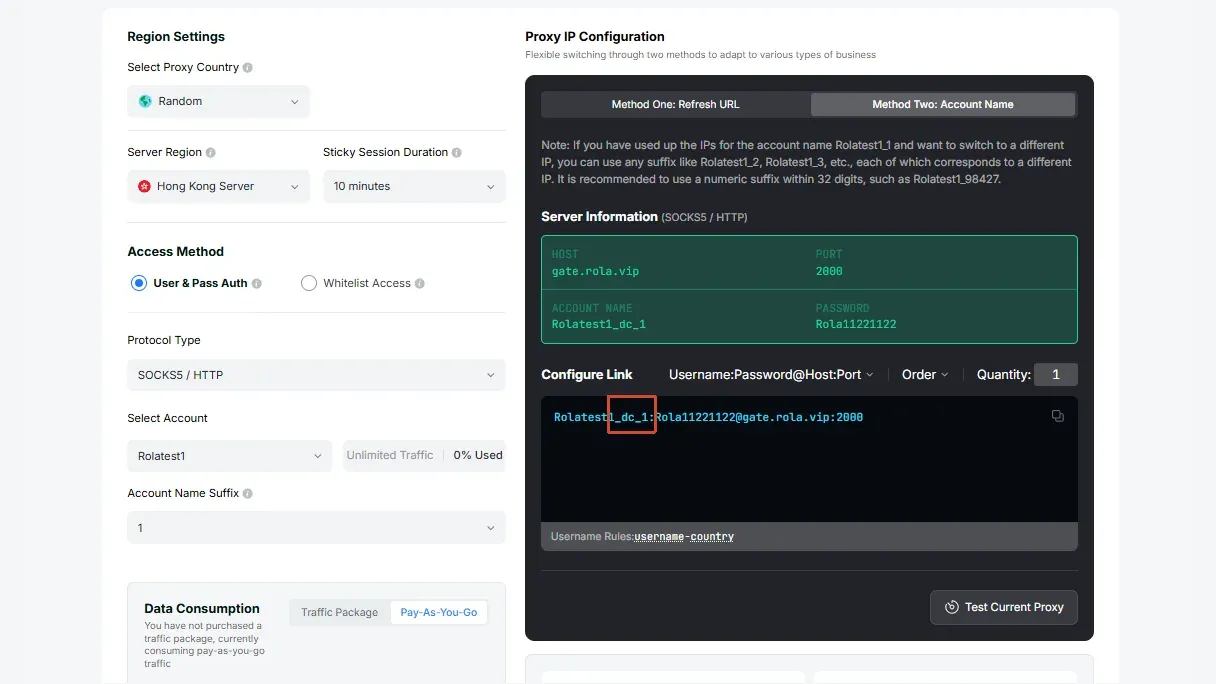
Treat the screenshot as a field-mapping example. Enter the current host, port, username, and password from your own dashboard:
PROXY_URL=http://your-proxy-domain:your-port
PROXY_USERNAME=youraccount_dc-country-us
PROXY_PASSWORD=your_password
ROLA IP uses username parameters for country selection and session control. For datacenter proxies, _dc identifies the network. An optional session ID follows another underscore, as in youraccount_dc_1-country-us-sessiontime-10. This example selects a US exit and requests a 10-minute sticky session. For stateless requests, youraccount_dc-country-us-f-1 selects the per-request rotation mode. Use these as alternative configurations, and verify rotation behavior under your application’s connection settings. See the proxy parameters reference for the username format.
With a stable ROLA IP gateway and credential configuration, reuse the Go client across requests. Choose a sticky session for workflows that need a consistent exit, or a rotation mode for stateless, authorized requests. Test the observed exit IP across repeated requests: an existing HTTPS tunnel or SOCKS5 connection may retain its exit even when a rotation mode is configured.