How to Bypass Amazon CAPTCHA: Prevention and Troubleshooting

Aug 18, 2026 · Guides · 12 min read
Amazon CAPTCHA cannot be bypassed reliably with one header, proxy, browser option, or solver. The practical approach is to identify the challenge type, reduce avoidable triggers, keep the browser and network session consistent, and use a supported CAPTCHA service only when an interactive challenge remains. This guide explains that workflow for authorized, low-volume data collection and testing.
Key takeaways
- Distinguish Amazon Robot Check from AWS WAF Challenge, AWS WAF CAPTCHA, and account verification.
- Start with a low-rate baseline and change only one variable at a time.
- Preserve cookies, browser state, locale, and proxy identity across related requests.
- Use a sticky proxy session for a page journey and rotation for independent, stateless requests.
- Verify the target page after challenge handling; a solver reporting success is not enough.
- Stop repeated retries when the target’s rules or response indicate that the workflow is not permitted.
Why Does Amazon Show a CAPTCHA?
Amazon uses multiple signals to decide whether a request looks legitimate. A CAPTCHA can appear because of one factor or several factors acting together:
- too many requests in a short period;
- high concurrency or repeated navigation patterns;
- an IP address with poor reputation or unusually high traffic;
- frequent IP changes during one cookie-backed session;
- missing, expired, or inconsistent cookies;
- browser behavior that does not match the declared headers;
- JavaScript or storage features required by the page not being available;
- an account-sensitive action that requires separate verification.
Changing the User-Agent alone rarely fixes these problems. It does not repair lost cookies, stabilize the exit IP, execute a JavaScript challenge, or reduce an excessive request rate.
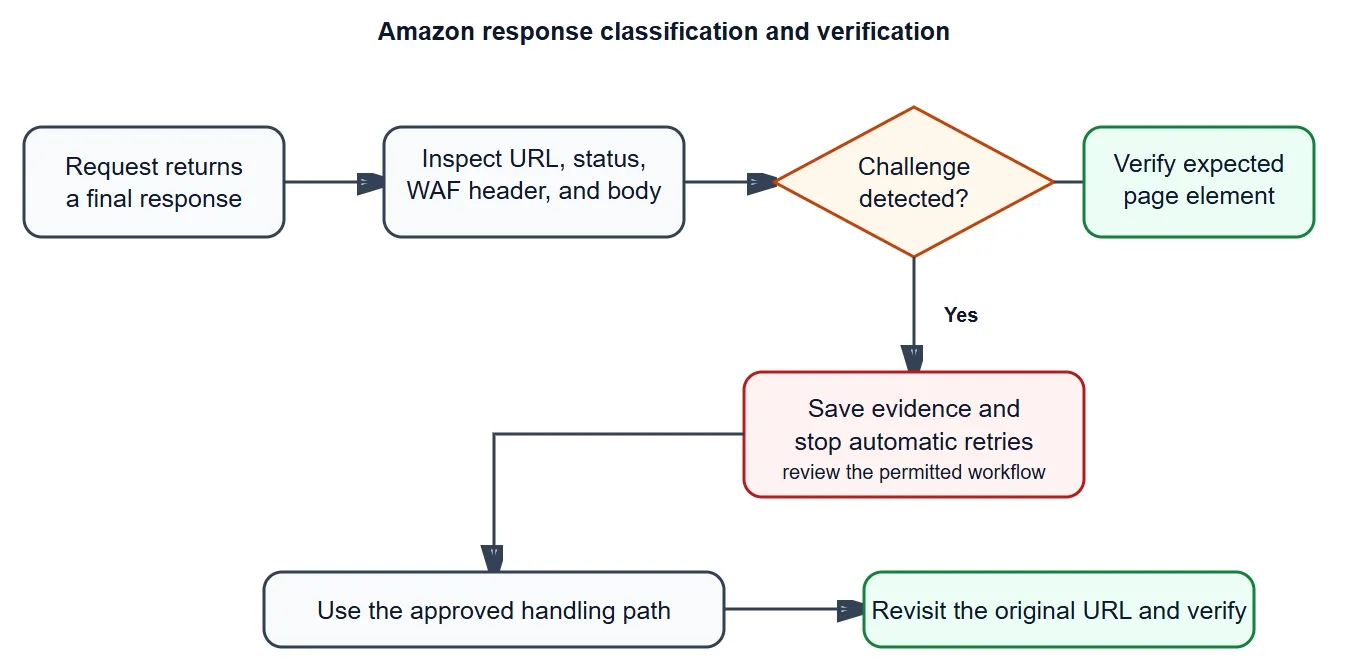
Inspect the final URL, status, response header, and page body before deciding how to handle the result.
Identify Which Amazon Challenge You Received
“Amazon CAPTCHA” is a broad label. Before changing the browser or adding a solver, record the final URL, status code, response headers, visible page text, and a screenshot or saved HTML file.
| Challenge type | Strongest identifying evidence | Recommended response |
|---|---|---|
| Amazon Robot Check | Page text such as “Robot Check” or a character-entry form | Stop automatic retries, reduce load, preserve evidence, and review whether the collection is permitted |
| AWS WAF Challenge | x-amzn-waf-action: challenge, normally with HTTP 202 |
Use a JavaScript-capable browser and preserve the resulting browser session |
| AWS WAF CAPTCHA | x-amzn-waf-action: captcha, normally with HTTP 405 |
Use an approved human or supported solver workflow, then verify the original URL |
| Account verification | Appears during sign-in, checkout, account creation, or another account-sensitive action | Keep it outside a scraping workflow and use Amazon’s approved account process |
AWS documents the standard response behavior for its CAPTCHA and Challenge actions. Status codes are useful evidence, but they should not be used alone because custom pages can return different responses.
The following Python function creates a basic classification record without retrying or attempting to solve the challenge:
import requests

ROBOT_MARKERS = (
    "robot check",
    "enter the characters you see below",
    "api/auth/captcha",
)

def classify(response: requests.Response) -> str:
    action = response.headers.get("x-amzn-waf-action", "").lower()
    sample = response.text[:200_000].lower()
    final_url = str(response.url).lower()

    if action == "captcha":
        return "aws_waf_captcha"
    if action == "challenge":
        return "aws_waf_challenge"
    if any(marker in sample or marker in final_url for marker in ROBOT_MARKERS):
        return "robot_check_candidate"
    return "no_known_challenge_marker"

with requests.Session() as session:
    response = session.get("YOUR_PERMITTED_URL", timeout=20)
    print(response.status_code, response.url, classify(response))
Do not log cookie values, proxy passwords, solver keys, or CAPTCHA tokens. For diagnosis, cookie names, timestamps, request IDs, response classifications, and screenshot paths are normally sufficient.
How to Reduce Amazon CAPTCHA Triggers
Prevention should come before solving. Establish one repeatable baseline, then test request rate, session persistence, proxy mode, and browser behavior separately. When several variables change at once, it becomes impossible to know which change improved or damaged the result.
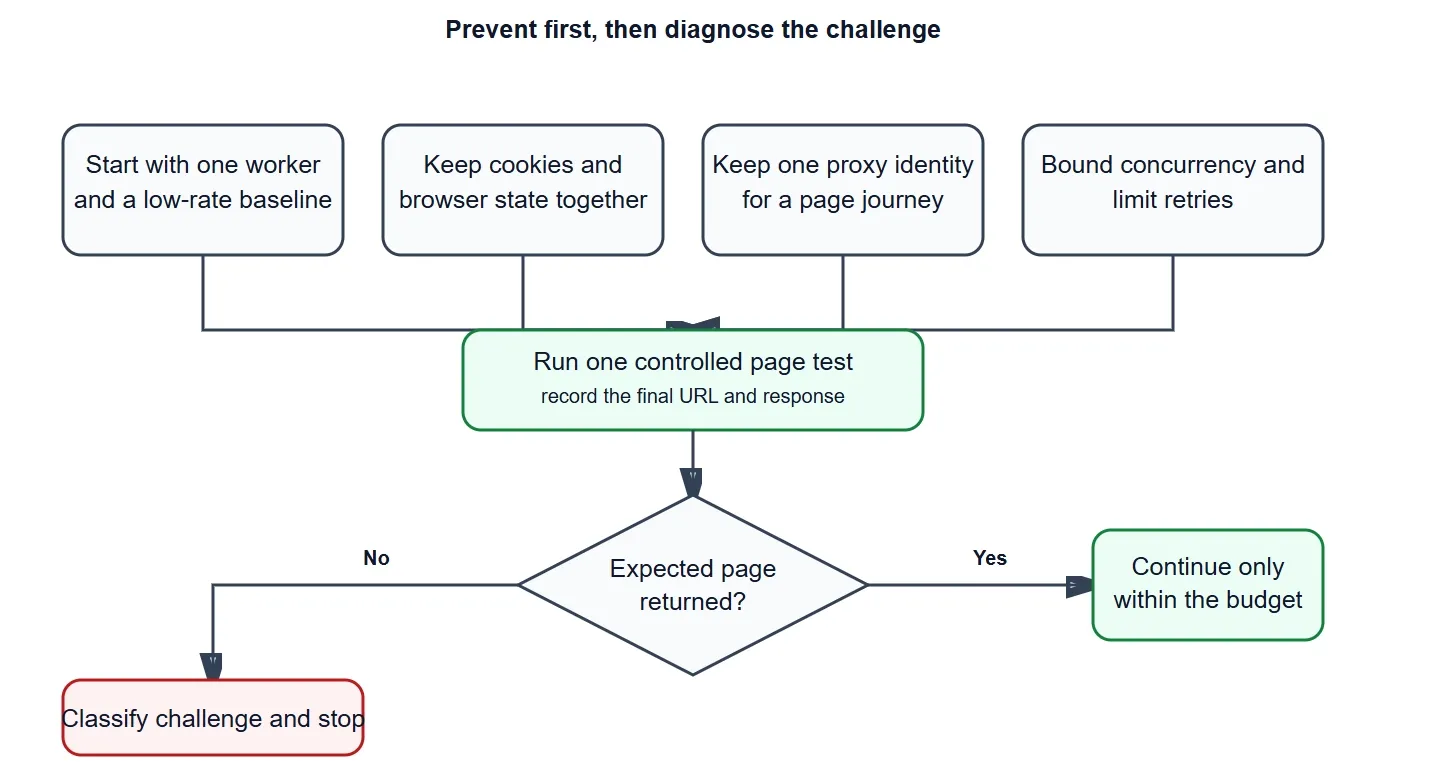
Start with a controlled baseline, preserve session state, and stop for diagnosis when a challenge repeats.
1. Slow Down Requests and Limit Concurrency
There is no universal “safe” delay. Start with one worker, a low request rate, and a maximum retry count. Add bounded jitter only after the baseline is stable. Back off when the response contains a challenge, HTTP 429, repeated 5xx errors, or connection failures.
A practical request policy should define:
- maximum concurrent workers;
- minimum and maximum delay between requests;
- exponential backoff conditions;
- maximum retries for one URL or session;
- a stop condition for repeated CAPTCHAs.
Unlimited retries make the request pattern more aggressive and can turn a temporary challenge into a persistent CAPTCHA loop.
2. Keep Cookies and Browser Sessions Consistent
Use one browser profile or one requests.Session for a related sequence of pages. Do not discard cookies between a search page and its product pages, and do not share one cookie jar across unrelated workers.
For each logical session, keep these elements aligned:
- browser profile and storage;
- cookies issued to that session;
- proxy exit IP;
- locale, language, and time-zone settings;
- request pacing and navigation pattern.
Selenium is useful when the page requires JavaScript because it can preserve browser state and capture the final page. However, Selenium alone is not an Amazon CAPTCHA bypass. Run the browser in headed mode during diagnosis so the actual page and challenge behavior are observable.
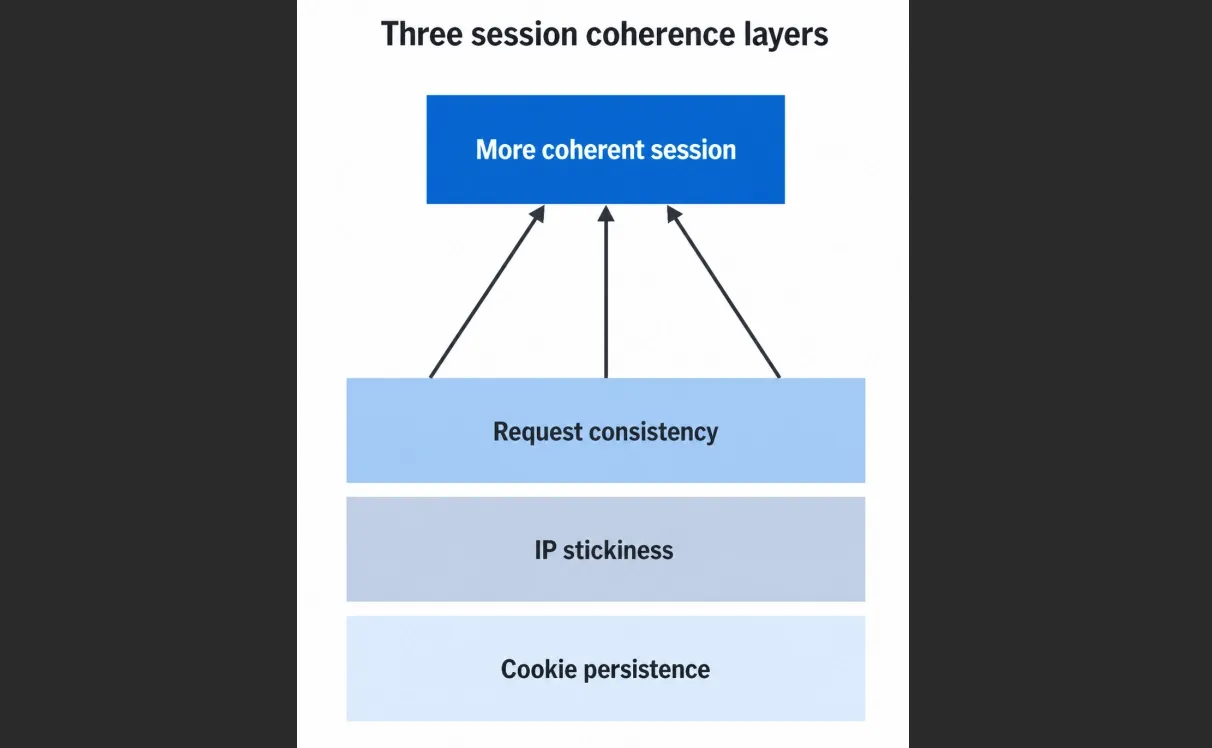
Cookies, proxy identity, and browser behavior should remain coherent during one page journey.
3. Use the Right Proxy Rotation Strategy
Proxy rotation is not always beneficial. The correct strategy depends on whether the requests belong to the same session.
| Request pattern | Recommended proxy mode | Reason |
|---|---|---|
| Search page followed by several product pages | Sticky session | Cookies and exit IP remain consistent during the journey |
| Independent, stateless URLs | Controlled rotation | Each request can use a separate identity without breaking session continuity |
| Login, checkout, or account activity | Do not use this workflow | Account-security and transaction risks require approved processes |
A residential proxy can provide a consumer-network exit, but it cannot fix excessive concurrency, missing cookies, or inconsistent browser behavior. Treat the proxy as one part of the session rather than a universal solution.
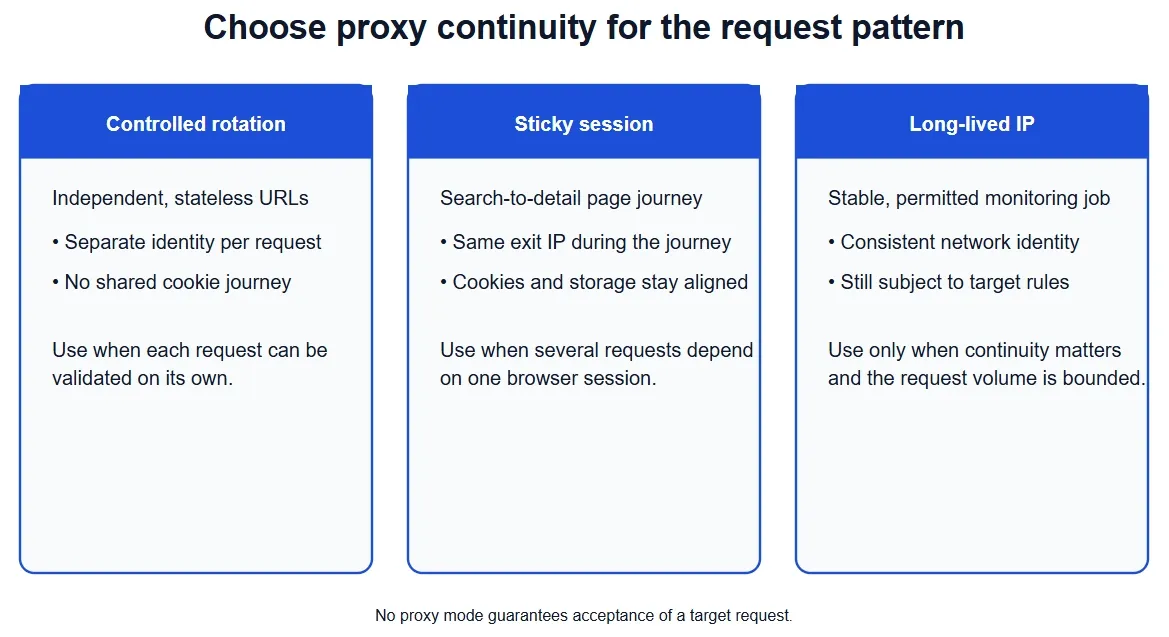
Choose controlled rotation, a sticky session, or a long-lived IP according to the request pattern.
4. Verify the Proxy Before Testing Amazon
Confirm that the proxy is reachable and that its exit location matches the intended region before adding Amazon to the test. Rola IP’s proxy quick start documents the required host, port, username, and password fields.
curl.exe -x "http://USERNAME:PASSWORD@PROXY_DOMAIN:PORT" `
  "http://ip123.in/ip.json"
Compare the returned exit IP with a direct request. You can also use a proxy checker to test connectivity before running the target workflow. Successful proxy verification proves that the proxy works; it does not prove that Amazon will accept the session.
For Rola IP, the documented username parameters support sticky sessions and per-request rotation:
USERNAME_1-country-us-sessiontime-10   # sticky session
USERNAME_2-country-us-sessiontime-10   # separate sticky session
USERNAME-country-us-f-1                # rotate for each request
The current proxy parameters guide should remain the source of truth for supported parameter ranges and formats. For a Python implementation, use the maintained Rola IP integration guide rather than copying credentials or connection code from an unrelated example.
How to Handle an Amazon CAPTCHA
Challenge handling should begin only after the response has been classified. Do not send every unusual response to a solver.
Amazon Robot Check
When a Robot Check page appears, stop the retry loop and save the response. Test whether the trigger is related to rate, session loss, or network context. After a cooldown or configuration change, run one controlled request rather than resuming the entire workload.
Robot Check is not automatically the same as an AWS WAF CAPTCHA, so an AWS WAF solver payload may not apply.
AWS WAF JavaScript Challenge
An AWS WAF Challenge is normally a silent JavaScript check rather than an interactive puzzle. A normal JavaScript-capable browser may complete it and receive session state that must be retained for later requests.
If the challenge repeats, confirm that the browser is not being restarted, its storage is not cleared, and the proxy exit does not change before the next page loads.
AWS WAF CAPTCHA
Use a human review process or a supported solver only when the page has been classified as an interactive AWS WAF CAPTCHA and the activity is authorized. Solver providers can require fields such as websiteURL, websiteKey, iv, and context. Those values belong to the current challenge and should not be reused from an earlier request.
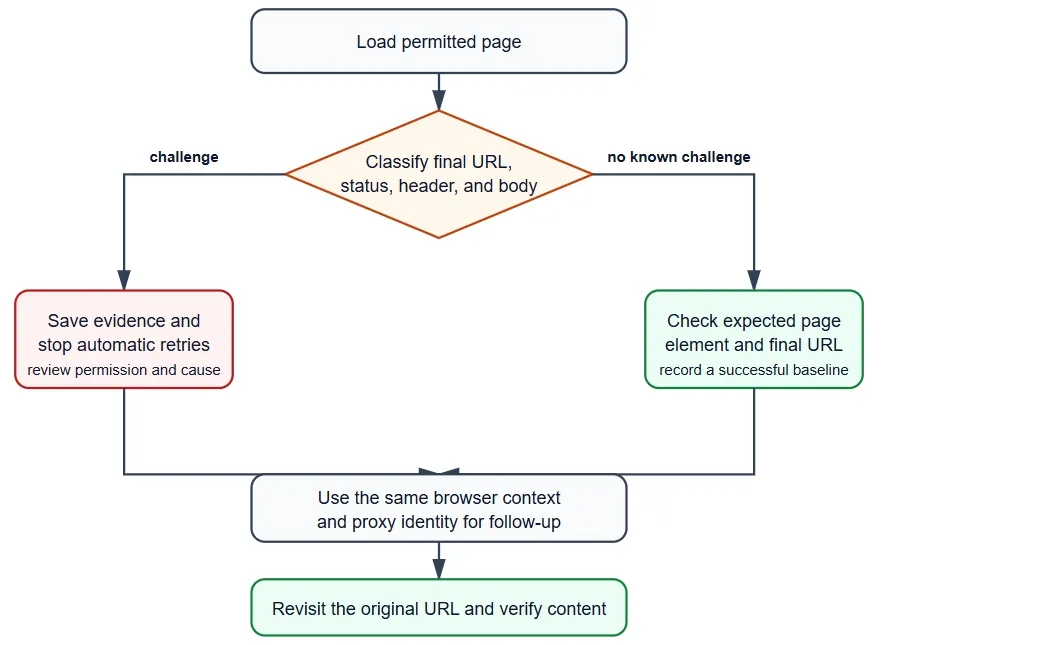
Classify the response, preserve the same session, follow the approved handling path, and verify the original page.
Follow the solver provider’s maintained documentation instead of copying an old request payload. API fields, token handling, proxy requirements, and response formats can change.
Verify the Original Page
A solver returning ready or solved does not prove that Amazon returned the expected content. Revisit the original URL in the same browser and proxy session, then verify:
- the expected product or search element is present;
- the final URL is correct;
- the challenge marker is absent;
- the response status and WAF header changed as expected;
- the retry count stayed within the defined limit.
If the same challenge returns, stop the solve loop and move to session diagnosis.
Playwright Example: Preserve a Session and Classify the Result
The following example is intended for a permitted, low-volume test. It opens one browser context, uses one proxy identity for the entire page journey, saves a trace when a challenge is detected, and checks the original page after navigation. It does not submit credentials, inject a token, or retry indefinitely.
Install Playwright once with pip install playwright and playwright install chromium. Supply the proxy endpoint through an environment variable instead of writing credentials into source control.
import os
from pathlib import Path
from playwright.sync_api import sync_playwright, Page

TARGET_URL = os.environ["PERMITTED_AMAZON_URL"]
PROXY_SERVER = os.environ.get("PROXY_SERVER")
PROXY_USER = os.environ.get("PROXY_USER")
PROXY_PASSWORD = os.environ.get("PROXY_PASSWORD")

def classify_page(page: Page, navigation_response) -> dict:
    body = page.locator("body").inner_text(timeout=5_000).lower()
    url = page.url.lower()
    title = page.title().lower()
    status = navigation_response.status if navigation_response else None
    waf_action = navigation_response.headers.get("x-amzn-waf-action", "").lower() if navigation_response else ""
    if waf_action == "captcha":
        kind = "aws_waf_captcha"
    elif waf_action == "challenge":
        kind = "aws_waf_challenge"
    elif "robot check" in body or "api/auth/captcha" in url:
        kind = "robot_check_candidate"
    elif "verify" in title or "verification" in body:
        kind = "account_verification_candidate"
    else:
        kind = "target_or_unknown"
    return {"kind": kind, "url": page.url, "title": title, "status": status, "waf_action": waf_action}

with sync_playwright() as p:
    proxy = None
    if PROXY_SERVER:
        proxy = {"server": PROXY_SERVER}
        if PROXY_USER and PROXY_PASSWORD:
            proxy.update({"username": PROXY_USER, "password": PROXY_PASSWORD})

    browser = p.chromium.launch(headless=False, proxy=proxy)
    context = browser.new_context(locale="en-US", timezone_id="America/Los_Angeles")
    context.tracing.start(screenshots=True, snapshots=True, sources=True)
    tracing_active = True
    page = context.new_page()

    responses = []
    page.on("response", lambda r: responses.append({
        "url": r.url,
        "status": r.status,
        "waf_action": r.headers.get("x-amzn-waf-action", ""),
        "resource_type": r.request.resource_type,
    }))

    try:
        navigation_response = page.goto(TARGET_URL, wait_until="domcontentloaded", timeout=30_000)
        result = classify_page(page, navigation_response)
        Path("artifacts").mkdir(exist_ok=True)
        page.screenshot(path="artifacts/amazon-result.png", full_page=True)
        print(result)
        print("recent responses:", responses[-10:])

        if result["kind"] != "target_or_unknown":
            context.tracing.stop(path="artifacts/amazon-challenge-trace.zip")
            tracing_active = False
            raise RuntimeError("challenge detected; stop and review the session")

        # If the test has a follow-up page, navigate within the same context so
        # cookies and storage are retained. Replace this selector with one
        # specific to the permitted target page.
        follow_up_url = os.environ.get("PERMITTED_FOLLOW_UP_URL")
        if follow_up_url:
            follow_up_response = page.goto(follow_up_url, wait_until="domcontentloaded", timeout=30_000)
            if follow_up_response and follow_up_response.status >= 400:
                raise RuntimeError(f"follow-up returned HTTP {follow_up_response.status}")
            page.locator("body").wait_for(state="visible")
            print("follow-up page loaded in the original browser context")
    finally:
        if tracing_active:
            try:
                context.tracing.stop(path="artifacts/amazon-trace.zip")
                tracing_active = False
            except Exception:
                pass
        browser.close()
The important part is the context boundary: do not create a new context, clear storage, or change the proxy between the initial page and the follow-up page. In production, replace the body-text heuristic with selectors and response headers specific to the target, and write the classification record as JSON so each test can be compared without exposing cookie values.
A Response Classification Example
Page text alone can be misleading, so combine the final URL, status code, WAF action header, and a short body sample. For example, these are the records a diagnostic logger might produce:
{"status":202,"url":"https://www.example.com/product/1","waf_action":"challenge","kind":"aws_waf_challenge"}
{"status":405,"url":"https://www.example.com/product/1","waf_action":"captcha","kind":"aws_waf_captcha"}
{"status":200,"url":"https://www.example.com/robots.txt","waf_action":"","kind":"robot_check_candidate"}
The first two records are identified primarily by x-amzn-waf-action; the last is a 200 response whose body contains Robot Check markers. A 200 status therefore does not mean that the requested content was returned. In a browser logger, classify the main document response returned by page.goto() rather than any historical subresource response. Store a bounded body sample, not the full response, and redact query parameters that may contain temporary challenge data.
Troubleshooting Walkthrough: From Loop to Root Cause
When a challenge repeats, make one controlled test for each hypothesis. The following sequence keeps the evidence useful:
- Capture the first failure. Save the final URL, status, WAF action, timestamp, request ID, screenshot, and the last ten navigation responses. Do not start another worker while collecting this evidence.
- Check session continuity. Confirm that the same Playwright context or
requests.Sessionhandled the preceding pages. Compare the cookie names and the proxy exit IP before and after the challenge; a changed value usually means the session was rebuilt or rotated. - Run a one-page baseline. Use one worker, the lowest configured rate, and one verified proxy session. If the baseline succeeds but the full job fails, concurrency or pacing is the leading suspect.
- Separate browser from network. Repeat the same URL with a headed browser and JavaScript enabled. If the browser receives a challenge while a static request receives a normal page, inspect storage and script execution. If both receive a challenge, compare the exit IP, region, and request rate.
- Validate the follow-up request. After any approved interactive handling, revisit the original URL in the same context. A solver status or a completed browser event is not success unless the expected product/search selector is present and the challenge marker is gone.
- Stop on a bounded failure. Two or three repeated challenges in one session should produce a diagnostic record and stop that session. Continuing to retry changes the evidence and can increase the trigger rate.
Typical interpretations are straightforward: a challenge on the next page points to lost cookies or a changed exit IP; a challenge only under load points to rate or concurrency; a successful challenge event followed by missing content points to stale or domain-mismatched challenge state. Fix the smallest confirmed cause, then rerun the one-page baseline before restoring the workload.
How to Fix an Amazon CAPTCHA Loop
Repeated CAPTCHAs usually indicate that the challenge result is not being carried into the next request or that the underlying request pattern is still being rejected.
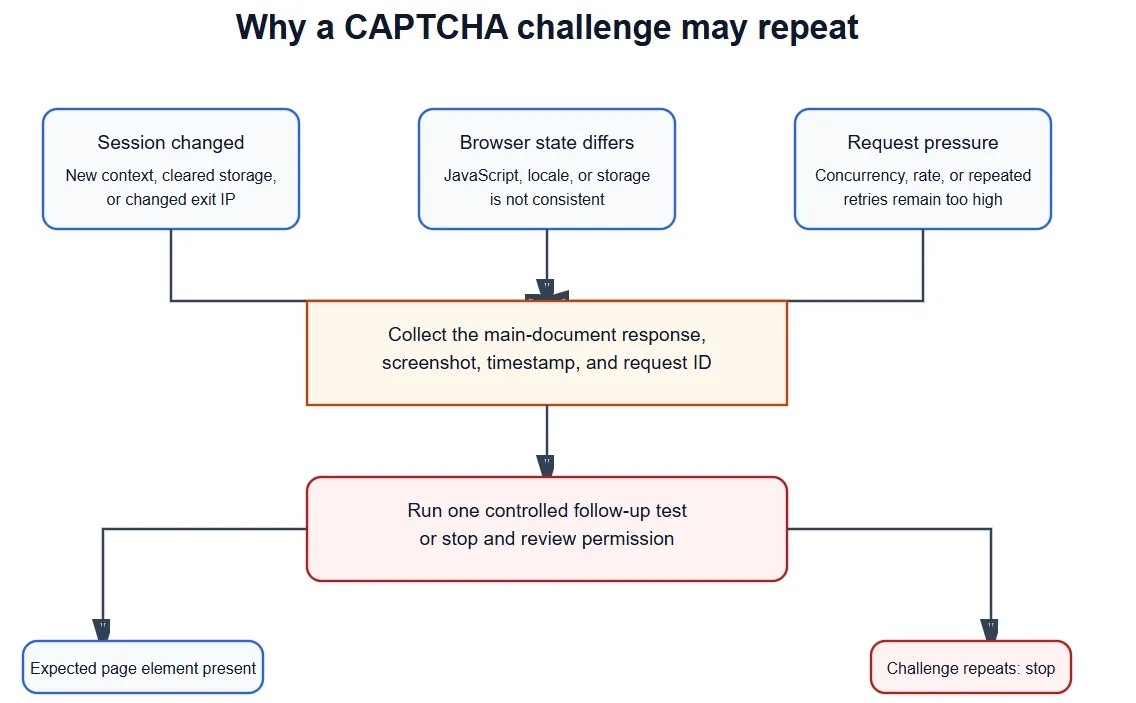
Check session continuity, browser state, and request pressure before running one controlled follow-up test.
| Symptom | Likely cause to test | Controlled fix |
|---|---|---|
| CAPTCHA returns on the next page | Proxy exit or browser session changed | Keep one sticky proxy and browser profile for the full journey |
| Solver reports success but content is missing | Solver completion was mistaken for target success | Reload the original URL and check for the expected page element |
| HTTP 202 or 405 repeats | Missing, invalid, expired, or domain-mismatched WAF state | Collect fresh challenge data and preserve the same session |
| Robot Check appears immediately | Request rate, IP reputation, or browser behavior is rejected | Compare one low-rate direct baseline with one verified proxy baseline |
| Results differ between workers | Cookies or proxy sessions are being shared incorrectly | Isolate state per worker and reduce concurrency |
| Challenges continue after one controlled retry | The workflow may not be accepted | Stop and review terms, robots controls, and available official APIs |
AWS does not define one universal 30-second CAPTCHA token lifetime. Its current documentation lists a default CAPTCHA and Challenge immunity time of 300 seconds. CAPTCHA immunity can be configured from 60 to 259,200 seconds, while Challenge immunity can be configured from 300 to 259,200 seconds. The protected site’s configuration determines the effective window. See AWS WAF token immunity times.
Recommended Amazon Scraping Workflow
For permitted public-page collection, use the least invasive method that satisfies the requirement:
- Check whether an official Amazon API supports the required data.
- Send one low-rate baseline request and classify the response.
- Confirm that the expected page element exists before scaling the workload.
- Verify the proxy separately and record the exit IP and region.
- Use a sticky session for related pages or controlled rotation for independent requests.
- Preserve browser storage and cookies for the lifetime of the session.
- Handle only the challenge type that was actually detected.
- Verify the original target page after any challenge-handling step.
- Stop after a bounded failure instead of creating an unlimited retry loop.
For broader data-collection projects, a dedicated web scraping proxy setup can make network configuration and session behavior easier to manage. It still needs an explicit request budget, target permission, error handling, and result validation.
Conclusion
The most reliable Amazon CAPTCHA strategy is prevention and controlled diagnosis, not a promise of permanent bypass. Identify the challenge, reduce request pressure, preserve cookies and proxy identity, and verify every result on the original page. Use a solver only for a correctly classified interactive CAPTCHA and only when the workflow is authorized.
Rola IP’s residential proxy, sticky-session parameters, and connection-verification documentation can support the network portion of this workflow. They should be combined with conservative request pacing, isolated browser sessions, explicit retry limits, and compliance with Amazon’s terms and applicable law.