
How to Bypass an IP Ban: Safe Recovery and Diagnosis

Aug 19, 2026 · Guides · 12 min read
TL;DR
To bypass an IP ban safely, first confirm that the restriction is actually tied to your IP address. Then stop the behavior that triggered it, respect any cooldown or appeal process, and use a different authorized network route only when the site permits the activity.
Changing an IP without fixing the cause rarely solves the problem for long. A new address can be blocked again if the same client continues sending excessive requests, reuses a damaged session, violates a site’s rules, or combines incompatible account and location signals.
Scope: This guide is for legitimate troubleshooting, approved testing, and authorized access to public resources. It does not cover evading account enforcement, paywalls, fraud controls, or security restrictions after a site has withdrawn permission.
Confirm That You Are Dealing With an IP Ban
Not every 403 response, CAPTCHA, or failed login is an IP ban. Identify the enforcement layer before changing anything.
| Observation | More likely explanation | Verification step |
|---|---|---|
HTTP 429 with Retry-After |
Rate limit or temporary throttling | Stop requests and wait for the stated interval |
| HTTP 403 on one URL only | Authorization or resource policy | Test another public URL on the same domain |
| Every device fails on the same network | Network or IP-level restriction | Compare with one authorized alternate network |
| One account fails on several networks | Account-level restriction | Test while logged out without creating another account |
| Site works in a browser but not a script | Client behavior, headers, cookies, or request rate | Compare request logs and reduce the client to one request |
| Content changes by country | Geographic or licensing policy | Check the service’s regional availability rules |
| DNS lookup or TLS connection fails | Local network, resolver, or certificate problem | Test DNS resolution and another HTTPS site |
HTTP 429 explicitly means the client sent too many requests in a period, and the response can include a Retry-After value. A 403 means the server understood the request but refused it; it does not, by itself, prove an IP ban.
Run a Controlled Network Comparison
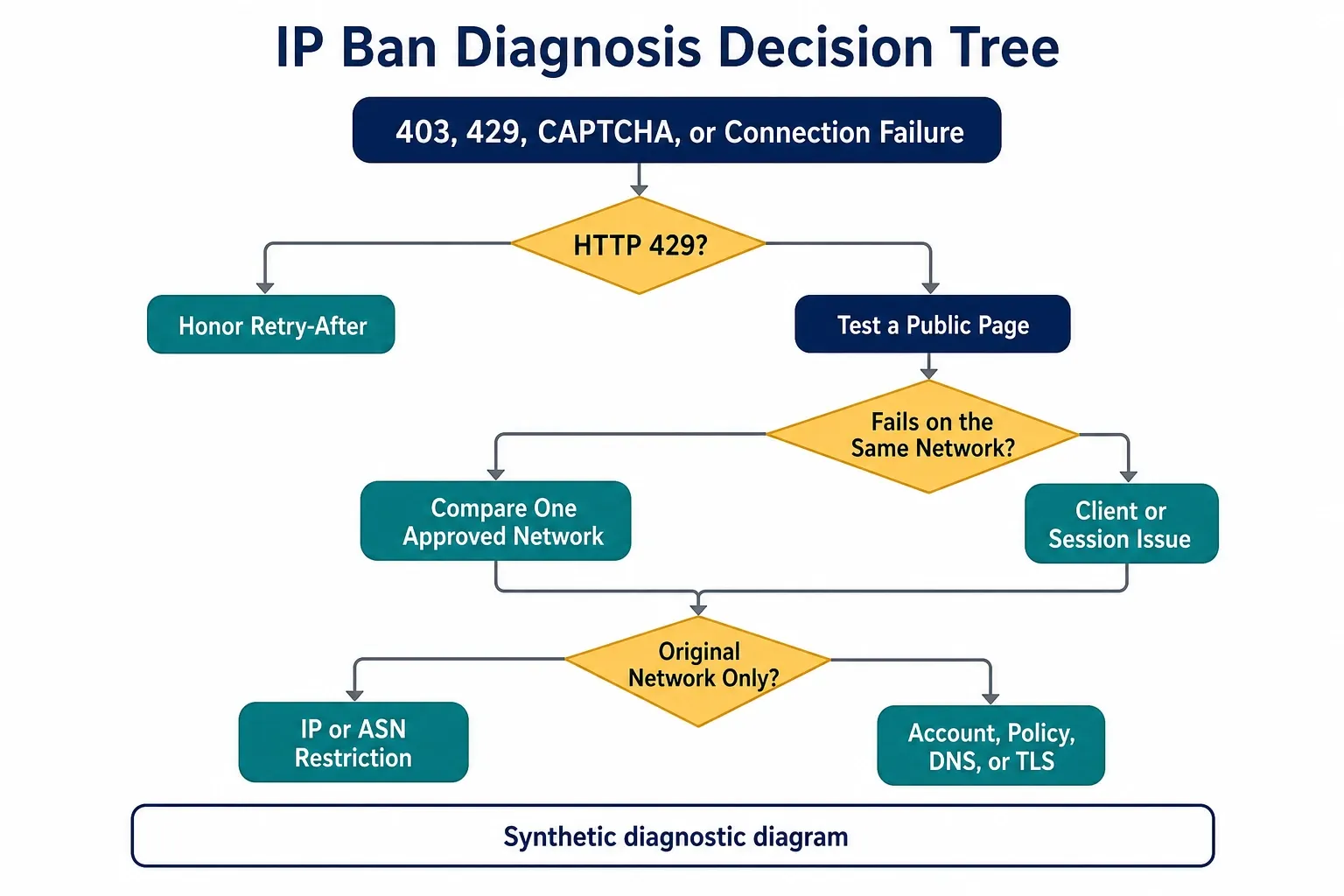
Use the following sequence without repeatedly retrying the blocked endpoint:
- Record the URL, time, HTTP status, response headers, and visible error message.
- Stop automated traffic from the original connection.
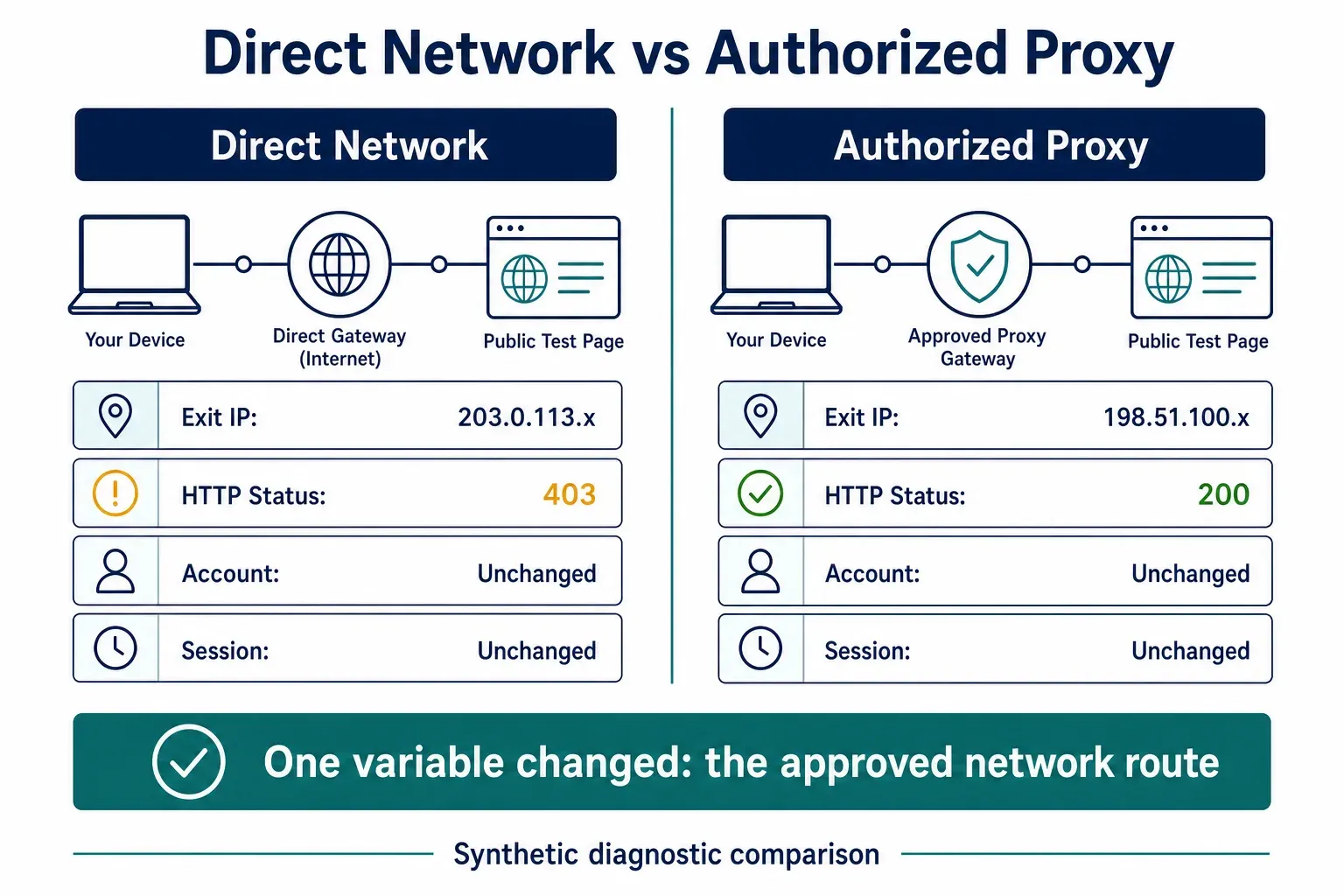
- Test one public page while logged out and without changing account state.
- Test the same page once from an authorized alternate network.
- Compare results from another device on the original network.
If multiple devices fail only on the original network, an IP-level restriction becomes more likely. If the account fails everywhere, changing the network route will not resolve the actual enforcement.
Use an IP Ban Diagnosis Decision Tree
Change one variable at a time. If the test changes the account, cookies, device, IP, and location simultaneously, the result cannot identify which layer caused the failure.
Classify the Restriction Before Recovery
| Restriction layer | Typical evidence | Compliant recovery path |
|---|---|---|
| Temporary rate limit | 429, Retry-After, rising latency |
Wait, reduce concurrency, add backoff |
| IP reputation block | Several devices fail through one public exit | Appeal, contact the network owner, test one approved route |
| ASN or hosting-network block | Cloud or datacenter exits fail while consumer networks work | Ask the site about permitted infrastructure |
| Account enforcement | One account fails across networks | Use the official appeal process |
| Session restriction | Failure follows a cookie or session token | Reauthenticate and preserve session consistency |
| Browser challenge | CAPTCHA or interactive verification appears | Complete the official flow or use a documented API |
| Geographic policy | Content is unavailable only in a region | Follow eligibility and licensing rules |
| DNS or TLS failure | Name resolution or certificate validation fails | Fix the resolver, clock, certificate chain, or network |
Which Signals Can Trigger an IP Restriction?
Sites rarely evaluate only the public IP. Modern enforcement can combine several signals, so changing one address may leave the decisive evidence unchanged.
IP and ASN Reputation
An address can inherit history from previous users, a shared hotspot, a VPN pool, or a hosting provider. Some services apply policy to an entire autonomous system or network range rather than one IP.
Request Rate and Concurrency
Bursts, parallel connections, synchronized retries, and repeated access to expensive endpoints can trigger rate controls. Averages can hide bursts, so record peak requests per second and active workers.
Browser, TLS, and HTTP Characteristics
Servers can compare browser capabilities, HTTP headers, protocol negotiation, and connection behavior. Use a supported client and stable configuration for authorized testing. Do not treat this as a checklist for disguising automation.
Cookies and Account Continuity
Changing the network does not reset an account decision or server-side session. For example, recovering access after a Discord ban requires distinguishing a server ban from an account suspension before choosing a recovery method. A block that follows the account or cookie across networks is not solved by rotating IPs.
Geography and Session Consistency
Large location changes within one login session can conflict with expected behavior. Keep the country, network type, cookies, and session stable for multi-step workflows.
CAPTCHA and Challenge Responses
A challenge is a stop signal, not permission to increase retries. Complete the official verification path, reduce traffic, or move to a documented API.
Identify Why the Address Was Blocked
The recovery method should match the cause. Common triggers include:
- Request bursts or concurrency above the site’s published limits.
- Ignoring 429 responses and retrying immediately.
- Repeated failed authentication attempts.
- Automated access where the terms or robots policy do not permit it.
- A shared public, VPN, hosting, or carrier address with poor reputation.
- Session changes that jump between distant locations or IP types.
- Spam, abuse, fraud, or other prohibited behavior.
For crawlers, retrieve and follow the site’s robots.txt rules, use a descriptive user agent, prefer an official API, and obtain permission when the intended access is not clearly allowed. Robots rules are not authorization, but compliant clients are expected to follow applicable groups and paths.
Recovery Options Compared
Use these options for diagnosis or permitted recovery, not to override a platform decision.
Option |
Best fit |
Session continuity |
Main limitation |
Platform permission needed? |
|---|---|---|---|---|
Wait for cooldown |
429 or a documented temporary restriction |
High |
Does not resolve permanent or account enforcement |
Follow the published policy |
Contact site support |
Incorrect block or inherited IP reputation |
High |
Response time depends on the operator |
No extra access until resolved |
Contact ISP or network owner |
Shared or reassigned home/office IP |
High |
The public IP may not change |
Site rules still apply |
Mobile hotspot comparison |
One low-frequency diagnostic request |
Low |
Random location, shared carrier IP, data cost |
Use only for permitted testing |
VPN comparison |
Personal network troubleshooting |
Medium |
Shared exit may already be restricted |
Does not override account enforcement |
Authorized proxy |
Regional QA or approved public-data collection |
Configurable |
Requires trustworthy sourcing and session controls |
Yes, when the site or contract requires it |
Tor Browser |
Privacy-focused browsing |
Low |
Public exits, high latency, poor login continuity |
Often unsuitable for authenticated services |
Restarting a router is not a guaranteed IP-change method. Many providers reuse the same DHCP lease, assign static addresses, or place customers behind carrier-grade NAT. Contact the ISP when an address change is genuinely required for network recovery.
Choose the Correct Recovery Path
Start with the least disruptive option. Do not treat every restriction as a reason to rotate identities.
| Situation | Recommended action | Avoid |
|---|---|---|
| 429 or temporary cooldown | Stop, honor Retry-After, then resume slowly |
Immediate retries from new addresses |
| Incorrect or inherited block | Contact support with timestamps and the public IP | Creating replacement accounts |
| Shared network has poor reputation | Ask the network owner or ISP for help | Repeated router resets during an active ban |
| Authorized regional testing | Use an approved proxy in the required location | Pretending to meet eligibility rules |
| Approved data collection | Use controlled concurrency, backoff, caching, and documented proxies | Rotating on every failure without diagnosis |
| Account or policy enforcement | Follow the appeal process and correct the violation | Using a new IP to defeat the account decision |
1. Wait and Honor the Server’s Cooldown
If the response is 429, pause the client. Follow Retry-After when it is present. Without a published value, use exponential backoff, lower concurrency, and set a maximum retry count.
Do not retry every failed request simultaneously. That creates a retry storm and can turn temporary throttling into a longer restriction.
2. Appeal an Incorrect Ban
An appeal is the most durable response when a shared or reassigned IP was blocked by mistake. Provide:
- The public IP, partially masked if submitted outside a private support channel.
- UTC timestamps and affected URLs.
- HTTP status codes and request IDs from response headers.
- The legitimate business or research purpose.
- The rate and concurrency used before the block.
- Changes already made to prevent recurrence.
Avoid emotional or vague requests. A concise incident record gives the site operator enough information to inspect logs and remove a false positive.
3. Use a Different Route for Authorized Work
When the site permits the activity and the original address has inherited poor reputation, a proxy can provide a separate exit route. A residential proxy uses an address associated with a residential ISP, while a mobile proxy exits through carrier-assigned mobile space.
Choose the network type based on the legitimate task, not only on whether an address can reach the site. For stable login or checkout testing, keep one location and one sticky session. For approved public-data collection, rotate only according to the workload and the site’s limits.
Rola IP’s proxy quick start explains how to retrieve the host, port, username, and password. Verify the proxy on an IP-check endpoint before sending any request to the target site.
Choose a Proxy Type by Test Requirement
| Proxy type | Appropriate authorized use | Session guidance | Limitation |
|---|---|---|---|
| Rotating residential | Independent public-page collection | Rotate under a controlled policy | Costs scale with traffic; rotation does not replace rate control |
| Mobile | Mobile-carrier environment and app QA | Keep one carrier and region per session | Shared carrier addressing can make location less precise |
| ISP or static residential | Stable login, checkout, and long workflow tests | Keep one dedicated exit | A fixed address accumulates reputation over time |
| Datacenter | Development, performance, and low-risk infrastructure tests | Static or controlled pool | Some sites restrict hosting ASNs broadly |
The device used to connect does not determine the exit type. A phone using a residential proxy still presents the proxy’s residential exit, while a desktop can test through a mobile proxy when the workflow is approved.
4. Fix the Client Before Resuming
For automated access, make these changes before a new test:
- Reduce concurrency to one worker.
- Add exponential backoff with a maximum delay.
- Honor
Retry-Afterand stop on repeated 403 responses. - Cache results and avoid requesting unchanged pages.
- Keep authentication, cookies, location, and IP stable within a session.
- Record status codes, response times, and block-page fingerprints.
- Increase volume gradually only after a clean observation window.
If the project involves authorized public-data collection, a purpose-built web scraping proxy can help separate workloads and control regional exits. It does not replace permission, rate limits, or application-level error handling.
Select Sticky or Rotating Sessions Correctly
Changing the IP too often can look as abnormal as never changing it.
| Workload | Better session model | Reason |
|---|---|---|
| Logged-in workflow | Sticky | Prevents mid-session location and identity changes |
| Checkout or multi-step form test | Sticky | Preserves cookies and server-side state |
| One-off regional availability check | Single fresh session | Produces a clear, reproducible result |
| Approved large public crawl | Controlled rotation | Distributes requests while respecting rate limits |
| Debugging a suspected block | One alternate exit | Keeps the comparison easy to interpret |
Do not assign a different country on every request. Keep the exit geography consistent with the session and business purpose. If a clean address is immediately blocked, stop and inspect the behavior instead of cycling through the pool.
Why Common IP Ban Fixes Fail
Clearing Cookies Does Not Change the Public IP
Cookies can affect account or session state, but deleting them does not change the address visible to the server. If clearing cookies appears to help, the restriction may have been session-based rather than a true IP ban.
Incognito Mode Is Not a New Network Route
Private browsing creates a separate local session. It does not replace the public IP assigned by the network or proxy.
Free Proxies Often Add More Reputation Problems
Public endpoints are heavily shared, may already appear on blocklists, and can expose traffic to an unknown operator. Do not send passwords, tokens, customer data, or confidential requests through an untrusted proxy.
A VPN May Change the IP but Not the Enforcement Layer
A VPN can provide a different network address, but it will not reverse an account suspension or correct prohibited behavior. Shared VPN exits can also inherit restrictions from other users.
Constant Rotation Breaks Sessions
An account that changes IP, provider, or country during one session can trigger additional risk checks. Use sticky routing where continuity matters.
Why Changing the IP May Not Remove the Block
Changing the public IP does not reset account enforcement, cookies, server-side sessions, client characteristics, request behavior, or geographic inconsistencies.
| Result after changing the exit | Check first | Next safe action |
|---|---|---|
| The same account still fails | Account or organization enforcement | Stop and use the appeal process |
| Failure follows the same cookie | Session state or server-side token | Reauthenticate only if the service permits it |
| Browser fails but an approved API works | Browser challenge or unsupported workflow | Use the documented API |
| IPv4 changes but IPv6 does not | Split routing or incomplete proxy coverage | Correct the network path before testing |
| Every tested exit fails | Resource, account, regional, or policy restriction | Stop rotating and contact the operator |
| Only cloud servers fail | ASN or datacenter-range policy | Ask which infrastructure is permitted |
| A new exit works briefly, then fails | Request behavior or retry policy | Reduce rate and inspect logs |
Verify IPv4, IPv6, DNS, and Browser Routing
An IP-check page proves only what that page observed. For authorized tests, verify all relevant network paths before concluding that the proxy covers the application.
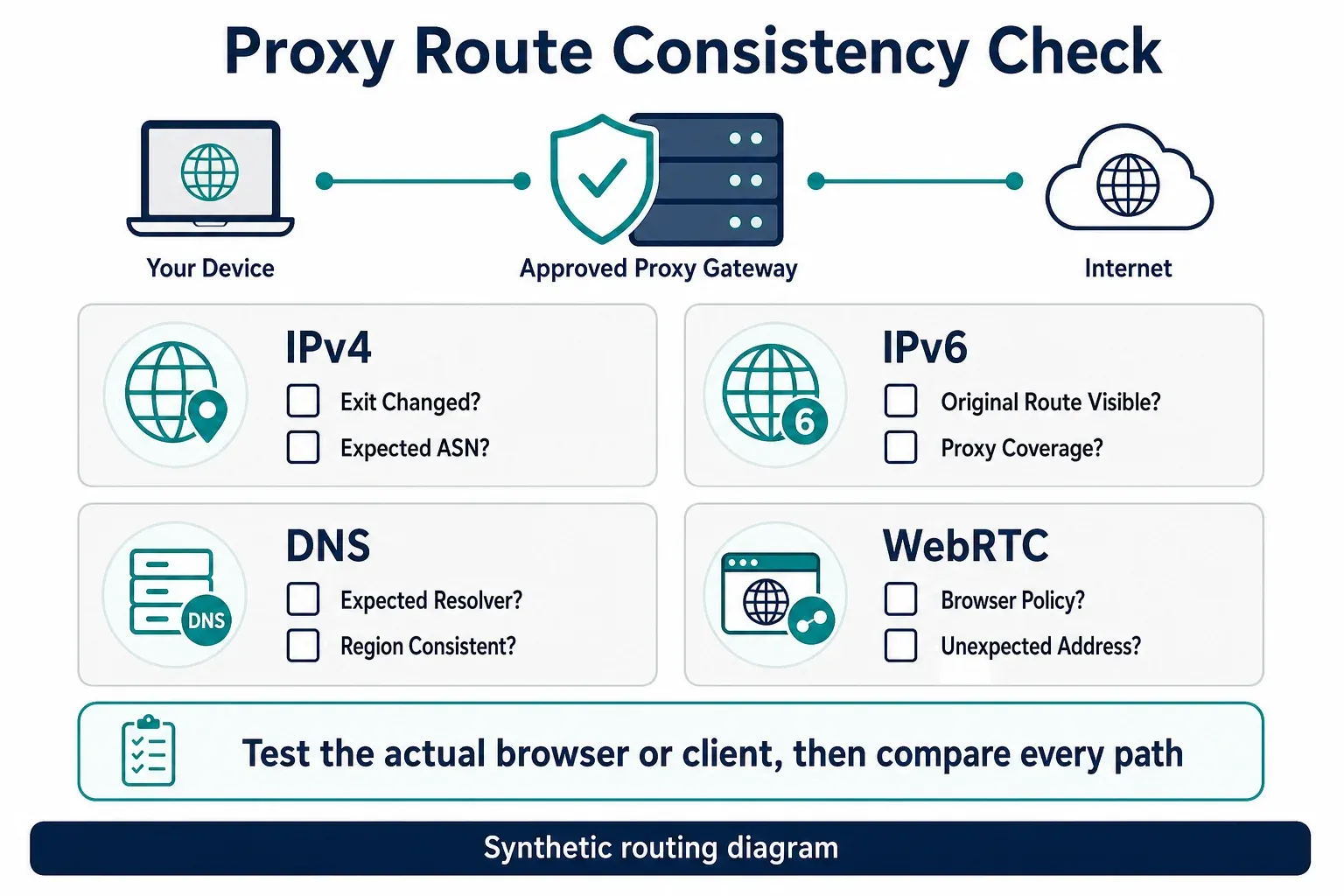
- Record the direct network’s public IPv4 and IPv6, if available.
- Connect the approved proxy and repeat both checks.
- Confirm that DNS resolution follows the intended resolver policy.
- Test the actual browser or application, not only a command-line client.
- Review WebRTC behavior when browser-based real-time communication is in scope.
- Confirm that all results use the expected country, ASN, and network type.
If IPv4 changes while IPv6 remains on the original network, the client has inconsistent routing. DNS queries can also follow a different path from web traffic. WebRTC results vary by browser and policy, so treat them as one diagnostic input rather than universal proof of a leak.
Do not publish full addresses, DNS history, cookies, or authentication data in screenshots. Mask values while retaining enough of each result to compare routes.
Prevent the Next IP Ban
Prevention is primarily a client-design problem.
- Prefer official APIs and documented bulk exports.
- Follow the service’s terms, authentication rules, and robots policy.
- Set explicit request-per-second and concurrency limits.
- Use exponential backoff with jitter for transient failures.
- Stop on repeated 403 responses instead of rotating indefinitely.
- Honor 429 responses and
Retry-After. - Cache content and deduplicate URLs.
- Keep sessions consistent in IP type, geography, cookies, and identity.
- Monitor CAPTCHA rate, 403 rate, 429 rate, latency, and success rate.
- Maintain an operator contact and a documented appeal process.
A healthy recovery is measurable. After resuming, confirm that 403 and 429 rates remain near baseline, response latency is stable, and the client is not consuming more addresses to maintain the same output.
Apply the Diagnosis to Common Business Scenarios
| Scenario | First question | Authorized next step |
|---|---|---|
| Social platform | Is the account suspended or only the shared network affected? | Follow account appeals; test another network only for permitted access |
| Marketplace or e-commerce QA | Is the restriction regional, account-based, or tied to the test environment? | Use approved test accounts and stable regional sessions |
| SaaS application | Does the vendor restrict office, VPN, or cloud ASNs? | Ask support to allowlist approved corporate exits |
| Developer API | Is the response 401, 403, or 429? | Correct credentials, permissions, quota, or backoff behavior |
| Public-data collection | Are the URLs allowed and is the request rate documented? | Use an API or an approved crawler with controlled concurrency |
| Corporate or school network | Do all users share one blocked exit? | Escalate to the network administrator and site operator |
Avoid platform-specific “ban bypass” recipes. The correct recovery depends on the service’s official policy, the affected layer, and whether continued access is permitted.
Authorized IP Restriction Recovery Runbook
- Stop automated traffic and preserve one redacted failure sample.
- Record UTC time, URL, status, request ID, public exit, and network type.
- Identify whether the restriction follows the IP, ASN, account, session, client, or region.
- Check
Retry-After, official documentation, terms, and the site’s support channel. - Wait or appeal when the restriction is temporary or appears incorrect.
- Fix concurrency, retries, caching, cookies, and session consistency.
- Test one approved alternate route against an IP-check endpoint first.
- Send one low-frequency target request and compare it with the preserved failure.
- Define a stop condition before resuming any larger workload.
IP Ban Troubleshooting Checklist
Before closing the incident, verify all of the following:
- The restriction was distinguished from an account ban, geo-block, DNS issue, and rate limit.
- The original client was stopped before testing.
- The trigger was identified or reduced to a small set of likely causes.
- Site rules and permission were reviewed.
- A cooldown or appeal was used where appropriate.
- Any alternate route was authorized and tested on an IP-check endpoint first.
- Request rate, concurrency, retries, and sessions were corrected.
- Logs contain timestamps, status codes, request IDs, and masked exit IPs.
- The resumed workload has a stop condition for repeated blocks.
unmasked network identifiers.
Final Takeaway
The reliable answer to how to bypass an IP ban is not endless IP rotation. Confirm the enforcement layer, stop the triggering behavior, honor cooldowns or appeals, and use a different route only for activity you are authorized to perform. The best long-term result is a client that respects limits, preserves session consistency, records failures, and stops before a temporary warning becomes a permanent block.