
How to Scrape Data from a Website with Python: Requests, BeautifulSoup, Playwright, and a Safe Proxy Pilot

Aug 19, 2026 · Guides · 10 min read
TL;DR
start with requests to download the page, use Beautiful Soup to select the fields you need, validate the result, and write a small CSV. If the values are missing from the initial HTML, move to Playwright so a browser can render the page. If the task grows into a controlled multi-page crawl, use Scrapy. This tutorial demonstrates that decision on the authorized Books to Scrape sandbox, then shows an optional Rola IP proxy pilot with credentials kept out of command-line arguments.
The important conclusion is not “use the most powerful scraper.” It is “choose the smallest tool that can reproduce the data contract, and stop when the target’s permission, terms, robots.txt, or rate limit says to stop.” A proxy can change the network path; it does not create permission to collect data or guarantee access.
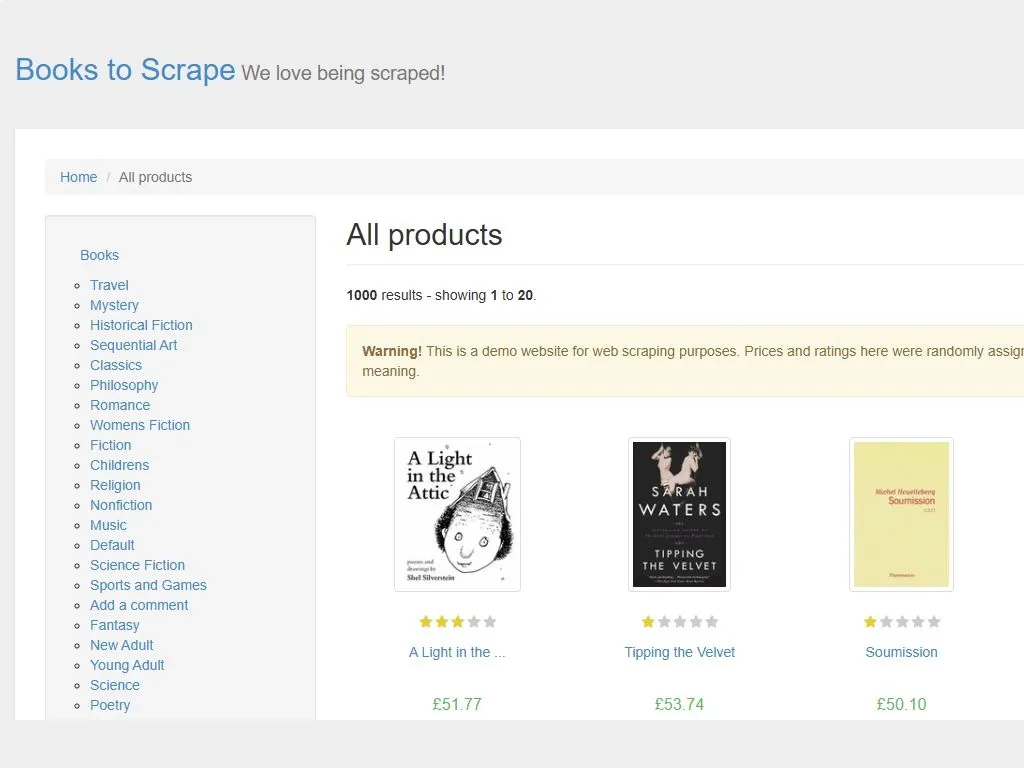
Evidence capture: Books to Scrape home page, captured 2026-08-18. The page identifies itself as a scraping demo; counts, prices, ratings, and selectors should still be rechecked before a production run.
Choose the Python scraping tool first
| Situation | First choice | Why | Stop or change course when |
|---|---|---|---|
| Data is present in the first HTML response | requests + Beautiful Soup |
Small dependency surface and easy debugging | Selectors return empty values or the page is only a shell |
| The page fills values after JavaScript runs | Playwright | Loads a real browser page and lets you inspect rendered DOM | A documented API or export is available and is simpler |
| Many pages, queues, and pipelines are required | Scrapy | Spiders, selectors, pagination, and item exports are built in | The crawl is not authorized or has no measurable stopping rule |
Requests exposes response text, status codes, headers, and explicit timeouts; its documentation recommends checking success with raise_for_status() rather than assuming that a response body means the request succeeded. Beautiful Soup then parses the HTML and extracts text or attributes from matching elements.
1. Define a permitted, measurable target
Before writing Python, record four items:
- Permission: you own the site, have written approval, or are using a documented demo/API/export.
- Scope: exact URL paths, fields, maximum pages, and a stop date.
- Rate: one request at a time, a conservative delay, and no attempt to defeat a block or CAPTCHA.
- Data contract: for this example, each row must contain
title,price,availability,rating, andproduct_url.
For a site that publishes robots.txt, Python’s urllib.robotparser.RobotFileParser.can_fetch() can answer whether a user agent may fetch a URL under that file’s rules.Treat that as one preflight signal, not as a replacement for terms, permission, or a site owner’s instructions.
from urllib.robotparser import RobotFileParser

BASE_URL = "https://books.toscrape.com/"
USER_AGENT = "authorized-training-scraper/1.0"

robots = RobotFileParser(f"{BASE_URL}robots.txt")
robots.read()
if not robots.can_fetch(USER_AGENT, BASE_URL):
    raise SystemExit("Robots policy does not allow this fetch; stop.")
If the policy cannot be retrieved or is ambiguous, pause and obtain permission instead of treating a network error as permission.
2. Install the small static-HTML stack
Create an isolated environment and install only the packages used by the first path:
python -m venv .venv

# Windows PowerShell
.\.venv\Scripts\Activate.ps1

# macOS/Linux
# source .venv/bin/activate

python -m pip install requests beautifulsoup4
Beautiful Soup’s parser can use Python’s built-in html.parser, so this example does not require lxml. Pin versions in your own project after the first successful run; the tutorial intentionally avoids promising a package version that may change.
3. Run a complete Requests + Beautiful Soup scraper
Save the following as scrape_books.py. It fetches at most two pages, waits between pages, checks the HTTP response, uses relative-link resolution, validates required fields, and writes books.csv. It does not print response bodies or proxy credentials.
import csv
import os
import time
from pathlib import Path
from urllib.parse import quote, urljoin

import requests
from bs4 import BeautifulSoup


START_URL = "https://books.toscrape.com/"
USER_AGENT = "authorized-training-scraper/1.0"
MAX_PAGES = 2
REQUEST_TIMEOUT = 15
OUTPUT_FILE = Path("books.csv")


def build_optional_proxies():
    """Return a Requests proxy map only when the operator configured one.

    Keep these values in a secret manager or protected CI variables. The
    assembled URL is never printed and never passed as a command-line value.
    """
    host = os.getenv("ROLA_PROXY_HOST")
    if not host:
        return None

    scheme = os.getenv("ROLA_PROXY_SCHEME", "http").lower()
    if scheme not in {"http", "https", "socks5", "socks5h"}:
        raise ValueError("ROLA_PROXY_SCHEME must be http, https, socks5, or socks5h")

    if scheme == "https" and os.getenv("ROLA_PROXY_TLS_CONFIRMED") != "1":
        raise RuntimeError(
            "Use an https proxy scheme only after the provider confirms TLS "
            "support for the gateway."
        )

    port = os.environ["ROLA_PROXY_PORT"]
    user = quote(os.environ["ROLA_PROXY_USER"], safe="")
    password = quote(os.environ["ROLA_PROXY_PASS"], safe="")
    proxy_url = f"{scheme}://{user}:{password}@{host}:{port}"
    return {"http": proxy_url, "https": proxy_url}


def fetch_html(session, url, proxies=None):
    response = session.get(
        url,
        headers={"User-Agent": USER_AGENT},
        timeout=REQUEST_TIMEOUT,
        proxies=proxies,
    )
    response.raise_for_status()
    if "text/html" not in response.headers.get("content-type", "").lower():
        raise ValueError(f"Expected HTML, received {response.headers.get('content-type')}")
    return response.text


def parse_books(html, page_url):
    soup = BeautifulSoup(html, "html.parser")
    rows = []
    for card in soup.select("article.product_pod"):
        title_link = card.select_one("h3 a")
        price_node = card.select_one(".price_color")
        availability_node = card.select_one(".availability")
        rating_node = card.select_one("p.star-rating")
        if not all((title_link, price_node, availability_node, rating_node)):
            continue

        rating_classes = [name for name in rating_node.get("class", []) if name != "star-rating"]
        rows.append(
            {
                "title": title_link.get("title", title_link.get_text(strip=True)),
                "price": price_node.get_text(" ", strip=True),
                "availability": availability_node.get_text(" ", strip=True),
                "rating": rating_classes[0] if rating_classes else "unknown",
                "product_url": urljoin(page_url, title_link.get("href", "")),
            }
        )
    return rows, soup


def validate_rows(rows):
    required = {"title", "price", "availability", "rating", "product_url"}
    if not rows:
        raise ValueError("No rows were extracted; inspect the HTML and selectors.")
    for index, row in enumerate(rows, start=1):
        if set(row) != required or any(not str(row[field]).strip() for field in required):
            raise ValueError(f"Row {index} failed the data contract: {row}")


def main():
    session = requests.Session()
    proxies = build_optional_proxies()
    rows = []
    next_url = START_URL

    for page_number in range(1, MAX_PAGES + 1):
        html = fetch_html(session, next_url, proxies=proxies)
        page_rows, soup = parse_books(html, next_url)
        rows.extend(page_rows)

        next_link = soup.select_one("li.next a")
        if not next_link:
            break
        next_url = urljoin(next_url, next_link.get("href", ""))
        time.sleep(1.5)

    validate_rows(rows)
    with OUTPUT_FILE.open("w", newline="", encoding="utf-8") as handle:
        writer = csv.DictWriter(handle, fieldnames=sorted(rows[0]))
        writer.writeheader()
        writer.writerows(rows)
    print(f"Validated and wrote {len(rows)} rows to {OUTPUT_FILE}")


if __name__ == "__main__":
    main()
Run it with:
python scrape_books.py
The embedded Python blocks were syntax-checked on 2026-08-18. The bundled authoring runtime did not include requests or beautifulsoup4, so install the two packages above and run the bounded demo yourself before using the pattern on an approved target.
At the time of the evidence capture, the practice page displayed 20 products on the first page and offered pagination. The script deliberately validates the rows it receives instead of hard-coding that count. A successful run should produce a CSV whose header contains the five contract fields and whose rows have non-empty values.
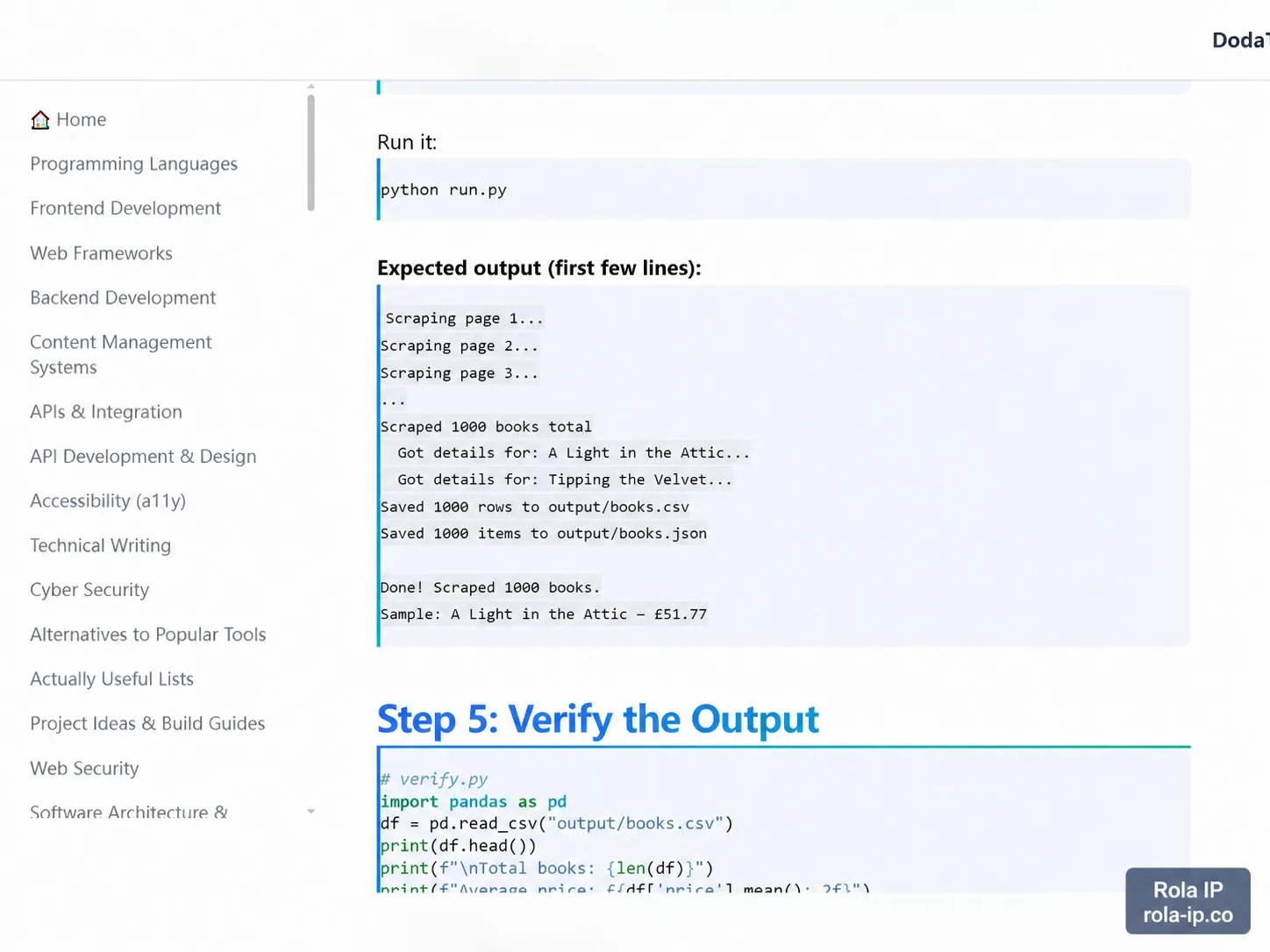
External evidence: DodaTech’s “Learn Build a Web Scraper with Python” labels this block “Expected output.” It is included as a public run-output reference, captured 2026-08-18 and watermarked for this Rola IP article; it is not an independent Rola IP benchmark.
Why each guard matters
timeout=15prevents an accidental hang; Requests notes that without an explicit timeout, a program may wait indefinitely.raise_for_status()turns a 4xx/5xx response into an actionable error before the parser sees it.Content-Typevalidation catches an HTML error page or a JSON endpoint being sent to an HTML parser.urljoin()makes relative product links usable without assuming a particular directory depth.validate_rows()makes schema drift visible rather than silently exporting blank data.MAX_PAGESandtime.sleep()create a finite, low-rate pilot. Increase them only after permission and a measured capacity plan.
4. Know when the initial HTML is not enough
Open the target with “view source” or inspect the response saved by Requests. If the values you see in the browser are absent from that HTML, the page may be rendered by JavaScript. Do not immediately add random headers or retry forever. First identify whether an authorized API, download, or export is available. If a browser is genuinely required, Playwright’s Python library supports installation with pip install playwright followed by playwright install, and its API can navigate to a page and take a screenshot.
python -m pip install playwright
playwright install
Minimal smoke test:
from playwright.sync_api import sync_playwright

TARGET = "https://example.org/authorized-page"

with sync_playwright() as p:
    browser = p.chromium.launch(headless=True)
    page = browser.new_page()
    page.goto(TARGET, wait_until="domcontentloaded", timeout=30_000)
    page.screenshot(path="rendered-page.png", full_page=True)
    print(page.locator("main").inner_text())
    browser.close()
Use stable, semantic locators and wait for a specific element, not an arbitrary long sleep. A rendered-page tool still follows the same permission, rate, and data-contract rules as Requests. The generated workflow below summarizes the decision.
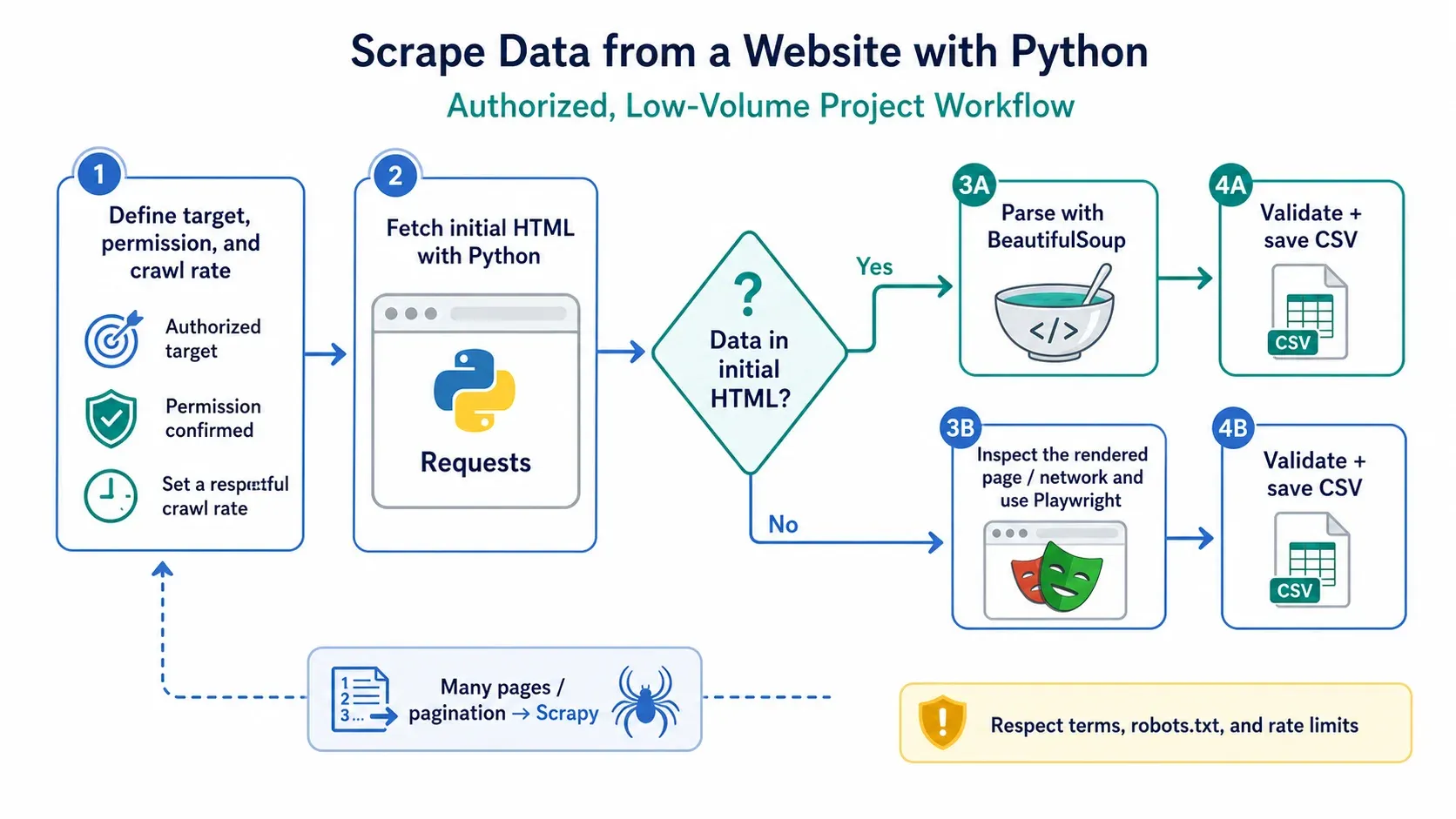
Generated instructional diagram. It describes a tool-selection process; it is not a screenshot of a live target or a promise that any provider will bypass a control.
5. Scale deliberately with Scrapy
Scrapy’s official tutorial uses a Python spider to fetch a practice site, select fields, follow links, and export items.That makes it a good next step when you need queues, pagination, retries with policy, pipelines, and structured logs. It is not automatically the right answer for a ten-row check.
Move the example to Scrapy only after you can answer:
- What exact paths and fields are authorized?
- What is the maximum page/item count per run?
- What response, item, and error metrics will stop the run?
- Where will duplicate records and changes in selectors be reported?
- How will you honor the target’s terms, robots policy, and rate limit?
6. Optional Rola IP proxy pilot
Rola’s integration documentation describes HTTP and SOCKS5 proxy connection patterns and an IP check endpoint; its whitelist documentation also describes extracting proxy entries for an allowlisted public IP. Use those pages as configuration references, not as permission to scrape a third-party target.The Rola Quick Start is useful when you need to confirm the gateway’s session parameters or connection type.
For an authorized pilot, a residential proxies plan may be relevant when the business requirement is geographic diversity on ordinary, permitted pages. A datacenter route can be simpler for low-risk, stateless testing. Compare both using the same target, page count, timeout, and success definition; do not claim that one network will defeat a site control.
Configure credentials without putting them in argv
Requests supports a proxies mapping and proxy URL schemes; it also supports SOCKS when the optional dependency is installed.The sample reads ROLA_PROXY_USER and ROLA_PROXY_PASS inside Python so the password is not expanded into the command line. Environment variables reduce accidental shell-history or process-argument exposure, but they are not a vault: protect the job, CI logs, crash reports, and variable store.
Set the following names in a protected local/CI secret store. Do not paste real values into a repository or article:
ROLA_PROXY_SCHEME=http
ROLA_PROXY_HOST=<gateway-host>
ROLA_PROXY_PORT=<gateway-port>
ROLA_PROXY_USER=<username>
ROLA_PROXY_PASS=<password>
The code intentionally defaults to http because many proxy gateways use an HTTP CONNECT or plain HTTP proxy URL. Only set ROLA_PROXY_SCHEME=https after Rola confirms that the specific gateway supports a TLS-protected client-to-proxy connection, and set ROLA_PROXY_TLS_CONFIRMED=1 at that time. Otherwise, the target’s HTTPS connection does not let you describe the entire client-to-proxy path as TLS-protected. Never print proxy_url, proxies, or an exception that includes credentials.
The Rola Python page’s http://ip123.in/ip.json check is a connectivity/exit-IP observation in the vendor’s example, not evidence that credentials or every target request are protected in transit. For a smoke test, record status, target URL, elapsed time, and the observed exit IP in a private run log; do not publish the IP or secrets.
A reproducible pilot matrix
Run the same authorized target with direct access and one configured proxy route. Keep the test small (for example, two pages and one request every 1.5 seconds) and stop on a policy or error threshold.
| Metric | Direct route | Proxy route | Pass condition |
|---|---|---|---|
| Pages attempted | 2 | 2 | Matches the declared cap |
| HTTP success rate | record | record | No unexplained 4xx/5xx responses |
| Valid rows | record | record | Every row passes the five-field contract |
| Median latency | record | record | Within the task’s budget |
| Timeout count | record | record | Zero, or explained and bounded |
| Exit geography | record | record | Matches the authorized requirement |
| Secret leakage | check logs | check logs | No password, proxy URL, or token appears |
This is a measurement plan, not a performance guarantee. If the proxy route is slower or less reliable, reduce scope or change the architecture; do not compensate by sending uncontrolled traffic.
Troubleshooting without turning the scraper into a hammer
| Symptom | Likely cause | Safe next check |
|---|---|---|
403 Forbidden |
Permission, policy, or request fingerprint issue | Stop, review authorization/terms, and ask the owner; do not rotate identities automatically |
429 Too Many Requests |
Rate or concurrency is too high | Stop or back off according to the published guidance; lower the pilot cap |
200 but zero cards |
Selector drift or JavaScript rendering | Save the HTML, inspect it, and choose a documented API or Playwright branch |
ReadTimeout |
Slow target, proxy, or network | Keep a finite timeout, record the route, and reduce scope before trying again |
| CSV has blank fields | Missing nodes or changed markup | Keep the validation failure and update the data contract after inspection |
| Proxy authentication error | Wrong scheme, host, port, or credentials | Check the provider’s current integration page; never echo the assembled URL |
Verification checklist before purchase or production
- [ ] Target owner/terms permit the exact paths and fields.
- [ ] Robots policy and crawl delay were checked where applicable.
- [ ] Request method, headers, timeout, page cap, and delay are documented.
- [ ] A direct baseline and optional proxy pilot use the same success criteria.
- [ ] The script validates status, content type, row count, required fields, and output encoding.
- [ ] Credentials come from a protected store and never appear in argv, source control, or logs.
- [ ] The proxy scheme’s transport properties were confirmed by the provider; no blanket “secure” claim is made.
- [ ] The run has a stop condition for 4xx/5xx spikes, timeouts, policy changes, or empty selectors.
Conclusion
Python web scraping works best when the tool matches the page and the authorized scope. Start with Requests and Beautiful Soup for data already present in the initial HTML. Use Playwright only when JavaScript rendering or browser interaction is required, and move to Scrapy when the project needs controlled pagination, queues, and item pipelines. Before production,validate permissions,robots policies, rate limits, response status, selectors, output fields, and credential handling. A proxy can provide an alternative network route for an approved workflow, but it does not grant access or override a website’s controls. Keep the first run small, measurable, and easy to stop.