How to Use cURL With a Proxy in PHP

Sep 10, 2026 · Guides · 10 min read
TL;DR
- Configure the proxy: Set
CURLOPT_PROXYto the generated Rola IP host and port,CURLOPT_PROXYTYPEto the documented protocol, andCURLOPT_PROXYUSERPWDto the proxy credentials. - Choose the session model: Reuse a documented session identifier for cookie-dependent workflows; use per-request rotation only for authorized stateless checks.
- Validate before scaling: Test one approved IP-information endpoint, record the status, cURL error, latency, response size, and exit IP, then run a small authorized pilot.
- Protect the deployment: Keep credentials in a secret manager, retain TLS certificate verification, limit redirects and retries, and treat 407, 403, and 429 as configuration, authorization, or rate-limit signals rather than problems to bypass.
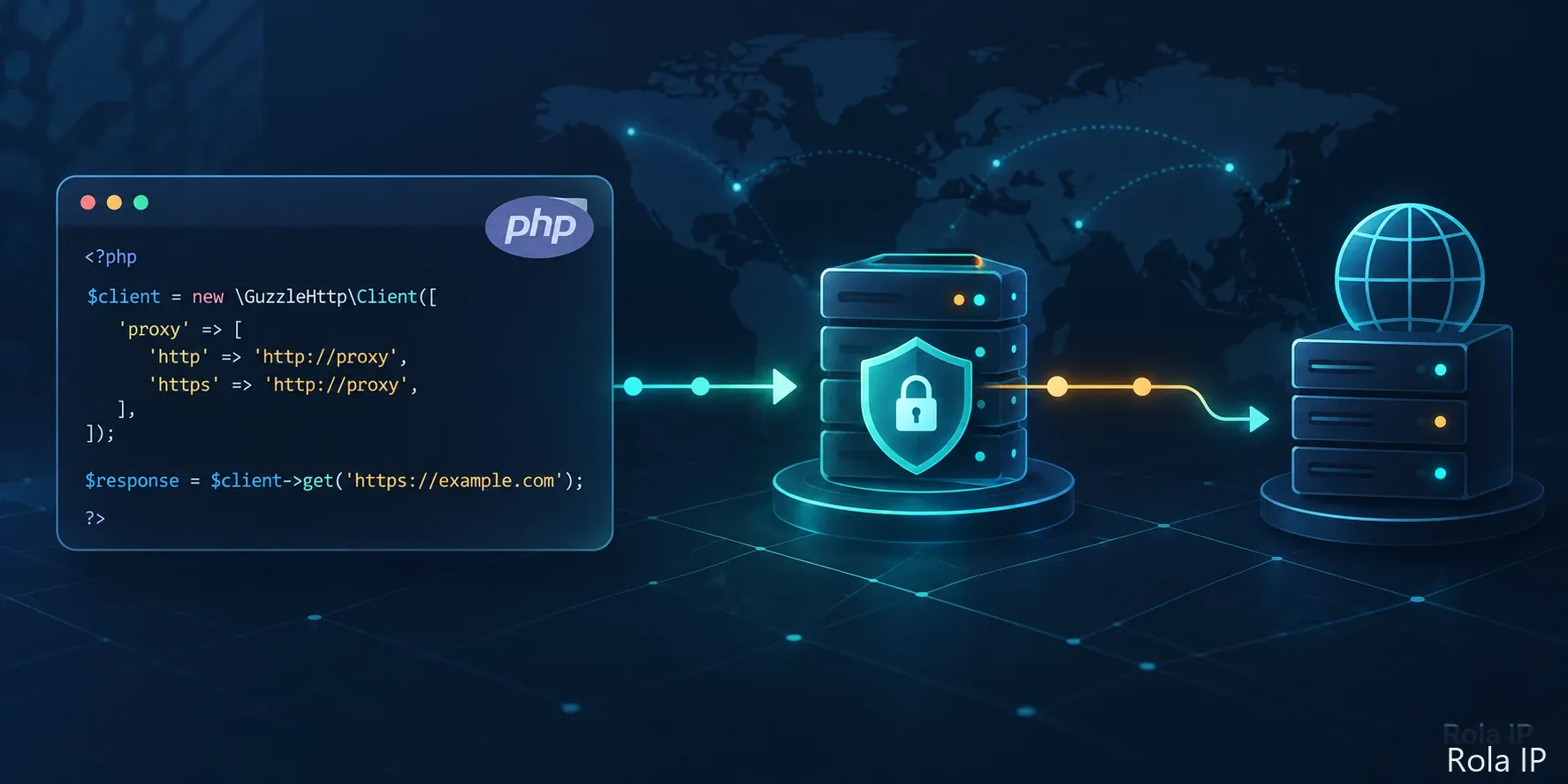
Before You Use a Proxy
A proxy changes how a request reaches the internet. It does not grant permission to access a website, render JavaScript, preserve a login session automatically, or guarantee that a target will return a page.
Before writing PHP code, confirm four things:
- Authorization: You are allowed to access the endpoint and collect the response under the target site’s terms and applicable law.
- Target type: The target is an API or server-rendered HTML endpoint that cURL can request. If the page is built in the browser with JavaScript, find the authorized data endpoint or use an approved browser automation workflow instead.
- Price and region logic: If the response changes by country, state, city, or account session, decide which variation you are testing before choosing a proxy.
- Session model: Use a stable session for a continuous, cookie-dependent workflow. Use per-request rotation only for authorized stateless checks that do not depend on one IP or cookie chain.
Rola IP documents country-level controls across its rotating networks. State and city controls are documented for Rotating Residential, while the account name can carry a session identifier and session duration. See the Rola IP proxy parameters before copying a parameter pattern into production.
Quick Answer: How Do You Use cURL With a Proxy in PHP?
Use PHP’s cURL extension to set CURLOPT_PROXY to the generated Rola IP host and port, CURLOPT_PROXYUSERPWD to the username and password, and CURLOPT_PROXYTYPE to the gateway’s documented protocol. Call curl_exec(), then record the HTTP status, cURL error, latency, and returned exit IP before sending more requests.
What You Need Before the PHP Example
You need:
- PHP with the cURL extension enabled.
- PHP match expression
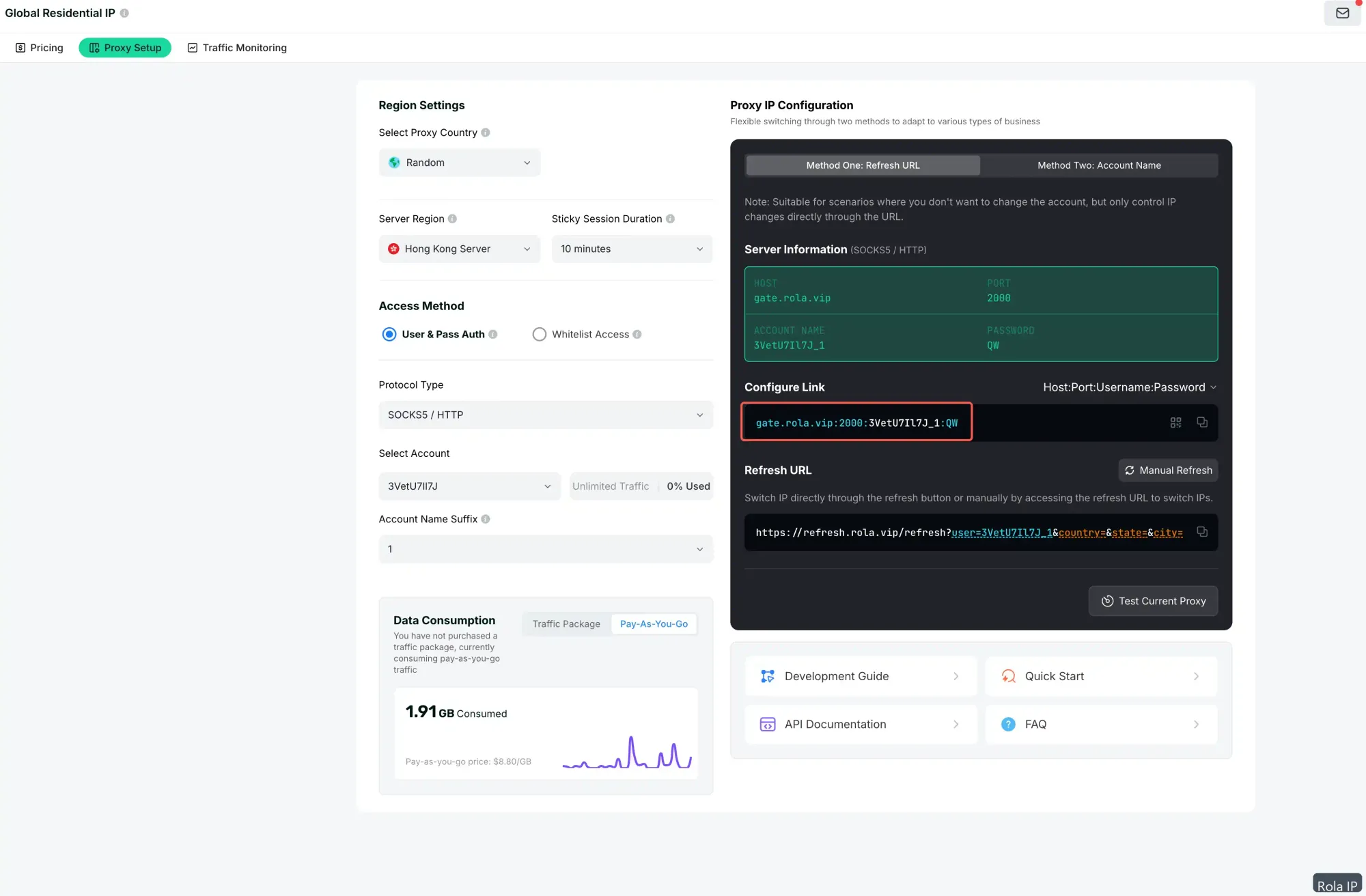
- A Rola IP proxy endpoint generated in your account.
- The generated host, port, username, and password.
- An approved IP-information endpoint or test URL.
- A secret manager or environment-variable mechanism for credentials.
- PHP 8.0 or newer for the match expression used in the sample; on older PHP versions, replace it with a switch statement.
The Rola IP proxy quick start describes the four connection details and the first connectivity check. Do not paste real credentials into the PHP file, a shell command, a screenshot, a CSV file, or a support ticket.
Check that PHP cURL is enabled
Run this in a non-production environment:
<?php
var_dump(extension_loaded('curl'));
var_dump(curl_version());
The first result should be true, followed by the installed libcurl information. If the extension is unavailable, enable the PHP cURL extension in the environment before troubleshooting the proxy. A proxy cannot work if the client library is not loaded.
Understand the cURL Proxy Model First
The cURL command-line flag -x or --proxy maps conceptually to CURLOPT_PROXY in PHP. Proxy authentication is separate from authentication at the destination server. A 407 response means the proxy has not accepted the proxy authentication exchange; it is not the same as a 401 response from the target application.
The proxy connection scheme also matters:
| Proxy setting | PHP cURL option | Use when |
|---|---|---|
| HTTP proxy | CURLPROXY_HTTP | The generated Rola endpoint documents an HTTP proxy. An HTTPS destination can still be requested through an HTTP proxy using the normal tunnel behavior. |
| SOCKS5 proxy | CURLPROXY_SOCKS5 | The gateway documents SOCKS5 and the client should resolve the destination hostname locally. |
| SOCKS5 with proxy-side hostname resolution | CURLPROXY_SOCKS5_HOSTNAME | The gateway documents socks5h and hostname resolution should happen through the proxy. |
| HTTPS proxy | Provider-specific | Use only when Rola confirms that the exact generated gateway supports a TLS-protected HTTPS proxy connection. |
The libcurl documentation lists the supported proxy schemes and explains the distinction between the proxy URL and the destination URL in CURLOPT_PROXY. Do not add -k or set CURLOPT_SSL_VERIFYPEER to false as a generic fix for a certificate error. First verify the gateway scheme, certificate path, and target URL.
Configure Rola IP in PHP With cURL
The following example reads every credential from the environment. It does not print the proxy username or password, and it reports only the fields needed to validate the request.
Save it as rola_curl_proxy.php:
<?php
declare(strict_types=1);

function required_env(string $name): string
{
    $value = getenv($name);

    if ($value === false || trim($value) === '') {
        throw new RuntimeException("Missing environment variable: " . $name);
    }

    return trim($value);
}

$targetUrl = getenv('ROLA_CHECK_URL') ?: 'https://api.ipify.org?format=json';
$proxyScheme = strtolower(getenv('ROLA_PROXY_SCHEME') ?: 'http');
$proxyHost = required_env('ROLA_PROXY_HOST');
$proxyPort = (int) required_env('ROLA_PROXY_PORT');
$proxyUsername = required_env('ROLA_PROXY_USERNAME');
$proxyPassword = required_env('ROLA_PROXY_PASSWORD');

if ($proxyPort < 1 || $proxyPort > 65535) {
    throw new InvalidArgumentException('ROLA_PROXY_PORT must be between 1 and 65535.');
}

$proxyType = match ($proxyScheme) {
    'socks5' => CURLPROXY_SOCKS5,
    'socks5h' => CURLPROXY_SOCKS5_HOSTNAME,
    'socks4' => CURLPROXY_SOCKS4,
    'http' => CURLPROXY_HTTP,
    default => throw new InvalidArgumentException(
        'ROLA_PROXY_SCHEME must be http, socks4, socks5, or socks5h.'
    ),
};

$proxy = $proxyScheme . '://' . $proxyHost . ':' . $proxyPort;
$startedAt = microtime(true);

$handle = curl_init($targetUrl);

curl_setopt_array($handle, [
    CURLOPT_RETURNTRANSFER => true,
    CURLOPT_FOLLOWLOCATION => true,
    CURLOPT_CONNECTTIMEOUT => 10,
    CURLOPT_TIMEOUT => 30,
    CURLOPT_SSL_VERIFYPEER => true,
    CURLOPT_SSL_VERIFYHOST => 2,

    CURLOPT_PROXY => $proxy,
    CURLOPT_PROXYTYPE => $proxyType,
    CURLOPT_PROXYUSERPWD => $proxyUsername . ':' . $proxyPassword,
    CURLOPT_PROXYAUTH => CURLAUTH_BASIC,
]);

$body = curl_exec($handle);
$curlErrorNumber = curl_errno($handle);
$curlErrorMessage = curl_error($handle);
$httpStatus = (int) curl_getinfo($handle, CURLINFO_HTTP_CODE);
$totalTime = microtime(true) - $startedAt;

curl_close($handle);

if ($body === false || $curlErrorNumber !== 0) {
    fwrite(STDERR, json_encode([
        'ok' => false,
        'http_status' => $httpStatus,
        'curl_errno' => $curlErrorNumber,
        'error' => $curlErrorMessage,
        'elapsed_ms' => round($totalTime * 1000, 1),
    ], JSON_PRETTY_PRINT | JSON_UNESCAPED_SLASHES) . PHP_EOL);

    exit(1);
}

$decoded = json_decode($body, true);
$exitIp = is_array($decoded) && isset($decoded['ip'])
    ? (string) $decoded['ip']
    : null;

echo json_encode([
    'ok' => $httpStatus >= 200 && $httpStatus < 400,
    'http_status' => $httpStatus,
    'curl_errno' => $curlErrorNumber,
    'elapsed_ms' => round($totalTime * 1000, 1),
    'response_bytes' => strlen($body),
    'exit_ip' => $exitIp,
], JSON_PRETTY_PRINT | JSON_UNESCAPED_SLASHES) . PHP_EOL;
Why each option is there
- CURLOPT_PROXY selects the Rola IP gateway without placing credentials in the proxy URL.
- CURLOPT_PROXYTYPE keeps the protocol choice explicit.
- CURLOPT_PROXYUSERPWD sends proxy credentials separately from the destination request.
- CURLOPT_PROXYAUTH selects Basic proxy authentication, which is the method shown in Rola’s official PHP integration example. Confirm the method for your generated endpoint if your account uses a different configuration.
- CURLOPT_CONNECTTIMEOUT limits the time spent establishing the proxy connection.
- CURLOPT_TIMEOUT limits the complete request.
- CURLOPT_RETURNTRANSFER lets the script inspect the response instead of printing it immediately.
- CURLOPT_SSL_VERIFYPEER and CURLOPT_SSL_VERIFYHOST keep destination certificate validation enabled.
The Rola IP PHP integration documents the core cURL options used here. The example above intentionally keeps certificate verification enabled and keeps credentials out of command-line arguments and output.
Environment variables
Set these names through your deployment environment or an approved secret manager:
ROLA_PROXY_SCHEME=http
ROLA_PROXY_HOST=your-generated-proxy-host
ROLA_PROXY_PORT=your-generated-proxy-port
ROLA_PROXY_USERNAME=your-generated-account-name
ROLA_PROXY_PASSWORD=your-generated-password
ROLA_CHECK_URL=https://api.ipify.org?format=json
Environment variables reduce accidental exposure in source control, but they are not a secret vault. Same-user or privileged processes may still inspect them. Clear temporary values after a pilot and use your production secret manager for scheduled jobs.
The sample check URL is only a convenient response-validation target. Replace it with an approved IP-information endpoint or an endpoint you are authorized to test. The response must include an ip field if you want the script to populate exit_ip.
Choose the Rola IP Network and Session Mode
Rola IP documents three rotating networks. Select based on the request, not on a promise that one network will work everywhere.
| Rola network | Suitable starting point | Documented controls | Important boundary |
|---|---|---|---|
| Rotating Residential | Location-sensitive checks, e-commerce testing, localization, or workflows that need a residential network context | Country, state, city, session ID, session time, per-request rotation | Availability and target-site treatment can vary |
| Rotating Datacenter | Low-risk, high-volume, cost-sensitive requests and API checks | Country, session controls | Target sites may recognize datacenter traffic |
| Mobile IP | Mobile-network identity and mobile-specific QA | Country and session controls | Resources and exact target behavior must be checked |
Use the account-name patterns documented by Rola IP rather than inventing a provider-neutral syntax:
- Country-level example: test-country-us
- A continuous session example: test_1-country-us-sessiontime-10
- A new exit for each stateless request: test-country-us-f-1
- A residential state/city example: test_1-country-us-state-ny-city-newyork
In these examples, the value after the underscore is the sessionid. Rola documents sessiontime in minutes from 1 to 120. The f-1 pattern is intended for per-request rotation and should not be used for a login, checkout, or cookie-dependent workflow that needs one continuing identity.
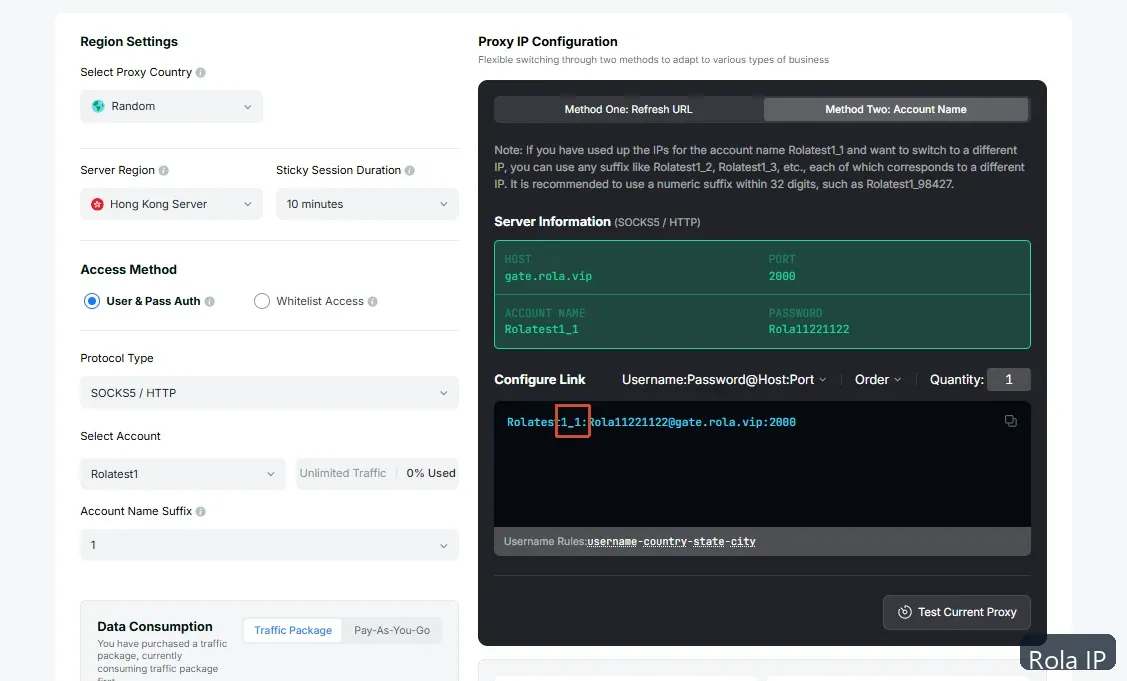
Keep the selected username in ROLA_PROXY_USERNAME. The PHP script does not need to understand every parameter; it only needs to pass the generated account name to the proxy. That keeps provider-specific routing controls separate from application logic.
Verify the Proxy Before Increasing Volume
A successful TCP connection is not enough. Use a bounded pilot:
- Send one request to an approved IP-information endpoint.
- Record http_status, curl_errno, elapsed_ms, response_bytes, and exit_ip.
- Send the same request directly, if policy allows, so you can compare the direct and proxied egress.
- Test three authorized target URLs sequentially.
- Wait about five seconds between requests.
- Retry at most once for a connection timeout. Do not blindly retry 401, 403, 407, or other policy/authentication errors.
- Use a fixed Rola session for cookie-dependent checks. Use f-1 only for stateless checks.
- Clear temporary environment values and delete temporary logs after the pilot.
The output should resemble:
{
  "ok": true,
  "http_status": 200,
  "curl_errno": 0,
  "elapsed_ms": 842.6,
  "response_bytes": 28,
  "exit_ip": "203.0.113.10"
}
The IP above is an example only. Your endpoint, response time, and exit IP will differ. Do not treat one successful IP response as proof that a third-party page is authorized, available, correctly localized, or safe to access at higher volume.
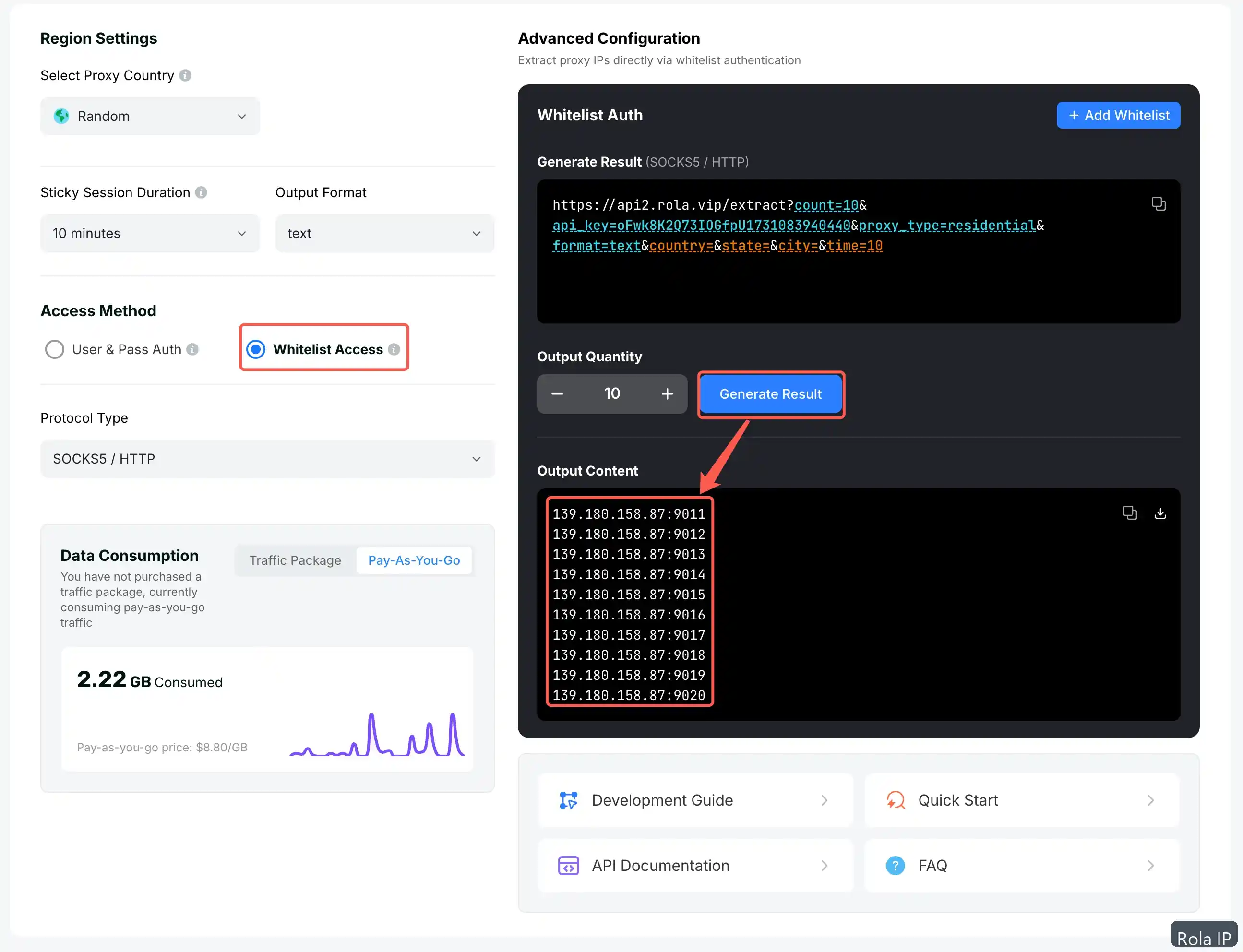
Use API Whitelist Access When Password Distribution Is a Problem
If the server running PHP has a stable public egress IP, Rola IP also documents API whitelist setup. You add the server’s public IP to the allowlist, extract IP:port entries, and use those entries without username/password authentication.
This is a different operating model from account/password authentication:
- It can reduce the need to distribute proxy passwords across application processes.
- The server’s public IP must remain allowlisted.
- Region, duration, protocol, and output count are selected through the extraction configuration.
- The extracted address is a relay endpoint; confirm the actual exit by making a request.
- If the server’s public IP changes, the allowlist must be updated.

For a PHP deployment that already uses a stable public IP, whitelist access may be easier to operate. For multiple environments, changing egress addresses, or fine-grained session parameters, username/password authentication may be more practical. Choose based on the deployment boundary rather than treating one method as universally safer.
Fix Common PHP cURL Proxy Errors
407 Proxy Authentication Required
Symptom: The proxy responds with HTTP 407.
Verify: Check the generated username, password, gateway host, port, and authentication method. Confirm that the PHP process is reading the variables you expect without printing them.
Fix: Keep CURLOPT_PROXYUSERPWD separate from CURLOPT_USERPWD. The former authenticates to the proxy; the latter authenticates to the destination server. The everything curl proxy-authentication guide explains why these are separate exchanges.
Connection refused or timeout
Symptom: cURL cannot establish a connection or reaches the timeout.
Verify: Test the generated host and port from the same server that runs PHP. Check local firewall rules, account status, and whether the selected protocol matches the endpoint. Temporarily use a 10-second connect timeout and 30-second total timeout so the failure is observable.
Fix: Correct the host, port, or proxy type first. Do not increase concurrency until one request succeeds consistently.
TLS certificate error
Symptom: The request fails during certificate validation, sometimes with a cURL 60 error.
Verify: Determine whether the certificate error belongs to the destination or to the proxy connection. Confirm the proxy scheme supported by the exact Rola gateway.
Fix: Keep destination certificate verification enabled. Do not hide the error with -k or CURLOPT_SSL_VERIFYPEER=false. If the gateway needs a TLS-protected proxy hop, use an HTTPS proxy URL only after Rola confirms that the exact endpoint supports it.
Wrong country, city, or session
Symptom: The returned location or IP continuity is not what you expected.
Verify: Check the full username string. Confirm that country is present, that state and city are being used only with Rotating Residential, and that the sessionid has not changed between requests.
Fix: Use the same account name and sessiontime for a continuous workflow. Use a different session ID for an independent session. Use f-1 only when a new IP per request is actually the goal.
Target returns 403 or 429
Symptom: The proxy connection succeeds, but the target rejects or throttles the request.
Verify: Check authorization, request rate, headers, cookies, target rules, response body, and whether the target requires a browser or an API rather than raw cURL.
Fix: Reduce request volume, use the target’s approved access method, and stop if permission is unclear. Rola IP can provide a transport option; it does not guarantee access, bypass a CAPTCHA, or make an unauthorized workflow acceptable.
Security and Compliance Checklist
Before moving from a pilot to a scheduled PHP job:
- Keep the proxy password in an approved secret manager.
- Do not put credentials in a Git repository, URL, shell history, screenshot, or log.
- Redact proxy hostnames if the generated hostname itself is sensitive to your organization.
- Keep destination certificate validation enabled.
- Treat an HTTP proxy URL and an HTTPS destination as separate security layers. HTTPS protects the destination connection after tunneling, but it does not automatically make the client-to-proxy authentication hop TLS-protected.
- Confirm exact gateway protocol support with Rola before using an HTTPS proxy scheme.
- Use only authorized endpoints and respect target-site rules, rate limits, privacy requirements, and applicable law.
- Record the network type, country, session policy, request time, status, error, and exit-IP result for each pilot.
- Clear temporary credentials when the pilot ends.
Conclusion
The practical PHP answer to “how to use curl with proxy” is to keep the transport configuration explicit: Rola IP host and port in CURLOPT_PROXY, credentials in CURLOPT_PROXYUSERPWD, the documented protocol in CURLOPT_PROXYTYPE, and the result in a small validation record. Start with one authorized request, confirm the exit IP, then run the three-URL pilot.
For country, session, and per-request controls, use the Rola IP configuration parameters described above. If your PHP server has a stable public egress IP and you want to avoid distributing passwords, review the Rola IP API whitelist access guidance. Neither path removes the need for authorization and target-specific testing.