Puppeteer Rotating Proxy Guide for Node.js Developers

Sep 8, 2026 · Guides · 12 min read
TL;DR
A Puppeteer rotating proxy uses either a provider-managed gateway or a proxy list selected by Node.js. Rotate between independent jobs, but keep one browser context and sticky proxy session for related steps. Configure credentials before navigation and check the observed exit IP. A new page does not guarantee a new address. Classify authentication errors, connection failures, access restrictions, rate limits, and missing data separately. Rola IP supplies the network route; your application manages browser state, scheduling, extraction, and validation.
Puppeteer Rotating Proxy Quick Start
Use an HTTP proxy endpoint from your provider and authenticate before the first navigation. In this example, the provider controls rotation; Puppeteer connects to the configured gateway.
Example status — September 8, 2026: These examples have passed JavaScript syntax checks with Node.js v24.19.0. They have not been executed with Puppeteer, Chrome, or an authenticated Rola endpoint, so no tested Puppeteer version or successful proxy output is claimed. Confirm package and browser compatibility before running them.
Use the examples only with targets you are authorized to access. Proxy rotation does not grant permission to bypass login requirements or access restrictions. Stop and investigate a 403 response; reduce traffic and honor the waiting period for a 429 response.
Install Node.js and Puppeteer
Use a supported Node.js LTS release that meets your installed Puppeteer version’s requirements. In a new project directory, run:
npm init -y
npm install puppeteer
Puppeteer normally downloads a compatible Chrome during installation. If your package manager blocks installation scripts and Chrome is missing, run npx puppeteer browsers install. See the official Puppeteer installation guide.
Create a .env file with the endpoint and credentials supplied by your provider:
PROXY_SERVER=http://YOUR_PROXY_HOST:YOUR_PROXY_PORT
PROXY_USERNAME=YOUR_PROXY_USERNAME
PROXY_PASSWORD=YOUR_PROXY_PASSWORD
These values are placeholders, not Rola gateway names or credential syntax. Copy the complete settings from your account. Add .env to .gitignore, and use your deployment platform’s secret manager in production.
Connect and Check the Exit IP
Save this as quick-start.mjs. The .mjs extension lets Node.js run the example as an ES module.
import puppeteer from 'puppeteer';

const server = process.env.PROXY_SERVER;
const username = process.env.PROXY_USERNAME;
const password = process.env.PROXY_PASSWORD;

if (!server || !username || !password) {
  throw new Error('Set all three PROXY environment variables.');
}

const browser = await puppeteer.launch({
  headless: true,
  args: [`--proxy-server=${server}`],
});

try {
  const page = await browser.newPage();
  await page.authenticate({ username, password });
  const response = await page.goto('https://httpbin.org/ip', {
    waitUntil: 'domcontentloaded',
    timeout: 30_000,
  });

  if (!response || !response.ok()) {
    throw new Error(`IP check failed: ${response?.status()}`);
  }

  const body = await page.$eval('body', el => el.textContent);
  console.log(JSON.parse(body));
} finally {
  await browser.close();
}
Run it with a Node.js release that supports environment files:
node --env-file=.env quick-start.mjs
The response reports the address observed by the IP-check service. It is not a guarantee that the next destination will receive the same exit IP. A rotating gateway may select an exit per connection, destination, or session. Repeat a few controlled checks to understand your plan’s behavior; do not treat a public diagnostic endpoint as a load-testing service.
How Proxy Rotation Works in Puppeteer
There are two separate decisions: which proxy endpoint Chrome connects to, and which public IP the proxy uses to reach the destination. Changing one does not necessarily change the other.
Choose the control you need. A rotating gateway lets the provider select exits; a proxy list lets Node.js select endpoints. A sticky session retains an exit for related requests, while a static proxy is intended to retain its allocated address over its service period. Gateway and list describe routing methods; sticky and static describe address persistence, so these are not four mutually exclusive product types.
A Rotating Gateway Versus a Proxy List
A rotating gateway gives you one host and port. The provider manages the exit pool behind that endpoint, so your script can keep using the same address while the public exit changes.
A proxy list gives your application several endpoints to select from. Your code can use round-robin selection, skip unhealthy entries, or reserve an endpoint for a particular job. Different endpoints can still share an exit pool, so separate list entries do not prove separate public IPs.
Choose a gateway when you want the provider to manage IP inventory. Choose a list when your application needs explicit endpoint scheduling. Neither approach resets cookies automatically.
Why Every Navigation Does Not Necessarily Get a New IP
One page.goto() can trigger the main document, scripts, images, API calls, and redirects. Chrome may reuse connections, and HTTPS requests commonly travel through a CONNECT tunnel. The proxy’s rotation policy operates within those transport constraints.
Consequently, a plan described as rotating per request should not be interpreted as one unique IP for each JavaScript navigation call. A new page is also not proof of a new connection or exit. Chromium’s proxy documentation explains the underlying proxy protocols and tunneling behavior.
For predictable jobs, define a rotation boundary such as one independent page, one small batch, or one complete session. Then check whether your provider’s session controls can implement that boundary.
Rotating Sessions Versus Sticky Sessions
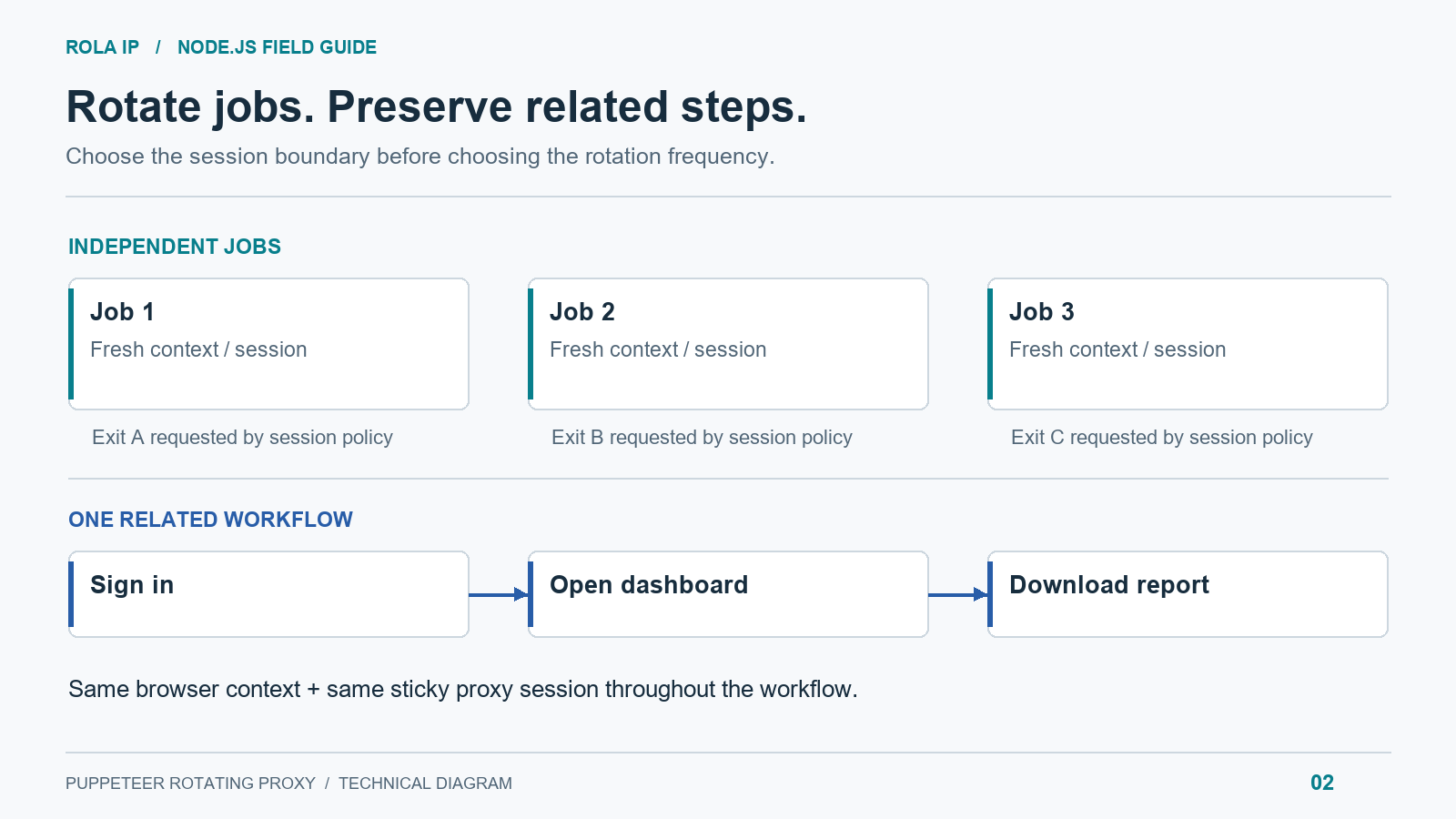
Use rotation between independent jobs. Use a sticky session when several requests belong to the same interaction: signing in, opening a dashboard, and downloading an authorized report, for example.
A browser context retains cookies and storage. A proxy session asks the provider to retain an exit. You need both for a consistent workflow. Residential peers can disconnect, so a sticky session is not a promise of permanent IP ownership.
Configure Puppeteer With Rola IP
Rola IP supplies the network layer. Your Node.js application still owns browser automation, scheduling, extraction, and validation. That separation lets you change IP resources without rewriting page interactions.
Choose the IP Resource for the Job
If your job compares localized catalogs or search results, start by identifying the region and consumer-network routing it needs. Rola’s residential proxy product is relevant to that requirement. Available inventory and location coverage can change, so confirm the current scope and test the required region before production use.
If public pages work reliably from server-network addresses, evaluate rotating datacenter proxies. Compare accepted results and latency on the actual target before expanding the job.
For a workflow that needs a persistent address, consider a static allocation, including an appropriate ISP proxy product. Static and sticky are different: a static allocation is intended to retain an address, while a sticky session depends on the provider’s policy and exit availability. Mobile IPs address mobile-network testing needs; they do not automatically change Chrome’s device behavior.
Obtain the Endpoint and Authentication Settings
In your Rola account, select the product, available location, authorization method, and rotation or session settings. Copy the generated host, port, username, and password into the quick-start configuration.
Use Rola’s rotating residential proxy setup and proxy parameters references for account-specific settings. Do not append guessed country or session suffixes to a username. Providers use different formats, and settings can differ across products.
If your account uses IP allowlisting, authorize the public outbound IP of the machine running Chrome. A laptop, container host, and cloud runner may have different outbound addresses. Remove page.authenticate() and its credential checks only when your selected authorization mode does not require a username and password.
Apply Location and Session Controls Deliberately
Start with country-level targeting unless a smaller region is necessary. Narrow targeting reduces the eligible inventory and can change latency or availability.
Keep the same provider session settings and browser context throughout a workflow. Start a fresh context with newly generated session settings for the next independent job. Changing the session identifier requests a new allocation according to the provider’s policy; it does not necessarily guarantee an IP that has never appeared before.
For location-sensitive SEO monitoring, record the requested country and the observed result locale. IP geolocation, browser geolocation, language, cookies, and account preferences can all affect the page. A proxy changes the network exit; it does not automatically configure every browser signal.
Rotate Proxies From a List With Browser Contexts
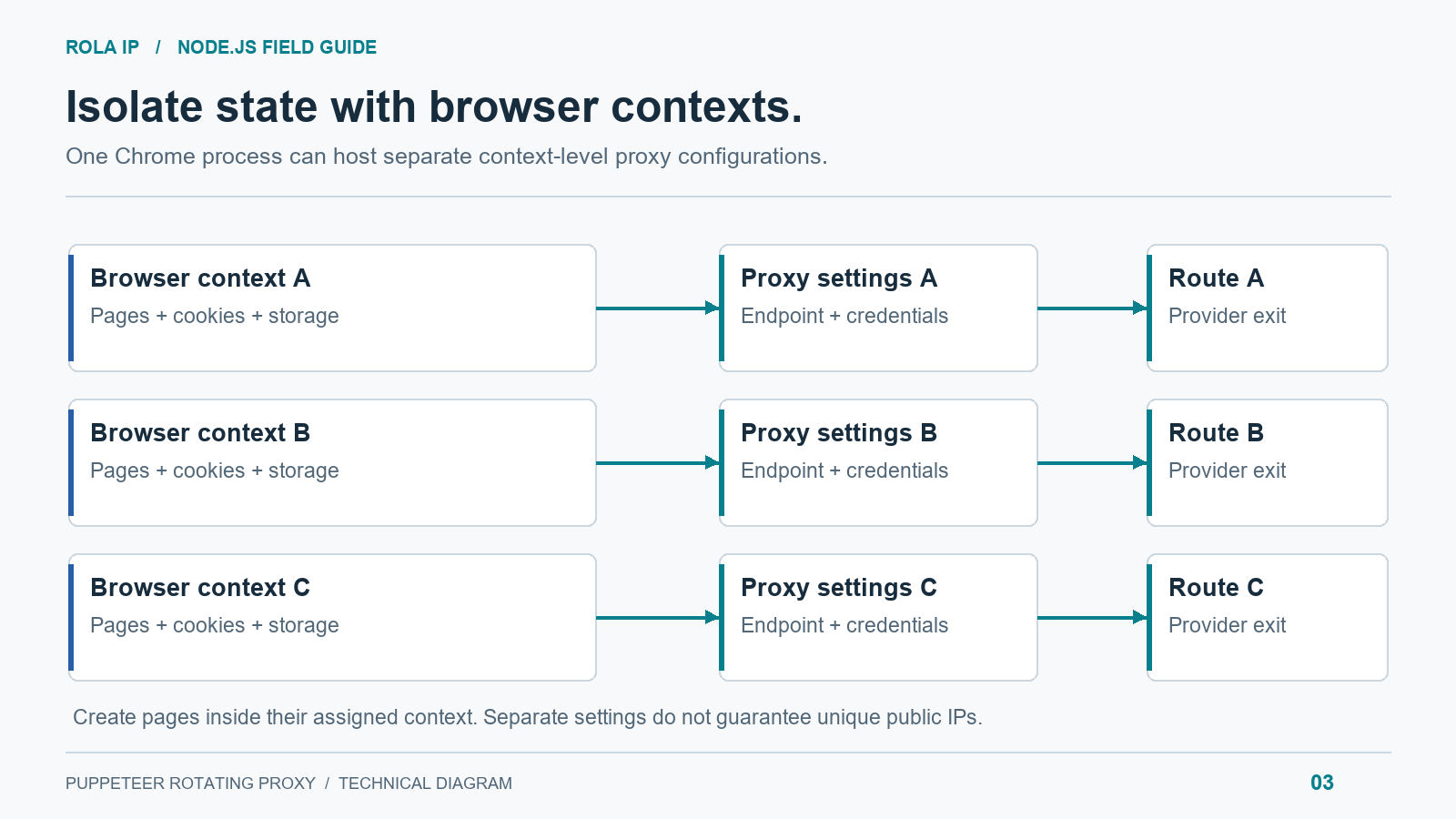
Launching a browser for each proxy is easy to understand but adds startup overhead. Current Puppeteer exposes proxyServer in BrowserContextOptions, so you can create contexts with different proxy configurations inside one Chrome process.
The following pattern assigns a proxy per independent job and closes the context afterward. It uses sequential execution to make routing and cleanup easy to verify. Check compatibility with your installed Puppeteer and browser versions before adapting it to an existing deployment.
Create the Proxy Pool
Save your real endpoints in a private proxies.json file and exclude it from version control:
[
  {
    "server": "http://HOST_A:PORT_A",
    "username": "USERNAME_A",
    "password": "PASSWORD_A"
  },
  {
    "server": "http://HOST_B:PORT_B",
    "username": "USERNAME_B",
    "password": "PASSWORD_B"
  }
]
Each entry can represent a separate endpoint or a provider-generated session configuration. For IP-allowlisted entries, omit both credential fields. Keep the examples private: a proxy URL containing credentials is a secret.
Assign One Context to Each Independent Job
Save as rotate-list.mjs:
import { readFile } from 'node:fs/promises';
import puppeteer from 'puppeteer';

const proxies = JSON.parse(
  await readFile(new URL('./proxies.json', import.meta.url), 'utf8')
);
if (!Array.isArray(proxies) || proxies.length === 0) {
  throw new Error('Provide at least one proxy.');
}
for (const proxy of proxies) {
  if (!proxy.server) throw new Error('Missing proxy server.');
  if ((proxy.username == null) !== (proxy.password == null)) {
    throw new Error('Provide both credential fields or neither.');
  }
}

const urls = [
  'https://example.com/?job=1',
  'https://example.com/?job=2',
];
const browser = await puppeteer.launch({ headless: true });

try {
  for (const [index, url] of urls.entries()) {
    const proxy = proxies[index % proxies.length];
    const context = await browser.createBrowserContext({
      proxyServer: proxy.server,
    });
    try {
      const page = await context.newPage();
      if (proxy.username != null) {
        await page.authenticate({
          username: proxy.username,
          password: proxy.password,
        });
      }
      const response = await page.goto(url, {
        waitUntil: 'domcontentloaded',
        timeout: 30_000,
      });
      if (!response || !response.ok()) {
        throw new Error(`Navigation status: ${response?.status()}`);
      }
      await page.waitForSelector('h1', { timeout: 10_000 });
      console.log({ job: index, title: await page.title() });
    } finally {
      await context.close();
    }
  }
} finally {
  await browser.close();
}
Run node rotate-list.mjs. Replace the example URLs and h1 selector with your own permitted targets and a meaningful readiness condition. An HTTP 200 response is insufficient if the expected data is missing.
This example stops on the first failed job. A production queue should record that failure and apply the error policy below. Do not blindly add every failure back to the queue.
Keep Session State Inside Its Assigned Context
For a multi-page workflow, put all its navigations inside the inner try block. Authenticate every new page before navigating it. Closing the context discards its browser state; do not close it between steps that depend on the same login.
Avoid using the default context for jobs that require a context-specific proxy. Keep a worker’s page creation attached to its assigned context. If your installed version lacks the required context proxy support, use separate browser launches with --proxy-server instead.
Handle Authentication and Proxy Protocols Correctly
Use Page Authentication for HTTP Proxy Credentials
Keep the host and port in --proxy-server or proxyServer, and supply HTTP proxy credentials through page.authenticate(). Embedding user:password@host in a Chrome proxy flag is not a reliable substitute.
Puppeteer’s authentication reference notes that authentication turns on request interception internally and may affect performance. Configure it before navigation. If the destination also requires HTTP Basic authentication, one page-level credential setting may not fit both challenges; a local forwarding proxy can handle upstream proxy authentication separately.
Understand SOCKS5 and Proxy Chaining
Chrome can use SOCKS5 endpoints, but its SOCKS5 implementation does not support username/password authentication. page.authenticate() does not add that protocol capability. Use an HTTP endpoint or a local adapter that supports your upstream protocol and authentication requirements.
The maintained proxy-chain project provides a local forwarder. Install it with npm install proxy-chain, then save this as proxy-chain-example.mjs. It uses the same environment variables as the quick start and demonstrates an authenticated HTTP upstream:
import puppeteer from 'puppeteer';
import proxyChain from 'proxy-chain';

const { PROXY_SERVER, PROXY_USERNAME, PROXY_PASSWORD } = process.env;
if (!PROXY_SERVER || !PROXY_USERNAME || !PROXY_PASSWORD) {
  throw new Error('Set all three PROXY environment variables.');
}
const upstream = new URL(PROXY_SERVER);
upstream.username = PROXY_USERNAME;
upstream.password = PROXY_PASSWORD;

let localProxy;
let browser;
try {
  localProxy = await proxyChain.anonymizeProxy(upstream.href);
  browser = await puppeteer.launch({
    args: [`--proxy-server=${localProxy}`],
  });
  const page = await browser.newPage();
  const response = await page.goto('https://example.com', {
    waitUntil: 'domcontentloaded',
    timeout: 30_000,
  });
  if (!response || !response.ok()) {
    throw new Error(`Navigation status: ${response?.status()}`);
  }
  console.log(await page.title());
} finally {
  try {
    if (browser) await browser.close();
  } finally {
    if (localProxy) {
      await proxyChain.closeAnonymizedProxy(localProxy, true);
    }
  }
}
Run node --env-file=.env proxy-chain-example.mjs. The URL setters encode credential characters for the upstream URL. Never print that URL to logs.
Here, “anonymize” means Chrome can connect to a local endpoint without receiving upstream credentials. It does not make traffic untraceable, rotate IPs by itself, or remove the provider’s visibility. Keep the local listener restricted to the machine or trusted network that needs it.
Diagnose Errors Before Rotating Again
The main navigation and the page’s data requests can fail differently. Check both the response status and the content you need. Puppeteer’s navigation reference documents the returned response; receiving an HTTP error page is not the same as a transport exception.
Proxy Authentication and Connection Failures
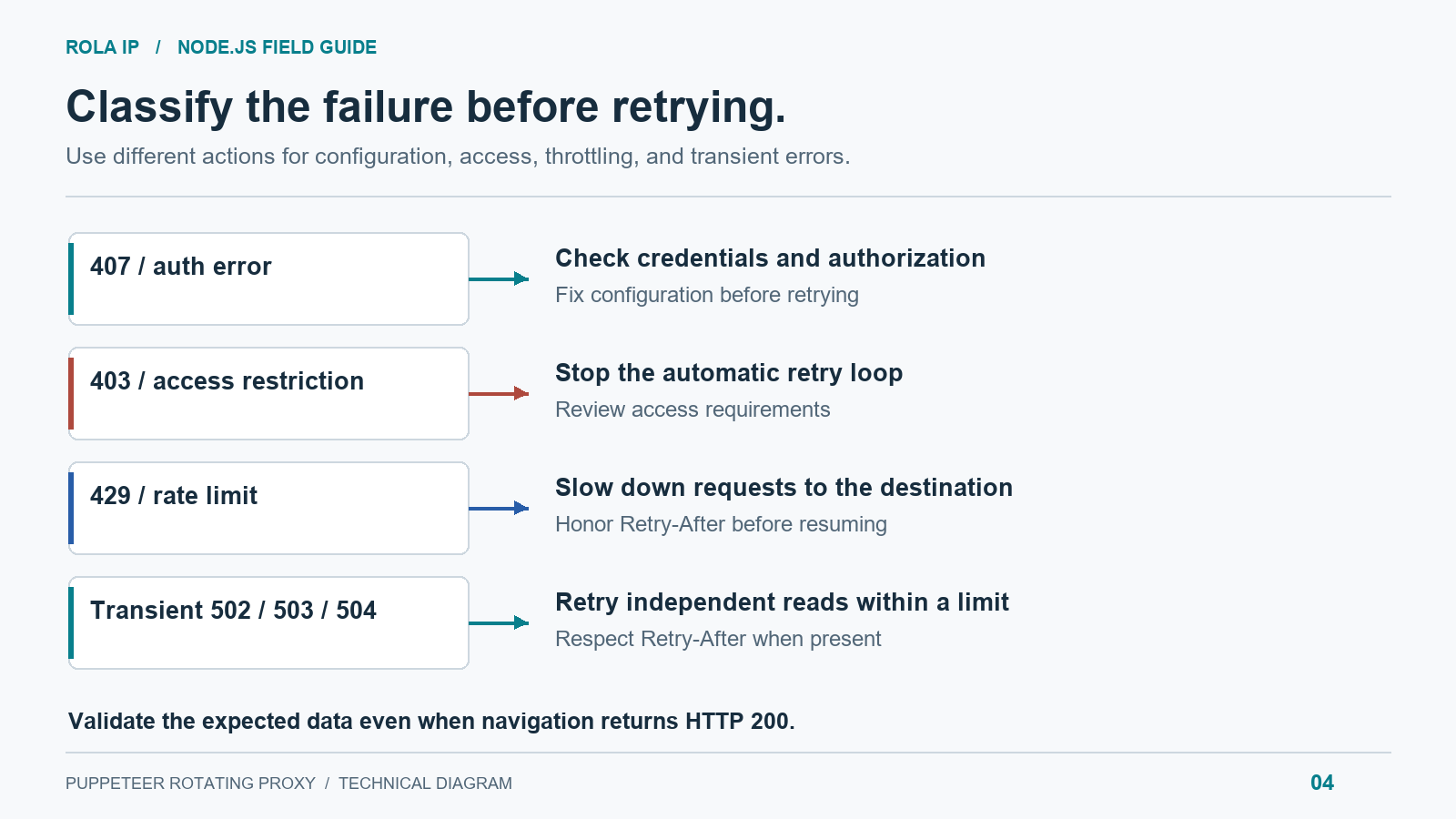
HTTP 407 or authentication errors: verify credentials, product access, and allowlisting. Fix the configuration before retrying. A CONNECT failure may surface as a Chromium network error rather than a readable 407 response.
ERR_PROXY_CONNECTION_FAILED: check the host, port, protocol, firewall, and gateway reachability. Compare the same configuration in a small diagnostic client before changing page code.
ERR_TUNNEL_CONNECTION_FAILED: inspect upstream authentication and whether the endpoint permits the requested HTTPS connection. Rotating through identical bad credentials cannot resolve it.
Certificate errors: check the certificate chain, system time, and proxy configuration. Disabling TLS checks across the browser conceals the cause and weakens verification.
HTTP 403 and 429 Need Different Responses
HTTP 403: stop the automatic retry loop and inspect access requirements and response content. A block page does not prove the proxy is offline. More IPs will not fix a missing authorization requirement.
HTTP 429: reduce the target-wide request rate. Honor Retry-After when present, including its HTTP-date form. Schedule the job for later if the delay exceeds your worker’s budget. MDN documents both formats in its Retry-After reference.
HTTP 502, 503, or 504: a bounded retry may be appropriate for an independent read. Identify whether the error originated at the target or proxy before marking an endpoint unhealthy. A 503 can also carry Retry-After.
Timeouts and Missing Data
Use domcontentloaded as a starting point, then wait for the element or response required for extraction. A site with persistent background requests may never reach your chosen network-idle condition.
If the main document loads but a selector times out, inspect the page: the selector may have changed, the data API may have failed, or the page may contain an access challenge. Save a limited diagnostic screenshot and sanitized metadata for investigation rather than repeatedly retrying the same assumptions.
Build a Bounded Retry Policy
For a first production implementation, allow at most three total attempts for transient failures on independent read-only jobs. Start with a one-second delay, double it for the next retry, and add a small random delay to prevent workers from restarting together. A valid server-provided waiting period takes precedence over that local schedule.
Release failed contexts before waiting. Quarantine endpoints after repeated connection failures, but keep target-specific blocks separate from global endpoint health. Cap retries across the whole queue as well as per job; otherwise a target outage can multiply traffic across every worker.
Do not automatically replay form submissions, purchases, or other actions with side effects after an ambiguous timeout. First determine whether the action completed. Retry policy belongs to the job’s semantics, not just its HTTP status.
Scale a Puppeteer Proxy Pool Without Wasting Traffic
Start with one worker and collect a baseline before adding concurrency. Useful fields include an opaque job ID, endpoint alias, requested region, attempt count, navigation time, status, and whether the expected data passed validation. Exclude passwords, cookies, and credential-bearing URLs.
Limit Workers and Target Request Rates Separately
Five browser workers can generate far more than five network requests because each page loads subresources. Bound browser concurrency for memory and CPU, and enforce a separate rate limit per destination. A provider’s connection allowance is not a recommended crawl rate.
Measure median and p95 latency as concurrency grows. Stop increasing workers when accepted throughput flattens or timeout rates rise. Larger IP inventory cannot remove a bottleneck in your machine, extraction logic, or destination.
Compare Cost Per Accepted Result
For bandwidth-priced proxies, images, fonts, video, and retries all affect cost. Block unnecessary resources only after checking that extraction still works; removing scripts or styles can alter page behavior.
Use total proxy and compute spend divided by validated records as your operating metric. For example, $12 spent collecting 4,000 valid records is $0.003 per accepted record. This is an illustrative calculation, not a Rola price quote.
Rola’s web scraping proxy resources fit applications where you want to retain control of Node.js and Chrome while selecting the network layer independently. Pilot with representative destinations before buying capacity for a larger queue.
Keep the Browser Configuration Consistent
Do not randomly change the user agent between pages in one session. A mismatched user agent, browser version, and client hints can introduce inconsistent behavior. Keep a stable configuration appropriate to the test and reset it at intentional job boundaries.
Stealth plugins are not required to configure a rotating proxy. They introduce another dependency and cannot guarantee acceptance. Validate the network setup and extraction behavior before adding tools intended to alter browser fingerprints.
When Puppeteer Is More Than You Need
If the data is available through an authorized API or server-rendered HTML, a Node.js HTTP client can reduce browser overhead. Configure that client’s proxy support separately; Chrome’s proxy flag does not route Node.js fetch() or other processes through the proxy.
A managed browser or scraping API can be useful when you want another service to operate rendering and retries. Compare its output fidelity, session controls, debugging access, and effective cost. Puppeteer plus a proxy provider remains useful when you need direct control over interactions and browser state.
Conclusion
A dependable Puppeteer rotating proxy workflow starts with a deliberate rotation boundary, an IP resource suited to the authorized workload, and browser state that matches the session you need to preserve. Use residential, datacenter, or ISP proxies according to the required network characteristics. Configure credentials through environment variables, verify the observed exit IP, and measure validated results rather than assuming that a new page creates a new address.