Python Requests Headers Tutorial: GET, POST, and User-Agent

Jul 21, 2026 · Guides · 12 min read
Python Requests accepts headers as a dictionary passed to the headers argument of requests.get(), requests.post(), or another request method. When several calls need the same values, place them in a Session with Session.headers.update(). This tutorial starts with a simple GET request, then moves through POST headers, a custom User-Agent, Session defaults, header inspection, and 403 troubleshooting.
The examples are intended for developers who work with JSON APIs or collect web data with permission. After completing them, you will know how to test request-level and Session-level headers, reproduce a controlled 403 response, and decide whether changing a header is relevant to a failed request.
Quick Answer
Pass a dictionary through
headersto add values to one call, for examplerequests.get(url, headers={"Accept": "application/json"}). Include"User-Agent"in that dictionary when an endpoint asks the client to identify itself. Persistent defaults belong insession.headers.update(...). To check the result, readresponse.request.headersfor the outgoing request andresponse.headersfor the server’s reply.
What are headers in Python Requests?
HTTP headers are key-value pairs sent alongside a request or response. They carry details that do not belong in the message body. With Python Requests, outgoing headers normally live in a dictionary supplied through headers= to methods such as requests.get() and requests.post(). The headers sent back by the server are exposed through response.headers.
Why use Python Requests headers?
Headers help a server determine whether a client expects JSON or HTML, how the request body is encoded, which credentials accompany the call, and what application is making it. Frequently used fields include Accept, Content-Type, Authorization, and User-Agent. Accurate values make a request easier for the server to interpret and make API failures easier to investigate.
Use headers= for a single call and a requests.Session when several calls share the same defaults. If you need to see the values Requests ultimately prepared, inspect response.request.headers. Before configuring GET, User-Agent, POST, and Session headers, the next section creates a small repeatable test environment.
Prepare the Python Requests test environment
Install the prerequisites
Create a virtual environment and install the pinned packages inside it:
python3 -m venv .venv
source .venv/bin/activate
python -m pip install requests==2.34.2 PySocks==1.7.1
PySocks is needed only for the optional SOCKS proxy example. The basic header examples require Requests alone.
| Component | Verified version | Purpose |
|---|---|---|
| Python | 3.14.0 | Runs the examples |
| Requests | 2.34.2 | Sends and inspects HTTP requests |
| PySocks | 1.7.1 | Enables socks5h:// proxy URLs |
| Test target | Local HTTP echo server | Produces repeatable results without a third-party dependency |
The demo runs a server on 127.0.0.1, receives each request, prints the submitted values, and can then be shut down locally. No external website data is collected.

Figure 1. Check the Python and Requests versions, then prepare the example environment.
Start the local test server
Every example points to a working URL on the reader’s own machine. Save this server as code/local_echo_server.py:
import json
from http.server import BaseHTTPRequestHandler, ThreadingHTTPServer


class Handler(BaseHTTPRequestHandler):
    def reply(self, status=200):
        length = int(self.headers.get("Content-Length", "0"))
        raw_body = self.rfile.read(length) if length else b""
        parsed_json = None
        body_text = None
        if raw_body:
            body_text = raw_body.decode("utf-8", errors="replace")
            try:
                parsed_json = json.loads(raw_body)
            except json.JSONDecodeError:
                pass
        payload = {
            "method": self.command,
            "path": self.path,
            "headers": dict(self.headers),
            "json": parsed_json,
            "body_text": body_text,
        }
        body = json.dumps(payload, indent=2).encode("utf-8")
        self.send_response(status)
        self.send_header("Content-Type", "application/json")
        self.send_header("Content-Length", str(len(body)))
        self.end_headers()
        self.wfile.write(body)

    def do_GET(self):
        self.reply(403 if self.path == "/blocked" else 200)

    def do_POST(self):
        self.reply()

    def log_message(self, format, *args):
        return


server = ThreadingHTTPServer(("127.0.0.1", 8765), Handler)
print("Local test server: http://127.0.0.1:8765", flush=True)
print("Press Control-C to stop.", flush=True)
try:
    server.serve_forever()
except KeyboardInterrupt:
    pass
finally:
    server.server_close()
This echo server returns parsed JSON when the body is valid JSON and preserves non-JSON bodies as text, so you can reuse it for both json= and data= experiments.
Run it in the first Terminal window and leave it open:
python3 code/local_echo_server.py

Figure 2. The local server is listening on port 8765 and is ready for the client examples.
How to configure Python Requests headers
Create a headers dictionary
An HTTP request header carries metadata ahead of the request body. A header may describe the format the client can receive, the media type of the body being sent, authentication details, caching preferences, or the software responsible for the call.
Requests normally represents these values with a plain dictionary:
import requests

url = "http://127.0.0.1:8765/headers"
headers = {
    "User-Agent": "inventory-client/2.1",
    "Accept": "application/json",
}
response = requests.get(url, headers=headers, timeout=(2, 5))
response.raise_for_status()
print(response.status_code)
HTTP header names are case-insensitive, although consistent title casing keeps code easier to scan. Header values should be strings. Leave Content-Length to Requests, which calculates it from the encoded body. Some purpose-built inputs also take priority over entries in headers: auth= may replace an Authorization value, for example, and credentials in a proxy URL can replace Proxy-Authorization.
Add headers to a GET request
The following is a minimal working pattern for Python Requests adding headers to one call:
import requests

url = "http://127.0.0.1:8765/headers"
headers = {
    "User-Agent": "inventory-client/2.1 (+https://rola-ip.co/)",
    "Accept": "application/json",
    "X-Trace-ID": "items-read-001",
}
response = requests.get(url, headers=headers, timeout=(2, 5))
response.raise_for_status()
received = response.json()
print("Status:", response.status_code)
print("Method:", received["method"])
print("User-Agent:", received["headers"]["User-Agent"])
print("X-Trace-ID:", received["headers"]["X-Trace-ID"])
Here, Accept tells the server that the client would prefer JSON, but it cannot force a JSON response. Use response.json() only after confirming that the request succeeded and, for an inconsistent endpoint, that the returned Content-Type is suitable.
Always supply a timeout. The first number limits the wait while Requests establishes a connection; the second limits how long it waits between pieces of response data. This setting does not guarantee that the entire download will finish within the combined number of seconds.

Figure 3. The local echo server received the per-request headers and returned HTTP 200.
Set a User-Agent in Python Requests
Requests uses a library-specific User-Agent by default, such as python-requests/2.34.2. Give your own application a descriptive value when it needs to identify itself:
import requests

url = "http://127.0.0.1:8765/headers"
response = requests.get(
    url,
    headers={"User-Agent": "inventory-client/2.1 (+https://rola-ip.co/)"},
    timeout=(2, 5),
)
response.raise_for_status()
print(response.json()["headers"]["User-Agent"])
A clear product name, version, and contact or information page is generally more useful to an API operator than a browser string copied from another client. When a service specifies its own User-Agent format, follow that requirement.
Changing the Python Requests User-Agent does not make the client behave like Chrome. Requests still does not execute JavaScript, reproduce a browser’s TLS behavior, manage browser client hints, or complete an authentication challenge. A copied browser value can even conflict with other parts of the request. Treat User-Agent as client identification rather than a universal fix for 403 responses.
Send Python Requests POST headers correctly
Add POST headers and a JSON body
For a JSON API, pass the Python object through json=:
import requests

url = "http://127.0.0.1:8765/items"
headers = {
    "User-Agent": "inventory-client/2.1 (+https://rola-ip.co/)",
    "Accept": "application/json",
    "X-Trace-ID": "item-create-001",
}
payload = {"name": "monitor", "quantity": 2}
response = requests.post(
    url,
    headers=headers,
    json=payload,
    timeout=(2, 5),
)
response.raise_for_status()
received = response.json()
print("Status:", response.status_code)
print("Method:", received["method"])
print("User-Agent:", received["headers"]["User-Agent"])
print("Content-Type:", received["headers"]["Content-Type"])
print("JSON received:", received["json"])
Using json=payload serializes the object and adds the appropriate JSON Content-Type. Do not normally run json.dumps() first and then pass that string through json=; doing so encodes a JSON string instead of the intended object.
Choose data= when an endpoint expects form fields or a body that has already been encoded. The endpoint’s contract, rather than the HTTP method alone, determines the correct encoding.
| Server expects | Requests argument | Typical generated Content-Type |
|---|---|---|
| JSON object | json={"key": "value"} |
application/json |
| HTML form fields | data={"key": "value"} |
application/x-www-form-urlencoded |
| Raw bytes or text | data=encoded_body |
Set according to the API contract |
| File upload | files={...} |
multipart/form-data; boundary=... |

Figure 4. The tested POST request delivered its User-Agent, trace header, Content-Type, and JSON object without an error.
Reuse and inspect Python Requests headers
Reuse headers with a Session
A requests.Session carries default headers and cookies from one call to the next, and it can reuse connections to the same host. That makes it a practical choice for a small API client or an authorized multi-page collection task:
import requests

with requests.Session() as session:
    session.headers.update(
        {
            "User-Agent": "inventory-client/2.1",
            "Accept": "application/json",
        }
    )
    response = session.get(
        "http://127.0.0.1:8765/headers",
        headers={"X-Trace-ID": "session-001"},
        timeout=(2, 5),
    )
    response.raise_for_status()
    received = response.json()
    print("Status:", response.status_code)
    print("User-Agent:", received["headers"]["User-Agent"])
    print("X-Trace-ID:", received["headers"]["X-Trace-ID"])
Requests merges the header dictionary for an individual call with the Session defaults. When the same key appears in both places, the per-request value wins for that call. Avoid sharing a mutable Session carelessly across concurrent threads, because cookies and other state can become difficult to predict; keep it in one worker or protect access appropriately.

Figure 5. A Session-level User-Agent and a request-level X-Trace-ID were merged into the same request.
Inspect request and response headers
Inspect the prepared request instead of assuming the original dictionary was sent unchanged:
import requests

response = requests.get(
    "http://127.0.0.1:8765/headers",
    headers={"User-Agent": "inspection-client/1.0"},
    timeout=(2, 5),
)
response.raise_for_status()
print("Method:", response.request.method)
print("URL:", response.request.url)
print("User-Agent sent:", response.request.headers["User-Agent"])
print("Response Content-Type:", response.headers["Content-Type"])
response.headers and response.request.headers serve different purposes:
| Expression | What it contains |
|---|---|
response.request.headers |
Request headers sent by the client |
response.headers |
Response headers returned by the server |
session.headers |
Defaults configured on the Session |
response.history |
Earlier responses created during redirects |
Do not print every production header without filtering. Authorization, Cookie, Proxy-Authorization, API keys, and custom tokens can all leak into logs. Select only safe fields or redact their values before logging.

Figure 6. The runnable inspection script distinguishes the headers sent by Requests from those returned by the server.
Understand header precedence
Requests builds the final message from several inputs. Three rules explain many results that otherwise look surprising:
- Prefer
auth=over manually constructingAuthorizationwhen Requests supports the authentication scheme. Credentials discovered through.netrcor supplied withauth=can override an Authorization value inheaders. - Put proxy credentials in the configured proxy URL or use the provider’s documented authentication flow. Requests can replace a manually supplied
Proxy-Authorizationheader. - Let Requests calculate
Content-Length. A hand-written value can be replaced when Requests knows the body length.
Requests also removes Authorization when a redirect moves to a different host. This is a safety measure, not evidence that the original dictionary was ignored. When debugging a redirect, review response.history together with the prepared headers.
Troubleshoot Python Requests header failures
Diagnose status codes before changing headers
Begin with the status code, response body, final URL, redirect history, and a safe subset of the prepared headers. Adding more browser-style fields to every failed request usually hides the real cause instead of fixing it.
| Symptom | Likely cause | How to verify | Practical fix |
|---|---|---|---|
400 Bad Request |
Invalid syntax, header value, or body shape | Read the API error body; compare with its schema | Correct the named field or encoding |
401 Unauthorized |
Missing, expired, or overridden credentials | Check the auth scheme and safe token metadata | Refresh credentials; use auth= if supported |
403 Forbidden |
Permission, policy, rate, IP reputation, or anti-automation control | Compare account permissions, documented limits, response body, and permitted network | Request access, slow down, or use an approved network path |
406 Not Acceptable |
Unsupported Accept value |
Check supported response formats | Send a documented media type |
415 Unsupported Media Type |
Body encoding and Content-Type disagree |
Inspect prepared body and headers | Use json=, data=, or files= correctly |
429 Too Many Requests |
Rate limit exceeded | Inspect Retry-After and provider quota headers |
Back off with jitter; reduce concurrency |
| Connect/read timeout | Network, proxy, or slow upstream | Test DNS and direct/proxy paths separately | Use bounded timeouts and retry only safe operations |
When a request returns 403, confirm the URL and authorization first, review the site’s access policy, and lower the request rate. A custom User-Agent may satisfy an endpoint that asks clients to identify themselves, but it cannot grant access. Adding a Referer, copied cookies, or browser-only Sec-CH-UA-* fields without understanding where they came from can make the request less consistent.
Retries require the same care. Repeating a GET is often safe, while automatically repeating a POST may create duplicate records unless the API supports an idempotency key. Honor Retry-After when it is present and place a limit on exponential backoff.
This script reproduces a known 403 without calling raise_for_status() too soon, leaving the prepared request available for diagnosis:
import requests

response = requests.get(
    "http://127.0.0.1:8765/blocked",
    timeout=(2, 5),
)
print("Status:", response.status_code)
print("URL:", response.request.url)
print("User-Agent sent:", response.request.headers["User-Agent"])
if response.status_code == 403:
    print("Diagnosis: controlled 403 reproduced; inspect policy and permissions.")

Figure 7. The demo reproduces a 403 deliberately, then inspects the prepared User-Agent before deciding what to change.
Use Rola IP for network routing and IP restrictions
If an authorized request works from one network but repeatedly fails from a shared server address, the limiting factor may be IP reputation, location, or a per-IP rate rule rather than the Python Requests header dictionary. An authenticated proxy can handle the network route separately from the application’s metadata.
Rola IP provides residential proxies, rotating datacenter proxies, and mobile proxy networks. Datacenter proxies suit stable, speed-sensitive API calls and batch jobs. Residential proxies route through household-network exits, while mobile proxies support workflows that need a mobile-network route. The appropriate option depends on the target’s access rules, the required location, and the size of the workload.
Open Proxy Setup in the Rola IP dashboard, then select the region, authentication method, protocol, and account. The page provides the host, port, username, and password for the connection. Keep these values in environment variables or a secret manager rather than placing live credentials in source code. See the official proxy connection details quick start for the dashboard flow.
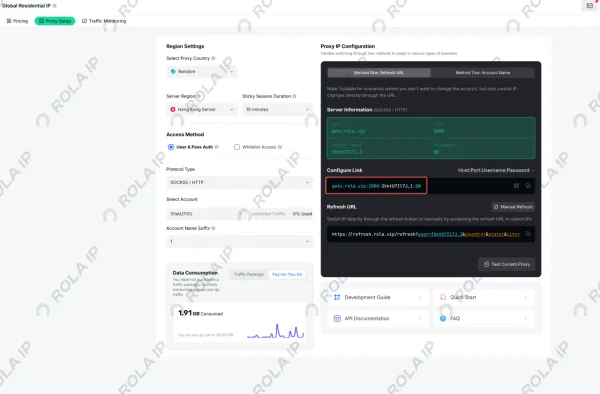
Figure 8. Find the proxy host, port, and authentication details on the Rola IP Proxy Setup page.
Choose sticky sessions when several requests must keep the same exit IP, and use per-request rotation when separate calls should leave through different exits. Location parameters route permitted traffic through the country or region required by the workflow. Keep these layers distinct: headers describe the application request, whereas a proxy changes its network path. A new IP cannot correct invalid authentication or an incorrect Content-Type, just as a different User-Agent cannot resolve an IP-reputation or location restriction.
Proxy routing does not replace authorization or remove obligations involving robots directives, contracts, privacy, and rate limits. It also does not render JavaScript. Use browser automation only when the page genuinely requires a browser and the workflow is permitted.
Best Practices for Python Requests Headers
- Use a specific, truthful User-Agent when the service asks clients to identify themselves.
- Match
Acceptand body encoding to the API documentation. - Prefer
json=for JSON rather than hand-building the body and length. - Set both connect and read timeouts.
- Call
raise_for_status()after preserving any diagnostic body you need. - Inspect
response.request.headersduring debugging, with secrets redacted. - Reuse a Session for related sequential calls.
- Retry only suitable methods, cap backoff, and honor
Retry-After. - Store tokens and proxy credentials in environment variables or a secret manager.
- Follow access terms, privacy rules, robots directives where applicable, and published rate limits.
Summary
Use a headers dictionary for one call and a Session for defaults shared across calls. Let Requests encode JSON and calculate body-related headers, then inspect the prepared request whenever the result is unexpected. If a permitted workload is limited by network reputation or geography rather than headers, an authenticated Rola IP route can address that separate layer. Pair it with sensible timeouts, controlled request rates, secure credential handling, and the target’s access rules.