Request Failed with Status Code 405: Causes and Fixes

Aug 18, 2026 · Troubleshooting · 13 min read
TL;DR
A 405 means the server recognized your HTTP method but does not permit it for the requested resource. Capture the Axios response, inspect the Allow header, reproduce the request with curl, then fix the client verb, route handler, CORS preflight, redirect, or intermediary policy. Do not retry or rotate IPs before identifying the rejecting layer.

Figure 1. The article’s main visual: the request reaches a route gate, but the selected method is rejected. This illustration explains the concept; it is not evidence from a live endpoint.
Request failed with status code 405 usually appears because Axios received an HTTP 405 Method Not Allowed response. The network request reached a server, but the responding layer rejected the method—such as POST, PUT, PATCH, DELETE, or OPTIONS—for that resource.
The fastest fix is not to change random headers or retry. Record the exact method and final URL, inspect the response’s Allow header, reproduce the request outside the application, and compare the result with the route and infrastructure configuration.
What a 405 response actually means
RFC 9110 defines 405 narrowly: the origin server recognizes the request method, but the target resource does not support it. A compliant 405 response must include an Allow header listing the methods currently supported by that resource.[1]
For example:
HTTP/1.1 405 Method Not Allowed
Allow: GET, HEAD
Content-Type: application/json

{"error":"Method Not Allowed"}
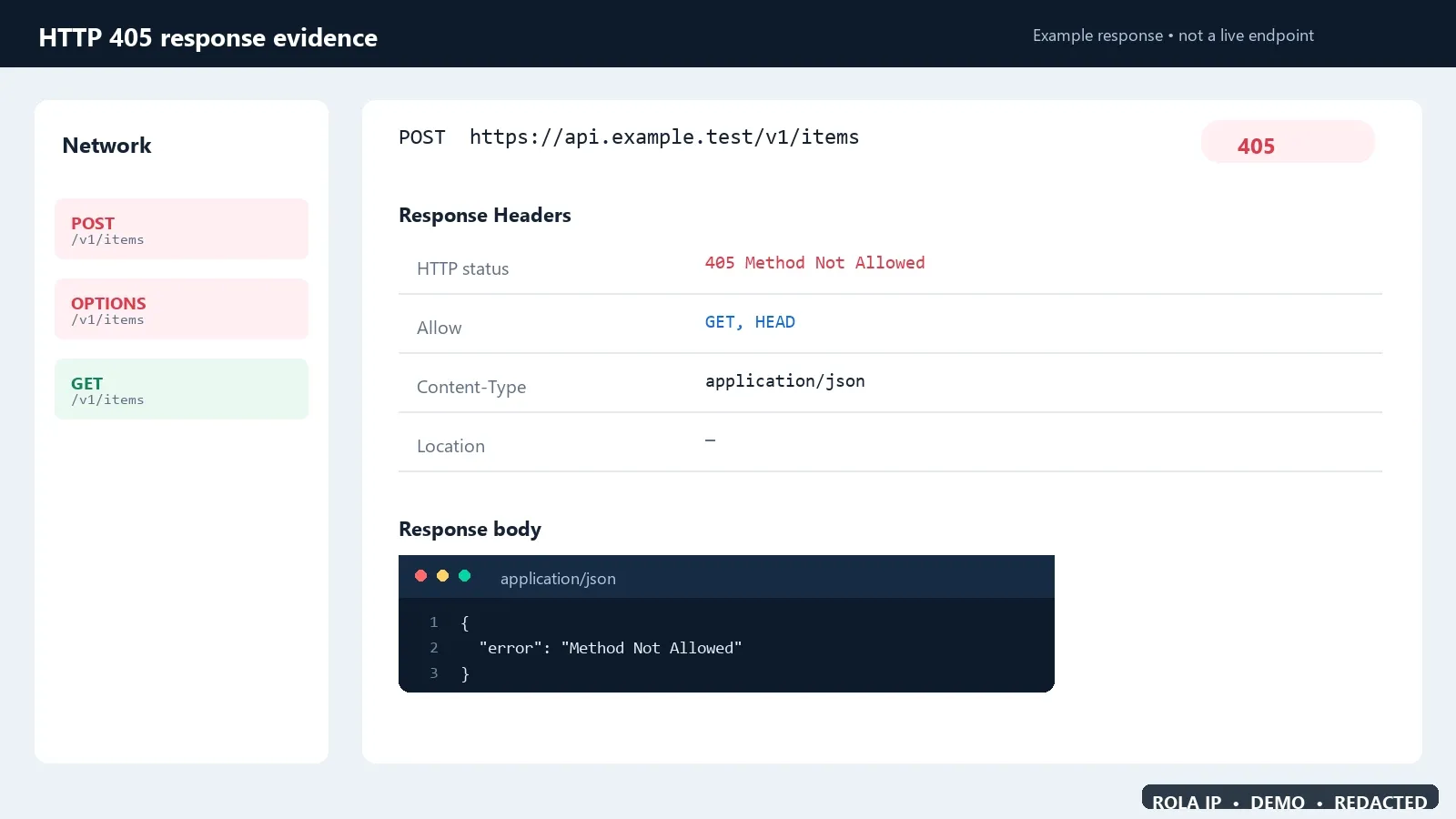
Figure 2. This example proves what a useful 405 response exposes: the rejected method, the Allow header, and a redacted response body. It is a synthetic example, not a live endpoint capture. Source: RFC 9110, Section 15.5.6.
This response tells you three useful things:
- The request reached an HTTP-speaking server.
- The server understood the method.
- The method and target resource do not match the server’s current contract.
Do not treat every 4xx response as the same problem:
| Status | Meaning for diagnosis | First check |
|---|---|---|
403 Forbidden |
The server understood the request but refuses it under an authorization or policy decision | Identity, permissions, target rules |
404 Not Found |
The server cannot find, or will not disclose, the target resource | Host, path, API version, deployment |
405 Method Not Allowed |
The method is known but is not supported by this resource | Method, route declaration, Allow |
415 Unsupported Media Type |
The request representation is not accepted | Content-Type and body encoding |
501 Not Implemented |
The server does not implement the method capability | Method support at the server level |
Changing Content-Type may fix a 415, but it does not repair a genuine 405 unless some application layer is incorrectly classifying the request.
Diagnose Request failed with status code 405 in five minutes
Use this sequence before editing application code:
- Capture the actual request. Record the uppercase method, scheme, host, path, query string, and whether a redirect occurred.
- Capture the response. Record status,
Allow,Location, server-identifying headers, and a redacted response body. - Replay the same request with curl. This separates Axios or browser behavior from the server contract.
- Compare the route definition. Confirm that the deployed application registers that method on that exact path.
- Inspect the layers in order. Browser preflight, CDN/WAF, reverse proxy, web server, framework router, then application handler.
The word “same” matters. A useful reproduction keeps the method, URL, body, Content-Type, authorization context, redirect behavior, and network path fixed. If you change several variables at once, a successful response will not identify the cause.
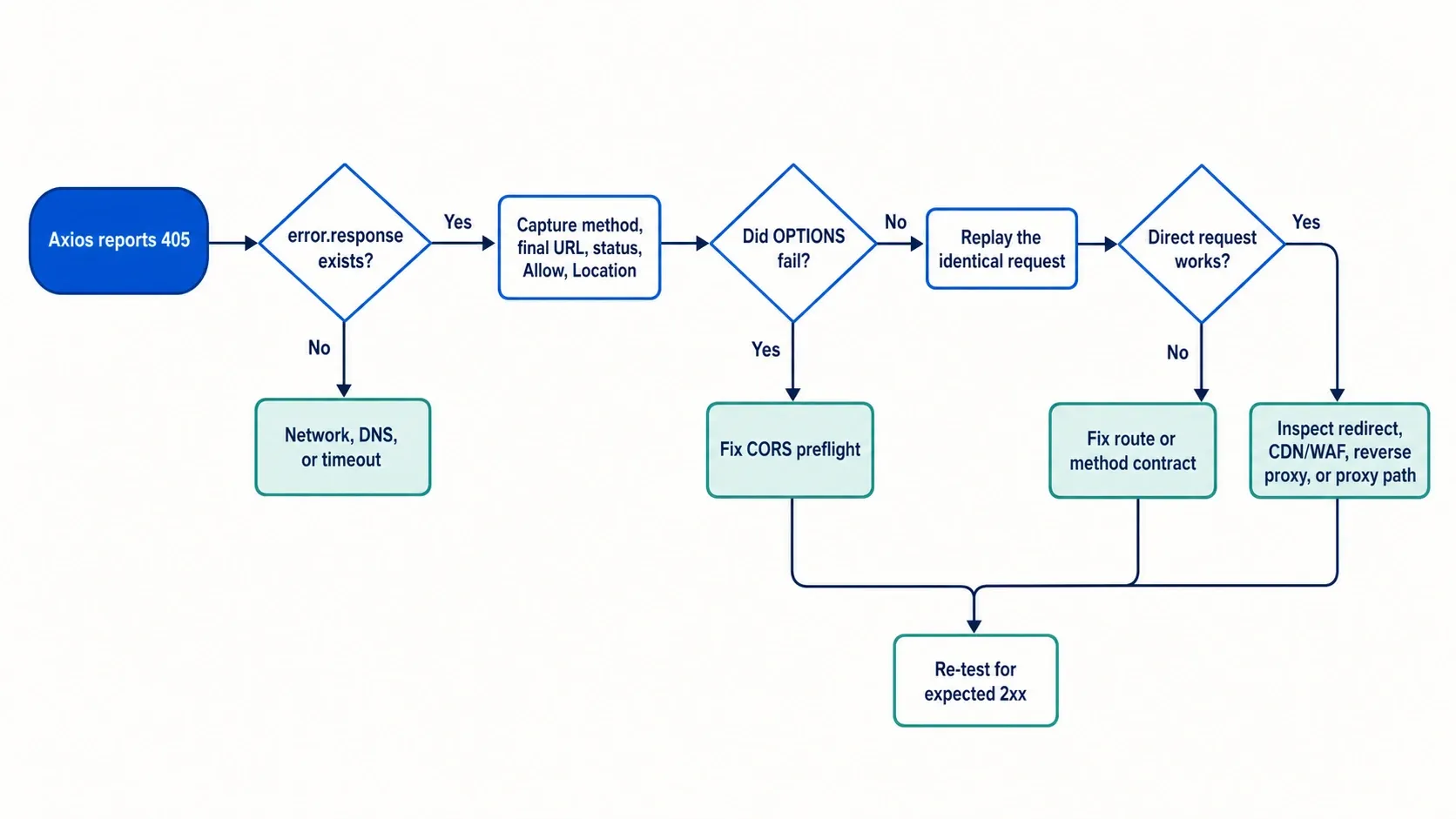
Figure 3. A decision path for separating an HTTP response, failed preflight, route mismatch, and intermediary-path difference. This generated diagram is a navigation aid, not evidence that any endpoint was tested.
Capture the full Axios 405 response
Axios rejects responses outside its configured success range by default. When a server responded, Axios exposes the response body, status, and headers on error.response; error.request instead represents a request that received no response.[2]
Log a small, redacted diagnostic object rather than only error.message:
import axios from "axios";

try {
  await axios.post("https://api.example.test/v1/items", {
    name: "gamma",
  });
} catch (error) {
  if (axios.isAxiosError(error) && error.response) {
    console.error({
      method: error.config?.method?.toUpperCase(),
      url: error.config?.url,
      status: error.response.status,
      allow: error.response.headers?.allow,
      location: error.response.headers?.location,
      data: error.response.data,
    });
  } else {
    console.error("No HTTP response was captured", error.message);
  }
  throw error;
}

Figure 4. This example proves which fields to capture from error.response: the actual method, final URL, status, Allow header, and response data. Credentials and cookies are intentionally redacted.
Do not log Authorization, cookies, API keys, proxy credentials, or unredacted customer data. Even the response body may contain sensitive debugging information, so sanitize it before storing or sending it to support.
Axios also provides validateStatus, but changing it only controls whether Axios resolves or rejects the promise. It does not convert a server’s 405 into a successful operation.[2] If you temporarily accept 405 for diagnostics, handle it explicitly and restore normal failure behavior afterward.
Reproduce the exact method with curl
Start with headers and no automatic redirect following:
curl -i --max-redirs 0 \
  -X POST "https://api.example.test/v1/items" \
  -H "Content-Type: application/json" \
  --data '{"name":"gamma"}'
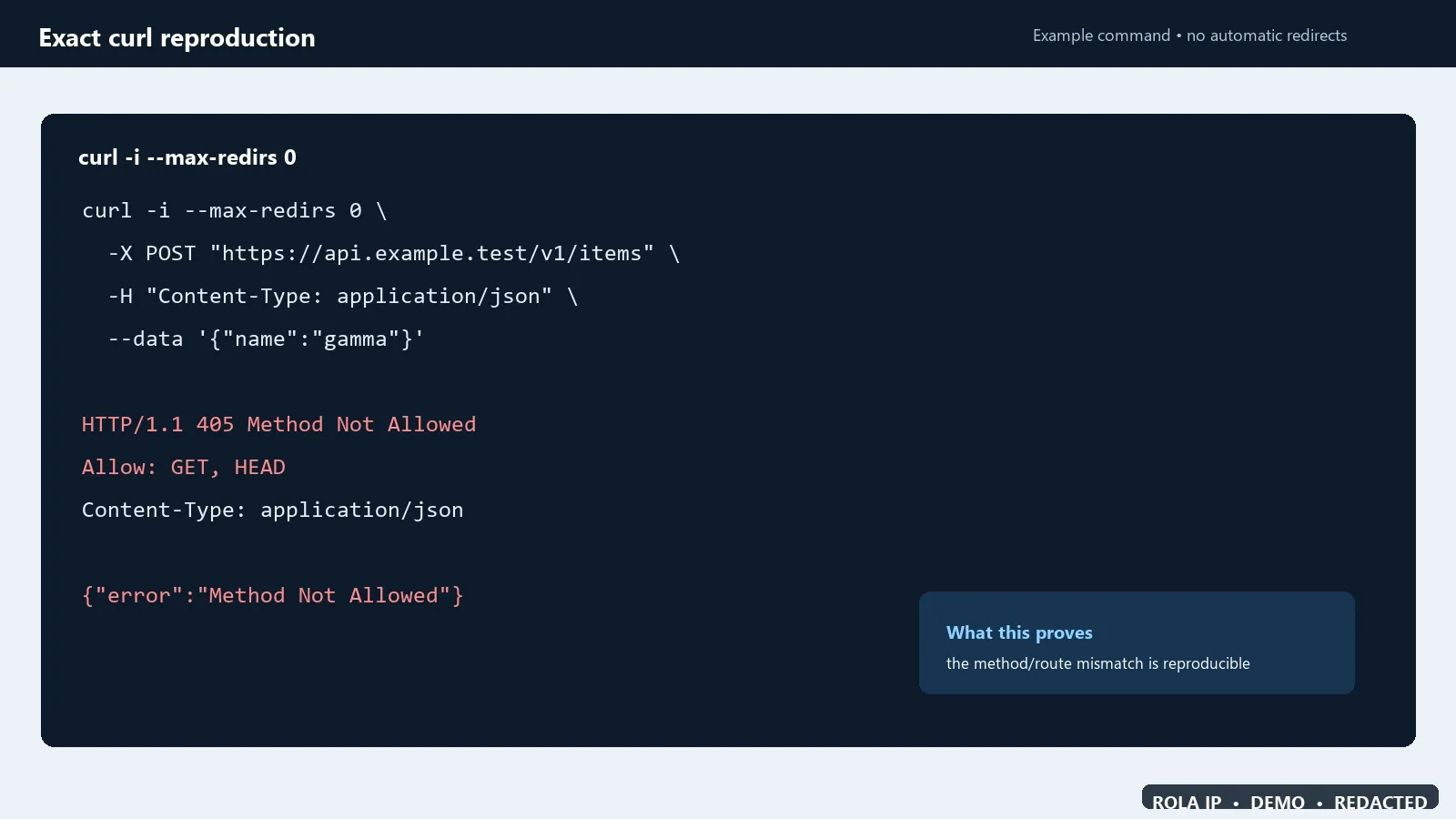
Figure 5. This example proves how to separate Axios behavior from the server contract by replaying the same method and URL with redirects disabled. It is a synthetic transcript, not a claim that this endpoint was tested.
Check:
- Is the response really 405?
- Does
AllowcontainPOST? - Is there a
Locationheader showing that you hit a redirect? - Does the response body identify a framework, gateway, static host, or web server?
- Does the same command work against the documented API host and version?
If the production request requires authentication, load the token from an approved secret manager or short-lived environment variable. Avoid pasting secrets directly into a shared command, ticket, screenshot, or shell history.
An absent Allow header does not make random method guessing safe. It means the response is incomplete, nonconforming, or was altered by an implementation layer. Confirm the API contract and inspect server logs instead.
Match the client method to the API contract
The most common repair is aligning the client and route:
- Use
GETwhen the documented operation only reads a resource. - Use
POSTwhen the API contract creates an action or subordinate resource. - Use
PUTwhen the contract replaces a resource at a known URI. - Use
PATCHonly when the endpoint explicitly implements partial updates. - Use
DELETEonly on a route that registers deletion.
Do not change a state-changing POST to GET merely because Allow: GET appears. That can produce the wrong semantics, leak data into URLs, or bypass the intended server operation. If the client is correct, add or deploy the missing server handler instead.
Also compare the entire route, not just the visible pathname. These may reach different handlers:
/api/items
/api/items/
/api/v1/items
/api/v2/items
https://www.example.test/api/items
https://api.example.test/items
A stale base URL, missing API prefix, wrong hostname, or static-site deployment can send a valid POST to a resource that only serves GET.
Fix method handling in Express and Next.js
Express
Express route methods correspond to HTTP methods, so app.get() and app.post() are separate route registrations.[6] A GET-only route does not automatically implement POST.
app.get("/api/items", (request, response) => {
  response.json({ items: ["alpha", "beta"] });
});

app.post("/api/items", express.json(), (request, response) => {
  response.status(201).json({ created: request.body });
});

app.all("/api/items", (request, response) => {
  response.set("Allow", "GET, POST");
  response.status(405).json({ error: "Method Not Allowed" });
});
Place the catch-all after the supported handlers. Verify that the router containing these declarations is mounted under the path the client actually calls.
Next.js App Router
Next.js Route Handlers use named exports such as GET, POST, and OPTIONS. Its official documentation states that an unsupported method receives a 405 response.[7]
// app/api/items/route.ts
export async function GET() {
  return Response.json({ items: ["alpha", "beta"] });
}

export async function POST(request: Request) {
  const body = await request.json();
  return Response.json({ created: body }, { status: 201 });
}
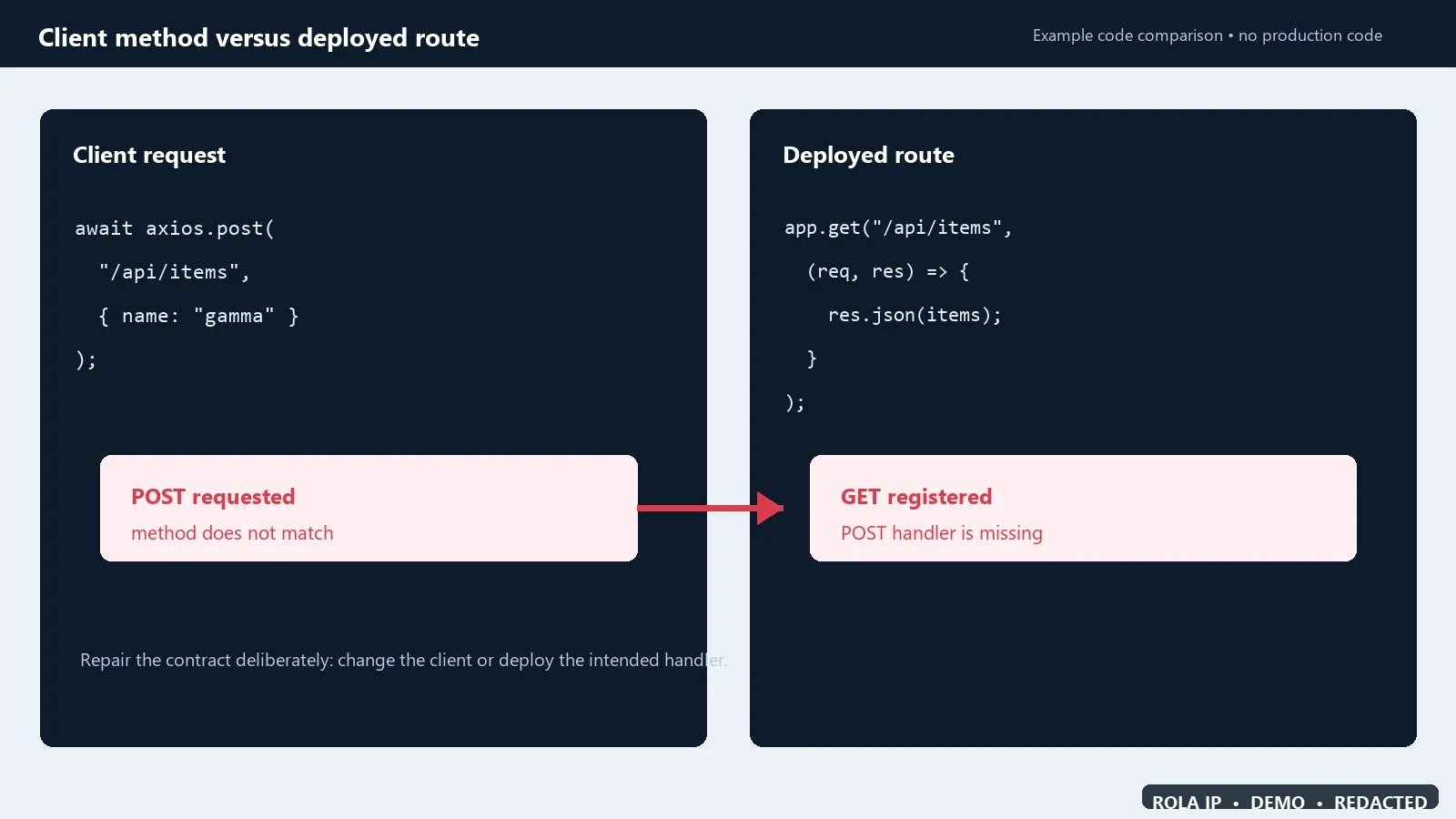
Figure 6. This example proves the common contract mismatch: the client sends POST, but the deployed route registers only GET. It does not imply that every 405 should be fixed by changing the client to POST.
Check that the file is named route.ts or route.js, is located under the intended app segment, and is present in the deployed build. A page component is not a replacement for an API route handler.
Check CORS preflight before changing application logic
A browser can send an OPTIONS preflight before the actual POST, PUT, PATCH, or DELETE. If the preflight receives 405, the browser may never send the application request. This is a CORS configuration problem at the server or gateway layer, not proof that Axios chose the wrong application method.
Inspect the browser Network panel for an OPTIONS request. A suitable response may look like:
HTTP/1.1 204 No Content
Allow: GET, POST, OPTIONS
Access-Control-Allow-Origin: https://app.example.test
Access-Control-Allow-Methods: GET, POST, OPTIONS
Access-Control-Allow-Headers: Content-Type, Authorization
Vary: Origin
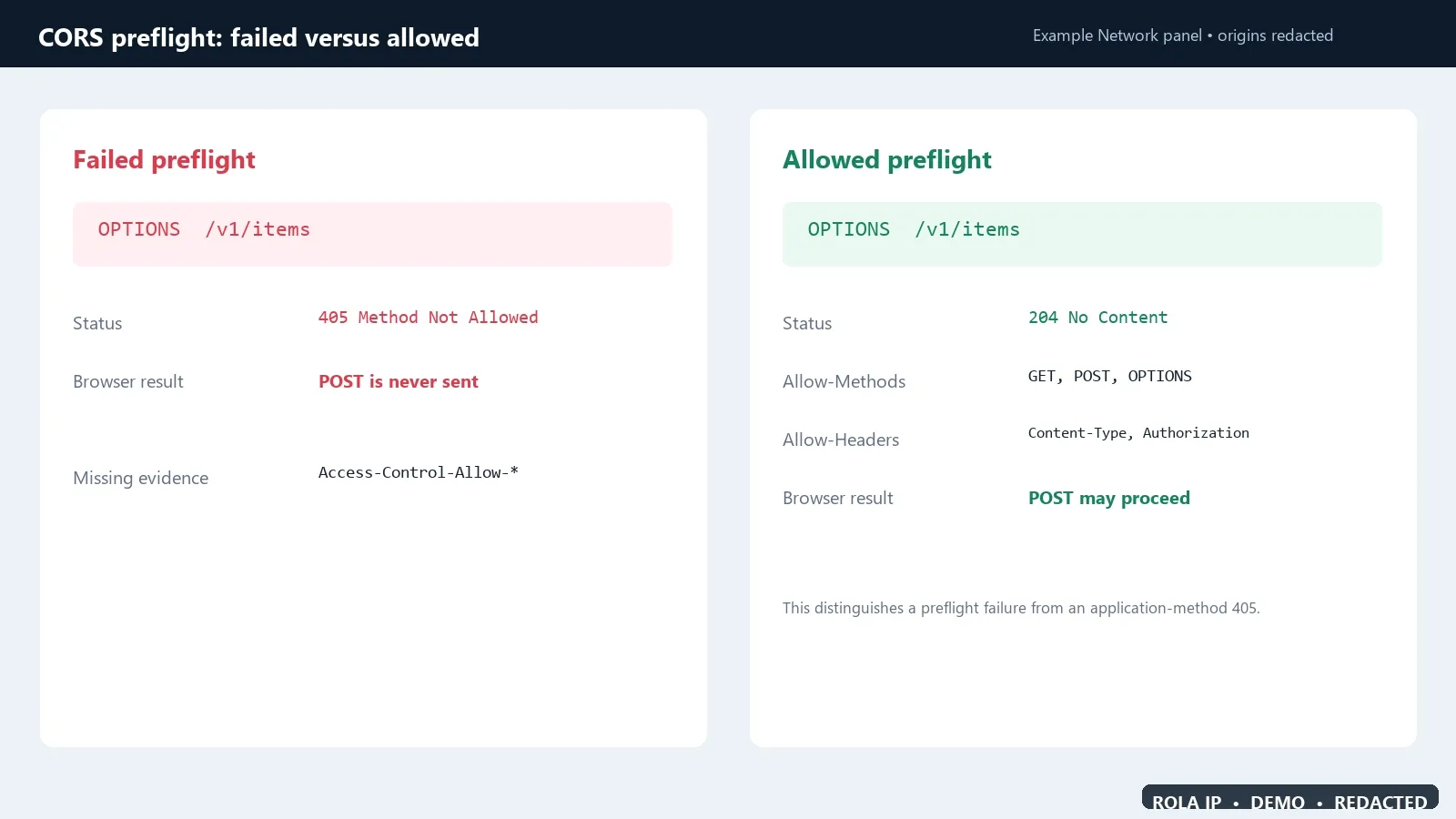
Figure 7. This comparison proves the diagnostic distinction: an OPTIONS 405 can prevent the browser from sending POST, while a successful preflight exposes the approved CORS methods and headers. The panel is a synthetic example.
Allow describes methods supported by the resource. Access-Control-Allow-Methods is specifically part of CORS preflight handling; the headers are related but not interchangeable.[8]
When cookies or other credentials are involved, do not combine credentialed browser access with a wildcard origin. Return the explicitly approved origin and apply the application’s authentication and authorization rules.[8]
Inspect redirects, reverse proxies, and production handlers
Redirects
The final URL may reject a method even when the original URL looks correct. Record every response in the redirect chain. HTTP 307 and 308 preserve the method and body, while 303 changes a non-GET request to GET; 301 and 302 have historically varied for non-GET methods.[9]
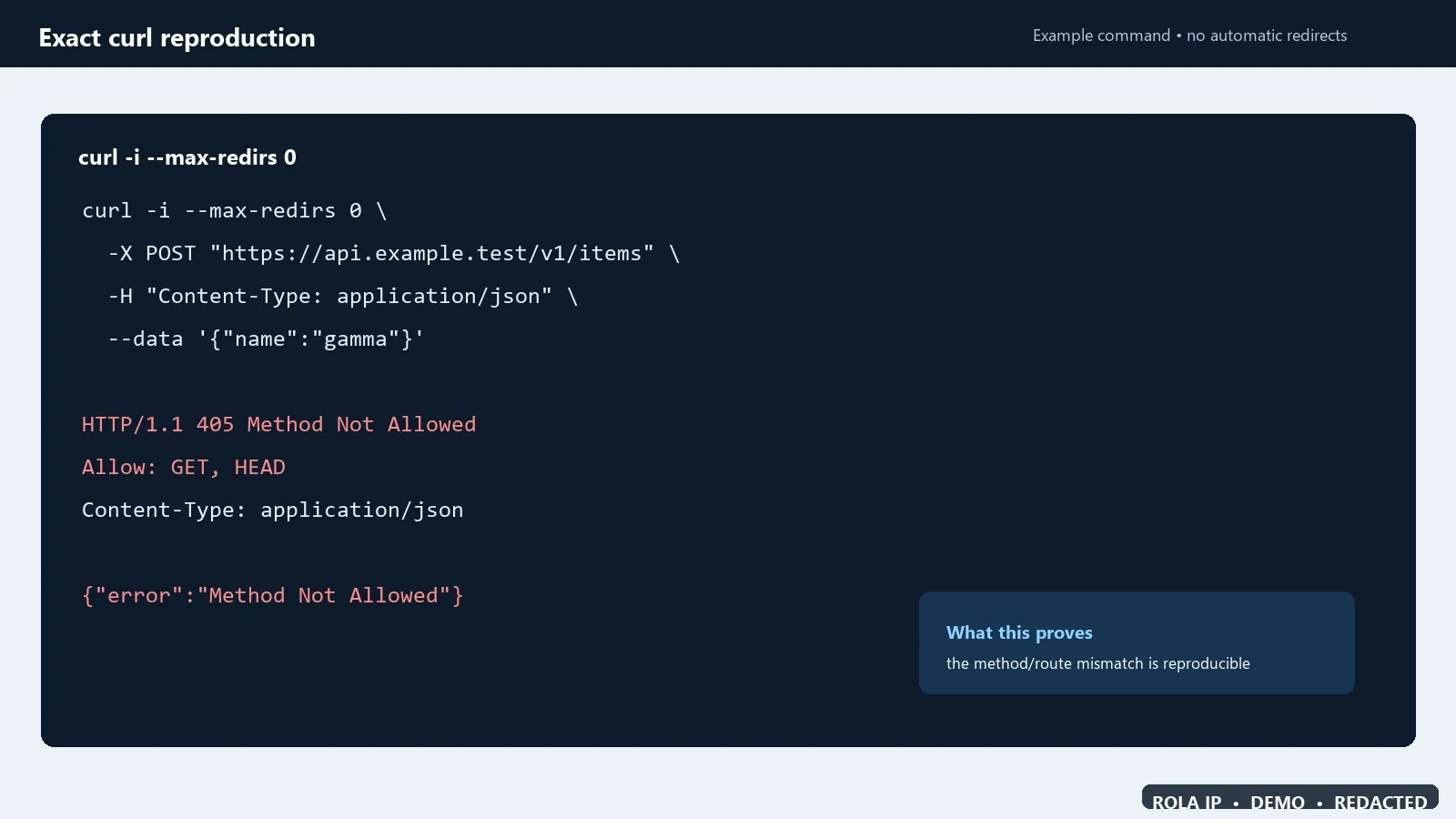
Figure 8. This example proves why automatic redirects should be disabled during diagnosis: the original URL and final URL can be different resources even when the method is preserved. It is a synthetic trace, not a live endpoint capture.
Use redirects intentionally. For an API hostname or trailing-slash migration that must preserve POST, prefer method-preserving semantics. Do not rely on a browser or HTTP library to repair an ambiguous redirect.
Nginx, CDN, WAF, or API gateway
An intermediary can reject a method before the framework sees it. Nginx, for example, provides limit_except for method-based access restrictions.[10] Compare the deployed location block, gateway route, WAF rule, and origin route. Correlate request IDs across layers when possible.
IIS and static hosting
Microsoft documents production 405 cases involving POST requests sent to static-file handlers and conflicts with WebDAV for methods such as PUT.[11] If local development works but production fails, compare installed server modules, handler mappings, deployment mode, and the actual published files. A static export cannot execute a dynamic POST handler.
Isolate a proxy route without blaming the proxy
A proxy is not the normal fix for a 405. First make the request work directly against a system you own or are authorized to test. Then, if the application legitimately requires a proxy path, repeat an A/B test with the same method, URL, headers, body, timeout, and redirect policy.
For Rola IP users, the Python code integration guide can help confirm that the client is wired to the intended proxy interface. The public proxy checker can test basic route reachability, while what is my IP can confirm the visible exit used by an interactive test. Neither tool proves that the target resource permits POST or another method.
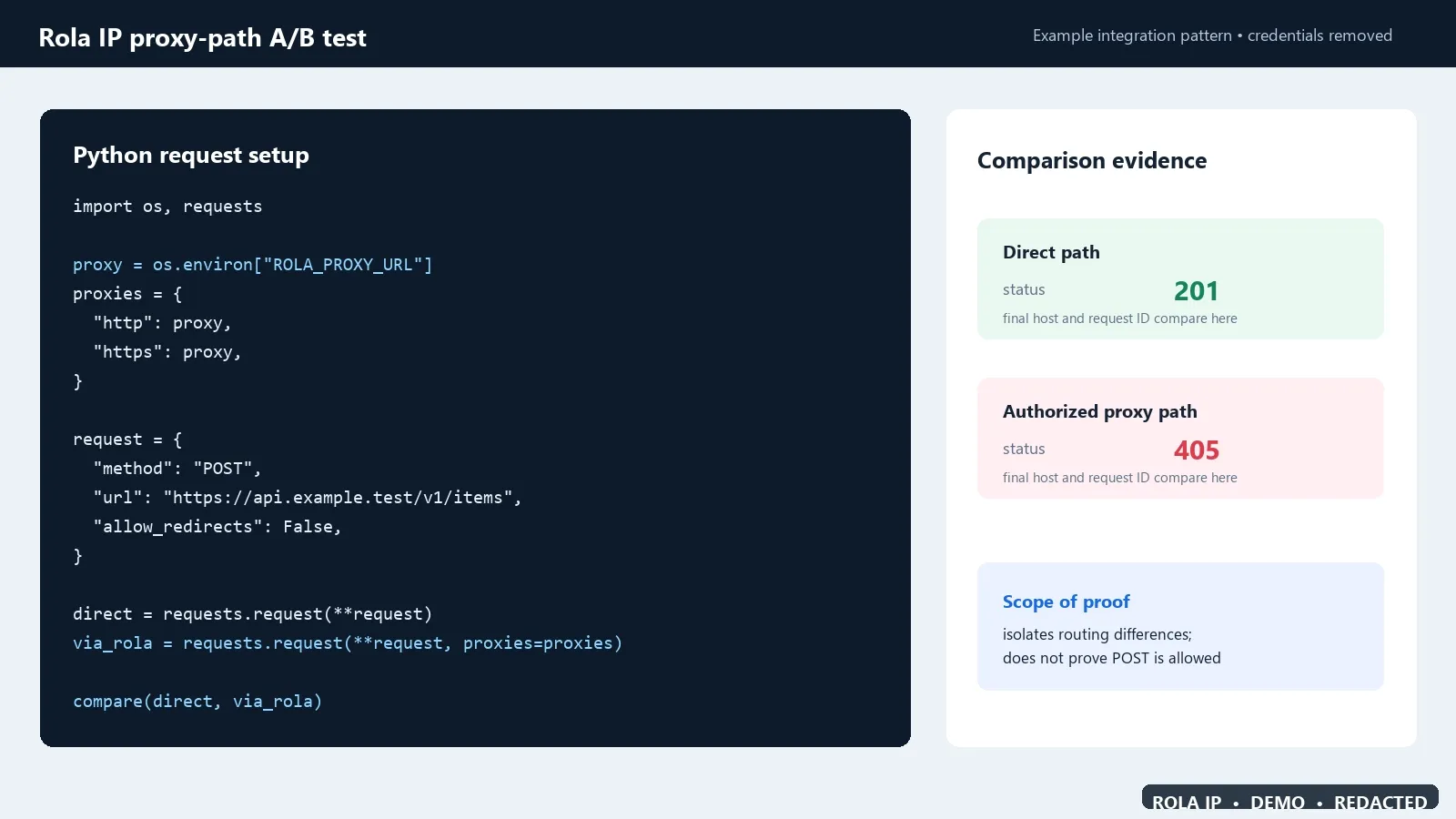
Figure 9. This Rola IP-branded example proves how to keep proxy credentials in an environment variable and compare a direct path with an authorized proxy path using the same method, URL, and redirect policy. It isolates routing differences; it does not prove that the target resource permits POST. See the Rola IP documentation for the integration context.
RFC 9110 says a proxy must not modify the Allow header.[12] If the direct path returns 2xx but the controlled proxy path returns 405, capture both complete exchanges and investigate differences in the final host, redirect chain, gateway policy, region-specific upstream, and origin selection. Do not rotate IPs repeatedly or increase request volume to force a different response.
Keep proxy credentials out of code and command-line arguments. Read them directly from environment variables or an approved secret manager. If an HTTP proxy gateway is used, do not assume that an HTTPS destination alone encrypts proxy authentication on the client-to-proxy hop; use a TLS-protected proxy connection only when the provider confirms support for that exact gateway.
Follow an online-verified Axios 405 workflow
The workflow below is based on public evidence that had already been executed and documented online. It does not depend on a local Axios installation or on a claim that this article’s author ran requests against a third-party service.
1. Start with the observed Axios failure
In a public Stack Overflow case, the client submitted a form with axios.post("/testing/", ...) and reported the exact message Request failed with status code 405.[4] That is direct evidence of the visible symptom, although a community report is not a substitute for protocol or framework documentation.
The Axios documentation explains the library behavior behind that message: responses outside the accepted status range are rejected by default, and a response received from the server is available through error.response, including its status, headers, and data.[2] Therefore, the first diagnostic branch is not “retry Axios.” It is “read the server response Axios preserved.”
try {
  await axios.post("/testing/", payload);
} catch (error) {
  if (axios.isAxiosError(error) && error.response) {
    console.log(error.response.status);
    console.log(error.response.headers.allow);
    console.log(error.response.data);
  }
}
2. Compare the method with the published route
The same public case showed a Laravel route registered for GET while Axios sent POST. The accepted answer identified that mismatch and changed the route declaration from GET to POST.[4] Laravel’s official routing documentation separately confirms that routes are registered for specific HTTP verbs, including Route::get and Route::post.[5]
The meaningful before-and-after change is therefore one variable:
// Before: does not match axios.post(...)
Route::get('/testing/', [AdminController::class, 'testing']);

// After: matches axios.post(...)
Route::post('/testing/', [AdminController::class, 'testing']);
Do not copy that change mechanically. If the API contract says the operation should be GET, fix the client instead. If it creates or changes server state, POST may be the correct contract and the server route should implement it. The point is to make the deployed route and the Axios method agree.
3. Keep Axios error handling separate from the server fix
Changing validateStatus can make Axios resolve a 405 response, but it cannot make the server execute the rejected operation. The official Axios repository documents both the default non-2xx rejection behavior and a successful axios.post(...) example that receives a normal response object.[3] Together with the 405 case, this shows that POST is not inherently a problem in Axios; the outcome depends on the method accepted by the target resource.
Use the same diagnostic fields before and after the route change:
| Field | Before the repair | After the repair |
|---|---|---|
| Method and final URL | Record the actual POST target |
Must remain identical unless the URL itself was wrong |
| Axios branch | catch, with error.response.status === 405 |
Fulfilled response for the documented success status |
Allow |
May advertise GET or other supported methods | Not applicable on the successful response |
| Server route | GET-only or otherwise missing POST | POST handler deployed on the same path |
| Response body | Error payload, redacted before logging | Expected application result |
4. Apply a strict post-fix success gate
The community case publishes the failing Axios call, the GET-only route, and the accepted route correction, but it does not publish a post-fix response transcript. Do not invent one. In your environment, the workflow is complete only when the identical request returns the success code defined by the API contract, such as 200 OK, 201 Created, or 204 No Content, and the expected side effect is confirmed.
This evidence boundary matters: the online case validates the common cause-and-remedy pattern; Axios and Laravel documentation validate the client and routing semantics; your deployment logs or authorized test environment must validate the final business outcome. Record the request ID, deployment version, method, redacted final URL, status, and expected result so another operator can reproduce the conclusion.
Verify the repair before deployment
Use a small matrix rather than one successful click:
| Check | Expected result | Failure interpretation |
|---|---|---|
Supported GET |
200 and expected representation |
Wrong path, handler, or application state |
Supported POST |
200/201 and expected result |
Missing route, validation, auth, or deployment issue |
| Unsupported method | 405 with accurate Allow |
Server error handling is incomplete if Allow is missing |
| Browser preflight | 204/200 with approved CORS headers |
Gateway or application does not handle OPTIONS |
| Redirect inspection | Intentional status and final route | Method may be reaching the wrong resource |
| Direct vs authorized proxy path | Same application semantics | Investigate path/policy differences before changing IPs |
Run the matrix in the declared production-like environment. Record the application version, route manifest or configuration revision, request timestamp, request ID, method, redacted URL, status, Allow, and responding layer. Avoid storing tokens or personal data.
Troubleshooting matrix
| Symptom | Likely cause | How to verify | Corrective action |
|---|---|---|---|
Axios POST returns 405 and Allow: GET |
Client and route contract disagree | Compare Axios config with API docs and route declaration | Use the documented method or implement POST server-side |
OPTIONS returns 405 in the browser |
Missing CORS preflight handler | Inspect Network panel and replay OPTIONS |
Handle preflight at the gateway/application and return approved CORS headers |
| curl works, browser fails | CORS, cookies, or browser-only redirect | Compare browser request headers and preflight | Correct CORS and credential settings; do not change application method blindly |
| Local works, production returns 405 | Deployment, static handler, WAF, Nginx, or IIS difference | Compare route manifests and each infrastructure hop | Deploy the handler or correct the rejecting server configuration |
| Original URL redirects, final URL returns 405 | Redirect reaches a route with different method support | Disable automatic redirects and inspect Location |
Correct URL or use intentional redirect semantics |
| Direct works, proxy path returns 405 | Different upstream, host, policy, or redirect chain | Compare identical redacted request/response pairs | Correct routing/configuration; do not assume IP rotation is the fix |
405 has no Allow header |
Nonconforming or incomplete response | Check origin and gateway logs | Add correct Allow at the layer generating 405 |
| Repeated retries return the same 405 | Deterministic contract/policy mismatch | Compare unchanged request and response | Stop retrying and repair the method-to-resource mapping |
Conclusion
Fix Request failed with status code 405 by identifying the layer that rejected the method. Start with Axios evidence, confirm the Allow header, reproduce the exact request with curl, and compare it with the deployed route. Then check preflight, redirects, and infrastructure in order.
A proxy-path comparison is useful only after the direct request works and only when a proxy is part of the authorized design. It should isolate a routing variable, not replace the method or bypass the target’s policy.