Request Failed with Status Code 429: Axios Causes and Fixes

Aug 20, 2026 · Troubleshooting · 13 min read
When Axios shows Request failed with status code 429, pause before retrying. The request reached an HTTP service, but a rate limiter rejected it. Immediate retries create more rejected traffic and may repeat work that should run only once.
The next step depends on what the service counts. A limit may apply to the source IP, account, API key, session, endpoint, concurrency level, or provider quota. Check error.response.data, error.response.headers, and Retry-After before changing code, credentials, or network routing.
This guide walks through how to identify the limited scope, read Retry-After, add bounded retries to repeatable Axios requests, handle login throttling, and decide when a proxy is relevant to an authorized workflow.
Key takeaways
- When Axios reports
Request failed with status code 429, inspect the server response before retrying.- Find out what the service counts before choosing a fix: IP, account, API key, session, endpoint, concurrency, or another quota.
- Honor
Retry-After, retry only operations that are safe to repeat, and defer the task if the required wait exceeds the automatic-wait budget.- Consider a proxy only for an authorized workflow after the response confirms an IP-scoped limit. A proxy does not reset account or API-key quotas.
What does “Request failed with status code 429” mean?
When error.response.status is 429, Axios received a response from the server and surfaced it as an error. HTTP 429 is the Too Many Requests response. RFC 6585 defines it as rate limiting: the server counted too many requests from an identified actor or resource within a period of time. The response may include Retry-After to tell the client how long to wait.
The phrase “user has sent too many requests” is easy to misread. The “user” is whatever identity the server counts. A service may count a source IP, an authenticated account, an API key or access token, a cookie or session, one endpoint, active concurrency, or a provider quota. It may also enforce more than one of these limits at the same time.
The status code does not reveal which dimension fired. That is why 429 rate limit requests exceeded describes the category of the error, not the complete diagnosis.
A 429 status does not identify the rate-limit counter
The same response can come from several counting scopes. Use the response body, headers, provider documentation, and controlled tests to identify the one that applies.
| Counting scope | What it may represent |
|---|---|
| Source IP | A shared NAT address or proxy exit |
| Account | A user or subscription |
| API key | A token or application |
| Session | A cookie or browser state |
| Endpoint | A route or protected resource |
| Burst or concurrency | A short time window or active work |
Diagnose an Axios 429 before retrying
Start with the response rather than a list of generic browser fixes. Current Axios error-handling documentation separates three cases:
error.responseexists: the server sent a response outside Axios’s accepted status range. A 429 belongs here.error.requestexists buterror.responsedoes not: Axios has no readable HTTP response. Investigate transport failures, timeouts, and, in a browser, CORS restrictions; this is not a confirmed 429 response.- Neither exists: Axios could not finish setting up the request.
Log only the diagnostic fields you need. Do not print authorization headers, cookies, full tokens, or personal data.
import axios from "axios";

async function fetchItems() {
  try {
    const response = await axios.get("https://api.example.com/items", { timeout: 10000 });
    return response.data;
  } catch (error) {
    if (axios.isAxiosError(error) && error.response) {
      const { status, data, headers } = error.response;

      console.error({
        status,
        retryAfter: headers["retry-after"],
        errorCode: data?.code ?? data?.error,
        message: data?.message,
        limitKey: data?.limitKey ?? data?.limit_key,
      });
    }

    throw error;
  }
}
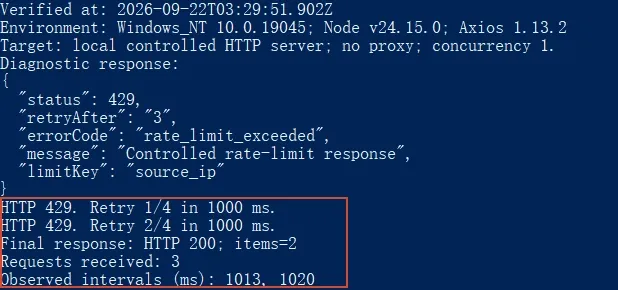
The code above is a diagnostic function: replace the example URL with your authorized endpoint and call fetchItems() from your application. Provider error fields may contain sensitive values, so review and redact them before logging. The reproducible local example below prints these fields from a controlled HTTP response. Its terminal screenshot in “What the local verification proves” shows both the diagnostic fields and the retry sequence. The fixture deliberately supplies the source-IP limit label; it does not prove that a live provider limits by IP.
Axios lowercases response header names, so read Retry-After as headers["retry-after"]. The runnable example below uses Node.js. For browser requests across origins, the server must permit CORS and expose Retry-After with Access-Control-Expose-Headers for JavaScript to read that header. A header visible in browser developer tools may still be unavailable to Axios.
Use the two tables below in order. Table 1 narrows the likely limit scope. Table 2 gives the next action and a way to check the result.
Table 1: Use the symptoms to narrow the limit scope
| What you observe | What it can indicate |
|---|---|
Retry-After is present |
A temporary window with a server-supplied wait |
| The body names a quota, account, token, or endpoint | A provider-specific limit |
| Failures begin when several workers run together | A burst or concurrency limit |
| The first request from one process returns 429 | A shared IP, key, account, application, or earlier quota use is possible |
| A login endpoint returns 429 | Authentication throttling or a temporary lockout is possible |
| A different IP still fails with the same account or key | The limit may not be IP based |
Table 2: Take the next step and verify the result
| Matching situation | Next step and verification |
|---|---|
Retry-After is present |
Wait at least that long. Verify: Send one controlled request after the interval |
| The body names a quota, account, token, or endpoint | Read that provider’s quota documentation and usage data. Verify: Confirm the named quota has reset or capacity is available |
| Failures begin when several workers run together | Reduce parallelism and put requests through a queue. Verify: Increase load slowly and watch the 429 rate |
| The first request from one process returns 429 | Check other clients and shared credentials before changing code. Verify: Correlate provider logs and usage for the same identity |
| A login endpoint returns 429 | Stop attempts and use the service’s recovery path. Verify: Retry once after the stated wait or after support clears the issue |
| A different IP still fails with the same account or key | Investigate the account, key, session, or provider quota. Verify: Test only through documented provider controls |
These branches narrow the diagnosis, but they do not prove which limit fired. Confirm the cause with the response body, headers, provider documentation, and server-side logs.
Read Retry-After correctly
Do not assume Retry-After is always a number. RFC 9110 allows two formats:
Retry-After: 120
The client should wait 120 seconds from the moment it receives the response.
Retry-After: Fri, 21 Aug 2026 14:30:00 GMT
Here, the client should wait until the timestamp in the header. It should support both formats.
If the header is missing, check the provider’s documentation and error body. If neither supplies a reset time, use a finite retry policy with exponential backoff and jitter. Do not pick a fixed sleep value and retry forever. A fixed delay can be too short for one provider and unnecessarily slow for another.
Fix “Request failed with status code 429” in Axios
The following Node.js example retries GET requests only and keeps Axios’s 2xx success policy. It waits for a valid Retry-After first; missing or malformed values fall back to exponential backoff with jitter. Four retries means at most five attempts. Each request has a ten-second timeout, and each automatic wait has a sixty-second budget. If the server requests a longer wait, the helper stops and asks the caller to defer the task—it never shortens that wait to retry early. An optional AbortSignal can cancel a request or a wait.
Install and run the controlled example
To reproduce the example locally, create a folder, save the three code blocks below as retry.mjs, server.mjs, and demo.mjs, and install the pinned Axios version. Run every command from that same folder:
npm init -y
npm install --save-exact axios@1.13.2
The .mjs extension enables ES modules; no type setting is required. The server binds only to 127.0.0.1 on a dynamically assigned port, needs no credentials, and closes after the demo. proxy: false is used only for these loopback requests so machine proxy environment variables do not route the local test elsewhere. For an authorized production endpoint, replace the local URL and configure its authentication and routing separately. The complete source is shown in this article; no downloadable attachment is required.
1. Save as retry.mjs:
import axios from "axios";
import { setTimeout as sleep } from "node:timers/promises";

export function parseRetryAfterMs(value) {
  if (value == null) return null;
  const text = String(value).trim();
  if (/^\d+$/.test(text)) return Number(text) * 1000;
  // HTTP-date (IMF-fixdate and the two legacy HTTP formats).
  const httpDate = /^(?:[A-Za-z]{3}, \d{2} [A-Za-z]{3} \d{4} \d{2}:\d{2}:\d{2} GMT|[A-Za-z]+, \d{2}-[A-Za-z]{3}-\d{2} \d{2}:\d{2}:\d{2} GMT|[A-Za-z]{3} [A-Za-z]{3} [ \d]\d \d{2}:\d{2}:\d{2} \d{4})$/;
  if (!httpDate.test(text)) return null;
  const retryAt = Date.parse(text);
  return Number.isNaN(retryAt) ? null : Math.max(0, retryAt - Date.now());
}

export async function getWith429Retry(url, config = {}) {
  const maxRetries = 4;
  const baseDelayMs = 1000;
  const maxBackoffMs = 30000;
  const maxAutomaticWaitMs = 60000;

  for (let attempt = 0; attempt <= maxRetries; attempt += 1) {
    try {
      return await axios.get(url, {
        ...config,
        timeout: 10000,
        validateStatus: (status) => status >= 200 && status < 300,
      });
    } catch (error) {
      if (!axios.isAxiosError(error) || error.response?.status !== 429 ||
          attempt === maxRetries || config.signal?.aborted) throw error;

      const retryAfterMs = parseRetryAfterMs(error.response.headers["retry-after"]);
      const backoffCapMs = Math.min(maxBackoffMs, baseDelayMs * 2 ** attempt);
      const delayMs = retryAfterMs ??
        Math.floor(backoffCapMs / 2 + Math.random() * backoffCapMs / 2);

      // Stop rather than shorten the server's requested wait or overflow a timer.
      if (!Number.isFinite(delayMs) || delayMs > maxAutomaticWaitMs) {
        throw new Error("Retry delay exceeds the 60-second automatic-wait budget; defer this task.",
          { cause: error });
      }
      console.warn(`HTTP 429. Retry ${attempt + 1}/${maxRetries} in ${delayMs} ms.`);
      await sleep(delayMs, undefined, { signal: config.signal });
    }
  }
}
This helper limits automatic waits to sixty seconds, below Node.js’s timer limit. Node.js documents that delays above 2,147,483,647 milliseconds are reduced to one millisecond; passing an unchecked server value directly to a timer can therefore retry too early. See Node.js timer limits. HTTP-date handling also assumes an accurate client clock.
2. Save as server.mjs:
import http from "node:http";

export async function startServer() {
  const requests = [];
  const counts = new Map();
  const server = http.createServer((req, res) => {
    const path = req.url;
    const count = (counts.get(path) ?? 0) + 1;
    counts.set(path, count);
    requests.push({ path, attempt: count, at: Date.now() });
    res.setHeader("Content-Type", "application/json");
    if (path === "/denied") {
      res.writeHead(403).end(JSON.stringify({ code: "access_denied" }));
      return;
    }
    const always = ["/diagnostic", "/persistent", "/too-long", "/overflow", "/infinite"].includes(path);
    if (always || count <= (path === "/retry-api" ? 2 : 1)) {
      const headers = {
        "/diagnostic": "3", "/retry-api": "1", "/persistent": "0",
        "/too-long": "61", "/overflow": "2147484",
        "/infinite": "9".repeat(400), "/invalid": "not-a-date",
        "/date": new Date(Date.now() + 2000).toUTCString(),
      };
      if (headers[path] != null) res.setHeader("Retry-After", headers[path]);
      res.writeHead(429).end(JSON.stringify({ code: "rate_limit_exceeded",
        message: "Controlled rate-limit response", limitKey: "source_ip" }));
      return;
    }
    res.writeHead(200).end(JSON.stringify({ items: [{ id: 1 }, { id: 2 }] }));
  });
  await new Promise((resolve, reject) => {
    server.once("error", reject);
    server.listen(0, "127.0.0.1", resolve);
  });
  return { url: `http://127.0.0.1:${server.address().port}`, counts, requests,
    close: () => new Promise((resolve) => server.close(resolve)) };
}
3. Save as demo.mjs:
import axios from "axios";
import os from "node:os";
import { startServer } from "./server.mjs";
import { getWith429Retry } from "./retry.mjs";

console.log(`Verified at: ${new Date().toISOString()}`);
console.log(`Environment: ${os.type()} ${os.release()}; Node ${process.version}; Axios ${axios.VERSION}`);
console.log("Target: local controlled HTTP server; no proxy; concurrency 1.");
const server = await startServer();
try {
  try {
    await axios.get(`${server.url}/diagnostic`, { timeout: 10000, proxy: false });
  } catch (error) {
    if (!axios.isAxiosError(error) || !error.response) throw error;
    const { status, data, headers } = error.response;
    console.log("Diagnostic response:");
    console.log(JSON.stringify({ status, retryAfter: headers["retry-after"],
      errorCode: data.code, message: data.message, limitKey: data.limitKey }, null, 2));
  }
  const response = await getWith429Retry(`${server.url}/retry-api`, { proxy: false });
  console.log(`Final response: HTTP ${response.status}; items=${response.data.items.length}`);
  const attempts = server.requests.filter((r) => r.path === "/retry-api");
  console.log(`Requests received: ${attempts.length}`);
  console.log(`Observed intervals (ms): ${attempts.slice(1).map((r, i) => r.at - attempts[i].at).join(", ")}`);
} finally { await server.close(); }
Run the demo:
node demo.mjs
What the local verification proves
Verified on September 22, 2026, on Windows 10 (build 19045), Node.js v24.15.0, and Axios 1.13.2. The target was a loopback HTTP fixture with concurrency one and no proxy. The code uses a ten-second request timeout, at most four retries, and a sixty-second maximum individual automatic wait. The following is the actual demo output; timestamps and observed intervals will differ on another run.
Verified at: 2026-09-22T03:22:40.751Z
Environment: Windows_NT 10.0.19045; Node v24.15.0; Axios 1.13.2
Target: local controlled HTTP server; no proxy; concurrency 1.
Diagnostic response:
{
  "status": 429,
  "retryAfter": "3",
  "errorCode": "rate_limit_exceeded",
  "message": "Controlled rate-limit response",
  "limitKey": "source_ip"
}
HTTP 429. Retry 1/4 in 1000 ms.
HTTP 429. Retry 2/4 in 1000 ms.
Final response: HTTP 200; items=2
Requests received: 3
Observed intervals (ms): 1012, 1016
The companion verification suite passed 10 checks covering header parsing, real waits and valid data, missing/invalid/date headers, exhausted retries, non-429 rejection, and waits exceeding the budget or timer range. The source used for that internal verification is reproduced in the code blocks above. These results apply to this local fixture only.
The two 429 responses and subsequent 200 response come from a controlled local fixture. Success means that the third response contains the expected two item records and that the observed intervals meet the one-second waits—not merely that an HTTP 200 appeared. This test does not establish real-provider quota behavior, Rola IP performance, or long-term production reliability.
Backoff increases the upper bound of the wait after each failure. Jitter chooses a different delay inside that bound so concurrent workers do not wake up together. A retry cap stops a persistent quota or configuration problem from becoming an endless loop. This follows the principles in AWS retry guidance.
Do not copy this automatic retry behavior to every POST, checkout, payment, account update, or other state-changing request. HTTP semantics warn against automatically retrying a non-idempotent operation unless the client knows it is safe to repeat or can determine that the first attempt was not applied. Use the provider’s documented idempotency mechanism, then verify the operation’s final state.
Changing Axios validateStatus is not a fix. It can make Axios resolve a promise for status 429, but the server still rejected the request. You would only move the same handling logic from catch into the normal response path.
Choose the fix by rate-limit scope
API quota or rate limit
Read the provider’s response body and quota documentation. Check whether the limit applies per second, minute, billing period, token, account, or endpoint. Reduce the matching demand. That may mean pacing calls, batching supported operations, removing duplicates, caching reusable GET results, or requesting more capacity through the provider’s approved process.
Do not create extra keys or accounts to evade a published quota. That hides demand instead of controlling it. Use the provider’s approved capacity process instead.
Burst or concurrency limit
An application can stay below an average requests-per-minute limit and still exceed a shorter burst or concurrency limit. Put outbound calls behind a shared queue or worker pool. Set an explicit concurrency ceiling and let one component own the retry budget. Otherwise each worker can add its own retries to already excessive traffic.
Verify this change gradually. Start with low concurrency, confirm requests succeed, then raise the level in small steps while watching response codes and provider usage.
Browser or app session
Stop refreshing the page and close duplicate tabs or app instances that may be polling the same endpoint. Wait for the service’s stated reset period. Check its status page or support channel if ordinary use continues to fail.
Clearing cookies is conditional, not routine. Use it when the service’s documented recovery asks you to reset the session. It will sign you out, and it does not reset an IP, account, API-key, application, or provider quota.
First request already returns 429
“First request” describes the first request you observed in one process. It does not establish that the limited identity had no earlier traffic. That identity may also be used by another worker, browser tab, server, teammate, customer behind the same public IP, or application sharing the same credential.
Check usage at the same scope named by the provider. If the response names an account quota, inspect account usage. If it names a key, locate every client using that key. If it names an IP rule, check other traffic leaving through the same public address. Until that evidence exists, changing the network is a guess.
If you failed to log in with status 429
A failed to log in status 429 message needs a different response from an API batch job. Login throttling is a security control that slows password guessing and other automated attacks. The OWASP Authentication Cheat Sheet describes maximum-attempt controls and temporary account lockout as common defenses.
If you are the user:
- Stop submitting the form. Repeated attempts can extend or retrigger a lockout.
- Wait for the period shown by the service.
- Confirm that your password manager is using the current credential.
- Use the official password-reset or account-recovery flow if the credential is uncertain.
- Contact the service if the error continues after the wait period.
If you operate the login system, inspect account-bound and network-bound throttles separately. Check for broken clients that submit the form more than once, repeated background authentication, and distributed attempts against one account. Keep recovery available without disclosing which internal limit fired.
Do not rotate IPs to get around a login throttle. The counter may be attached to the account, and bypassing an authentication control is not a safe troubleshooting method.
When a proxy can help with 429
A proxy is relevant only after three conditions are true:
- The workflow is authorized, such as permitted collection of public data.
- Response evidence or provider documentation shows that the rate limit is keyed to source IP.
- The total request pattern remains within the target’s allowed rate and access rules.
If the 429 is tied to an account, API key, session, endpoint, application, or provider quota, changing the IP leaves that limited identity in place. Even with an IP-based limit, lower the request rate and honor Retry-After. Rotation is not a substitute for backoff.
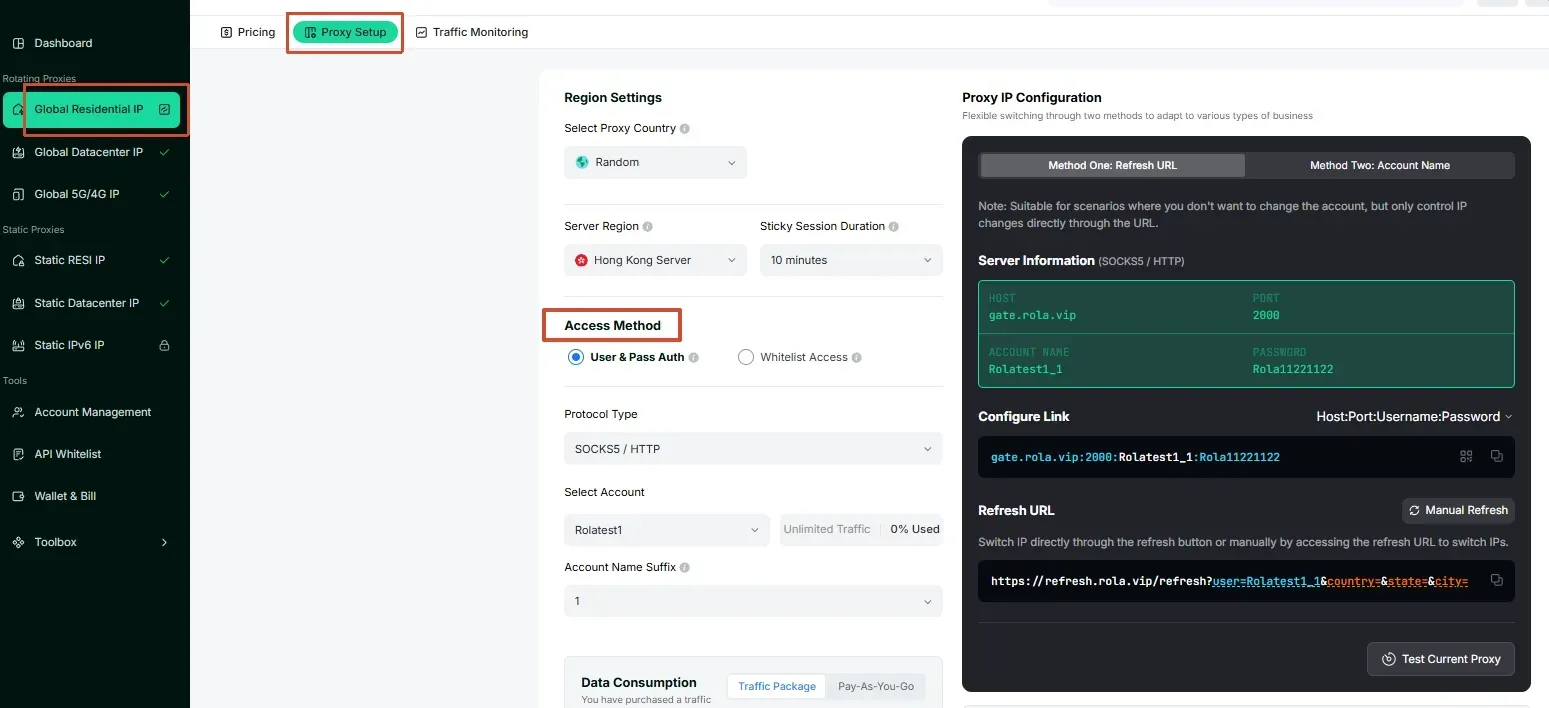
For an authorized public-data workflow with a confirmed IP-scoped restriction, the residential proxy setup explains request-based rotation and session configuration. Choose continuity settings for the task; changing an exit does not reset account-level or API-key quotas. The setup features were checked against that documentation on September 22, 2026.
Rola IP’s rotating residential proxies are one option to evaluate where residential exits are appropriate. The web scraping use case provides related context for authorized collection. These links are implementation starting points, not a guarantee that a proxy will fix a 429 response.
Prevent the error from returning
Once requests work again, fix the demand pattern that caused the incident.
- Put request generation behind a queue with an explicit concurrency ceiling.
- Deduplicate identical work and cache reusable GET responses where the provider permits it.
- Track provider quotas at the same scope used by the limit: account, key, endpoint, resource, or IP.
- Centralize retries so nested libraries and workers do not each retry the same failure.
- Record status, provider error code, retry delay, attempt count, endpoint, and a redacted request identifier.
- Set a maximum retry count or elapsed-time budget, then surface a controlled failure to the caller.
- Test burst and concurrency behavior before production traffic reaches the limit.
After the change, run the normal workload long enough to confirm that requests keep succeeding, retry volume remains bounded, and usage stays below the documented limit. A single successful request is not enough.
Conclusion: The right order for handling Axios 429 errors
Identify which scope is limited before changing the request pattern. Honor Retry-After, retry only repeatable operations within a finite budget, and defer work when the required wait exceeds that budget. Resolve account or API-key quotas through the provider; consider network routing only for authorized, confirmed IP-scoped cases. Verify recovery with valid response data and sustained workload monitoring.