Scrape Yahoo Finance with Python: Quotes & Historical Data

Sep 22, 2026 · Guides · 12 min read
TL;DR
Use Selenium to reproduce Yahoo Finance’s rendered Historical Data table; use yfinance for structured research data. Validate dates, fields, adjustments, and rate limits before exporting, and use proxies only for authorized network configuration.
Yahoo Finance spreads quotes, historical prices, corporate events, and charts across different areas of the page. A genuinely reliable yahoo finance scraper shouldn’t just “find a number” — it should first confirm field meaning, the trading date, currency, and adjustment rules, then convert the page content into structured records. This article uses Apple Inc. (AAPL) as the example, first locating the data on the English page, then giving two Python paths: Selenium reading the browser-rendered historical table, and yfinance fetching structured quote data. It also covers CSV export, data validation, and handling HTTP 429.
This article only discusses publicly visible market data and ordinary browser access. Before automating, confirm your data authorization, the applicable Yahoo terms, robots rules, and request frequency. Yahoo’s terms include restrictions on unauthorized automated access and data extraction, so a production project can’t assume bulk collection is permitted just because “the browser can open it.” The Yahoo Terms of Service can serve as your compliance-check entry point.
Understand the Page Data Before You Scrape Yahoo Finance
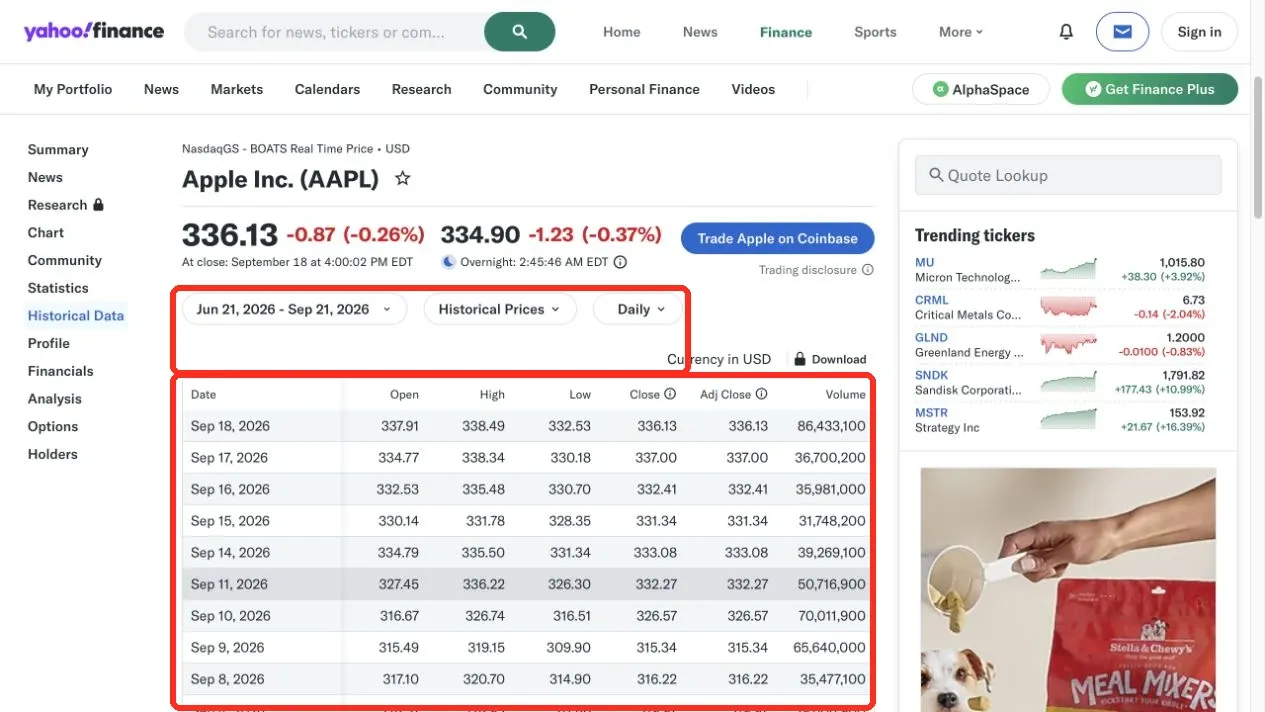
After opening https://finance.yahoo.com/quote/AAPL/, the top of the page can show both the regular trading-session price and the after-hours or overnight price at the same time. When scraping, record the corresponding label and timestamp — don’t call the largest number on the screen “the real-time price.” The supplied screenshots are dated captures, not live values; use the labels and capture time rather than copying the displayed prices as current data.
Core Fields to Confirm on the Quote Page
| Field | Page Meaning | What to Watch When Scraping |
|---|---|---|
| Price | The current or most recent regular-session quote | Save currency, exchange, and page timestamp together |
| Open High Low Close | The day’s opening, high, low, and closing prices | Verify Low isn’t higher than Open and Close, and High isn’t lower than them |
| Adj Close | The close adjusted for splits, dividends, or capital allocations | Usually more suitable than raw Close for long-term return backtesting |
| Volume | The day’s trading volume | Save as an integer — don’t automatically write a missing value as 0 |
| Dividends and Splits | Dividend and split events | The event row’s structure differs from an ordinary price row and should be saved separately |
After clicking Historical Data, the page shows Date, Open, High, Low, Close, Adj Close, and Volume. The supplied screenshot shows a 3-month, Daily-frequency range ending September 21, 2026, with September 18, 2026 as the first visible price record. The capture time and market session should be recorded with the screenshot because web data updates throughout the trading day.
Why You Can’t Mix Up Close and Adj Close
Close is that trading day’s closing price without accounting for subsequent dividend effects. Adj Close factors in splits, dividends, or other capital allocations, making it easier to compare total returns across time. For example, an ordinary price row on the page might show Close and Adj Close as the same value, while dates before a dividend may show a difference. For short-term page monitoring, you can save Close; for long-term backtesting or return calculations, you should clearly decide whether to use Adj Close, and save that choice in your output metadata.
Page Preparation for How to Scrape Yahoo Finance Historical Data
Step 1: Choose the Date Range
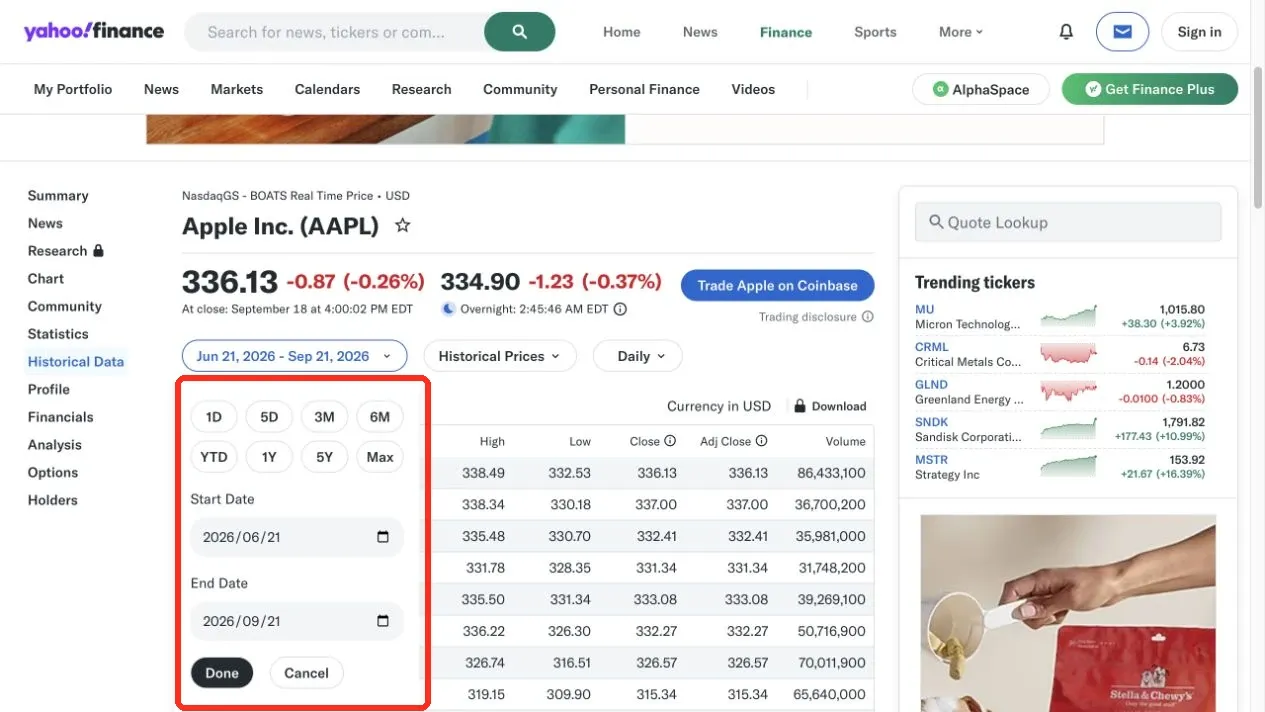
On the Historical Data page, click the date range. Choose 1M, 3M, 6M, YTD, 1Y, 5Y, or Max, or enter a start and end date, then click Done. Test with 1M or 3M first — it shortens loading time and makes manual verification easier.
Step 2: Choose the Sampling Frequency
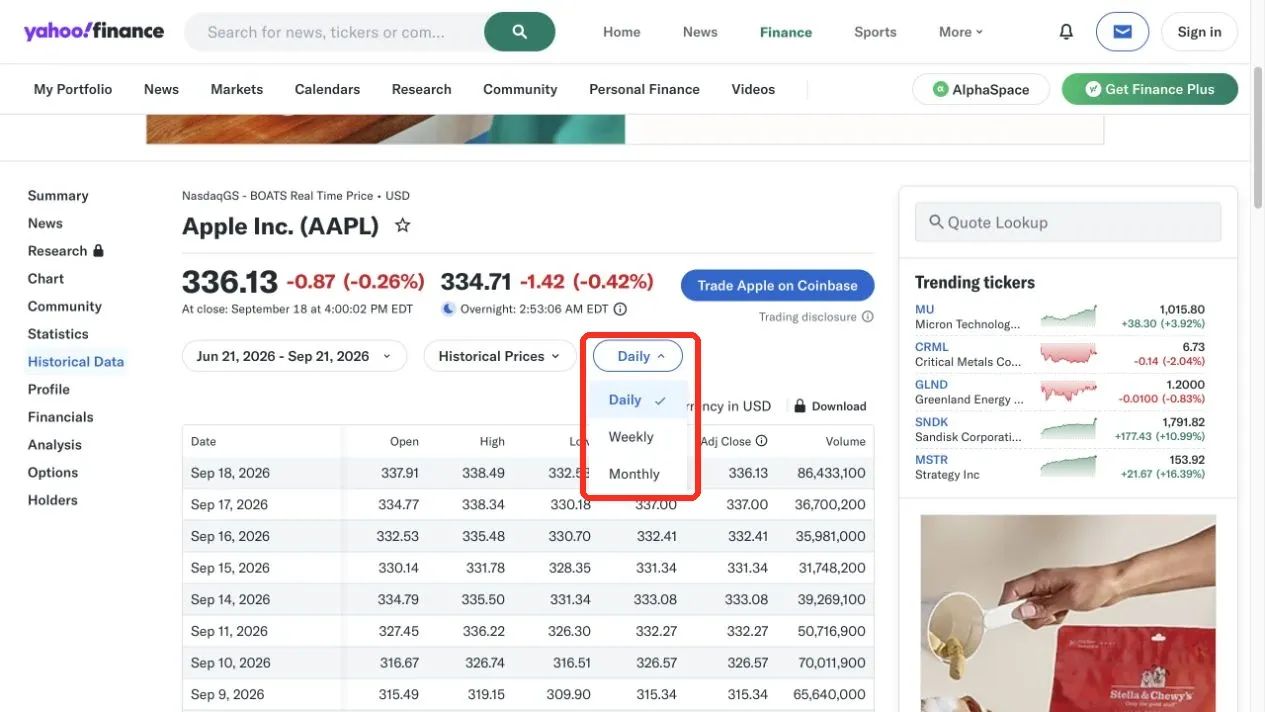
Click Daily to switch to Weekly or Monthly. Daily suits day-by-day analysis; Weekly and Monthly reduce the record count, but they aren’t simply picking a random row out of the daily data — you must preserve the page’s selected frequency as part of your data-source information.
Step 3: Decide on a Collection Method
The current Yahoo Finance page is dynamically rendered by JavaScript. A plain requests.get() may not get the historical table, and may also return HTTP 429. When this happens, don’t immediately start retrying in a loop. If a 429 response includes a Retry-After header, wait at least that long; if it does not, stop the task and apply an operator-defined cooldown. Prioritize lowering your frequency, stopping and waiting, then choose one of the following paths:
- When you need to reproduce exactly what’s shown on the page, use a real browser like Selenium and wait for the historical table to appear.
- When you need research-oriented structured data, use yfinance, and be clear that it’s an independent open-source library — not an official Yahoo SDK.
- When you’ve already manually saved a rendered page, you can parse that snapshot offline, avoiding further requests to the site.
How Do You Prepare a Scrape Yahoo Finance Python Environment?
It’s recommended to create an isolated virtual environment for the project. Use the activation command for your shell, then install the direct dependencies used by the examples.
python3 -m venv .venv
source .venv/bin/activate  # macOS/Linux
python -m pip install --upgrade pip
python -m pip install selenium pandas yfinance requests
On Windows PowerShell, use:
python -m venv .venv
.\.venv\Scripts\Activate.ps1
python -m pip install --upgrade pip
python -m pip install selenium pandas yfinance requests
Run the code below to check your environment. The version numbers help locate a “the same code gives a different result on another machine” problem.
import sys
import pandas as pd
import requests
import selenium
import yfinance as yf

print("Python:", sys.version.split()[0])
print("pandas:", pd.__version__)
print("requests:", requests.__version__)
print("selenium:", selenium.__version__)
print("yfinance:", yf.__version__)
For reproducibility, note the operating system, browser version, Python and dependency versions, ticker, date range, frequency, proxy type (if any), command, row count, and sanitized output alongside your data.
Save the Selenium example as scrape_yahoo.py and run it from the activated environment with python scrape_yahoo.py. A successful run produces a non-empty price table, a date-unique data frame, and an event_data frame whose columns are Date, Symbol, and Event.
Modern Selenium can find a compatible Chrome driver through Selenium Manager. The browser and ChromeDriver should still stay compatible; if an enterprise environment prohibits automatic driver downloads, an administrator should pre-install it and specify the path.
How Do You Use Selenium to Scrape Yahoo Finance Historical Prices?
The program below opens the AAPL Historical Data page, waits for a table containing both Date and Adj Close to appear, then parses prices and corporate events row by row. It doesn’t rely on easily-changed CSS class names — it locates the target table by header semantics. The code raises an explicit error when it finds a missing table, an abnormal column count, or an invalid numeric relationship, avoiding silently outputting incomplete data.
from datetime import datetime, timezone
import math
import pandas as pd
from selenium import webdriver
from selenium.webdriver.common.by import By
from selenium.common.exceptions import TimeoutException, WebDriverException
from selenium.webdriver.support.ui import WebDriverWait
from selenium.webdriver.support import expected_conditions as EC

URL = "https://finance.yahoo.com/quote/AAPL/history/"
SYMBOL = "AAPL"
# Set these to the values selected in the page UI. This script does not click the page controls.
DATE_RANGE = "REPLACE_WITH_CAPTURED_DATE_RANGE"
FREQUENCY = "REPLACE_WITH_CAPTURED_FREQUENCY"
CURRENCY = "REPLACE_WITH_CAPTURED_CURRENCY"
COLUMNS = ["Date", "Open", "High", "Low", "Close", "Adj Close", "Volume"]


def parse_number(text):
    value = text.strip().replace(",", "")
    if value in {"", "-", "--", "N/A"}:
        return None
    number = float(value)
    if not math.isfinite(number):
        raise ValueError(f"Invalid number: {text}")
    return number


options = webdriver.ChromeOptions()
options.add_argument("--lang=en-US")
# Keep the browser window visible while debugging; only add --headless=new once it's stable.

driver = None
try:
    driver = webdriver.Chrome(options=options)
    driver.set_page_load_timeout(30)
    driver.get(URL)
    wait = WebDriverWait(driver, 30)
    table = wait.until(EC.presence_of_element_located((
        By.XPATH,
        "//table[.//th[contains(normalize-space(.),'Date')] "
        "and .//th[contains(normalize-space(.),'Adj Close')]]"
    )))

    prices, events = [], []
    for row in table.find_elements(By.CSS_SELECTOR, "tbody tr"):
        cells = [c.text.strip() for c in row.find_elements(By.CSS_SELECTOR, "td")]
        if not cells:
            continue
        date = datetime.strptime(cells[0], "%b %d, %Y").date().isoformat()
        if len(cells) == 2:
            events.append({"Date": date, "Symbol": SYMBOL, "Event": cells[1]})
            continue
        if len(cells) != 7:
            raise ValueError(f"Unexpected row with {len(cells)} cells")
        values = [parse_number(value) for value in cells[1:]]
        op, high, low, close, adj_close, volume = values
        if all(v is not None for v in (op, high, low, close)):
            if not low <= min(op, close) <= max(op, close) <= high:
                raise ValueError(f"OHLC check failed on {date}")
        prices.append(dict(zip(COLUMNS, [date] + values)))

    data = pd.DataFrame(prices, columns=COLUMNS)
    if data.empty or data["Date"].duplicated().any():
        raise ValueError("Empty data or duplicate dates")
    data["Volume"] = data["Volume"].astype("Int64")
    data = data.sort_values("Date").reset_index(drop=True)
    event_data = pd.DataFrame(events, columns=["Date", "Symbol", "Event"])
    metadata = {
        "symbol": SYMBOL,
        "source": URL,
        "currency": CURRENCY,
        "date_range": DATE_RANGE,
        "frequency": FREQUENCY,
        "retrieved_at": datetime.now(timezone.utc).isoformat(),
    }
except (TimeoutException, WebDriverException) as exc:
    raise RuntimeError(
        "Yahoo Finance did not load a usable Historical Data table; "
        "check consent prompts, access policy, and the page structure."
    ) from exc
finally:
    if driver is not None:
        driver.quit()

print(data.tail())
print(event_data)
print(metadata)
The Selenium example reads the table that is currently rendered at the URL; it does not change the Historical Data date range or frequency controls. Select those controls manually before running it, or extend the script with verified locators for the controls, then set the three metadata values to the selections shown on the page.
How Do You Extract Each Field?
The program first reads each td within every tr. An ordinary price row should have 7 cells, mapping one-to-one to Date, Open, High, Low, Close, Adj Close, and Volume. A dividend or split row usually only has a date and an event description, so it is put into event_data with the ticker symbol rather than being forced into the price table. parse_number() strips commas and converts a missing marker into None — it never fakes a missing price as 0.
After parsing, the code checks for duplicate dates, an empty result, and the basic OHLC relationships. This kind of validation can’t prove the data is absolutely correct, but it can promptly catch a page-structure change, a half-loaded table, or a parsing error.
How Do You Use yfinance to Scrape Yahoo Finance Python Data?
yfinance suits research and personal analysis, and its call pattern is simpler than browser automation. The official yfinance documentation explicitly states the project has no affiliation with Yahoo, isn’t endorsed or vetted by Yahoo, and notes that the Yahoo Finance API is for personal use only. Confirm your own authorization and intended use before using it.
from datetime import datetime, timezone
import yfinance as yf

ticker = yf.Ticker("AAPL")
try:
    history = ticker.history(
        period="3mo",
        interval="1d",
        auto_adjust=False,
        actions=True,
        timeout=20,
        raise_errors=True,
    )
except Exception as exc:
    if "429" in str(exc) or "rate limit" in str(exc).lower():
        raise RuntimeError(
            "Yahoo Finance rate-limited this request; stop and apply the documented cooldown."
        ) from exc
    raise

if history.empty:
    raise RuntimeError("Yahoo Finance returned no historical rows")
required = {"Open", "High", "Low", "Close", "Adj Close", "Volume"}
missing = required.difference(history.columns)
if missing:
    raise RuntimeError(f"Missing columns: {sorted(missing)}")

print(history.tail())
metadata = {
    "symbol": "AAPL",
    "source": "yfinance",
    "date_range": "3mo",
    "frequency": "1d",
    "adjustment": "auto_adjust=False",
    "retrieved_at": datetime.now(timezone.utc).isoformat(),
}
print(metadata)
auto_adjust=False is set explicitly here, so the output keeps both Close and Adj Close; if auto-adjustment is enabled, the field structure and price meaning change. In a date-based interface, the end date is usually an exclusive boundary, so when scraping by a specific date, check the last trading date returned — don’t just trust the parameter text.
The yfinance example does not infer currency from the ticker symbol. Retrieve the currency from the returned ticker metadata or the source page before using the data for comparisons or exports.
How Do You Handle a 429 From yfinance?
HTTP 429 means the request frequency or the current exit is being restricted — it doesn’t mean “Python installation failed.” Stop retrying and record the status code and time. If the raw response exposes Retry-After, wait at least that long; otherwise apply an operator-defined cooldown. yfinance may not expose the underlying response headers consistently, so do not claim an exact server-provided wait time unless it was captured by the HTTP client. Then check whether another program shares the same exit, reduce the number of tickers and the date range, add caching and a reasonable interval, and confirm the access terms. Do not use an infinite loop, CAPTCHA bypassing, or high-frequency identity switching to hide an error.
How Do You Export Yahoo Finance Data as an Excel-Ready File?
CSV is the easiest delivery format to audit, and Excel can open it directly. Using utf-8-sig reduces encoding issues when opening a UTF-8 file in a non-English environment.
import json
from pathlib import Path

output = Path("output")
output.mkdir(exist_ok=True)
data.to_csv(output / "AAPL-history.csv", index=False, encoding="utf-8-sig")
event_data.to_csv(output / "AAPL-events.csv", index=False, encoding="utf-8-sig")

if "metadata" not in globals():
    raise RuntimeError("Run one collection path first so metadata is available")
with (output / "AAPL-metadata.json").open("w", encoding="utf-8") as handle:
    json.dump(metadata, handle, ensure_ascii=False, indent=2)

check = pd.read_csv(output / "AAPL-history.csv")
if len(check) != len(data):
    raise RuntimeError("Export verification failed")
print(check.tail())
In Excel, choose Data, then From Text/CSV, select AAPL-history.csv, confirm the encoding is UTF-8 and the delimiter is a comma, then click Load. After importing, spot-check the first row, the last row, whether Volume is an integer, whether Date was incorrectly converted, and whether Close and Adj Close are still two separate columns.
Using Rola IP to Improve Controlled Data-Collection Networking
A proxy solves problems around network exit, region, and connection stability — it can’t substitute for data authorization, and it can’t guarantee the target site will always return a success. For teams that need a fixed exit, repeatable verification, and long-running tasks, static residential proxies provide a fixed, long-term session with HTTP and SOCKS5 support; for a compliant project collecting public data by region, residential proxies support country- and city-level targeting. The official English Python proxy integration and proxy parameters documentation can be used to check the proxy format and parameter names.
In Requests, encode the username and password safely and construct the proxy URL, reading credentials from environment variables. Don’t write real credentials into an article, a screenshot, or a Git repository. Save this snippet as verify_proxy.py and run python verify_proxy.py only with an authorized proxy; success means the endpoint returns a response that matches the expected protocol and region, not merely HTTP 200.
import os
from urllib.parse import quote
import requests

host = os.environ["ROLA_PROXY_HOST"]
port = os.environ["ROLA_PROXY_PORT"]
user = quote(os.environ["ROLA_PROXY_USER"], safe="")
password = quote(os.environ["ROLA_PROXY_PASSWORD"], safe="")
proxy = f"http://{user}:{password}@{host}:{port}"

session = requests.Session()
session.trust_env = False
session.proxies.update({"http": proxy, "https": proxy})
response = session.get("https://ipinfo.io/json", timeout=20)
if response.status_code == 429:
    retry_after = response.headers.get("Retry-After", "not provided")
    raise RuntimeError(
        f"Proxy check was rate-limited (429); stop and honor Retry-After: {retry_after}"
    )
if response.status_code in {401, 403, 407}:
    raise RuntimeError(
        f"Proxy check failed with HTTP {response.status_code}; verify authorization and configuration"
    )
response.raise_for_status()
print(response.json().get("country"))
First use an IP-check endpoint to confirm the proxy protocol, authentication method, and target region, then run the collection program. The example above demonstrates an HTTP proxy; a SOCKS5 configuration requires the appropriate client support and an authorized endpoint. If Yahoo returns a 401, 403, or 429, preserve the response, honor Retry-After when present, stop the task, and investigate the cause — don’t treat switching IPs as an unlimited retry mechanism. Financial data demands high reproducibility, and a fixed exit is usually easier to audit than a randomly changing one on every request.
Common Yahoo Finance Scraping Errors and Troubleshooting
The Page Opens, but the Code Can’t Find the Historical Table
The page may not have finished JavaScript rendering, or the locator may have stopped working. First run it in a visible browser and confirm the Historical Data table appears; then check whether the XPath can still find a header containing Date and Adj Close. Don’t enable headless mode from the start.
Only a Few Dozen Records Are Scraped
The Yahoo page may only render the current date range, or may need scrolling to load more records. First narrow the range and check the row count, then decide whether to scroll; after each scroll, wait for the row count to stabilize, and deduplicate by date. Don’t equate “the current row count” with “the complete historical dataset” when you don’t know the page’s actual limit.
The Download Button Doesn’t Directly Download a CSV
The feature entry point and permissions may vary by region, account, or product plan. The supplied screenshot shows a lock indicator beside Download, so this article doesn’t describe it as a fixed method every user can use for free. In that case, use the page table, an authorized API, or a yfinance workflow that fits your permitted use.
The Numbers Don’t Fully Match the Top of the Page
The top-of-page quote and Historical Data may use different update times or trading sessions. First compare the date, regular-vs-after-hours labels, currency, adjustment setting, and data-refresh time, rather than immediately concluding one side is wrong.
Conclusion
The key to scraping Yahoo Finance isn’t writing one line of a selector — it’s fully preserving the page fields, trading sessions, adjustment rules, and data source. First confirm Price, Close, Adj Close, Volume, and event rows on the English Yahoo Finance page, then choose Selenium or yfinance; have the code fail explicitly when it finds an empty result, a structural change, or a 429. Finally, export prices, corporate events, and collection metadata separately, and re-verify through page sampling and rule-based validation. When you need a fixed exit or regional verification, you can use Rola IP as compliant network infrastructure — but you must still follow data authorization and the target site’s rules.