Sticky vs Rotating Proxies for Reliable Web Automation

Sep 21, 2026 · Comparisons · 15 min read
TL;DR
Choose sticky proxies for logins, stateful pagination, and multistep workflows that need a consistent exit IP. Choose rotating proxies for independent page requests or separate jobs that benefit from IP diversity. For mixed workloads, stay sticky within each job and rotate between jobs. Manage cookies separately: a stable IP does not preserve a login by itself, and changing IPs does not reset browser state. Sticky sessions can expire or lose their assigned exit, while rotation does not guarantee unique IPs or prevent blocks. Verify session behavior, location, and usable results before scaling.
That distinction matters when a script logs in successfully but fails on the next page, or when a price monitor needs regional coverage without mixing results from different locations. The question is how long a particular task needs the same network identity.
This guide is for developers running web scraping, browser automation, SEO monitoring, and regional testing. It explains the tradeoffs, shows a reproducible session experiment, and gives you a practical way to select and verify a rotation policy before production.
Sticky vs Rotating Proxies at a Glance
| Decision point | Sticky session | Rotating session |
|---|---|---|
| Exit IP behavior | Reuses an assigned IP within session limits | Selects IPs at a configured rotation boundary |
| Best starting use case | Login, pagination with state, multistep testing | Independent public pages or separate regional jobs |
| Cookie management | Client must retain cookies | Client must still manage cookies explicitly |
| Primary failure risk | Expiration, peer loss, or excessive traffic on one exit | Changing identity before a workflow finishes |
| Scaling approach | Separate sticky sessions for independent workers | Rotation across independent requests or jobs |
| Guarantees | No automatic promise of permanent or exclusive IPs | No promise of unique IPs or block prevention |
What Is a Sticky Proxy Session?
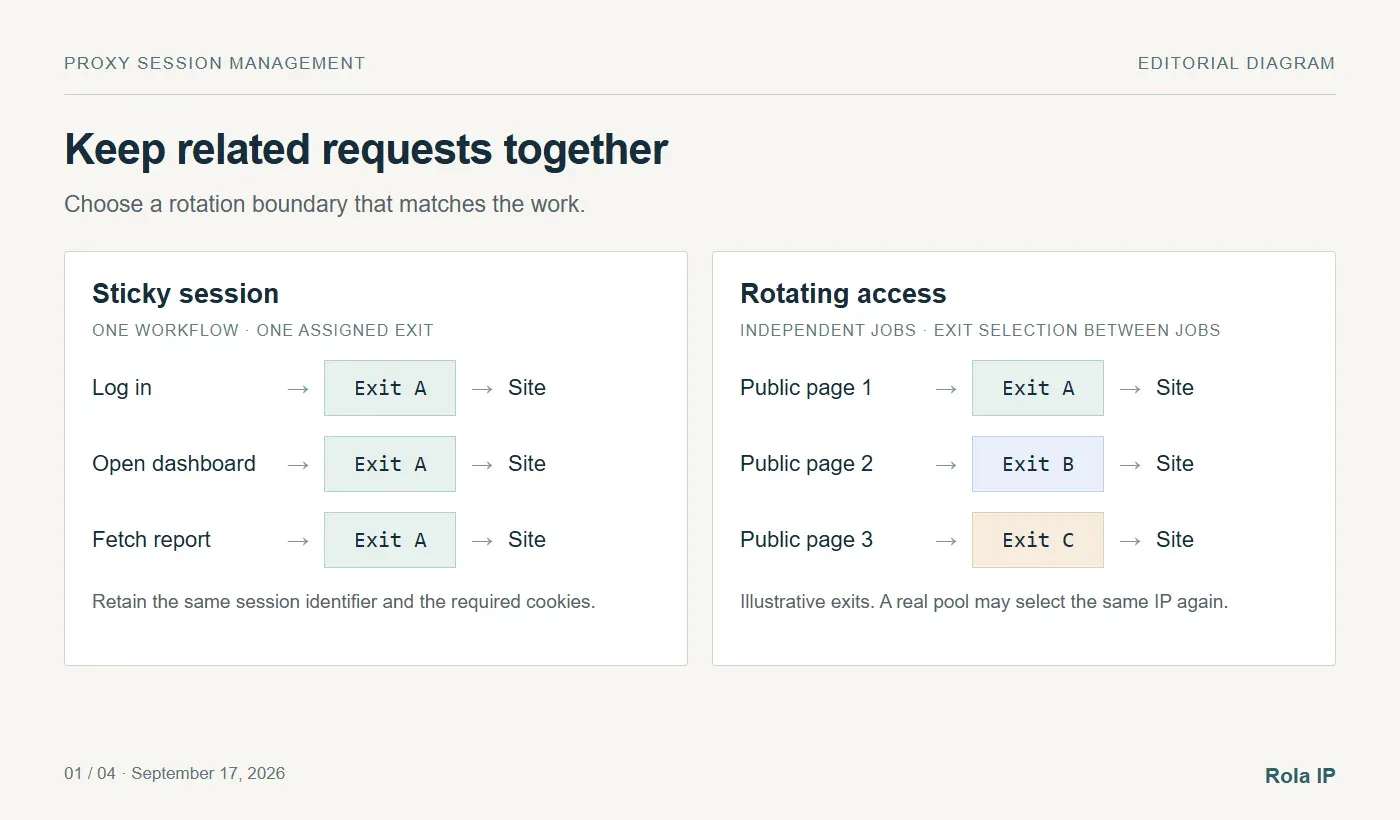
A sticky proxy session asks a provider to keep routing your traffic through the same exit IP for a period of time. The application connects to a proxy gateway, and the gateway associates a session identifier or endpoint with an exit from its pool.
For example, an authorized reporting workflow might open a login page, authenticate, navigate to an account dashboard, and download a report. Reusing the session identifier helps keep its network identity consistent across those steps.
Sticky sessions are temporary assignments
The assignment depends on the provider’s session lifetime, any idle timeout, and the exit remaining available. A residential device can disconnect before the requested duration ends. Providers may return an error or assign another exit, depending on their service behavior.
Apify’s residential proxy documentation, for example, describes session assignments that can change after expiration or an unresponsive peer. That is an implementation example, not a universal timeout for other providers. Check the rules for the specific network you purchase. Source: Apify residential session persistence.
Sticky is different from static or dedicated
These terms describe different properties. Sticky describes temporary routing persistence. Static describes an address intended to remain fixed over a longer service period. Dedicated describes allocation to a particular customer rather than sharing.
If a workflow needs the same address across days or requires a stable allowlist entry, evaluate a static product instead of repeatedly extending a sticky session. Rola’s ISP proxies are relevant to that requirement. Confirm the allocation and replacement terms for your plan before depending on long-term identity.
What Is a Rotating Proxy Session?
A rotating proxy selects an exit IP from a pool at a defined boundary. That boundary might be a new request, a new connection, a time interval, or the start of a new session. The gateway address can stay the same while the IP visible to the destination changes.
What a proxy rotator actually controls
A provider-managed rotator handles exit selection behind one gateway. An application-managed rotator chooses among proxy endpoints itself. In either case, your application still decides which requests belong together and when a change is acceptable.
Do not assume that every browser resource receives a new IP. Connection reuse, HTTPS tunnels, and browser-level proxy configuration can affect when a new exit is selected. Apify explicitly distinguishes browser-based rotation from individual HTTP request rotation in its documentation. Verify your own provider and client’s behavior. Source: Apify IP address rotation.
Rotation does not guarantee a different IP every time
An exit can appear again, especially when the eligible pool is small or targeting is narrow. Different session identifiers also do not necessarily guarantee different physical exits.
Rotation can distribute requests across a pool, but it cannot guarantee access, anonymity, or fewer CAPTCHAs. A website can associate activity through authentication, cookies, browser characteristics, and request patterns. Keep overall request volume controlled even when it is spread across multiple IPs.
Choose a Session Policy Around the Workflow
The most useful rotating vs sticky proxies comparison starts with a single question: Would changing identity midway through this task make its result unreliable?
Independent public product pages
Start with rotation when each product URL can be fetched independently and does not rely on a prior cart, login, or browsing session. Keep geography and language consistent if you are comparing prices within one market.
A page that returns a location-dependent price is not interchangeable with a page fetched through an arbitrary country. Validate the currency and market in the response, not just the HTTP status.
Authenticated reports and browser workflows
Use a sticky session for authorized account access and multistep tests. Keep one browser context or cookie jar with that logical workflow, and avoid rotating during authentication or report generation.
For multiple independent jobs, assign separate contexts and session identifiers. Do not share a mutable cookie jar across accounts or let unrelated workers overwrite one another’s session settings.
Pagination and search results
Pagination can be either stateful or independent. If each page is a complete URL with stable filters, rotation may work. If the server uses cookies, temporary tokens, a search-session identifier, or location-sensitive ordering, hold a sticky session through that result set.
Record item identifiers and deduplicate results. Even a stable IP cannot prevent the underlying inventory or rankings from changing during collection.
SEO monitoring and ad verification
Keep the requested market stable throughout one observation. A sticky session is useful for following a landing-page journey or comparing several steps from the same location. Rotate between independent observations when broader coverage is the goal.
For a mixed workload, combine the modes: rotate between jobs and stay sticky within each job. This provides multiple workers without forcing every worker onto one shared exit.
Why an IP Session Does Not Preserve a Login by Itself
A proxy session and a website session exist at different layers. The proxy manages routing. The website typically recognizes a signed-in client through cookies or tokens. Your HTTP client or browser must preserve that application state.
Changing proxies does not automatically delete cookies. Keeping a proxy unchanged does not automatically store them. MDN’s cookie documentation explains how a server sets a cookie and how the client sends it with later requests. Source: Using HTTP cookies.
A website may accept the same cookie after an IP change, require another check, or reject it. The behavior is site-specific. A well-designed automation workflow preserves the required state and handles the destination’s actual responses rather than assuming either universal acceptance or universal failure.
Run a Local Session Experiment in Python
This experiment isolates two common problems: changing the exit identity during an IP-bound session, and losing the cookie while keeping the exit identity stable.
Set up the test
Download [session_lab.py] from the accompanying article files. It requires Python 3.12 or later and no third-party packages. Open a terminal in the directory containing the script and run:
python session_lab.py
The script was tested with Python 3.12.14 on Windows. The package includes the [raw results] and [reproduction instructions]. If your installation uses a different Python launcher, invoke the same file with that launcher.
The script starts a temporary HTTP server on 127.0.0.1, chooses an available port, performs three login-to-account flows, and shuts down. It writes lab-results.json beside the script. No proxy credentials, external websites, or paid traffic are needed.
The server deliberately binds a demo login cookie to X-Lab-Exit. This header contains labels such as exit-A; it does not change your IP and has no proxy functionality. The artificial rule makes the failure conditions repeatable.
Compare the three outcomes
- Same exit label, retained cookie: HTTP 200. The account request satisfies both rules.
- Changed exit label, retained cookie: HTTP 403. This demo application rejects the identity change.
- Same exit label, missing cookie: HTTP 401. Routing consistency cannot replace authentication state.
These are observed results from the local test, not predictions of every website’s status codes. The final line reports PASS: 3/3 cases when all three expected outcomes occur. The two error responses are intentional test cases.
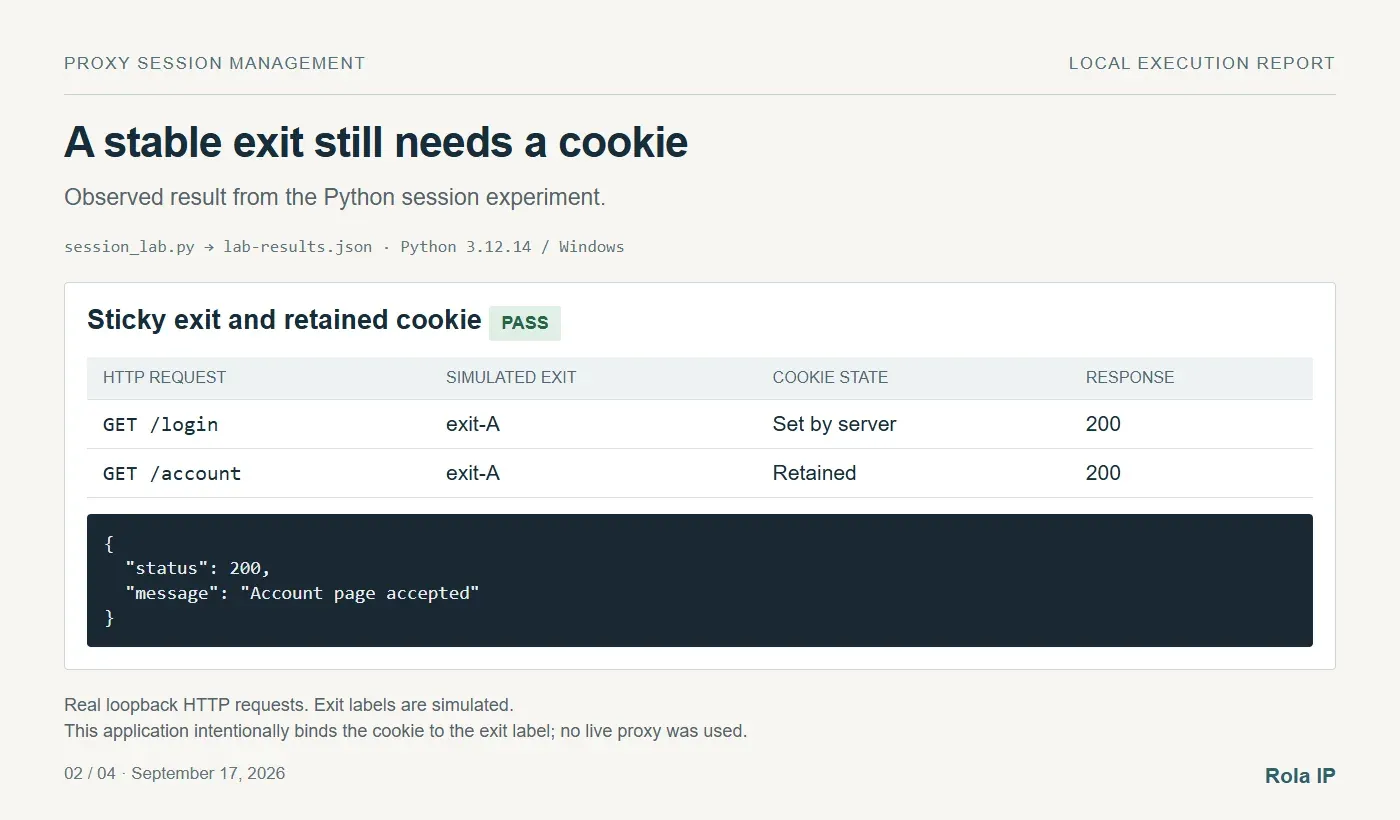
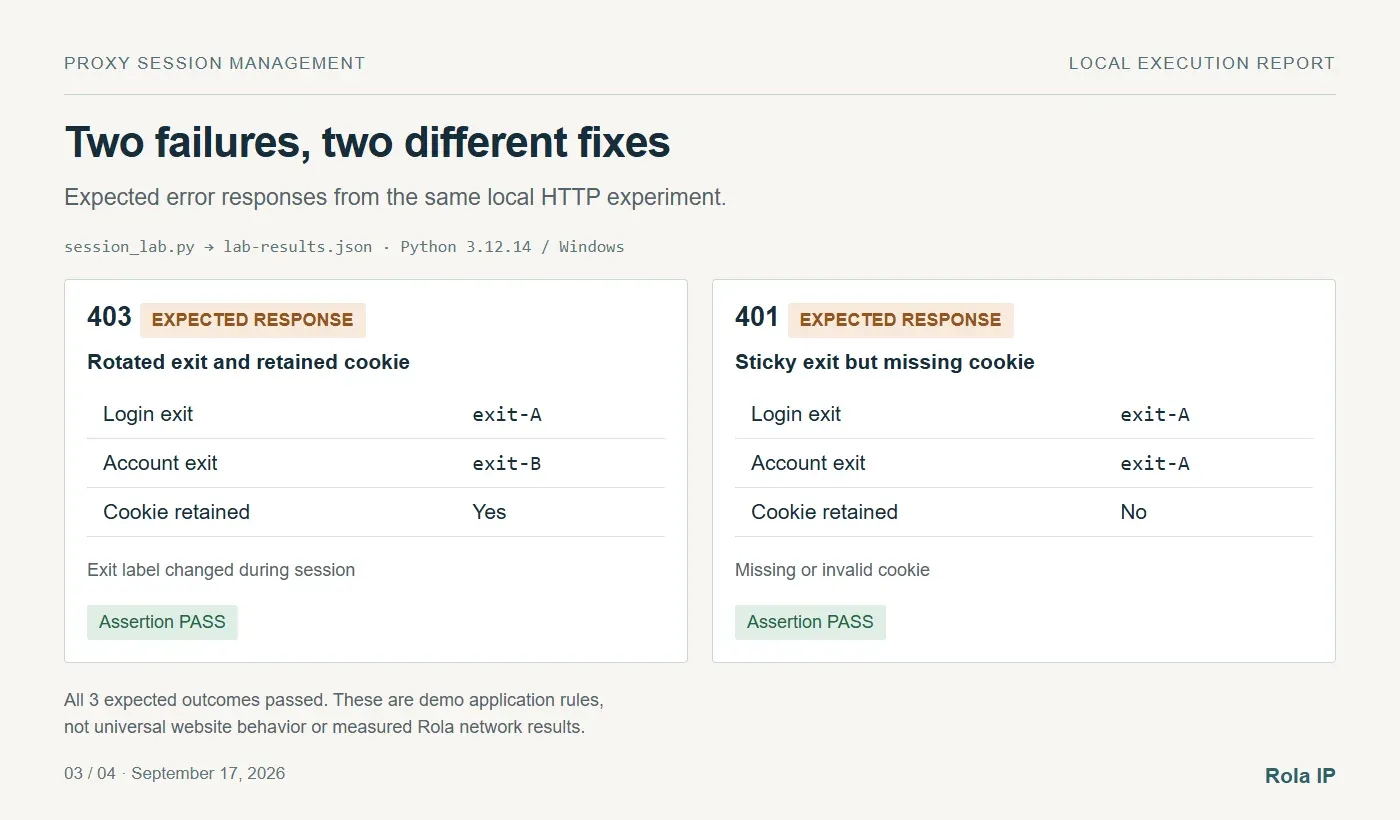
The operational lesson is to track the proxy session and application session together. If the first case fails in your reproduction, check that you downloaded the complete script and are running a supported Python version. The test prints an assertion failure if an observed response differs from the expected one.
Configure and Verify the Policy With Rola IP
Once the workflow boundary is clear, select the network and session mode. Rola IP provides proxy products for different persistence requirements. Its rotating residential network supports the session and rotation controls documented below. This example uses that network’s username/password access, not static ISP allocation or whitelist extraction.

Use the configuration generated for your purchased product. Do not transfer session suffixes, ports, or timeout values from another provider’s examples.
Step 1 — Generate the connection settings
Open the console’s Rotating Residential settings page at console.rola-ip.co/dynamic/residential/setting. Select your proxy account and copy the generated host, port, base account name, and password. These are proxy credentials, not necessarily your website login credentials.
The official proxy parameters page and Residential guide agree on the following format, checked September 18, 2026. Replace YOUR_ACCOUNT with the base account name; job001 and job002 are example session identifiers:
YOUR_ACCOUNT_job001-country-us-sessiontime-10
YOUR_ACCOUNT_job002-country-us-sessiontime-10
YOUR_ACCOUNT-country-us-f-1
The first username keeps one job on its session assignment; the second requests another independent session for the next job. The third requests per-request rotation for stateless work. Do not use -f-1 in the middle of a workflow that needs stable identity.
| Setting | Documented behavior | What to enter |
|---|---|---|
| Gateway and port | Official Python examples show gate.rola.vip:1000 for HTTP and :2000 for SOCKS5 | Use the host and protocol-specific port generated for your account |
| Authentication | Username/password access; whitelist access is a separate setup | Proxy base account and password from Residential settings |
| Country | -country-us selects a US exit | Use the supported country code for the job |
| State and city | -state-ny-city-newyork; supported on Rotating Residential | Add only if required and available for the target market |
| Sticky identifier | Suffix after the underscore; maximum 32 characters | Reuse one identifier within a job; generate another between independent jobs |
| Requested duration | -sessiontime-10 means 10 minutes; documented range 1–120 minutes | Select a duration suitable for the job; anticipate early exit loss |
| Per-request rotation | -f-1 is the documented stateless rotation control | Use instead of the fixed-session policy for independent requests |
The Python integration page also contains a different -sid- example. This tutorial follows the dedicated Parameters and Residential pages, which both specify the underscore form. Check that the generated console configuration agrees before live use. The source record links all three pages and preserves their downloaded versions.
The reviewed pages do not establish a precise idle timeout, authoritative timer start, or guaranteed failover behavior. Confirm those with Rola for your product before relying on a particular recovery deadline. A documented duration is not proof that an exit will remain online that long.
Step 2 — Check connectivity and observed identity
Use the proxy checker as a preliminary connectivity check, then verify the proxy through the client that will actually run the job. An IP-check page in an unconfigured browser reports that browser’s route, not necessarily your script’s route.
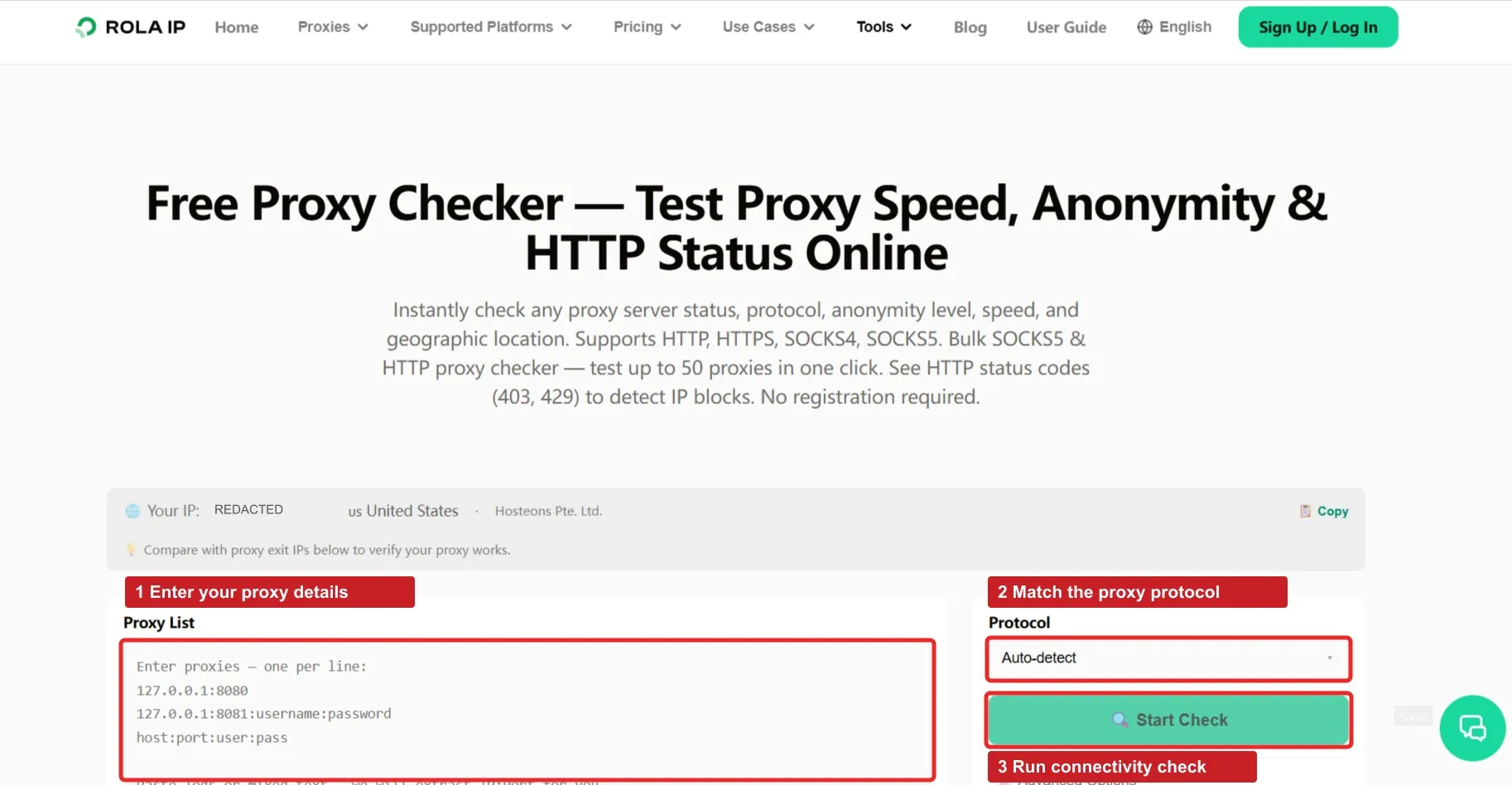
Send several requests to a trusted IP-echo endpoint through the configured proxy. Record the observed exit IP, country, response time, and whether each request succeeds. Avoid logging passwords, complete proxy URLs, or session cookies.
For sticky mode, check whether the exit remains stable across the time gaps your workflow actually uses. For rotation, make fresh connections where the provider’s policy requires them and inspect a sample of observed addresses. One repeated address does not by itself prove that rotation is broken.
Step 3 — Test a representative workflow
Run one small, authorized job before increasing concurrency, following the target’s access and rate policies. Verify the returned content, preserved login state, expected market, and successful completion of every required step.
A fast response from an IP-echo service does not predict the speed of a JavaScript-heavy target. Likewise, a successful connection does not guarantee that the destination accepts the exit. This live preflight remains necessary: the local experiment above validates session logic, not Rola’s network performance.
How Do You Keep One Proxy Session Across a Multistep Job?
Download [rola_session_client.py]. This standard-library example creates two independent jobs. Each job checks its exit, sets a harmless test cookie through HTTPBin, reads the cookie back, and checks the exit again. It uses HTTP proxy authentication; HTTPS destinations use the client’s normal CONNECT handling with certificate verification enabled.
The complete file is runnable with Python 3.12 or later and needs no package installation. It is a cookie-continuity demonstration, not a universal website login implementation. For an authorized account workflow, perform the site’s supported authentication through the same client before its dependent steps.
Supply your own account details
Set these values in the same Windows PowerShell session used to run the file. Replace every angle-bracket placeholder. The gateway and HTTP port must match the current Residential settings; do not assume the public documentation’s example values apply to every account.
$env:ROLA_ACCOUNT = '<YOUR_BASE_PROXY_ACCOUNT>'
$env:ROLA_HOST = '<YOUR_DASHBOARD_HOST>'
$env:ROLA_PORT = '<YOUR_DASHBOARD_HTTP_PORT>'
$env:ROLA_COUNTRY = 'us'
$env:ROLA_SESSION_MINUTES = '10'
$env:ROLA_PASSWORD = Read-Host 'Proxy password' -MaskInput
python rola_session_client.py
The masked prompt requires PowerShell 7. The code reads credentials from environment variables and never prints the proxy URL. It writes a diagnostic live-validation.json in the working directory. This command has not been run with a live Rola account; the locally tested client behavior is described below.
Keep the proxy identifier and cookie jar with the job
The following excerpt from the downloadable module shows the lifecycle. client_for constructs the documented underscore username, percent-encodes credentials, and attaches the job’s own CookieJar to an HTTP opener:
for index in range(1, 3):
    job = Job(f"job-{index:02}", uuid4().hex, country, minutes)
    client = client_for(job, account, password, host, port)
    print(job.job_id, run_job(client, job, echo, start, follow, trace))
The same client handles every request and redirect in that job. The next iteration creates another session ID and a fresh cookie jar. It does not carry a previous account’s state into an unrelated job. Fresh HTTP connections are requested deliberately, so persistence depends on the provider’s session mapping rather than accidental socket reuse.
The default exit check uses Rola’s documented http://ip123.in/ip.json diagnostic endpoint and expects ip plus country_code. It checks the country against the requested market and keeps IP comparisons in memory; saved records contain hashed exit labels. The test-cookie requests use HTTPS and must return cookies.session equal to rola-demo. Replace the target steps with your own content and market checks before treating this as a business workflow.
Interpret success and failure without hiding the evidence
Successful live execution would print job-01 complete and job-02 complete. That output means the demo cookie checks and before/after exit checks passed for those sampled requests. It cannot prove that every intermediate destination saw the same exit, that two jobs received globally unique IPs, or that a longer session would remain available.
A 401, 403, or 407 stops the job for inspection. A 429 stops without rotating and records any Retry-After value. Transient transport failures and 502/503/504 responses receive at most one retry because these steps are GET-only. Exit changes, missing cookies, wrong markets, and the local deadline stop the workflow. A real write operation needs its own completion or idempotency check before any retry.
The client passed eight local fixture cases: successful continuity, exit change, wrong market, cookie loss, 429, 407, bounded 503 retries, and job isolation/rotation syntax. The fixture used real HTTP requests through a loopback proxy with simulated upstream responses. It did not test Rola credentials, external services, or HTTPS CONNECT. Download the [fixture results] and [fixture runner] to reproduce those checks.
Manage Expiration, Retries, and Concurrency
Create a session record for each independent workflow containing its proxy session identifier, start time, cookie jar or browser context, target market, and task checkpoint.
At the start of a new job, check whether the remaining configured lifetime comfortably exceeds the expected job duration. If it does not, create a new session before beginning. For example, a hypothetical ten-minute session with only two minutes remaining is a poor fit for a four-minute export. The example illustrates scheduling logic; it is not a Rola timeout specification.
Treat a local deadline as a conservative scheduling estimate unless the provider exposes authoritative expiry information. The example starts its clock when the job object is created and subtracts a safety margin; that is an application policy, not a verified provider TTL. Maximum duration, an idle timeout, and an exit disappearing early are three separate events. Keep the job’s session_id, cookies, country, created, and checkpoint together so recovery can distinguish them.
Before adding another step, check the local budget and the last observed state. Retire an expired job before new work. On exit loss or an unexpected identity change, stop, establish a replacement session, and restore authentication as required. Resume only at a checkpoint where repeating the operation is safe.
Record routing checks and application checks separately
The following record format is a blank live-validation template, not claimed Rola results. Fill it from the client log and your application checks. Keep the job and session labels pseudonymous when sharing the record. The package also includes a [CSV template] with one row per request.
| Record field | Before the workflow | After the workflow |
|---|---|---|
| Job / session label | Record logical job and session label | Confirm the same pair within the job |
| Request time | Record UTC timestamp | Record UTC timestamp and elapsed duration |
| Connection reused | No in this example | No in this example |
| Observed exit | Record hashed exit label | Compare with the initial label |
| Market | Compare observed country with requested country | Recheck country and application market |
| Status code | Record actual response code | Record actual response code |
| Content check | Validate diagnostic schema | Validate cookies and required business content |
| Recovery action | Stop if setup fails | Complete, stop, or recover from a safe checkpoint |
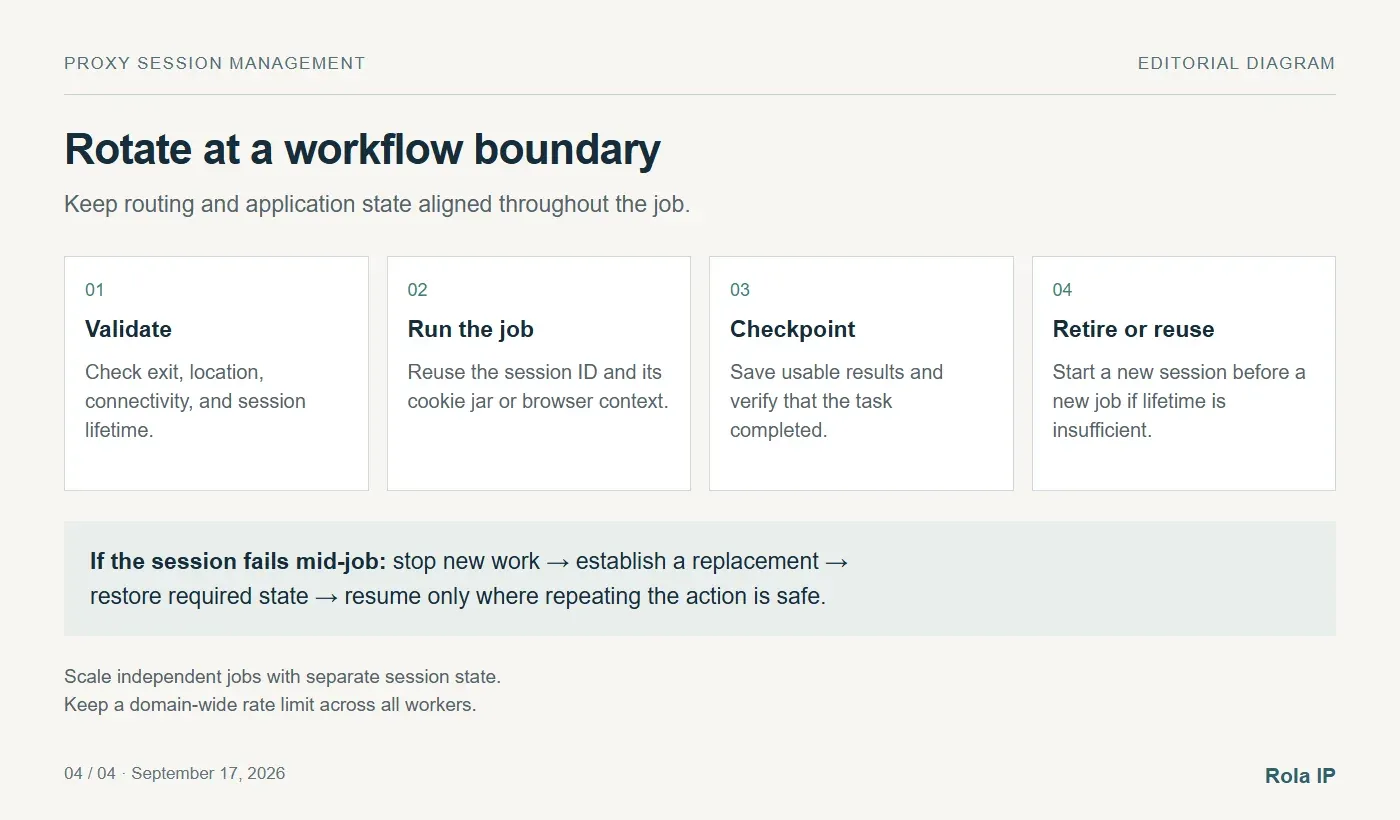
On expiration or unexpected exit changes, stop sending new work through that session. Create a replacement, restore application state through the supported login flow if needed, and resume only where repeating an operation is safe.
Read-only page fetches are usually easier to retry than actions that create records or submit transactions. After an ambiguous submission failure, check whether the action already completed before repeating it.
Apply limits both per session and across the target domain. Increasing the number of sessions should not silently multiply your intended traffic rate. Use bounded retries with backoff for transient failures, and honor a server’s Retry-After guidance when present. Session rotation is not a substitute for pacing.
Troubleshoot the Failure You Actually Observe
The sticky exit changes unexpectedly
Compare the generated configuration and session identifier across requests. Check session age, idle periods, targeting changes, and provider errors. If the application changed its identifier per request, fix that mapping. If the peer disappeared, use the recovery path instead of assuming the original exit can be recovered.
Rotating mode keeps showing one address
Check for a sticky parameter or endpoint, an unexpired interval, and connection reuse. Retest with a new connection if required by the provider’s rotation boundary. Expand the sample before diagnosing a fault, and remember that a small eligible pool can reuse exits.
Login succeeds but later requests fail
Inspect whether the client retained cookies and any required tokens, whether its context changed, and whether the response is an authentication page or challenge. Compare the observed exit before and after the failure. An IP change is one possible cause, not a diagnosis by itself.
The proxy returns 407 or the destination returns 429
A 407 usually points to proxy authentication: check credentials, formatting, and the applicable access rules. A 429 indicates rate limiting somewhere in the request path. Identify the responder, reduce traffic, and respect retry instructions instead of immediately rotating and repeating at full speed. See MDN’s 407 authentication reference and 429 rate-limit reference.
The response is 200 but the data is wrong
Check the page title, required fields, currency, and account or market context. A login page, consent screen, or challenge can still arrive with a successful HTTP status. Count usable results rather than treating every 200 response as a completed job.
Compare Performance by Completed Jobs
A useful sticky proxy vs rotating proxy test measures the same representative workload with fixed geography, concurrency, timeouts, and success criteria.
Track completed workflows, usable records, transferred bytes, retries, and median and p95 latency. Include failed attempts and repeated logins in the totals. Otherwise, the configuration with more retries may appear cheaper or faster than it really is.
For bandwidth billing, a useful metric is total proxy cost divided by usable records collected. For authenticated automation, completion rate is often more meaningful than request-level success rate: nine successful steps followed by a failed export can still mean one failed job.
Neither mode is inherently faster. Sticky sessions can avoid unnecessary setup within a workflow, while rotation can move independent work across different exits. Network quality, target behavior, and recovery costs determine the actual
Conclusion
The choice between sticky vs rotating proxies depends on how your workflow uses identity. Choose sticky sessions for logins, stateful pagination, and multistep tasks that need a consistent exit IP. Choose rotation for independent requests or separate jobs that benefit from IP diversity. For mixed workloads, keep the session stable within each job and rotate at the next job boundary.
Reliable automation also requires preserved cookies, consistent market settings, bounded retries, and a recovery plan for session loss. Before scaling with Rola IP, confirm the settings generated for your account and run one representative workflow through your actual client. Verify the exit IP and application state, then compare completed jobs and usable results. Select the policy that completes your workload reliably at an acceptable cost.