What Is an Anonymous Proxy? Levels, Limits, and Testing

Sep 17, 2026 · Proxy Basics · 10 min read
TL;DR
An anonymous proxy forwards requests through another server while hiding your direct public IP from the destination in those requests. The website usually sees the proxy’s exit IP instead: client → proxy → website. This does not make you unidentifiable. Accounts, cookies, browser signals, and traffic outside the configured route may still link activity to you.
First, this guide explains the common anonymity labels and their limits. The developer section then shows how to check proxy anonymity level by comparing direct and proxied HTTPS echo observations. The example uses synthetic fixtures and a direct public echo; it was not run through a Rola IP account.
What Is an Anonymous Proxy, Exactly?
“Anonymous proxy” has two common uses. Broadly, it means a proxy that hides the client’s direct public IP from a destination. In the common three-level shorthand, anonymous more narrowly means the IP is hidden but a proxy clue remains. A widely used labeling convention calls elite/high anonymity Level 1, anonymous Level 2, and transparent Level 3. These are descriptive labels, not protocol certifications or a score produced by the script below.
| Common label | Evidence in the sampled request | Responsible conclusion |
|---|---|---|
| Level 1 — elite/high-anonymity style | A different observed exit and no selected client-address or proxy-header clues | Only this route, client, echo, protocol, and moment passed these checks |
| Level 2 — anonymous style | No baseline-address exposure found; a selected proxy clue remains | The tested request hid the baseline address but may reveal proxy use |
| Level 3 — transparent style | A verified baseline address appears in a client-forwarding field with understood semantics | Investigate which component supplied it; the sampled request did not hide that address |
| Inconclusive — not a level | Matching exits, ambiguous forwarding semantics, unsupported address data, or failed requests | Verify routing and observation point before assigning a level |
An intentionally deployed transparent proxy can serve caching or organizational filtering; “transparent” describes the address evidence here, not whether that deployment is useful or permitted. The script’s result labels are narrower observations that require interpretation before mapping to the conventional levels.
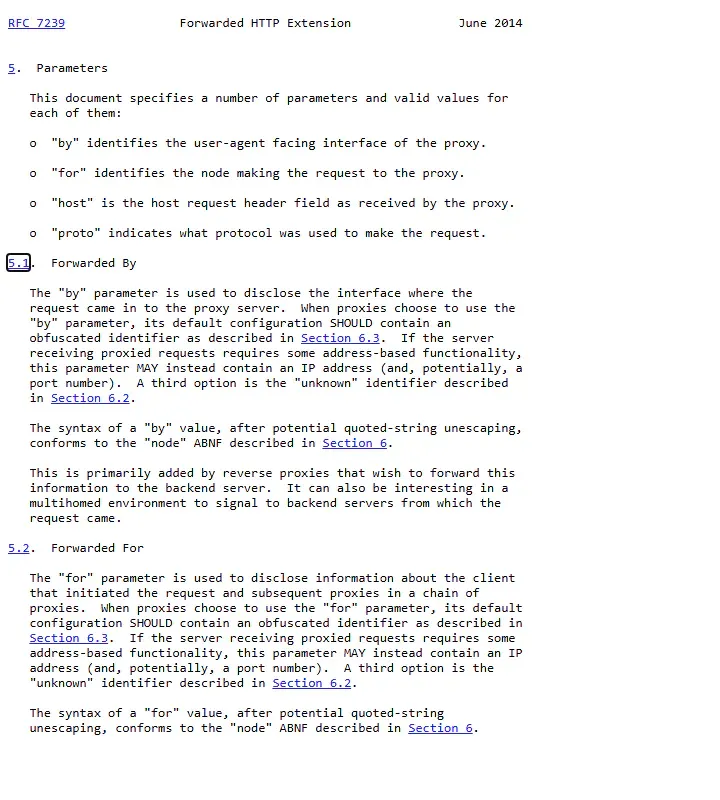
In RFC 7239, Forwarded: for= identifies the node that made a request to a proxy, while by= identifies a proxy interface. A baseline address in by= is therefore not by itself proof that it was forwarded as the client source. X-Forwarded-For carries an address chain but has its own trust limitations. A client or intermediary may supply these fields. Header evidence does not identify the adding hop, and an IP-reputation service may flag a proxy even without a header clue.
How Does an Anonymous Proxy Work?
Your app connects to a proxy endpoint; that endpoint makes the configured onward request. The destination generally sees the exit address for that request, while the proxy operator necessarily sees a connection from you and may see destination metadata depending on the protocol and service. A site you log into can still recognize the account regardless of the exit address. If the client uses an HTTP proxy for an HTTPS destination, a CONNECT tunnel normally carries the TLS connection onward; this does not make every other client path use the proxy or establish a universal anonymity level.
What Does an Anonymous Proxy Not Hide?
It does not erase login identity, session cookies, browser signals, or traffic that bypasses the configured route. HTTPS can protect application content when certificate validation succeeds and the connection is not intercepted, but it does not hide the exit IP from the destination. A proxy and a VPN may cover different application traffic depending on configuration; neither is automatically an identity-isolation tool. Password prompts reduce terminal exposure, not the risk of an unencrypted client-to-proxy authentication exchange. DNS and WebRTC need separate checks for browser use.
For example, an authorized team checking a regional page can verify that its configured client reaches an owned echo through the intended exit rather than its office’s direct public IP. It must then check the page’s actual region and content separately: an IP/header check cannot prove the business page loaded correctly.
How to Check Proxy Anonymity Level
Quick Check: Confirm the Exit and Scope
From the same configured client, note the expected direct public exit and the IP an approved destination or echo observes through the proxy. If policy forbids any direct request, do not create a direct baseline just for this check. Inspect the destination’s request headers for client-address forwarding and proxy clues, interpreting Forwarded: for= separately from by=. A changed IP alone does not establish Level 1 or Level 2; a matching IP is inconclusive. For a browser, check DNS and WebRTC separately, because an HTTP header test does not observe those paths.
Developer Verification: Controlled Echo Comparison
The Python example below makes a direct and then a proxied HTTPS request to a trusted echo, compares selected addresses and headers, and returns observation labels rather than a permanent anonymity grade. It is appropriate only when a direct baseline is allowed. Save the complete listing as anonymity_probe.py before running it.
Before Testing: Choose the Right Observation Point
The destination sees the request that reaches its server, not whatever your local proxy settings claim. Use a trusted HTTPS echo that reports its observed peer address and request headers. The example below uses httpbin’s /anything endpoint, which returns request data for diagnostics. If you control an echo endpoint, prefer that for production validation: it lets you inspect raw server logs and understand any CDN or reverse-proxy headers in front of it.
Privacy prerequisite: The script deliberately contacts the echo once without the configured proxy before trying the proxied request. That service receives your current direct public exit, which might be a VPN or corporate NAT address. Prefer an owned or trusted echo. Do not run the public baseline if policy requires all requests to remain behind a proxy; use an approved alternative measurement instead. The comparison examines selected IP/header behavior, not whether the two requests can be linked.
Use the same script, machine, network, and echo URL for both observations. A browser-based what is my IP result can be a separate cross-check, but a browser and Python may follow different proxy settings. The direct baseline identifies a public exit, not your device’s private LAN address.
Step 1: Prepare the Environment and Save the Script
Use Python 3.10+ in a virtual environment and install Requests. SOCKS5 users also need its optional SOCKS dependencies; the Requests proxy documentation explains requests[socks], per-request proxy mappings, and socks5h for proxy-side destination DNS resolution. These are setup instructions, not a claim that a fresh installation was performed for this draft.
python -m venv .venv
# Activate .venv using your shell's standard command.
python -m pip install "requests[socks]"
The Technical Appendix script accepts a proxy gateway through environment variables. It uses separate, equivalently configured Sessions so cookies set by the echo during the direct request are not automatically sent on the proxy request. This reduces one correlation path but does not prove unlinkability. The password prompt protects against terminal echo and shell-history exposure; it does not encrypt proxy authentication. Check the client-to-proxy transport separately from HTTPS to the destination. socks5h moves destination DNS resolution to the proxy for this Requests call but does not itself add encryption. An HTTP proxy normally uses an HTTPS CONNECT tunnel, so a clean HTTPS echo cannot certify behavior for plaintext HTTP.
The full script is retained in the Technical Appendix below. Save it as anonymity_probe.py before running Step 2.
Step 2: Run the Direct Baseline
After saving the script, run the direct check only if you accept the privacy prerequisite above:
python anonymity_probe.py
The script makes one direct HTTPS request with environment proxy overrides disabled. In the recorded local check, it printed:
direct_baseline: obtained (IP omitted from log)
proxy_test: not run
If that fails, stop before classification. Check echo reachability, TLS verification, and network policy. Do not use verify=False to force a pass. APPROVED_CA_BUNDLE can point to an organization-approved CA bundle.
Step 3: Compare the Same Echo Through a Proxy
Obtain the actual gateway, port, generated username, and authentication method from your Rola IP account and the proxy quick start. A residential proxy can provide an alternate exit for authorized regional QA, but its network category says nothing conclusive about the observed anonymity level. Do not publish or commit account values.
Replace the non-secret example values below with your account-generated details. Choose http or socks5h only if your endpoint supports it; these are not actual Rola gateway details. The password is entered at the script’s prompt.
Bash:
export ROLA_PROXY_HOST='REPLACE_WITH_ACCOUNT_GATEWAY'
export ROLA_PROXY_PORT='REPLACE_WITH_ACCOUNT_PORT'
export ROLA_PROXY_USERNAME='REPLACE_WITH_GENERATED_USERNAME'
export ROLA_PROXY_SCHEME='http'
python anonymity_probe.py --proxy
PowerShell:
$env:ROLA_PROXY_HOST = 'REPLACE_WITH_ACCOUNT_GATEWAY'
$env:ROLA_PROXY_PORT = 'REPLACE_WITH_ACCOUNT_PORT'
$env:ROLA_PROXY_USERNAME = 'REPLACE_WITH_GENERATED_USERNAME'
$env:ROLA_PROXY_SCHEME = 'http'
python anonymity_probe.py --proxy
The tool prints a narrow result label and header names, not IPs or raw header values. Do not paste a credential-bearing proxy URL into a public checker, issue tracker, screenshot, or chat. It caps each response at 16 KiB, refuses redirects and non-HTTPS echoes, uses connect/read timeouts, and does not fall back to direct access after a proxy failure. The script is not a strict whole-operation deadline; diagnose failures instead of looping through new exits.
Step 4: Interpret the Observation Without Overclaiming
The script compares the direct baseline with the proxied echo’s origin and selected request headers. It deliberately prints no_header_hint_observed, not guaranteed_elite. Use the table below to decide what to investigate next.
| Result label | Possible level mapping | Next check |
|---|---|---|
client_ip_exposed_in_headers |
Level 3-style signal, if the field’s meaning and baseline are verified | Inspect client-added headers and the echo’s reverse-proxy path; do not call this anonymous |
proxy_hint_observed |
Level 2-style sample, if the clue belongs to the tested proxy path | Identify whether the client, gateway, CDN, or echo inserted it |
no_header_hint_observed |
Level 1-style sample for these selected headers only | Repeat on the intended client and test browser/DNS paths separately |
ambiguous_forwarded_inconclusive |
No level: baseline appeared as Forwarded: by= |
That field identifies a proxy interface, not necessarily the forwarded client source; inspect the chain |
unparsed_header_inconclusive |
No level: unknown, obfuscated, or malformed address data | Use an owned echo or inspect raw data before assigning a level |
same_exit_inconclusive |
No level: direct and proxy observations share an IP | Check that the proxy was actually used; equality alone does not mean transparent |
credential_header_exposed |
No level: the echo received Proxy-Authorization |
Stop, rotate or revoke credentials, and investigate the client/proxy setup |
An echo behind a CDN can alter origin or add Via/X-Forwarded-For; a client can also send spoofed forwarding headers. Those cases can create misleading classifications. The script reports a signal for investigation, not a forensic attribution. If the destination returns a login wall, CAPTCHA, 403, or 429, pause and follow its permitted process; changing exits is not an anonymity test or authorization to continue.
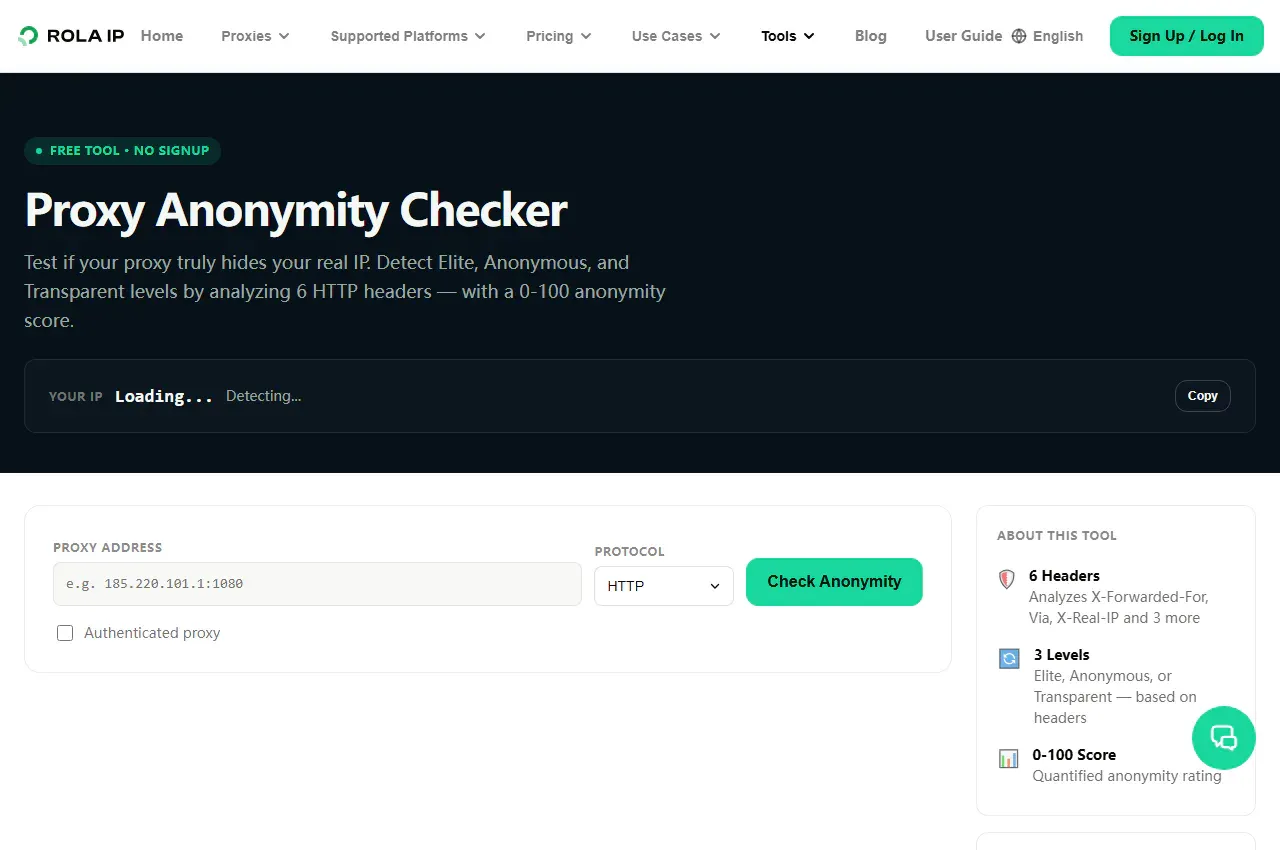
For a second view, Rola IP’s proxy anonymity checker describes a six-header HTTP check and explicitly says DNS and WebRTC need separate testing. Its published description concerns a request sent through a checker, not this local Python/browser route. Compare results and investigate disagreements; neither score establishes privacy for every client or target. Check the service’s credential-handling terms before submitting any proxy details.
Step 5: Test Browser and DNS Paths Separately
An HTTP echo cannot see all browser behaviors. In the same browser profile and proxy configuration, use an approved diagnostic page or owned WebRTC test to inspect ICE candidates. Record whether each is host, srflx, or relay, as described by MDN’s candidate-type reference. Investigate an unexpected public direct address; a private address or mDNS hostname alone is not proof of a public-IP leak. A Python requests pass is not a browser pass.
For DNS, determine whether the application, local resolver, or proxy resolves the destination hostname. Requests’ documented socks5h option delegates that lookup to the proxy for its proxied request; it is not a device-wide DNS policy. With an approved diagnostic resolver or local network trace, compare queries made during the configured browser workflow against an idle baseline, including IPv4 and IPv6 where applicable. An unexpected local query merits investigation; if its source cannot be identified, call the result inconclusive. Do not claim “zero leaks” from one header score.
Local Reproduction: What Was Actually Tested
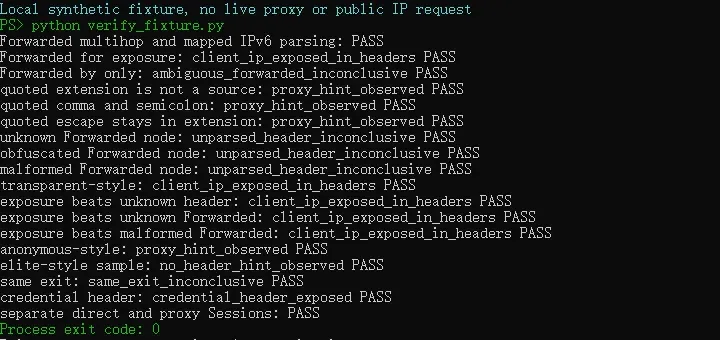
The synthetic fixture exercises 18 cases, including Forwarded semantics, quoted delimiters and escapes, exposure-versus-parse-error precedence, and separate direct/proxy Sessions. All passed in the recorded local Python environment. No authenticated Rola request, DNS test, WebRTC test, or target-site acceptance test was run. The runnable fixture, recorded output, and limits of the check appear in the Technical Appendix.
Troubleshooting an Unexpected Anonymity Result
| Symptom | Likely cause | Safe verification |
|---|---|---|
| Baseline and proxy exit match | Proxy not applied, same public NAT, or echo ambiguity | Confirm explicit proxy mapping and inspect an independently controlled echo |
X-Forwarded-For contains the baseline IP |
Client, proxy, or upstream intermediary supplied it | Remove client-added forwarding headers and inspect raw server-side observations |
Forwarded: by= contains the baseline IP |
The field names a proxy interface rather than establishing client-source forwarding | Inspect for= and the proxy chain; keep the result inconclusive |
| Forwarding value is unknown, obfuscated, or malformed | The example parser cannot establish an address comparison | Use a trusted raw echo or a parser suited to your deployment; do not label it elite |
Via appears only at one echo |
CDN/reverse proxy behavior may differ by endpoint | Compare another authorized echo; do not attribute the header automatically |
HTTP 407 or authentication error |
Gateway credentials or allowlist mismatch | Check account-generated values without publishing them |
| TLS validation fails | Wrong host, interception, or CA configuration | Check certificate chain; use only an approved CA bundle, never verify=False |
| Proxy request times out | Gateway, protocol, network, or echo reachability | Check endpoint and protocol; stop rather than rotating identities against a target |
| Checker says Elite but browser shows another IP | Different testing vantage point or browser bypass | Test the exact browser profile, DNS, WebRTC, and route selection |
Conclusion
An anonymous proxy is best judged by what a destination actually receives, not by the product name or a single checker badge. A controlled direct-versus-proxy HTTPS echo can show whether the sampled route changed the observed IP and whether selected headers exposed a baseline address or proxy clue. Keep the result scoped to that client and path, and test DNS and WebRTC separately when browser privacy matters.
Rola IP’s proxy resources and checking tools can support that workflow, but no account-wide Elite claim or “never leaks” promise follows from the evidence in this article. Configure the intended route, run the test with approved credentials, record the date and limitations, and repeat when the client or network configuration changes.