Axios Proxy in Node.js: HTTP, HTTPS, SOCKS5

Sep 17, 2026 · Guides · 11 min read
In Node.js, Axios 1.20.0’s HTTP adapter uses the proxy option to route HTTP requests and establish CONNECT tunnels for HTTPS targets. SOCKS5 requires a routing agent such as SocksProxyAgent; set proxy: false when that agent handles proxying. This guide covers authentication, environment variables, TLS trust, and troubleshooting for server-side requests. These examples do not apply to browser Axios or the fetch adapter.
Before you start
Everything below applies to server-side Node.js using the axios HTTP adapter, not to axios in a browser and not to the fetch adapter, which do not share this proxy configuration path. The local test matrix was verified with axios 1.20.0 on Node v24.15.0. Proxy host, port and credentials come from your proxy provider’s dashboard; the proxy password is usually not your dashboard login password. Point TARGET_URL at an endpoint you own or are authorized to test.
npm install axios@1.20.0
The configuration that works
Save the following JavaScript as axios-proxy.cjs. The protocol field describes the connection to the proxy, not the scheme of the target URL. This example uses username/password authentication. For an IP-allowlisted or unauthenticated proxy, remove PROXY_USERNAME and PROXY_PASSWORD from the required list and remove the auth object from the proxy configuration.
Set the environment variables before running the file. Replace every placeholder with your provider’s connection details and an authorized target.
PowerShell:
$env:PROXY_HOST = 'YOUR_PROXY_HOST'
$env:PROXY_PORT = 'YOUR_PROXY_PORT'
$env:PROXY_USERNAME = 'YOUR_PROXY_USERNAME'
$env:PROXY_PASSWORD = 'YOUR_PROXY_PASSWORD'
$env:TARGET_URL = 'https://YOUR_AUTHORIZED_TARGET/'
node axios-proxy.cjs
Bash or zsh:
export PROXY_HOST='YOUR_PROXY_HOST'
export PROXY_PORT='YOUR_PROXY_PORT'
export PROXY_USERNAME='YOUR_PROXY_USERNAME'
export PROXY_PASSWORD='YOUR_PROXY_PASSWORD'
export TARGET_URL='https://YOUR_AUTHORIZED_TARGET/'
node axios-proxy.cjs
Use your application’s secret store for deployed credentials and avoid sharing shell history containing real passwords.
const axios = require('axios');

class InputError extends Error {}

async function main() {
  const required = [
    'PROXY_HOST', 'PROXY_PORT', 'PROXY_USERNAME',
    'PROXY_PASSWORD', 'TARGET_URL',
  ];
  for (const name of required) {
    if (!process.env[name]) throw new InputError(`Missing ${name}`);
  }
  const port = Number(process.env.PROXY_PORT);
  if (!Number.isInteger(port) || port < 1 || port > 65535) {
    throw new InputError('PROXY_PORT must be an integer from 1 to 65535');
  }

  const response = await axios.get(process.env.TARGET_URL, {
    adapter: 'http',
    proxy: {
      protocol: 'http',
      host: process.env.PROXY_HOST,
      port,
      auth: {
        username: process.env.PROXY_USERNAME,
        password: process.env.PROXY_PASSWORD,
      },
    },
    timeout: 15000,
  });
  console.log('HTTP status:', response.status);
}

main().catch((error) => {
  const detail = error instanceof InputError ? error.message : error.code || error.name;
  console.error('Request failed:', detail);
  process.exitCode = 1;
});
The proxy object takes protocol, host, port and an optional auth object with username and password, as documented in the axios 1.20.0 request configuration. Set timeout on every proxied request; a proxy that accepts the connection and then stalls will otherwise hang the promise.
To apply the same settings to every request, put them on an instance and reuse it:
const client = axios.create({
  adapter: 'http',
  proxy: {
    protocol: 'http',
    host: process.env.PROXY_HOST,
    port: Number(process.env.PROXY_PORT),
    auth: {
      username: process.env.PROXY_USERNAME,
      password: process.env.PROXY_PASSWORD,
    },
  },
  timeout: 15000,
});
Anything you pass in a single request config wins over the instance default for that field, so an instance is a baseline rather than a lock.
What the proxy actually receives
Reading the config tells you what you asked for. Reading the proxy’s log tells you what happened, and that is the thing that settles most arguments about whether axios is working at all.
For this guide, a local HTTP proxy logged requests sent to local HTTP and HTTPS origins. The matrix was verified on 16 September 2026 with axios 1.20.0, https-proxy-agent 9.1.0, socks-proxy-agent 10.1.0, and Node v24.15.0 on Windows. The HTTPS origin used a self-signed certificate. C2 therefore supplied its CA through a standard https.Agent; C3–C5 deliberately tested different trust settings.
The results below come from an unauthenticated local HTTP proxy, not live Rola exits or authenticated commercial proxies. S1 checks rejection of SOCKS in the native proxy option; it does not test a successful SOCKS5 connection. These observations describe the versions and local conditions listed here, not a guarantee for every proxy service.
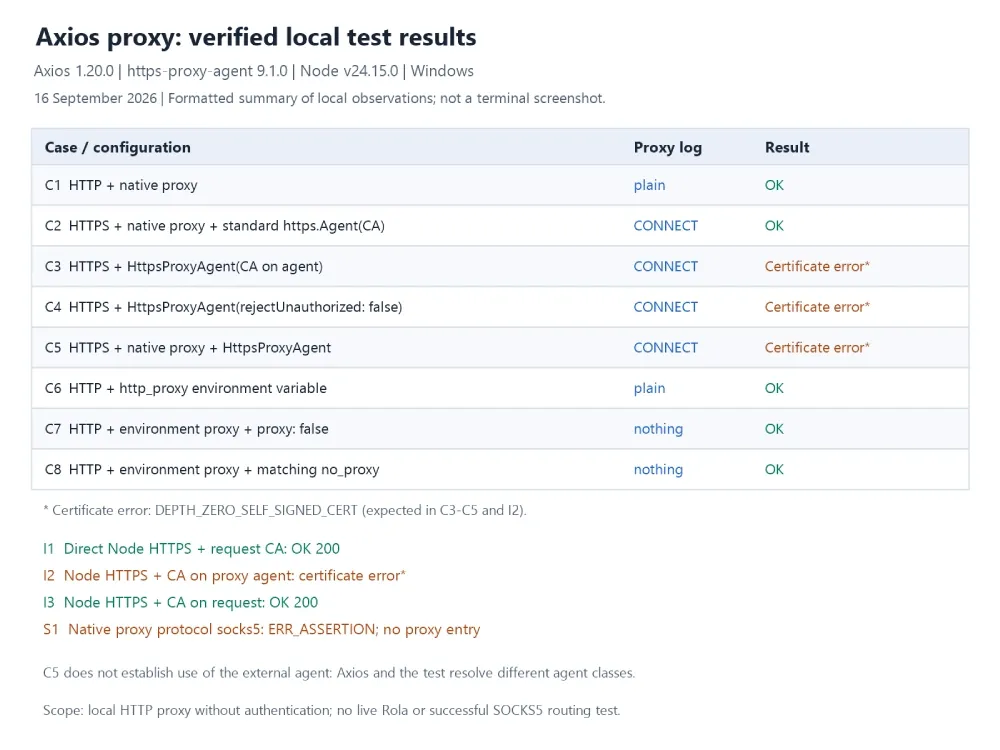
| Case | Configuration | What the proxy logged | Result |
|---|---|---|---|
| C1 | HTTP target, proxy option |
A plain forwarded request | Succeeded |
| C2 | HTTPS target, proxy plus a standard https.Agent with the origin CA |
A CONNECT tunnel |
Succeeded |
| C3 | HTTPS target, https-proxy-agent with ca on the agent |
A CONNECT tunnel |
Failed on certificate trust |
| C4 | HTTPS target, https-proxy-agent with rejectUnauthorized: false on the agent |
A CONNECT tunnel |
Failed on certificate trust |
| C5 | HTTPS target, native proxy plus external HttpsProxyAgent 9.1.0; see the class-identity limitation below |
A CONNECT tunnel |
Failed on certificate trust; does not establish use of the external agent |
| C6 | http_proxy set, no proxy in config |
A plain forwarded request | Succeeded |
| C7 | http_proxy set, proxy: false |
Nothing | Succeeded, went direct |
| C8 | http_proxy set, no_proxy matching the host |
Nothing | Succeeded, went direct |
| S1 | proxy: { protocol: 'socks5' } |
Nothing | Threw ERR_ASSERTION |
I1 verifies a direct HTTPS request with the trusted CA. I2 and I3 isolate the placement of that CA and are explained in the TLS section below.
C6, C7 and C8 used lowercase http_proxy and no_proxy. Uppercase variables were not exercised in this matrix. The test runner clears inherited proxy settings and Node proxy options before starting each child process.
Several of those results are worth their own section.
Can Axios 1.20.0 tunnel HTTPS through an HTTP proxy in Node.js?
Axios 1.20.0’s Node.js HTTP adapter can establish the CONNECT tunnel without an additional routing-agent package. In C2, the proxy option selected the route, while a standard https.Agent supplied the CA needed to trust the self-signed test origin. The proxy logged CONNECT and the request completed. The standard agent configured certificate trust; it did not select the proxy route.
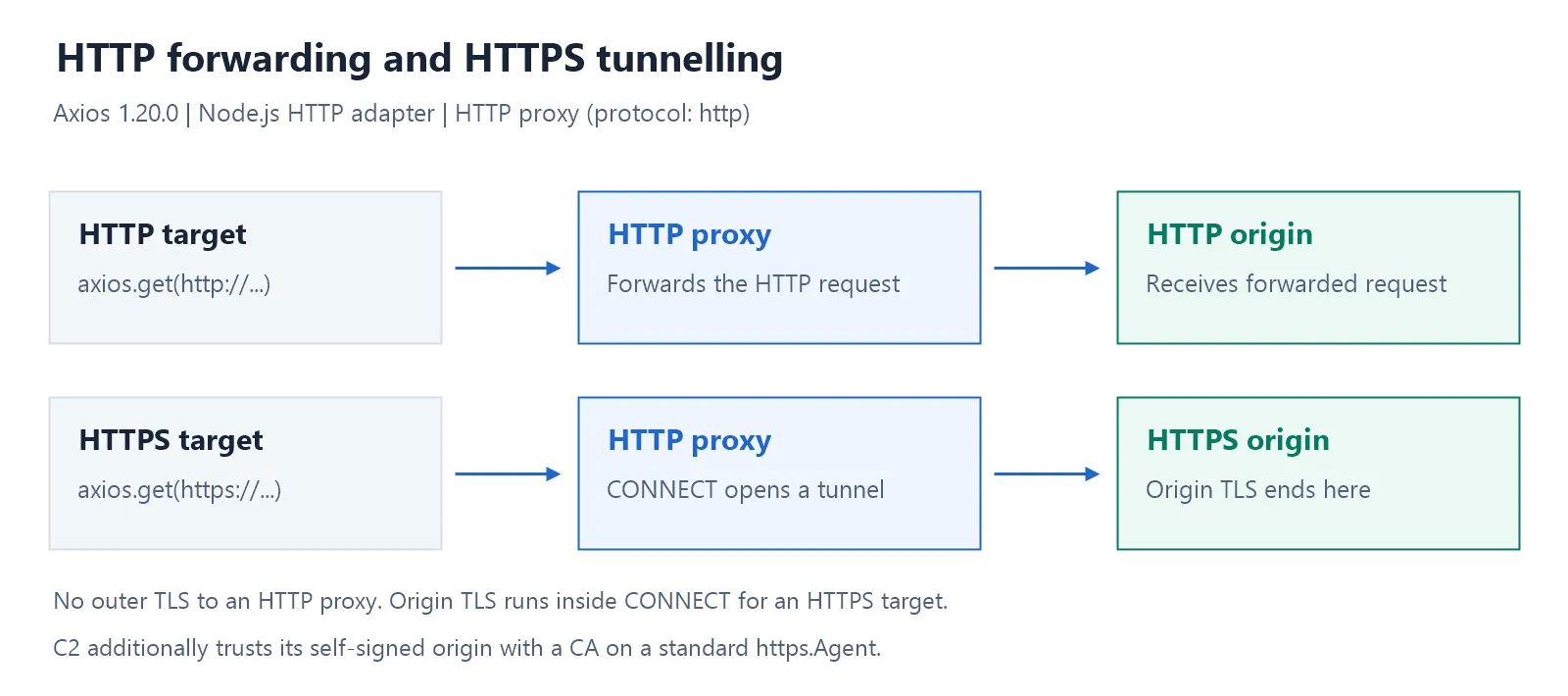
The Axios 1.20.0 documentation explains that Axios forwards a standard https.Agent’s TLS options, including ca, to the generated tunnelling agent for the origin connection. That is the configuration used in C2.
Do not treat the documentation’s statement that Axios leaves tunnelling to a supplied HttpsProxyAgent as a guarantee across package versions or separate installed copies. In the tested installation, Axios resolves https-proxy-agent 5.0.1 internally, while the test imports 9.1.0. The HTTP adapter uses instanceof to recognize its own agent class; the external 9.1.0 instance fails that check. C5 therefore does not establish that the external agent handled the tunnel. When a custom routing agent should own proxying, set proxy: false and configure the agent explicitly, as in C3 and the SOCKS5 example.
Reach for a routing agent when you need something axios does not build for you, such as SOCKS. For an ordinary HTTP proxy in front of HTTPS targets, the proxy option is fewer moving parts.
Origin TLS when the proxy tunnels
With an HTTP proxy, the connection from Node.js to the proxy is not protected by TLS. For an HTTPS target, TLS with the origin begins inside the tunnel after CONNECT succeeds. An HTTPS proxy adds a separate TLS connection between Node.js and the proxy. Check which handshake failed before changing trust settings: DEPTH_ZERO_SELF_SIGNED_CERT or UNABLE_TO_VERIFY_LEAF_SIGNATURE during the origin handshake indicates a trust problem with the certificate chain presented inside the tunnel.
On axios 1.20.0, the supported way to supply a trusted origin CA is a standard https.Agent alongside the native proxy option. Axios forwards those TLS options into the tunnelling agent it generates. This is an increment to the same main() above, not a separate program:
const https = require('node:https');
const fs = require('node:fs');

const originTlsAgent = new https.Agent({
  ca: fs.readFileSync(process.env.ORIGIN_CA_FILE),
});
Set ORIGIN_CA_FILE to the path of the trusted PEM certificate file. Add httpsAgent: originTlsAgent to the request config and keep the native proxy option for routing. Do not assume that a top-level ca in an axios request config behaves like ca passed to Node’s https.request; the axios HTTP adapter does not map arbitrary top-level TLS fields onto the native request options.
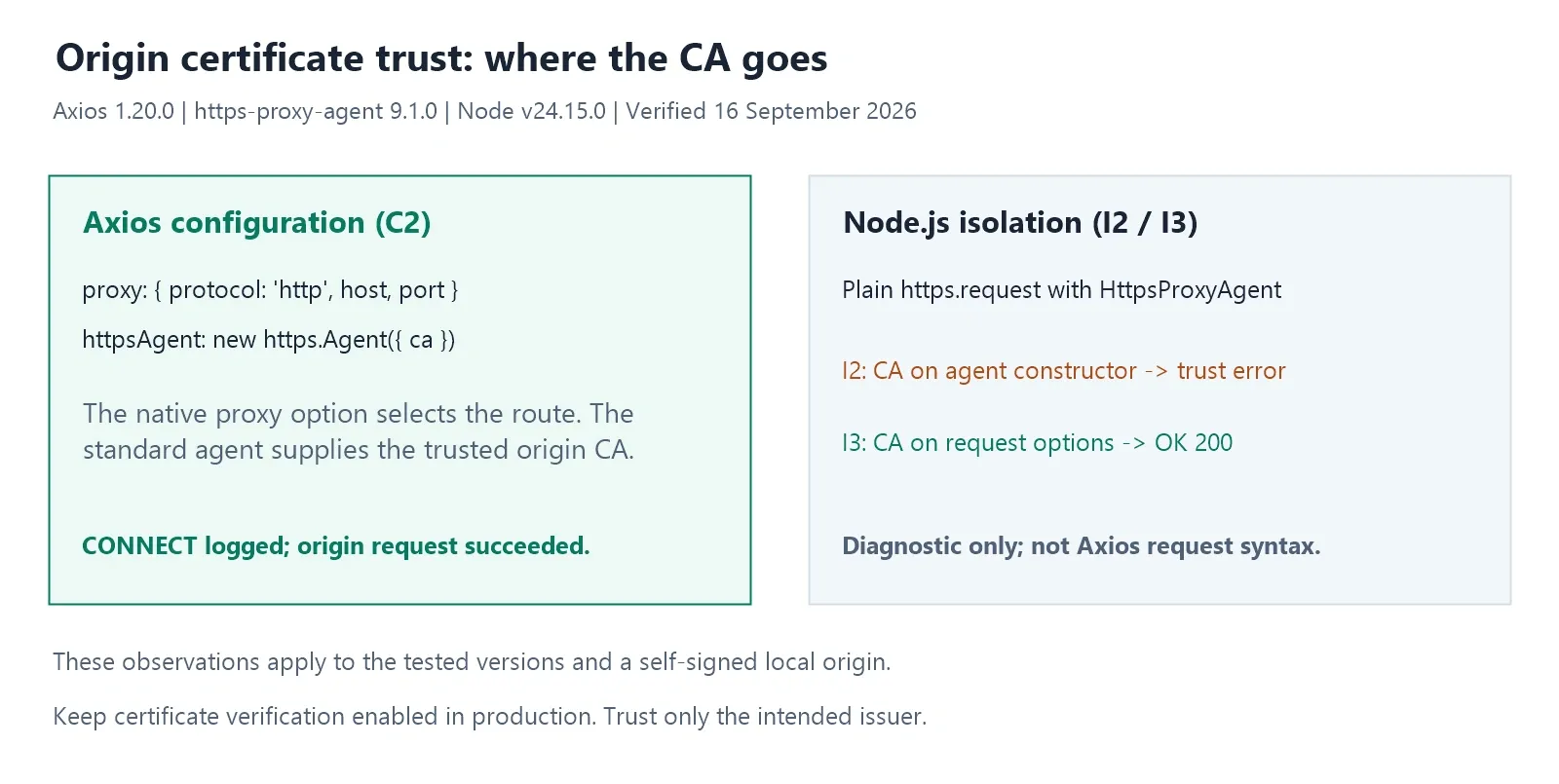
In C3, passing ca to the HttpsProxyAgent constructor did not make the self-signed origin trusted. In the plain Node.js isolation tests, the same CA failed on the agent constructor (I2) but succeeded on the request options (I3). These observations apply to the recorded versions and explain why this Axios example supplies origin trust through a standard https.Agent. They do not mean every proxy agent handles TLS options identically.
Supply a custom CA only when you trust its issuer and need it for that origin. Never reach for rejectUnauthorized: false to make the error go away in production; it disables the check that tells you whether you are talking to the server you think you are.
Environment variables, and how to switch them off
Axios reads proxy settings from the conventional environment variables without any code change. The documentation states it uses http_proxy and https_proxy, and treats no_proxy as “a comma-separated list of domains that should not be proxied”.
Both behaviours held in the recorded run. In C6, with http_proxy set and no proxy in the config, the proxy logged the request. In C8, with no_proxy matching the target host, it logged nothing and the request went direct.
To disable Axios’s own environment-based proxy selection, the documentation says to “use false to disable proxies, ignoring environment variables”:
async function fetchWithoutAxiosProxy(url) {
  return axios.get(url, {
    adapter: 'http',
    proxy: false,
    timeout: 15000,
  });
}
This disables Axios’s own proxy selection; it does not guarantee a direct connection. A custom routing agent can still proxy the request. On Node versions with native environment-proxy support, the global agents can also proxy it when the process starts with NODE_USE_ENV_PROXY=1 or --use-env-proxy (including via NODE_OPTIONS). In a local check on Node v24.15.0, an HTTP request with proxy: false still reached the local proxy when the process started with HTTP_PROXY set and NODE_USE_ENV_PROXY=1.
For a direct-connection check, start a fresh process with Node’s environment-proxy startup setting disabled, and ensure neither custom nor replaced global agents select a proxy. Removing an environment variable after a global agent has already been initialized is not a reliable reset. In the comparison run, a fresh process with native proxying disabled, HTTP_PROXY still present, and proxy: false reached the local origin directly. Confirm the exit address from the actual application process before drawing the same conclusion in your environment.
SOCKS5 with axios
The native proxy option does not speak SOCKS. In S1, setting protocol: 'socks5' on it threw ERR_ASSERTION and the proxy logged nothing, which is consistent with a check that runs before the request is dispatched.
SOCKS5 goes through an agent instead. Install it first:
npm install axios@1.20.0 socks-proxy-agent@10.1.0
const axios = require('axios');
const { SocksProxyAgent } = require('socks-proxy-agent');

async function main() {
  for (const name of ['SOCKS_URL', 'TARGET_URL']) {
    if (!process.env[name]) {
      console.error(`Missing ${name}`);
      process.exitCode = 1;
      return;
    }
  }
  const agent = new SocksProxyAgent(process.env.SOCKS_URL);

  const response = await axios.get(process.env.TARGET_URL, {
    adapter: 'http',
    httpAgent: agent,
    httpsAgent: agent,
    proxy: false,
    timeout: 15000,
  });
  console.log('HTTP status:', response.status);
}

main().catch((error) => {
  console.error('Request failed:', error.code || error.name);
  process.exitCode = 1;
});
Set SOCKS_URL to socks5://USERNAME:PASSWORD@HOST:PORT, and use the socks5h:// scheme instead when you want hostnames resolved at the proxy rather than locally, which keeps DNS lookups off your own resolver. Set proxy: false alongside the agent so axios does not also select a proxy of its own, and set both httpAgent and httpsAgent unless every target you touch uses one scheme.
Percent-encode the username and password separately when constructing SOCKS_URL: use encodeURIComponent(username) and encodeURIComponent(password), not encoding on the entire URL. Reserved characters such as @, #, and : in credentials can otherwise change how the URL is parsed. Save this example as axios-socks.cjs, set SOCKS_URL and TARGET_URL in the same shell, then run node axios-socks.cjs.
Rotating the exit IP per request
Axios does not manage a proxy pool for you. With Rola IP, request rotation and sticky sessions can be selected through parameters in the proxy username.
Rola IP’s rotating residential proxy setup documentation shows both shapes. For a new exit on every request, the documented pattern is ACCOUNT-country-us-f-1. For requests that should share one exit, the documented pattern is ACCOUNT_1-country-us-sessiontime-10, where the trailing number is the session length in minutes and the documentation gives a range of 1 to 120. A sticky session is a bounded lease, not a permanent static IP, and separate sessions are not a promise that two of them never land on the same address.
const ACCOUNT = process.env.ROLA_ACCOUNT;

const rotatingUsername = `${ACCOUNT}-country-us-f-1`;
const stickyUsername = `${ACCOUNT}_1-country-us-sessiontime-10`;
Use rotatingUsername as proxy.auth.username for per-request rotation, and stickyUsername for a run of requests that must share a session. ACCOUNT is the base account name with no parameter suffix already attached. Generate the username in the dashboard and preserve its parameters when copying it into proxy.auth.username. If the connection fails, verify the generated username, password, host, and port together. The same account-name approach applies if you are on the built-in fetch instead of axios, as covered in our Node.js fetch proxy guide. Native fetch uses a different proxy configuration interface from Axios.
For an authorized localization test, select the country you need and compare your own site’s responses from that exit against a baseline, holding a sticky session when the workflow spans several requests. The residential proxy page describes the location and session controls. Rotation changes where a request appears to come from; it does not grant access to anything and does not remove a target site’s usage limits.
When an axios proxy is not working
Start with two questions in this order: did the request succeed, and did the proxy log it? Together they split every other cause into a small number of branches, and they cost one log line to answer.
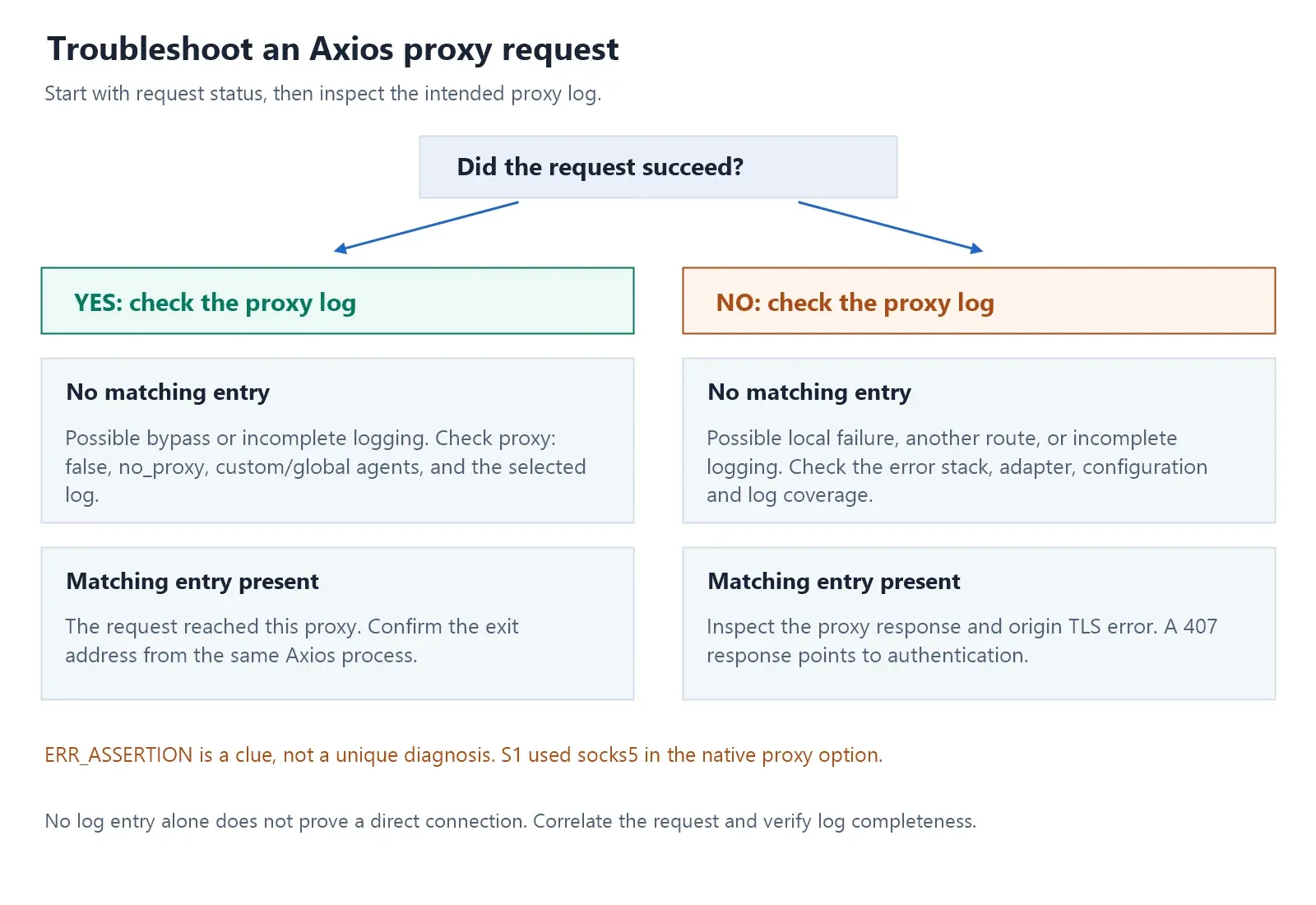
| Symptom | Likely cause | What to check |
|---|---|---|
| Proxy logs nothing, request succeeded | This proxy may have been bypassed, or its log is incomplete | Check proxy: false, no_proxy, the selected agent, and which log you are reading |
| Proxy logs nothing, request failed | Local failure, another route, or incomplete logging | Check the error, adapter, effective config, correct proxy and logging coverage |
ERR_ASSERTION with no proxy entry |
In S1, an unsupported socks5 scheme in the native option |
Inspect the stack and protocol first; if using SOCKS, use SocksProxyAgent with proxy: false |
Origin certificate fails after a CONNECT |
The trusted CA or chain is missing for the origin, not the proxy | Supply the origin CA through a standard https.Agent on httpsAgent |
| A per-request proxy appears to be ignored | An interceptor, wrapper or adapter choice is altering routing | Request config outranks instance defaults for fields you set explicitly, so inspect the final config with credentials redacted |
| Request takes too long or hangs | The proxy or the origin is stalled or unreachable | Set timeout on every proxied call, then read the connection error it surfaces |
| Works locally, not on the server | The proxy environment differs | Check HTTP_PROXY, HTTPS_PROXY and NO_PROXY and their lowercase forms; log only whether each is set, never the value |
proxy: false still reaches a proxy |
A custom or global agent owns proxy routing | Check NODE_USE_ENV_PROXY, --use-env-proxy, relevant NODE_OPTIONS flags, and the selected agents; restart with native proxying disabled for a direct baseline |
| Exit country is wrong | The account-name parameter was altered or dropped | Regenerate the account string in the dashboard at country level |
407 Proxy Authentication Required and ECONNREFUSED are also useful troubleshooting clues. A 407 response indicates that proxy authentication is required or was not accepted. ECONNREFUSED means a connection attempt was refused; check the destination host, port, listener, and network policy. Neither error occurred in this local test matrix; they are general reference items.
Never log a full proxy URL or process.env.http_proxy value while debugging. Those strings normally carry username:password@host and end up in whatever collects your logs. Log the fact that a variable is set, or a redacted host and port.
How do I verify that an axios request used the proxy?
Send a request to an IP-echo endpoint you trust from the same axios process that runs your application, using the same config, and compare the address it reports against the address you see with the proxy switched off. Doing it in the running process is the point: a separate tool cannot tell you what a different process did. A proxy checker is useful for confirming that a proxy is reachable and working at all, but its result does not prove which route your local axios request took.