
How to Make a Successful Stealth eBay Account: 7 Setup Steps

Aug 19, 2026 · Guides · 7 min read
If you’re researching how to make a successful stealth eBay account, start with a legitimate second account registered to its real owner. This guide covers choosing the account identity, completing seller verification, matching payout details, managing staff access, and maintaining seller performance.
“Stealth account” is seller slang, not an official eBay account type. eBay allows multiple accounts for legitimate purposes, but prohibits using a new or existing account to avoid selling limits, restrictions, or suspensions. Every account needs accurate identity, business, contact, and payout information.
Quick answer
To build a successful second eBay seller account:
- Choose the real individual or business that will own the account.
- Register through eBay and complete the requested identity checks.
- Match the account type, tax details, and payout information.
- Give staff individual access through eBay Team access.
- Prepare accurate listings, available stock, shipping, and customer support.
- Document the network setup if the team needs an authorized remote workflow.
- Monitor Seller Hub metrics and respond to verification or performance issues.
What eBay means by multiple accounts
eBay’s multiple account policy says that users may have more than one account. The same buying and selling policies still apply to every account. If eBay restricts one account, similar action may affect other linked accounts.
| Action | Policy status |
|---|---|
| Creating accounts for different product lines | Allowed, if legal details are accurate and performance standards are met. |
| Using Team access for staff or agencies | Allowed, using individual invitations and limited permissions. |
| Creating an account to bypass limits or suspensions | Not allowed. eBay may apply similar restrictions to other linked accounts. |
| Using someone else’s identity or fake documents | Not allowed, accounts must belong to the real operating entity. |
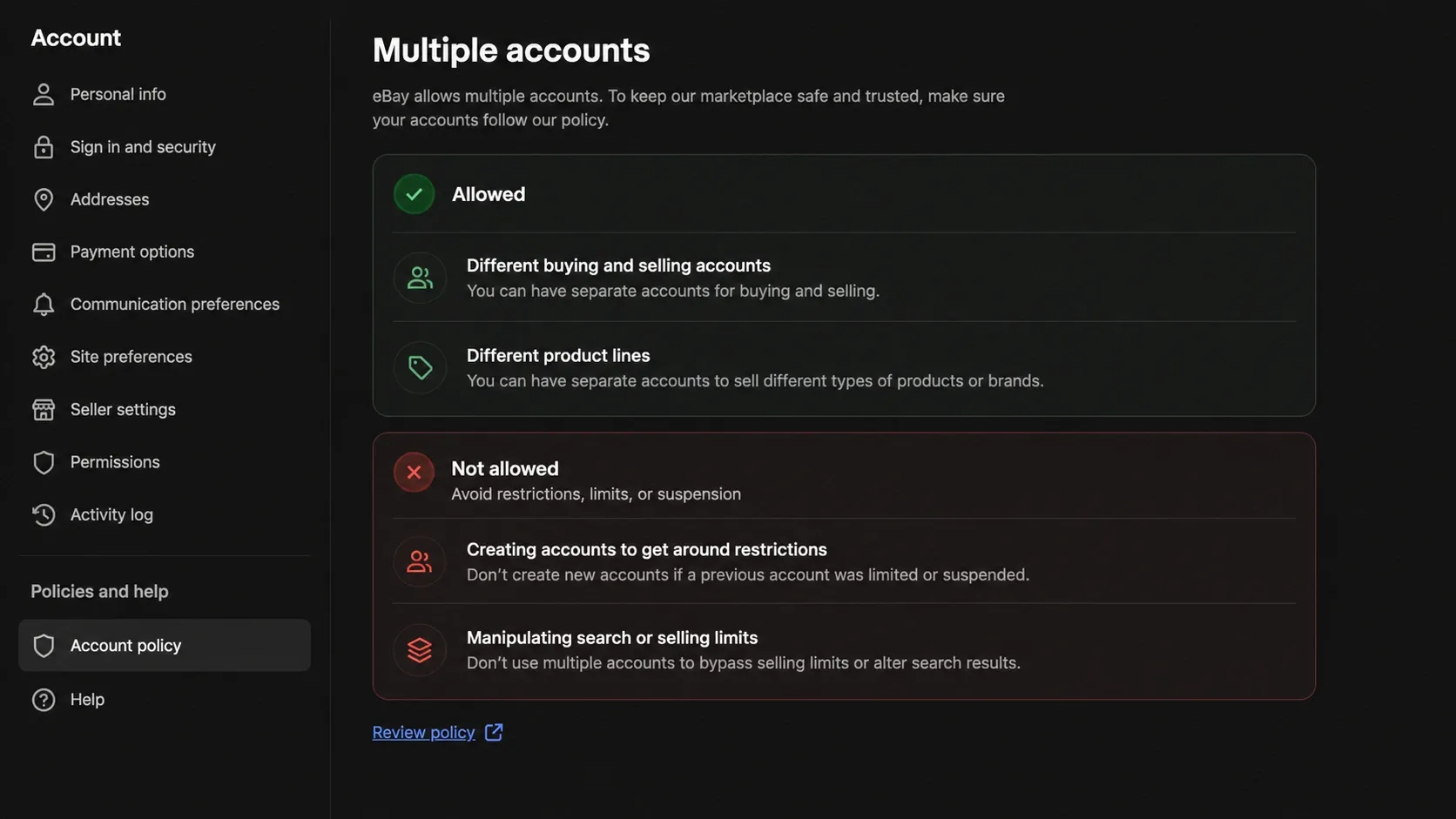
When do you actually need a second eBay account?
Choose the setup that fits the task before starting registration. A separate store can help organize different product lines, while staff access usually calls for permissions on the existing account.
| Your goal | Appropriate setup |
|---|---|
| Separate personal buying from business selling | Separate accounts with accurate ownership details |
| Operate distinct product lines or storefront brands | An additional seller account with records matching the real owner |
| Let employees or an agency manage listings and orders | Team access on the existing account |
| Continue selling while an account is restricted | Follow the restriction notice and resolve the issue; another account must not be used to avoid it |
Step 1: Choose the correct legal account identity
Decide whether the new seller account belongs to you as an individual, to a sole proprietorship, or to a registered company. The account type should match the way you receive payouts and report sales.
For an individual account, prepare the legal name, physical address, date of birth, and any tax information eBay requests. For a business account, use the legal business name, business address, tax or registration number, and details for people who control the business when eBay asks for them.
Use the actual owner’s details for verification. You can choose a separate store name for branding while keeping the legal owner clearly identified in the account records.
Step 2: Complete identity verification through eBay’s seller flow
Use eBay’s official seller registration process. eBay may confirm your identity, business details, and payout account when you register or when you change relevant information. Requirements vary by marketplace and account type, so prepare the records requested in your own registration flow.
Before you submit, compare the account entries against the supporting records:
| Information | What to check |
|---|---|
| Legal owner | The account identifies the person or business actually operating it |
| Legal name | Account details and verification documents are consistent |
| Address | The submitted address matches current supporting records |
| Business details | Registration and tax information match the relevant business records |
| Account type and payouts | The personal or business setup meets eBay’s payout ownership requirements |
| Documents | Files are current, readable, complete, and meet the requested format |
| Contact details | You can receive messages at the email address and phone number on the account |
eBay’s seller help page says that requested documents must match the information on the account. It also lists accepted file formats and warns that unreadable or incomplete documents can delay verification.
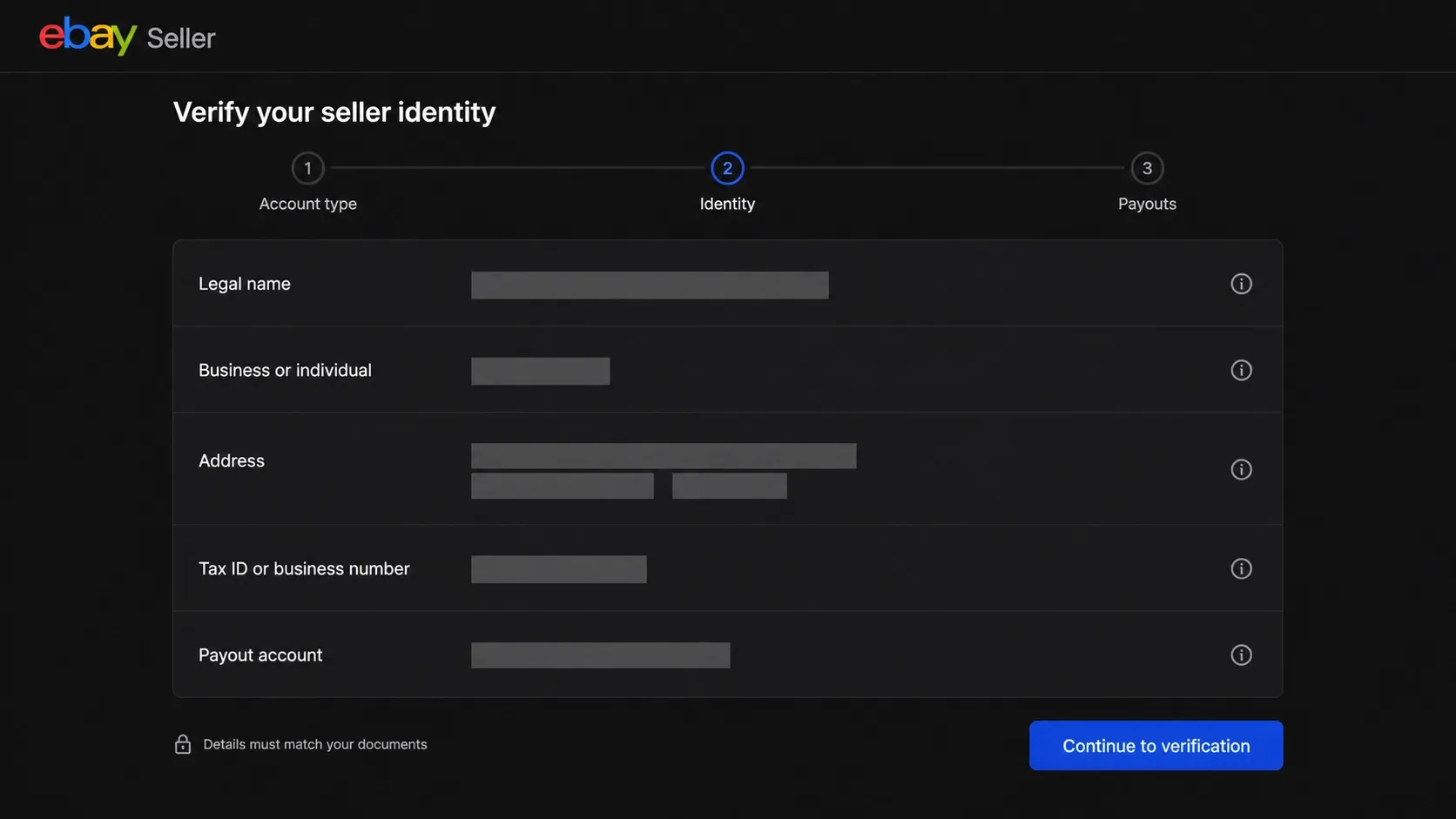
Step 3: Match payouts and tax information
Check payout ownership before submitting the account for verification. eBay says that personal account information should match the linked personal payout account. A business account should use the matching business name and account type.
Keep a private record of the legal owner, business registration, payout account, tax settings, and the date each detail was last checked. This record helps you answer a verification request without guessing or mixing information between stores.
If your business changes its address, legal name, ownership, or payout account, update eBay through the account settings and keep supporting records.
What if eBay cannot verify your details?
Read the verification request and identify which information needs attention: identity, business registration, address, or payout details. Compare the account entry with the relevant document, then submit the requested correction through eBay’s official flow.
- A document is unreadable or incomplete: submit a clear, complete copy in the format requested.
- A name or address does not match: check for a genuine entry error or an outdated record and follow the instructions for correcting it.
- Payout ownership is unclear: check the account holder name and personal or business account type against eBay’s request.
- The request remains unclear: contact support through the account before making further changes.
Check the message or banner in your account for the verification outcome and any next steps.
Step 4: Give staff access without sharing a password
If another person needs to list products, answer messages, or print labels, eBay’s Team access feature lets you grant permissions without sharing the owner’s password.
With Team access, the account owner sends an invitation, selects permissions, and can review activity later. Depending on the permissions, a team member can create or revise listings, view orders, upload tracking, manage messages, or handle other Seller Hub tasks. Invited users use their own eBay accounts and must enable two-step verification.
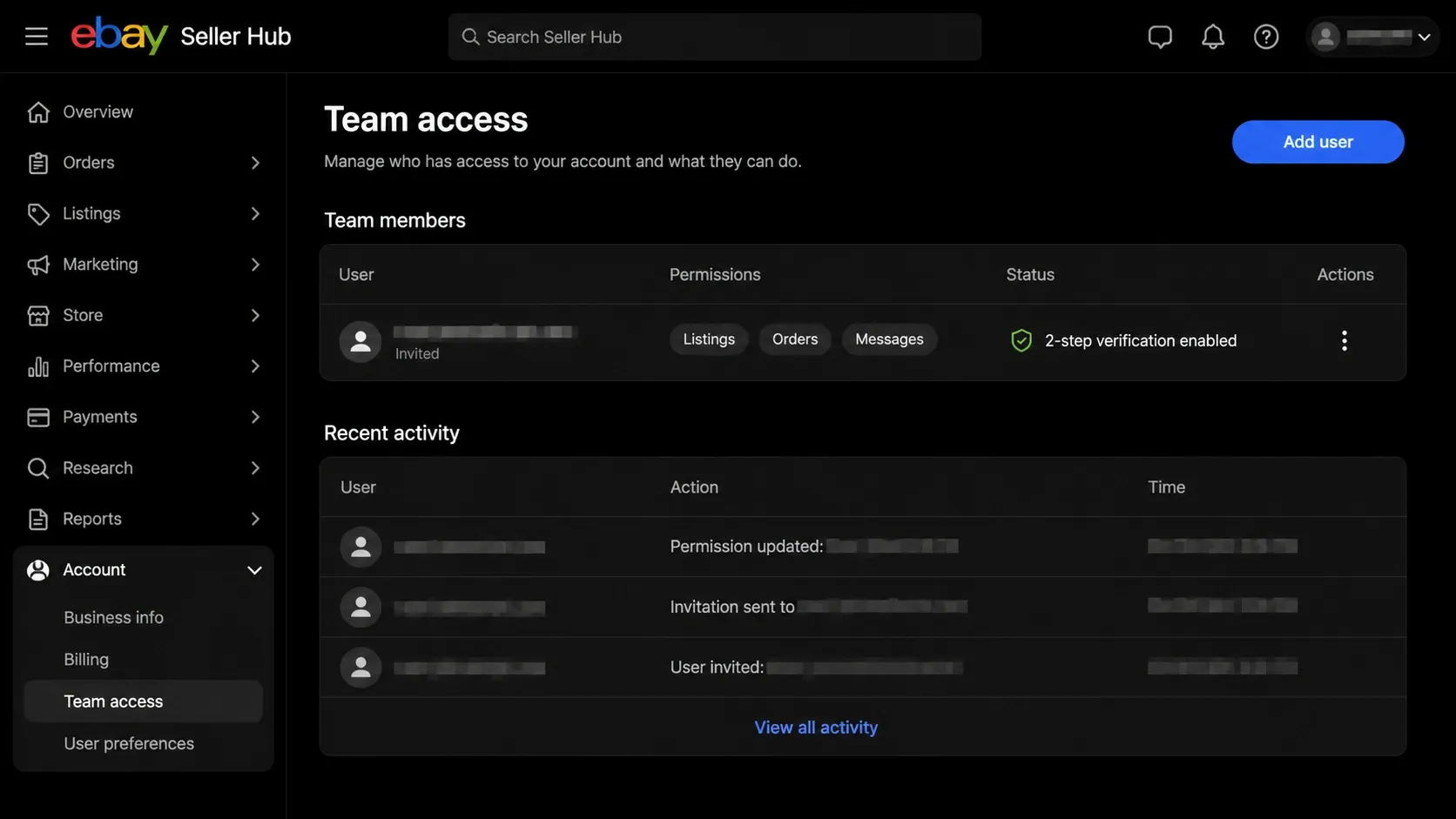
Grant only the permissions a person needs. Remove access when a contractor leaves, review the activity log, and never send your main password through email or chat.
Step 5: Prepare listings, inventory, and fulfillment
Prepare your listings and fulfillment process before the first order arrives.
Use stock that you can actually ship. Write original titles and descriptions that match the item. Use photos that show the product and disclose defects. Set handling times you can meet, upload tracking when required, and respond to buyer questions through eBay Messages.
Keep stock counts up to date to reduce cancellations. If a buyer reports a problem, resolve it through eBay’s case process and keep the communication clear.
The eBay seller standards policy evaluates issues such as cases closed without seller resolution, transaction defects, and late shipments. The policy page says sellers should review their performance dashboard and address problems before the next evaluation.
Step 6: Set up consistent network access for your team
A regular internet connection is sufficient for registration. For remote teams using a proxy in a permitted workflow, record the endpoint, location, access permissions, and connection settings so team members can maintain a consistent setup.
If the team needs a persistent endpoint, compare the IP assignment and session conditions of static residential proxies when choosing a plan.
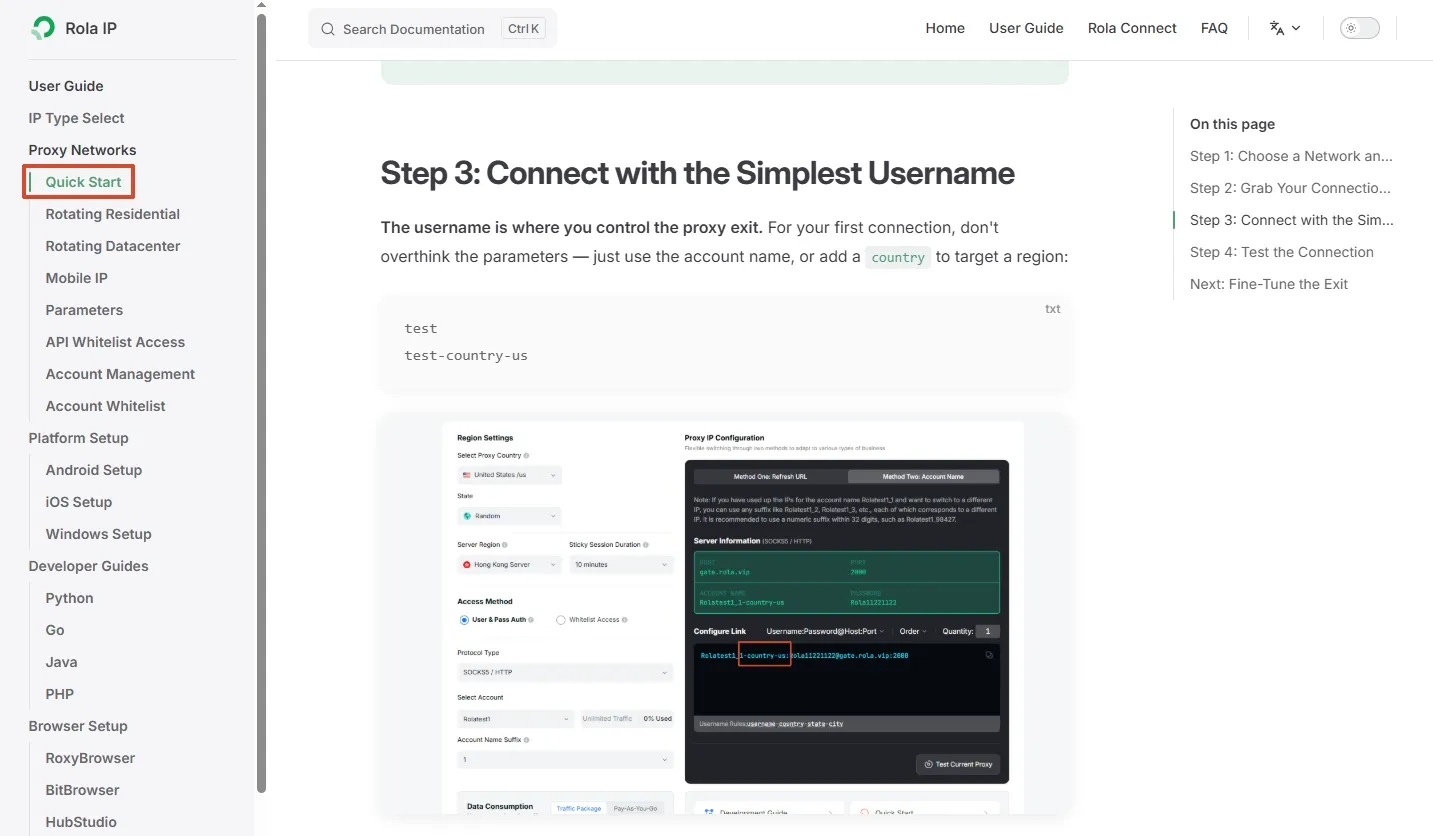
The proxy quick start guide covers connection settings. Confirm the host, port, authentication details, location, and session parameters for your selected service. Keep credentials private and remove access when a team member leaves.
For authorized public catalog research, the guide to proxies for price monitoring discusses connection choices for that workflow.
Step 7: Monitor the account before a problem becomes a restriction
Open Seller Hub regularly to review seller performance, service metrics, and outstanding requests. Use the thresholds and evaluation dates shown for your marketplace to prioritize the issues that need attention.
| Metric to watch | Practical action |
|---|---|
| Cases closed without seller resolution | Answer cases promptly and provide a clear resolution before eBay has to step in. |
| Transaction defects | Keep inventory accurate, avoid unexpected cancellations, and fix recurring listing problems. |
| Late shipments | Set realistic handling times and upload valid tracking within the stated time. |
| Item not received or not as described reports | Improve packaging, listing accuracy, and delivery communication. |
| Messages and verification requests | Reply through official eBay channels and keep supporting records ready. |
The seller performance overview explains how Seller Hub displays seller levels and service metrics. Review recurring issues and assign corrective actions before the next evaluation.
Common shortcuts that create account problems
| Shortcut | Why it fails | Safer alternative |
|---|---|---|
| Buying an aged or verified eBay account | A seller’s verification and account history do not establish your ownership; eBay prohibits account transfers without its consent. | Register an account for the real owner and complete verification. |
| Using a borrowed ID or address | The data will not match the actual owner or payout records. | Use current documents for the registered individual or business. |
| Opening a new account after a suspension | eBay’s policy prohibits creating accounts to avoid restrictions or other consequences. | Appeal the decision and fix the underlying issue. |
| Sharing one password with a team | It removes accountability and exposes private account information. | Use Team access and individual two-step verification. |
| Switching countries or proxies repeatedly | It makes the workflow harder to document and does not change who owns the account. | Use a permitted, stable connection and keep an internal access record. |
| Listing a large catalog immediately | Your inventory, shipping, and support process may not be ready for the order volume. | Grow at a pace your stock and service capacity can support. |
Final checklist
Before you list on a second eBay account, confirm that:
- The account has a documented, legitimate business purpose.
- The legal identity or registered business is the real owner.
- The account type, tax details, and payout account match.
- Verification documents are current, readable, and private.
- Staff use Team access instead of a shared password.
- Inventory, shipping, returns, and buyer support are ready.
- Any proxy or remote network is permitted, stable, and documented.
- Seller Hub metrics are reviewed on a regular schedule.
- Existing restrictions are handled through eBay’s appeal or support process.