Python Requests Session: Cookies, Auth, Proxies, Retries

Sep 10, 2026 · Guides · 20 min read
A Python Requests Session keeps selected client state across related HTTP calls. A Requests Session can persist cookies and shared configuration while reusing connections to the same host, but it does not automatically create safe retries, rotate IP addresses, render JavaScript, or grant access to restricted resources. This guide builds a tested Session client for cookies, authentication, retries, proxies, and clean shutdown.
Quick Answer: What Does a Requests Session Do?
requests.Session() is a reusable HTTP client. It stores cookies and defaults such as headers, parameters, authentication, proxies, and TLS settings. Its adapters also pool connections, so repeated calls to the same host can avoid unnecessary connection setup.
A Session is useful for an API client, an authorized login flow, or repeated requests to one service. It still needs explicit timeouts, a deliberate retry policy, and a clear lifecycle.
| Capability | Top-level requests.get() calls |
requests.Session() |
|---|---|---|
| Persist cookies across calls | No | Yes |
| Share default configuration | No reusable client state | Yes |
| Reuse a pool across related calls | No reusable client owned by your code | Yes |
| Rotate the exit IP | No | No |
| Apply a complete retry policy | No | Only after configuration |
| Close shared resources | Per response | Close the Session and streamed responses |
What Is a Python Requests Session?
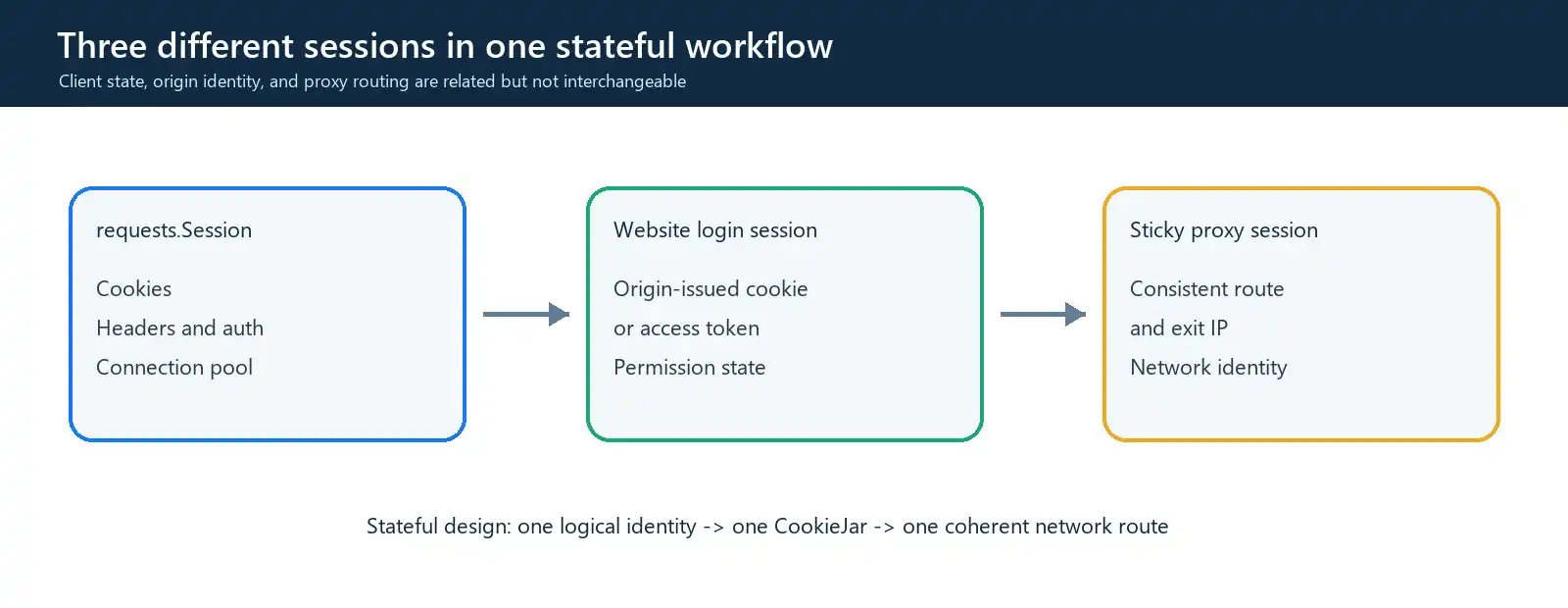
The word session describes three different layers in many Python projects. Confusing them leads to broken login flows and incorrect proxy designs.
| Session type | What it controls | Typical state |
|---|---|---|
requests.Session |
Python HTTP client | Cookies, headers, auth, adapters |
| Website login session | Identity recognized by the origin server | Session cookie or token |
| Sticky proxy session | Network route | Consistent proxy exit IP |
A requests.Session can hold the cookie that represents a website login, but it does not create permission by itself. Likewise, a sticky proxy can keep a network route stable without storing the website’s cookies.
The Session object can persist cookies, headers, query parameters, authentication, proxy settings, certificate settings, and mounted adapters. Request-level dictionaries are merged with Session defaults, and a request-level value wins when the same key appears in both places.
Not every request argument becomes a persistent default. Setting an arbitrary attribute such as session.timeout = 30 does not make Requests pass that timeout to later calls. A reliable client must supply timeout= through its request method.
Requests vs. Requests.Session: When Should You Use Each?
Use a top-level Requests function for one independent call. Use a Session when several related calls need the same cookies, authentication, configuration, or connection pool.
| Scenario | Recommended design |
|---|---|
| One independent request | requests.get() or another top-level function |
| Repeated calls to one API | One Session for that client |
| Login followed by authorized calls | One Session per login identity |
| Multiple user accounts | Separate Sessions and CookieJars |
| Concurrent workers | One Session per worker |
| Unrelated domains carrying sensitive auth | Separate Sessions |
| Independent proxy-routed jobs | Isolated Session or worker per job |
Do not treat a Session as a global variable for an entire application. Mutable cookies and headers become difficult to reason about when unrelated users, hosts, or threads share the same object.
How to Use Requests Session in Python
The examples below were run on Windows with Python 3.12.14 and Requests 2.34.2. They use a local HTTP/1.1 server, so cookie, timeout, retry, and connection behavior can be reproduced without collecting data from an external website.
Create a virtual environment and install the pinned dependency:
# Windows PowerShell
py -m venv .venv
.\.venv\Scripts\Activate.ps1
python -m pip install "requests[socks]==2.34.2"
# macOS or Linux
python3 -m venv .venv
source .venv/bin/activate
python -m pip install "requests[socks]==2.34.2"
The SOCKS extra is needed only for the later socks5h:// example. The Session, cookie, authentication, and retry examples use Requests itself.
Create one local project directory for the examples. Copy each labeled code block in this guide into a file with the filename shown before the block. The examples use only a local HTTP server and do not require a downloadable fixture or a third-party test website.
1. Create local_test_server.py
Copy the complete local fixture below into local_test_server.py. It implements every local endpoint used in this article.
"""Local HTTP/1.1 fixture for the Python Requests Session article."""

from __future__ import annotations

import base64
import json
import threading
import time
from collections import defaultdict
from http.server import BaseHTTPRequestHandler, ThreadingHTTPServer
from urllib.parse import urlsplit


class DemoHTTPServer(ThreadingHTTPServer):
    daemon_threads = True
    allow_reuse_address = True

    def __init__(self, server_address: tuple[str, int]):
        super().__init__(server_address, DemoHandler)
        self.attempts: defaultdict[str, int] = defaultdict(int)
        self.state_lock = threading.Lock()


class DemoHandler(BaseHTTPRequestHandler):
    protocol_version = "HTTP/1.1"

    @property
    def demo_server(self) -> DemoHTTPServer:
        return self.server  # type: ignore[return-value]

    def _json_response(
        self,
        status: int,
        payload: dict[str, object],
        extra_headers: dict[str, str] | None = None,
    ) -> None:
        body = json.dumps(payload, sort_keys=True).encode("utf-8")
        self.send_response(status)
        self.send_header("Content-Type", "application/json")
        self.send_header("Content-Length", str(len(body)))
        if extra_headers:
            for name, value in extra_headers.items():
                self.send_header(name, value)
        self.end_headers()
        try:
            self.wfile.write(body)
        except (BrokenPipeError, ConnectionAbortedError, ConnectionResetError):
            # A short client timeout can close the socket before /slow replies.
            pass

    def _count_attempt(self) -> int:
        key = f"{self.command} {urlsplit(self.path).path}"
        with self.demo_server.state_lock:
            self.demo_server.attempts[key] += 1
            return self.demo_server.attempts[key]

    def do_GET(self) -> None:  # noqa: N802 - required by BaseHTTPRequestHandler
        path = urlsplit(self.path).path

        if path == "/set-cookie":
            self._json_response(
                200,
                {"cookie_set": True},
                {"Set-Cookie": "demo_session=active; Path=/; SameSite=Lax"},
            )
            return

        if path == "/echo":
            self._json_response(
                200,
                {
                    "cookie": self.headers.get("Cookie", ""),
                    "user_agent": self.headers.get("User-Agent", ""),
                    "client_port": self.client_address[1],
                },
            )
            return

        if path == "/flaky":
            attempt = self._count_attempt()
            if attempt < 3:
                self._json_response(
                    503,
                    {"attempt": attempt, "status": "temporary failure"},
                    {"Retry-After": "0"},
                )
            else:
                self._json_response(200, {"attempt": attempt, "status": "ok"})
            return

        if path == "/slow":
            # The timeout test intentionally closes the client socket early.
            self.close_connection = True
            time.sleep(0.20)
            self._json_response(200, {"status": "slow response completed"})
            return

        if path == "/basic-auth":
            expected = base64.b64encode(b"testuser:testpass").decode("ascii")
            if self.headers.get("Authorization") == f"Basic {expected}":
                self._json_response(200, {"authenticated": True})
            else:
                self._json_response(
                    401,
                    {"authenticated": False},
                    {"WWW-Authenticate": 'Basic realm="demo"'},
                )
            return

        if path == "/blocked":
            self._json_response(403, {"status": "controlled forbidden response"})
            return

        if path == "/rate-limited":
            self._json_response(
                429,
                {"status": "controlled rate limit"},
                {"Retry-After": "1"},
            )
            return

        self._json_response(404, {"status": "not found"})

    def do_POST(self) -> None:  # noqa: N802 - required by BaseHTTPRequestHandler
        content_length = int(self.headers.get("Content-Length", "0"))
        if content_length:
            self.rfile.read(content_length)

        path = urlsplit(self.path).path
        if path == "/flaky":
            attempt = self._count_attempt()
            self._json_response(
                503,
                {"attempt": attempt, "status": "POST not retried by default"},
            )
            return

        self._json_response(404, {"status": "not found"})

    def log_message(self, format: str, *args: object) -> None:
        return


def create_server(host: str = "127.0.0.1", port: int = 8765) -> DemoHTTPServer:
    return DemoHTTPServer((host, port))


def main() -> None:
    server = create_server()
    print("Local test server: http://127.0.0.1:8765", flush=True)
    print("Press Control-C to stop.", flush=True)
    try:
        server.serve_forever()
    except KeyboardInterrupt:
        pass
    finally:
        server.server_close()


if __name__ == "__main__":
    main()
Start the fixture in the first terminal:
python local_test_server.py
Local test server: http://127.0.0.1:8765
Press Control-C to stop.
The fixture implements /set-cookie, /echo, /basic-auth, /flaky, /slow, /blocked, and /rate-limited. It uses no third-party website and contains every endpoint referenced below.
The smallest safe pattern uses a context manager and an explicit connect/read timeout:
import requests

url = "http://127.0.0.1:8765/echo"

with requests.Session() as session:
    session.headers.update(
        {
            "User-Agent": "inventory-client/1.0",
            "Accept": "application/json",
        }
    )
    response = session.get(url, timeout=(2, 10))
    response.raise_for_status()

    print("Status:", response.status_code)
    print("Final URL:", response.request.url)
    print("User-Agent:", response.request.headers["User-Agent"])
The first timeout value limits connection establishment. The second limits how long Requests waits between response bytes; it is not a guaranteed deadline for the entire download.
Request-level headers are merged with session.headers. A request-level value replaces a same-named Session default for that call. See the separate Python requests headers guide for header precedence and safe inspection in more detail.
Python Requests Session Example: Build a Healthy Client
A production-oriented client needs more than requests.Session(). The following wrapper adds connection pooling, safe status retries, explicit timeouts, secret-safe response logging, and clean shutdown. It is a starting point rather than a complete application SDK.
2. Create production_session.py
Copy the following production-oriented Session client into production_session.py in the same local project directory.
"""A small Requests client with explicit timeouts and bounded retries."""

from __future__ import annotations

import logging
from collections.abc import Iterable
from typing import Any
from urllib.parse import urlsplit

import requests
from requests.adapters import HTTPAdapter
from urllib3.util import Retry


LOGGER = logging.getLogger("session_client")


def log_response(response: requests.Response, *args: object, **kwargs: object) -> None:
    """Log useful request metadata without headers, cookies, or credentials."""
    elapsed_ms = response.elapsed.total_seconds() * 1000
    LOGGER.info(
        "%s %s -> %s in %.1f ms",
        response.request.method,
        urlsplit(response.url).netloc,
        response.status_code,
        elapsed_ms,
    )


class SessionClient:
    def __init__(
        self,
        *,
        timeout: tuple[float, float] = (2.0, 10.0),
        retry_total: int = 3,
        retry_statuses: Iterable[int] = (429, 500, 502, 503, 504),
    ) -> None:
        self.timeout = timeout
        self.session = requests.Session()
        self.session.headers.update(
            {
                "User-Agent": "rola-session-guide/1.0 (+https://rola-ip.co/)",
                "Accept": "application/json",
            }
        )
        self.session.hooks["response"].append(log_response)

        retry = Retry(
            total=retry_total,
            connect=retry_total,
            read=retry_total,
            status=retry_total,
            other=0,
            backoff_factor=0.2,
            status_forcelist=frozenset(retry_statuses),
            allowed_methods=frozenset({"GET", "HEAD", "OPTIONS"}),
            respect_retry_after_header=True,
            raise_on_status=False,
        )
        adapter = HTTPAdapter(
            max_retries=retry,
            pool_connections=10,
            pool_maxsize=10,
            pool_block=False,
        )
        self.session.mount("http://", adapter)
        self.session.mount("https://", adapter)

    def request(self, method: str, url: str, **kwargs: Any) -> requests.Response:
        kwargs.setdefault("timeout", self.timeout)
        response = self.session.request(method, url, **kwargs)
        response.raise_for_status()
        return response

    def get(self, url: str, **kwargs: Any) -> requests.Response:
        return self.request("GET", url, **kwargs)

    def close(self) -> None:
        self.session.close()

    def __enter__(self) -> "SessionClient":
        return self

    def __exit__(self, *exc_info: object) -> None:
        self.close()
Retry is intentionally limited to GET, HEAD, and OPTIONS. Automatically repeating a POST can create duplicate records or purchases unless the API supports an idempotency key and documents the retry behavior.
The response hook logs only the method, destination host, status, and elapsed time. It deliberately omits the URL path, headers, cookies, tokens, and proxy credentials. Applications can attach a request ID without placing authentication material in the log record.
pool_block=False prevents a caller from waiting indefinitely for a free pool slot, but excess concurrent calls can create additional connections that are not retained in the pool. Bound concurrency with a worker limit or semaphore instead of treating pool size as a complete rate limiter.
The final failed status is returned by the adapter and then converted into an HTTPError by raise_for_status(). Callers therefore receive a normal response after a successful retry but still see a clear exception when all attempts fail. The urllib3 Retry reference documents the individual counters and backoff behavior.
In the controlled test, /flaky returned 503 twice and 200 on the third attempt. A POST to the same endpoint was attempted once because POST was not in allowed_methods.
Retry result: {'attempt': 3, 'status': 'ok'}
POST attempts: 1
3. Create and run session_demo.py
After creating local_test_server.py and production_session.py, save the combined example below as session_demo.py in the same directory. It starts the fixture on an available local port, exercises cookies, connection reuse, Basic Auth, and retries, then shuts the fixture down.
"""Run the article's cookie, pooling, authentication, and retry examples."""

from __future__ import annotations

import threading

import requests

from local_test_server import create_server
from production_session import SessionClient


def main() -> None:
    server = create_server(port=0)
    thread = threading.Thread(target=server.serve_forever, daemon=True)
    thread.start()
    host, port = server.server_address
    base_url = f"http://{host}:{port}"

    try:
        requests.get(f"{base_url}/set-cookie", timeout=(1, 2)).close()
        plain = requests.get(f"{base_url}/echo", timeout=(1, 2))
        print("Without Session cookie:", plain.json()["cookie"] or "<empty>")
        plain.close()

        with requests.Session() as session:
            session.headers.update({"User-Agent": "session-demo/1.0"})
            session.get(f"{base_url}/set-cookie", timeout=(1, 2)).close()
            first = session.get(f"{base_url}/echo", timeout=(1, 2))
            second = session.get(f"{base_url}/echo", timeout=(1, 2))
            print("With Session cookie:", first.json()["cookie"])
            print(
                "Connection reused:",
                first.json()["client_port"] == second.json()["client_port"],
            )
            first.close()
            second.close()

        with requests.Session() as authenticated:
            authenticated.auth = ("testuser", "testpass")
            response = authenticated.get(f"{base_url}/basic-auth", timeout=(1, 2))
            print("Basic auth:", response.json()["authenticated"])
            response.close()

        with SessionClient(timeout=(1, 2)) as client:
            response = client.get(f"{base_url}/flaky")
            print("Retry result:", response.json())
            response.close()
    finally:
        server.shutdown()
        server.server_close()
        thread.join(timeout=2)


if __name__ == "__main__":
    main()
Run it from the project directory:
python session_demo.py
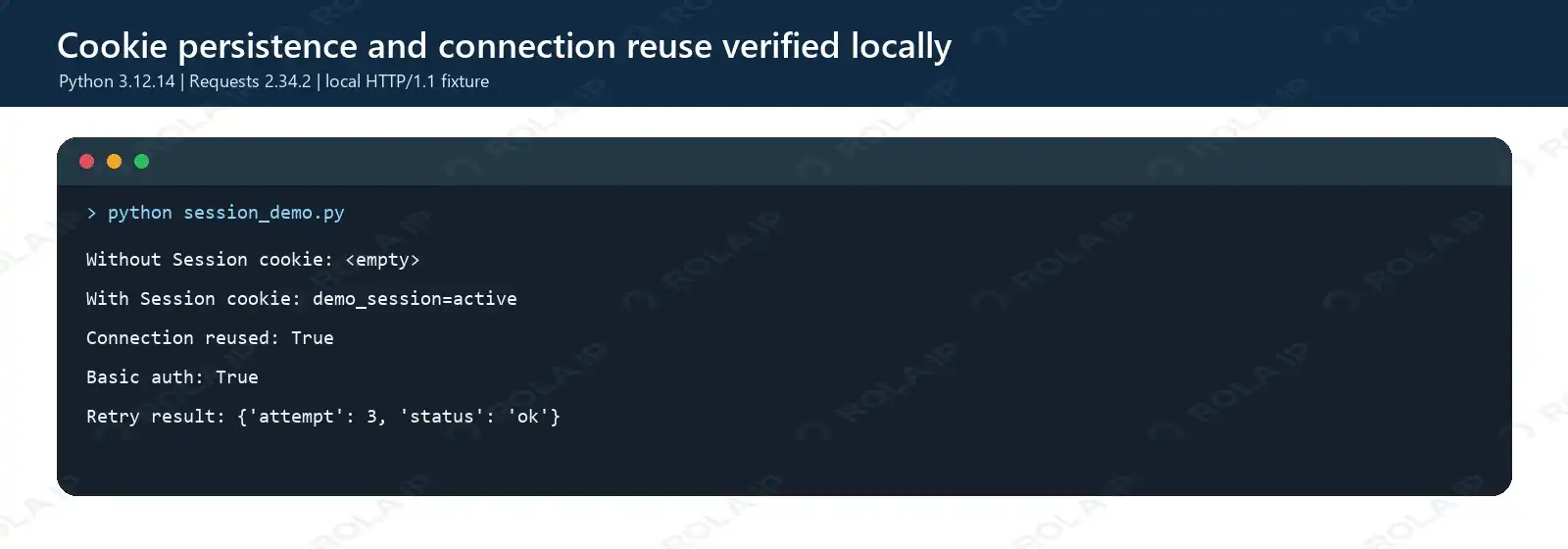
Expected output:
Without Session cookie: <empty>
With Session cookie: demo_session=active
Connection reused: True
Basic auth: True
Retry result: {'attempt': 3, 'status': 'ok'}
4. Create and run test_session.py
The suite also imports ProxySettings from rola_proxy_session.py, which appears later in this guide. After creating all five labeled local files, save the following suite as test_session.py. It checks cookie isolation and persistence, HTTP/1.1 connection reuse, Basic Auth, GET retry behavior, POST non-retry behavior, timeout defaults and overrides, encoded proxy credentials, SOCKS5h configuration, and invalid proxy settings.
"""Repeatable tests for the article examples."""

from __future__ import annotations

import os
import threading
import unittest
from unittest.mock import patch

import requests

from local_test_server import DemoHTTPServer, create_server
from production_session import SessionClient
from rola_proxy_session import ProxySettings


class SessionArticleTests(unittest.TestCase):
    server: DemoHTTPServer
    thread: threading.Thread
    base_url: str

    @classmethod
    def setUpClass(cls) -> None:
        cls.server = create_server(port=0)
        cls.thread = threading.Thread(target=cls.server.serve_forever, daemon=True)
        cls.thread.start()
        host, port = cls.server.server_address
        cls.base_url = f"http://{host}:{port}"

    @classmethod
    def tearDownClass(cls) -> None:
        cls.server.shutdown()
        cls.server.server_close()
        cls.thread.join(timeout=2)

    def setUp(self) -> None:
        with self.server.state_lock:
            self.server.attempts.clear()

    def test_top_level_calls_do_not_persist_cookie(self) -> None:
        requests.get(f"{self.base_url}/set-cookie", timeout=(1, 2)).close()
        response = requests.get(f"{self.base_url}/echo", timeout=(1, 2))
        self.assertEqual(response.json()["cookie"], "")
        response.close()

    def test_session_persists_cookie(self) -> None:
        with requests.Session() as session:
            session.get(f"{self.base_url}/set-cookie", timeout=(1, 2)).close()
            response = session.get(f"{self.base_url}/echo", timeout=(1, 2))
            self.assertEqual(response.json()["cookie"], "demo_session=active")
            response.close()

    def test_session_reuses_http_connection(self) -> None:
        with requests.Session() as session:
            first = session.get(f"{self.base_url}/echo", timeout=(1, 2))
            second = session.get(f"{self.base_url}/echo", timeout=(1, 2))
            self.assertEqual(first.json()["client_port"], second.json()["client_port"])
            first.close()
            second.close()

    def test_session_auth(self) -> None:
        with requests.Session() as session:
            session.auth = ("testuser", "testpass")
            response = session.get(f"{self.base_url}/basic-auth", timeout=(1, 2))
            self.assertEqual(response.status_code, 200)
            self.assertTrue(response.json()["authenticated"])
            response.close()

    def test_get_retries_safe_status(self) -> None:
        with SessionClient(timeout=(1, 2)) as client:
            response = client.get(f"{self.base_url}/flaky")
            self.assertEqual(response.json()["attempt"], 3)
            response.close()

    def test_post_is_not_retried_by_default(self) -> None:
        with SessionClient(timeout=(1, 2)) as client:
            with self.assertRaises(requests.HTTPError):
                client.request("POST", f"{self.base_url}/flaky", data=b"demo")
        self.assertEqual(self.server.attempts["POST /flaky"], 1)

    def test_short_read_timeout_fails(self) -> None:
        with SessionClient(timeout=(1, 0.02), retry_total=0) as client:
            with self.assertRaises((requests.Timeout, requests.ConnectionError)):
                client.get(f"{self.base_url}/slow")

    def test_request_timeout_overrides_client_default(self) -> None:
        with SessionClient(timeout=(1, 0.02), retry_total=0) as client:
            response = client.get(f"{self.base_url}/slow", timeout=(1, 1))
            self.assertEqual(response.status_code, 200)
            response.close()

    def test_proxy_url_encodes_credentials(self) -> None:
        environment = {
            "ROLA_PROXY_HOST": "proxy.example",
            "ROLA_PROXY_PORT": "12345",
            "ROLA_PROXY_USERNAME": "user@example",
            "ROLA_PROXY_PASSWORD": "p:ss/word",
            "ROLA_PROXY_SCHEME": "http",
        }
        with patch.dict(os.environ, environment, clear=False):
            proxies = ProxySettings.from_env().as_requests_dict()
        self.assertEqual(proxies["http"], proxies["https"])
        self.assertIn("user%40example", proxies["https"])
        self.assertIn("p%3Ass%2Fword", proxies["https"])

    def test_socks5h_proxy_scheme(self) -> None:
        environment = {
            "ROLA_PROXY_HOST": "proxy.example",
            "ROLA_PROXY_PORT": "12345",
            "ROLA_PROXY_USERNAME": "demo-user",
            "ROLA_PROXY_PASSWORD": "demo-pass",
            "ROLA_PROXY_SCHEME": "socks5h",
        }
        with patch.dict(os.environ, environment, clear=False):
            proxies = ProxySettings.from_env().as_requests_dict()
        self.assertTrue(proxies["https"].startswith("socks5h://"))

    def test_missing_proxy_settings_fail_clearly(self) -> None:
        with patch.dict(os.environ, {}, clear=True):
            with self.assertRaisesRegex(RuntimeError, "Missing required environment variables"):
                ProxySettings.from_env()

    def test_proxy_port_must_be_an_integer(self) -> None:
        environment = {
            "ROLA_PROXY_HOST": "proxy.example",
            "ROLA_PROXY_PORT": "not-a-port",
            "ROLA_PROXY_USERNAME": "demo-user",
            "ROLA_PROXY_PASSWORD": "demo-pass",
        }
        with patch.dict(os.environ, environment, clear=True):
            with self.assertRaisesRegex(RuntimeError, "must be an integer"):
                ProxySettings.from_env()

    def test_proxy_scheme_is_validated(self) -> None:
        environment = {
            "ROLA_PROXY_HOST": "proxy.example",
            "ROLA_PROXY_PORT": "12345",
            "ROLA_PROXY_USERNAME": "demo-user",
            "ROLA_PROXY_PASSWORD": "demo-pass",
            "ROLA_PROXY_SCHEME": "ftp",
        }
        with patch.dict(os.environ, environment, clear=True):
            with self.assertRaisesRegex(RuntimeError, "must be http, socks5, or socks5h"):
                ProxySettings.from_env()


if __name__ == "__main__":
    unittest.main(verbosity=2)
Run all 13 tests:
python test_session.py
Expected result from the tested environment:
test_get_retries_safe_status (__main__.SessionArticleTests.test_get_retries_safe_status) ... ok
test_missing_proxy_settings_fail_clearly (__main__.SessionArticleTests.test_missing_proxy_settings_fail_clearly) ... ok
test_post_is_not_retried_by_default (__main__.SessionArticleTests.test_post_is_not_retried_by_default) ... ok
test_proxy_port_must_be_an_integer (__main__.SessionArticleTests.test_proxy_port_must_be_an_integer) ... ok
test_proxy_scheme_is_validated (__main__.SessionArticleTests.test_proxy_scheme_is_validated) ... ok
test_proxy_url_encodes_credentials (__main__.SessionArticleTests.test_proxy_url_encodes_credentials) ... ok
test_request_timeout_overrides_client_default (__main__.SessionArticleTests.test_request_timeout_overrides_client_default) ... ok
test_session_auth (__main__.SessionArticleTests.test_session_auth) ... ok
test_session_persists_cookie (__main__.SessionArticleTests.test_session_persists_cookie) ... ok
test_session_reuses_http_connection (__main__.SessionArticleTests.test_session_reuses_http_connection) ... ok
test_short_read_timeout_fails (__main__.SessionArticleTests.test_short_read_timeout_fails) ... ok
test_socks5h_proxy_scheme (__main__.SessionArticleTests.test_socks5h_proxy_scheme) ... ok
test_top_level_calls_do_not_persist_cookie (__main__.SessionArticleTests.test_top_level_calls_do_not_persist_cookie) ... ok

----------------------------------------------------------------------
Ran 13 tests in 1.217s

OK
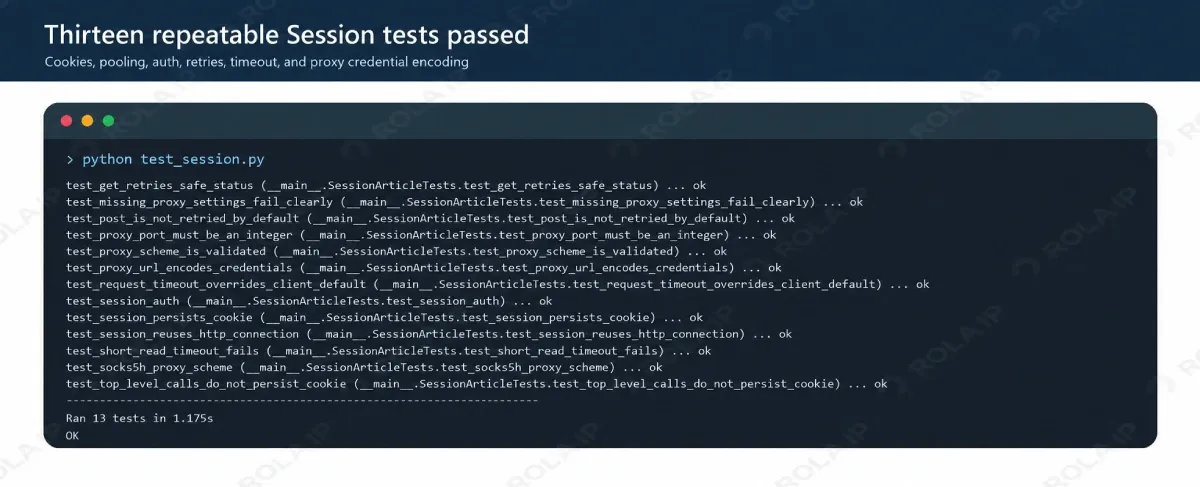
The test also confirmed that two responses sent through one Session used the same client port on the local HTTP/1.1 connection. That proves connection reuse in this fixture; it does not promise a fixed speed improvement on every network. Read the dedicated Python requests timeout guide before tuning values for a slow upstream service.
Python Requests Session Auth and Cookies
Python Requests Session Auth
Session-level authentication is useful when every request goes to the same authorized service. The local fixture accepts testuser:testpass, so this example can be run without a real account:
import requests

with requests.Session() as session:
    session.auth = ("testuser", "testpass")
    response = session.get(
        "http://127.0.0.1:8765/basic-auth",
        timeout=(1, 2),
    )
    response.raise_for_status()
    print(response.json())
The expected output is {"authenticated": true}. For a real service, read credentials from a secret manager or environment variables rather than placing them in source code.
Bearer tokens can be placed in session.headers["Authorization"] when the API specifies that scheme. Do not reuse that Session for unrelated hosts, and never print the full Authorization, Cookie, or Proxy-Authorization values in diagnostic logs.
Origin and proxy authentication are separate. Authorization identifies the client to the target service, while proxy credentials authenticate the connection to the proxy gateway. Fixing one does not fix a failure in the other layer.
Python Requests Add Cookie to Session
A server’s Set-Cookie response is added to the Session CookieJar automatically. A later matching request can then send that cookie without manually building a Cookie header.
import requests

with requests.Session() as session:
    session.get("http://127.0.0.1:8765/set-cookie", timeout=(1, 2))
    response = session.get("http://127.0.0.1:8765/echo", timeout=(1, 2))
    response.raise_for_status()
    print(response.json()["cookie"])
Expected output:
demo_session=active
For an authorized test environment, a cookie can also be added explicitly:
session.cookies.set(
    "display_mode",
    "compact",
    domain="example.com",
    path="/",
)
Do not copy session cookies from accounts or systems you do not control. A session identifier is a credential and belongs in a protected store, not source code, screenshots, analytics, or shared logs.
Python Requests Session Cookies: Persistence and Scope
Cookie persistence is governed by domain, path, expiry, and security attributes. A CookieJar entry can exist without being eligible for the current URL.
| Symptom | Likely cause | How to verify | Fix |
|---|---|---|---|
| Cookie exists but is not sent | Domain or path mismatch | Inspect CookieJar scope and final URL | Correct the cookie scope |
| Login expires after a delay | Cookie or token expired | Check expiry and server response | Reauthenticate through the supported flow |
| Cookie works only in a browser | JavaScript or browser storage is required | Review the documented login process | Use the official API or a permitted browser flow |
| Auth disappears after a redirect | Redirect moved to another host | Inspect response.history |
Keep credentials scoped to the correct origin |
Passing cookies={...} to one request sends those values for that call; it does not necessarily make them persistent Session cookies. Use the CookieJar when later requests genuinely need the same value.
Requests is not a browser. It does not execute JavaScript or reproduce browser storage, navigation, CORS, and SameSite enforcement as a browser does. A cookie appearing in a Requests CookieJar therefore does not prove that a browser login flow has been reproduced correctly.
Why a Requests Session Still Gets 403 or 429
A Session does not grant access. A 403 can represent missing permission, invalid authentication, an account policy, an IP rule, or an anti-automation control. A 429 usually indicates that the client exceeded a rate or quota limit.
Start with evidence instead of adding random headers or rotating addresses:
- Confirm the URL and HTTP method.
- Check account permission and token expiry.
- Record the status, final URL, safe response excerpt, and redirect history.
- Inspect a redacted subset of
response.request.headers. - Check
Retry-Afterand the provider’s documented limits. - Compare permitted direct and proxy routes only when a network rule is plausible.
- Determine whether the page requires JavaScript or an interactive challenge.
Some services may challenge an authenticated session when its cookie, location, IP address, or other risk signals change unexpectedly. That behavior is service-specific. It is not a universal HTTP rule and should not be presented as a guaranteed forced logout.
A proxy cannot repair an expired token, malformed body, missing account permission, CAPTCHA, or browser-only workflow. If the request itself is invalid, fix it before changing the network route.
Python Requests Session Proxy
A proxy is relevant when an authorized workload needs a defined network location, an isolated exit identity, or controlled routing. It should be added only after authentication, request shape, and rate limits have been checked.
Configure an authenticated proxy safely
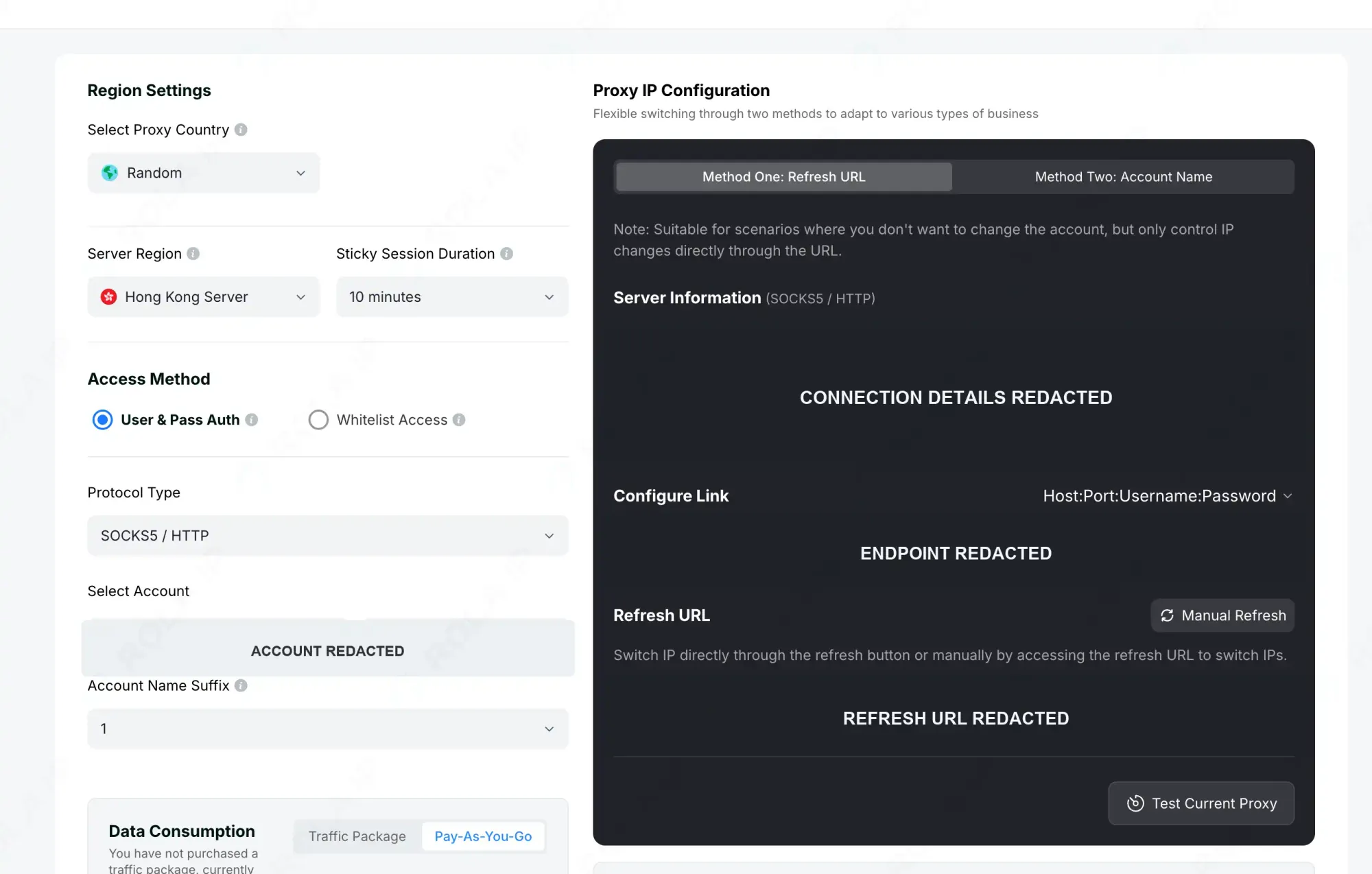
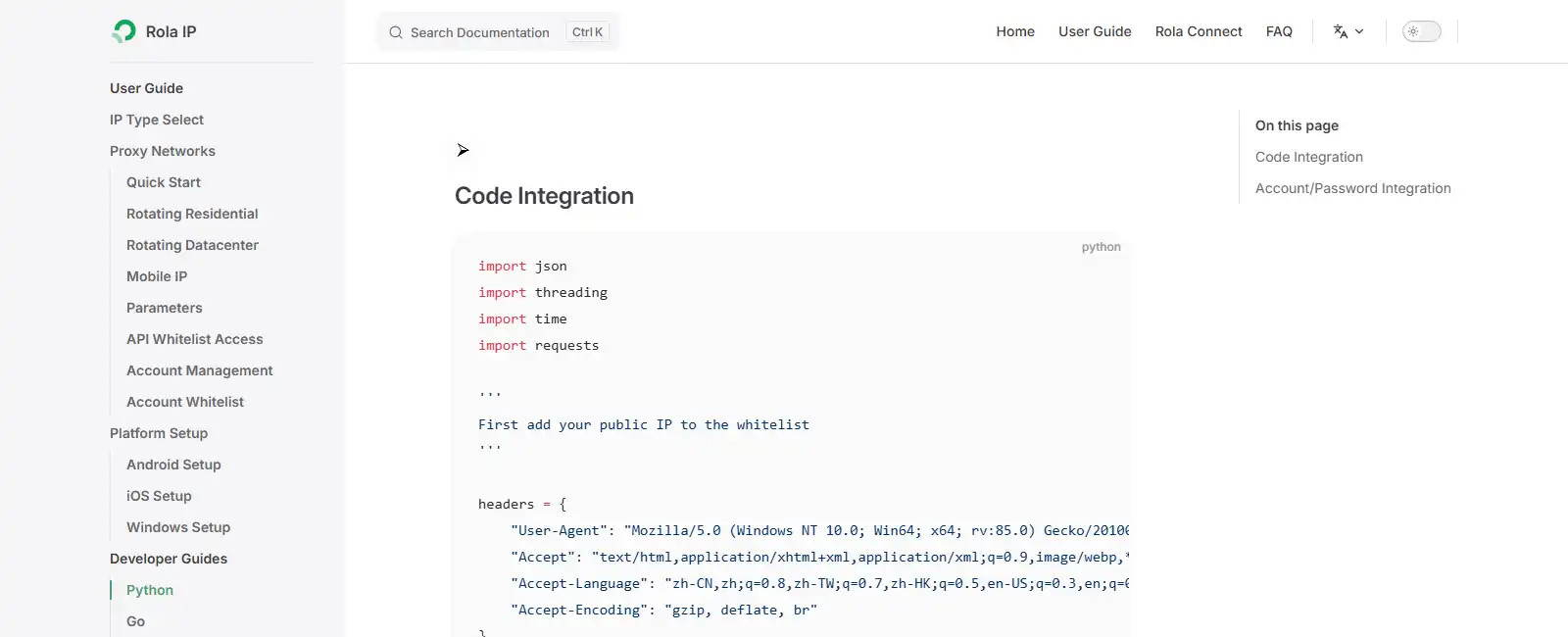
ROLA IP supplies the host, port, username, and password through its proxy setup flow. Keep the exact account name, suffix, and routing values generated by the dashboard. Its Python integration documentation shows the current connection format.
Configure the dashboard in this order:
- Select the proxy network and required country or region.
- Choose the server region and an appropriate Sticky Session Duration.
- Select user/password or whitelist authentication.
- Choose HTTP or SOCKS5 as the protocol.
- Select the account and, when shown, its Account Name Suffix.
- Copy the generated connection details and store them outside source control.
- Use Test Current Proxy before placing the endpoint in an application.
Map the displayed values to Python without rewriting the provider-generated username:
| ROLA IP dashboard field | Python setting |
|---|---|
| Protocol Type | ROLA_PROXY_SCHEME |
| Host | ROLA_PROXY_HOST |
| Port | ROLA_PROXY_PORT |
| Account name or generated username | ROLA_PROXY_USERNAME |
| Password | ROLA_PROXY_PASSWORD |
| Sticky Session Duration and suffix | Keep the dashboard-generated routing values unchanged |
5. Create rola_proxy_session.py
Save the complete proxy-aware client below as rola_proxy_session.py beside production_session.py. It validates the configuration, URL-encodes credentials, and passes the proxy dictionary explicitly on each request.
"""Load a ROLA IP gateway from environment variables without leaking secrets."""

from __future__ import annotations

import os
from dataclasses import dataclass
from typing import Any
from urllib.parse import quote

import requests

from production_session import SessionClient


@dataclass(frozen=True)
class ProxySettings:
    host: str
    port: int
    username: str
    password: str
    scheme: str = "http"

    @classmethod
    def from_env(cls) -> "ProxySettings":
        names = (
            "ROLA_PROXY_HOST",
            "ROLA_PROXY_PORT",
            "ROLA_PROXY_USERNAME",
            "ROLA_PROXY_PASSWORD",
        )
        missing = [name for name in names if not os.environ.get(name)]
        if missing:
            raise RuntimeError(f"Missing required environment variables: {', '.join(missing)}")

        try:
            port = int(os.environ["ROLA_PROXY_PORT"])
        except ValueError as exc:
            raise RuntimeError("ROLA_PROXY_PORT must be an integer") from exc

        scheme = os.environ.get("ROLA_PROXY_SCHEME", "http").lower()
        if scheme not in {"http", "socks5", "socks5h"}:
            raise RuntimeError("ROLA_PROXY_SCHEME must be http, socks5, or socks5h")

        return cls(
            host=os.environ["ROLA_PROXY_HOST"],
            port=port,
            username=os.environ["ROLA_PROXY_USERNAME"],
            password=os.environ["ROLA_PROXY_PASSWORD"],
            scheme=scheme,
        )

    def as_requests_dict(self) -> dict[str, str]:
        username = quote(self.username, safe="")
        password = quote(self.password, safe="")
        proxy_url = f"{self.scheme}://{username}:{password}@{self.host}:{self.port}"
        return {"http": proxy_url, "https": proxy_url}


class RolaProxyClient(SessionClient):
    def __init__(self, settings: ProxySettings, **kwargs: Any) -> None:
        super().__init__(**kwargs)
        self.proxies = settings.as_requests_dict()

    def request(self, method: str, url: str, **kwargs: Any) -> requests.Response:
        # Explicit per-request proxies take precedence over ambient proxy settings.
        kwargs.setdefault("proxies", self.proxies)
        return super().request(method, url, **kwargs)


def main() -> None:
    settings = ProxySettings.from_env()
    with RolaProxyClient(settings) as client:
        response = client.get("https://api.ipify.org", params={"format": "json"})
        exit_ip = response.json().get("ip")
        if not isinstance(exit_ip, str) or not exit_ip:
            raise RuntimeError("The IP check endpoint did not return an IP address")
        print("Proxy scheme:", settings.scheme)
        print("Exit IP:", exit_ip)


if __name__ == "__main__":
    main()
The script prints only the selected scheme and verified exit IP. It never prints the gateway password or complete proxy URL.
The Requests documentation warns that session.proxies can interact unexpectedly with proxies discovered from the environment. Inspect HTTP_PROXY, HTTPS_PROXY, ALL_PROXY, and NO_PROXY; use an explicit proxies= argument when that precedence must be unambiguous.
Use SOCKS5 with a Requests Session
The installed requests[socks] extra enables SOCKS URLs. Use the protocol shown by the ROLA IP dashboard; socks5h:// sends hostname resolution through the proxy, while socks5:// normally resolves the target hostname on the client.
settings = ProxySettings.from_env()
with RolaProxyClient(settings) as client:
    response = client.get("https://api.ipify.org", params={"format": "json"})
    print(response.json())
Do not change an HTTP endpoint to SOCKS syntax unless the selected gateway supports that protocol.
Verify HTTP and SOCKS5 proxy routes
Run the embedded verification client once for each protocol enabled by the selected ROLA IP gateway. These PowerShell commands assume the other four ROLA_PROXY_* variables already contain the redacted dashboard values:
$env:ROLA_PROXY_SCHEME = "http"
python rola_proxy_session.py

$env:ROLA_PROXY_SCHEME = "socks5h"
python rola_proxy_session.py
Use the equivalent export ROLA_PROXY_SCHEME=http or export ROLA_PROXY_SCHEME=socks5h command on macOS and Linux. A successful run prints the selected scheme and the proxy exit IP without exposing the gateway credentials:
Proxy scheme: http
Exit IP: [redacted]
Compare the returned address with the direct connection and confirm that they differ. Then enter the proxy address in the ROLA IP IP lookup tool and compare its reported country with the country selected in the dashboard. Geolocation databases can disagree temporarily, so investigate a mismatch before treating one lookup as definitive.
| Result | What to check | Corrective action |
|---|---|---|
407 Proxy Authentication Required |
Username, password, account suffix, or whitelist mode | Copy fresh connection details and confirm the selected authentication method |
ProxyError or connection timeout |
Host, port, protocol, firewall, or expired endpoint | Test the gateway in the dashboard, then retry with the displayed protocol |
| SOCKS connection fails before DNS | requests[socks] installation and scheme |
Install the SOCKS extra and use socks5h only on a supported gateway |
| Exit IP matches the direct IP | Proxy argument was not applied or NO_PROXY matched |
Pass proxies= explicitly and inspect environment proxy variables |
| Exit country differs from the selection | Wrong region setting or database variance | Recheck dashboard parameters and compare another current lookup |
| Target still returns 403 | Permission, authentication, rate, or target policy | Diagnose the origin response; do not assume the proxy is the failed layer |
Choose rotation or a sticky route
Rotation and stickiness solve different problems. Rotation suits independent jobs that share no login state. A sticky route is usually the coherent choice when several authorized requests belong to one stateful workflow.
| Workflow | Cookie dependency | Recommended routing |
|---|---|---|
| Independent public requests | None | Rotation may be appropriate |
| Anonymous pagination | Low | Keep one route through the page sequence |
| Authorized login workflow | High | Keep a sticky IP for that logical session |
| Multiple authorized accounts | Separate CookieJars | Separate client and proxy identities |
| Invalid auth or malformed input | Irrelevant | Fix the request; a proxy will not help |
For a stateful workflow, align one authorized identity with one requests.Session, one CookieJar, and the exact sticky duration and account values generated by the ROLA IP dashboard. Keep the route stable until the logical task ends, then close the client or start a new provider-defined proxy session.
For independent collection tasks, rotation can distribute permitted requests across separate exits. Do not rotate unpredictably in the middle of a login, checkout, or other flow that expects continuity.
ROLA IP can provide the network layer for these designs, while the Python client remains responsible for cookies, authentication, retries, and response validation. A proxy network does not replace authorization, rate control, privacy obligations, or the target’s access rules.
The proxy URL builder was tested with placeholder credentials, including @, :, and /, to verify correct percent-encoding. Its HTTP and socks5h scheme validation also passed. No live ROLA IP credentials were available, so this article does not claim a successful external proxy request or measured sticky-IP result.
Ready to validate an authorized Python workload? Follow the ROLA IP Python proxy integration guide, generate a test endpoint in the dashboard, and complete the HTTP or SOCKS5 checks above before increasing request volume.
For permitted data-collection workflows, review the available web scraping proxy options before choosing a route.
Session Close in Python: Streaming and Thread Safety
Use a context manager whenever the Session fits inside one scope. It calls session.close() even when an exception leaves the block.
For a long-lived client class, expose close() and call it in finally, application shutdown, or the class’s context-manager exit method. Do not rely on garbage collection to release pooled resources at a predictable time.
Streaming requires an additional rule. With stream=True, consume the entire body or close the Response; otherwise, Requests cannot return that connection to the pool.
from pathlib import Path


with requests.Session() as session:
    with session.get(url, stream=True, timeout=(2, 30)) as response:
        response.raise_for_status()
        with Path("download.bin").open("wb") as output:
            for chunk in response.iter_content(chunk_size=64 * 1024):
                if chunk:
                    output.write(chunk)
A Session contains mutable headers and cookies. The safest design is one Session per worker and one CookieJar per logical identity rather than sharing a single mutable Session across threads or processes.
Troubleshooting
| Symptom | Likely cause | Verification | Safe fix |
|---|---|---|---|
ConnectTimeout |
Slow network or proxy connection | Test the permitted routes separately | Use a bounded connect timeout |
ReadTimeout |
Upstream stopped sending data | Measure response timing | Set an appropriate read timeout |
ProxyError |
Invalid gateway, port, or credentials | Test the proxy configuration alone | Correct the endpoint or authentication |
SSLError |
Certificate validation failed | Read the certificate error | Fix the CA or hostname; do not default to verify=False |
401 |
Missing, invalid, or expired credentials | Check the auth scheme and expiry | Refresh authorized credentials |
403 |
Permission, account, policy, or network rule | Inspect the body and prepared request | Correct the failing layer |
429 |
Rate or quota exceeded | Inspect Retry-After |
Reduce concurrency and back off |
| Cookie missing | Scope, expiry, or redirect mismatch | Inspect CookieJar and final URL | Correct scope or reauthenticate |
Summary
Use requests.Session to reuse connections and maintain related cookies, authentication, and defaults. Add explicit timeouts, bounded retries, clean response handling, and one clear lifecycle per identity. When an authorized workflow genuinely needs controlled network routing, choose rotation for independent jobs or a sticky ROLA IP route for stateful requests—without treating the proxy as a substitute for valid access.