
AliExpress商品数据采集教程:Python提取商品信息并导出CSV

2026年10月21日 · 教程 · 23 分钟阅读
AliExpress商品数据采集,先要确认价格属于目标商品。本教程用Python从速卖通商品页的JSON-LD中提取商品ID、标题、价格和币种,再导出CSV,适用于商品资料整理、竞品比价和价格监测。
整个流程分为商品匹配、字段校验和数据导出三个环节,核心规则如下:
- 商品身份必须一致: 以Product对象的
url或@id匹配目标商品,不能把卖家SKU当作平台商品ID。 - 每条记录只接受一个明确标价: 价格必须有限且不小于0;多报价、价格区间需要另行处理。
- 缺失信息保持缺失: 评分缺失留空,库存不明记为
Unknown,不擅自填成0或缺货。
一、准备Python环境与完整解析脚本
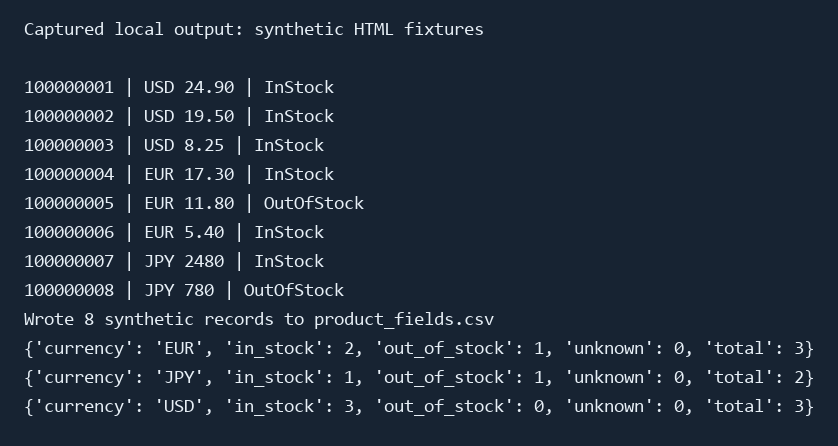
本地流程于2026年10月20日测试,环境为Windows 10、Python 3.12.10、Requests 2.34.2和Beautiful Soup 4.15.0。8份人工构造的商品HTML与17项检查均通过。测试数据用于验证解析逻辑,不代表真实商品行情。
新建工作文件夹,检查Python版本并安装依赖:
python --version
python -m pip install requests==2.34.2 beautifulsoup4==4.15.0
商品URL必须采用以下格式:
https://www.aliexpress.com/item/PRODUCT_ID.html
其中PRODUCT_ID必须替换为数字商品ID。解析器接受aliexpress.com和www.aliexpress.com,仅允许HTTPS及默认端口或443端口;输入URL不能带查询参数、片段标识或账号密码。搜索结果页、购物车、结算页和评论分页不在本教程范围内。
将以下完整代码保存为article_ali_scraper.py:
"""Strict Product JSON-LD parser and optional, bounded AliExpress fetcher."""
import argparse
import csv
import json
import os
import re
import sys
import tempfile
from datetime import datetime, timezone
from decimal import Decimal, InvalidOperation
from pathlib import Path
from urllib.parse import urljoin, urlsplit

import requests
from bs4 import BeautifulSoup

FIELDS = ['product_id', 'title', 'currency', 'price', 'availability', 'rating',
          'review_count', 'processed_at_utc', 'input_url', 'final_url', 'source_kind']
REDIRECTS = {301, 302, 303, 307, 308}


def product_id_from_url(url, expected_id=None):
    try:
        u = urlsplit(url)
        valid_host = u.hostname in {'aliexpress.com', 'www.aliexpress.com'}
        valid_port = u.port in (None, 443)
    except (ValueError, TypeError):
        raise ValueError('invalid product URL') from None
    match = re.fullmatch(r'/item/([0-9]+)\.html', u.path)
    if (u.scheme != 'https' or not valid_host or not valid_port or u.username
            or u.password or u.query or u.fragment or not match):
        raise ValueError('use an HTTPS aliexpress.com /item/ID.html URL without query or fragment')
    pid = match.group(1)
    if expected_id is not None and pid != expected_id:
        raise ValueError('redirect or Product identity mismatch')
    return pid


def has_type(obj, wanted):
    types = obj.get('@type', [])
    if isinstance(types, str):
        types = [types]
    return isinstance(types, list) and any(t in {wanted, 'https://schema.org/' + wanted,
                                                'http://schema.org/' + wanted} for t in types if isinstance(t, str))


def walk(node):
    if isinstance(node, dict):
        yield node
        for value in node.values():
            yield from walk(value)
    elif isinstance(node, list):
        for value in node:
            yield from walk(value)


def candidate_matches(item, requested_id):
    identities = []
    for key in ('url', '@id'):
        value = item.get(key)
        if not value:
            continue
        if not isinstance(value, str):
            return False
        # A fragment may identify the Product entity within its own page.
        try:
            identities.append(product_id_from_url(value.split('#', 1)[0]))
        except ValueError:
            return False
    # Never equate a seller SKU with the marketplace's product ID.
    return bool(identities) and all(pid == requested_id for pid in identities)


def numeric(value, label):
    if isinstance(value, bool):
        raise ValueError(label + ' must be numeric')
    try:
        number = Decimal(str(value))
    except (InvalidOperation, ValueError):
        raise ValueError(label + ' must be numeric') from None
    if not number.is_finite() or number < 0:
        raise ValueError(label + ' must be finite and nonnegative')
    return format(number, 'f')


def parse_product(html, input_url, final_url=None, source_kind='saved_html'):
    requested_id = product_id_from_url(input_url)
    final_url = final_url or input_url
    product_id_from_url(final_url, requested_id)
    soup = BeautifulSoup(html, 'html.parser')
    # These are sample stop markers, not a universal challenge detector.
    visible = soup.get_text(' ', strip=True).lower()
    if any(marker in visible for marker in ('slide to verify', 'verify you are human',
                                             '请拖动下方滑块完成验证')):
        raise ValueError('verification page returned')
    candidates = []
    for script in soup.find_all('script', attrs={'type': 'application/ld+json'}):
        try:
            data = json.loads(script.string or script.get_text(), parse_float=Decimal)
        except (json.JSONDecodeError, TypeError):
            continue
        candidates.extend(n for n in walk(data) if has_type(n, 'Product')
                          and candidate_matches(n, requested_id))
    if len(candidates) != 1:
        raise ValueError('requested Product identity is missing or ambiguous')
    product = candidates[0]
    title = product.get('name')
    if not isinstance(title, str) or not title.strip():
        raise ValueError('product title is missing')
    offer = product.get('offers')
    if isinstance(offer, list) and len(offer) == 1:
        offer = offer[0]
    if (not isinstance(offer, dict) or not has_type(offer, 'Offer')
            or has_type(offer, 'AggregateOffer') or 'lowPrice' in offer or 'highPrice' in offer):
        raise ValueError('a single Offer with one price is required')
    price = numeric(offer.get('price'), 'price')
    currency = str(offer.get('priceCurrency', '')).strip().upper()
    if not re.fullmatch('[A-Z]{3}', currency):
        raise ValueError('currency must contain three ASCII letters')
    availability = str(offer.get('availability', '')).rstrip('/').rsplit('/', 1)[-1]
    if availability not in {'InStock', 'OutOfStock'}:
        availability = 'Unknown'
    rating = product.get('aggregateRating', {})
    rating = rating if isinstance(rating, dict) else {}
    optional = {}
    for key, output in [('ratingValue', 'rating'), ('reviewCount', 'review_count')]:
        value = rating.get(key)
        optional[output] = ''
        if value is not None and value != '':
            try:
                parsed = numeric(value, key)
                if key != 'reviewCount' or Decimal(parsed) == Decimal(parsed).to_integral_value():
                    optional[output] = parsed
            except ValueError:
                pass
    return dict(product_id=requested_id, title=title.strip(), currency=currency,
                price=price, availability=availability, **optional,
                processed_at_utc=datetime.now(timezone.utc).isoformat(timespec='seconds'),
                input_url=input_url, final_url=final_url, source_kind=source_kind)


def fetch_product(url, session):
    requested_id = product_id_from_url(url)
    current = url
    for hop in range(6):
        with session.get(current, timeout=(10, 20), allow_redirects=False, stream=True) as response:
            if response.status_code in REDIRECTS:
                if hop == 5 or not response.headers.get('Location'):
                    raise ValueError('redirect limit exceeded or Location missing')
                target = urljoin(current, response.headers['Location'])
                product_id_from_url(target, requested_id)
                current = target
                continue
            if response.status_code == 429:
                raw = response.headers.get('Retry-After', 'not supplied')
                hint = ''.join(c for c in raw if c.isprintable())[:100]
                raise ValueError('HTTP 429; stop. Retry-After: ' + hint)
            if response.status_code != 200:
                raise ValueError('HTTP ' + str(response.status_code) + '; stop current request')
            chunks, size = [], 0
            for chunk in response.iter_content(65536):
                size += len(chunk)
                if size > 5_000_000:
                    raise ValueError('HTML exceeds 5 MB limit')
                chunks.append(chunk)
            html = b''.join(chunks).decode(response.encoding or 'utf-8', errors='replace')
            return parse_product(html, url, current, source_kind='online_response')
    raise ValueError('redirect limit exceeded')


def safe_cell(value):
    text = str(value)
    # Protect spreadsheet users from formula-like untrusted product titles.
    return "'" + text if text.lstrip().startswith(('=', '+', '-', '@')) else value


def write_csv(path, rows, fields=FIELDS):
    path = Path(path)
    path.parent.mkdir(parents=True, exist_ok=True)
    name = None
    try:
        with tempfile.NamedTemporaryFile('w', encoding='utf-8-sig', newline='',
                                         dir=path.parent, delete=False) as f:
            name = f.name
            writer = csv.DictWriter(f, fieldnames=fields)
            writer.writeheader()
            writer.writerows({key: safe_cell(row[key]) for key in fields} for row in rows)
        os.replace(name, path)
    finally:
        if name and os.path.exists(name):
            os.unlink(name)


def main():
    parser = argparse.ArgumentParser(description=__doc__)
    parser.add_argument('url', help='HTTPS product-detail URL, without tracking parameters')
    parser.add_argument('--html', type=Path, help='parse saved HTML without any network request')
    parser.add_argument('--output', type=Path, default=Path('product.csv'))
    parser.add_argument('--authorized', action='store_true', help='confirm permission for an online request')
    args = parser.parse_args()
    try:
        if args.html:
            row = parse_product(args.html.read_text(encoding='utf-8'), args.url)
        else:
            if not args.authorized:
                parser.error('online requests require --authorized; use --html for offline parsing')
            with requests.Session() as session:
                row = fetch_product(args.url, session)
        write_csv(args.output, [row])
        print('Wrote 1 record to ' + str(args.output))
    except requests.RequestException as exc:
        print('STOP: ' + type(exc).__name__ + '; check connection, proxy and credentials locally', file=sys.stderr)
        return 1
    except (ValueError, OSError) as exc:
        print('STOP: ' + str(exc), file=sys.stderr)
        return 1
    return 0


if __name__ == '__main__':
    sys.exit(main())
二、运行示例,导出商品CSV
先运行人工构造的HTML示例,可以核对解析、导出和汇总是否按预期工作。两个脚本分别负责生成8份HTML,以及读取HTML后输出CSV和JSON,全程不发送网络请求。
1.生成商品HTML示例
在同一工作文件夹中,将以下代码保存为build_examples.py:
"""Create eight explicitly synthetic parser fixtures; no network requests."""
import json
from pathlib import Path

EXAMPLES = [
    ('USB-C 7-in-1 Hub', 'USD', '24.90', 'InStock', '4.6', 328),
    ('Portable Laptop Stand', 'USD', '19.50', 'InStock', '4.5', 217),
    ('Compact Cable Organizer', 'USD', '8.25', 'InStock', None, None),
    ('Travel Packing Cubes', 'EUR', '17.30', 'InStock', '4.2', 84),
    ('Foldable Travel Bottle', 'EUR', '11.80', 'OutOfStock', None, None),
    ('Desk Cable Clips', 'EUR', '5.40', 'InStock', '4.1', 63),
    ('Adjustable Desk Lamp', 'JPY', '2480', 'InStock', '4.7', 105),
    ('Canvas Pencil Case', 'JPY', '780', 'OutOfStock', None, None),
]


def build():
    folder = Path(__file__).parent / 'saved_html'
    folder.mkdir(exist_ok=True)
    manifest = []
    for i, (title, currency, price, stock, rating, count) in enumerate(EXAMPLES, 100000001):
        url = f'https://www.aliexpress.com/item/{i}.html'
        product = {'@context': 'https://schema.org', '@type': 'Product', 'url': url,
                   'name': title, 'offers': {'@type': 'Offer', 'price': price,
                   'priceCurrency': currency, 'availability': 'https://schema.org/' + stock}}
        if rating is not None:
            product['aggregateRating'] = {'@type': 'AggregateRating', 'ratingValue': rating, 'reviewCount': count}
        html = '<!doctype html><html lang="en"><meta charset="utf-8"><title>Synthetic fixture</title><body><h1>Synthetic parser fixture; not a marketplace capture</h1><script type="application/ld+json">' + json.dumps(product) + '</script></body></html>'
        (folder / f'{i}.html').write_text(html, encoding='utf-8')
        manifest.append({'file': f'{i}.html', 'url': url, 'source_kind': 'synthetic_fixture'})
    (folder / 'manifest.json').write_text(json.dumps(manifest, indent=2), encoding='utf-8')
    print('Created 8 synthetic HTML fixtures; no marketplace requests were made.')


if __name__ == '__main__':
    build()
2.批量解析并汇总
将以下代码保存为run_local_pipeline.py。该脚本会调用前面的parse_product()和write_csv(),因此三个Python文件应放在同一目录:
"""Parse the delivered synthetic HTML and export CSV summaries."""
import json
from collections import Counter
from pathlib import Path
from article_ali_scraper import parse_product, write_csv


def main():
    root = Path(__file__).parent
    folder = root / 'saved_html'
    manifest = json.loads((folder / 'manifest.json').read_text(encoding='utf-8'))
    rows = [parse_product((folder / entry['file']).read_text(encoding='utf-8'),
                          entry['url'], source_kind=entry['source_kind']) for entry in manifest]
    write_csv(root / 'product_fields.csv', rows)
    summaries = []
    for currency in sorted({r['currency'] for r in rows}):
        counts = Counter(r['availability'] for r in rows if r['currency'] == currency)
        summaries.append(dict(currency=currency, in_stock=counts['InStock'],
                              out_of_stock=counts['OutOfStock'], unknown=counts['Unknown'], total=sum(counts.values())))
    write_csv(root / 'currency_availability_summary.csv', summaries,
              ['currency', 'in_stock', 'out_of_stock', 'unknown', 'total'])
    (root / 'product_fields.json').write_text(json.dumps(rows, indent=2), encoding='utf-8')
    for row in rows:
        print(f"{row['product_id']} | {row['currency']} {row['price']} | {row['availability']}")
    print('Wrote 8 synthetic records to product_fields.csv')
    for item in summaries:
        print(item)


if __name__ == '__main__':
    main()
在该目录运行:
python build_examples.py
python run_local_pipeline.py
第一条命令在saved_html/下创建8份HTML及清单文件manifest.json。第二条命令生成以下结果:
| 文件 | 用途 |
|---|---|
product_fields.csv |
8条商品记录,包含商品字段、输入URL、最终URL、处理时间与来源类型 |
currency_availability_summary.csv |
按币种汇总有货、缺货、库存未知及总记录数 |
product_fields.json |
与商品CSV对应的JSON记录,方便后续程序处理 |
示例的预期统计如下。这里统计的是记录数量,不是金额:
币种 |
有货InStock |
缺货OutOfStock |
未知Unknown |
合计 |
|---|---|---|---|---|
USD |
3 |
0 |
0 |
3 |
EUR |
2 |
1 |
0 |
3 |
JPY |
1 |
1 |
0 |
2 |
总计 |
6 |
2 |
0 |
8 |
3.替换为自己保存的商品HTML
用文本编辑器打开UTF-8编码的HTML,搜索application/ld+json,确认其中包含:
@type为Product的对象。- 能匹配目标商品的
url或@id。 offers中的单个Offer,以及price和priceCurrency。
如果缺少这些结构,先检查保存的文件内容。浏览器中看得到商品信息,不代表保存的HTML一定包含解析器需要的数据。
将命令中的PRODUCT_ID替换为实际商品ID:
python article_ali_scraper.py "https://www.aliexpress.com/item/PRODUCT_ID.html" --html saved-product.html --output product.csv
使用--html时,脚本只读取本地文件。成功时退出码为0,终端显示Wrote 1 record并更新CSV;字段校验失败时退出码为1,已有输出文件保持原样。
三、如何确认提取的是目标商品,而非推荐商品
商品身份由Product对象中的url和@id确定,商品标题和卖家SKU不能替代这一步。页面中必须恰好存在一个匹配目标ID的Product,否则解析器会拒绝输出。
解析器遍历所有<script type="application/ld+json">,在JSON对象、数组和@graph等嵌套结构中查找Product,支持字符串或列表形式的@type。无法解析的JSON块会被跳过。
身份匹配遵循以下规则:
url与@id至少有一个能指向目标/item/ID.html页面。- 如果两者都有非空值,每个值都必须是解析器支持的URL,且商品ID均与请求ID相同;其中一个无效也会拒绝记录。
- 结构化数据标识可带
#product等片段,匹配时先去掉片段。 - 推荐卡片、相似商品名称和卖家自定义SKU均不作为目标身份依据。
用第一组模拟HTML调用解析函数:
from pathlib import Path
from article_ali_scraper import parse_product

html = Path("saved_html/100000001.html").read_text(encoding="utf-8")
record = parse_product(
    html,
    "https://www.aliexpress.com/item/100000001.html",
    source_kind="synthetic_fixture",
)
print(record["product_id"], record["currency"], record["price"])
输出应为:
100000001 USD 24.90
这条URL仅用于标识模拟数据,保留本地运行方式即可。若页面使用未展开的JSON-LD引用、出现多个匹配Product,或采用解析器不支持的身份格式,需要根据实际HTML扩展规则;不能随意选择其中一个对象。
四、商品价格、币种和评分如何校验
必填字段不合格就拒绝整条记录;可选评分字段不合格则留空。这样可以避免把缺失评分当成0分,也避免把未知库存误判为缺货。
| 输出字段 | 校验或记录规则 | 缺失、异常时的处理 |
|---|---|---|
product_id |
必须匹配请求URL中的商品ID | 拒绝记录 |
title |
读取Product的name,去除首尾空白后不能为空 |
拒绝记录 |
price |
读取单个Offer.price,使用十进制数值,要求有限且不小于0 |
拒绝记录 |
currency |
去除首尾空白并转为大写,必须为3个ASCII字母 | 拒绝记录 |
availability |
只明确识别InStock和OutOfStock |
缺失或其他状态记为Unknown |
rating |
可选;要求为有限、非负数值 | 留空 |
review_count |
可选;要求为有限、非负整数 | 留空 |
processed_at_utc |
记录本次解析的UTC时间 | 不能当作网页保存时间 |
input_url、final_url |
记录输入地址和经校验的最终地址 | 最终地址与目标商品不符时拒绝记录 |
source_kind |
区分模拟数据、本地HTML和在线响应 | 保留数据来源 |
单个标价与价格区间要分开处理
解析器接受一个Offer对象,或只包含一个Offer的列表。以下情况会被拒绝:
- 多个Offer,需要先确定具体商品规格或报价。
AggregateOffer聚合报价。- 含
lowPrice或highPrice的价格区间。 - 负价格、
NaN、无穷值或无法转为数值的价格。
这些限制是为了让每条记录只对应一个明确标价,不代表其他Schema.org结构无效。字段定义可查阅Schema.org的Offer说明。
代码将JSON小数直接解析为Decimal,也接受十进制字符串,避免先转为二进制浮点数造成精度偏差。CSV按定点小数文本输出,因此科学计数法可能展开为普通数字。
币种校验只检查“三个大写英文字母”的格式,并不验证该代码是否属于ISO 4217货币列表。需要严格货币校验时,应另加最新有效币种白名单。评分校验也只检查数值是否有限且非负,不校验平台评分上限。
标价不能直接当作最终成交价
JSON-LD中的单个Offer价格不一定等于结算金额。商品规格、促销、税费、运费和收货地都可能改变最终价格。做竞品比价或商品价格监测时,还应单独记录:
- 选定的商品规格或变体。
- 目标市场与收货国家、地区。
- 页面采集时间与适用促销条件。
- 运费和税费是否计入。
代理出口IP不能证明这些条件已经一致。本地HTML模式下,final_url默认等于input_url,也不能据此还原网页保存前的跳转过程。原始采集URL、采集时间和本次处理时间应分别保留。
五、用Excel检查CSV,避免商品ID失真和误算价格
导入CSV时,先把商品ID设为文本,再检查评分缺失与库存分类。不同币种的价格应分组分析,不能直接相加或计算混合均价。
在Excel中选择“数据→从文本/CSV”,导入product_fields.csv,将product_id列的数据类型设为文本,避免长数字ID被四舍五入。评分空值继续留空。
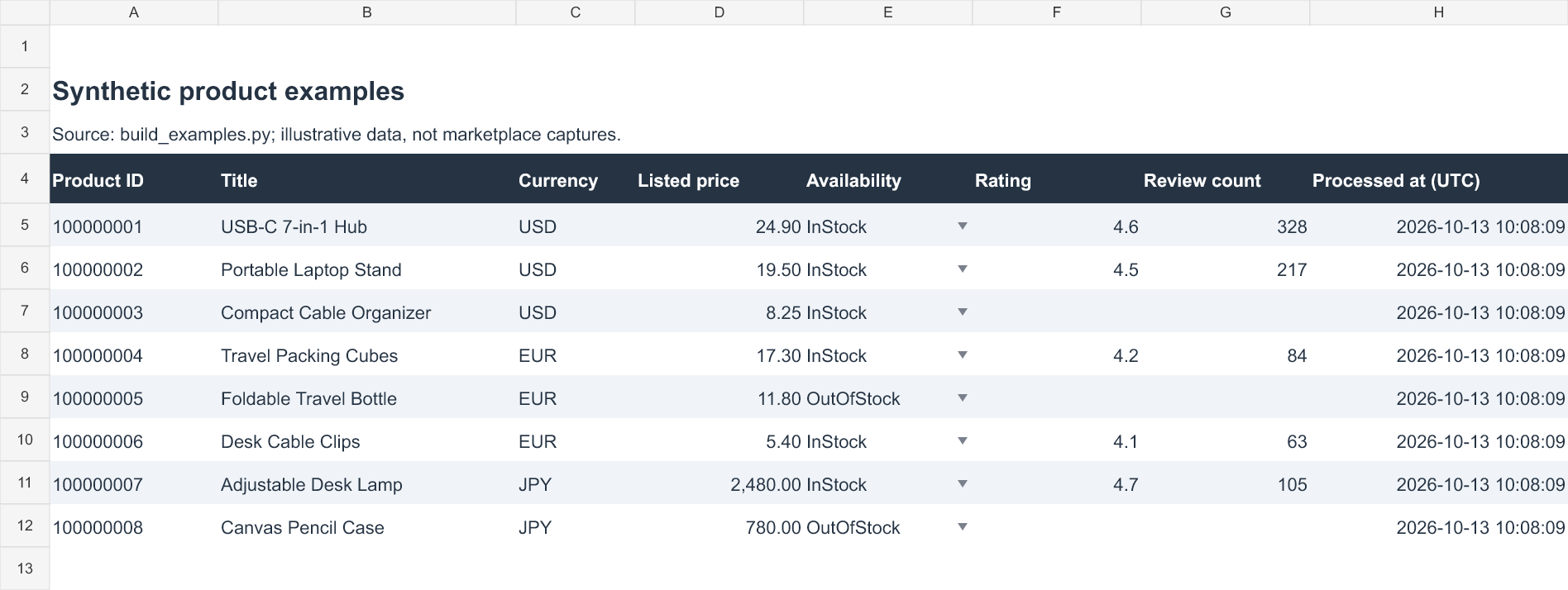
为对应下方截图和公式,创建两个工作表,分别命名为Product Fields和Summary:
- 在
Product Fields第4行放表头,第5—12行放8条记录。 - A—H列依次为商品ID、标题、币种、标价、库存状态、评分、评论数和处理时间。
- 输入URL、最终URL和来源类型放在右侧其余列。
前面的Python脚本只生成CSV和JSON,不会自动创建Excel工作簿;工作表与公式需要按以下步骤设置。
按币种与库存状态统计商品数量
在Summary的A4:E4依次填写“币种、有货、缺货、未知、合计”,A5:A7依次填写USD、EUR、JPY。在B5输入:
=COUNTIFS('Product Fields'!$C$5:$C$12,$A5,'Product Fields'!$E$5:$E$12,"InStock")
- C5使用相同公式,将
"InStock"改为"OutOfStock"。 - D5将条件改为
"Unknown"。 - E5输入
=SUM(B5:D5),再将B5:E5向下填充到第7行。 - B8输入
=SUM(B5:B7),横向填充到E8,计算总数。
8条示例应得到6条有货、2条缺货、0条未知。解析器将缺失或无法识别的库存值记为Unknown,不会归入缺货。
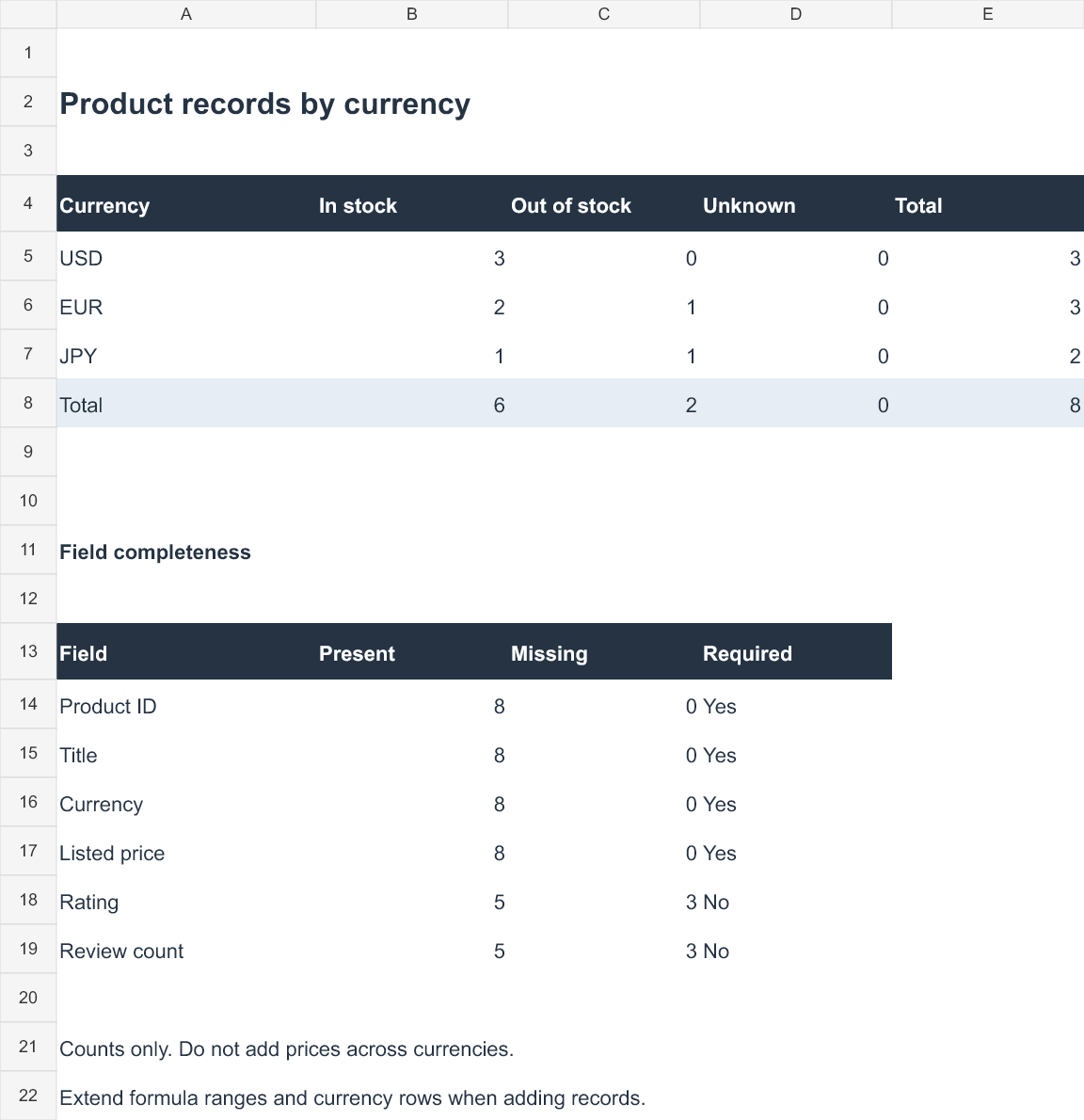
新增记录时,扩展公式引用范围,并在汇总表补充新币种。手动替换数据时,可选中Product Fields的E5:E12,在“数据→数据验证→序列”中设置InStock,OutOfStock,Unknown,限制库存字段的输入值。
统计缺失字段,保留真实的0值
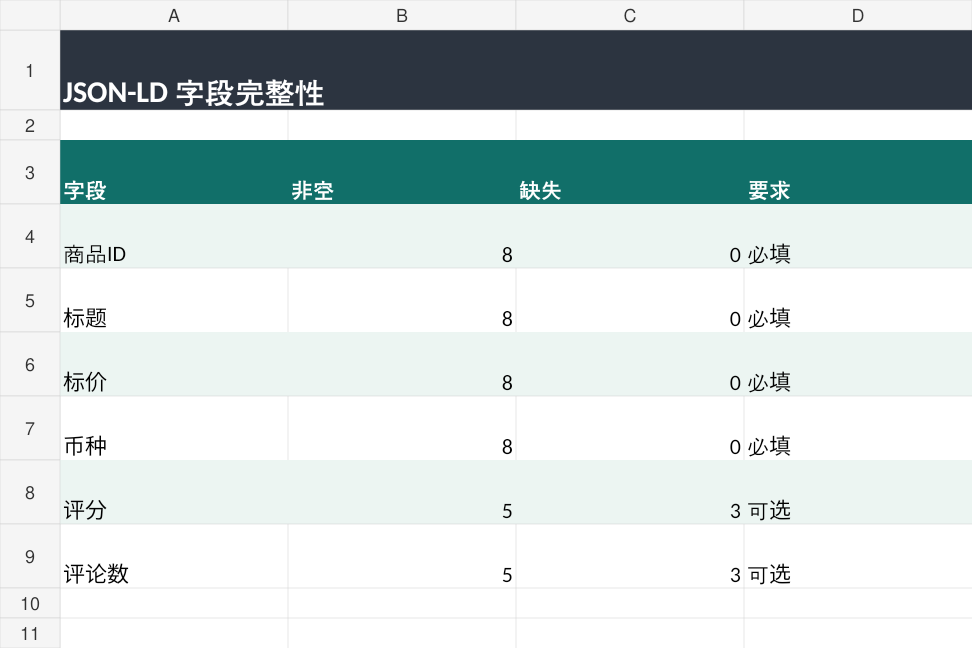
示例中8条记录都有商品ID、标题、币种和价格;5条有评分及评论数,3条缺少这两项。统计评分空值:
=COUNTBLANK('Product Fields'!F5:F12)
统计已有评分的记录数:
=ROWS('Product Fields'!F5:F12)-COUNTBLANK('Product Fields'!F5:F12)
对A—D列和G列应用相同思路,可以核对其他字段的完整度。数值0属于已有值,不应当作缺失项。分析更大的数据集时,先按币种、商品规格、市场和采集时段分组,再计算价格统计量。
六、采集失败如何排查:先验证页面,再看网络
HTTP200只能说明请求收到成功响应,不能证明拿到了目标商品。验证页、登录页、错误商品或不完整的结构化数据,都不应写成有效商品记录。

在使用自己的HTML前,先用模拟文件的副本检查失败处理:
- 将价格改为
"NaN",运行单文件解析命令,应以退出码1结束,已有CSV不变。 - 恢复文件,再将Product URL改成其他商品ID,应同样拒绝输出。
- 恢复文件,删除库存字段,应输出
Unknown。 - 删除可选评分信息,评分与评论数应留空。
每次检查后恢复输入,再测试下一项;这些操作只需本地文件。
| 现象 | 优先检查 | 处理方式 |
|---|---|---|
| 找不到唯一匹配的Product | url、@id、重复对象及HTML内容 |
检查保存的页面,不用推荐商品数据补位 |
| HTTP200但没有有效商品 | 登录提示、验证内容、最终URL | 停止当前流程,核对页面身份 |
| 缺少价格或只有价格区间 | Offer结构、已选规格 | 拒绝记录,或另写支持规格的解析器 |
| HTTP403 | 页面访问条件与任务权限 | 停止当前请求 |
| HTTP429 | Retry-After与请求频率 |
停止请求,按提示安排后续允许的访问 |
HTTP407或ProxyError |
代理协议、地址、端口和认证信息 | 在本地检查配置,避免泄露密码 |
| 连接超时或读取超时 | 网络链路与响应进度 | 定位故障后再决定是否重试 |
解析器只内置了几个常见验证提示词,不是通用验证页检测器。即使没有命中提示词,响应也仍须通过商品身份与必填字段校验。
批处理会先解析全部记录,再写入主CSV。每个CSV通过临时文件和os.replace替换,JSON则直接写入;三个输出文件之间不具备整体事务性。检查一次运行结果时,要同时核对文件时间和记录数。
此外,CSV导出会为以=、+、-或@开头的疑似公式内容添加前导单引号,降低外部商品标题被电子表格当作公式执行的风险。
七、在线接入:请求参数与页面校验边界
在线接入需要先确认任务的访问许可和目标站规则,再把商品页响应交给同一个解析器。Requests不执行JavaScript,响应中仍须包含唯一匹配的Product和受支持的Offer,才能输出记录。
代码中的fetch_product(url, session)负责请求和重定向校验,随后调用parse_product()提取字段。命令行的--authorized用于显式启用在线请求,访问权限仍需事先确认。
请求层的参数如下:
| 参数 | 设定 | 含义 |
|---|---|---|
| 连接超时 | 10秒 | 限制建立连接的等待时间 |
| 读取超时 | 20秒 | 限制等待响应数据的时间,不代表任务总时限 |
| 重定向 | 最多5次 | 每次都须指向允许域名下的同一商品 |
| 响应体上限 | 5,000,000字节 | 按iter_content()返回的字节块累计,超过上限即停止;之后才解码为文本 |
| HTTP错误 | 停止,不自动重试 | 遇到429时输出Retry-After提示后退出 |
Requests的iter_content()会自动处理gzip、deflate等受支持的内容压缩,因此这里限制的是解压后的字节数,不是网络传输的压缩包大小。读取超时也不是整个下载任务的总时限,具体行为见Requests响应读取说明与超时说明。
如果HTML没有所需结构,脚本会拒绝该响应,不会自动补齐字段或处理验证挑战。用于商品比价时,保留商品字段和采集条件即可,无需额外采集买家身份等个人信息。
八、Rola IP在商品采集流程中负责什么
Rola IP可以为需要特定网络出口的任务提供住宅代理连接;商品身份和字段校验仍由解析器负责。出口地区、页面币种、商品规格和收货地需要分别记录,不能相互替代。
需要接入代理时,可以从Rola IP住宅代理产品入口了解服务,再使用控制台实际发放的主机、端口和认证信息配置连接。对商品记录而言,代理配置属于采集条件,不能替代页面里的币种、收货地或商品规格信息。
Requests官方文档确认支持http_proxy、https_proxy、no_proxy和all_proxy,也接受这些环境变量的大写形式。下例用HTTPS_PROXY配置HTTPS目标的代理连接,依据为Requests官方代理文档。
macOS或Linux终端:
export HTTPS_PROXY="http://USERNAME:PASSWORD@HOST:PORT"
Windows PowerShell:
$env:HTTPS_PROXY = "http://USERNAME:PASSWORD@HOST:PORT"
目标URL使用HTTPS,并不意味着代理地址也必须以https://开头;代理地址中的协议应与服务商发放的接入方式一致。
将所有大写占位符替换为控制台发放的实际参数,并注意:
- 用户名或密码含保留字符时,构造代理URL前要进行百分号编码。
- 不要将真实凭证放入共享脚本、终端截图或导出的命令历史。
NO_PROXY可能让部分目标绕过代理,需要核对程序实际出口。- PowerShell自身的代理设置与它启动的Python进程配置存在区别,具体可参考Windows PowerShell设置代理教程。
遇到HTTP503时,先判断响应来自目标站点、CDN还是代理链路,再调整配置。更换出口IP本身无法解决账号限制、会话状态或页面结构变化。
九、做好数据校验,让商品比价更可靠
先运行示例核对输出,再处理实际商品数据。保留商品身份、采集时间、规格和市场条件,并在Excel中检查缺失字段、按币种分组,才能让后续比价结果有明确依据。