How to Scrape Etsy: Python API Export and HTML Parsing

Sep 18, 2026 · Use Cases · 12 min read
TL;DR
Start with Etsy’s documented API when your application’s approved purpose and endpoint access cover the data you need. This guide separates an API-to-CSV workflow from a synthetic HTML-parsing exercise. Validate fields, preserve price components, deduplicate accepted records, and audit each page. Run the credential-free fixture first; the live API mode is provided for approved users but was not run here. A proxy changes the route, not permissions, quotas, or data completeness.
Choose the Appropriate Data Path
| Method | Useful when | Evidence needed before use | Example result |
|---|---|---|---|
| Etsy Open API v3 | An approved app needs listing fields available from a documented endpoint | Approved application purpose, API key, endpoint access, and any required OAuth scope | JSON results converted to CSV |
| Saved HTML parsing | Etsy has expressly authorized the specific page collection, or the page is your own test fixture | Written scope and a captured page whose structure you can test | Product JSON-LD converted to CSV |
| Optional outbound proxy | An approved deployment requires a known exit IP or regional network test | Supported protocol, credentials, and an HTTPS echo endpoint you control | A separate route check, not implemented or tested here |
Etsy’s API Terms of Use, section 3 require approval of an application’s purpose. Section 5, prohibited behavior items 24–25 addresses automated access or scraping without Etsy’s express written authorization and separately restricts API collection for analytics and similar uses without that authorization. These are contractual terms for API use, not a universal legal ruling about every jurisdiction or every data source. Confirm that your particular project and intended use are covered before running the live branch. A public URL or an API key alone is not a substitute for that check.
Prerequisites and Data Contract
The offline examples were run on Windows with Python 3.12.14 and use only the standard library. The live API branch requires an approved app and an x-api-key header. Etsy’s authentication documentation currently specifies <keystring>:<shared_secret> for that header; private or scoped endpoints additionally require OAuth 2.0. The findAllListingsActive reference lists API-key authorization for the endpoint used here. Recheck its requirements before deployment.
Define a minimum record before collecting pages. A malformed response should never look like a successful zero-result search.
| Field | Required for this example? | Validation and handling |
|---|---|---|
results |
Yes | Must be an array; an empty array is a valid empty page. |
listing_id |
Yes | Positive integer; deduplicate only accepted records. |
title and url |
Yes | Nonempty title and HTTPS URL; reject incomplete records. |
price.amount, price.divisor, price.currency_code |
Yes | Integer, nonnegative amount; positive integer divisor; three-letter currency. Retain numeric components as strings for recalculation. |
price_decimal |
Computed | Decimal quotient under the active precision context, not a universal two-decimal display format. |
captured_at_utc, source, buyer_country |
Context | Preserve when and how the record was obtained; buyer country may be blank. |
Etsy explains its Money fields in the API definitions: an amount of 2450 with divisor 100 is 24.5 units of the stated currency. This example stores the amount and divisor as traceable numeric strings, not the original JSON bytes. Decimal arithmetic avoids binary floating-point artifacts, but division still follows the active Decimal precision; 1 / 3 is not an infinitely exact decimal. Formatting 24.5 as 24.50 USD is a separate presentation decision. A listing price is not necessarily a tax- and shipping-inclusive checkout total.
Step 1: Request One Approved Search Page
The documented findAllListingsActive endpoint is https://openapi.etsy.com/v3/application/listings/active. Its keywords, limit, and offset parameters make a bounded query possible. The delivered etsy_data_demo.py has a separate, unexecuted live mode that makes one direct request per page and never retries a denial from another IP. This excerpt shows the request and error boundary; the complete callable script is in the companion package.
query = urlencode({"keywords": keyword, "limit": 25, "offset": offset})
url = "https://openapi.etsy.com/v3/application/listings/active?" + query
request = Request(url, headers={"x-api-key": key, "Accept": "application/json"})
opener = build_opener(ProxyHandler({}))  # Direct route for this example.
try:
    with opener.open(request, timeout=15) as response:
        payload = json.load(response)
except HTTPError as exc:
    raise FetchError(f"http_{exc.code}", status=exc.code,
                     retry_after=exc.headers.get("Retry-After")) from exc
This excerpt assumes imports, key, offset, and FetchError defined in the complete script; it is not a second standalone program. The URL syntax guide documents an offset ceiling of 12,000 and generic pagination bounds; the findAllListingsActive operation in the API reference documents its specific inputs. The example fixes the page size at 25 and the total at no more than three attempted pages. Those limits are a request budget, not permission to exhaust results. The code uses ProxyHandler({}) to avoid inheriting an ambient proxy for this route; approved environments that require an organizational proxy need their own reviewed networking configuration. Never print the API key or put it in a published command or screenshot.
Step 2: Validate, Normalize, and Export
The important ordering is: validate each row, append it, then reserve its ID. If the first appearance of ID 1001 has no valid price but a later one is complete, the later one can still be accepted. This is the decisive branch from the delivered normalize() function; the complete validator and CSV read-back are in etsy_data_demo.py, with edge cases in test_etsy_data_demo.py.
for index, item in enumerate(items):
    # Earlier checks have validated the ID, title, URL, Money object, and currency.
    amount, divisor = money.get("amount"), money.get("divisor")
    if type(amount) is not int or type(divisor) is not int or amount < 0 or divisor <= 0:
        rejected.append((index, "invalid_money"))
        continue
    price_decimal = Decimal(amount) / Decimal(divisor)
    accepted.append({
        "listing_id": listing_id,
        "title": title.strip(),
        "price_decimal": str(price_decimal),
        "currency": currency,
        "amount": str(amount),
        "divisor": str(divisor),
        "url": url,
        "captured_at_utc": captured_at,
        "source": source,
        "buyer_country": buyer_country,
    })
    seen.add(listing_id)  # An invalid earlier duplicate never reserves the ID.
The code above is an excerpt inside a larger loop, not a paste-ready standalone function. The full script validates results before iterating, checks title, HTTPS URL, and currency, and writes the CSV only after validation. It then reopens the CSV to compare the exported fields. This is a deliberately strict teaching contract, not a claim that every Etsy response has the same optional fields or that a CSV reader such as Excel will interpret every arbitrary string safely. For spreadsheet display, handle untrusted strings separately from the raw export. The example covers listing ID, title, price, currency, URL, and capture context—not reviews, inventory, variants, shipping, shop details, or a checkout total.
Step 3: Run the Synthetic Fixture and Check the CSV
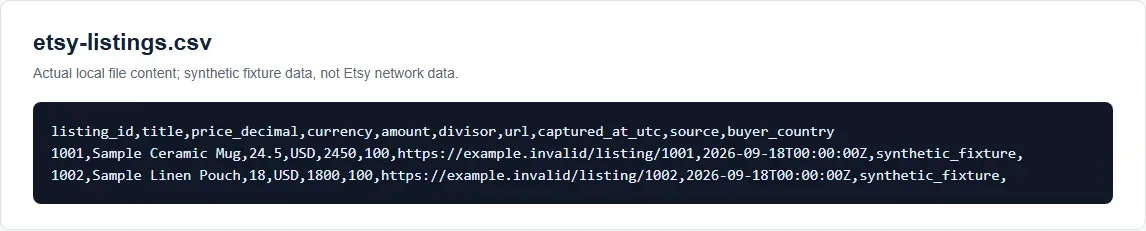
The fixture contains three invented entries: two distinct listings and a valid duplicate of ID 1001. Their URLs use example.invalid; none identifies a real Etsy product. Save this as sample-etsy-api-response.json:
{"results": [
  {"listing_id": 1001, "title": " Sample Ceramic Mug ",
   "url": "https://example.invalid/listing/1001",
   "price": {"amount": 2450, "divisor": 100, "currency_code": "USD"}},
  {"listing_id": 1002, "title": "Sample Linen Pouch",
   "url": "https://example.invalid/listing/1002",
   "price": {"amount": 1800, "divisor": 100, "currency_code": "USD"}},
  {"listing_id": 1001, "title": "Duplicate card",
   "url": "https://example.invalid/listing/1001",
   "price": {"amount": 2450, "divisor": 100, "currency_code": "USD"}}
]}
The delivered companion files sit together: etsy_data_demo.py (fixture and optional live API modes), sample-etsy-api-response.json, test_etsy_data_demo.py, make_offline_page_log.py, parse_authorized_html_demo.py, and sample-authorized-page.html. The full script is part of this delivery; when this article is published separately, host the same version of those files so these commands remain reproducible. Run the offline path from that directory (or use the absolute script path):
python --version
python etsy_data_demo.py --mode fixture
python -m unittest -q test_etsy_data_demo.py
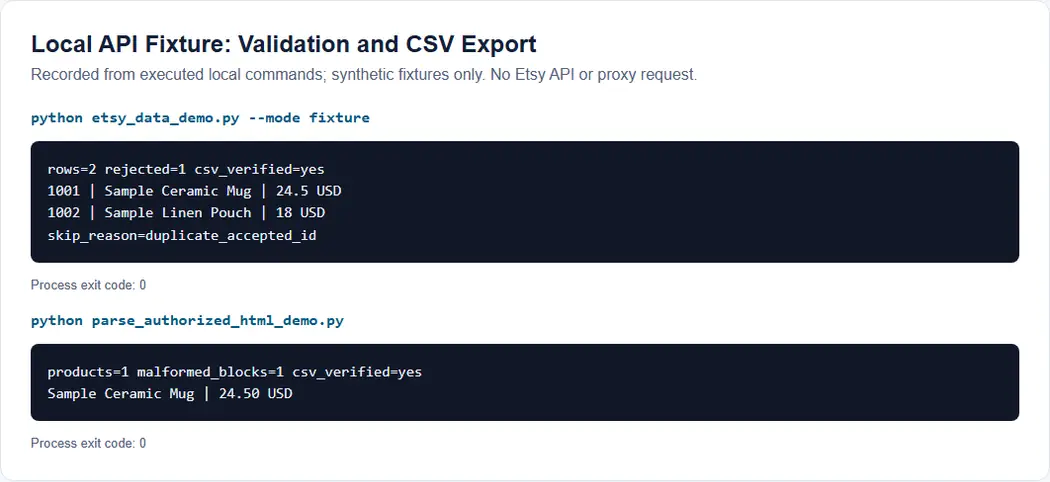
In the local Python 3.12.14 run on September 18, 2026, the script reopened etsy-listings.csv and printed:
rows=2 rejected=1 csv_verified=yes
1001 | Sample Ceramic Mug | 24.5 USD
1002 | Sample Linen Pouch | 18 USD
skip_reason=duplicate_accepted_id
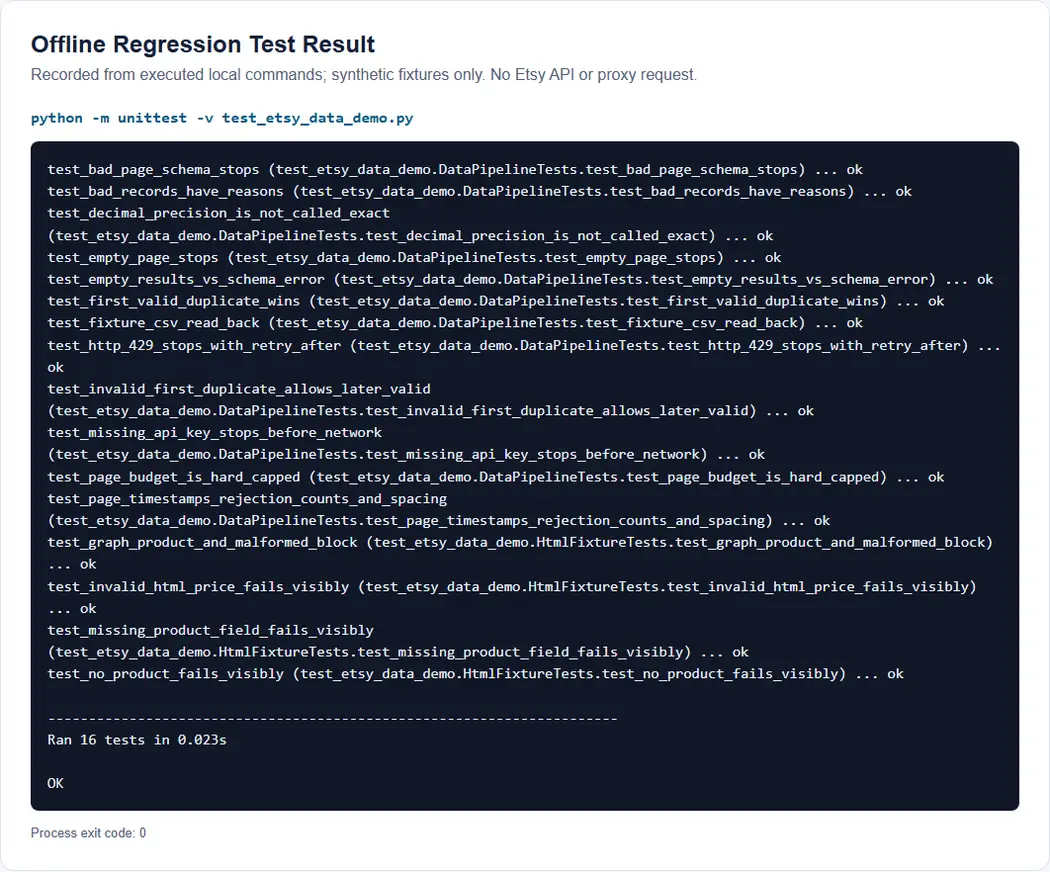
The accompanying regression suite passed 16 local, offline tests (Ran 16 tests ... OK). They cover rejected and duplicate records, Money validation, CSV read-back, bounded-page logs and stop conditions, missing API credentials without a request, and HTML parser boundaries. The fixture result and test output are reproducible from the delivered files. They establish behavior for synthetic inputs only: no live Etsy endpoint, current Etsy page, or Rola gateway was tested.
Step 4: Paginate Within a Small, Approved Budget
Once a single page is validated and the approved use permits more, advance offset by 25. The delivered collector enforces one to three attempted pages of 25 results, rather than treating a reported count as a command to download everything. It returns both rows and page_log; this excerpt shows the per-page audit fields:
entry = {
    "offset": page * 25,
    "requested_limit": 25,
    "captured_at_utc": utc_now(),
    "received_count": 0,
    "accepted_count": 0,
    "rejection_counts_by_reason": {},
    "stop_reason": None,
}
# The complete collector fills the counts and reason, then returns rows, page_log.
The --interval-seconds setting must be chosen from the approved app’s current quota; it is not a universal safe rate. The collector timestamps each attempt, logs received/accepted counts and rejection reasons, and records http_status and retry_after if an HTTP error occurs. A 401, 403, or 429 stops the run without trying another IP, and the CLI writes the page log but does not publish a partial CSV as a success. An empty valid page, no new valid records, or reaching the configured budget are separate stop reasons. An entire rejected page does not prove all results were collected. Offset results can drift as listings change; timestamps and deduplication aid diagnosis but cannot guarantee no gaps. Etsy’s rate-limit guide documents per-second and rolling-day quotas, plus 429 and retry-after.
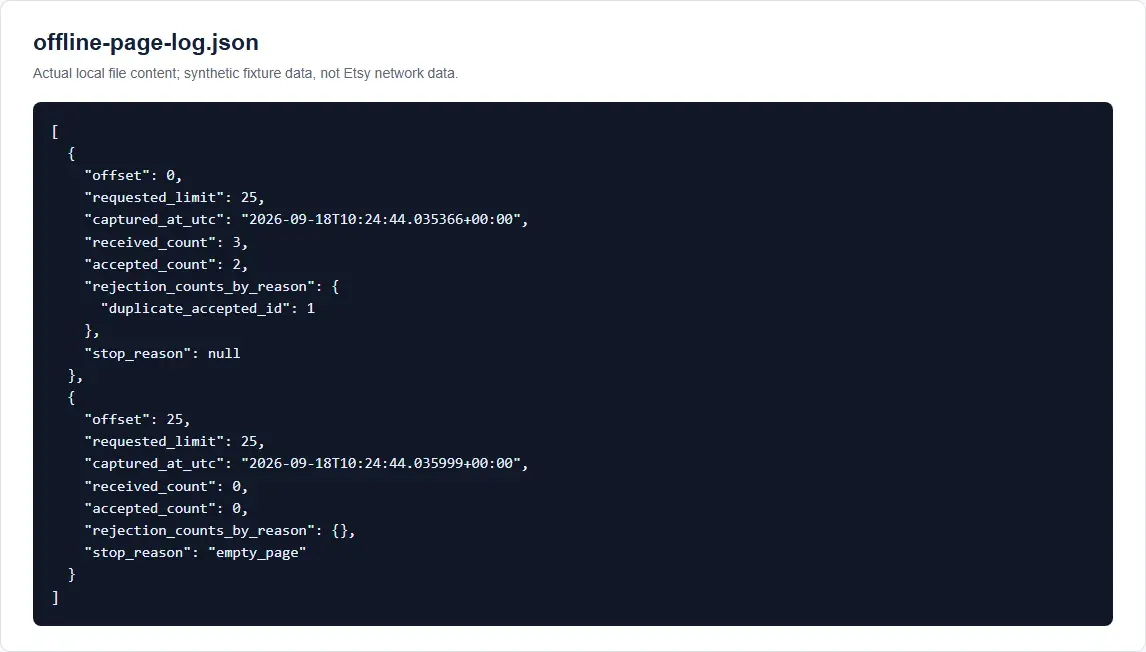
For a readable page-by-page audit example, python make_offline_page_log.py runs the same collector against the synthetic first page and an empty second page. It writes offline-page-log.json with offsets 0 and 25, one rejected duplicate, and the final empty_page stop reason. This is a real local run, not a recorded Etsy response.
How Do I Run the Approved API Export?
Only after your actual app purpose and endpoint access are approved, inject ETSY_API_KEY using your organization’s secret-management method. For the documented header format, use the app keystring and shared secret as described in Etsy’s authentication guide. The following is a command template, not a claim of a live run; replace the interval with the value your current quota and workload permit:
python etsy_data_demo.py --mode live --approved-use --keyword "ceramic mug" --max-pages 1 --interval-seconds <approved-interval> --output etsy-api-listings.csv --page-log etsy-page-log.json
The live entry point calls fetch_approved_listings() through collect_bounded(), then verifies the CSV by reading it back. It does not execute when --mode fixture is selected. The --approved-use switch is the operator’s acknowledgement, not Etsy authorization; likewise, source="etsy_api" is only a provenance label. Avoid typing secrets directly into recorded commands or screenshots.
Step 5: Parse Authorized HTML Offline
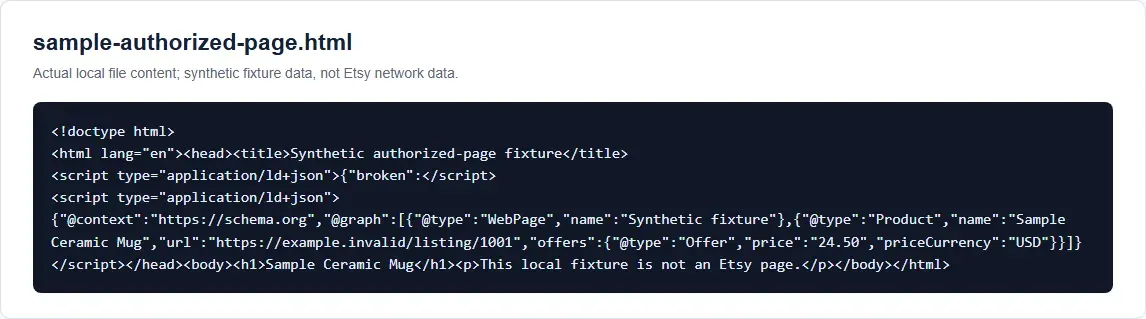
The API path does not require HTML scraping. If Etsy has separately authorized page collection for your purpose, develop the HTML parser against a saved page first. The following synthetic sample-authorized-page.html contains one malformed JSON-LD block and another with @graph → Product → Offer. It is not a snapshot of Etsy’s current DOM.
<script type="application/ld+json">{"broken":</script>
<script type="application/ld+json">
{"@context":"https://schema.org","@graph":[
  {"@type":"Product","name":"Sample Ceramic Mug",
   "url":"https://example.invalid/listing/1001",
   "offers":{"@type":"Offer","price":"24.50","priceCurrency":"USD"}}
]}
</script>
Save the following as parse_authorized_html_demo.py. It counts malformed blocks, walks an object, list, or @graph, validates a Product, then writes and rereads a CSV. It never requests a website:
import csv
import json
import re
from decimal import Decimal, InvalidOperation
from html.parser import HTMLParser
from pathlib import Path
from urllib.parse import urlsplit

class JsonLdExtractor(HTMLParser):
    def __init__(self):
        super().__init__()
        self.capture, self.parts, self.documents, self.malformed = False, [], [], 0

    def handle_starttag(self, tag, attrs):
        if tag == "script" and dict(attrs).get("type") == "application/ld+json":
            self.capture, self.parts = True, []

    def handle_data(self, data):
        if self.capture:
            self.parts.append(data)

    def handle_endtag(self, tag):
        if tag == "script" and self.capture:
            self.capture = False
            try:
                self.documents.append(json.loads("".join(self.parts)))
            except json.JSONDecodeError:
                self.malformed += 1

def products_in(value):
    if isinstance(value, list):
        for child in value:
            yield from products_in(child)
    elif isinstance(value, dict):
        if value.get("@type") == "Product":
            yield value
        if "@graph" in value:
            yield from products_in(value["@graph"])

def parse_local_html(text):
    parser = JsonLdExtractor()
    parser.feed(text)
    products = [p for document in parser.documents for p in products_in(document)]
    if not products:
        raise ValueError(f"No Product JSON-LD; malformed_blocks={parser.malformed}")
    rows = []
    for product in products:
        offer = product.get("offers")
        if isinstance(offer, list):
            offer = offer[0] if offer else None
        if not isinstance(offer, dict):
            raise ValueError("Product has no usable Offer")
        name, price, currency, url = (
            product.get("name"), offer.get("price"),
            offer.get("priceCurrency"), product.get("url"))
        if not all(isinstance(v, str) and v.strip() for v in (name, price, currency, url)):
            raise ValueError("Product is missing a required field")
        try:
            number = Decimal(price)
            if not number.is_finite() or number < 0:
                raise InvalidOperation
        except InvalidOperation as exc:
            raise ValueError("Product price is not a valid number") from exc
        if not re.fullmatch(r"[A-Z]{3}", currency):
            raise ValueError("Product currency is invalid")
        try:
            parsed = urlsplit(url)
        except ValueError as exc:
            raise ValueError("Product URL is malformed") from exc
        if parsed.scheme != "https" or not parsed.netloc:
            raise ValueError("Product URL is not HTTPS")
        rows.append({"title": name.strip(), "price": str(number),
                     "currency": currency, "url": url})
    return rows, parser.malformed

if __name__ == "__main__":
    rows, malformed = parse_local_html(
        Path("sample-authorized-page.html").read_text(encoding="utf-8"))
    with open("authorized-html-products.csv", "w", newline="", encoding="utf-8") as stream:
        writer = csv.DictWriter(stream, fieldnames=["title", "price", "currency", "url"])
        writer.writeheader(); writer.writerows(rows)
    with open("authorized-html-products.csv", newline="", encoding="utf-8") as stream:
        restored = list(csv.DictReader(stream))
    if restored != rows:
        raise AssertionError("HTML CSV read-back mismatch")
    print(f"products={len(rows)} malformed_blocks={malformed} csv_verified=yes")
    for row in rows:
        print(f"{row['title']} | {row['price']} {row['currency']}")
Run:
python parse_authorized_html_demo.py
Expected and observed local output:
products=1 malformed_blocks=1 csv_verified=yes
Sample Ceramic Mug | 24.50 USD
This parser supports a Product object with a string name, HTTPS URL, and an Offer containing a string price and currency. It finds that object directly, in a list, or in @graph; if offers is a list, it reads only the first item. It does not generally support AggregateOffer, variants, numeric prices, or every JSON-LD @type representation. A malformed block is counted, while an invalid selected Product fails the example rather than being silently guessed or quarantined. For a real page that you are expressly authorized to save, first identify its page type, save time, and relevant application/ld+json blocks in the local copy. Then add a matching fixture and test before extending the parser. The synthetic result is not proof that a current Etsy listing, search, or shop page has been parsed successfully.
Step 6: Verify an Optional Rola IP Route
The examples above do not need a proxy. When an approved deployment requires a fixed egress route, Rola IP can supply a web scraping proxy as the network layer, not Etsy access rights. First confirm the actual endpoint, protocol, and authentication method in your account. Then configure the client explicitly and send a single HTTPS request to an echo endpoint you control; compare the observed exit IP with the expected session. Keep TLS verification enabled.
An authenticated HTTP proxy carrying HTTPS traffic must complete the CONNECT handshake before the target’s TLS session. A Python handler arrangement that is syntactically valid may still fail on a proxy’s 407 during that handshake. No authenticated CONNECT or Rola gateway test was performed for this article, so it does not publish a copy-paste proxy-authentication recipe. Before adding that route, use a client and authentication method verified against your actual gateway. Test correct credentials, rejected credentials, TLS certificate validation, and whether bypass rules affect both the owned echo endpoint and Etsy API host. Do not clear organizational proxy rules without approval. An HTTP-proxy configuration is not interchangeable with a SOCKS5 endpoint. Use Rola IP’s residential proxy configuration guide for account-specific setup, then record the observed route independently of the data export.
For an authorized regional display check, hold the product URL, account state, currency, language, delivery country, and session fixed; change only the intended route. Otherwise, differences cannot be attributed to the exit IP. Changing IP does not guarantee a local price or bypass an API quota. The API’s parameters and Etsy’s decisions still determine the response.
Diagnose Errors by Layer
| Symptom | Layer to inspect | Stop or correction |
|---|---|---|
Proxy 407 or tunnel failure |
Proxy protocol, credentials, host/port, TLS tunnel | Correct your own configuration; do not send an Etsy request yet. |
| Owned echo reports unexpected exit | Proxy route or session setting | Check the approved proxy configuration. |
Etsy API 401 or 403 |
App key, approved purpose, endpoint, OAuth scope | Stop and use Etsy developer settings or support. |
Etsy API 429 |
Per-key quotas and retry-after |
Stop the run; follow the documented quota process. |
Empty results |
Query or truly empty search page | Treat as success only if the response schema is valid. |
| Missing title, malformed money, invalid URL | Parser/data contract | Quarantine the record with a reason; never publish a guessed value. |
| HTML verification or CAPTCHA page | Access-control response, not listing markup | Stop automated collection; do not rotate IPs to defeat the control. |
Do not treat a different exit IP as evidence of authorization.
Conclusion
A useful Etsy data workflow has two independent checks: the access and purpose must be approved, and the extracted records must pass a testable data contract. The API example covers a small search, bounded pagination, validation, and CSV read-back; the HTML example covers only a synthetic saved page, not a live Etsy DOM. If your approved deployment needs an IP route, verify it separately with an endpoint you control. That separation makes the pipeline easier to reproduce without mistaking a working network connection for permission or data quality.