How to Scrape a Website That Requires Login with Python?

Sep 30, 2026 · Guides · 13 min read
When you scrape data after logging in, the key is not simply sending a username and password once. The login request, cookies, CSRF token, protected pages, and any later pagination requests all need to remain part of the same valid session. This guide uses a local ecommerce demo site to show how to scrape a website that requires login with Python using a Requests form login, Playwright for JavaScript-rendered pages, and the correct place to add a Rola IP sticky-session proxy.
The demo credentials in this article are only for the local test site. On real websites, use only accounts you own or are authorized to use, and follow the site’s access rules. The code and runtime results target the local demo site, so the field names and selectors from the two environments should not be mixed.
Quick Answer
| Login or page characteristic | Recommended method | How to decide |
|---|---|---|
| Simple form, hidden CSRF field, and product HTML is present in the response | requests.Session + BeautifulSoup |
Use the same session to GET the login page, POST the form, and then GET the protected page. |
| SSO, interactive forms, or products loaded by JavaScript | Playwright browser context | Let the browser execute scripts and retain cookies, then wait for the target data to appear. |
| MFA, CAPTCHA, or server-side authorization is required | Complete authorization manually or use the official API | A program cannot gain account permissions by changing IP addresses. |
| An authorized login workflow needs a stable network exit | Same browser/session + sticky proxy | Keep the cookie state and exit IP stable separately, then change sessions only after the task is complete. |
The shortest path is to open the login page and use the browser Network panel to confirm the request method, form fields, CSRF source, and post-login redirect. If the product data is already in the server-returned HTML, start with Requests. If the HTML contains only a container and products are loaded later through XHR or fetch, use Playwright. Do not treat HTTP 200 alone as proof of a successful login; verify the protected URL, the login cookie, and actual product rows.
Tutorial Environment
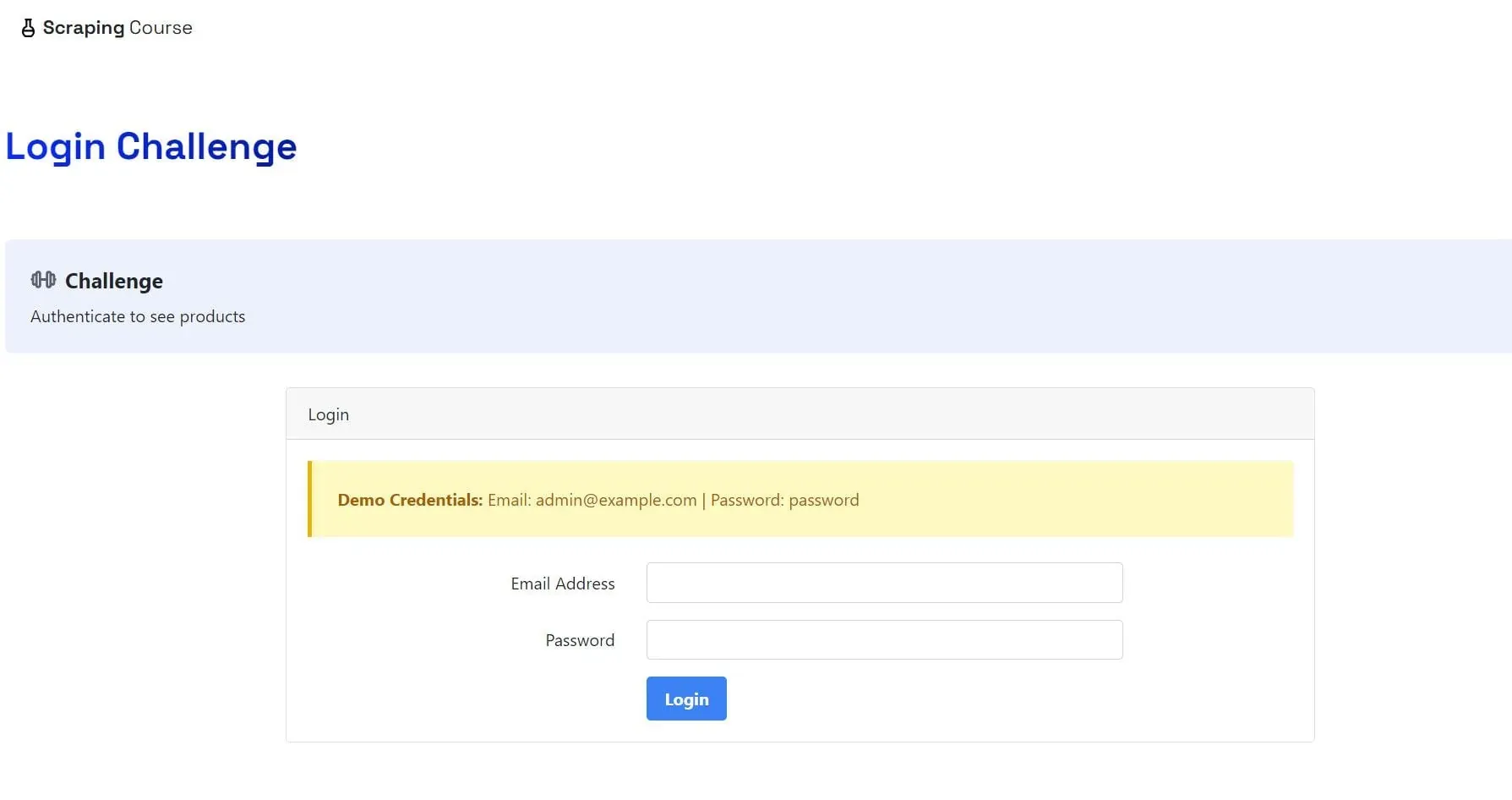
*Figure 1. Scraping Course Login Challenge, included as a reference example of a login-gated page. *
The examples use a controlled ecommerce workflow with a login form, a server-rendered product page, and a JavaScript-rendered catalog. Apply the same workflow only to a site and account you are authorized to access. Replace BASE, the form fields, credentials, and selectors with values from that site.
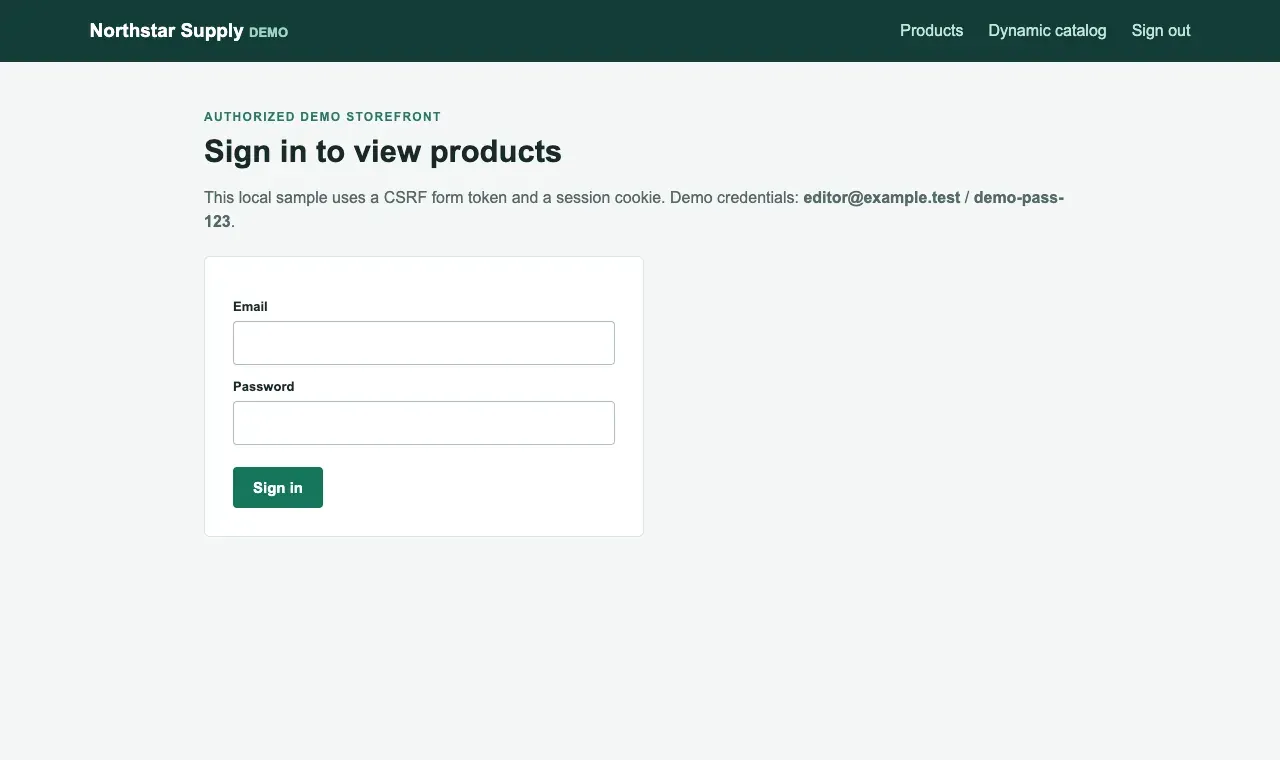
Figure 2. Example login page for a controlled demo storefront.
For background on CSRF protection in login workflows, see the OWASP Cross-Site Request Forgery Prevention Cheat Sheet.
Method 1: Use a Requests Session to Scrape a Website That Requires Login
Step 1: Read the Form and Extract the Dynamic CSRF Token
First install requests and beautifulsoup4, then use a Session to request the login page. The session automatically keeps cookies set by the server. A hidden token must be extracted from the current response rather than copied from a previous visit. On a real site, the field may not be named csrf_token, so confirm the actual name in the browser form and Network payload.
Code 1. Install dependencies and check the tool versions
python -m pip install requests beautifulsoup4
python --version
python -m pip show requests beautifulsoup4
Code 2. Use the same Session to fetch the login page and CSRF token
with requests.Session() as session:
    login_page = session.get(BASE + "/login", timeout=10)
    login_page.raise_for_status()
    soup = BeautifulSoup(login_page.text, "html.parser")
    token_input = soup.select_one('input[name="csrf_token"]')
    if not token_input or not token_input.get("value"):
        raise RuntimeError("Login form has no CSRF token")
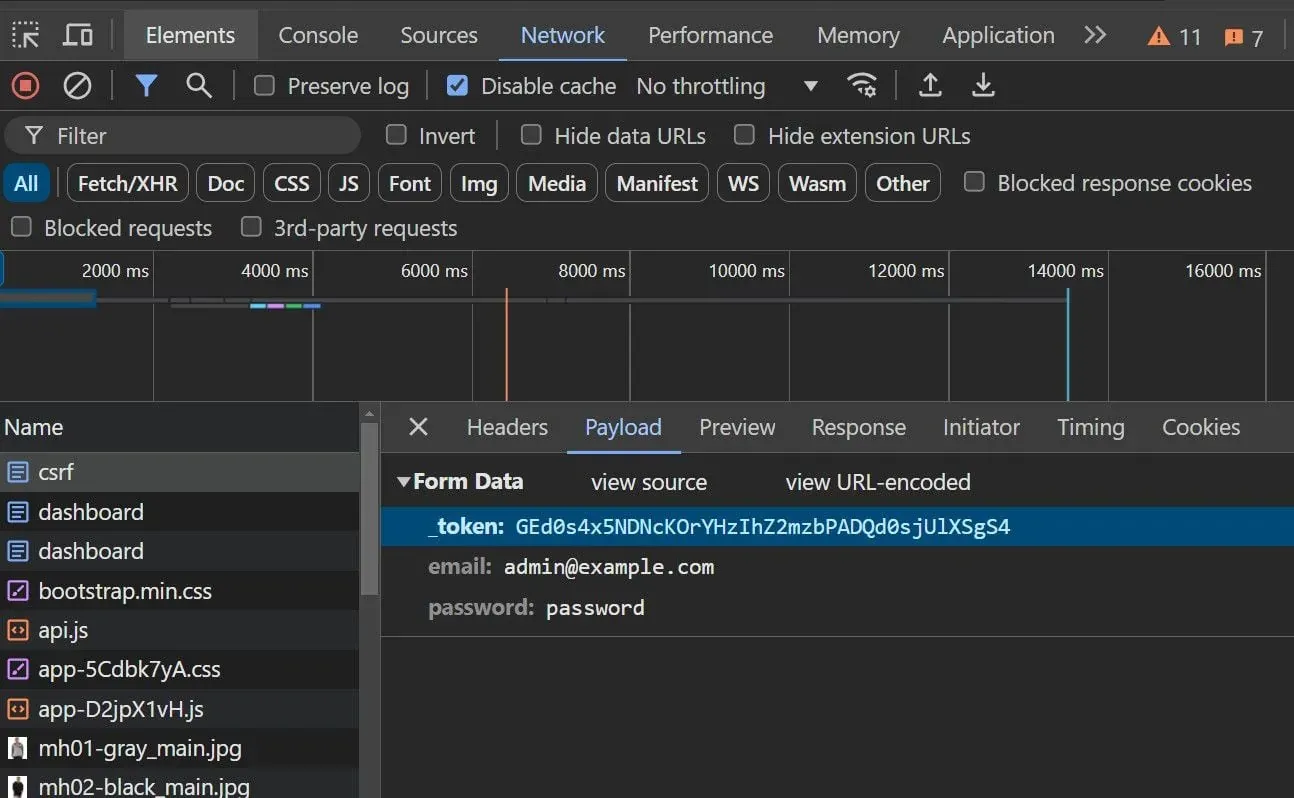
Figure 3. The reference site’s Network Payload panel shows _token, email, and password.
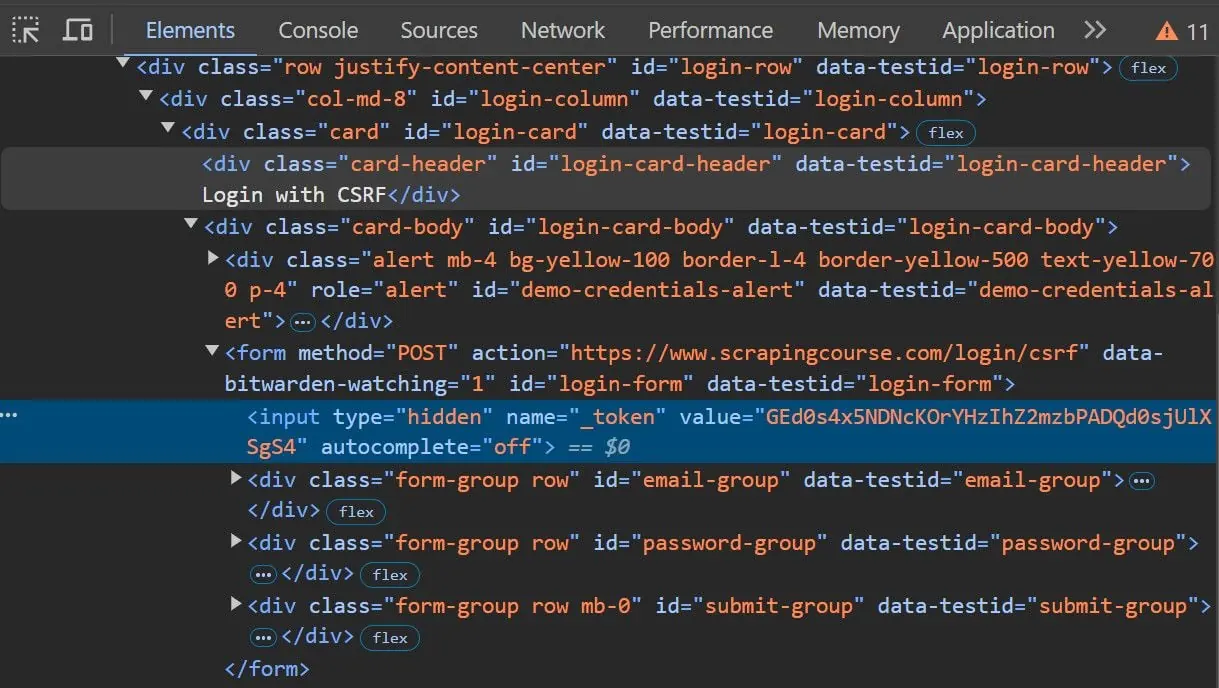
Figure 4. The reference form contains a hidden input named _token and posts to /login/csrf.
Step 2: Submit the Form and Verify the Cookie and Protected Page
Use the same session to POST email, password, and the CSRF token. Then GET /products again and confirm that the final URL still ends in /products. Some sites return 200 even when authentication fails, so the status code alone is not enough. In this demo, CSV fields can be extracted from the SKU, name, and price cells in each .product row.
Code 3. Submit the credentials and verify that the session remains authenticated
login = session.post(BASE + "/login", data={
    "csrf_token": token_input["value"],
    "email": USER,
    "password": PASSWORD,
}, timeout=10)
login.raise_for_status()

if "demo_session" not in session.cookies:
    raise RuntimeError("Login did not create a session cookie")

protected = session.get(BASE + "/products", timeout=10)
protected.raise_for_status()
if not protected.url.endswith("/products"):
    raise RuntimeError("Protected page redirected to login")
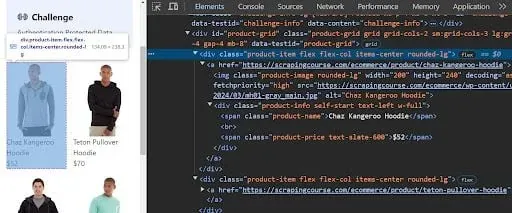
Figure 5. Inspecting the CSS classes used by product elements. Re-check the selectors when adapting the workflow to another site.
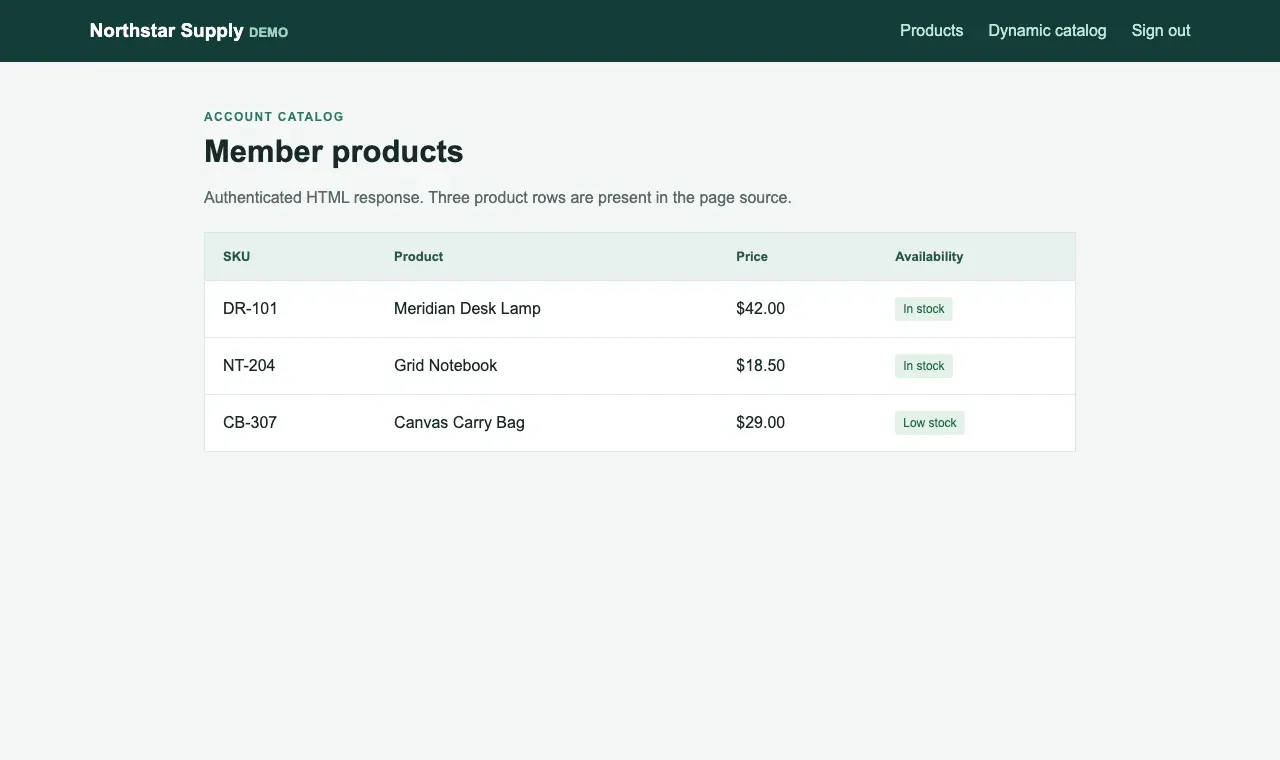
Figure 6. The protected product page opened after login with the same Session. Three product rows are visible in the page source.
A complete runnable Requests version appears in Appendix A and can be saved as requests_login.py. It outputs products_requests.csv and uses utf-8-sig to reduce encoding problems in common spreadsheet applications.
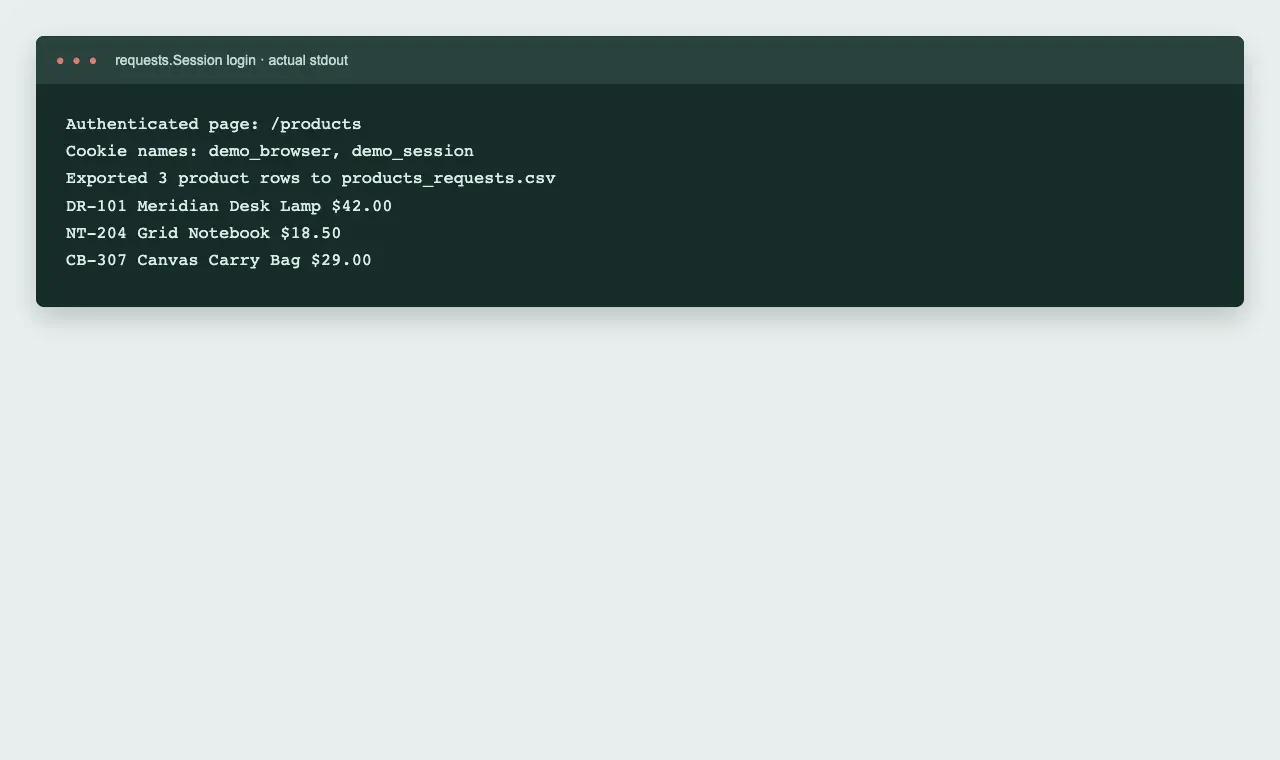
Figure 7. Actual output from requests_login.py, showing cookie names, the protected page, and three product records.
Method 2: Use Playwright to Scrape JavaScript-Rendered Websites
If the authenticated page contains only an empty container and products are inserted by browser fetch or XHR requests, parsing only the first HTML response with Requests often produces an empty table. Playwright can follow the real browser login flow and reuse cookies stored in the browser context. In this demo, the script waits for #catalog[data-state="ready"] and the first .product row instead of relying on a fixed sleep delay.
Code 4. Install Playwright and Chromium
python -m pip install playwright
python -m playwright install chromium
python -m playwright --version
Code 5. Log in with the browser and wait for JavaScript-rendered product rows
with sync_playwright() as playwright:
    browser = playwright.chromium.launch(headless=True)
    context = browser.new_context()
    page = context.new_page()
    page.goto(BASE + "/login", wait_until="domcontentloaded")
    page.get_by_label("Email").fill(USER)
    page.get_by_label("Password").fill(PASSWORD)
    with page.expect_navigation(url=BASE + "/products"):
        page.get_by_role("button", name="Sign in").click()
    page.goto(BASE + "/dynamic", wait_until="domcontentloaded")
    page.locator('#catalog[data-state="ready"] tr.product').first.wait_for()
    rows = page.locator("tr.product").count()
    print("Rendered product rows:", rows)
    browser.close()
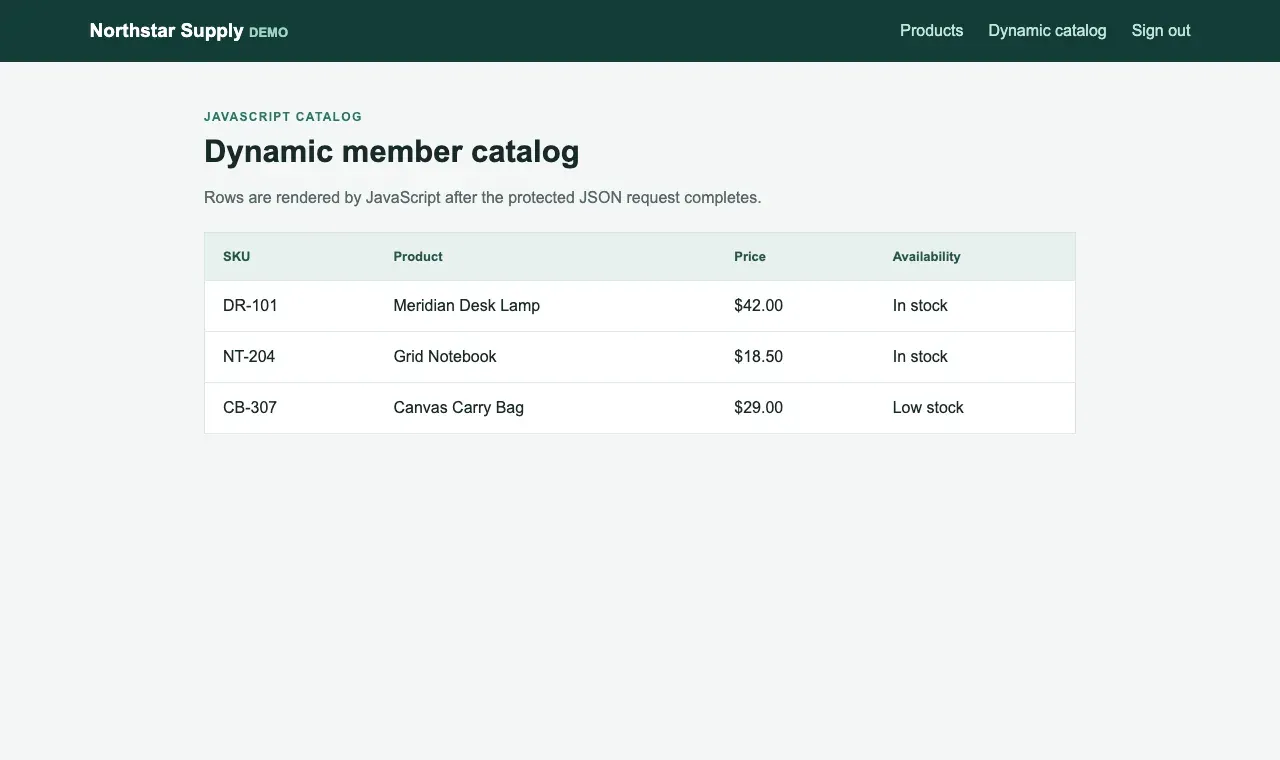
Figure 8. The member product page after Playwright waits for JavaScript rendering. The three rows are produced by a protected JSON request.
If the target uses SSO or MFA, use the site’s official login process only when you have permission. A CAPTCHA or second authentication factor should not be treated as an error that can be bypassed with a proxy. For long-running authorized tasks, Playwright can save storage_state as described in its documentation, but that file contains session credentials and should be access-controlled and refreshed after expiration.
See the official Playwright Authentication documentation for browser-session persistence.
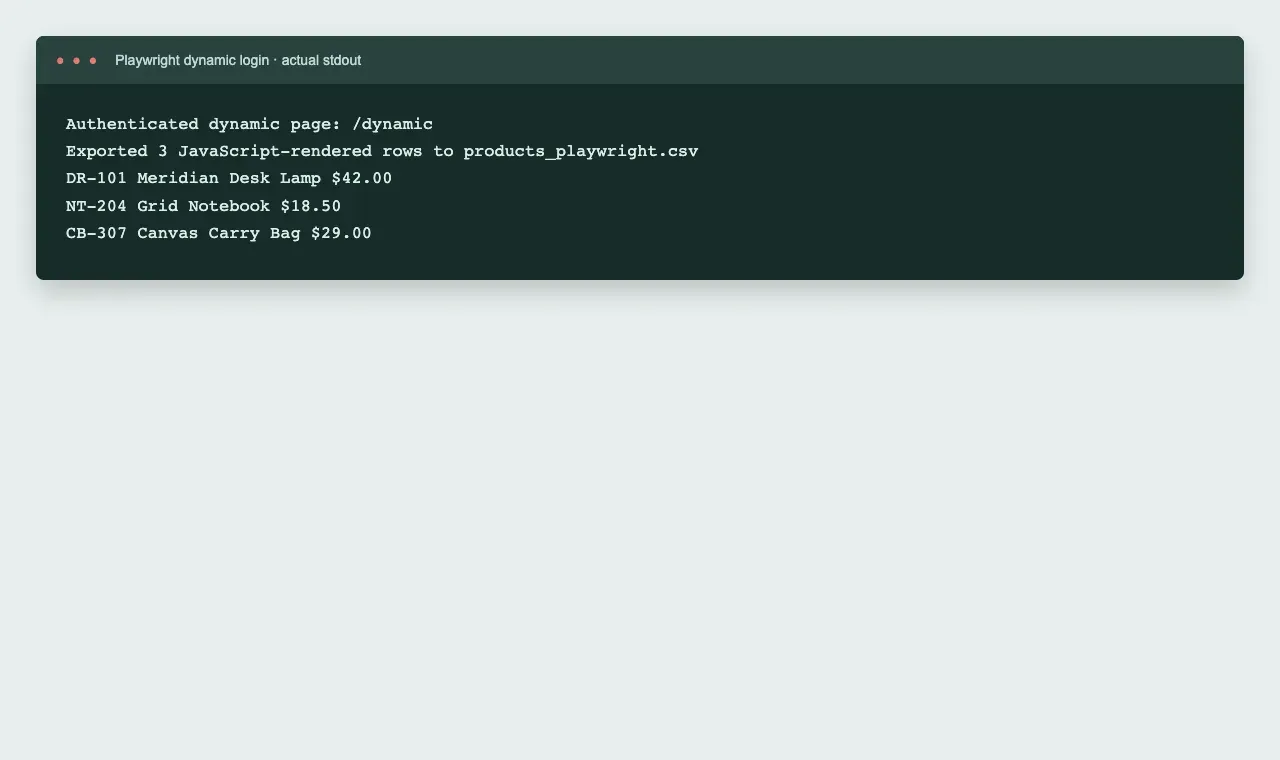
Figure 9. Actual output from playwright_login.py, showing the authenticated dynamic page and three JavaScript-rendered records.
The Critical Challenge: Keep the Cookie Session Stable and Control Request Rate
| State to preserve | Requests | Playwright | Common mistake |
|---|---|---|---|
| Login cookie | Keep the same requests.Session |
Keep the same browser context | Creating a new client and assuming it is still logged in |
| CSRF token | Re-read the form before login | Submit through the browser’s form flow | Hard-coding a one-time token in the script |
| Exit IP | Keep the same proxy session identifier | Keep the same proxy configuration for the browser instance | Rotating the exit IP in the middle of login and causing risk-control or state problems |
| Request rate | Use timeouts, rate limits, and bounded retries | Wait for elements and limit concurrency | Treating 429 as an error that should be retried forever |
A cookie proves that the client holds authenticated session state. A sticky proxy only tries to preserve the same network exit; it does not store cookies and cannot give an unauthorized account additional access. Rotating proxies are better suited to independent public-page requests. For workflows with login, carts, pagination, or other dependent steps, keep one session identifier for the whole task and switch only after the task is finished.
For more detail on routing choices, read Rola IP’s sticky vs rotating proxies guide. For Requests cookie handling, see the Python Requests Session tutorial.
Production Solution: Add a Rola IP Sticky Proxy in Python
Rola IP’s parameter documentation specifies that the session ID is the value after the underscore in the account name, for example account_login001. For Rotating Residential, a complete example is account_login001-country-us-sessiontime-10; Rotating Datacenter and Mobile IP use their documented account-name markers. Session duration is represented by -sessiontime-10 for 10 minutes, with a documented range of 1 to 120 minutes.
Country targeting is supported across the documented networks, while state and city targeting are limited to Rotating Residential. The frequently seen example username-session-123456@proxy.rola-ip.co:port is not the syntax shown on the current parameter page. Use the proxy host, port, network marker, and account type shown in your own console. If another Rola documentation page shows a different legacy example, use the current Proxy Parameters page and the marker for the network in your account.
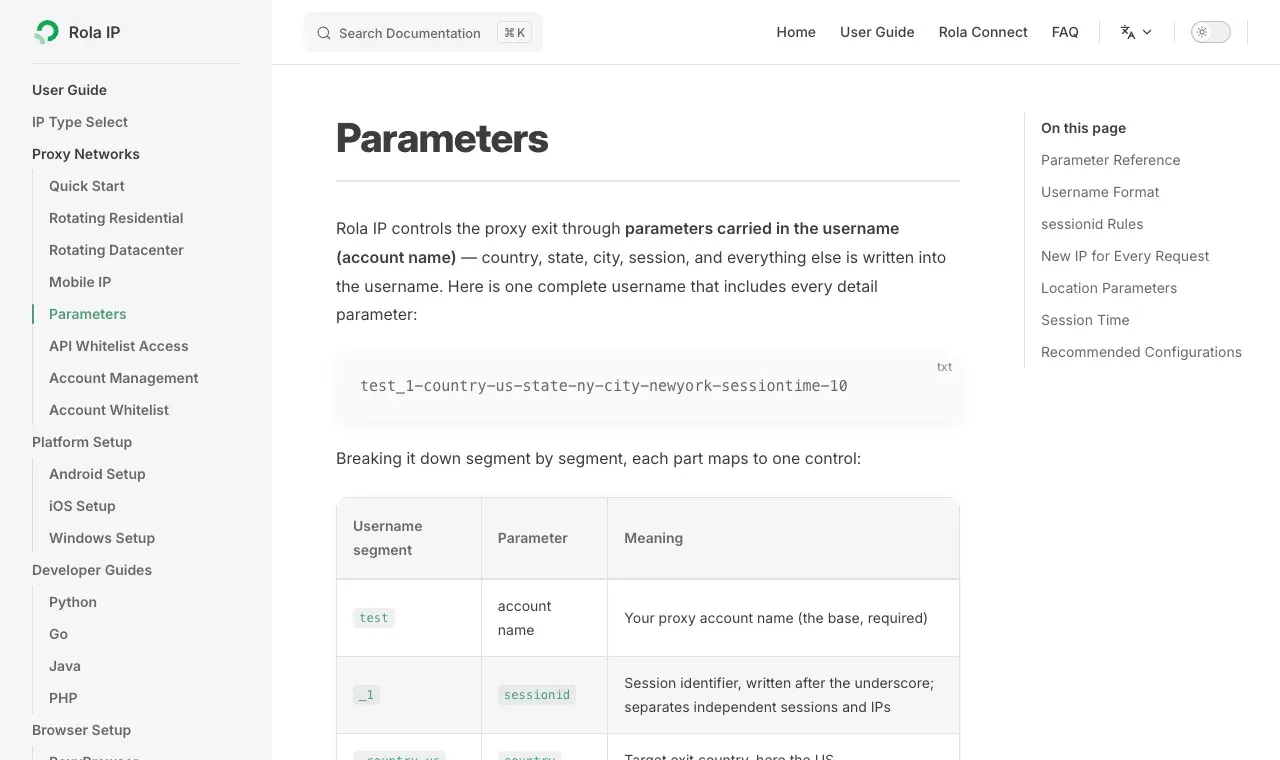
Figure 10. Rola IP’s Parameters documentation, showing sessionid, location, and sessiontime encoded in the username.
Start with the Rola IP proxy parameters documentation, then configure your account using the Python proxy integration guide. The official parameter page was checked on 2026-09-29: sessionid is the value after the underscore in the account name, sessiontime is measured in minutes and supports 1–120, and HTTP/SOCKS5 use the documented gateway ports 1000/2000 respectively. These values can change, so verify the current documentation and the network-specific account marker before deployment.
Code 6. Keep a fixed proxy session and cookie container in Requests
import os
from urllib.parse import quote

import requests

# ROLA_PROXY_USER is the base account name from the Rola IP console,
# without the generated _sessionid and location suffix.
# Environment: ROLA_PROXY_USER, ROLA_PROXY_PASSWORD, ROLA_COUNTRY
account = os.environ["ROLA_PROXY_USER"]
password = os.environ["ROLA_PROXY_PASSWORD"]
country = os.getenv("ROLA_COUNTRY", "us").lower()
session_id = os.getenv("ROLA_SESSION_ID", "login001")
minutes = int(os.getenv("ROLA_SESSION_MINUTES", "10"))
gateway = os.getenv("ROLA_PROXY_GATEWAY", "gate.rola.vip:1000")
username = f"{account}_{session_id}-country-{country}-sessiontime-{minutes}"
proxy_url = f"http://{quote(username, safe='')}:{quote(password, safe='')}@{gateway}"

session = requests.Session()
session.proxies.update({"http": proxy_url, "https": proxy_url})
# Use this one session for GET login form, POST login and GET product pages.
Code 7. Keep the same proxy identity in Playwright
from playwright.sync_api import sync_playwright

proxy = {
    "server": "http://" + gateway,
    "username": username,
    "password": password,
}

browser = playwright.chromium.launch(headless=True, proxy=proxy)
context = browser.new_context()
# Keep this browser context for the entire authorized login workflow.
The two snippets above show the integration point; Code 7 reuses the gateway and username values built in Code 6. Appendix C builds the documented username and gateway values with URL-safe credentials. Before production use, verify the exit IP through an authorized IP-echo service and confirm that requests at the beginning and end of the same task use a consistent exit. The official Python integration page documents HTTP on port 1000 and SOCKS5 on port 2000; this article uses HTTP.
Rola IP’s web scraping proxy page can help compare routes. If the proxy returns 407, use the 407 Proxy Authentication Required guide to troubleshoot authentication.
Best Practices Checklist Before Scraping Authenticated Pages in Production
For idempotent GET requests, a bounded backoff can handle transient failures without turning a rate limit into an endless retry loop. Do not blindly retry a credential-submitting POST, and honor the target’s Retry-After value when it is present:
import time
from datetime import datetime, timezone
from email.utils import parsedate_to_datetime


def get_with_backoff(session, url, attempts=3):
    for attempt in range(attempts):
        response = session.get(url, timeout=10)
        if response.status_code != 429 and response.status_code < 500:
            response.raise_for_status()
            return response
        if attempt == attempts - 1:
            response.raise_for_status()
        retry_after = response.headers.get("Retry-After")
        if retry_after and retry_after.isdigit():
            delay = int(retry_after)
        elif retry_after:
            retry_at = parsedate_to_datetime(retry_after)
            if retry_at.tzinfo is None:
                retry_at = retry_at.replace(tzinfo=timezone.utc)
            delay = max(0, int((retry_at - datetime.now(timezone.utc)).total_seconds()))
        else:
            delay = 2 ** attempt
        time.sleep(min(delay, 30))
    raise RuntimeError("unreachable")
- Confirm that the account, target pages, and intended use of the data are authorized. Prefer the site’s official API or export feature when available.
- Store usernames, passwords, and proxy credentials in environment variables or a secrets manager. Do not log full cookies, tokens, or
Authorizationheaders. - Inspect the login page’s method, action, form fields, and CSRF source before writing the script. Do not copy sample field names directly into code for another site.
- Define login success using the final protected URL, a valid cookie, and at least one expected data record. HTTP 200 by itself is not enough.
- Complete stateful tasks inside one cookie container and one proxy session. Follow the documented
sessiontimeand avoid changing the exit IP midway through the workflow. - For transient failures, use a small bounded retry count, honor
Retry-Afteron HTTP 429, and reduce request frequency. Do not retry forever or rotate IPs to evade a limit. - Set request timeouts, intervals, and concurrency limits. When you receive 429, back off according to the server’s guidance rather than rotating IPs to evade limits.
- Before export, validate the SKU, price, encoding, and source URL. Do not accidentally write the login page or an empty container to CSV.
Appendix A: Runnable Requests Login and Export Script
Set DEMO_BASE_URL, DEMO_USERNAME, and DEMO_PASSWORD to values for an authorized test site, then run the script below. Replace the form fields and selectors when the target site uses different names. The screenshots show the controlled example output described in the tutorial.
Complete Requests script, part 1 of 2
"""Sign in to the local demo storefront and export protected HTML products."""

import csv
import os
from pathlib import Path
from urllib.parse import urljoin

import requests
from bs4 import BeautifulSoup

BASE = os.environ["DEMO_BASE_URL"].rstrip("/") + "/"
USER = os.environ["DEMO_USERNAME"]
PASSWORD = os.environ["DEMO_PASSWORD"]
OUTPUT = Path(os.getenv("OUTPUT_CSV", "products_requests.csv"))


def collect():
    with requests.Session() as session:
        session.headers.update({"User-Agent": "AuthorizedDemoResearch/1.0"})
        login_page = session.get(urljoin(BASE, "login"), timeout=10)
        login_page.raise_for_status()
        token_input = BeautifulSoup(login_page.text, "html.parser").select_one(
            'input[name="csrf_token"]'
        )
        if not token_input or not token_input.get("value"):
            raise RuntimeError("Login form has no CSRF token")

        login = session.post(
            urljoin(BASE, "login"),
            data={"csrf_token": token_input["value"], "email": USER, "password": PASSWORD},
            timeout=10,
        )
        login.raise_for_status()
        if "demo_session" not in session.cookies:
            raise RuntimeError("Login did not create a session cookie")
Complete Requests script, part 2 of 2
        protected = session.get(urljoin(BASE, "products"), timeout=10)
        protected.raise_for_status()
        if not protected.url.endswith("/products"):
            raise RuntimeError(f"Protected page redirected to {protected.url}")
        soup = BeautifulSoup(protected.text, "html.parser")
        products = []
        for row in soup.select("tr.product"):
            products.append({
                key: row.select_one("." + key).get_text(strip=True)
                for key in ("sku", "name", "price")
            })
        if not products:
            raise RuntimeError("Login succeeded, but no product rows were found")
        return products, sorted(session.cookies.keys())


def main():
    products, cookie_names = collect()
    with OUTPUT.open("w", newline="", encoding="utf-8-sig") as handle:
        writer = csv.DictWriter(handle, fieldnames=("sku", "name", "price"))
        writer.writeheader()
        writer.writerows(products)
    print("Authenticated page: /products")
    print("Cookie names:", ", ".join(cookie_names))
    print(f"Exported {len(products)} product rows to {OUTPUT}")
    for item in products:
        print(item["sku"], item["name"], item["price"])


if __name__ == "__main__":
    main()
Appendix B: Runnable Playwright Dynamic Login Script
On first use, run python -m playwright install chromium. If you want the local test to use a system Chrome installation, set CHROME_PATH; most readers can leave it unset and use the Chromium installed by Playwright.
Complete Playwright script, part 1 of 2
"""Sign in with a browser and wait for JavaScript-rendered product rows."""

import csv
import os
from pathlib import Path

from playwright.sync_api import sync_playwright

BASE = os.environ["DEMO_BASE_URL"].rstrip("/")
USER = os.environ["DEMO_USERNAME"]
PASSWORD = os.environ["DEMO_PASSWORD"]
CHROME = os.getenv("CHROME_PATH")
OUTPUT = Path(os.getenv("OUTPUT_CSV", "products_playwright.csv"))


def collect():
    with sync_playwright() as playwright:
        options = {"headless": True}
        if CHROME:
            options["executable_path"] = CHROME
        browser = playwright.chromium.launch(**options)
        try:
            context = browser.new_context()
            page = context.new_page()
            page.goto(BASE + "/login", wait_until="domcontentloaded")
            page.get_by_label("Email").fill(USER)
            page.get_by_label("Password").fill(PASSWORD)
            with page.expect_navigation(url=BASE + "/products"):
                page.get_by_role("button", name="Sign in").click()
            page.goto(BASE + "/dynamic", wait_until="domcontentloaded")
            page.locator('#catalog[data-state="ready"] tr.product').first.wait_for()
            products = page.locator("tr.product").evaluate_all(
                "rows => rows.map(row => ({"
                "sku: row.querySelector('.sku').textContent.trim(),"
                "name: row.querySelector('.name').textContent.trim(),"
Complete Playwright script, part 2 of 2
                "price: row.querySelector('.price').textContent.trim()"
                "}))"
            )
            if not products:
                raise RuntimeError("Dynamic page rendered no products")
            return products
        finally:
            browser.close()


def main():
    products = collect()
    with OUTPUT.open("w", newline="", encoding="utf-8-sig") as handle:
        writer = csv.DictWriter(handle, fieldnames=("sku", "name", "price"))
        writer.writeheader()
        writer.writerows(products)
    print("Authenticated dynamic page: /dynamic")
    print(f"Exported {len(products)} JavaScript-rendered rows to {OUTPUT}")
    for item in products:
        print(item["sku"], item["name"], item["price"])


if __name__ == "__main__":
    main()
Appendix C: Build Rola IP Sticky-Session Proxy Parameters
Complete Rola IP configuration helper
"""Build a Rola IP sticky session configuration without storing credentials."""

import os
import re
from urllib.parse import quote


def proxy_identity():
    # ROLA_PROXY_USER is the base account name, not a previously generated username.
    account = os.environ["ROLA_PROXY_USER"]
    password = os.environ["ROLA_PROXY_PASSWORD"]
    session_id = os.getenv("ROLA_SESSION_ID", "login001")
    country = os.getenv("ROLA_COUNTRY", "us").lower()
    minutes = int(os.getenv("ROLA_SESSION_MINUTES", "10"))
    if not re.fullmatch(r"[A-Za-z0-9]{1,32}", session_id):
        raise ValueError("ROLA_SESSION_ID must contain 1-32 letters or digits")
    if not re.fullmatch(r"[a-z]{2,3}", country):
        raise ValueError("ROLA_COUNTRY must be a supported country code")
    if not 1 <= minutes <= 120:
        raise ValueError("ROLA_SESSION_MINUTES must be 1-120")
    username = f"{account}_{session_id}-country-{country}-sessiontime-{minutes}"
    return username, password


def requests_proxy():
    username, password = proxy_identity()
    gateway = os.getenv("ROLA_PROXY_GATEWAY", "gate.rola.vip:1000")
    url = f"http://{quote(username, safe='')}:{quote(password, safe='')}@{gateway}"
    return {"http": url, "https": url}


def playwright_proxy():
    username, password = proxy_identity()
    gateway = os.getenv("ROLA_PROXY_GATEWAY", "gate.rola.vip:1000")
    return {
        "server": "http://" + gateway,
        "username": username,
        "password": password,
    }
The workflow verifies CSRF validation, authenticated HTML, JavaScript-rendered data, CSV export, protected-page redirects, and API authorization. For a real site, replace the example selectors and credentials with values from an account you are authorized to use. The Rola IP section uses the current documented parameter syntax; verify the exit IP and target-site behavior as part of that authorized deployment.