
407 Proxy Authentication Required: Diagnose and Fix It

Sep 14, 2026 · Troubleshooting · 13 min read
407 Proxy Authentication Required means the intermediary proxy—not the destination website—refused the request because it did not receive valid proxy credentials. Check the proxy endpoint and authentication mode first, then verify the username, password, and source-IP allowlist. Do not begin by clearing website cookies; they normally have no role in proxy authentication.
Use this quick triage before changing application code:
| What you observe | Most likely layer | First check |
|---|---|---|
| Direct request works; proxied request returns 407 | Proxy authentication | Proxy-Authenticate, credentials, auth mode |
| Browser works; Python fails | Client configuration | Environment proxies, URL encoding, scheme |
| HTTP works; HTTPS fails with CONNECT 407 | Tunnel authentication | HTTPS proxy mapping and CONNECT logs |
| Every device on a company network fails | Managed gateway | PAC file, SSO, certificate, network policy |
| A supposed SOCKS5 proxy returns HTTP 407 | Protocol mismatch or upstream HTTP proxy | Endpoint type and port |
The practical fix is to change one authentication variable at a time and repeat the same request. A successful retest should replace 407 with the target response—not merely a different connection error.
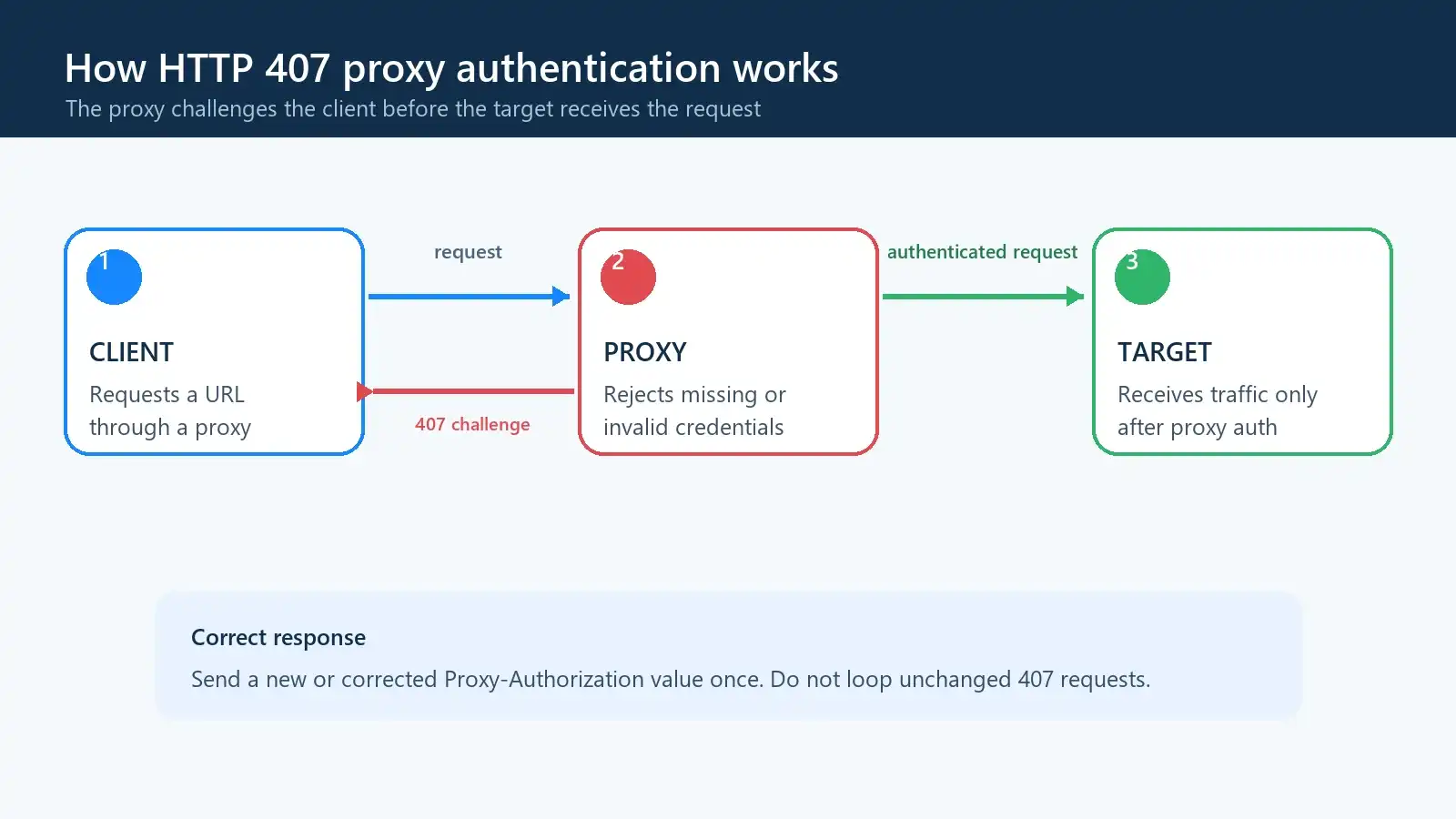
Figure 1. A 407 challenge is issued by the proxy. The target server may not receive the request until proxy authentication succeeds.
Tested Environment and Verification Scope
The examples below were verified against a loopback-only HTTP proxy fixture. It accepts one Basic-auth credential pair, returns a standards-shaped 407 challenge for missing or incorrect credentials, and forwards valid HTTP requests to a local origin. It cannot reach arbitrary hosts.
| Component | Tested value | What was verified |
|---|---|---|
| Operating system | Windows build 26200.9445 | PowerShell command syntax |
| Python | 3.12.14 | Client and test fixture |
| Requests | 2.34.2 | HTTP 407, valid auth, URL encoding, proxy exceptions |
| curl | 8.21.0 | Direct, no-auth, valid-auth, and CONNECT cases |
| Proxy auth | HTTP Basic | Proxy-Authenticate and Proxy-Authorization flow |
All 13 checks passed: ten integration checks covered direct, authenticated, unauthenticated, client, and CONNECT behavior; two unit checks covered credential handling; and one mocked client check verified the timeout argument. The fixture proves local client behavior without exposing a commercial proxy credential or sending traffic to a third-party website. Corporate NTLM, Kerberos, source-IP allowlisting, and cloud proxy control planes were not reproduced.
What Does 407 Proxy Authentication Required Mean?
The MDN definition of HTTP 407 is precise: the request lacks valid authentication credentials for the proxy between the client and the requested resource. A compliant response includes Proxy-Authenticate, which tells the client which scheme the proxy expects.
A simplified exchange looks like this:
HTTP/1.1 407 Proxy Authentication Required
Proxy-Authenticate: Basic realm="proxy-gateway"
Content-Length: 0
The client can then repeat the request with a new or corrected Proxy-Authorization field. RFC 9110, section 15.5.8 requires a proxy sending 407 to include at least one applicable authentication challenge.
For an HTTP target, the proxy may return 407 as a normal HTTP response. For an HTTPS target, the client usually sends CONNECT host:443 first. If the proxy rejects that tunnel request, libraries often wrap the 407 inside a proxy or tunnel exception. The destination server has not necessarily seen the request.
What HTTP Error 407 Does Not Mean
A 407 is not proof that the destination blocked your IP, rejected your account, or rate-limited you. It also does not automatically mean the password is wrong. An incorrect proxy host, incompatible authentication scheme, expired subscription, missing source-IP allowlist, or overwritten environment setting can produce the same symptom.
Diagnose HTTP Error 407 with cURL
cURL is useful because it exposes the status line and response headers without your application framework hiding them. Keep the target URL, method, and timeout identical across the following three tests. Only change whether a proxy and credentials are supplied.
The screenshot below comes from the author’s loopback fixture. For your diagnosis, set the variables to an authorized proxy and a harmless HTTPS endpoint you are allowed to request. You do not need the local fixture to run this comparison.
Windows PowerShell
$env:TARGET_URL = "https://example.com/"
$env:PROXY_URL = "http://proxy.example:8000"
$env:PROXY_USER = "your-proxy-user"
$env:PROXY_PASS = "your-proxy-password"

# 1. Direct baseline
curl.exe --silent --show-error --include --fail-with-body `
  --noproxy "*" --max-time 10 "$env:TARGET_URL"

# 2. Same request through the proxy, without credentials
curl.exe --silent --show-error --include --fail-with-body `
  --noproxy "" --proxy "$env:PROXY_URL" --max-time 10 `
  "$env:TARGET_URL"

# 3. Same request with valid proxy credentials
curl.exe --silent --show-error --include --fail-with-body `
  --noproxy "" --proxy "$env:PROXY_URL" `
  --proxy-user "$($env:PROXY_USER):$($env:PROXY_PASS)" --max-time 10 `
  "$env:TARGET_URL"
Use curl.exe so the command invokes cURL rather than relying on PowerShell alias behavior. --noproxy "*" guarantees a direct baseline, while the empty --noproxy "" forces the next requests through the explicitly supplied proxy.
macOS and Linux shell
export TARGET_URL="https://example.com/"
export PROXY_URL="http://proxy.example:8000"
export PROXY_USER="your-proxy-user"
export PROXY_PASS="your-proxy-password"

# 1. Direct baseline
curl --silent --show-error --include --fail-with-body \
  --noproxy "*" --max-time 10 "$TARGET_URL"

# 2. Proxy without credentials
curl --silent --show-error --include --fail-with-body \
  --noproxy "" --proxy "$PROXY_URL" --max-time 10 \
  "$TARGET_URL"

# 3. Proxy with credentials
curl --silent --show-error --include --fail-with-body \
  --noproxy "" --proxy "$PROXY_URL" \
  --proxy-user "$PROXY_USER:$PROXY_PASS" --max-time 10 \
  "$TARGET_URL"
Our no-auth request returned 407 Proxy Authentication Required with Proxy-Authenticate: Basic realm="local-proxy". The authenticated request returned 200 through a path that was independently distinguished from the direct request. An HTTPS request without credentials failed earlier with CONNECT tunnel failed, response 407.
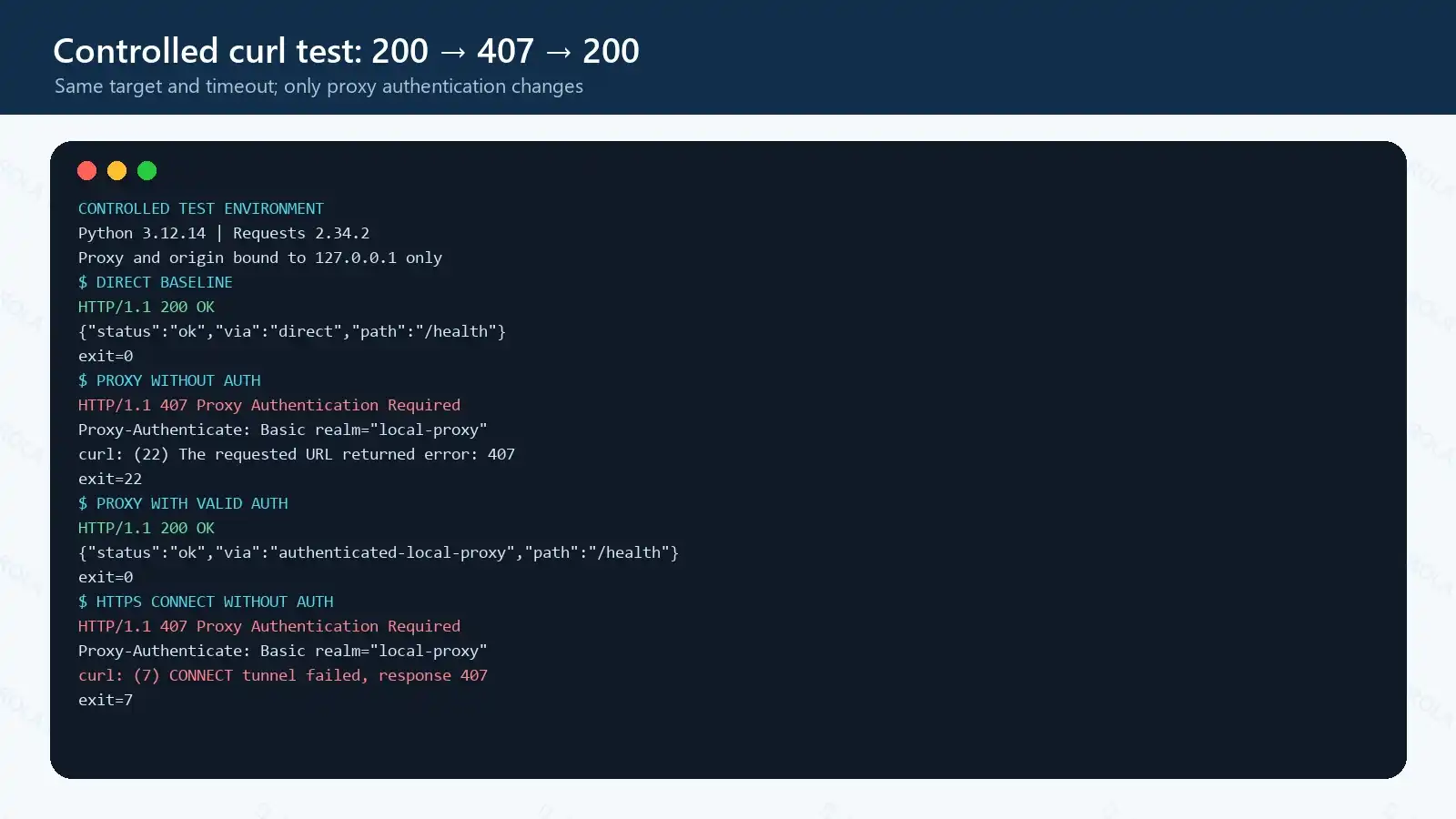
Figure 2. A normalized excerpt of the real curl output from the loopback fixture. Only redundant server-generated lines are omitted. This self-run image carries the required brand watermark.
Interpret the three outcomes as follows:
| Direct | Proxy without auth | Proxy with auth | Conclusion |
|---|---|---|---|
| 200 | 407 | 200 | Proxy authentication was the only failing variable |
| 200 | 407 | 407 | Credentials, scheme, account state, or allowlist is still wrong |
| 200 | Timeout/refused | Same | Endpoint, port, firewall, or protocol issue—not yet an auth diagnosis |
| Fails | Any result | Any result | Repair DNS, target, or local network before blaming proxy auth |
Inspect Proxy-Authenticate in verbose output. If the proxy advertises multiple schemes and cURL does not select the expected one, --proxy-anyauth can negotiate among supported schemes, as described in Everything curl’s authentication guide. Do not use it as a substitute for confirming the provider’s required method.
--fail-with-body makes cURL return a nonzero exit code for an HTTP 407 while preserving the response body. Without --fail or --fail-with-body, cURL can receive HTTP 407 and still exit with code 0 because the HTTP exchange itself completed. Automation must therefore inspect both the HTTP status and the process exit code.
Treat verbose logs and process arguments as sensitive. They can expose usernames, proxy hosts, and headers. On shared systems, even environment-variable values expanded into --proxy-user may be visible to process inspection. Use temporary test credentials where possible, unset the variables afterward, and never paste production secrets into tickets or screenshots.
Common Causes of HTTP 407
Commercial proxy causes
- Wrong hostname or port. Providers often separate HTTP, HTTPS, and SOCKS endpoints. A valid account sent to the wrong listener may still fail.
- Authentication mode mismatch. Username/password authentication and source-IP allowlisting are separate modes. Enabling one does not necessarily enable the other.
- Malformed credentials. Copying a trailing space, omitting a username suffix, or failing to encode
@,:,/, and%inside a proxy URL changes how the URL is parsed. - Expired or restricted account. A disabled plan, zero balance, concurrency policy, or unapproved sub-user can be surfaced as an authentication failure.
- Old secret in one layer. CI variables, browser profiles, containers, and process managers can retain a previous password after the dashboard is updated.
Corporate network causes
Managed gateways may expect NTLM, Kerberos, Negotiate, or an authenticated PAC route rather than Basic auth. A browser can succeed through single sign-on while a Python process fails because it has no domain token. VPN changes can also select a different gateway or source address.
In that environment, do not keep guessing passwords. Record the proxy hostname, advertised scheme, timestamp, client, and whether the browser works. Your network administrator can confirm the PAC URL, SSO method, permitted destination, and whether the device must be domain joined.
Send a compact escalation record instead of an entire verbose log:
Time and timezone: 2026-09-11 10:15 UTC+8
Client and version: curl 8.21.0
Proxy endpoint label: corporate-proxy-a (no password)
Target class: approved HTTPS health endpoint
Result: CONNECT returned 407
Challenge: Proxy-Authenticate: Negotiate
Browser on same device: works / fails
VPN state: connected / disconnected
Match the authentication method to the client
| Method | Signal or configuration | What to verify |
|---|---|---|
| Basic | Proxy-Authenticate: Basic |
Username, password, URL encoding, and transport security |
| Digest | Proxy-Authenticate: Digest |
Client support and challenge negotiation |
| NTLM / Negotiate | Managed enterprise gateway | Domain identity, SSO, PAC route, and administrator policy |
| Source-IP allowlist | No password in the client | Current public egress IP and propagation time |
| SOCKS5 username/password | SOCKS negotiation, not HTTP 407 | Correct SOCKS endpoint, port, and library support |
Basic credentials are Base64-encoded, not encrypted. An https:// destination protects the tunneled destination traffic after CONNECT, but it does not automatically add TLS between the client and an http:// proxy. Use a trusted network, a VPN, or a TLS-enabled proxy endpoint when the provider supports it; never assume Basic authentication alone protects the password in transit.
HTTP 407 versus SOCKS5 authentication
HTTP 407 belongs to HTTP. Native SOCKS5 negotiation uses SOCKS reply codes, not an HTTP status line. If software configured as SOCKS5 reports 407, it is probably speaking HTTP to that port, passing through an upstream HTTP gateway, or presenting a library-level message that wraps another proxy.
An HTTPS target is not necessarily an HTTPS proxy
In a Requests proxy dictionary, the https key selects traffic whose destination URL begins with https://. The proxy URL can still begin with http:// because HTTPS is tunneled through an HTTP proxy with CONNECT. Changing it to https:// without provider support can replace 407 with a TLS or connection error.
How to Resolve 407 Proxy Authentication Required
Work through these checks in order. Stop when the controlled cURL request changes from 407 to the expected target response.
1. Verify the proxy endpoint and protocol
Copy the hostname and port from the current provider dashboard or corporate configuration. Confirm whether that listener expects HTTP proxying, HTTPS-to-proxy, or SOCKS5. Test DNS resolution and TCP reachability separately if cURL reports timeout or connection refused instead of 407.
2. Read the authentication challenge
Capture response headers with cURL. Proxy-Authenticate: Basic indicates a Basic challenge; Negotiate or NTLM points to managed network authentication. If no challenge is present, an upstream appliance or client wrapper may be obscuring the real response.
3. Re-copy credentials and account parameters
Use the generated proxy username exactly as shown. Country, city, session, and sub-account settings may be encoded in a username suffix. Verify case, remove accidental spaces, and confirm the account is active. Do not silently substitute the website login password for proxy credentials.
4. Percent-encode credentials embedded in a URL
Reserved characters have structural meaning in a URL. Encode the username and password components before constructing http://user:password@host:port. In Python, use urllib.parse.quote(value, safe=""); do not encode the entire proxy URL.
5. Validate the source-IP allowlist
If the proxy uses allowlist authentication, add the public egress IP seen by the proxy—not a private address such as 192.168.x.x. VPNs, cloud NAT gateways, home routers, and CI runners can change that public IP. Allowlist updates may also take time to propagate.
6. Remove conflicting proxy settings
Check HTTP_PROXY, HTTPS_PROXY, ALL_PROXY, and NO_PROXY, including lowercase variants on Unix-like systems. Also inspect container environment variables, IDE run configurations, system proxy settings, PAC files, and application-specific proxy extensions.
A clean diagnostic should use one explicit source of proxy configuration. Once it works, decide whether the application should inherit operating-system settings or own its configuration.
7. Retry only after the authentication state changes
One challenge-response retry with new credentials is part of normal authentication. Repeating the same unauthenticated request many times is not a fix. It creates noise, can trigger account protections, and will keep returning 407.
8. Verify the fix beyond the status code
Confirm that the target response is correct and, where relevant, that the observed egress IP or region matches your selection. A 200 response from a captive portal, gateway error page, or unexpected cache is not proof that the intended route worked.
Fix 407 in Python Requests and Browsers
Python Requests example
This example reads secrets from environment variables, percent-encodes each credential component, disables inherited proxy variables for a controlled diagnosis, and applies separate connect and read timeouts.
import os
from urllib.parse import quote

import requests
from requests.exceptions import HTTPError, ProxyError, RequestException

proxy_host = os.environ["PROXY_HOST"]
proxy_port = os.environ["PROXY_PORT"]
proxy_user = quote(os.environ["PROXY_USERNAME"], safe="")
proxy_pass = quote(os.environ["PROXY_PASSWORD"], safe="")
proxy_url = f"http://{proxy_user}:{proxy_pass}@{proxy_host}:{proxy_port}"
target_url = os.environ.get("TARGET_URL", "https://example.com/")

with requests.Session() as session:
    # Use False while diagnosing so ambient HTTP(S)_PROXY values cannot win.
    session.trust_env = False
    session.proxies.update({"http": proxy_url, "https": proxy_url})

    try:
        response = session.get(target_url, timeout=(3.05, 10))
        response.raise_for_status()
        print(f"status={response.status_code}")
        print(response.text[:200])
    except ProxyError as exc:
        # CONNECT failures are commonly wrapped here, including a tunnel 407.
        raise RuntimeError(
            "Proxy connection failed: check endpoint, auth mode, credentials, and allowlist"
        ) from exc
    except HTTPError as exc:
        # Plain HTTP proxy responses can surface as an ordinary HTTP 407.
        if exc.response is not None and exc.response.status_code == 407:
            challenge = exc.response.headers.get("Proxy-Authenticate", "not supplied")
            raise RuntimeError(f"HTTP 407; proxy challenge: {challenge}") from exc
        raise
    except RequestException as exc:
        raise RuntimeError(f"Request failed: {exc}") from exc
This exact client path was tested by setting TARGET_URL to the loopback origin. The public default is deliberately a neutral HTML page, so the example does not assume that an IP-echo API is reachable or returns JSON. For final route validation, replace it with an approved health endpoint and check the expected body or egress IP.
The https dictionary key describes the destination scheme; it does not prove the proxy connection itself uses TLS. Requests also warns that proxy URLs and environment variables require careful handling, especially when credentials are involved; see its official proxy configuration documentation. For provider-specific connection fields, compare the working code with the Python proxy integration guide.
If your log says authentication proxy connection failed, inspect the exception chain. A message such as Tunnel connection failed: 407 Proxy Authentication Required points to CONNECT authentication. A raw response.status_code == 407 is more typical for an HTTP target.
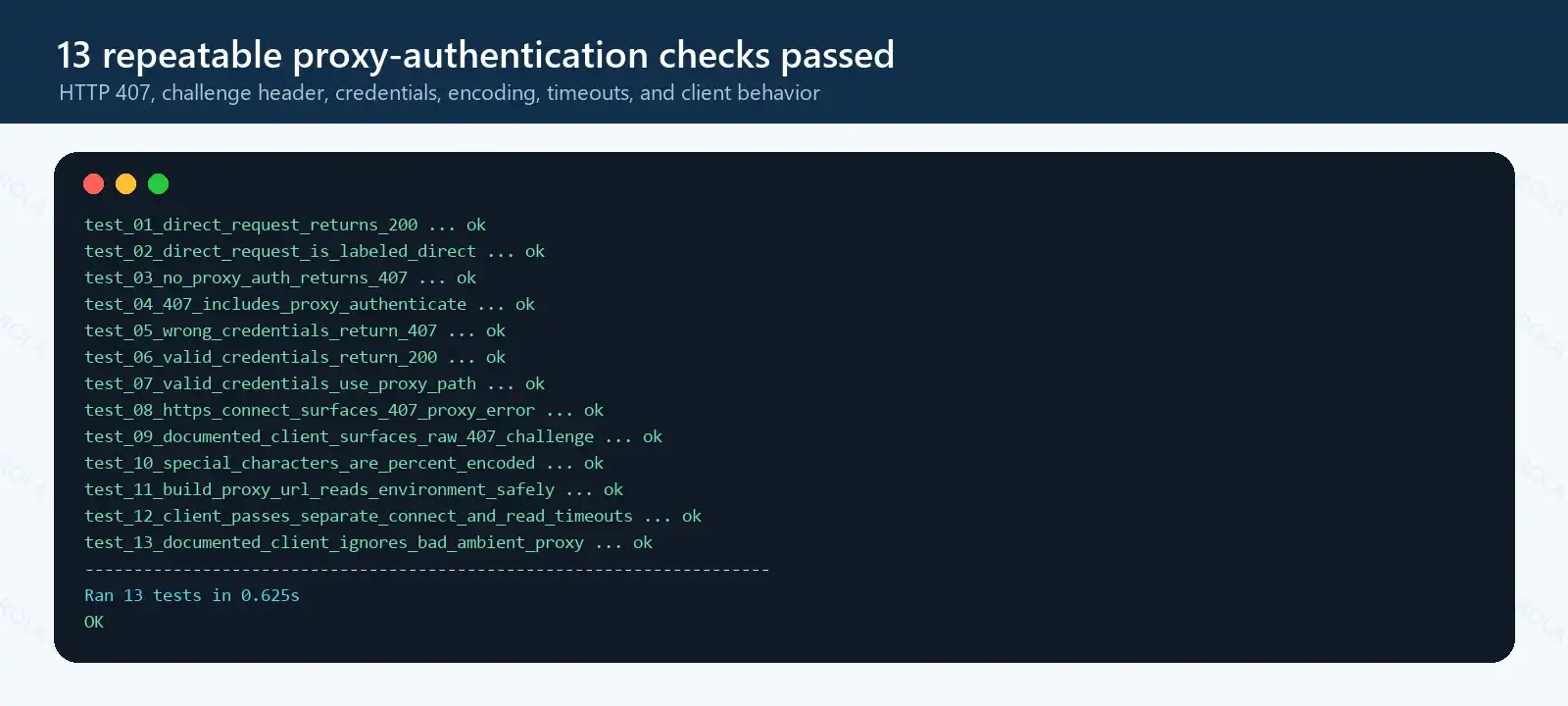
Figure 3. All 13 code checks passed in the declared environment. The screenshot is watermarked because it records a self-run test.
Chrome and Edge on Windows
Chrome and Edge normally use Windows proxy settings unless a policy, extension, or command-line flag overrides them.
- Open Settings > Network & internet > Proxy.
- Confirm the manual proxy or setup script URL with your provider or administrator.
- Open
chrome://policyoredge://policyand check for managed proxy policies. - Disable only unneeded proxy extensions, then retest in a fresh browser window.
- If the gateway uses corporate SSO, sign in through the approved flow instead of embedding credentials in a URL.
Clearing site cookies rarely fixes 407 because website cookies authenticate to the destination, not the proxy. A browser profile reset is useful only when an extension or stored proxy configuration is the conflicting layer.
Firefox
In current Firefox builds, open Settings > Privacy & Security > Connection and software security > Advanced settings > Proxy settings > Configure proxy, following the current Firefox connection-settings guidance. Some older builds still show General > Network Settings > Settings. Confirm whether Firefox uses system settings, a manual proxy, or a PAC URL; then compare the effective host, port, and bypass list with the working client.
The dialog also identifies extensions controlling the connection. Disable only the conflicting extension, not every privacy or security extension. UI labels can move between Firefox releases, so use the Settings search box for proxy if neither path appears.
407 vs. 401, 403, and 429
These client errors point to different actors and require different fixes.
| Status | Who is responding? | Typical signal | Correct first action |
|---|---|---|---|
| 401 | Destination server | WWW-Authenticate |
Fix origin-site or API credentials |
| 403 | Destination or intermediary policy | Access explicitly refused | Check permissions, rules, and target policy |
| 407 | Proxy server | Proxy-Authenticate |
Fix proxy auth, endpoint, or allowlist |
| 429 | Destination or gateway rate limiter | Often Retry-After |
Reduce rate and apply bounded backoff |
Do not rotate target-site cookies to solve 407, and do not rotate proxy IPs to solve a destination 401. First identify which hop generated the response.
Resolve 407 in a ROLA IP Setup
Once the generic cURL test proves that the failure is at the proxy-authentication layer, map each client value to the current ROLA IP dashboard instead of retyping it from memory.
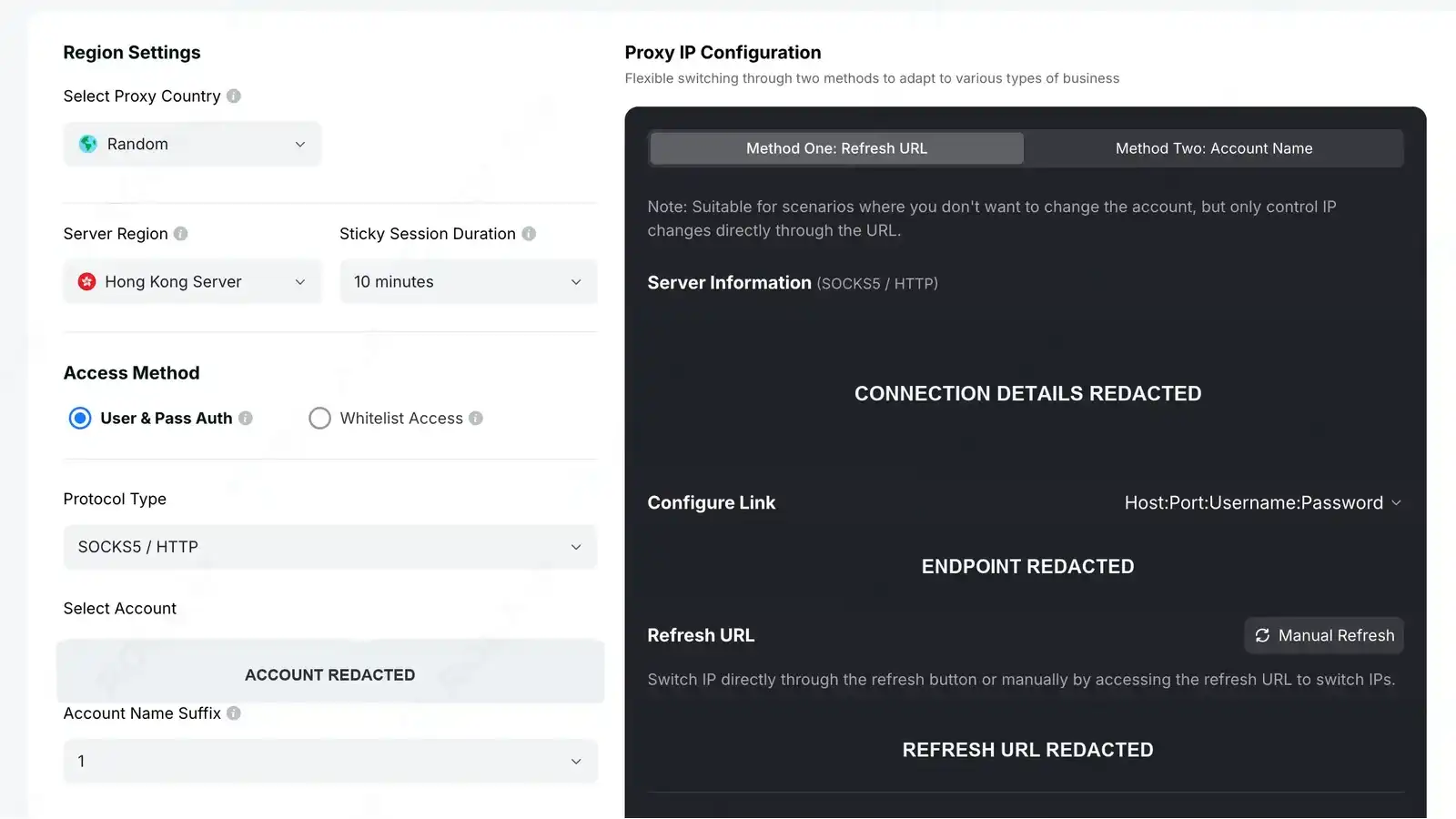
Figure 4. Use the dashboard’s current host, port, protocol, and generated account value. Sensitive endpoint and account details are redacted.
- For an HTTP 407 investigation, select and test the HTTP proxy endpoint. Native SOCKS5 authentication does not return HTTP 407; a 407 seen in a supposed SOCKS5 setup is a reason to recheck the selected port, scheme, or upstream gateway. Review the proxy protocols supported page before changing the endpoint.
- Under Auth Method, choose either username/password authentication or the available whitelist flow for your account.
- Copy the generated account name in full. If region or sticky-session choices change the suffix, use the newly generated value.
- For source-IP authentication, verify the public egress IP in the proxy account whitelist.
- Test the exact endpoint with cURL before placing it in Python, a browser profile, or an automation platform.
If cURL works but code does not, compare the application’s URL scheme, credential encoding, and environment variables. The proxy API connection failed checklist covers ROLA IP-specific connection diagnostics. After authentication succeeds, use a proxy checker or an approved IP echo endpoint to confirm the egress route.
This order keeps the product layer from hiding the protocol issue: establish a known-good proxy request first, then add session, location, browser, or crawler settings one at a time.
Prevent 407 Errors in Production
- Store credentials in a secret manager. Do not commit them, place them in screenshots, or log complete proxy URLs.
- Rotate secrets deliberately. Update runtime variables and restart long-lived workers so old values do not remain in memory.
- Add a startup preflight. Send one low-cost request and fail fast if the proxy returns 407, times out, or exits through the wrong region.
- Separate auth failures from transport failures. Track 407, DNS errors, connection refusal, TLS errors, and target 403/429 responses as different metrics.
- Cap retries. A 407 should enter a configuration or credential repair path, not ordinary exponential backoff.
- Monitor allowlist drift. Alert when a NAT gateway, VPN, or CI runner changes its public egress IP.
- Redact observability data. Preserve status, challenge scheme, endpoint label, and correlation ID; strip passwords and authorization headers.
A useful health record contains timestamp, client version, proxy endpoint label, destination class, result code, latency, and selected authentication mode. It should never contain a reusable secret.
Summary
- Confirm that 407 came from the proxy by comparing one direct request with two controlled proxy requests.
- Read
Proxy-Authenticate, then fix the endpoint, scheme, credentials, encoding, or allowlist that corresponds to that challenge. - Verify the expected response and route before restoring production traffic, and never send an unchanged 407 into a general retry loop.