
Walmart Inventory Checker: How to Check Local Stock and Build a Monitor

Oct 15, 2026 · Guides · 14 min read
A Walmart inventory checker answers a deceptively specific question: is this exact item available from this seller, for this fulfillment method, at this store or ZIP code, right now? For a one-time check, select the store on Walmart.com or in the Walmart app, open the exact product, and inspect pickup, delivery, and shipping separately. For automation, use an official or contractually authorized data source before adding schedulers, alerts, or proxies.
Residential proxies can help an authorized QA or commerce-research team reproduce a regional storefront journey. They do not grant permission to collect data, guarantee a correct shelf count, or make a denied request acceptable. Walmart’s current Terms of Use prohibit automated retrieval, scraping, and data mining without express prior written consent. Treat that as the design boundary, not a problem to route around.
TL;DR
- For shoppers: set the exact store, search the exact item, and read pickup status. A shipping offer does not prove local inventory.
- For Walmart Marketplace sellers: use the official Inventory API for SKUs and ship nodes your approved account controls.
- For regional QA: keep the market, store, seller, fulfillment mode, timestamp, and proxy session attached to every observation.
- For Rola IP routing: keep one route for a repeatable store journey; change exits only when the research design requires it.
- For failed checks: distinguish access errors, rate limits, and invalid inventory data before scheduling another check.
Can I Check Walmart Inventory Online Without a Tool?
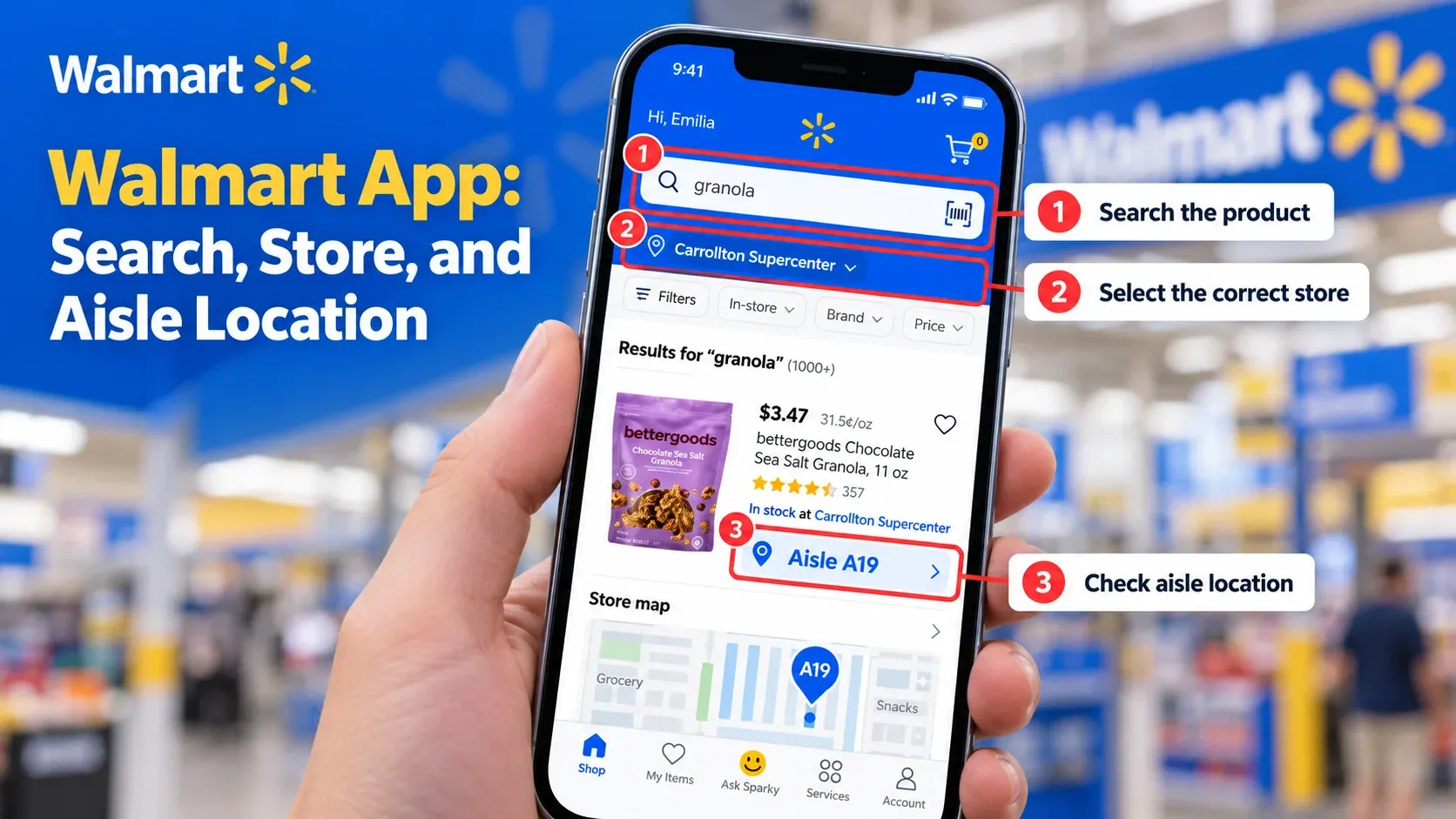
Yes. Walmart’s website and app are the right first stop for a shopper who needs to know how to check Walmart inventory.
- Enter your ZIP code or address.
- Select the exact store you intend to visit.
- Search by product name or model, or open the product URL. Use a UPC only where the selected interface supports it; do not assume a Marketplace seller’s internal SKU works as a consumer search term.
- Open the full product page. Search cards can mix Walmart inventory with Marketplace sellers.
- Compare pickup, delivery, and shipping as separate signals.
- Confirm the store name again after changing variants, ZIP code, or seller.
- For a scarce item, place a pickup order when available and wait for the ready-for-pickup confirmation, or contact the selected store before making a long trip.
Walmart’s item-finder page says the app can search for an item, show its price, and provide an aisle location in a selected store. It does not promise that every online status is a physical shelf count. A unit may be reserved, misplaced, damaged, in another shopper’s cart, or sold between the check and arrival.
Choose the Data Source Before You Build the Checker
The phrase “Walmart inventory” describes three different datasets. Mixing them produces bad alerts and unnecessary compliance risk.
| Need | Correct starting point | What it can establish | What it cannot establish |
|---|---|---|---|
| A shopper wants one local item | Walmart.com or Walmart app | Store-aware pickup, delivery, shipping, price, and sometimes aisle context | A guaranteed physical shelf count |
| A seller wants inventory for its own catalog | Walmart Marketplace Inventory API | Inventory for authorized SKUs and ship nodes | Arbitrary competitor or local-store shelf inventory |
| A commerce team needs regional storefront QA | Written consent, a contractually approved feed, or another authorized source | Regional price, seller, promotion, or availability observations within the approved scope | Permission beyond the contract or a right to bypass controls |
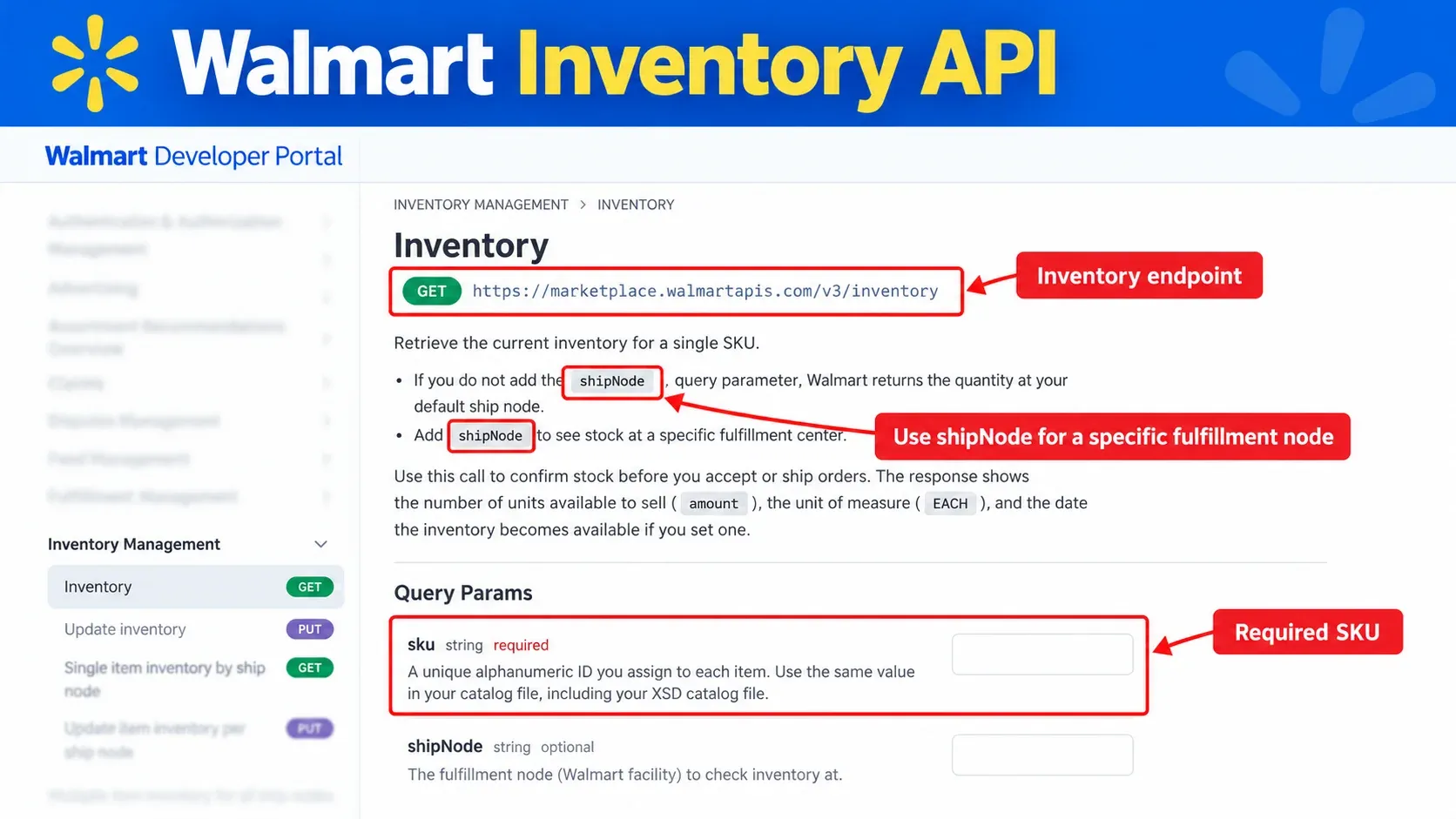
Walmart documents its Marketplace Inventory API for approved sellers and solution providers. It requires OAuth 2.0 and supports inventory retrieval for the seller’s SKUs and ship nodes. It is not a public consumer-stock API.
Define the Inventory Record Before Writing Code
An alert is only useful when the observation preserves its context. At minimum, store these fields:
{
  "observed_at": "2026-10-13T01:03:00Z",
  "ingested_at": "2026-10-13T01:03:01Z",
  "market": "US",
  "store_id": "store-001",
  "zip_code": "75201",
  "item_id": "demo-123",
  "seller": "example-seller",
  "variant": "blue-64gb",
  "fulfillment": "pickup",
  "raw_status": "IN_STOCK",
  "normalized_status": "IN_STOCK",
  "price_minor": 2997,
  "currency": "USD",
  "source": "authorized-local-fixture",
  "proxy_session_id": "not-applicable"
}
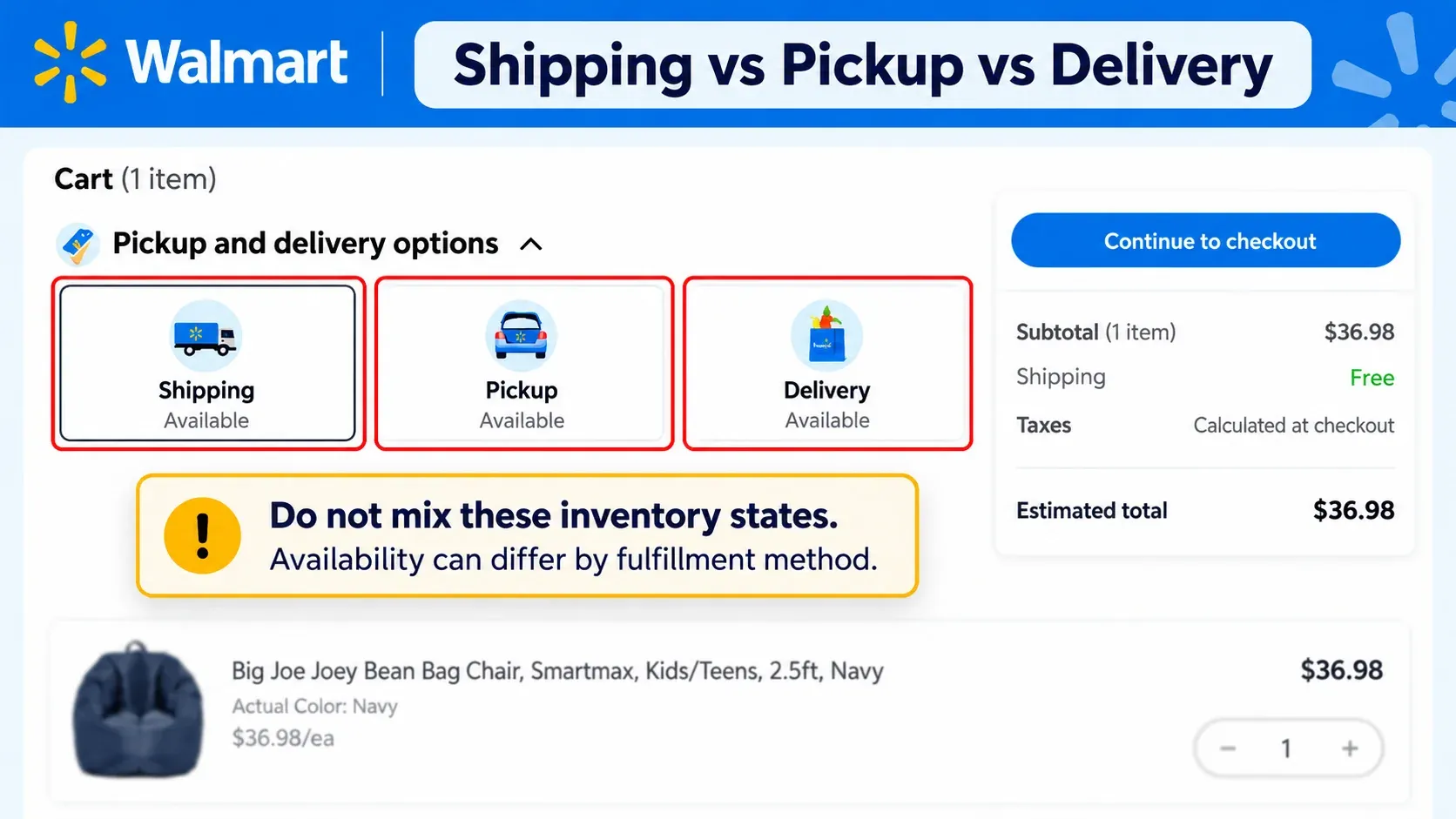
Do not collapse shipping, delivery, and pickup into one in_stock Boolean. A product can be shippable nationally while unavailable for pickup at the selected store. Preserve the source’s raw value beside the normalized state, distinguish observation time from ingestion time, and store money as a decimal value or integer minor units rather than a binary floating-point number.
For change detection, compare like with like:
(market, store_id, item_id, seller, variant, fulfillment)
Trigger an alert only when a meaningful field changes, such as OUT_OF_STOCK to IN_STOCK, a price crossing a defined threshold, or pickup becoming available. A page timestamp changing is not an inventory event.
Where Rola IP Fits in a Walmart Inventory Workflow
Once you have selected the data source, determine whether the observation needs a regional network route. If it does, the Rola IP Walmart proxy solution maps proxy types to commerce tasks.
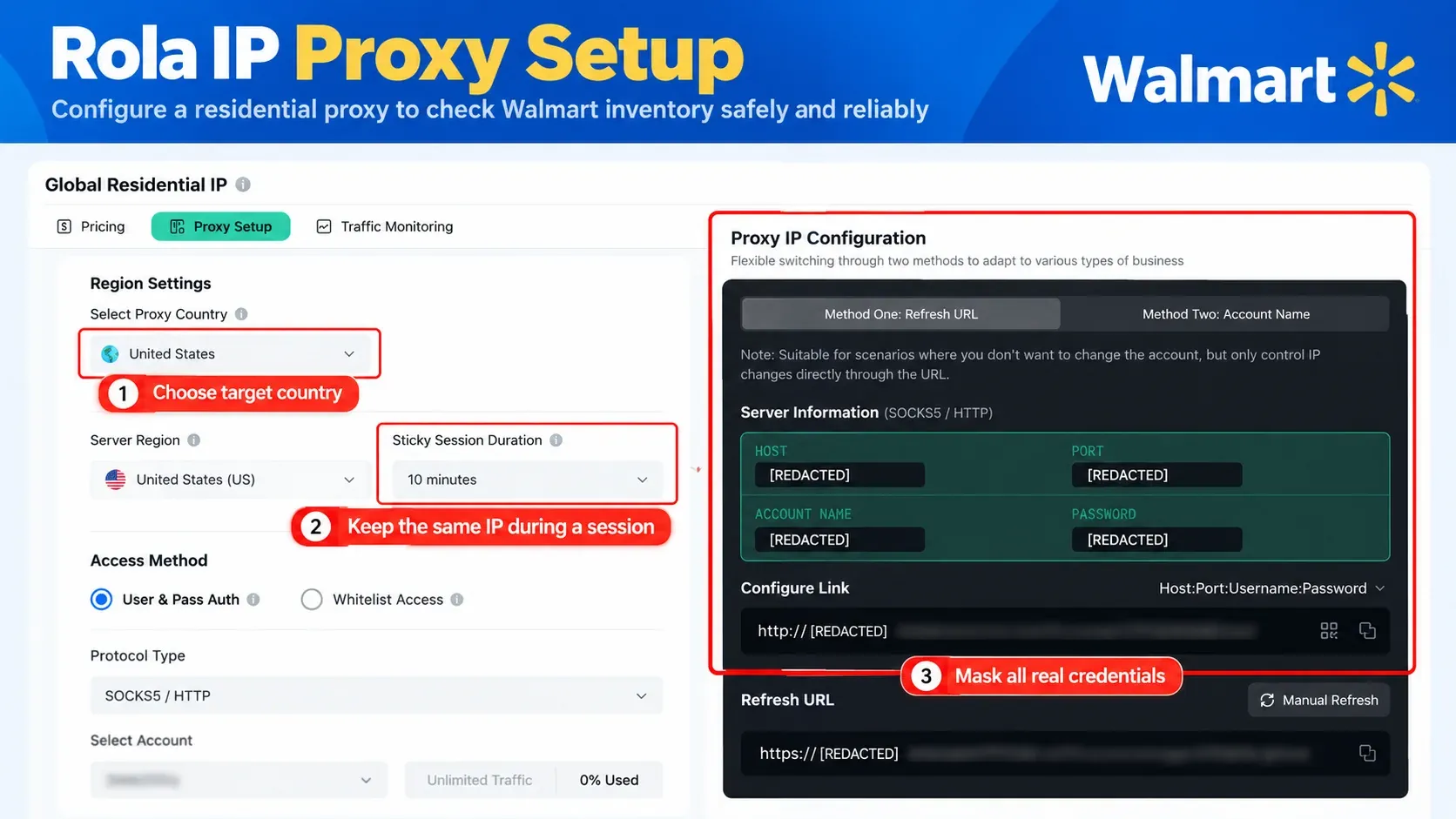
Keep one exit for a multi-step check that requires network continuity. A sticky session provides temporary persistence under the provider’s session rules; a static residential allocation keeps a fixed address according to its rental and replacement terms. Independent jobs do not automatically need different IPs. Use rotation when the workflow calls for changing exits, and preserve store and fulfillment context separately.
The current Rola IP proxy setup guide documents four connection values: host, port, username, and password. It also documents username parameters for country, supported city targeting, sticky sessions, and per-request rotation. Confirm the parameters supported by your selected network and plan before deployment.
Sticky, static, or rotating?
| Workflow | Starting choice | Session rule |
|---|---|---|
| Reproduce one store-aware shopper journey | Sticky session or static residential proxies | Keep the same exit through the full observation |
| Compare products across several markets | Regional routes matching the study | Change exits only when the research design requires it, never mid-journey |
| Recheck a promotion from the same region | Sticky session | Reuse a named session for the bounded test window |
| Monitor a large catalog | Depends on source contract and endpoint | Partition by market, enforce source limits, and preserve job IDs |
If you also track prices, store the currency, seller, variant, fulfillment method, and applicable purchase conditions with each observation. A price change and a stock change are separate events and should have separate alert rules.
Step-by-Step: Build a Safe Walmart Inventory Checker Harness
The safest build sequence starts locally. Prove normalization, state comparison, alert logic, and stop conditions against a fixture before connecting any live source.
Step 1: Prepare the environment
The reproducible example was run on macOS with Python 3.9.6 and Requests 2.32.5.
python3 -m venv .venv
source .venv/bin/activate
python3 -m pip install "requests==2.32.5"
For production, pin dependencies in your own lockfile and use a currently supported Python release. Never put proxy passwords, Walmart OAuth tokens, cookies, or account credentials in source code.
Step 2: Prove change detection with a local fixture
The complete, self-contained example is shown below. It uses four loopback-only fixture responses: an out-of-stock baseline, an invalid status, the same valid status again, and an in-stock transition. The implementation validates required fields, separates raw and normalized status, stores price as integer cents, compares the full context key, persists valid observations, and leaves the last valid state untouched when validation fails.
"""Bounded local inventory monitor used by the Rola IP editorial tutorial.

The script starts an in-process HTTP fixture, performs four checks, validates
and normalizes each response, persists valid observations, emits one restock
alert, and exits. It makes no request to Walmart or Rola IP.
"""

from __future__ import annotations

import json
import tempfile
import threading
import time
from dataclasses import asdict, dataclass
from datetime import datetime, timezone
from decimal import Decimal, InvalidOperation, ROUND_HALF_UP
from http.server import BaseHTTPRequestHandler, HTTPServer
from pathlib import Path
from typing import Any, Dict, Tuple

import requests


BASE_FIXTURE: Dict[str, Any] = {
    "market": "US",
    "store_id": "store-001",
    "zip_code": "75201",
    "item_id": "demo-123",
    "seller": "example-seller",
    "variant": "blue-64gb",
    "fulfillment": "pickup",
    "price": "29.97",
    "currency": "USD",
    "source": "authorized-local-fixture",
    "proxy_session_id": "not-applicable",
}

FIXTURES = [
    {**BASE_FIXTURE, "observed_at": "2026-10-13T01:00:00Z", "raw_status": "OUT_OF_STOCK"},
    {**BASE_FIXTURE, "observed_at": "2026-10-13T01:01:00Z", "raw_status": "MYSTERY"},
    {**BASE_FIXTURE, "observed_at": "2026-10-13T01:02:00Z", "raw_status": "OUT_OF_STOCK"},
    {**BASE_FIXTURE, "observed_at": "2026-10-13T01:03:00Z", "raw_status": "IN_STOCK"},
]

STATUS_MAP = {
    "IN_STOCK": "IN_STOCK",
    "AVAILABLE": "IN_STOCK",
    "OUT_OF_STOCK": "OUT_OF_STOCK",
    "UNAVAILABLE": "OUT_OF_STOCK",
}

REQUIRED_FIELDS = {
    "observed_at",
    "market",
    "store_id",
    "item_id",
    "seller",
    "variant",
    "fulfillment",
    "raw_status",
    "price",
    "currency",
    "source",
}


class FixtureHandler(BaseHTTPRequestHandler):
    request_index = 0

    def do_GET(self) -> None:  # noqa: N802
        if self.path != "/authorized-inventory":
            self.send_error(404)
            return
        index = min(self.request_index, len(FIXTURES) - 1)
        body = json.dumps(FIXTURES[index]).encode("utf-8")
        FixtureHandler.request_index += 1
        self.send_response(200)
        self.send_header("Content-Type", "application/json")
        self.send_header("Content-Length", str(len(body)))
        self.end_headers()
        self.wfile.write(body)

    def log_message(self, _format: str, *_args: object) -> None:
        return


@dataclass(frozen=True)
class Observation:
    observed_at: str
    ingested_at: str
    market: str
    store_id: str
    zip_code: str
    item_id: str
    seller: str
    variant: str
    fulfillment: str
    raw_status: str
    normalized_status: str
    price_minor: int
    currency: str
    source: str
    proxy_session_id: str

    @property
    def comparison_key(self) -> Tuple[str, str, str, str, str, str]:
        return (
            self.market,
            self.store_id,
            self.item_id,
            self.seller,
            self.variant,
            self.fulfillment,
        )


def parse_observation(payload: Dict[str, Any]) -> Observation:
    missing = sorted(REQUIRED_FIELDS - payload.keys())
    if missing:
        raise ValueError(f"missing fields: {', '.join(missing)}")

    raw_status = str(payload["raw_status"]).strip().upper()
    normalized_status = STATUS_MAP.get(raw_status)
    if normalized_status is None:
        raise ValueError(f"unknown raw_status: {raw_status}")

    try:
        price = Decimal(str(payload["price"])).quantize(Decimal("0.01"), ROUND_HALF_UP)
    except InvalidOperation as exc:
        raise ValueError("price is not a decimal amount") from exc
    if price < 0:
        raise ValueError("price cannot be negative")

    try:
        observed = datetime.fromisoformat(str(payload["observed_at"]).replace("Z", "+00:00"))
    except ValueError as exc:
        raise ValueError("observed_at must be an ISO-8601 timestamp") from exc
    if observed.tzinfo is None:
        raise ValueError("observed_at must include a timezone")

    return Observation(
        observed_at=observed.astimezone(timezone.utc).isoformat().replace("+00:00", "Z"),
        ingested_at=datetime.now(timezone.utc).isoformat(timespec="seconds").replace("+00:00", "Z"),
        market=str(payload["market"]),
        store_id=str(payload["store_id"]),
        zip_code=str(payload.get("zip_code", "")),
        item_id=str(payload["item_id"]),
        seller=str(payload["seller"]),
        variant=str(payload["variant"]),
        fulfillment=str(payload["fulfillment"]),
        raw_status=raw_status,
        normalized_status=normalized_status,
        price_minor=int(price * 100),
        currency=str(payload["currency"]).upper(),
        source=str(payload["source"]),
        proxy_session_id=str(payload.get("proxy_session_id", "not-applicable")),
    )


def fetch_observation(url: str) -> Observation:
    response = requests.get(url, timeout=(3.05, 10))
    response.raise_for_status()
    payload = response.json()
    if not isinstance(payload, dict):
        raise ValueError("response must be a JSON object")
    return parse_observation(payload)


class Monitor:
    def __init__(self, output_dir: Path) -> None:
        self.last_valid: Dict[Tuple[str, ...], Observation] = {}
        self.observations_path = output_dir / "observations.jsonl"
        self.alerts_path = output_dir / "alerts.jsonl"

    @staticmethod
    def _append(path: Path, record: Dict[str, Any]) -> None:
        with path.open("a", encoding="utf-8") as stream:
            stream.write(json.dumps(record, sort_keys=True) + "\n")

    def process(self, current: Observation) -> str:
        key = current.comparison_key
        previous = self.last_valid.get(key)
        self._append(self.observations_path, asdict(current))
        self.last_valid[key] = current

        if previous is None:
            return f"BASELINE status={current.normalized_status}"
        if previous.normalized_status == current.normalized_status:
            return f"NO_CHANGE status={current.normalized_status}"

        event = {
            "comparison_key": key,
            "from": previous.normalized_status,
            "to": current.normalized_status,
            "observed_at": current.observed_at,
        }
        self._append(self.alerts_path, event)
        return f"ALERT {event['from']} -> {event['to']}"


def main() -> None:
    FixtureHandler.request_index = 0
    server = HTTPServer(("127.0.0.1", 0), FixtureHandler)
    thread = threading.Thread(target=server.serve_forever, daemon=True)
    thread.start()
    endpoint = f"http://127.0.0.1:{server.server_port}/authorized-inventory"

    print("Authorized local fixture: ready")
    print("Network boundary: loopback only; credentials in logs: none")

    try:
        with tempfile.TemporaryDirectory(prefix="inventory-demo-") as directory:
            monitor = Monitor(Path(directory))
            for check_number in range(1, len(FIXTURES) + 1):
                try:
                    current = fetch_observation(endpoint)
                    print(f"Check {check_number}: {monitor.process(current)}")
                except (ValueError, requests.RequestException) as exc:
                    print(
                        f"Check {check_number}: ERROR {type(exc).__name__}; "
                        "last valid state preserved"
                    )
                time.sleep(0.05)

            observation_count = len(monitor.observations_path.read_text(encoding="utf-8").splitlines())
            alert_count = len(monitor.alerts_path.read_text(encoding="utf-8").splitlines())
            print(f"Persisted valid observations: {observation_count}; alerts: {alert_count}")
    finally:
        server.shutdown()
        server.server_close()

    print(f"Stop condition: completed {len(FIXTURES)} bounded checks")


if __name__ == "__main__":
    main()
Copy the code into a file named authorized_inventory_demo.py, install Requests if needed, and run it locally:
python3 -m pip install requests==2.32.5
python3 authorized_inventory_demo.py
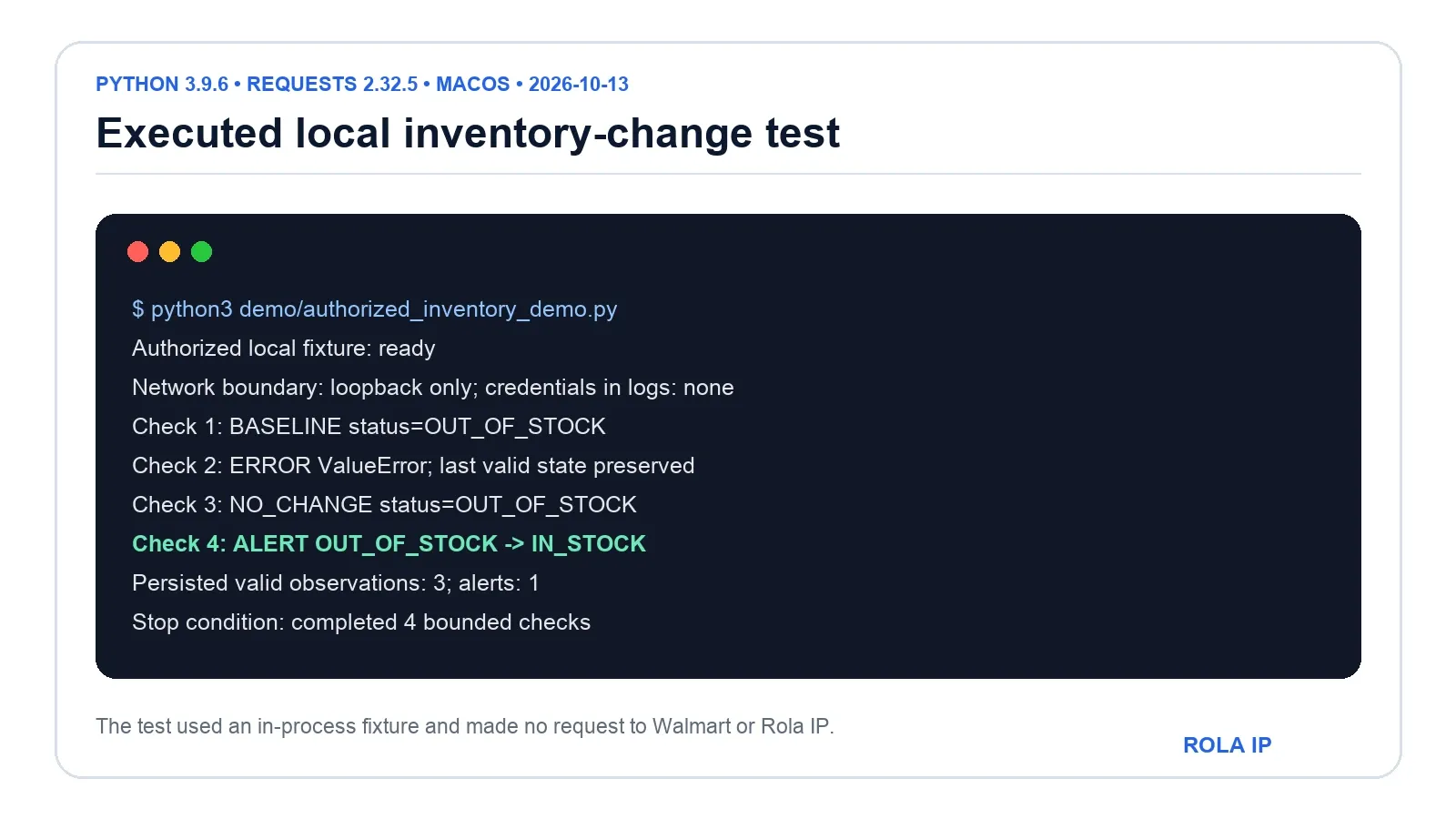
The full script was executed on October 13, 2026, using macOS, Python 3.9.6, and Requests 2.32.5. It produced this output:
Authorized local fixture: ready
Network boundary: loopback only; credentials in logs: none
Check 1: BASELINE status=OUT_OF_STOCK
Check 2: ERROR ValueError; last valid state preserved
Check 3: NO_CHANGE status=OUT_OF_STOCK
Check 4: ALERT OUT_OF_STOCK -> IN_STOCK
Persisted valid observations: 3; alerts: 1
Stop condition: completed 4 bounded checks
When should an inventory change trigger an alert?
| Previous observation | New observation | Action |
|---|---|---|
| No valid baseline | IN_STOCK or OUT_OF_STOCK |
Save the baseline; notify only if initial availability alerts are explicitly enabled |
OUT_OF_STOCK |
IN_STOCK with the same comparison key |
Persist one restock event and send one alert |
IN_STOCK |
IN_STOCK with the same comparison key |
Persist the observation without another restock alert |
| Any valid status | Error, unknown status, or missing context | Log the failure and preserve the last valid state |
| Any status | Different seller, variant, store, or fulfillment method | Maintain a separate observation series |
Step 3: Add a live-source adapter
Keep the source adapter separate from normalization and alerts. That makes it easy to use the Walmart Marketplace API for seller-owned inventory, a contracted feed for commerce research, or a manual import without rewriting the monitor.
If the HTTP source requires regional routing, load secrets from environment variables:
export AUTHORIZED_TARGET_URL="https://approved.example/inventory"
export ROLA_PROXY_URL="http://USERNAME:PASSWORD@HOST:PORT"
Do not paste those values into tickets, screenshots, shell history shared with coworkers, or application logs. If credentials contain reserved URL characters, use the complete proxy URL generated by the provider or percent-encode each credential component before constructing the URL.
The following configuration template reads those variables and checks the response status and content type:
import os
import requests

target_url = os.environ["AUTHORIZED_TARGET_URL"]
proxy_url = os.environ["ROLA_PROXY_URL"]

try:
    response = requests.get(
        target_url,
        proxies={"http": proxy_url, "https": proxy_url},
        timeout=(5, 20),
        allow_redirects=True,
    )
except requests.RequestException:
    raise SystemExit("Stop: transport failure; review redacted operational logs")

if response.status_code in {401, 403, 407, 429}:
    raise SystemExit(f"Stop: source returned {response.status_code}")

response.raise_for_status()
if "application/json" not in response.headers.get("Content-Type", ""):
    raise SystemExit("Stop: authorized source did not return JSON")
Step 4: Add bounded retries and scheduling
Use a finite attempt count, exponential backoff, and jitter for transient network failures and server errors. Route authentication failures, access denials, rate limits, and verification pages to the status-specific handling below.
A sensible scheduler also prevents duplicate work:
- one active job per
(market, store, item, seller, variant, fulfillment)key; - a minimum interval approved for the source;
- a daily request ceiling;
- a circuit breaker after repeated failures;
- idempotent alerts, so one change creates one notification;
- structured logs with secrets removed;
- a retention policy for observations and account identifiers.
Step 5: Verify the result, not just the HTTP status
An HTTP 200 response can still be wrong for your task. Validate the selected store, market, seller, item variant, fulfillment method, currency, and observation time. Save the source’s raw status alongside your normalized status. If a result says “available” but the store context is missing, classify it as incomplete rather than in stock.
For extraction details within the data-source scope defined above, see the Walmart scraping with Python guide. This checker handles context validation, state comparison, and alerts.
How to Handle HUMAN/PerimeterX Challenges, 403, 407, and 429
PerimeterX merged with HUMAN Security in 2022, so both names still appear in technical discussions. Walmart does not publish a universal list of protection vendors for every surface. Engineer around the observable signal, not an assumed vendor name.
CAPTCHA or challenge page
Stop the automated job and review the endpoint and access requirements. Use an official API, contracted feed, or manual review when required; do not rotate IPs to defeat verification.
HTTP 401 or 403
Treat these as authentication or access-control failures. Verify OAuth scopes, endpoint choice, account status, and source permissions before resuming.
HTTP 407
This is proxy authentication failure. Check the Rola IP host, port, username parameters, password, or IP allowlist. Confirm that reserved characters are encoded. Log only the error class and request ID, never the full proxy URL.
HTTP 429
Stop the current batch, respect Retry-After, and reduce the request frequency to fit the source’s limits.
HTTP 200 with the wrong price or store
Check whether the selected seller, variant, fulfillment method, ZIP code, or store changed. Regional price differences are meaningful only when the rest of the comparison key is stable.
Safe Multi-Store and Multi-Account Operations
If a company operates several authorized Walmart Marketplace accounts or regional QA environments, network separation is only one control. Use least-privilege OAuth scopes, separate secret stores, explicit account-to-store mappings, independent audit logs, and documented retention periods. Never share session cookies or tokens between accounts.
A static route can make an account’s operating environment repeatable, but it does not isolate browser, device, payment, identity, or behavior signals. Network separation does not replace the account controls above.
For every alert, retain a non-secret evidence record:
- account or business-unit ID;
- approved source and scope;
- item, seller, store, market, and fulfillment method;
- proxy product and non-secret session label;
- timestamp, normalized status, and raw status;
- request ID and parser version;
- operator decision and alert destination.
What Makes the Best Residential Proxies for a Walmart Inventory Checker?
The best residential proxies for a Walmart inventory checker fit the workflow’s regional and session requirements and make observations reproducible. Evaluate providers on these criteria:
- Targeting that matches the research design. Country or city selection is useful only when the source actually varies by that context.
- Controllable sessions. You need sticky behavior for one journey and explicit rotation between independent jobs.
- Credential hygiene. Look for environment-friendly connection strings, allowlisting where appropriate, and clear authentication errors.
- Traceability. A team should be able to attach a market and non-secret session label to each observation.
- Failure transparency. The provider should not market CAPTCHA disappearance or account safety as guaranteed outcomes.
- Small-pilot validation. Test regional accuracy, session stability, error rates, and data consistency on an approved target before scaling.
Rola IP’s Walmart solution maps static residential, rotating residential, mobile, and datacenter routes to different QA and research jobs. Validate the current network parameters and plan terms against your workload and pilot results.
Conclusion
A dependable Walmart inventory checker validates each observation, compares it with the last valid state for the same store, seller, variant, and fulfillment method, and emits one alert per meaningful change. Failed checks should preserve the last valid state rather than overwrite it with a false stock status.
Start with Walmart’s website or app for a shopper check and the Marketplace Inventory API for your seller inventory. For regional QA that needs a local route, configure Rola IP around the observation window: temporary persistence or a fixed allocation for one journey, with rotation between independent jobs only when needed.
Disclosure: This article is published by Rola IP. Check product settings against current documentation before deployment.