
Wikipedia Knowledge Graph: How to Build One from Wikipedia with Python

Nov 2, 2026 · Proxy Basics · 13 min read
TL;DR
A Wikipedia knowledge graph generally refers to a network of entities and relationships built using Wikipedia articles and associated data, not a single, officially named product published by Wikipedia. In practice, start with a Wikipedia page to find its Wikidata QID, retrieve Wikidata properties and objects, clean the records, and export triples. Use official APIs for small experiments and evaluate official data dumps for large-scale construction. A proxy is only an optional connection method where a target site’s rules allow it; it does not replace rate-limit compliance.
What Is a Wikipedia Knowledge Graph?
A knowledge graph represents information as queryable entity–relationship–entity or value statements. For example: “Douglas Adams — occupation — writer.” Wikipedia provides human-readable articles; Wikidata records structured statements using stable QIDs for entities and PIDs for properties; DBpedia is a separate project extracting structured information from Wikipedia. Before choosing a source, decide whether you need narrative text, stable entity identifiers, or previously extracted linked data.
Breaking the model into its constituent fields makes it easier to understand. Douglas Adams (Q42) is the subject, P106 denotes the “occupation” property, and a QID such as Q49757 can be an occupation object. One CSV row represents one relationship. Original Wikidata statements can also include qualifiers, references, and ranks. For example, a position may have been held only during certain years; retaining just “person — position” could misleadingly portray a historical relationship as current. See Wikidata Help: Statements for an explanation of these fields.
A Wikipedia page does not necessarily correspond to one unambiguous fact. People with identical names may have different QIDs, articles may redirect, and language editions vary in coverage. Use QIDs as cross-language primary keys; keep the page title and language code for verification. Do not merge nodes on display names alone.
Also distinguish the knowledge graph constructed here from Google’s search knowledge panels. The former uses queryable Wikimedia data; the latter is a Google product presentation that may draw on Wikipedia, Wikidata, and other sources. Creating an article or completing structured data does not guarantee a knowledge panel, and a screenshot of a search result is not a stable graph export. Brand teams should separately check public entity relationships, their official website, and the fields actually shown in search. See Google’s explanation of knowledge panels and Google Search Central’s organization structured-data documentation.
Why Build a Knowledge Graph from Wikipedia?
Common uses include entity disambiguation and related-entity navigation in enterprise search, traceable background relationships for research or AI applications, and comparison of entity coverage between language editions. Wikipedia text supplies context; Wikidata is more convenient for building relationship edges. You must still check sources, dates, and ambiguities instead of assuming every statement is current and uncontested.
For enterprise search, consider an ambiguous query such as “Jordan,” which might refer to a person, a country, or an organization. Use QIDs to distinguish entities, then expand candidates through relationships such as “occupation,” “location,” or “member of organization.” This allows accurate search filters. The value lies in aligned entities and explainable relationships—not simply a high node count.
For research or AI retrieval, use article bodies as reading material and Wikidata relationships as a retrieval index. For example, identify a writer’s works first, then consult the relevant articles to verify dates and context. These relationships are useful for finding material but should not automatically be treated as training labels or definitive answers; article revisions, statement qualifiers, and outside references still require review.
For regional comparison, distinguish coverage across language editions from differences in the page users actually see in different regions. The former can be analyzed with Wikipedia interlanguage links and QID alignment. The latter requires recording the language, access time, and actual response. A regional proxy can change the network exit for permitted access, but cannot replace multilingual entity alignment.
Tutorial: Generate Triples from a Wikipedia Article
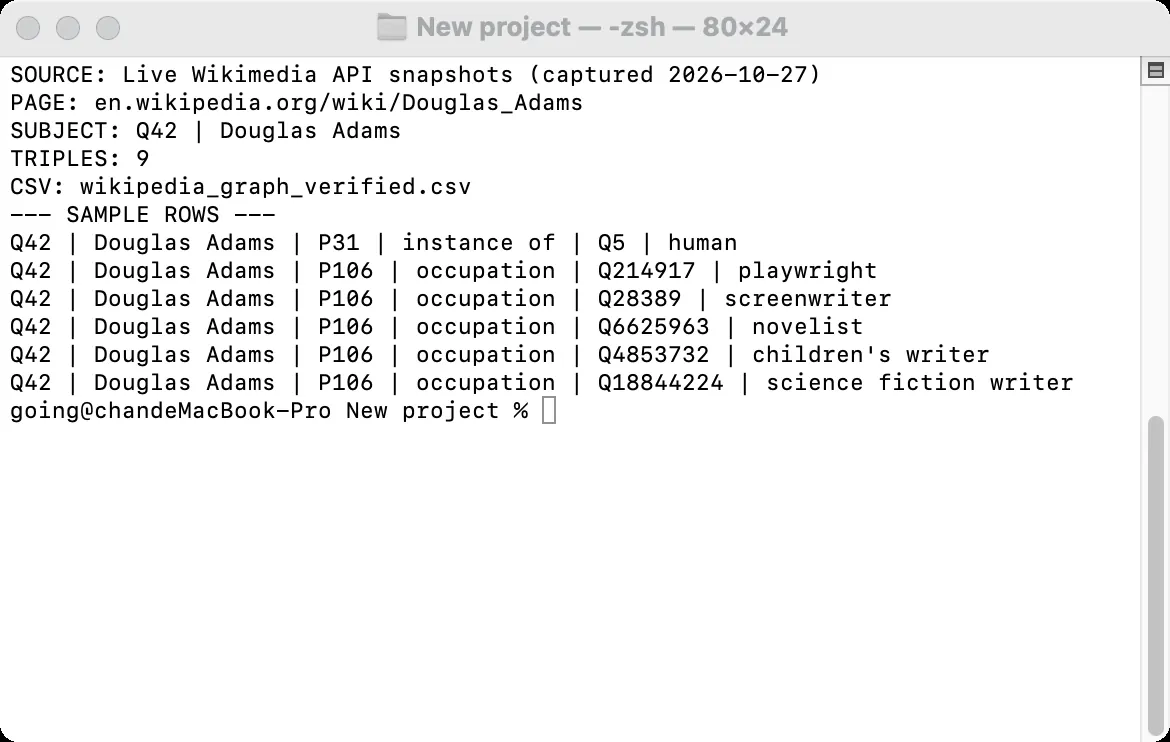
This tutorial follows Wikipedia page title → Wikidata QID → entity statements → CSV. The terminal and CSV screenshots below originate from actual Wikimedia API responses captured on October 27, 2026. Because direct command-line API access timed out in the original test environment, the raw JSON was first saved through Chrome and then processed using the same Python parsing function. These screenshots do not claim to show successful direct command-line API calls.
Step 1: Define the Scope and Ontology
Start with a limited set of entity types, properties, and records. This example begins with the English Wikipedia article on Douglas Adams and retains Wikidata P31 (“instance of”) and P106 (“occupation”). The output has six fixed columns: subject_id, subject, property_id, property, object_id, and object. Temporal analysis would also require qualifiers, references, and effective dates; those advanced semantics are beyond this small example.
For your own topic, answer three questions: Which entities are allowed in the graph? Which relationships are worth keeping? How can you determine when records refer to the same entity? For a writers graph, start with people and occupations, then consider nationality, works, and birthplace. More properties mean more validation work. Manually verify QIDs and PIDs for 5–10 samples before scaling up.
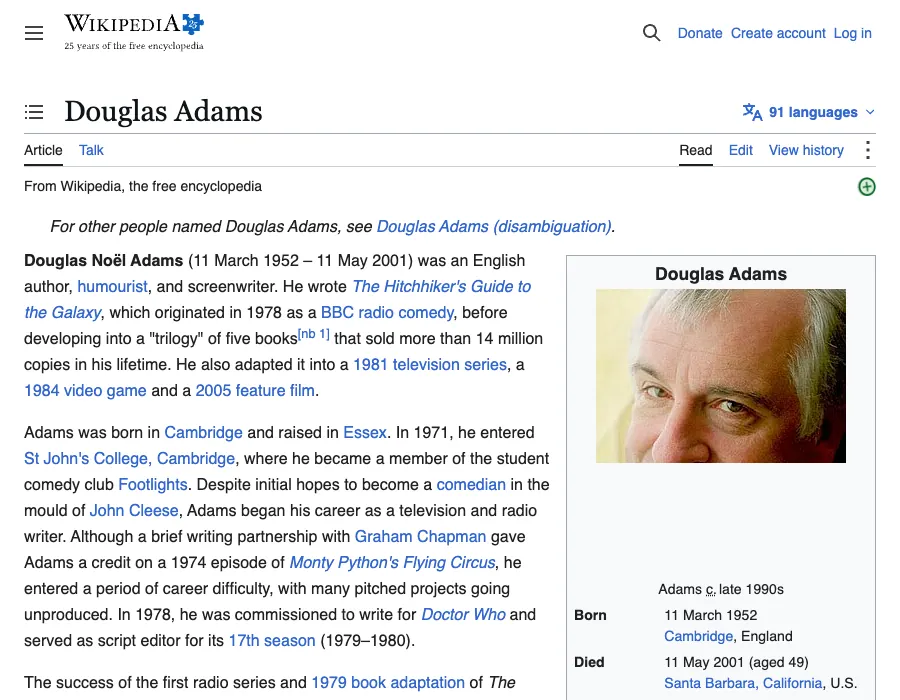
The screenshot shows the English Wikipedia article on Douglas Adams. Its title is the API query input; the associated Q42 is confirmed by the pageprops response in the next step, not by the article screenshot itself.
Step 2: Retrieve the QID and Structured Statements
Wikipedia Action API’s pageprops can return an article’s associated wikibase_item; Wikidata API’s wbgetentities can retrieve its labels and claims. The example filters out values without entity IDs, builds edges only for entity-to-entity relationships, and fetches target entity labels in batches. See MediaWiki Action API, Wikidata data access, and wbgetentities documentation for endpoint and data-format details.
This filtering is essential. Some properties contain dates, quantities, or text rather than an entity QID. Treating all values as entity-to-entity edges produces an incorrect graph. The example reads only mainsnak values with snaktype set to value and an id present. It demonstrates a subset of entity relationships, not the article’s complete knowledge.
Step 3: Run the Python Example
Install Requests with pip install requests. Replace the email address in USER_AGENT with a reachable contact address. Save the script as wikipedia_graph_article_example.py and run python wikipedia_graph_article_example.py. It creates a UTF-8 CSV. If the API responds with HTTP 429, the script reports Retry-After; wait before retrying. English labels make cross-language checking easier.
The script obtains the QID from the page title, reads only P31 and P106 statements, and retrieves English labels for their target QIDs in a batch. A missing linked QID raises an explicit error; a missing English label falls back to the ID. After execution, check for a CSV header, the number of extracted rows, and several known relationships.
"""Small Wikipedia/Wikidata knowledge-graph example for the article.

Install: pip install requests
Before running, replace the contact address in USER_AGENT.
"""

import csv
from pathlib import Path
import requests

USER_AGENT = "WikipediaGraphTutorial/1.0 (contact: [email protected])"
WIKIPEDIA_API = "https://en.wikipedia.org/w/api.php"
WIKIDATA_API = "https://www.wikidata.org/w/api.php"
PROPERTIES = {"P31": "instance of", "P106": "occupation"}


def get_json(session, url, params):
    response = session.get(url, params=params, timeout=20)
    if response.status_code == 429:
        raise RuntimeError(
            f"Wikimedia rate limit reached; Retry-After: "
            f"{response.headers.get('Retry-After', 'not supplied')}"
        )
    response.raise_for_status()
    return response.json()


def label(entity):
    labels = entity.get("labels", {})
    return labels.get("en", {}).get("value", entity["id"])


def build_rows(session, page_title="Douglas Adams"):
    page_data = get_json(
        session,
        WIKIPEDIA_API,
        {
            "action": "query",
            "prop": "pageprops",
            "ppprop": "wikibase_item",
            "titles": page_title,
            "format": "json",
            "formatversion": "2",
        },
    )
    page = page_data["query"]["pages"][0]
    if page.get("missing") or "wikibase_item" not in page.get("pageprops", {}):
        raise ValueError(f"No Wikidata item linked to {page_title!r}")
    subject_id = page["pageprops"]["wikibase_item"]
    data = get_json(
        session,
        WIKIDATA_API,
        {
            "action": "wbgetentities",
            "ids": subject_id,
            "props": "labels|claims",
            "languages": "en",
            "format": "json",
        },
    )
    subject = data["entities"][subject_id]
    pairs = []
    for property_id in PROPERTIES:
        for claim in subject.get("claims", {}).get(property_id, []):
            mainsnak = claim.get("mainsnak", {})
            if mainsnak.get("snaktype") != "value":
                continue
            value = mainsnak.get("datavalue", {}).get("value", {})
            if isinstance(value, dict) and value.get("id"):
                pairs.append((property_id, value["id"]))
    object_ids = sorted({object_id for _, object_id in pairs})
    objects = {}
    if object_ids:
        data = get_json(
            session,
            WIKIDATA_API,
            {
                "action": "wbgetentities",
                "ids": "|".join(object_ids),
                "props": "labels",
                "languages": "en",
                "format": "json",
            },
        )
        objects = data["entities"]
    return [
        (
            subject_id,
            label(subject) if subject.get("labels") else page_title,
            property_id,
            PROPERTIES[property_id],
            object_id,
            label(objects[object_id]),
        )
        for property_id, object_id in pairs
        if object_id in objects
    ]


def main():
    session = requests.Session()
    session.headers.update({"User-Agent": USER_AGENT})
    rows = build_rows(session)
    output = Path("wikipedia_graph.csv")
    with output.open("w", encoding="utf-8-sig", newline="") as file:
        writer = csv.writer(file)
        writer.writerow(
            ["subject_id", "subject", "property_id", "property", "object_id", "object"]
        )
        writer.writerows(rows)
    print(f"Wrote {len(rows)} triples to {output}")


if __name__ == "__main__":
    main()
Step 4: Validate and Visualize the Results
Open wikipedia_graph.csv and check each QID, PID, and English label. QIDs identify nodes and PIDs identify edge properties. Names are for display, not node merging. This snapshot contains nine P31/P106 relationships for Q42; the count neither covers all statements about the person nor establishes their current occupations.
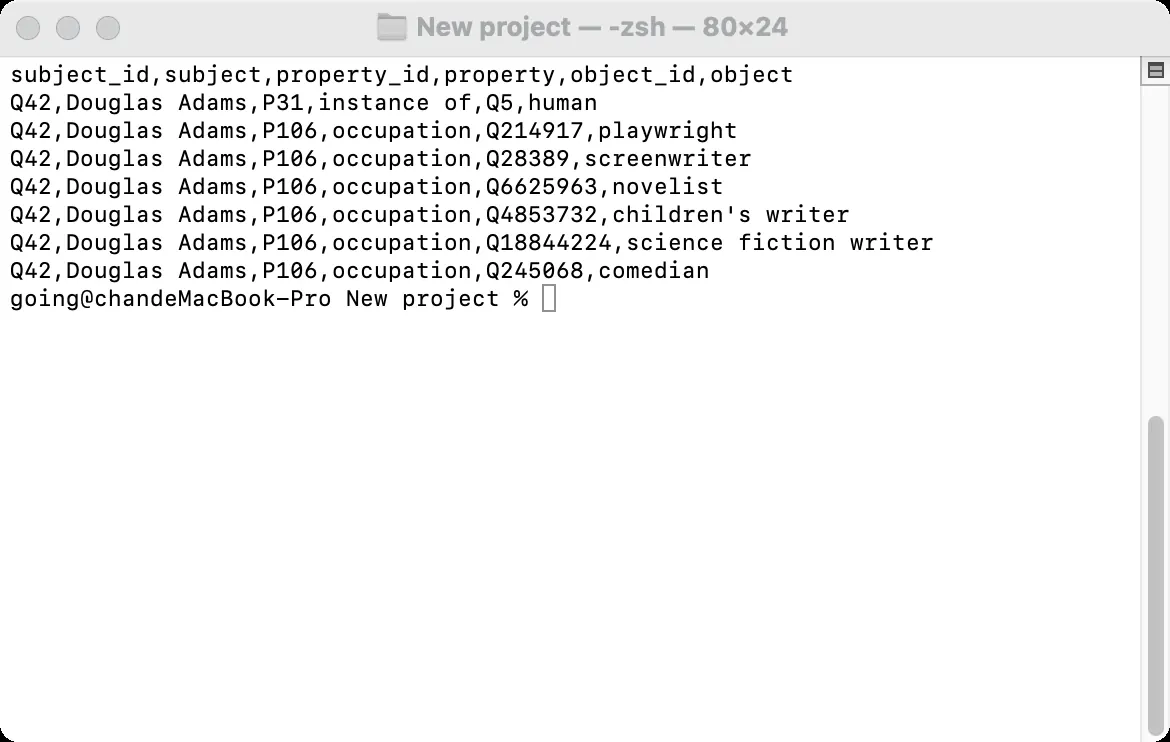
Next, convert the CSV into a queryable graph. Install the libraries with python -m pip install networkx matplotlib. Save the following code as wikipedia_graph_networkx_demo.py in the same folder as wikipedia_graph.csv, then run python wikipedia_graph_networkx_demo.py. It creates nodes from QIDs, stores PIDs on directed edges, queries occupations reached from Q42 through P106, and writes wikipedia_graph.png.
import csv
import matplotlib
matplotlib.use("Agg")
import matplotlib.pyplot as plt
import networkx as nx

with open("wikipedia_graph.csv", encoding="utf-8-sig", newline="") as source:
    rows = list(csv.DictReader(source))
if not rows or {row["subject_id"] for row in rows} != {"Q42"}:
    raise ValueError("Expected the tutorial's Q42 CSV")

graph = nx.MultiDiGraph()
for row in rows:
    graph.add_node(row["subject_id"], label=row["subject"])
    graph.add_node(row["object_id"], label=row["object"])
    graph.add_edge(row["subject_id"], row["object_id"],
                   key=row["property_id"], property_id=row["property_id"])

occupations = sorted(
    (target_id, graph.nodes[target_id]["label"])
    for _, target_id, data in graph.out_edges("Q42", data=True)
    if data["property_id"] == "P106"
)
print(f"CSV rows: {len(rows)}; graph edges: {graph.number_of_edges()}")
print(f"Q42 via P106: {len(occupations)} occupation nodes")
for target_id, label in occupations:
    print(f"  {target_id}: {label}")

targets = sorted(graph.successors("Q42"), key=lambda qid: graph.nodes[qid]["label"])
positions = {"Q42": (0, 0)}
positions.update({qid: (2.8, 4 - index) for index, qid in enumerate(targets)})
figure, axis = plt.subplots(figsize=(11, 7))
nx.draw_networkx_nodes(graph, positions, nodelist=["Q42"], node_size=650,
                       node_color="#255c64", ax=axis)
nx.draw_networkx_nodes(graph, positions, nodelist=targets, node_size=230,
                       node_color="#eef3f2", edgecolors="#759193", ax=axis)
edge_colors = ["#236a8a" if data["property_id"] == "P31" else "#c35b43"
               for _, _, data in graph.edges(data=True)]
nx.draw_networkx_edges(graph, positions, edge_color=edge_colors, arrows=True,
                       arrowsize=15, node_size=230, width=1.6, ax=axis)
axis.text(-0.23, 0, "Douglas Adams\nQ42", ha="right", va="center", fontsize=12)
for qid in targets:
    axis.text(3.1, positions[qid][1],
              f"{graph.nodes[qid]['label']}  ({qid})", va="center", fontsize=10)
axis.text(-1.5, -4.65, "Blue: P31 instance of    Orange: P106 occupation", fontsize=9)
axis.set_xlim(-1.6, 6.5)
axis.set_ylim(-5, 5)
axis.set_title("Q42: instance-of and occupation relationships", loc="left", fontsize=14)
axis.axis("off")
figure.savefig("wikipedia_graph.png", dpi=160, bbox_inches="tight", facecolor="white")
plt.close(figure)
print("Saved wikipedia_graph.png")
For this CSV, the script reports nine edges and eight P106 occupation nodes. Q5 is an object of P31 and must not be counted as an occupation. Figure 4 was produced by reading the same CSV. Node counts and layout can help inspect structure, but do not prove that statements remain valid today. For dates and provenance, revisit the original Wikidata statements and their qualifiers and references.
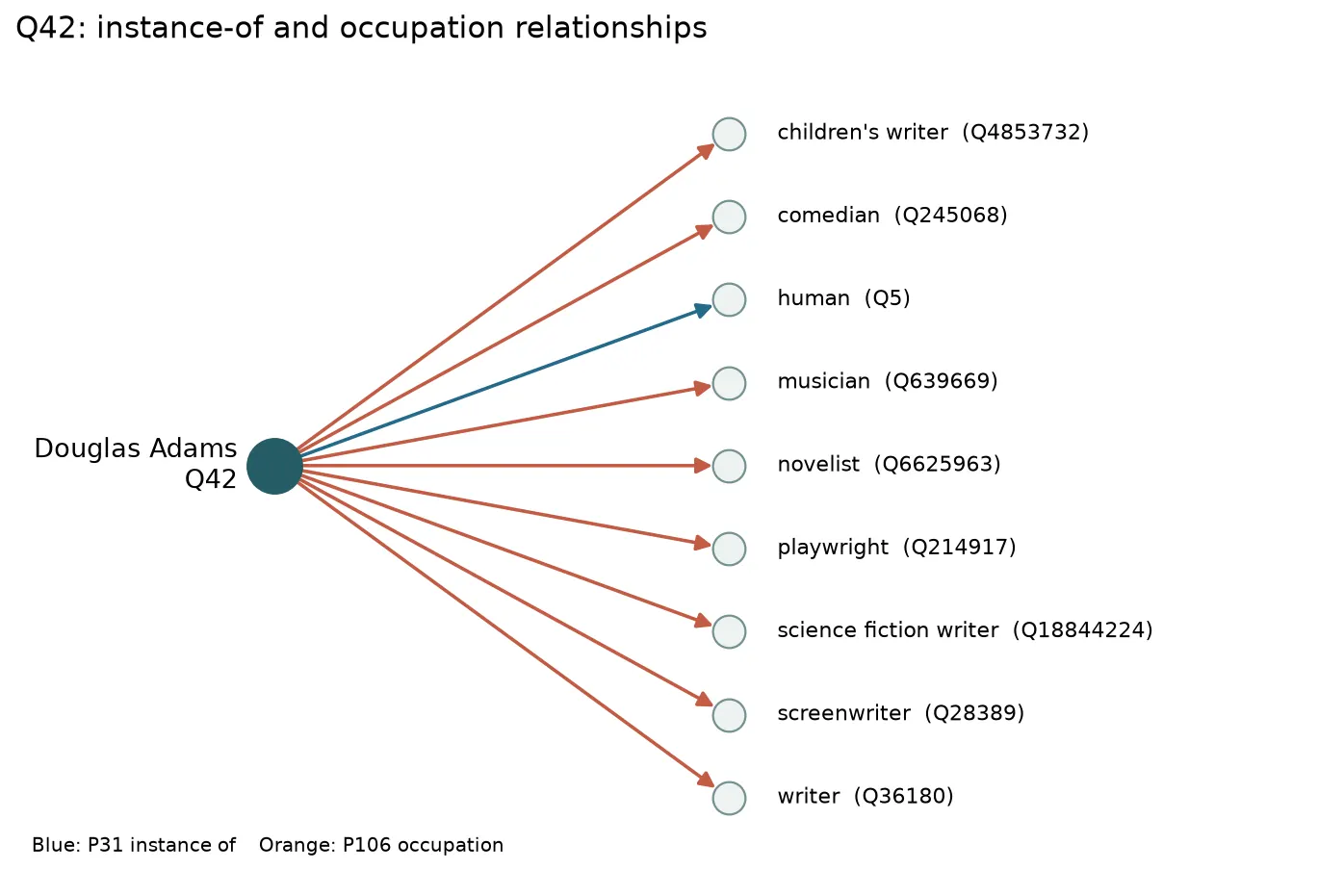
NetworkX is used here to demonstrate a minimum working workflow; a Neo4j import is not presented as a completed step. For database querying, you would need to design uniqueness constraints, repeated-import handling, and relationship-property mappings, then validate with the same QID/PID samples. See the NetworkX MultiDiGraph documentation.
How Can You Check Whether a Knowledge Graph Is Ready for a Real Project?
Before adding more articles, sample-check four things: whether each page maps to the correct QID, whether the same QID generates duplicate nodes, whether properties match your domain definitions, and whether dates or qualifiers change the meaning of relationships. For each failed sample, document the error and correction—not merely how many items were successfully fetched.
For production, retain two layers: raw API responses or dump excerpts, and filtered triples. Raw inputs enable traceability, while triples simplify querying. Record the extraction date, source URL, language, and code version for each import. When Wikidata entities change, rerun the same rules and compare added, removed, and modified edges. This is easier to audit than storing only the final CSV.
The example CSV stores only QIDs, PIDs, and labels; original statement time qualifiers and references are not carried onto graph edges. Visualization can reveal suspicious connections or isolated nodes, but a convincing layout does not establish factual accuracy. Before scaling, retain provenance and qualifiers and recheck important relationships.
API, HTML Scraping, or Data Dumps: Which Should You Use at Scale?
For a small set of entities and incremental checks, prefer official APIs. For article body text, tables, or fields absent from Wikidata, first determine whether an official API exposes them, then evaluate page parsing. For large entity sets or complete relationships, prioritize the official Wikimedia dumps and Wikidata database downloads. HTML parsers are vulnerable to template changes; API endpoints and structured dumps generally make more reliable graph pipelines.
APIs work well when starting with known QIDs: requests are scoped, errors are easy to inspect, and limited changes can be supplemented. However, endpoint limits apply; querying millions of items one by one is not an appropriate full-export strategy. For weekly or monthly rebuilds, evaluate dump format, update cadence, download size, and import costs before planning incremental updates.
Page parsing is appropriate for fields found only in prose, infoboxes, or tables, but keep extracted page text separate from Wikidata statements. HTML templates, languages, and article edits introduce variation; extracted textual relationships require entity recognition, disambiguation, and manual sampling. For QIDs and P31/P106 alone, structured data is simpler.
Before access, check the target’s robots.txt, terms, and API policies. Use an identifiable User-Agent, reasonable concurrency, and backoff. HTTP 429 means slow down; changing IP addresses to evade quotas or bans is not acceptable. Consult Wikimedia API etiquette and the Wikimedia User-Agent policy.
In production, log HTTP status codes, request duration, entity counts, and parsing failures separately. Apply limited retries to timeouts or 5xx responses as official guidance allows. Follow 429 waiting instructions and reduce the request rate. Treat 404 responses or missing wikibase_item values as separate investigation cases. Labelling all of these “proxy instability” obscures distinct issues such as missing pages, missing fields, or excessive request volume.
When Do You Need a Regional Proxy to Check Public Pages?
This tutorial only queries a few official Wikimedia entities, so direct API access is sufficient. A different network exit is worth considering only after the graph is built and you also need to compare how a third-party public page—one you are permitted to access—is presented across regions. Fix the URL, language, time window, and parsing rules; store page observations separately from graph QIDs. A regional presentation difference does not by itself mean the underlying entity facts changed.
Rola IP’s rotating residential proxy service can be considered for permitted region and session comparisons. Choose the required geographic granularity and determine whether consecutive requests must retain one exit IP. Proxies affect connectivity and network exit; QID matching, statement cleaning, and graph quality remain responsibilities of your data workflow.

How to Connect Rola IP to a Python Data Workflow
First, select an account under Residential Settings in the Rola IP console and generate host, port, username, and password. Second, follow the English residential proxy configuration documentation to select country, state, city, or sessiontime parameters. Use a stable session when consecutive requests need the same exit rather than forcing a new IP for every request. Third, test the documented IP-check endpoint to confirm the exit IP and region before connecting to an approved target.
Region and session parameters are account configuration encoded into the proxy username, not parameters appended to the destination webpage URL. For example, the documentation’s test-country-us-state-ny is a format example; use the actual username, proxy hostname, port, and password generated in the console. Keep development, testing, and production credentials separate, and never publish passwords in article code or commit them to Git.
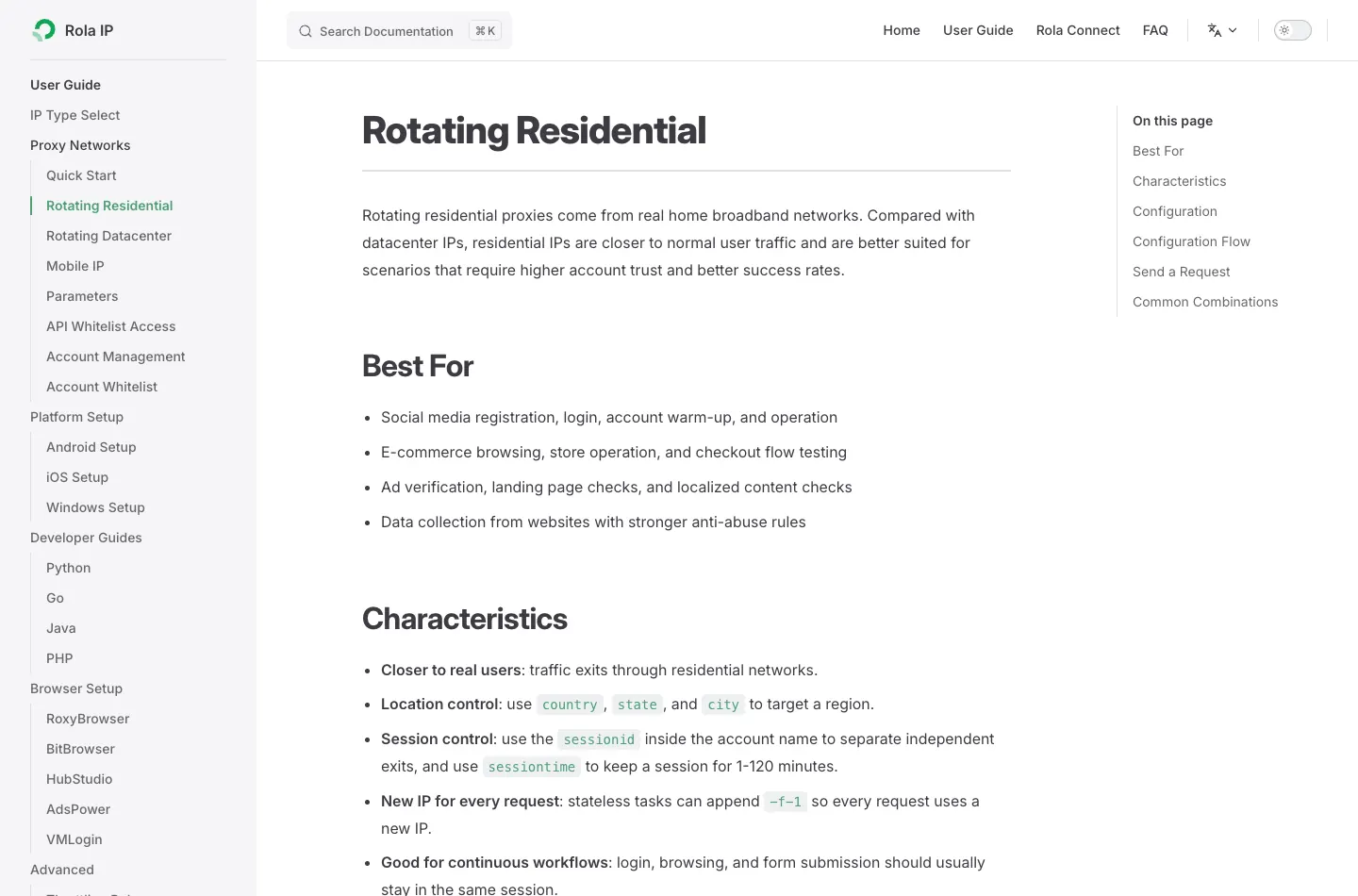
The following code demonstrates only proxy authentication and connectivity testing, reading credentials from environment variables. Replace PROXY_HOST, PROXY_PORT, PROXY_USER, and PROXY_PASS with real values from your console. Without valid account credentials, successful Rola IP connectivity has not been verified. For further Requests configuration, see Rola IP’s Python Requests proxy tutorial.
import os
import requests

proxy_url = (
    f"http://{os.environ['PROXY_USER']}:{os.environ['PROXY_PASS']}"
    f"@{os.environ['PROXY_HOST']}:{os.environ['PROXY_PORT']}"
)
response = requests.get(
    "http://ip123.in/ip.json",
    proxies={"http": proxy_url, "https": proxy_url},
    timeout=20,
)
response.raise_for_status()
print(response.json())
Rola IP also publishes a Wikipedia proxy use-case page explaining its product positioning. Any access to official Wikipedia or Wikidata endpoints must follow Wikimedia’s automated-access rules. A proxy does not increase permitted quotas and must not bypass rate limits. For large-scale graph construction, evaluate official dumps first.
Conclusion
Building a Wikipedia knowledge graph requires correctly aligning page titles to Wikidata entities and preserving relationships, sources, and update dates. Validate fields with a small API-based sample, and consider official dumps for large workloads. Proxies solve connectivity requirements in permitted use cases; they cannot replace data governance or access policies.