
WhatsApp CRM Integration: Options, Architecture, and Reliability

Nov 2, 2026 · Proxy Basics · 15 min read
A reliable WhatsApp CRM integration is a two-way event system. WhatsApp sends inbound messages and delivery updates to a webhook; the CRM supplies customer, owner, pipeline, and consent context; and an integration layer keeps the two systems synchronized without duplicating records or sending the wrong message.
You can connect the systems through a CRM’s native connector, a third-party WhatsApp platform, or a custom integration with Meta’s Cloud API.
The hard part is rarely the first API request. It is deciding who owns each field, matching the right person, handling repeated and out-of-order events, enforcing messaging rules, and giving operators a safe recovery path.
TL;DR
- Use a native connector when it supports the required number, CRM objects, assignment rules, audit history, region, and export path. Use a third-party platform when the team needs a shared inbox or managed channel workflows. With custom middleware, your team owns webhook security, queues, recovery, monitoring, and support.
- Before choosing a route, verify number migration or coexistence, vendor and CRM plan limits, template ownership, historical-data access, data export, and total cost.
- Treat inbound messages and message-status notifications as different event types. Persist a recoverable inbox state before acknowledging a notification, and make each CRM side effect idempotent.
- Store message status as an append-only timeline. The message ID correlates events; it is not sufficient by itself to identify every status notification.
- Check consent, opt-out state, message type, templates, and current platform policy at the send boundary.
- A proxy routes only traffic that your middleware or QA client explicitly sends through it. It cannot change Meta approval, messaging policy, or delivery limits.
What Does a WhatsApp CRM Integration Actually Connect?
WhatsApp is the conversation channel. Your CRM is usually the system of record for people, companies, opportunities, tickets, and assignments. The integration translates events between them.
Meta’s official WhatsApp Business Platform workspace describes Cloud API as the official API for sending and receiving messages from your own systems. It also states that Cloud API is hosted by Meta. This distinction matters: your application controls its requests, data model, queues, and logs, while Meta controls the hosted messaging service and platform rules.
Define ownership before writing code:
| Data | Recommended source of truth | Integration responsibility |
|---|---|---|
| Customer identity and lifecycle | CRM or customer master | Match, create, merge, and preserve source identifiers |
| WhatsApp message payload and channel status | WhatsApp event stream | Validate, store, and associate with a CRM record |
| Conversation owner and business outcome | CRM | Route to the correct team and update deal or ticket state |
| Consent and opt-out evidence | Consent system or CRM with audit history | Check at send time and stop disallowed workflows |
| Message templates and channel eligibility | Current WhatsApp Business Platform configuration | Select only approved, applicable message types |
This ownership table prevents a common failure: two systems both believe they are authoritative, so a delayed webhook overwrites a newer CRM decision.
Choose Native, Third-Party, or Custom Cloud API Integration
Native connectors, third-party messaging platforms, and custom Cloud API middleware solve different operational problems. Compare them by workflow coverage, number ownership, data control, total cost, and the team responsible for support.
Route |
Workflow and ownership |
Number and account checks |
Data and exit considerations |
Cost and support responsibility |
|---|---|---|---|---|
Native CRM connector |
Standard sales, service, and record-based workflows inside one CRM |
Confirm supported editions, regions, number eligibility, migration or coexistence, and who manages the WABA and templates |
Check which CRM objects receive messages, whether history and status events are visible, and how data can be exported |
Meta charges may still apply; check CRM add-ons, seat limits, vendor support, and escalation ownership |
Third-party platform or solution provider |
Shared inboxes, routing, templates, automation, and connections across business systems |
Confirm number onboarding, provider migration, Business App coexistence, template ownership, and rollback options |
Adds another processor and operating console; verify audit history, exports, retention, and exit costs |
Combine Meta charges with platform, seat, feature, and support-plan fees; clarify which vendor owns incidents |
Custom Cloud API middleware |
Proprietary mapping, strict data ownership, complex routing, or internal platforms |
Your team owns the Meta app, WABA relationship, credentials, phone-number lifecycle, and configuration changes |
Maximum schema and retention control, but you must build exports, reconciliation, replay, and deletion processes |
Include cloud, logging, engineering, security, monitoring, and on-call costs in addition to platform charges |
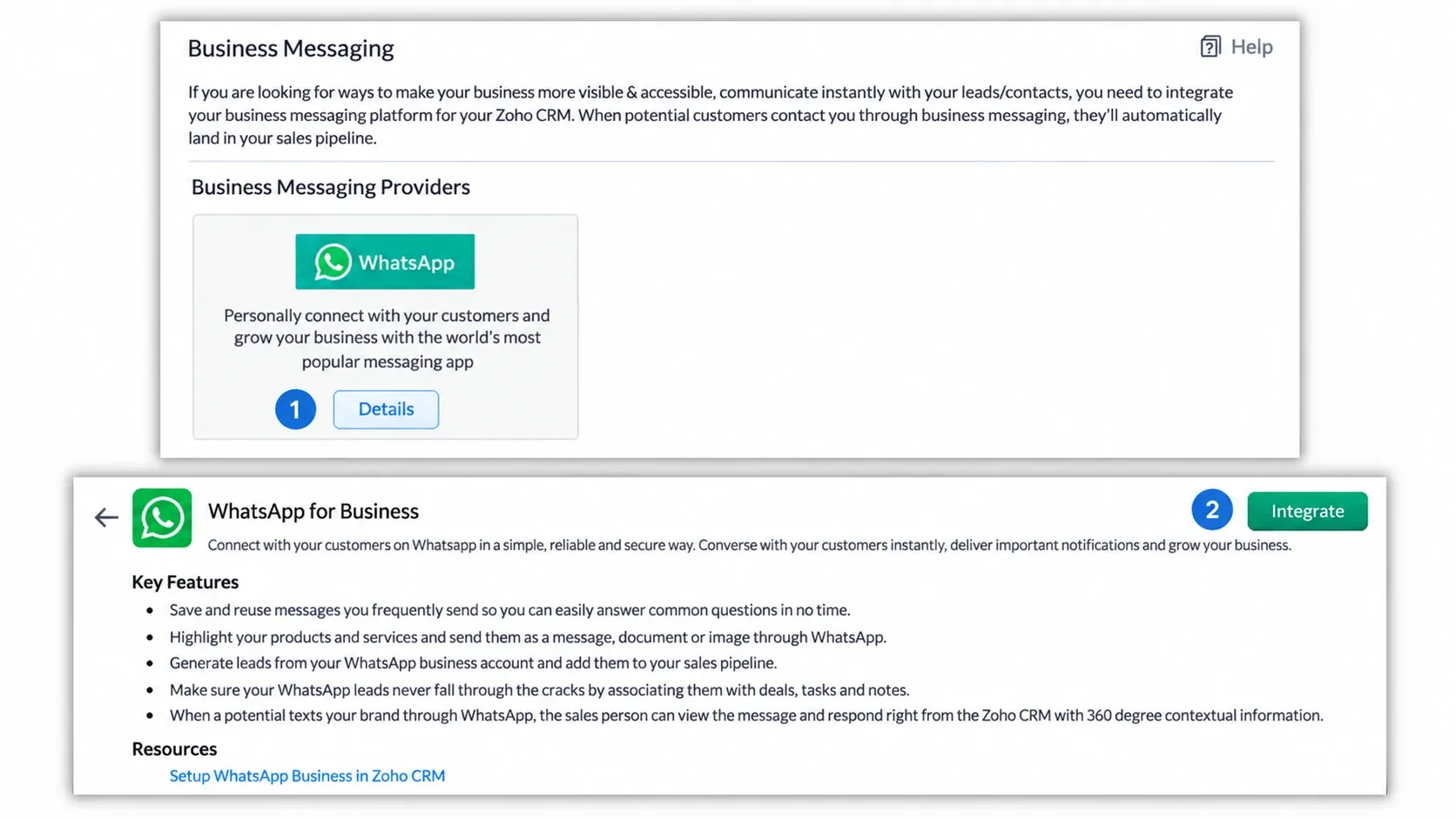
Zoho provides a useful native example. Its current WhatsApp Business integration guide covers administrator setup, Meta account connection, phone-number selection, module mapping, and assignment rules. The exact fields and availability are Zoho-specific, but the pattern is broadly useful: connect the business account, choose the channel identity, decide where unknown senders go, map fields, and assign ownership.
Implementation Checklist for WhatsApp API and CRM Integration
The sequence below is an architecture and acceptance checklist, not a framework-specific SDK tutorial. It applies to a custom integration and also works as an evaluation checklist for packaged connectors. Use the current Meta examples for request syntax and the selected CRM’s current API documentation for object-specific writes.
1. Confirm Prerequisites and Administrative Ownership
Meta’s current Cloud API materials list a Meta business portfolio, WhatsApp Business Account, and business phone number as core assets. Assign named owners for the Meta app, WABA, phone number, CRM integration user, secrets, templates, and incident response. Avoid an integration that depends on one employee’s personal account or undocumented token.
For a native CRM path, confirm the vendor’s edition, administrator permissions, supported regions, eligible phone-number conditions, and migration behavior. Zoho, for example, documents business verification, a WhatsApp Business account, and an eligible registered phone number as prerequisites.
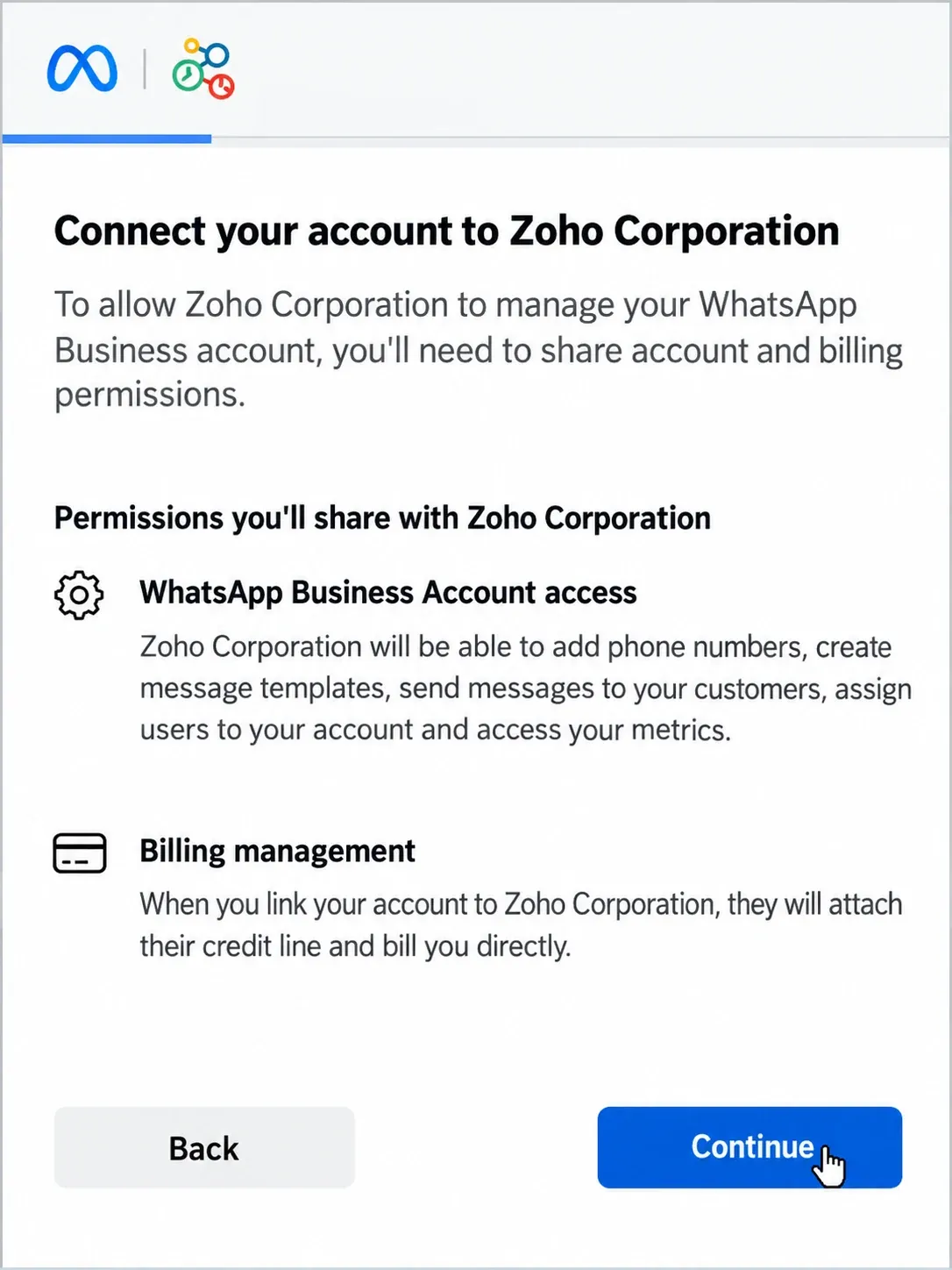
If the business already uses the WhatsApp Business App or another provider, do not treat number onboarding as a simple credential change. Before touching production, record the current owner of the number and WABA, whether the chosen route supports coexistence or requires migration, what conversation or template history is retained, the expected interruption window, and the rollback owner. These conditions vary by Meta flow, CRM edition, provider, region, and account state.
Phone verification is a separate channel and carrier process. If onboarding stalls because a code does not arrive, use a focused WhatsApp verification-code troubleshooting guide instead of repeatedly changing API settings or network routes.
2. Model Customer Identity Before Messages Arrive
Phone numbers are useful matching keys, but they are not durable CRM primary keys. Normalize numbers to one canonical international format, preserve the raw input for audit, and store channel identifiers in dedicated fields.
A practical contact-resolution order is:
- Match the stored WhatsApp channel identifier when present.
- Match a verified, normalized phone number within the correct tenant or business unit.
- If one record matches, attach the event and store the channel identifier.
- If no record matches, create an unverified lead or queue the event for review according to your policy.
- If multiple records match, do not guess. Open a merge or identity-resolution task.
Use (tenant_id, channel_identifier) as a unique key. A phone number alone can collide across tenants, sandboxes, duplicate CRM records, recycled numbers, or poorly normalized imports.
Example: From Click-to-WhatsApp Lead to CRM Outcome
A useful design review follows one conversation across the whole system:
- A prospect starts a conversation from a Click-to-WhatsApp entry point on a business-owned page.
- The integration authenticates the notification, records only the fields required for processing, and acknowledges it after the durable inbox write succeeds.
- The resolver searches within the correct business account and tenant. A single match attaches to the existing contact; no match or multiple matches enter a review queue.
- CRM rules assign the lead or ticket by region, team, product, or case type. The assignment event and owner are written to the audit trail.
- Before any outbound message, the send service checks consent evidence, opt-out state, message type, template eligibility, and current policy conditions.
- The returned message ID is attached to the CRM activity, while later transport statuses are appended to a separate timeline.
- If sales cannot resolve the request, the CRM transfers ownership to support without changing the channel identity or losing the conversation-to-record link.
Measure the workflow with operational definitions rather than borrowed benchmark claims. Useful metrics include first-response time, assignment delay, unmatched-contact rate, duplicate-activity rate, send failure rate, opt-out rate, human-handoff rate, resolution time, and attributed outcome. Compare them with the organization’s own baseline and document exclusions.
3. Receive, Verify, and Acknowledge Webhooks
Subscribe the application to the WABA so Meta can send webhook events for its phone numbers. Meta’s webhook overview and official Postman reference describe the endpoint, subscription, verification, and notification flow.
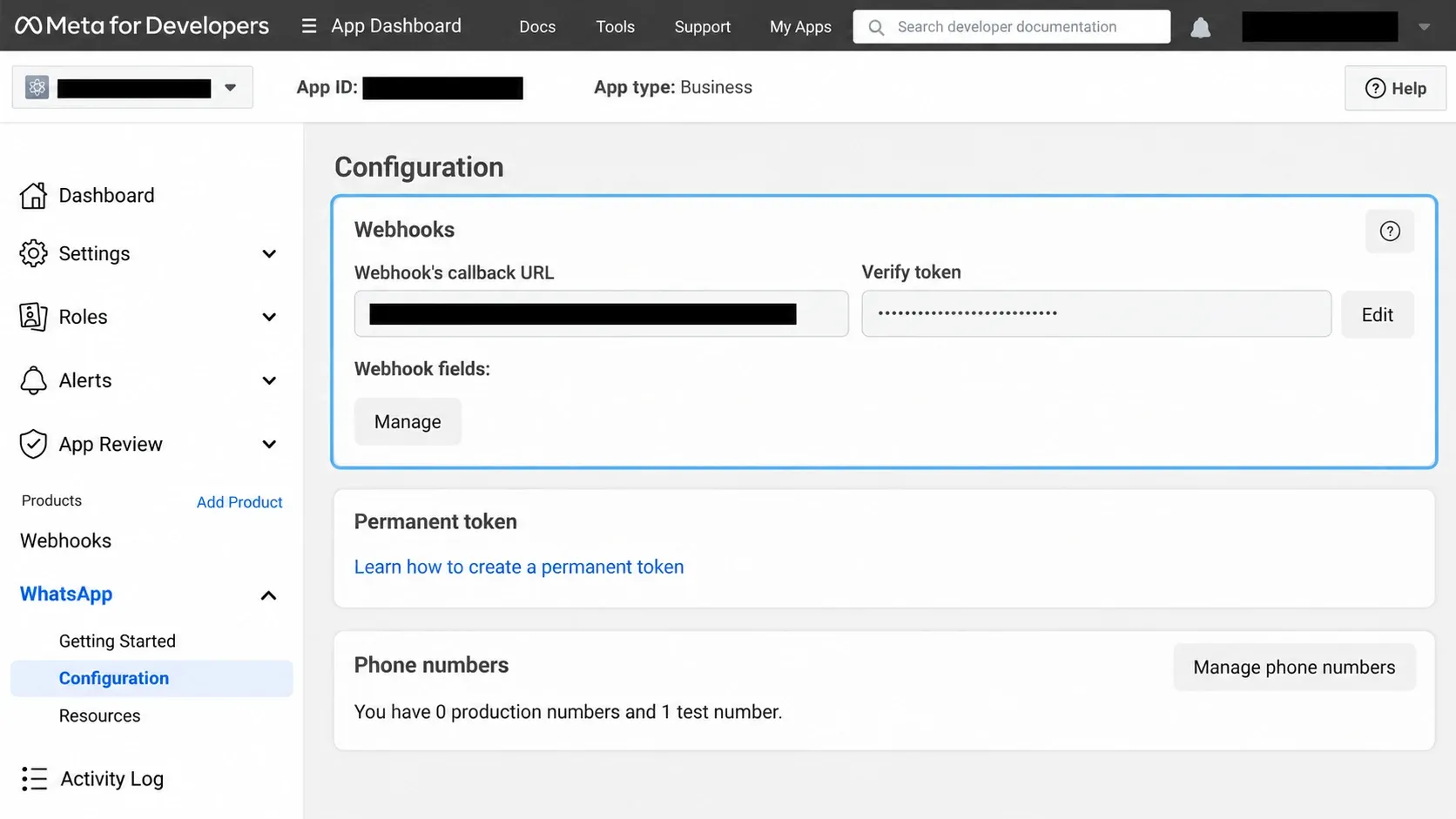
Treat setup verification and notification authentication as separate controls:
- Subscription verification: during endpoint setup, compare the supplied verification token with the secret value stored for the application. Return the challenge only when the token and expected subscription request match; reject a mismatch without processing business data.
- Notification authentication: for each event delivery, validate Meta’s current request-signature requirement against the exact raw request body before parsing or transforming it. Reject an invalid signature and record only sanitized diagnostic metadata.
- Durable receipt: validate size and basic structure, extract the minimum fields required for routing and recovery, then write an inbox record with state
RECEIVED. Do not write message bodies, phone numbers, tokens, or media URLs to ordinary application logs. - Acknowledgement: return success only after the durable receipt commits. CRM lookup, enrichment, assignment, and replies belong in an asynchronous worker. If the durable store is unavailable, do not claim successful receipt.
Platform redelivery and worker retry solve different failures. Platform redelivery repeats a notification when delivery was not acknowledged. Worker retry resumes an inbox record after a CRM, queue, or downstream failure. A duplicate delivery can reuse the existing inbox record, but it must not change a failed record to APPLIED or prevent an authorized retry.
4. Make Event Processing Idempotent
Assume every notification can be delivered more than once and every worker can fail after completing only part of its work. The durable inbox therefore needs both an event-specific uniqueness key and a processing state.
| Event type | Correlation and uniqueness approach | Required behavior |
|---|---|---|
| Inbound message | Scope the message ID by business account or phone-number identity and event type | One CRM message activity per inbound message; retries may resume an unfinished record |
| Message-status notification | Use the message ID as the correlation key, then distinguish the status, event timestamp, business account, and event type | Preserve sent, delivered, read, and failure events without allowing a delayed event to move the current state backward |
| Outbound CRM command | Assign a stable command ID before the API call and store the attempt and result separately | Do not create two sends because a worker restarted; if the result is uncertain, reconcile before retrying |
Move inbox records through explicit states such as RECEIVED, PROCESSING, APPLIED, RETRYABLE, and DEAD_LETTER. Claiming a record in a transaction prevents two workers from applying it concurrently. Mark it APPLIED only after the CRM side effect succeeds. On a temporary CRM failure, retain the error class and next-attempt time; on a permanent conflict, preserve a safe reference for review.
The CRM write also needs a stable external activity key or an equivalent conditional-create operation. Inbox uniqueness prevents duplicate workers from starting the same event, while CRM-side idempotency prevents a retry after an uncertain response from creating a second activity. This is recoverable at-least-once processing with idempotent effects, not an end-to-end exactly-once guarantee.
5. Write Message Statuses Back as a Timeline
The send endpoint returns a message ID. Store it on the CRM activity immediately, then use it to correlate status events. Meta’s official message-status example documents sent, delivered, and read notifications and warns that notification order may not match actual timing.
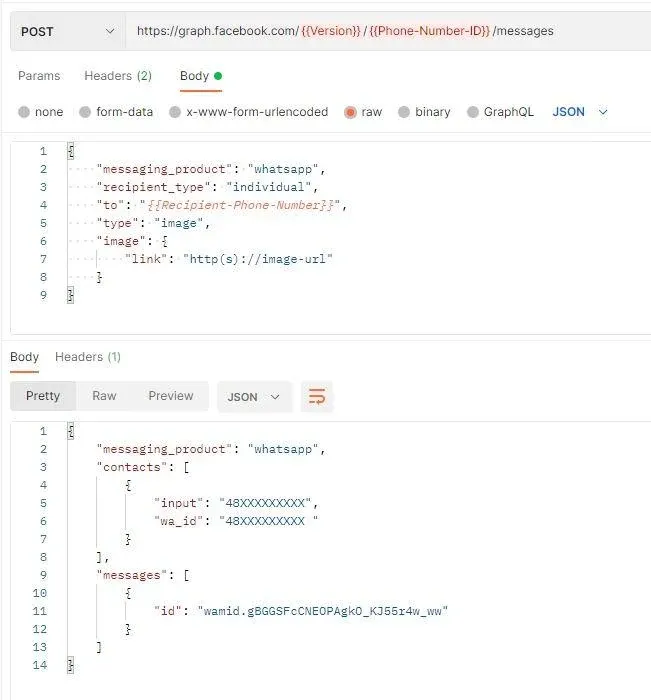
Do not overwrite one status field blindly. Store the latest valid state plus an append-only event history containing the message ID, status, event timestamp, received timestamp, and relevant error data. A delayed sent event should not move a record backward from delivered.
Map business actions separately from transport states. “Delivered” does not mean the customer agreed, a ticket was solved, or a deal advanced. Those outcomes should require their own CRM events.
6. Enforce Consent and Templates at the Send Boundary
Do not let every CRM automation call the messaging endpoint directly. Route outbound commands through one policy layer that checks the recipient, business account, requested message type, consent evidence, opt-out status, template state, and current platform requirements.
Keep these CRM fields explicit:
- WhatsApp opt-in state, source, timestamp, and wording version
- opt-out state and timestamp
- last relevant inbound conversation timestamp
- approved business account and phone-number identity
- template name, language, and version used
- campaign, workflow, or agent that initiated the command
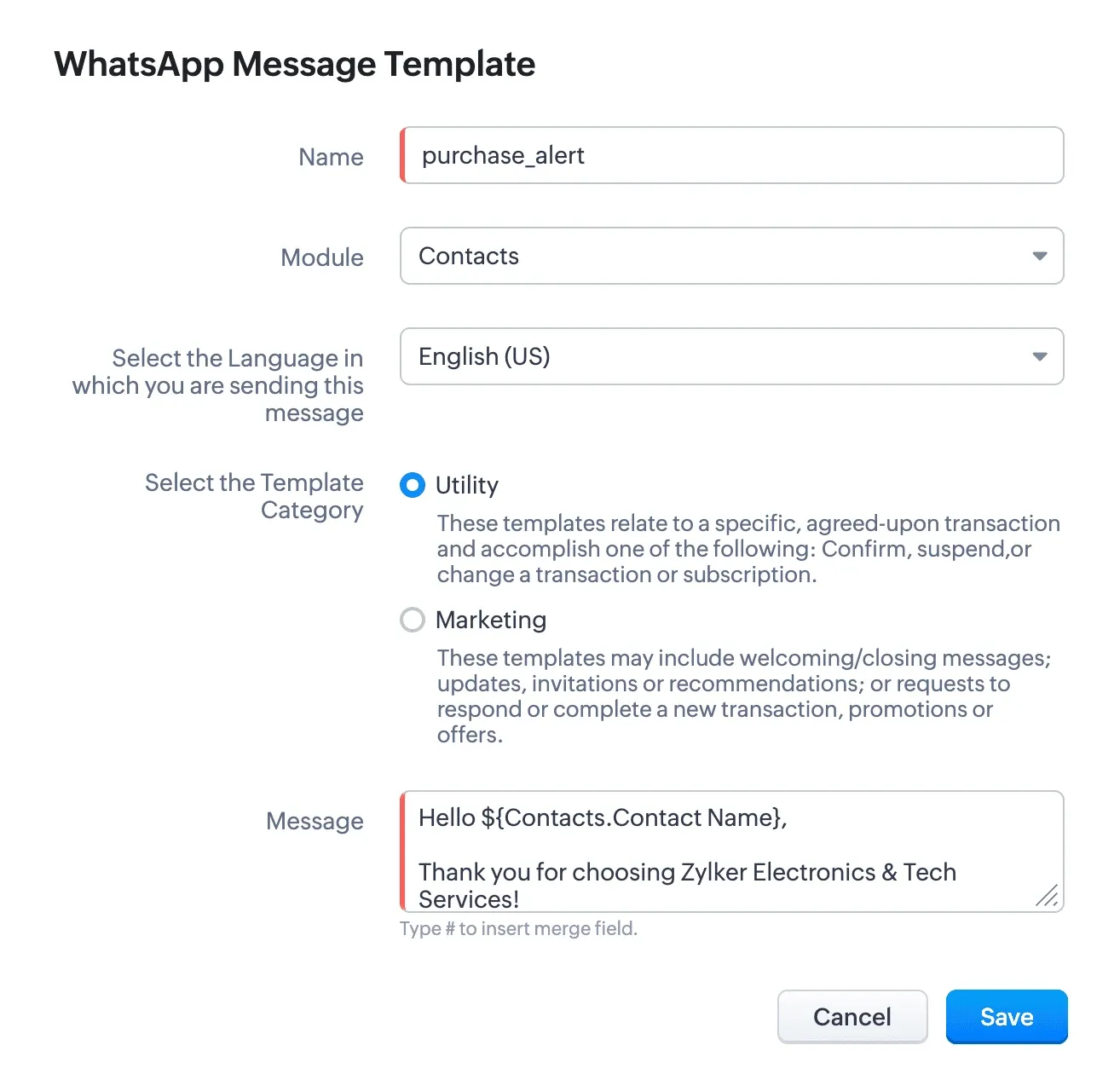
The current WhatsApp Business Messaging Policy requires recipient permission, honoring opt-out requests, and using approved templates when initiating conversations outside the applicable customer-service window. It also places responsibility for notices, permissions, data protection, and lawful use on the business. Policy, template categories, eligibility, pricing, and limits can change, so recheck the official policy and vendor documentation before launch rather than encoding an old blog’s rules into permanent logic.
7. Define the Webhook Data Lifecycle
Default to a normalized inbox record rather than indefinite storage of the complete webhook. The minimum useful record usually includes tenant and business-account scope, event type, message or status identifier, event and receipt timestamps, a safe contact reference, processing state, attempt count, correlation ID, and a structured error code. Store message text, attachments, media URLs, or a raw phone number only when a documented workflow genuinely requires them.
If incident response, audit, or authorized replay requires the original payload, place it in a separate encrypted store with least-privilege access, an owner, a policy-defined retention period, automated deletion, and an access log. Keep raw content out of routine logs and analytics. Replays should require an authenticated operator, record the reason and target event, and preserve the original processing history. Apply the same deletion and access rules to downloaded media and CRM copies.
8. Add Queues, Retries, and an Exception Path
Use separate queues for inbound processing and outbound commands. Retries should be bounded and use exponential backoff with jitter. Classify failures before retrying:
- Transient: network interruption, timeout, or temporary service response. Retry within a defined budget.
- Configuration: expired credential, missing permission, invalid phone-number mapping, or disabled integration. Stop and alert an owner.
- Policy or recipient: disallowed message, opt-out, invalid recipient, or rejected template. Do not rotate infrastructure and keep trying.
- CRM conflict: duplicate or ambiguous contact, locked record, or schema validation failure. Send to a review queue with the event preserved.
A dead-letter queue is useful only when someone owns it. Include a reason code, first and last attempt time, attempt count, correlation ID, safe payload reference, and the action required to resume. Classify API responses using the current official error documentation. If a send timed out after the request may have reached the service, do not blindly issue another send; reconcile the stored command, response evidence, and later status events or route it for operator review.
9. Test Failure Paths Before Rollout
A successful test message proves only the happy path. Run a launch suite that covers:
- the same webhook delivered twice;
- an invalid subscription token and an invalid notification signature;
- durable inbox storage unavailable before acknowledgement;
- two workers processing the same event concurrently;
- unknown, duplicated, and malformed phone numbers;
- duplicate and out-of-order status events for the same message ID;
- CRM downtime after the webhook is acknowledged;
- a CRM timeout after the activity may already have been created;
- expired credentials and revoked permissions;
- API throttling, a transient service response, and an uncertain send result;
- an opted-out recipient and a nonapproved template request;
- a retry that reaches its limit and enters the exception queue;
- logs and screenshots with secrets, phone numbers, and message content redacted.
Start with an internal test cohort. Compare the WhatsApp event log, middleware inbox state, retry history, and CRM activity count. Confirm that a duplicate inbound delivery does not create another CRM activity, a temporary CRM failure can resume, different statuses for one message are retained, and the current status never moves backward because an older event arrived late.
What Does a WhatsApp CRM Integration Cost?
There is no useful universal price. Build the estimate from the organization’s actual markets, message mix, volume, CRM plan, provider, reliability requirements, and support model:
Monthly total cost = WhatsApp platform charges + provider or platform fees + CRM seats and add-ons + cloud and log storage + engineering, monitoring, and support labor.
For each estimate, record the target countries, message categories, expected volume, included seats, automation or inbox features, retention needs, support tier, and pricing date. A native connector may shift cost into a CRM add-on; a third-party platform may charge by seat, number, usage, or feature; a custom build moves more cost into engineering, infrastructure, security, and on-call ownership.
Use Meta’s current WhatsApp pricing documentation and the current vendor plan when preparing a budget. Avoid copying fixed rates from an older article because market, category, and policy changes can make the estimate inaccurate.
Where Network Infrastructure Fits Into WhatsApp Business CRM Integration
Network infrastructure can support a custom integration, but its scope must be precise. A proxy affects only requests that your middleware, browser, or QA client explicitly routes through it. It does not make Meta’s hosted Cloud API run from that exit node.
For authorized teams, Rola IP’s WhatsApp Business QA workflow can support documented regional checks of owned landing pages, public business entry points, and approved backend requests. A useful QA record includes the target market, source URL, configured route, session mode, timestamp, observed handoff, and expected result.
Use a controlled network route only when it answers a real test question. Examples include checking whether an owned localized landing page loads from the intended market, confirming a Click-to-WhatsApp link contains the expected destination, or reproducing an outbound connectivity problem from a documented environment.
The Rola IP compliance guide explains the separate authorization, data-minimization, request-control, and retention questions that remain the customer’s responsibility. When you need to confirm the exit used by the configured test client, a proxy checker can verify that network path. It does not prove WhatsApp delivery, consent, template eligibility, or CRM correctness.
A proxy cannot:
- create or replace user opt-in;
- make an unapproved template eligible;
- change a business account’s permissions or messaging limits;
- repair a wrong contact mapping;
- guarantee message delivery, read status, or account acceptance;
- grant permission to collect or reuse data.
WhatsApp CRM Integration Launch Checklist
Before production, require an owner to sign off each area:
- Architecture: selected route, source-of-truth table, tenant boundaries, and support owner.
- Identity: normalized phone fields, channel IDs, collision behavior, and merge workflow.
- Security: least-privilege credentials, secret rotation, webhook validation, encryption, redacted logs, and access review.
- Reliability: durable inbox, event-type-specific keys, processing states, CRM-side idempotency, bounded retries, dead-letter owner, replay procedure, and correlation IDs.
- Messaging: consent evidence, opt-out enforcement, approved templates, current policy review, and human handoff.
- CRM: field mapping, unknown-sender behavior, assignment rules, status history, and outcome tracking.
- Data lifecycle: minimized fields, raw-payload justification, access owner, encryption, retention, deletion, media handling, and replay authorization.
- Cost: target markets, message mix, vendor and CRM plans, cloud resources, support labor, pricing date, and exit costs.
- Testing: duplicates, out-of-order events, downtime, permission loss, policy failures, and rollback.
- Network: explicit route scope, authorized targets, egress verification, timeout budget, and no unsupported delivery claims.
Conclusion
The best integration is the smallest architecture that meets your control requirements. Use a native CRM connector when its objects and workflows fit. Add a third-party platform when it removes channel-specific operations your team does not want to own. Build custom middleware only when identity, routing, governance, or automation requirements justify running a production service.
Whichever route you choose, make event identity, contact ownership, policy checks, retries, and observability explicit before scaling. That work prevents more customer-facing failures than a clever first API call.
Disclosure: This article is published by Rola IP for technical and editorial reference. Product interface screenshots are sourced from official public materials or project-supplied captures, remain the property of their respective owners, and do not imply sponsorship or endorsement. Interfaces may change over time. The architecture checklist was verified against current official documentation but was not deployed in a customer production environment.