
HTTPX vs Requests vs aiohttp: Features, Performance, and Python Use Cases

Aug 28, 2026 · Comparisons · 9 min read
Requests is the best default for straightforward synchronous Python scripts. HTTPX is the closest modern alternative when a project needs both synchronous and asynchronous APIs or HTTP/2. aiohttp is strongest in an async-first application that also benefits from native WebSockets, connector controls, or its server framework. None is universally fastest: latency, concurrency, connection reuse, protocol support, and the surrounding application matter more than a library name.
This HTTPX vs Requests vs aiohttp comparison uses runnable code and controlled local measurements. Every example was tested on Windows 11 with CPython 3.12.13, Requests 2.34.2, HTTPX 0.28.1, and aiohttp 3.14.3 on August 27, 2026.
TL;DR: Use Requests for simple synchronous scripts and established integrations. Use HTTPX when one project needs both sync and async APIs, or when HTTP/2 is required and verified. Use aiohttp for async-first applications that benefit from native WebSockets, detailed connector controls, or its server framework. The local benchmark figures below are environment-specific, so validate performance against your own target service, concurrency, and proxy route.
HTTPX vs Requests vs aiohttp at a Glance
| Criterion | Requests | HTTPX | aiohttp |
|---|---|---|---|
| I/O model | Synchronous | Synchronous and asynchronous | Asynchronous |
| Reusable client | Session |
Client / AsyncClient |
ClientSession |
| HTTP/2 client | No | Optional and opt-in | Not in the tested stable client |
| WebSocket client | Third-party | Third-party | Built in |
| HTTP server | No | No | Built in |
| Learning curve | Low | Low to medium | Medium to high |
| Best fit | Scripts and existing sync apps | Modern SDKs and mixed architectures | Async services and high-concurrency crawlers |
Choose Requests when the call flow is linear and maintainability matters most. Choose HTTPX when a Requests-like API must work in sync and async code, or when verified HTTP/2 support is required. Choose aiohttp when asyncio already defines the application architecture and its broader framework features are useful.
Do not add async solely because a script makes several requests. Async I/O improves how one thread handles waiting sockets; it does not accelerate CPU-heavy parsing, bypass server limits, or make an inefficient request strategy safe.
Run the Same Request With All Three Clients
The following dependency-free server makes the examples reproducible without relying on a public test service. Save it as local_json_server.py, then run it in one terminal.
import json
from http.server import BaseHTTPRequestHandler, ThreadingHTTPServer

class Handler(BaseHTTPRequestHandler):
    protocol_version = "HTTP/1.1"

    def do_GET(self):
        client = self.headers.get("X-Client-Name", "unknown")
        body = json.dumps({"message": "test passed", "client": client}).encode()
        self.send_response(200)
        self.send_header("Content-Type", "application/json")
        self.send_header("Content-Length", str(len(body)))
        self.end_headers()
        self.wfile.write(body)

    def log_message(self, format, *args):
        pass

ThreadingHTTPServer(("127.0.0.1", 8765), Handler).serve_forever()
Install the tested clients and start the server:
python -m pip install requests==2.34.2 "httpx[http2]==0.28.1" aiohttp==3.14.3
python local_json_server.py
Requests
import requests

with requests.Session() as session:
    response = session.get(
        "http://127.0.0.1:8765/json",
        headers={"X-Client-Name": "requests"},
        timeout=5,
    )
    response.raise_for_status()
    print(response.status_code, response.json())
A Requests Session persists cookies and shared settings while allowing urllib3’s connection pool to reuse connections to the same origin. It remains synchronous: each request blocks its current thread.
HTTPX
import httpx

with httpx.Client(timeout=5) as client:
    response = client.get(
        "http://127.0.0.1:8765/json",
        headers={"X-Client-Name": "httpx"},
    )
    response.raise_for_status()
    print(response.status_code, response.http_version, response.json())
HTTPX deliberately feels familiar to Requests users. The httpx.Response object also exposes http_version, which verifies whether HTTP/2 was actually negotiated.
aiohttp
import asyncio
import aiohttp

async def main():
    timeout = aiohttp.ClientTimeout(total=5)
    async with aiohttp.ClientSession(timeout=timeout) as session:
        async with session.get(
            "http://127.0.0.1:8765/json",
            headers={"X-Client-Name": "aiohttp"},
        ) as response:
            response.raise_for_status()
            print(response.status, await response.json())

asyncio.run(main())
aiohttp body methods such as .json(), .text(), and .read() are awaitable. Its official Client Quickstart recommends reusing a ClientSession because the session owns the connection pool.
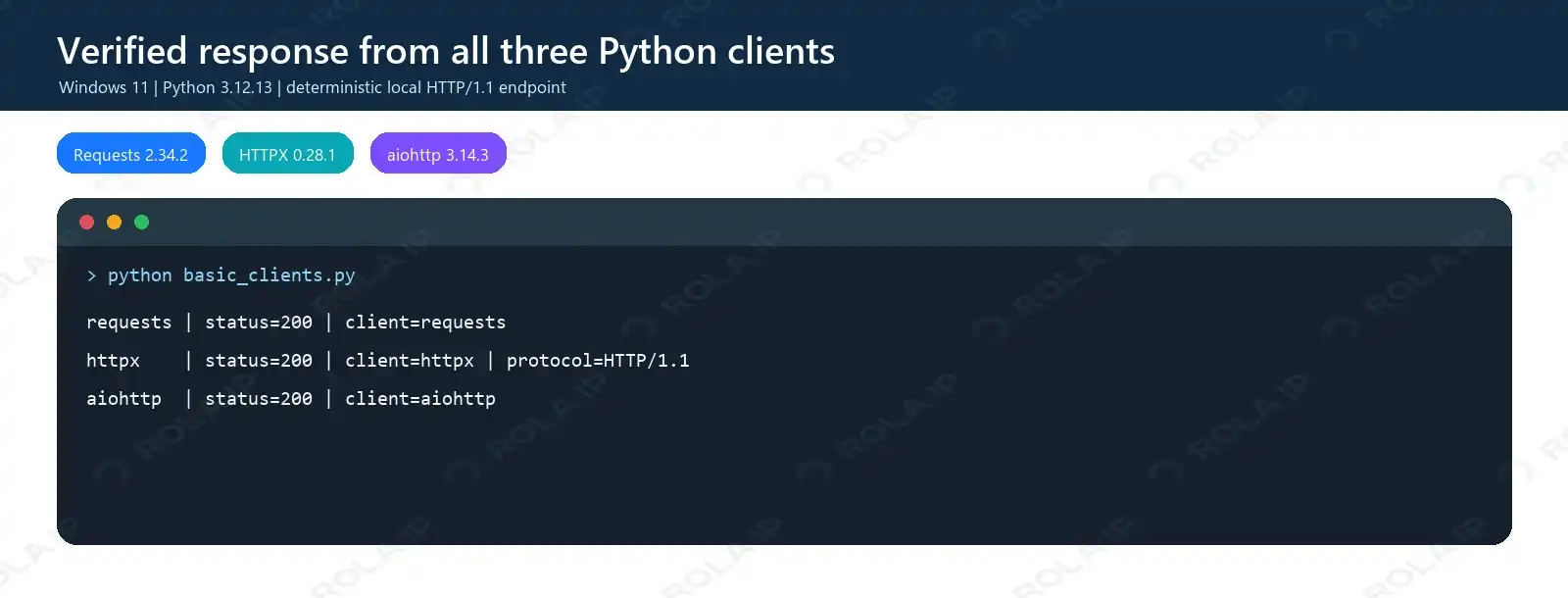
All three clients returned HTTP 200 from the same deterministic local endpoint.
Sessions, Responses, and Connection Reuse
Top-level calls such as requests.get() and httpx.get() are convenient for one request. Repeated traffic should use a reusable client. Requests documents cookie persistence and pooling in its advanced usage guide.
| Task | Requests | HTTPX | aiohttp |
|---|---|---|---|
| Reuse connections | Session |
Client / AsyncClient |
ClientSession |
| Status | .status_code |
.status_code |
.status |
| Text | .text |
.text |
await .text() |
| JSON | .json() |
.json() |
await .json() |
| Bytes | .content |
.content |
await .read() |
| Cleanup | with |
with / async with |
async with |
Even with httpx.AsyncClient, .json() and .text are synchronous after a normal awaited request because the body has already been read. For large files, use each client’s streaming interface rather than materializing the complete response.
An HTTP client session is not the same as a proxy sticky session. The client session owns sockets, cookies, and shared configuration. A proxy session controls whether multiple requests retain the same exit IP. Both may need deliberate reuse in a scraping or monitoring workflow.
Synchronous vs Asynchronous Concurrency
Requests and httpx.Client block their threads while waiting. HTTPX AsyncClient and aiohttp return control to the event loop, allowing other sockets to progress without one thread per request.
Bound concurrency at both the task and connection-pool layers:
import asyncio
import httpx

async def fetch_many(urls: list[str]) -> list[int]:
    semaphore = asyncio.Semaphore(10)
    limits = httpx.Limits(max_connections=10, max_keepalive_connections=10)
    async with httpx.AsyncClient(timeout=10, limits=limits) as client:
        async def fetch(url: str) -> int:
            async with semaphore:
                response = await client.get(url)
                response.raise_for_status()
                return response.status_code
        return await asyncio.gather(*(fetch(url) for url in urls))
The semaphore limits tasks entering the request block; the pool limits open connections. Creating thousands of tasks can exhaust file descriptors, fill a pool, increase proxy handshakes, or trigger HTTP 429. Async improves waiting efficiency but does not override rate limits.
Feature-by-Feature Comparison
| Feature | Requests 2.34.2 | HTTPX 0.28.1 | aiohttp 3.14.3 |
|---|---|---|---|
| HTTP/1.1 | Yes | Yes | Yes |
| HTTP/2 | No | Optional extra | No released stable client support tested |
| Default timeout | None | 5 seconds of network inactivity | 300 seconds total |
| GET redirects | Followed | Off unless enabled | Followed |
| Automatic status retry | No | No | No |
| Streaming | Yes | Yes | Yes |
| HTTP proxy | Yes | Yes | Yes |
| SOCKS | Optional dependency | Optional dependency | Usually third-party |
| WebSocket | Third-party | Third-party | Built in |
Three differences cause frequent production bugs. Requests has no default request timeout, so every production call should set one; this Python Requests timeout guide explains connect and read timeouts. HTTPX does not follow redirects by default. None of the clients automatically retries arbitrary 429 or 5xx responses with safe exponential backoff.
HTTPX requires the httpx[http2] extra and http2=True. The server must negotiate HTTP/2; check response.http_version instead of assuming it worked. The official HTTPX HTTP/2 documentation describes the opt-in behavior.
HTTPX vs Requests vs aiohttp Performance Benchmark
The benchmark used a separate local HTTP/1.1 server process, complete-body validation, ten warm-up requests, seven isolated measured runs per case, randomized client order, and matched connection limits. Requests concurrency used ThreadPoolExecutor with thread-local Sessions; HTTPX and aiohttp used one async client with both a semaphore and a connection limit. The figures are a local benchmark snapshot, not a vendor performance claim. Publish the benchmark harness, raw runs, and aggregation method with this article before treating the numbers as independently reproducible evidence.
| Workload and mode | Requests req/s | HTTPX req/s | aiohttp req/s |
|---|---|---|---|
| 20 ms / 1 KB, 100 sequential | 45.84 | 46.72 | 47.28 |
| 20 ms / 1 KB, 100 requests, concurrency 10 | 413.86 | 383.82 | 468.09 |
| 200 ms / 100 KB, 30 sequential | 4.94 | 4.95 | 4.96 |
| 200 ms / 100 KB, 100 requests, concurrency 10 | 48.88 | 48.44 | 49.59 |
| 200 ms / 100 KB, 500 requests, concurrency 50 | 239.97 | 162.96 | 245.35 |
All listed requests completed without errors. Sequential results were effectively tied because server delay dominated client overhead. aiohttp led the selected concurrent cases on this Windows machine, but these figures are not a universal ranking. Public DNS, TLS, packet loss, proxies, throttling, parsing, and operating-system event loops can change the result.
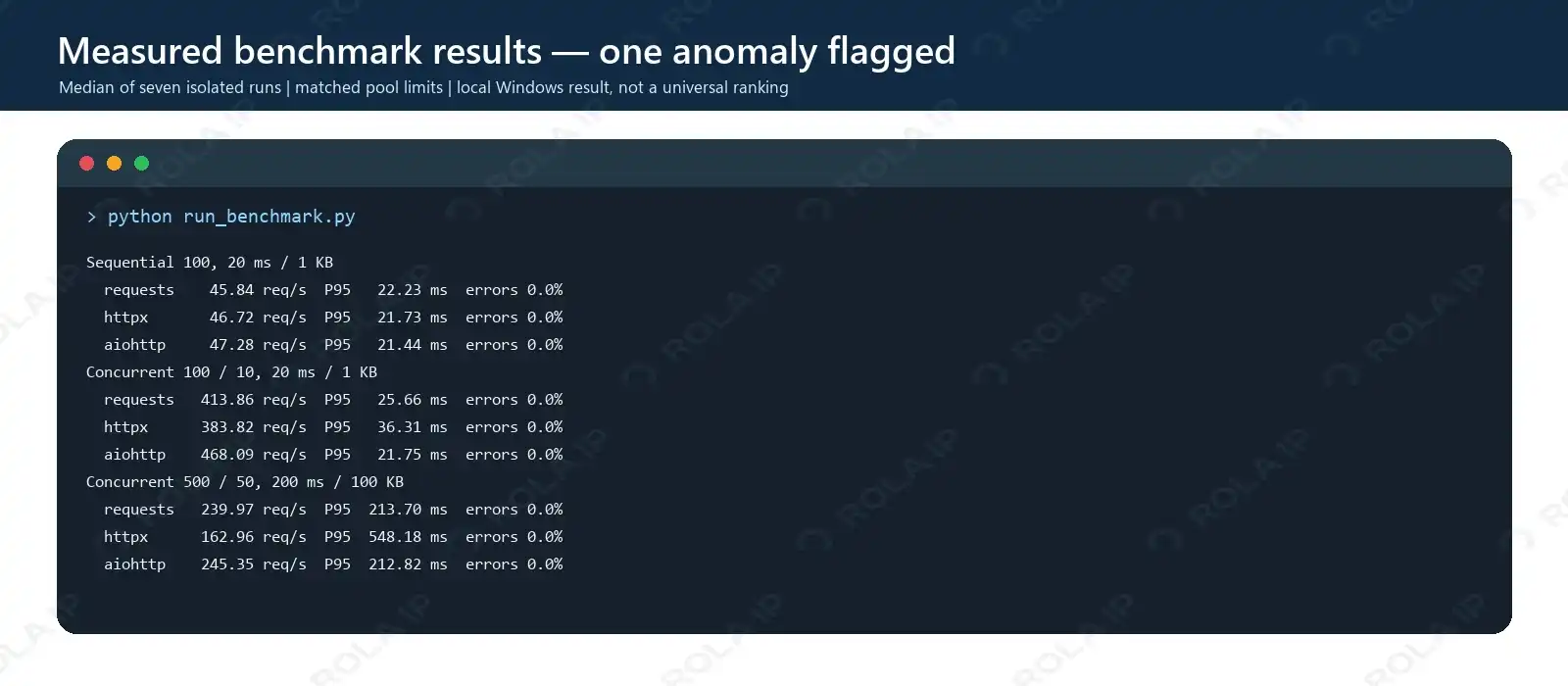
The image is generated from measured run data, with the methodology stated directly on the visual.
Why the Extreme HTTPX Result Is Not a General Conclusion
In a separate stress case—500 one-kilobyte responses, 20 ms delay, concurrency 50—Requests measured 1,420.18 req/s, HTTPX 156.13 req/s, and aiohttp 2,136.59 req/s. The HTTPX result repeated across seven runs even though the AsyncClient was reused and both max_connections and max_keepalive_connections were 50.
That does not prove HTTPX is nine times slower in real applications. The loopback workload removes DNS, TLS, routing, and remote-server variance while emphasizing tiny-operation scheduling on one Windows event loop. No comparable Linux or remote-service run was performed, so the result is an environment-specific anomaly and is excluded from the main decision logic. If high concurrency is critical, reproduce the workload on the intended operating system and target service.
Separate HTTPX HTTP/1.1 vs HTTP/2 Test
Against the same local TLS server with ALPN, HTTPX handled 100 requests at concurrency 20. HTTP/1.1 reached 214.94 req/s with a 190.82 ms P95; HTTP/2 reached 470.97 req/s with a 58.77 ms P95. This is a within-client protocol test and must not be compared directly with the three-client HTTP/1.1 benchmark.
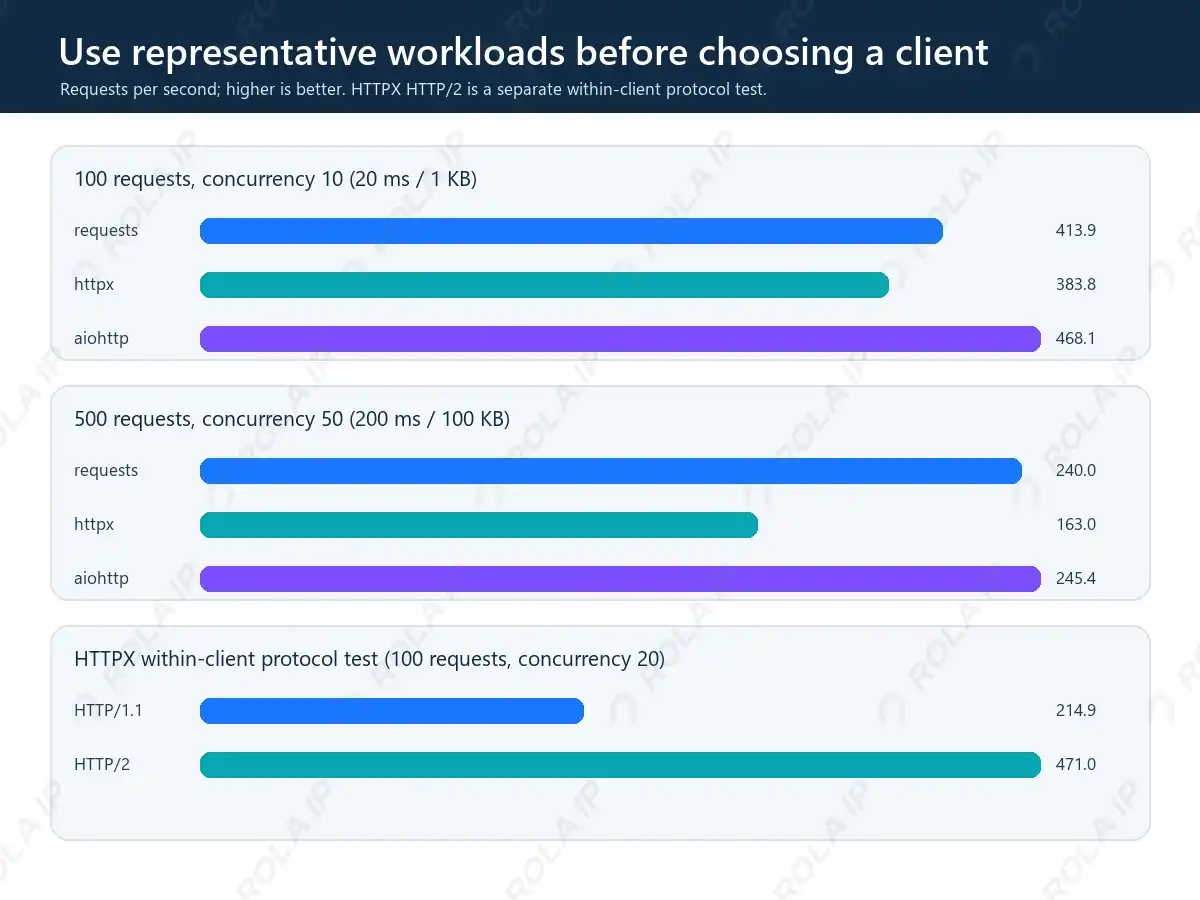
The bottom chart isolates HTTPX protocol behavior so it is not mistaken for a three-client comparison.
Safe Retries for 429 and 5xx Responses
Retry only failures that may be temporary, cap attempts, honor Retry-After, and avoid automatically replaying non-idempotent operations. This tested HTTPX pattern handles GET requests without hiding permanent 4xx errors:
import asyncio
from datetime import datetime, timezone
from email.utils import parsedate_to_datetime
import httpx

RETRYABLE = {429, 502, 503, 504}

def delay_for(response, attempt):
    value = response.headers.get("Retry-After")
    if value:
        try:
            return max(0.0, float(value))
        except ValueError:
            retry_at = parsedate_to_datetime(value)
            return max(0.0, (retry_at - datetime.now(timezone.utc)).total_seconds())
    return min(0.5 * (2 ** attempt), 8.0)

async def get_with_retry(client, url, attempts=4):
    for attempt in range(attempts):
        response = await client.get(url)
        if response.status_code not in RETRYABLE:
            response.raise_for_status()
            return response
        if attempt == attempts - 1:
            response.raise_for_status()
        await asyncio.sleep(delay_for(response, attempt))
Retries and concurrency controls solve different problems. Reducing concurrency prevents avoidable pressure; backoff determines when a failed attempt may be repeated. Proxy rotation should not be used to evade an explicit rate limit.
Using Proxies With Requests, HTTPX, and aiohttp
All three clients support authenticated HTTP proxies. Keep credentials in environment variables and percent-encode them before constructing a URL.
Use proxies only for targets and data you are authorized to access. Follow applicable law, the destination’s terms, rate limits, and Retry-After responses; changing HTTP clients or proxy routes does not remove those obligations.
import asyncio, os
from urllib.parse import quote, urlsplit, urlunsplit
import aiohttp, httpx, requests

gateway = os.environ["PROXY_GATEWAY"]  # http://gateway:port
username = quote(os.environ["PROXY_USERNAME"], safe="")
password = quote(os.environ["PROXY_PASSWORD"], safe="")
parts = urlsplit(gateway)
host = f"{parts.hostname}:{parts.port}"
proxy_url = urlunsplit((parts.scheme, f"{username}:{password}@{host}", "", "", ""))
target = "https://example.com/"

with requests.Session() as session:
    r = session.get(target, proxies={"http": proxy_url, "https": proxy_url}, timeout=10)
    r.raise_for_status()

with httpx.Client(proxy=proxy_url, timeout=10) as client:
    r = client.get(target)
    r.raise_for_status()

async def via_aiohttp():
    timeout = aiohttp.ClientTimeout(total=10)
    async with aiohttp.ClientSession(timeout=timeout) as session:
        async with session.get(target, proxy=proxy_url) as r:
            r.raise_for_status()
            print(r.status)

asyncio.run(via_aiohttp())
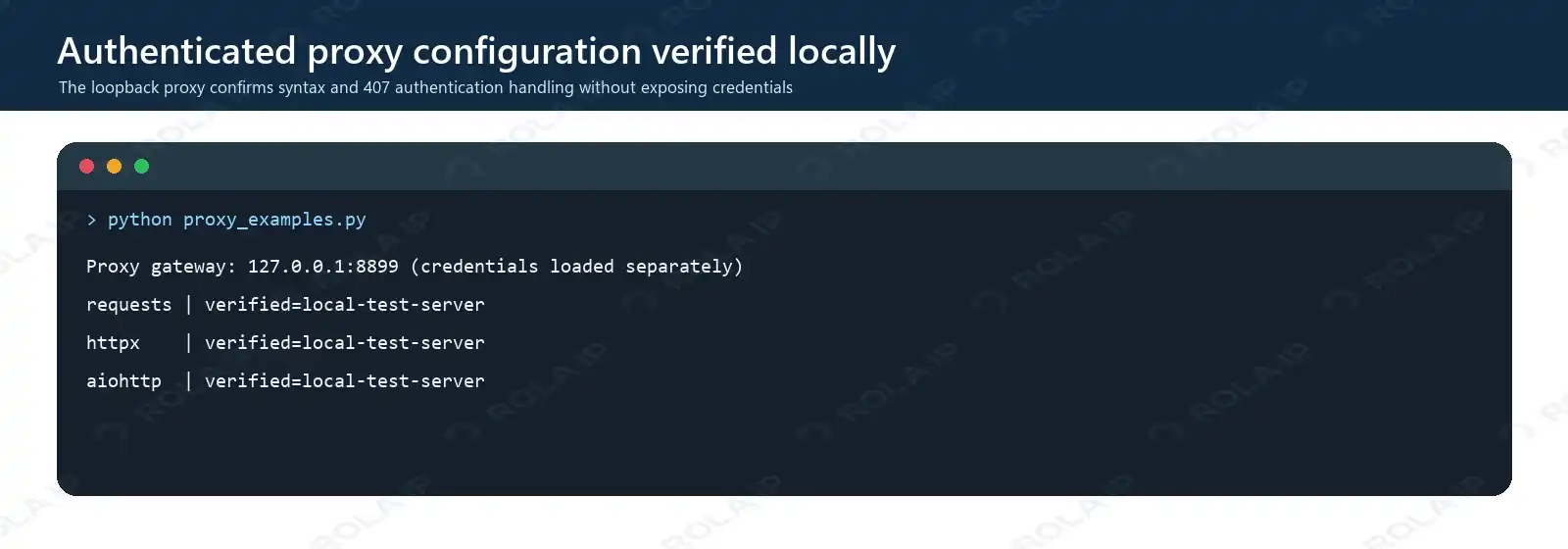
The three clients reached the same local verification endpoint through an authenticated proxy; no commercial credentials or public IP appear in the screenshot.
A 407 response means the proxy rejected authentication. A 403 usually comes from the destination. A 429 indicates rate limiting. Switching clients cannot make those conditions equivalent.
For authorized scraping, monitoring, or regional verification, Rola IP supplies the network layer while the HTTP client manages connections and responses. The web scraping proxy page outlines a relevant authorized collection scenario. The Python proxy integration guide covers connection syntax, while proxy parameters control location, rotation, and session behavior.
Client and proxy settings should be planned together. Reusing an HTTP client reduces repeated handshakes. A sticky proxy session keeps an exit IP stable for pagination or a multi-step check; rotation suits independent authorized requests. Geographic accuracy, session stability, and responsible pacing often matter more than a small local throughput difference.
Common Errors and How to Fix Them
| Symptom | Likely cause | Fix |
|---|---|---|
| Request appears to hang | Missing or excessive timeout | Set explicit connect/read or total timeouts |
Unclosed client session |
aiohttp session not closed | Use async with ClientSession() |
RuntimeError: no running event loop |
Async object created outside its loop | Create it inside an async function |
| HTTPX returns 301 while Requests returns 200 | Different redirect defaults | Set follow_redirects=True when intended |
| Pool timeout or too many files | Task count exceeds pool or OS limits | Bound tasks and reuse one client |
| HTTP 429 | Request rate too high | Honor Retry-After, reduce concurrency, and back off |
| Proxy 407 | Invalid proxy authentication | Check encoded credentials and gateway |
| Memory rises during downloads | Entire body buffered | Stream chunks and close responses |
Conclusion: Which Python HTTP Client Should You Choose?
Keep Requests for clear synchronous work and mature integrations. Choose HTTPX for the most balanced migration path, a shared sync/async design, or HTTP/2. Choose aiohttp when an async-first architecture, native WebSockets, or its server framework justifies the additional lifecycle complexity.
Do not migrate for novelty or select a client from a synthetic leaderboard. Test the intended server, response size, operating system, concurrency, and proxy route. In production, client reuse, explicit timeouts, bounded concurrency, safe retries, and responsible pacing usually matter more than small library-level speed differences.