Best Instagram Proxies in 2026: 8 Providers Compared

Aug 25, 2026 · Use Cases · 12 min read
The best Instagram proxies match the network to the authorized workflow: mobile proxies for carrier and mobile-app QA, static residential or ISP proxies for stable client sessions, and rotating residential proxies for independent regional checks. A proxy for Instagram changes the visible exit IP and approximate IP location; it does not change account history, cookies, device signals, behavior, or platform permissions. This comparison is for agencies, social media teams, testers, and researchers working with accounts or public data they are allowed to access.
Key Takeaways
- Choose mobile proxies when carrier routing or mobile-app behavior is the variable being tested.
- Choose static residential or ISP proxies when an authorized session needs a consistent endpoint and region.
- Choose rotating residential proxies for separate, permitted regional checks where session persistence is not required.
- Use datacenter proxies only when a hosting-network exit is acceptable for the test; ordinary personal use usually needs no proxy.
- A proxy changes the network route and visible exit IP. It does not remove account, device, cookie, behavior, or platform-policy risks.
- Prices, inventory, targeting, and session limits below are provider-stated and must be rechecked before purchase.
Best Instagram Proxies at a Glance
These providers are grouped by practical fit, not ranked from first to eighth. Per-GB, per-IP, and time-based prices are not directly comparable.
Product, price, and feature details below are provider-stated rather than results from a uniform performance test. Taxes, promotions, inventory, and account eligibility can change.
| Provider | Best fit for | Product compared | Minimum public entry checked | Price condition |
|---|---|---|---|---|
| ROLA IP | Mixed residential, ISP, and mobile selection | Residential, ISP, and mobile | PAYG | $4/GB residential; $5/GB mobile |
| Bright Data | Enterprise targeting and tooling | Residential | PAYG with no commitment | Promotional $4/GB with displayed coupon |
| DataImpulse | Low-commitment mobile testing | Mobile | $5 for 2.5GB intro | Standard rate displayed at $2/GB |
| Decodo | Small starter bundles | Residential and mobile | $11.25/3GB residential; $7.50/2GB mobile | VAT may apply; volume rates differ |
| IPRoyal | Multiple billing models | Rotating residential | Minimum total not stated on summary page | From $1.75/GB; volume context matters |
| Oxylabs | Documented enterprise controls | Residential | Minimum total varies by plan | From $8/GB; plan limits apply |
| SOAX | Granular targeting and session controls | Combined traffic plan | $90/month for 25GB | Equivalent to $3.60/GB at Starter tier |
| Webshare | Budget static or public-page QA | Static residential | Minimum total varies by quantity | From $0.30/IP; term and quantity matter |
Confirm the required country, city, carrier, or ASN and checkout terms before committing to a plan.
How We Evaluated Instagram Proxy Providers
We reviewed each provider’s public product, pricing, and connection documentation on August 24, 2026. The comparison records five practical fields that affect a purchase decision:
- Network fit: residential, ISP/static, mobile, or datacenter availability.
- Targeting and sessions: country, city, carrier/ASN, rotation, and sticky-session controls where documented.
- Buying terms: billing unit, minimum commitment, displayed entry price, trial, refund, and applicable taxes.
- Connection details: HTTP(S), SOCKS5, authentication, API or allowlist options where documented.
- Evidence and limitations: a direct provider page and any unresolved inventory, plan, or eligibility condition.
These are documentation-based category labels, not rankings or performance scores. Prices and features are provider-stated, not results from a uniform speed, success-rate, or ban-rate test. Confirm the live source page and checkout terms before purchase.
Which Instagram Proxy Type Should You Choose?
An Instagram proxy sends traffic through an intermediary. Instagram sees the proxy’s public IP, ASN or carrier, and approximate network location. This can reproduce a test region or network path, but it is only one layer of the environment.
| Proxy type | Best-fit permitted use | Session need | Main tradeoff |
|---|---|---|---|
| Mobile 4G/5G | Mobile-app and carrier-path QA | Documented sticky mode | Highest typical cost; carrier-side changes remain possible |
| Static residential / ISP | Stable authorized sessions | Fixed endpoint and region | Per-IP cost and local inventory |
| Rotating residential | Separate regional public checks | No rotation during a stateful session | Traffic cost and variable latency |
| Datacenter | Public QA where hosting traffic is accepted | Consistent endpoint per test | Does not reproduce a residential route |
| Free public proxy | No credentialed use recommended | Unpredictable | Security, privacy, and uptime risk |
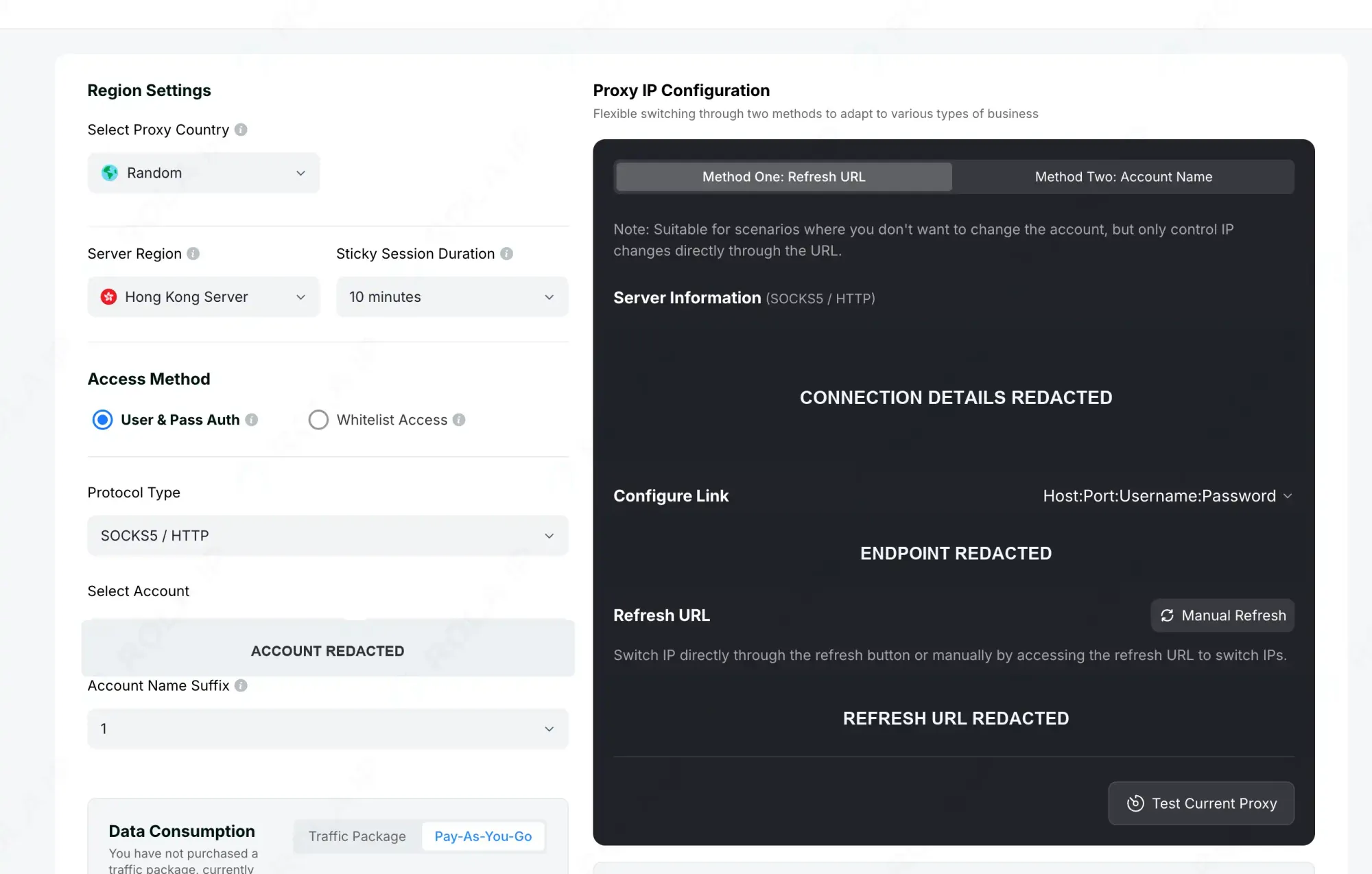
Figure 1. A real ROLA IP proxy setup screen shows that region, sticky duration, access method, and protocol are separate choices. Connection details are redacted and the ROLA IP watermark is applied. Source: ROLA IP Quick Start documentation; checked August 24, 2026.
Mobile Proxies for Instagram
A mobile proxy fits a test where the carrier network is the variable—for example, checking a mobile app through a target country’s 4G/5G route. Verify country, carrier or ASN, sticky duration, forced rotation, and bidirectional traffic cost.
Mobile does not mean permanent. Carrier NAT can place many subscribers behind one address, and an upstream peer can disappear. Sticky mode requests continuity but cannot prevent every carrier-side change.
Residential Proxies for Instagram
A rotating residential proxy suits separate permitted regional checks. Static residential or ISP is easier when one approved account must stay mapped to one region and endpoint.
Rotating plans are commonly billed by traffic and change peers by time or request rules. Static plans are normally billed per IP and retain one address during the subscription, subject to availability. Stateful work requires a clear expiry and forced-rotation policy.
For a broader comparison of network characteristics, review the network definitions before selecting a product.
When Datacenter or No Proxy Is Enough
Datacenter proxies can be economical for public, non-authenticated QA where a hosting-network exit is accepted, but they do not reproduce a residential or carrier path. Ordinary personal use usually needs no proxy; an unnecessary network layer only adds credentials and routing failures.
8 Best Instagram Proxy Providers by Category
The following profiles use the same decision fields and follow the order in the comparison table. All prices and capabilities are provider-stated and last checked August 24, 2026. Confirm the live product page and checkout screen because promotions, taxes, plan limits, inventory, and trial eligibility can change.
ROLA IP — Flexible Residential, ISP, and Mobile Selection
Category fit: Teams choosing among rotating residential, static residential/ISP, and mobile networks.
ROLA IP displayed residential PAYG at $4/GB, mobile PAYG at $5/GB, and static residential/ISP from $5 per IP. Product pages describe HTTP(S)/SOCKS5, password and allowlist authentication, and supported country, city, or ASN parameters. Coverage and sessions remain product-specific. See the official residential page.
The advantage is matching the network to the task: rotating residential for separate regional checks, ISP/static for consistent sessions, and mobile for carrier QA. Availability varies, per-IP and per-GB products are not directly comparable, and trial eligibility needs confirmation.
Bright Data — Enterprise Targeting and Tooling
Category fit: Enterprise programs that need several network types, fine location controls, documentation, and formal compliance onboarding.
Bright Data lists residential, ISP, mobile, and datacenter networks. Its official residential page displayed pay-as-you-go at $4/GB under a 50 percent promotion, with no monthly commitment; larger monthly tiers used different included traffic and rates. The provider advertises country, state, city, ZIP, and ASN targeting, extended session controls, Proxy Manager, and SOCKS5 support through that tooling.
The breadth lets a team evaluate rotating and fixed networks without changing vendors, while enterprise plans advertise seats and SLA options. The tradeoff is complexity: residential and mobile access may require KYC, and features depend on product and connection method. Small agencies should confirm they need that control surface.
DataImpulse — Low-Commitment Mobile Testing
Category fit: A small mobile or residential proof of concept where PAYG entry cost matters more than enterprise administration.
DataImpulse’s official mobile page displayed an introductory $5 purchase for 2.5GB and a standard $2/GB rate. It describes traffic as non-expiring and lists rotating and sticky sessions, HTTP(S), SOCKS5, API access, IP authorization, country targeting, and a seven-day refund policy. The advertised sticky duration reaches 120 minutes, although the exact endpoint and peer can still be affected by network availability.
The clear per-GB entry simplifies a one-market test. However, global coverage language does not prove that a desired carrier or city has sufficient inventory, and refund eligibility may include conditions hidden from the headline. Confirm both before using it for client work.
Decodo — Straightforward Starter Plans
Category fit: Teams that want small, visible starter bundles across residential, mobile, and ISP options.
At the time of review, Decodo’s official pricing page displayed a 3GB residential package at $3.75/GB, totaling $11.25 plus applicable VAT; a 2GB mobile package at $3.75/GB, totaling $7.50 plus VAT; and an ISP option at $3/GB. The same page also displayed lower volume-based rates, so those figures should not be mistaken for the entry purchase. A three-day, 100MB trial was advertised.
Residential sticky sessions are documented for up to 30 minutes, while mobile supports rotating and sticky modes. Country, state, and city controls and HTTP(S)/SOCKS5 vary by product. Small starter sizes are useful, but a mobile peer can go offline, and sticky SOCKS5 requires the documented session parameter.
IPRoyal — Multiple Buying Models
Category fit: Buyers who want to compare per-GB residential, per-IP ISP, and time-based mobile purchasing under one provider.
IPRoyal advertised rotating residential proxies from $1.75/GB, ISP proxies from $2.40 per proxy, datacenter proxies from $1.39 per proxy, and mobile proxies from $10.11 per day. These are starting figures from different product and volume contexts—not directly comparable prices. The residential product advertises flexible rotation and city or state targeting, while the mobile offering lists 3G, 4G, and 5G options. SOCKS5 is available on relevant products.
Source: IPRoyal’s official residential page.
The advantage is billing flexibility. The weakness is that a global headline does not prove the required region, carrier, or static inventory is available at the advertised rate. Check product checkout, session rules, protocol, and refund terms before purchase.
Oxylabs — Enterprise Programs and Documented Controls
Category fit: Larger teams that prioritize documented targeting, sticky residential/mobile sessions, and a fixed ISP option.
Oxylabs displayed residential pricing from $8/GB, mobile pricing from $9/GB, and ISP pricing from $1.60 per IP in the reviewed materials. Its product documentation describes sticky behavior for residential and mobile connections and fixed or long-lived behavior for ISP proxies. Country, state, city, and ASN targeting are offered on particular products, and SOCKS5 support is documented for relevant connection types.
Source: Oxylabs’ official residential page.
Product breadth and documentation help teams distinguish connection models, and fixed ISP is relevant when consistency matters more than rotation. Limitations are price context and fit: a from rate can depend on plan size, and an enterprise package can exceed a single-market test. No speed superiority is assumed here.
SOAX — Granular Targeting and Configurable Sessions
Category fit: Programs that value country, region, city, and ISP filters together with configurable rotation.
SOAX’s reviewed pricing showed a Starter plan at $90 per month for 25GB, equivalent to $3.60/GB, followed by higher-traffic monthly tiers. Its current materials list multiple proxy types, including residential, mobile, ISP, and datacenter choices. The provider advertises sticky and rotating sessions, customizable refresh behavior, location and ISP filters, and HTTP(S), SOCKS5, UDP, and QUIC support.
Source: SOAX’s official pricing page.
Granular selection and broad protocol support help when country-level routing is insufficient. However, $90 is a larger first commitment than the smallest PAYG offers, and features vary by product and plan. Verify the filter, location, session duration, and protocol together.
Webshare — Budget Static and Residential QA
Category fit: Budget-oriented residential, static-residential, or public-page QA where mobile carrier routing is not required.
Webshare advertised static residential proxies from $0.30 per IP, with the final price depending on quantity and term. Its current lineup includes residential, static residential, and datacenter or proxy-server products. Connection documentation describes session IDs for sticky behavior, while city targeting is associated with residential proxies rather than every product. The reviewed refund language used a two-day window and low usage thresholds that differed between static/proxy-server and rotating residential services.
Source: Webshare’s official proxy page.
Low advertised per-IP pricing is the principal strength. No broad mobile product was found, and headline pricing omits full quantity and location context. Webshare therefore fits budget static or public QA better than carrier-specific work. Recheck refund thresholds before sending traffic.
Choose the Best Proxy for Your Instagram Workflow
Start with the workflow, then choose the network. Starting with a provider name often leads to paying for targeting or rotation that the project does not need.
| Authorized workflow | Recommended starting point | Critical feature | Success measure | Stop condition |
|---|---|---|---|---|
| Approved client-account session | Static residential/ISP or controlled mobile | Stable endpoint, region, and ownership record | Expected connection continuity during normal use | Ownership uncertainty or an official checkpoint |
| Regional ad or content QA | Residential or mobile with explicit geo selection | Accurate country, city, carrier, or ASN | Correct regional variant and verified exit | Wrong region or explicit access denial |
| Mobile-app QA | Mobile | Carrier/ASN routing and session control | Expected carrier path and application connectivity | Unsupported device or account flow |
| Permitted public research | Rotating residential, or datacenter where accepted | Rate control and separate sessions | Valid, in-scope public responses | Rate limit, terms conflict, block, or denial |
| Small proof of concept | Low-minimum residential plan | Target inventory and low commitment | Cost per usable check or session | Missing location or unstable endpoint |
| Ordinary personal use | Usually no proxy | Simplicity and account security | Normal access | No reason to add proxy infrastructure |
Before purchasing, answer seven questions:
- Is the workflow permitted? Document account ownership, client authorization, or the public-data scope before selecting infrastructure.
- Does the task need a carrier, a residential location, or simply another server route? Choose the network from the variable being tested.
- Is the exact location available? A provider’s country count says little about city, carrier, or ASN inventory at a particular moment.
- How long must one session remain stable? Check both the advertised sticky duration and forced changes caused by expiry or peer loss.
- Does the real tool support the connection? Match HTTP(S) or SOCKS5 and username/password or IP allowlisting to the browser, device, or QA client.
- What is the cost per useful result? Include minimum spend, bidirectional traffic, unused credits, static IP count, and staff time—not only the lowest displayed unit rate.
- What is the smallest valid test? Validate one region and one workflow before purchasing broad coverage.
Instagram does not publish a universal safe number of accounts per proxy. An agency should maintain an auditable mapping based on legitimate ownership and operational need rather than copying an unofficial ratio from a marketing page.
How to Validate an Instagram Proxy Before Use
Dashboards differ, but the verification sequence is consistent. Use an approved client and never expose credentials in shared screenshots.
- Select the product and region. Use the workflow table, then confirm any required city, carrier, or ASN.
- Generate an endpoint. Set region, protocol, session parameters, and authentication. Keep real connection data in a secret manager; documentation can use safe sample values.
For provider-specific parameter names and session fields, use the proxy quick start documentation.
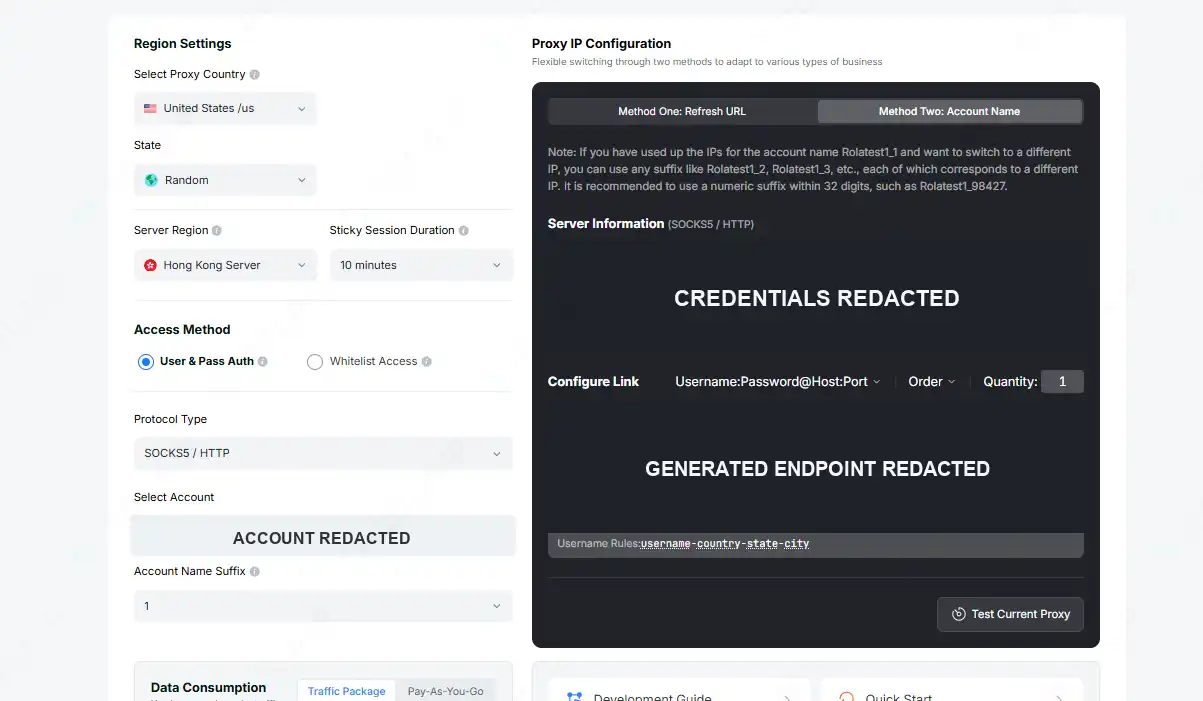
Figure 2. A real configuration screen showing country, sticky duration, protocol, authentication, and endpoint fields. Credentials are redacted. Source: ROLA IP Quick Start documentation; checked August 24, 2026.
- Configure the client. Enter host and port in the approved browser, device, or tool. Match the provider’s protocol; a SOCKS endpoint in an HTTP-only field will fail even with valid credentials.
- Verify before Instagram. Record exit IP, country, relevant city, ASN or carrier, protocol, and timestamp with a reputable lookup. Compare a second database when city accuracy matters.

*Figure 3. A real documentation connection check. Credentials, exit IP, and network are redacted; country, ASN, organization, and location remain visible. *
- Check continuity. Repeat the IP/ASN check after the planned interval. A changed address requires investigation of the endpoint, session token, peer, or expiry rule.
- Keep a record. Store a non-secret endpoint label, authorized owner, region, proxy type, session policy, and verification time. Exclude passwords, cookies, recovery codes, client names, and allowlist details from screenshots.
| Symptom | Likely cause | How to verify | Safe response |
|---|---|---|---|
| Proxy does not connect | Wrong host, port, protocol, credential, or allowlist | Test the endpoint outside Instagram | Correct the configuration or contact the provider |
| Exit location is wrong | Wrong geo parameter or stale location database | Compare two IP/ASN lookups | Regenerate the endpoint or request another location |
| IP changes during the session | Rotation trigger, peer loss, or session expiry | Record the IP before and after the interval | Use a supported sticky or static option |
| Instagram requests verification | Account-security, network, or device change | Read the exact official prompt | Stop and complete the official recovery flow |
| Action block continues | Activity, automation, account status, or policy issue | Pause activity and review account status | Use approved tools and reduce scope; an IP change is not a fix |
| Uploads are slow | Distant route, congestion, or protocol mismatch | Test latency and upload throughput | Select a nearer supported endpoint or correct the protocol |
Free Proxy Risks and Instagram Compliance
Free public proxies are unsuitable for credentials, client work, or dependable QA. Their operator may be unknown, traffic may be logged or modified, and heavily shared endpoints can disappear without notice. A legitimate trial or small paid plan provides an accountable operator and support path, but still requires validation.
A proxy does not grant permission to collect data, send spam, create fake engagement, operate deceptive accounts, or access another person’s account. Instagram’s Terms of Use and Meta’s Community Standards apply regardless of the exit IP. Use official APIs or approved business tools when they cover the required task.
Stop on a CAPTCHA, checkpoint, action block, account lock, or explicit denial. Use the official verification or recovery path; review permissions, automation, account status, and activity instead of rotating addresses.
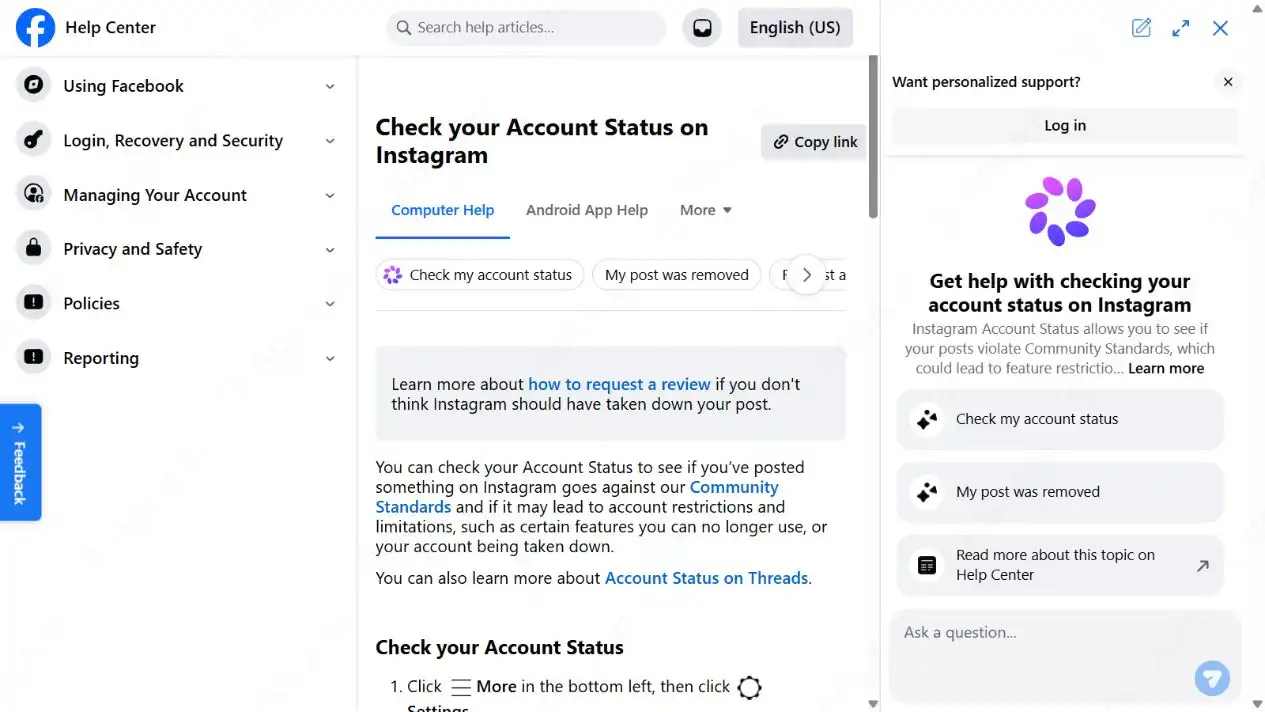
Figure 4. Meta’s Help Center directs users to Instagram Account Status for policy and feature restrictions. Captured August 17 and rechecked August 24, 2026.
Final Recommendation
The best Instagram proxies are the ones that reproduce the network conditions a permitted workflow actually needs. Start with mobile for carrier QA, static residential/ISP for a consistent authorized session, or rotating residential for separate regional checks; choose no proxy when there is no location or routing requirement. Compare exact inventory, session behavior, protocol support, and full purchase cost before scaling. ROLA IP is one disclosed option across residential, ISP, and mobile routing, not a universal winner. Teams ready for a limited regional test can buy residential proxy traffic after confirming current plan terms and permissions.