Amazon Price Scraping: Validate Prices, Diagnose Blocks, and Export to Excel

Sep 29, 2026 · Use Cases · 16 min read
Amazon price scraping collects product offers for price monitoring and market research. A useful snapshot needs more than a price: it must identify the product, marketplace, currency, seller where available, and capture time.
Failures are often misleading. The script may finish without an exception while saving a price from the wrong offer, a different country site, or a CAPTCHA response. This guide covers challenge and error responses, proxy configuration, offer validation, and Excel export for an authorized workflow.
TL;DR: Start with a data source whose access and usage terms fit your project. For an authorized browser workflow, match the marketplace and delivery settings to the research, then select and verify the proxy exit location. Keep one session for related steps, inspect the response status and page identity before parsing, and export every observation with an honest validation state. Rola IP supplies the network route; offer accuracy still depends on the page, session, and parser.
The failures you will see first
Rate limits and concentrated requests
The first failure is often operational rather than technical. A loop that requests hundreds of product pages from one IP in a short burst creates a concentrated traffic pattern. The response may slow down, return an error page, or switch to a challenge. The threshold is not a stable number that a tutorial can promise, so design around a measured, conservative workload instead of a fixed “safe” request rate.
CAPTCHA and challenge pages replace the product page
A parser expects a product title and price. Amazon may instead return a challenge document with a successful HTTP status or a generic error page. If your code only checks response.status_code, it can write the challenge text into a price field or silently record a missing value as a price drop.
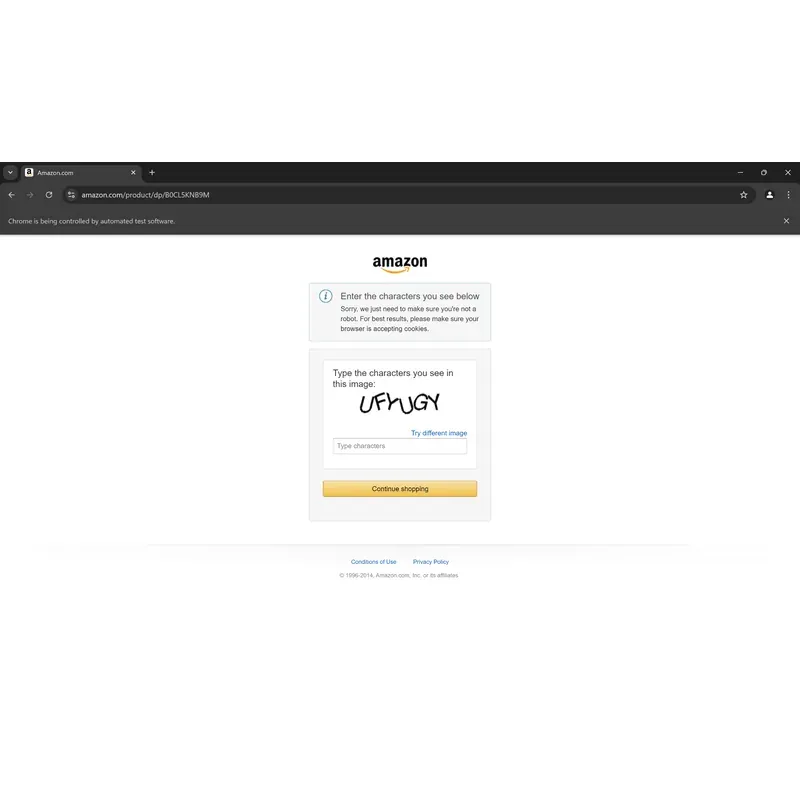
Validate the page before extracting data. Look for the expected product identity, a price container, the intended marketplace, and any challenge or sign-in signals. A CAPTCHA, 403, 429, or login page should end that run while you review the access conditions. Repeating the same request indefinitely only creates more noise. A CAPTCHA-solving service cannot clarify authorization or repair a broken data source.
If the returned document is specifically an Amazon verification page, this guide to handling Amazon CAPTCHA challenges explains the common signals and the checks to make before another permitted request. Treat it as a diagnostic reference, not a promise that a proxy will remove the challenge.
Network reputation and location affect the result
The IP address is one part of the request context. Cookies, account state, browser and protocol behavior, request concentration, and the delivery settings shown on the page may also affect the response. Amazon does not publish a complete retail-site detection model, so a troubleshooting guide should record these inputs without pretending to know the platform’s private scoring logic.
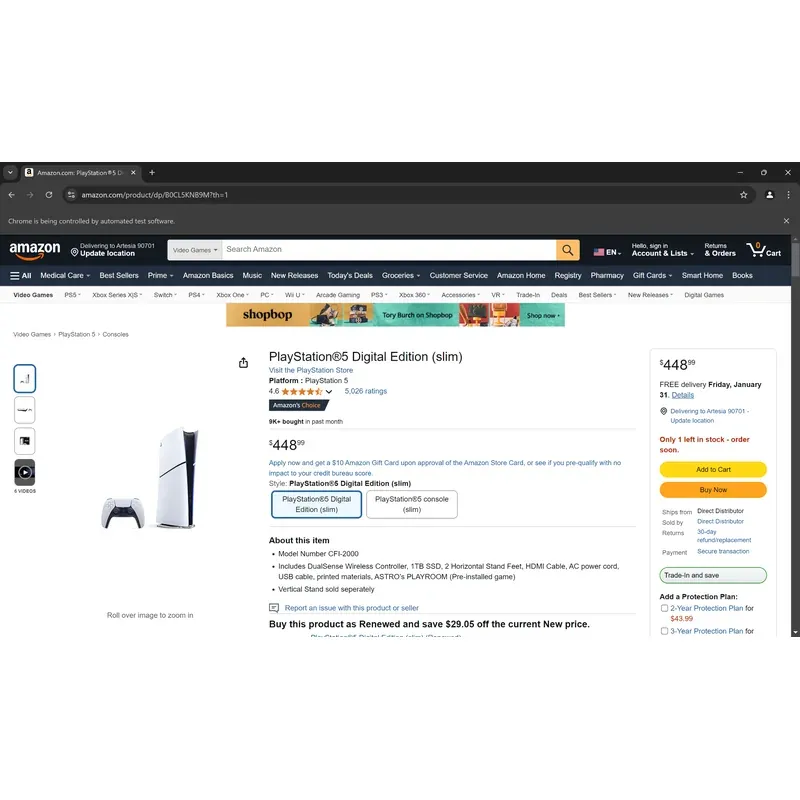
For US-focused research, control the Amazon marketplace, delivery ZIP code, currency, cookies, and account state. If the test is intended to represent a US network location, select and verify a US proxy exit as well. A US IP by itself cannot determine the price, seller, or delivery offer. Keep the same session while validating a related sequence of pages.
Price blocks are dynamic and change over time
Amazon pages contain more than one number: current price, list price, coupon-adjusted price, other-seller offers, shipping, and related-product prices. Some fields are rendered or updated by JavaScript, and page layouts change.
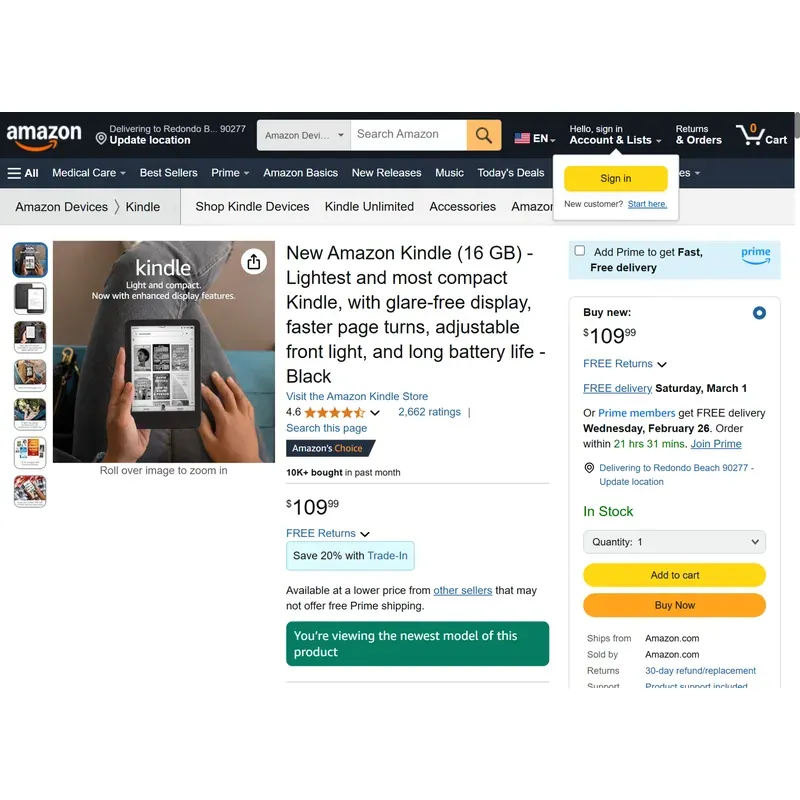
Parse the field your analysis actually needs. For a Buy Box comparison, save the Buy Box seller beside the displayed price. For a discount study, keep the current price and reference price as separate fields. The first dollar amount on the page is often not the product price.
Decide where the price data should come from
Before writing the scraper, decide where the price data should come from. If an approved Amazon or partner API exposes the fields you need, that is usually the lowest-maintenance route. Amazon’s Creators API guidance, for example, applies to eligible integrations rather than every price-monitoring project. Check whether its access model and permitted use fit your case.
For recurring multi-marketplace monitoring, a managed data service may save more engineering time than maintaining selectors. Direct browser or HTTP collection makes more sense when the scope is small, authorized, and under your control. Review the current Amazon Conditions of Use and any agreement attached to your account or API before scheduling collection.
Pause if the workflow requires an account, exposes personal data, conflicts with the target’s terms, or repeatedly returns challenge pages. Public visibility leaves the automation and reuse question unresolved.
Where Rola IP fits
Rola IP belongs at the network layer. Its proxies for price monitoring can provide a selected exit location and session behavior for recurring price snapshots. The Playwright proxy settings guide covers the connection pattern used by browser automation.
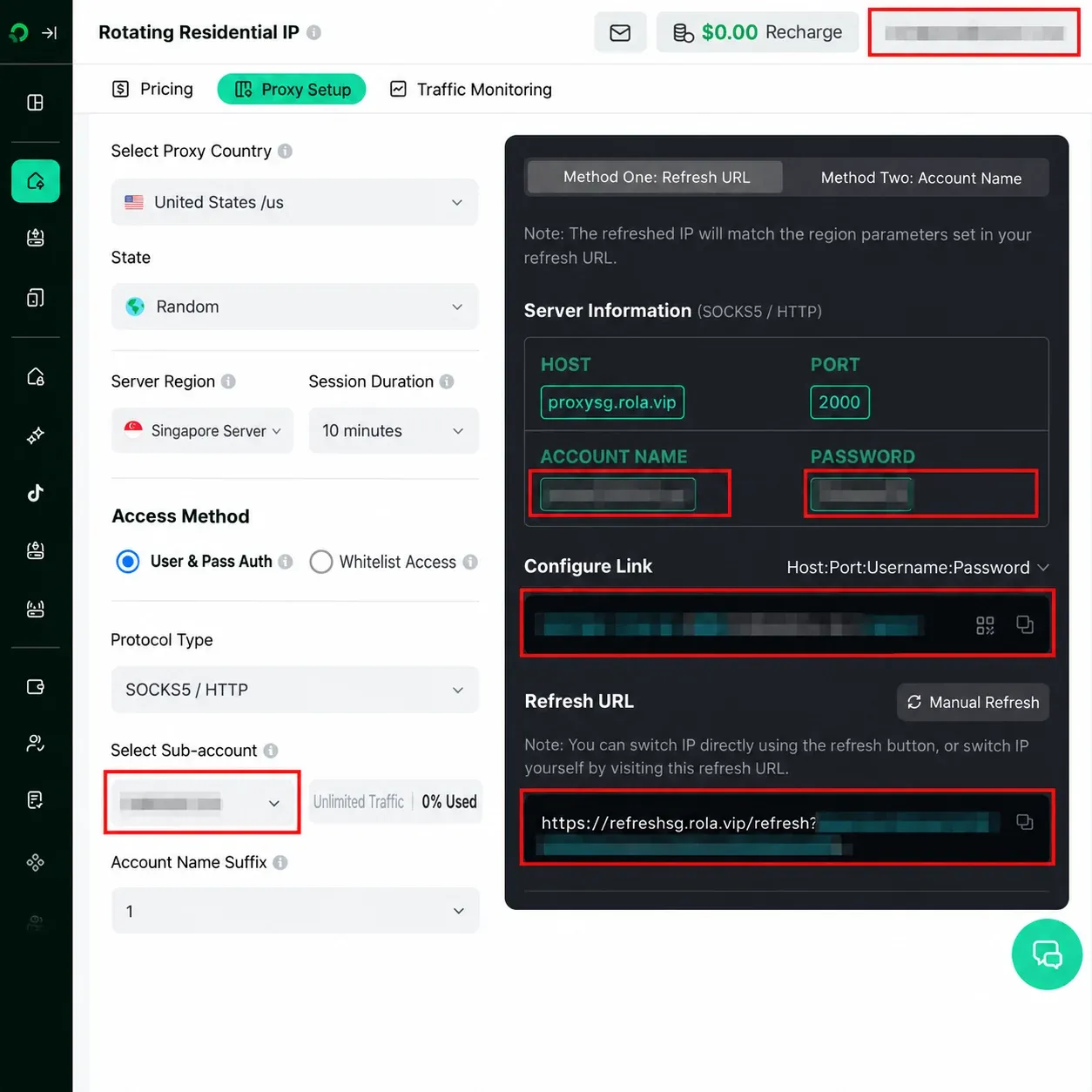
The session choice depends on what the job is measuring:
| Research task | Session approach | Why |
|---|---|---|
| Compare unrelated ASINs as independent samples | Rotation may be appropriate if the source terms and request policy allow it | Each observation stands alone |
| Check a product, its variations, and its offer details | Use a sticky session | The delivery, cookie, and marketplace context should remain consistent |
| Reproduce a failed response | Keep the same inputs first, then change one variable | Otherwise you cannot tell whether the route, page, or parser caused the difference |
Both rotating and static residential products can support session continuity, depending on the plan and configuration. Static residential or ISP routing is useful when a longer-lived identity is required. Datacenter routing remains useful for fixtures, connectivity tests, or targets that accept it. Start with a small sample in the environment you actually plan to run.
A proxy only handles network routing. If the selector is broken, the session lands on the wrong marketplace, or Amazon returns a challenge page, changing the IP alone will not repair the data. Use a proxy checker to inspect properties it actually reports, such as connectivity and exit IP. Verify the final URL, marketplace, ASIN, offer context, and price fields separately in the collection client. Connectivity is only one check; the offer still needs its own validation.
A small Playwright check in Python
Playwright controls a real browser engine, so it can render JavaScript and inspect the page that a browser actually received. That helps when Requests returns incomplete HTML. The same source rules still apply. The template below performs one authorized Amazon.com check and writes a candidate observation to CSV and Excel. It only marks a record as fully comparable when every required context check passes. The selectors still need maintenance.
Prerequisites
- Python 3.10 or newer
- Playwright installed in an isolated environment
- A product list and an authorized collection workflow
- An HTTP proxy host, port, username, and password copied from the current Rola dashboard or documentation
- An expected marketplace, ASIN, ISO currency code, and delivery label for the observation
Install Playwright in your environment:
python -m pip install playwright pandas openpyxl
python -m playwright install chromium
python --version
python -m playwright --version
python -m pip show pandas openpyxl
Store the connection details as environment variables. Never commit them to a repository or print a full proxy URL in logs.
export ROLA_HTTP_PROXY_SERVER="http://CURRENT_ROLA_HOST:PORT"
export ROLA_PROXY_USERNAME="replace-with-account-username"
export ROLA_PROXY_PASSWORD="replace-with-account-password"
export AMAZON_PRODUCT_URL="https://www.amazon.com/dp/B0XXXXXXXXX"
export EXPECTED_ASIN="B0XXXXXXXXX"
export EXPECTED_MARKETPLACE="amazon.com"
export EXPECTED_CURRENCY="USD"
export EXPECTED_DELIVERY_LABEL="10001"
export PLAYWRIGHT_STORAGE_STATE="amazon-context.json"
This code path deliberately uses HTTP proxy syntax with username and password. Playwright documents credentials for HTTP(S) proxies and separately states that browsers can load through SOCKSv5. That wording does not prove that an authenticated SOCKS5 endpoint will work with the same Chromium configuration, so do not replace http:// with socks5:// unless the current Rola endpoint and your Playwright browser build have been tested together. See the current Playwright proxy documentation.
The optional storage-state file lets the new context reuse cookies and local storage from a preparatory browser session. Set the delivery location in that session, save the state locally, and verify the displayed label again during collection. Storage-state files may contain sensitive cookies and headers, so keep them out of source control and shared logs. Playwright documents this behavior in its browser-state guidance.
Save the following code as amazon_price_snapshot.py. It performs one bounded top-level navigation; Chromium may still make many subresource requests for scripts, fonts, images, and API calls.
import os
import re
from datetime import datetime, timezone
from decimal import Decimal
from pathlib import Path
from urllib.parse import urlparse

import pandas as pd
from playwright.sync_api import (
    Error as PlaywrightError,
    TimeoutError as PlaywrightTimeoutError,
    sync_playwright,
)


EXPORT_COLUMNS = [
    "requested_url",
    "final_url",
    "asin",
    "title",
    "marketplace",
    "variation",
    "variation_status",
    "seller",
    "raw_price",
    "numeric_price",
    "currency_symbol",
    "currency_code",
    "expected_currency",
    "delivery_location",
    "delivery_status",
    "offer_container",
    "captured_at_utc",
    "http_status",
    "top_level_navigations",
    "browser_request_count",
    "validation_status",
    "missing_reason",
]

STRICT_USD_DISPLAY = re.compile(
    r"^\$(?P<whole>(?:0|[1-9]\d{0,2}(?:,\d{3})*))\.(?P<fraction>\d{2})$"
)


class CollectionError(RuntimeError):
    def __init__(self, stage, message, status=None, retry_after=None):
        super().__init__(message)
        self.stage = stage
        self.status = status
        self.retry_after = retry_after


def normalized_host(url: str) -> str:
    host = (urlparse(url).hostname or "").lower()
    return host.removeprefix("www.")


def normalized_text(value: str) -> str:
    return " ".join(value.split())


def first_visible_text(scope, selectors):
    for selector in selectors:
        locator = scope.locator(selector).first
        if locator.count() and locator.is_visible():
            text = normalized_text(locator.inner_text())
            if text:
                return text, selector
    return None, None


def wait_for_page_outcome(page):
    page.wait_for_function(
        """() => Boolean(
            document.querySelector('#productTitle') ||
            document.querySelector('input#captchacharacters') ||
            document.querySelector("form[action*='validateCaptcha']") ||
            document.querySelector("form[name='signIn']") ||
            document.querySelector('input#ap_email')
        )""",
        timeout=12_000,
    )


def detect_page_type(page, final_url: str) -> str:
    lower_url = final_url.lower()
    captcha = page.locator(
        "input#captchacharacters, form[action*='validateCaptcha'], img[src*='captcha']"
    )
    login = page.locator("form[name='signIn'], input#ap_email")

    if "validatecaptcha" in lower_url or captcha.count():
        return "captcha"
    if "/ap/signin" in lower_url or login.count():
        return "login_wall"
    if page.locator("#productTitle").count():
        return "product"
    return "unknown"


def extract_asin(page, final_url: str):
    asin_input = page.locator("input#ASIN").first
    if asin_input.count():
        value = asin_input.get_attribute("value")
        if value:
            return value.upper()

    match = re.search(r"/(?:dp|gp/product)/([A-Z0-9]{10})", final_url, re.I)
    return match.group(1).upper() if match else None


def parse_strict_usd_display(raw_price: str) -> str:
    value = normalized_text(raw_price)
    match = STRICT_USD_DISPLAY.fullmatch(value)
    if not match:
        raise CollectionError(
            "price_format",
            "price text was not one unambiguous US-style dollar amount",
        )
    amount = match.group("whole").replace(",", "")
    return str(Decimal(f"{amount}.{match.group('fraction')}"))


def extract_currency_code(offer_container):
    marker = offer_container.locator("[itemprop='priceCurrency']").first
    if not marker.count():
        return None
    value = marker.get_attribute("content") or marker.text_content() or ""
    value = normalized_text(value).upper()
    return value if re.fullmatch(r"[A-Z]{3}", value) else None


def extract_offer_candidate(page):
    container_selectors = ("#apex_desktop", "#buybox", "#rightCol")

    page.wait_for_function(
        """() => Boolean(
            document.querySelector('#apex_desktop .a-price') ||
            document.querySelector('#buybox .a-price') ||
            document.querySelector('#rightCol .a-price') ||
            document.querySelector('input#captchacharacters') ||
            document.querySelector("form[name='signIn']")
        )""",
        timeout=10_000,
    )

    page_type = detect_page_type(page, page.url)
    if page_type != "product":
        raise CollectionError(
            "offer_wait",
            f"page changed to {page_type} while waiting for the offer",
        )

    for container_selector in container_selectors:
        container = page.locator(container_selector).first
        if not container.count() or not container.is_visible():
            continue

        nodes = container.locator(
            ".a-price:not(.a-text-price) .a-offscreen"
        )
        observed = []
        for index in range(nodes.count()):
            node = nodes.nth(index)
            price_box = node.locator("xpath=..")
            if price_box.count() and price_box.is_visible():
                text = normalized_text(node.text_content() or "")
                if text and text not in observed:
                    observed.append(text)

        if len(observed) > 1:
            raise CollectionError(
                "offer_ambiguity",
                f"multiple active price candidates appeared in {container_selector}",
            )
        if len(observed) == 1:
            return container, observed[0], container_selector

    raise CollectionError(
        "offer_validation",
        "no single active price candidate was found in the offer containers",
    )


def extract_variation_state(page):
    controls = page.locator("[id^='variation_']")
    selections = page.locator("[id^='variation_'] .selection")

    if controls.count() == 0:
        return None, "not_applicable"

    values = []
    for index in range(selections.count()):
        text = normalized_text(selections.nth(index).inner_text())
        if text and text not in values:
            values.append(text)

    if not values:
        return None, "unresolved"
    return " | ".join(values), "observed"


def classify_browser_error(exc, stage):
    message = str(exc).lower()
    if "407" in message or "proxy authentication" in message:
        return "proxy_authentication"
    if "name_not_resolved" in message or "dns" in message:
        return "dns_resolution"
    if "certificate" in message or "ssl" in message or "tls" in message:
        return "tls_handshake"
    if "connection refused" in message or "connection reset" in message:
        return "connection"
    if isinstance(exc, PlaywrightTimeoutError):
        return f"{stage}_timeout"
    return stage


def collect_price(url: str, expected_asin: str, expected_marketplace: str) -> dict:
    proxy = {
        "server": os.environ["ROLA_HTTP_PROXY_SERVER"],
        "username": os.environ["ROLA_PROXY_USERNAME"],
        "password": os.environ["ROLA_PROXY_PASSWORD"],
    }

    expected_currency = os.environ.get("EXPECTED_CURRENCY", "").upper()
    expected_delivery = normalized_text(
        os.environ.get("EXPECTED_DELIVERY_LABEL", "")
    )
    storage_state = os.environ.get("PLAYWRIGHT_STORAGE_STATE")
    state_loaded = False

    context_options = {"locale": "en-US"}
    if storage_state:
        storage_path = Path(storage_state)
        if not storage_path.is_file():
            raise CollectionError(
                "context_setup",
                "PLAYWRIGHT_STORAGE_STATE does not point to a file",
            )
        context_options["storage_state"] = str(storage_path)
        state_loaded = True

    with sync_playwright() as playwright:
        browser = None
        context = None
        stage = "browser_launch"
        try:
            browser = playwright.chromium.launch(headless=True, proxy=proxy)
            stage = "context_setup"
            context = browser.new_context(**context_options)
            page = context.new_page()
            network = {"requests": 0}
            page.on(
                "request",
                lambda _request: network.__setitem__(
                    "requests", network["requests"] + 1
                ),
            )

            stage = "navigation"
            response = page.goto(
                url,
                wait_until="domcontentloaded",
                timeout=30_000,
            )
            if response is None:
                raise CollectionError("navigation", "no HTTP response was returned")

            status = response.status
            retry_after = response.headers.get("retry-after")
            final_url = page.url

            if status < 200 or status >= 300:
                raise CollectionError(
                    "http_response",
                    f"target returned HTTP {status}",
                    status,
                    retry_after,
                )

            stage = "page_identity"
            wait_for_page_outcome(page)
            page_type = detect_page_type(page, page.url)
            if page_type != "product":
                raise CollectionError(
                    "page_identity",
                    f"expected product page, received {page_type}",
                    status,
                    retry_after,
                )

            marketplace = normalized_host(final_url)
            if marketplace != expected_marketplace:
                raise CollectionError(
                    "marketplace",
                    f"expected {expected_marketplace}, received {marketplace}",
                    status,
                )

            observed_asin = extract_asin(page, final_url)
            if observed_asin != expected_asin.upper():
                raise CollectionError(
                    "product_identity",
                    f"expected ASIN {expected_asin}, received {observed_asin}",
                    status,
                )

            title = normalized_text(
                page.locator("#productTitle").inner_text(timeout=10_000)
            )

            stage = "offer_wait"
            offer, raw_price, offer_selector = extract_offer_candidate(page)
            numeric_price = parse_strict_usd_display(raw_price)
            currency_code = extract_currency_code(offer)
            seller, _ = first_visible_text(
                offer, ["#sellerProfileTriggerId", "#merchant-info"]
            )
            delivery, _ = first_visible_text(page, ["#glow-ingress-line2"])
            variation, variation_status = extract_variation_state(page)

            reasons = []
            if not expected_currency:
                reasons.append("expected currency was not declared")
            elif currency_code != expected_currency:
                reasons.append(
                    "ISO currency code was not independently observed or did not match"
                )
            if not seller:
                reasons.append("seller was not found inside the selected offer container")
            if variation_status == "unresolved":
                reasons.append("variation controls existed but the active selection was unresolved")
            if not state_loaded:
                reasons.append("no prepared browser storage state was loaded")
            if not expected_delivery:
                reasons.append("expected delivery label was not declared")
                delivery_status = "undeclared"
            elif not delivery:
                reasons.append("delivery label was not visible")
                delivery_status = "missing"
            elif expected_delivery.casefold() not in delivery.casefold():
                reasons.append("displayed delivery label did not match the expected context")
                delivery_status = "mismatch"
            else:
                delivery_status = "observed_match"

            validation_status = (
                "candidate_context_complete"
                if not reasons
                else "candidate_manual_review"
            )

            return {
                "requested_url": url,
                "final_url": final_url,
                "asin": observed_asin,
                "title": title,
                "marketplace": marketplace,
                "variation": variation,
                "variation_status": variation_status,
                "seller": seller,
                "raw_price": raw_price,
                "numeric_price": numeric_price,
                "currency_symbol": "$",
                "currency_code": currency_code,
                "expected_currency": expected_currency or None,
                "delivery_location": delivery,
                "delivery_status": delivery_status,
                "offer_container": offer_selector,
                "captured_at_utc": datetime.now(timezone.utc).isoformat(),
                "http_status": status,
                "top_level_navigations": 1,
                "browser_request_count": network["requests"],
                "validation_status": validation_status,
                "missing_reason": "; ".join(reasons) or None,
            }
        except CollectionError:
            raise
        except (PlaywrightTimeoutError, PlaywrightError) as exc:
            category = classify_browser_error(exc, stage)
            raise CollectionError(category, "browser operation failed") from exc
        finally:
            if context is not None:
                context.close()
            if browser is not None:
                browser.close()


def main():
    captured = collect_price(
        os.environ["AMAZON_PRODUCT_URL"],
        os.environ["EXPECTED_ASIN"],
        os.environ.get("EXPECTED_MARKETPLACE", "amazon.com"),
    )

    expected_keys = set(EXPORT_COLUMNS)
    actual_keys = set(captured)
    if actual_keys != expected_keys:
        missing = sorted(expected_keys - actual_keys)
        extra = sorted(actual_keys - expected_keys)
        raise RuntimeError(f"record schema mismatch: missing={missing}, extra={extra}")

    frame = pd.DataFrame([captured], columns=EXPORT_COLUMNS)

    stamp = datetime.now(timezone.utc).strftime("%Y%m%dT%H%M%SZ")
    state = captured["validation_status"].replace("_", "-")
    base = Path(f"amazon-price-snapshot-{state}-{stamp}")
    frame.to_csv(base.with_suffix(".csv"), index=False)
    frame.to_excel(base.with_suffix(".xlsx"), index=False)
    print(f"Saved {state} observation to {base}.csv and {base}.xlsx")


if __name__ == "__main__":
    try:
        main()
    except CollectionError as exc:
        details = [f"stage={exc.stage}"]
        if exc.status is not None:
            details.append(f"status={exc.status}")
        if exc.retry_after:
            details.append(f"retry_after={exc.retry_after}")
        print(f"Collection stopped: {exc}. " + ", ".join(details))
        raise SystemExit(2)
Run the saved file from the same shell:
python amazon_price_snapshot.py
If the observation must use a specific delivery setting, prepare a separate local browser state first, set the delivery location in that browser, close it, and point PLAYWRIGHT_STORAGE_STATE to the saved file:
python -m playwright codegen \
  --save-storage=amazon-context.json \
  https://www.amazon.com/
Do not sign in unless the authorized workflow requires an account. The saved file can contain cookies and local storage, so do not commit or share it.
The script rejects every non-2xx top-level response and waits for a bounded product, CAPTCHA, or login outcome. It checks dedicated challenge elements instead of treating the navigation phrase “sign in” as a login wall. Browser failures are classified as proxy authentication, DNS, TLS, connection, or stage-specific timeout errors without printing a credential-bearing proxy URL.
Price handling is intentionally strict. The parser accepts one complete string such as $19.99 or $1,299.00; it rejects C$19.99, US$19.99, price ranges, missing symbols, and malformed decimals. The dollar symbol is stored separately and never treated as independent proof of USD. If all automated context checks succeed, the script writes candidate_context_complete. It still does not claim that a changing retail DOM has proved the business meaning of the price. That final promotion requires review of the rendered offer and retained evidence.
Run and acceptance states
Exit code 0 means the script wrote a CSV and XLSX file. It does not, by itself, mean the observation is ready for repricing or seller comparison.
| Result | Meaning | Permitted next step |
|---|---|---|
candidate_manual_review |
Product identity and one candidate price were captured, but one or more context checks were incomplete | Inspect the rendered offer and missing reasons before use |
candidate_context_complete |
Every automated context check passed, but the selector still identifies a candidate offer | Review a same-run screenshot or redacted DOM excerpt before promotion |
complete_comparable_record |
A documented manual check confirmed the current-offer meaning, seller, currency, variation, and delivery context | Add the record to the comparison set and preserve the audit evidence |
Exit code 2 |
Navigation, HTTP response, page identity, offer ambiguity, format, or browser stage failed | Use the reported stage in the troubleshooting table; do not create a price record |
The screenshots in this article remain separate examples, not output from this script. For this revision, the code was syntax-checked and the strict parser was tested offline on September 28, 2026, using macOS 26.3.1 and Python 3.9.6. The offline cases accepted three unambiguous strings and rejected seven ambiguous or malformed strings. That local check excluded Playwright, Chromium, pandas, openpyxl, a Rola endpoint, and Amazon, so publication still needs a controlled run with recorded versions and redacted output.
Saving the result to Excel
The script performs one top-level navigation and may generate many browser subresource requests. It counts those requests so traffic estimates are less likely to confuse a page visit with one proxy request. The same classified observation is written to both files. Before pandas builds the DataFrame, the script compares the record keys with EXPORT_COLUMNS; the column list then fixes the export order. Timestamped filenames preserve earlier snapshots. Pandas uses openpyxl to write .xlsx files.
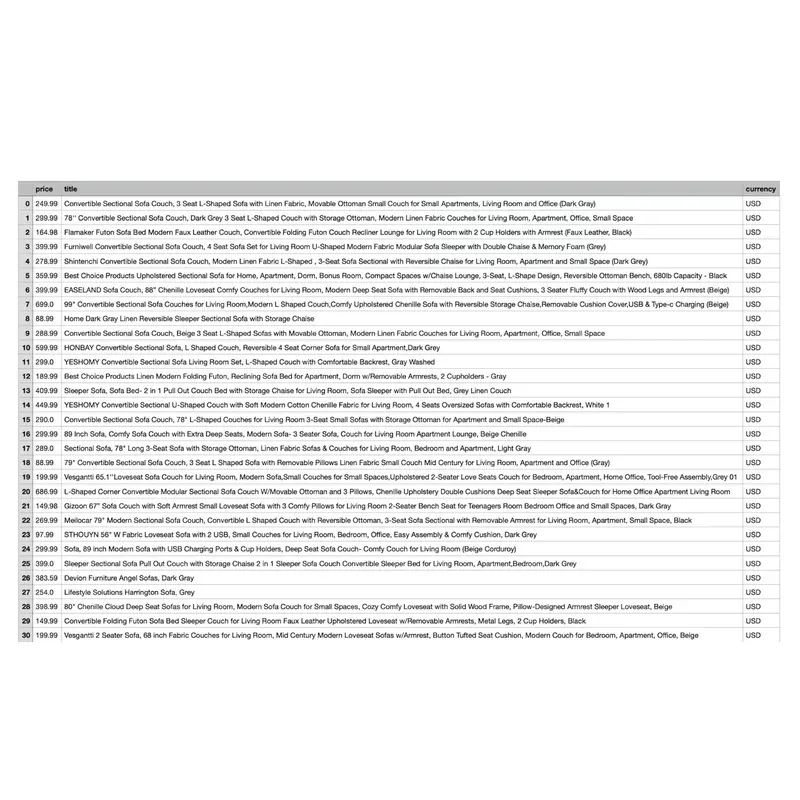
If you later convert currencies, preserve the original value and currency. Add the converted value, exchange-rate source, and rate date as new fields. Replacing the displayed price with a converted number makes the original observation impossible to audit.
What should an Amazon price snapshot contain?
The export should separate what the page showed from the conditions under which you observed it.
| Field | What it answers | Validation note |
|---|---|---|
requested_url and final_url |
Did the browser land where expected? | Reject an unexpected marketplace or redirect |
asin |
Is this the intended product? | Match it to the job input |
marketplace |
Which Amazon domain returned the offer? | Record the final hostname |
variation and variation_status |
Which size, color, or style was selected? | Distinguish no variation, an observed selection, and an unresolved control |
seller |
Whose offer produced the price? | Require it from the same offer container for a complete record |
raw_price |
What text was displayed? | Preserve symbols and formatting |
numeric_price, currency_symbol, and currency_code |
Can the value be compared safely? | A symbol alone is insufficient; require an independent ISO code for a complete record |
delivery_location and delivery_status |
Which delivery context affected the offer? | Compare the visible label with the prepared context in the same browser state |
captured_at_utc |
When was the observation made? | Use a timezone-aware timestamp |
http_status and validation_status |
Did the response and page meet the checks? | Keep candidates separate from complete comparable records |
missing_reason |
Why is an optional field empty? | Missing is different from zero |
Public logs should not contain proxy credentials, full cookies, account identifiers, or personal delivery addresses. Keep any sensitive run details in access-controlled operational records.
Which Amazon scraping failures can a proxy help diagnose?
The fastest troubleshooting starts by naming the layer that failed. A proxy can help test the network route, but several common failures belong to the target response, account, or parser.
| Symptom | Evidence to collect | What to do | What to retest |
|---|---|---|---|
Proxy returns 407 Proxy Authentication Required |
Endpoint, protocol, username format, and client configuration | Correct proxy authentication. This is not an Amazon account error | Test the proxy route against an approved IP-check endpoint before Amazon |
| Target returns any non-2xx status | HTTP status, final URL, Retry-After, timestamp, and request pattern |
Stop before parsing. Review access conditions, permission, and workload | Repeat only after the underlying cause has been addressed |
Target returns 429 Too Many Requests |
Retry-After, concurrency, request count, and recent retries |
Stop the batch and wait before any permitted retry | Resume with a smaller bounded sample and lower concurrency |
Target returns 503 |
Response body, page type, timing, and whether other requests also failed | Distinguish a temporary service response from a challenge document | Use a limited recovery attempt only when appropriate |
| Timeout or connection failure | DNS result, proxy connectivity, TLS stage, and target timing | Test the route separately and record where the connection stopped | Retest the same URL with the same inputs before changing variables |
HTTP 200 but wrong or missing price |
ASIN, variation, same-container seller, currency code, delivery context, and selector used | Reject or classify the record as a candidate. Never save the missing value as zero | Check the rendered offer and update the selector or field model |
| Account restriction or verification notice | Account notice, final URL, and official support guidance | Resolve it through the platform’s account process | A network route cannot remove an account restriction |
One controlled change at a time makes the result useful. If you switch the IP, cookies, marketplace, selector, and delivery ZIP together, a successful retest will not tell you which change mattered.
How to reduce avoidable Amazon scraping blocks in 2026
No universal “unblocked” setting exists. Current workflows are easier to maintain when they stop early, preserve evidence, and avoid traffic that adds nothing to the dataset.
Start with a handful of ASINs and inspect each output manually. Keep concurrency bounded, use a delay that fits the permitted workload, and stop the batch when the failure rate crosses a limit chosen before the run. Independent samples may use rotation where allowed; product and variation checks should keep the same session so the context stays stable.
Browser automation can consume much more proxy traffic than an HTML request because it loads page resources and background calls. Before scaling, confirm the billing unit, minimum purchase, traffic validity period, whether failed requests and retries consume traffic, and the budget threshold that stops the job. Check current Rola product materials for the actual values instead of copying numbers from an older article. Also decide how often the business question truly needs a refresh. A daily decision rarely needs a minute-by-minute crawl.
If your authorized workflow needs a specific exit location or session behavior, review Rola IP’s Amazon proxy solution and validate a small sample in your own environment. Check exit location, offer accuracy, failure rate, and traffic cost before expanding. Rola IP provides the route; your team still owns authorization, parser maintenance, response validation, and data governance.
Disclosure: This article is published by Rola IP. Check product examples against the current documentation and your authorized use case.
Conclusion
Reliable Amazon price collection depends on catching bad responses before they enter the dataset. A CAPTCHA page, wrong marketplace, different seller, or stale price can all look valid when the script only checks whether navigation finished.
Start with a small sample. Verify the page and offer manually, keep enough context to audit each record, and measure the traffic cost. Scale only after the same checks work consistently.