How to Scrape Glassdoor: Permissions and Python Fixture Practice

Sep 28, 2026 · Guides · 14 min read
TL;DR
This guide does not send automated requests to Glassdoor job pages or provide a live scraper. It shows how to practice job-card parsing with a synthetic local HTML fixture, validate missing fields, export a minimal dataset, and diagnose a proxy endpoint only against an approved IP-check service. Live Glassdoor collection requires written permission or a licensed source covering the URLs, fields, rate, retention, and reuse. Stop on a 403, 429, CAPTCHA, sign-in wall, or other denial; changing IPs does not create authorization.
Legal Glassdoor Scraping: Permission Before Automation
The practical answer starts with Glassdoor’s current rules, not with a Python library or proxy. On September 24, 2026, we reviewed Glassdoor’s official Terms of Use and its Terms History. The current page labels its revision July 1, 2026. Section 4.3(16) restricts introducing software or automated agents to scrape, strip, or mine service data without express written permission; Section 4.3(24) prohibits attempts to circumvent a security feature. This is a summary, not legal advice; terms, contracts, and laws vary by jurisdiction and use, so check the current text and obtain qualified advice where appropriate.
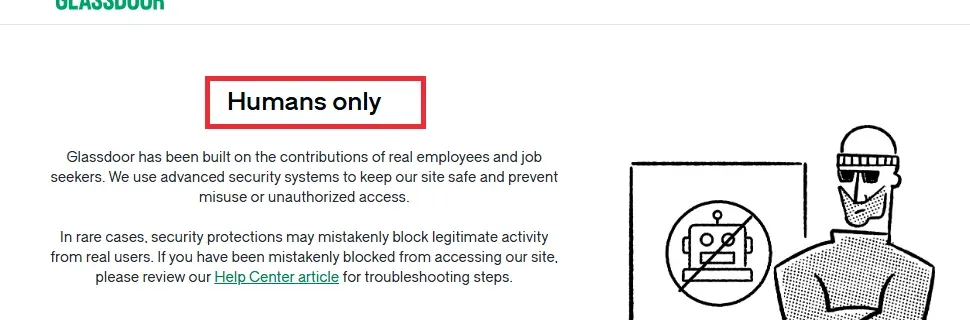
This matters because some tutorials move directly from “the page is visible” to code that collects it. Public visibility is not, by itself, proof that automated collection, storage, republication, or commercial reuse is authorized. Nor does a browser automation tool, a scraping API, or a residential IP grant permission. The applicable contractual and legal analysis depends on jurisdiction, data type, and intended use; get qualified advice for a commercial project.
Use this decision gate before building a collector:
| Situation | Safer next step |
|---|---|
| You are learning HTML parsing | Use the local synthetic fixture in this tutorial; it makes no Glassdoor request. |
| You need production job or company data | Look for a licensed feed, approved API, or alternative source whose terms permit your use. |
| Glassdoor has given your organization written permission | Follow the exact scope, fields, access method, limits, and retention terms in that permission. |
| A page asks you to sign in, shows a CAPTCHA, returns 403/429, or denies access | Stop automated requests. Do not rotate IPs or identities to get around the restriction. |
This tutorial is a parser and data-quality exercise, not a live Glassdoor scraper. Its HTML records are synthetic and exist only on your computer. That distinction is intentional: it answers how to practice Glassdoor job data extraction with Python without implying that a public page or a proxy authorizes live collection.
Plan Glassdoor Job Data Extraction Before Writing Code
Define the question and the minimum fields before collecting anything. For an authorized jobs analysis, you might need a role title and a broad location; you may not need the complete job description, employer contact details, or user reviews. Collecting fewer fields makes validation, retention, and review simpler.
| Data category | Example fields | Practical cautions |
|---|---|---|
| Job listing | Title, employer, location, posting date, listing URL | Confirm each field and reuse right are within the written scope. Job descriptions may contain protected text. |
| Salary estimate | Displayed range, currency, location, role | Preserve whether it is an estimate; don’t treat it as a verified offer or individual wage. |
| Company summary | Company name, rating or aggregate count | Record the observation date and source; aggregates may change. |
| Employee or interview review | Rating, date, text, identity-related details | User-generated content can involve privacy and copyright concerns. Avoid identity details and verbatim republication; collect only if specifically authorized and necessary. |
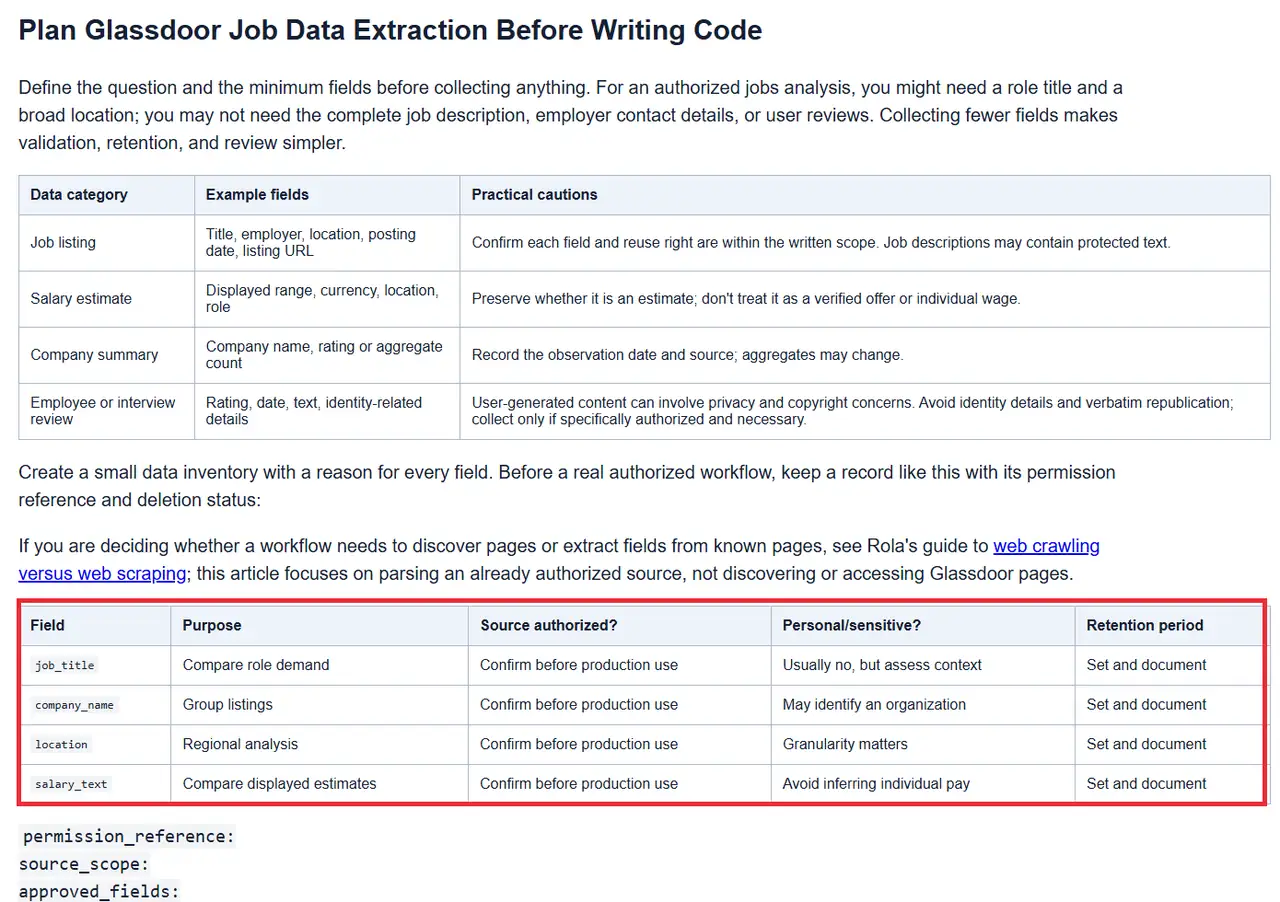
Create a small data inventory with a reason for every field. Before a real authorized workflow, keep a record like this with its permission reference and deletion status:
If you are deciding whether a workflow needs to discover pages or extract fields from known pages, see Rola’s guide to web crawling versus web scraping; this article focuses on parsing an already authorized source, not discovering or accessing Glassdoor pages.
| Field | Purpose | Source authorized? | Personal/sensitive? | Retention period |
|---|---|---|---|---|
job_title |
Compare role demand | Confirm before production use | Usually no, but assess context | Set and document |
company_name |
Group listings | Confirm before production use | May identify an organization | Set and document |
location |
Regional analysis | Confirm before production use | Granularity matters | Set and document |
salary_text |
Compare displayed estimates | Confirm before production use | Avoid inferring individual pay | Set and document |
permission_reference:
source_scope:
approved_fields:
retrieved_at:
request_method:
rate_or_concurrency_limit:
retention_until:
reuse_allowed:
deletion_status:
parser_version:
Choose an Authorized Data Route for Glassdoor Data
For a real project, prefer a source whose contract explicitly covers the intended collection and reuse. Possible routes include a Glassdoor-approved arrangement, a licensed data provider, or another job-data source whose terms support your planned fields and use. Check the limits on storage, attribution, derived data, and onward sharing; permission to access data does not necessarily include permission to republish it.
For a local parsing exercise involving structured page data, Rola’s Python table-scraping guide is a related example; use it for extraction concepts, not as authorization to collect Glassdoor content.
If you have written permission from Glassdoor, treat it as an implementation specification. Record:
- The permitted URLs, endpoints, or product features.
- The fields and volume covered by the permission.
- The approved authentication and request method.
- Any rate, concurrency, caching, or retention limits.
- Who to contact if the response changes or access is denied.
Do not add undocumented endpoints, login-wall access, CAPTCHA solving, identity rotation, or retry loops that continue after a denial. If the authorized route stops working, pause and ask the data provider or Glassdoor contact for guidance.
Does a Glassdoor Scraping API Automatically Authorize Collection?
No. A third-party tool marketed as a Glassdoor scraping API does not itself grant rights to the target’s content or override Glassdoor’s terms. Check whether Glassdoor or the data provider has approved the exact API, fields, access method, retention, and reuse for your project. If that is not documented, do not assume the API name or a successful response makes collection permissible.
What Is the Safest Way to Learn Glassdoor Data Extraction?
Use a synthetic local HTML fixture or a licensed dataset to practice selectors, missing-field handling, validation, and export. Move to live collection only when the source, fields, access method, rate, retention, and reuse rights are covered by written authorization or an applicable license. This separates learning a parser from accessing Glassdoor, which are different activities with different evidence and permission requirements.
The Role of a Proxy for Authorized Web Scraping
A proxy for authorized web scraping is a network route, not an access license. It may route an allowed request through a selected egress IP, but it cannot grant permission, override Glassdoor’s terms, or turn a 403, CAPTCHA, or 429 response into approval. Keep four checks separate:
This workflow treats the proxy strictly as an authorized network route; it cannot grant permission to collect Glassdoor data.
| Layer | Question | Evidence |
|---|---|---|
| Source authorization | Are the target, fields, method, volume, retention, and reuse permitted? | Written permission, API contract, or data license |
| Proxy endpoint | Do the host, port, protocol, and credentials work? | A permitted endpoint check |
| Client routing | Is your approved Python client using the intended proxy? | A request to a permitted IP diagnostic service |
| Destination response | Did the authorized source return a normal response? | Status and response from the approved route; stop on a denial or challenge |
Choose the proxy type and session behavior for the permitted task
The proxy choice should follow the authorized workflow’s technical requirements, not an attempt to look less automated:
| Network type | Fit only when the authorized task requires it | Rola-documented configuration / limitation |
|---|---|---|
| Rotating Residential | A permitted route where residential egress or more granular regional testing is explicitly needed | Supports country/state/city targeting; session controls are account parameters |
| Rotating Datacenter | A permitted, stateless network or endpoint check when a datacenter route is appropriate | Country-level targeting; not a substitute for source approval |
| Mobile IP | A permitted test that specifically requires a mobile-network route | Country-level targeting; not a general-purpose fix for access denial |
Rola’s proxy parameters documentation, checked September 24, 2026, documents country targeting across its listed rotating networks, state/city targeting for Rotating Residential, and session-duration parameters of 1–120 minutes. These configuration details do not imply that a proxy route authorizes Glassdoor access or guarantees a particular result. Check the account dashboard for the endpoint, protocol, credentials, and current availability before use.
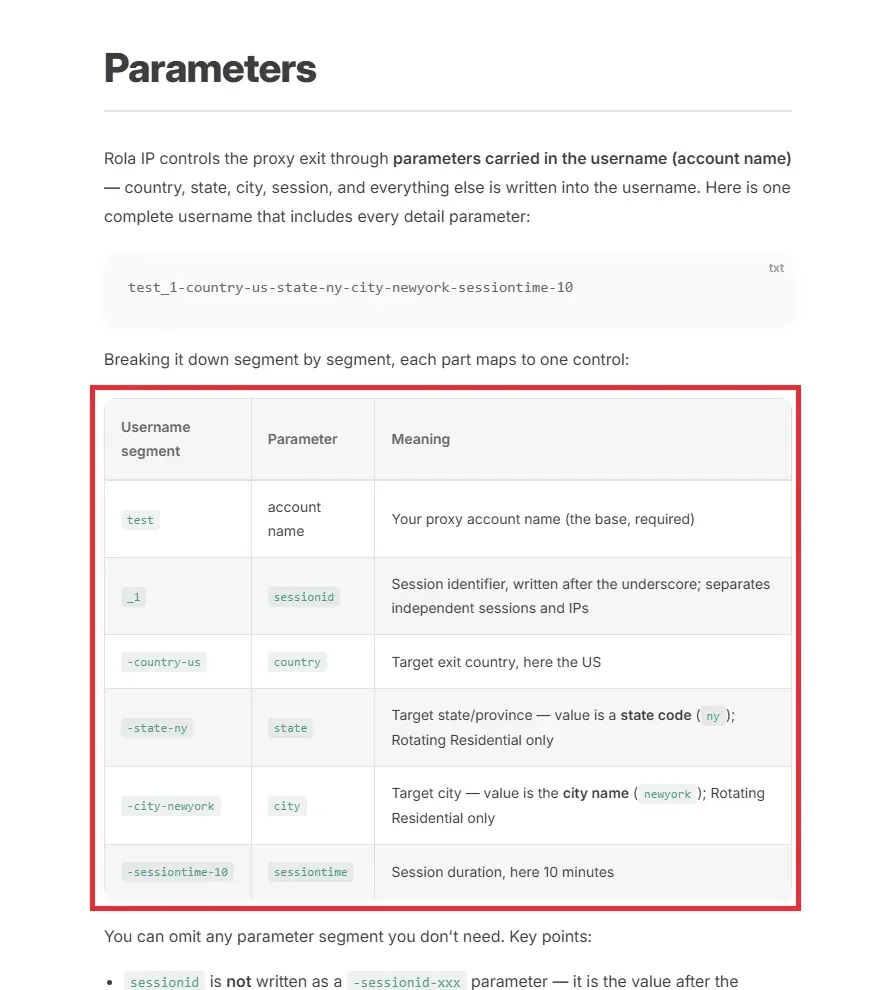
Use only the authentication and session settings documented for the account. Keep credentials in environment variables or a secret manager, not in source code, screenshots, command history, or shared logs. Choose a stable session or per-request rotation only when the approved design specifies it; never change routes to evade a denial.
Rola’s Python integration guide shows separate HTTP and SOCKS5 examples. This article’s standard-library diagnostic intentionally covers HTTP proxy endpoints only; do not pass a SOCKS5 URL to it.
Test the proxy route separately from the Glassdoor workflow
The companion proxy_diagnostic.py uses Python’s standard library to send HTTP and HTTPS destination requests through an HTTP proxy endpoint. It does not accept a socks5:// endpoint, and it does not validate Glassdoor access. It checks no_proxy/system bypass for the diagnostic host and refuses to run if the host would bypass the proxy. Run it only against an IP-check service you are allowed to use. Set ROLA_PROXY_URL in the process environment; do not paste credentials into source, screenshots, or shell history. URL-encode reserved characters in any credentials embedded in the endpoint URL.
import ipaddress
import json
import os
import ssl
from urllib.error import HTTPError, URLError
from urllib.parse import urlsplit
from urllib.request import ProxyHandler, Request, build_opener, proxy_bypass

CHECK_URL = "https://api.ipify.org?format=json"
CHECK_HOST = "api.ipify.org"

def read_public_ip(opener):
    request = Request(CHECK_URL, headers={"Accept": "application/json"})
    with opener.open(request, timeout=12) as response:
        if response.status != 200:
            raise ValueError(f"diagnostic returned HTTP {response.status}")
        payload = json.loads(response.read().decode("utf-8"))
    return str(ipaddress.ip_address(payload["ip"]))

try:
    proxy_url = os.environ.get("ROLA_PROXY_URL", "").strip()
    if not proxy_url:
        raise ValueError("ROLA_PROXY_URL is not set")
    parsed = urlsplit(proxy_url)
    if parsed.scheme != "http" or not parsed.hostname or parsed.port is None:
        raise ValueError("expected an HTTP proxy URL with host and port; SOCKS5 is not supported here")
    if proxy_bypass(CHECK_HOST):
        raise ValueError("diagnostic host matches a proxy bypass rule; refusing a potentially direct request")

    direct_ip = read_public_ip(build_opener(ProxyHandler({})))
    proxy_opener = build_opener(ProxyHandler({"http": proxy_url, "https": proxy_url}))
    proxy_ip = read_public_ip(proxy_opener)
    if direct_ip == proxy_ip:
        print("INCONCLUSIVE: diagnostic IP matched the direct baseline; inspect route and account settings.")
    else:
        print("ROUTE_CHANGED: diagnostic observed a different egress IP through the configured client route.")
    print(f"direct_ip={direct_ip}; proxy_ip={proxy_ip}; destination={CHECK_HOST}")
except HTTPError as exc:
    print(f"HTTP_ERROR: status={exc.code}; no response body or credentials logged")
except ssl.SSLError:
    print("TLS_ERROR: certificate or TLS negotiation failed; credentials not logged")
except TimeoutError:
    print("TIMEOUT: diagnostic exceeded 12 seconds; no automatic retry")
except URLError as exc:
    reason = exc.reason
    if isinstance(reason, TimeoutError):
        print("TIMEOUT: proxy or diagnostic connection timed out; no automatic retry")
    else:
        print(f"URL_ERROR: connection failed ({type(reason).__name__}); details redacted")
except (KeyError, TypeError, json.JSONDecodeError, UnicodeDecodeError, ValueError) as exc:
    print(f"CONFIG_OR_RESPONSE_ERROR: {type(exc).__name__}; details redacted")
Run it with python proxy_diagnostic.py after setting ROLA_PROXY_URL in a private environment-variable prompt or secret manager. The example makes one direct baseline request and one proxied request, does not retry, and does not print credentials. An IP change means only that this diagnostic observed a different egress during its check; an unchanged IP is inconclusive and should trigger local configuration review. Neither result proves Glassdoor authorization, target access, or extraction success. urllib.request.ProxyHandler does not provide SOCKS support by itself; for SOCKS5 use a separately documented client and pinned dependency, such as the approach shown in Rola’s Python guide, after independently validating its security and behavior. This article does not execute that external network test.
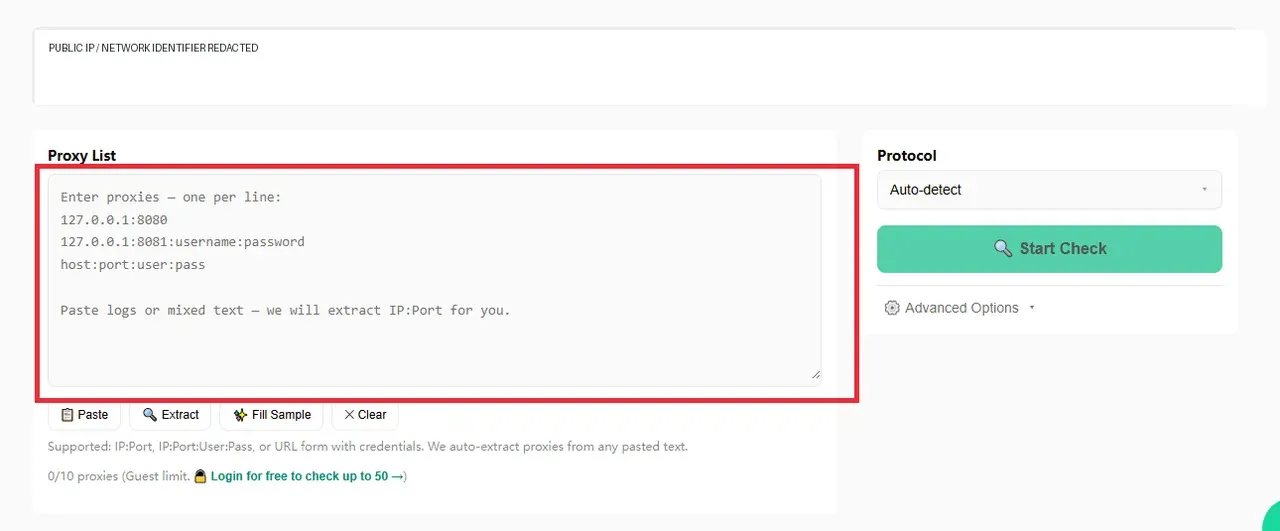
Rola IP’s Proxy Checker checks the configured proxy endpoint. It does not check Glassdoor access. A server-side checker and your own Python process take different network paths, so record those observations separately.
How to Practice Glassdoor-Style Job Parsing with a Local Fixture
This section demonstrates the parsing mechanics associated with “how to scrape Glassdoor” without contacting Glassdoor. A local fixture lets you practice selecting cards, handling missing and nested fields, reporting rejected records, and exporting data. Its company names and listing details are fictional; the output is not Glassdoor data and is not evidence of live access.
Prerequisites and project structure
The fixture tutorial uses only Python’s standard library; there are no package install commands or third-party dependencies. It was run with Python 3.12.14 on September 24, 2026. The example files are included alongside this article:
examples/glassdoor-fixture/
├── fixtures/
│   └── jobs.html
├── output/                 # created by export_fixture.py
├── tests/
│   └── test_parse_fixture.py
├── export_fixture.py
├── parse_fixture.py
└── proxy_diagnostic.py    # optional; makes two requests to api.ipify.org only
From the examples/glassdoor-fixture/ directory, run python --version, python parse_fixture.py, python export_fixture.py, and python -m unittest discover -s tests -v. All commands operate only on fixtures/jobs.html; none makes a network request. See the adjacent run-log.txt for the captured commands and output.
Create a synthetic HTML fixture
The delivered fixtures/jobs.html uses a deliberately small, invented structure to exercise nested text, an optional missing field, and one rejected row:
<main>
  <article class="job-card">
    <h2 class="title">Example <span>Data</span> Analyst</h2>
    <span class="company">Northstar Demo Co.</span>
    <span class="location">Sample City</span>
    <span class="salary">$80,000-$95,000 (sample)</span>
  </article>
  <article class="job-card">
    <h2 class="title">Example QA Engineer</h2>
    <span class="company">Harbor Test Labs</span>
    <span class="location">Example Region</span>
  </article>
  <article class="job-card">
    <h2 class="title">Example Product Designer</h2>
    <span class="company">Juniper Sample Studio</span>
    <!-- Missing location is intentional; export reports this rejection. -->
  </article>
</main>
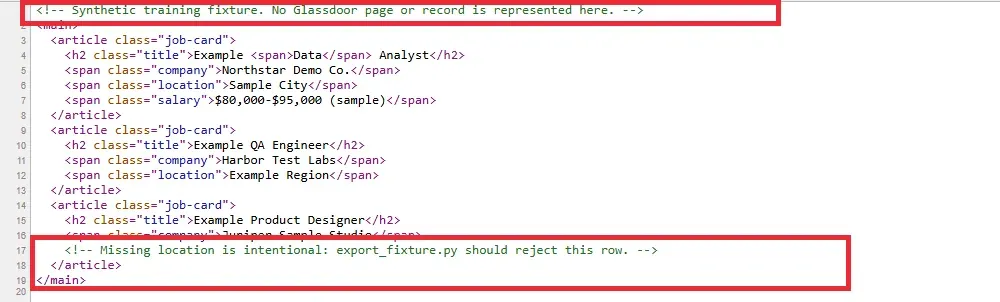
The second card intentionally omits salary, which remains null/None; the third lacks the required location and is reported as rejected. This fixture is not a Glassdoor HTML snapshot; it is a tiny test document with generic class names.
Parse only the fields in your schema
The runnable parse_fixture.py uses Python’s standard-library HTMLParser. It selects only the four declared fields from the generic fixture structure; it contains no HTTP client and cannot contact Glassdoor:
from html.parser import HTMLParser
from pathlib import Path

FIELD_BY_CLASS = {
    "title": "job_title",
    "company": "company_name",
    "location": "location",
    "salary": "salary_text",
}
VOID_TAGS = {"area", "base", "br", "col", "embed", "hr", "img", "input", "link", "meta", "param", "source", "track", "wbr"}
EMPTY_RECORD = {field: None for field in FIELD_BY_CLASS.values()}

class JobCardParser(HTMLParser):
    def __init__(self):
        super().__init__(convert_charrefs=True)
        self.records, self.card = [], None
        self.active_field, self.field_tag_stack, self.parts = None, [], []

    def handle_starttag(self, tag, attrs):
        classes = dict(attrs).get("class", "").split()
        if tag == "article" and "job-card" in classes:
            if self.card is not None:
                self._finish_card()
            self.card = EMPTY_RECORD.copy()
            return
        if self.card is None:
            return
        if self.active_field:
            if tag not in VOID_TAGS:
                self.field_tag_stack.append(tag)
            return
        field = next((FIELD_BY_CLASS[name] for name in classes if name in FIELD_BY_CLASS), None)
        if field:
            self.active_field, self.parts = field, []
            self.field_tag_stack = [] if tag in VOID_TAGS else [tag]
            if not self.field_tag_stack:
                self._finish_field()

    def handle_data(self, data):
        if self.card is not None and self.active_field:
            self.parts.append(data)

    def handle_endtag(self, tag):
        if self.card is None:
            return
        if self.active_field and tag in self.field_tag_stack:
            index = len(self.field_tag_stack) - 1 - self.field_tag_stack[::-1].index(tag)
            del self.field_tag_stack[index:]
            if not self.field_tag_stack:
                self._finish_field()
        if tag == "article":
            self._finish_card()

    def close(self):
        super().close()
        if self.card is not None:
            self._finish_card()

    def _finish_field(self):
        value = " ".join(" ".join(self.parts).split())
        self.card[self.active_field] = value or None
        self.active_field, self.field_tag_stack, self.parts = None, [], []

    def _finish_card(self):
        if self.active_field:
            self._finish_field()
        self.records.append(self.card)
        self.card = None

def parse_jobs(html):
    parser = JobCardParser()
    parser.feed(html)
    parser.close()
    return parser.records

if __name__ == "__main__":
    fixture = Path(__file__).parent / "fixtures" / "jobs.html"
    for record in parse_jobs(fixture.read_text(encoding="utf-8")):
        print(record)
The function accepts an HTML string and returns only the four fields declared in the sample schema. Its tag stack preserves nested inline text; it is intentionally limited to this fixture’s article.job-card structure, does not implement browser rendering, and is not a general-purpose production parser. It does not fetch a URL, inspect a live site, or discover hidden page data. On an authorized source, selectors and markup must come from the documented access method—not from probing restricted Glassdoor endpoints.
Run the parser locally:
python parse_fixture.py
Actual fixture output from Python 3.12.14 on September 24, 2026 (python parse_fixture.py):
{'job_title': 'Example Data Analyst', 'company_name': 'Northstar Demo Co.', 'location': 'Sample City', 'salary_text': '$80,000-$95,000 (sample)'}
{'job_title': 'Example QA Engineer', 'company_name': 'Harbor Test Labs', 'location': 'Example Region', 'salary_text': None}
{'job_title': 'Example Product Designer', 'company_name': 'Juniper Sample Studio', 'location': None, 'salary_text': None}
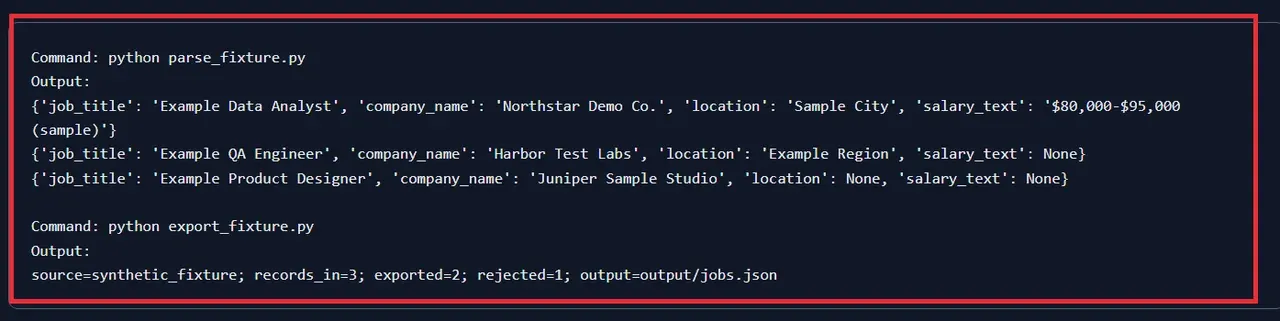
These values were produced from the included synthetic file only. They are not Glassdoor records, an approved dataset, or real employers. The parser returns all three cards; the export step below reports the incomplete one instead of silently dropping it.
Validate and export a small dataset
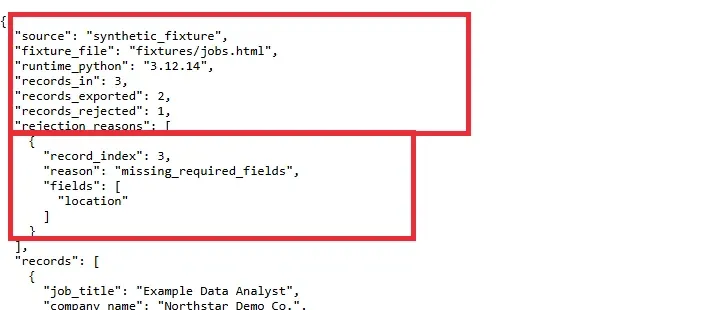
export_fixture.py imports parse_jobs from the sibling parse_fixture.py, reads the same fixture, checks the required fields (job_title, company_name, location), and writes JSON to output/jobs.json. The file itself records source: synthetic_fixture, the fixture filename, Python version, input/export/rejection counts, rejection reasons, and exported rows. The exporter code is included in the companion project.
python export_fixture.py
Expected summary from the local fixture run is source=synthetic_fixture; records_in=3; exported=2; rejected=1; output=output/jobs.json. The reject report identifies record 3 and the missing location. In an authorized pipeline, add real source and permission metadata only when accurate; do not store entire HTML pages by default.
Test nested markup, missing fields, and export rejections
A parser should make its limits testable. The delivered tests check nested text in a title, an optional missing salary, an empty document, and an incomplete required-field record with an explicit rejection reason. Run:
$ python -m unittest discover -s tests -v
test_empty_html_returns_no_records ... ok
test_export_reports_rejected_records_and_reasons ... ok
test_fixture_has_three_synthetic_records_and_nested_text ... ok
test_missing_salary_stays_none ... ok
test_nested_field_markup_preserves_all_text ... ok

Ran 5 tests in 0.002s
OK
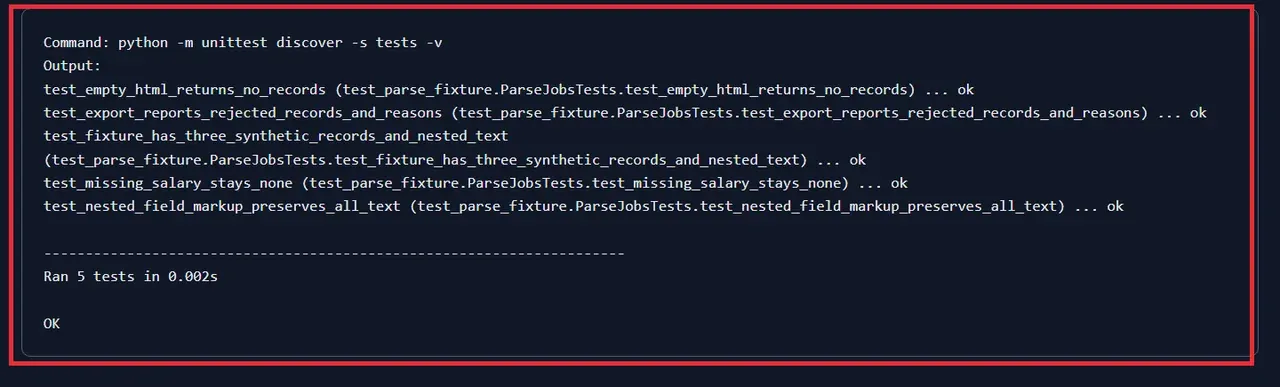
This run used Python 3.12.14 on September 24, 2026. The test file is tests/test_parse_fixture.py; it uses the standard-library unittest runner. A passing fixture test proves only that the parser handles these synthetic examples; it does not prove it works on Glassdoor, that access is authorized, or that a field is accurate. The companion run-log.txt contains the actual captured output; rerun locally before relying on it in another environment.
Troubleshooting Without Evading Restrictions
| Symptom | Safe diagnostic | What to do next |
|---|---|---|
| Local parser returns no records | Confirm the fixture path and HTML structure; print a small local snippet | Fix the fixture/test, not by probing Glassdoor |
A required field is None |
Check for a missing node or changed authorized schema | Preserve None; don’t silently invent a value |
| Proxy connection fails | Recheck host, port, protocol, credentials, and account status | Ask the proxy provider for support; redact credentials in logs |
| IP diagnostic shows the wrong route | Confirm client-level proxy settings and bypass rules | Test only an approved endpoint and diagnostic destination |
| Glassdoor returns 403 or access denied | Stop automated requests and review written permission | Contact the authorized data owner; do not rotate IPs to evade denial |
| Glassdoor returns 429 or a CAPTCHA | Treat it as a stop signal | Do not retry aggressively, solve the CAPTCHA automatically, or change identity |
The key distinction is between diagnosing your own proxy configuration and defeating a destination’s access controls. The first can be appropriate for an authorized workflow; the second is not a troubleshooting technique this guide recommends.
Data Quality, Privacy, and Reuse
Even with a valid access route, treat data governance as part of engineering:
- Keep a source and retrieval timestamp for each approved record.
- Collect only fields necessary for the stated analysis.
- Set a retention period and delete data when it expires or permission ends.
- Avoid personal identifiers and unnecessary review text.
- Preserve currency, geography, and “estimate” labels for salary values.
- Check rights before redistributing, publishing, or combining records with other datasets.
- Document parser version and test results so downstream users can understand limitations.
Glassdoor’s terms and privacy documentation can change. Recheck the current text before launch and whenever the project scope, data fields, or intended use changes. Keep the permission and retention record above with the project rather than embedding real credentials or personal data in screenshots.
Conclusion
The responsible way to approach how to scrape Glassdoor is to establish permission before automating, define a minimal schema, and respect any access and reuse limits. You can learn the Python mechanics safely with a local fixture, meaningful parser tests, and a clearly labeled synthetic output. In a permitted production workflow, proxies may help route and diagnose connections, but they are only a network layer—not a workaround for a denial or substitute for authorization. If the intended collection is not covered by written permission, choose a licensed data source instead.