How to Web Scrape a Table in Python: 4 Working Methods

Sep 10, 2026 · Guides · 14 min read
TL;DR
To web scrape a table in Python, first confirm whether the table is present in the HTML returned by the server. For regular static tables, pandas.read_html() is the fastest option. When you need precise control over fields, use Requests + Beautiful Soup. For tables loaded with JavaScript, use a public API or Playwright. Finally, clean data types, remove duplicates, and export the results to CSV.
This guide uses a real English-language practice site for three reproducible hands-on examples: a single-page table that returns 25 rows and 9 columns, a 24-page pagination run that returns 582 unique records, and a dynamic movie table that returns 16 rows after the browser executes JavaScript. The examples access only public practice pages and include timeouts, status checks, field-count validation, and deduplication so you can adapt them directly to your own projects.
How Are Web Tables Structured?
HTML tables are usually built from <table>, <tr>, <th>, and <td> elements, but real-world pages may omit <thead> or <tbody>, or create rows after page load with JavaScript.
<table>: the table container; a page can contain more than one.<tr>: one row of data.<th>: a header cell, which may also be used as a row header.<td>: a standard data cell.rowspanandcolspan: allow cells to span rows or columns, changing the relationship between the visible column count and the actual number of nodes.
Which Python Table-Scraping Method Should You Choose Before You Start?
Your method should depend on where the data appears. If the complete table is already present in the raw HTML, use pandas or Beautiful Soup. If the initial response contains no data, then consider an API or browser rendering.
| Page Situation | Recommended Method | Advantages | Limitations |
|---|---|---|---|
Regular static <table> |
pandas.read_html() |
Converts the table to a DataFrame in a few lines | Less control over irregular structures; does not execute JavaScript |
| Static but irregular structure | Requests + Beautiful Soup | Precise control over rows, columns, attributes, and error-tolerance rules | You must build fields and data types yourself |
| Predictable multi-page URLs | Requests Session + Next link | Fast, resource-efficient, and easy to resume | Must handle duplicate pages and stopping conditions |
| JavaScript dynamic table | Public JSON/XHR API first, then Playwright | Can read the rendered DOM | Browser automation costs more resources, and wait conditions must be accurate |
| High request volume or multiple regions | Proxy pool + layered retries | Distributes authorized tasks and verifies pages from different regions | Proxies do not fix parsing errors or grant permission to access a site |
Environment and Dependency Versions
The code in this guide was run with Python 3.12.13, Requests 2.34.2, Beautiful Soup 4.15.0, pandas 3.0.5, lxml 6.1.3, and Playwright 1.62.0.
macOS or Linux:
python3 -m venv .venv
source .venv/bin/activate
python -m pip install requests beautifulsoup4 pandas lxml playwright
Windows PowerShell:
py -m venv .venv
.venv\Scripts\Activate.ps1
python -m pip install requests beautifulsoup4 pandas lxml playwright
This guide runs Playwright with a locally installed Chrome browser. If your system does not have a usable browser, run playwright install chromium to download a compatible Chromium build. For virtual environment setup, see the Python venv documentation.
How Do You Check Whether the Target Table Is Static HTML?
You can confirm that a table is directly scrapeable with a static parser only when the target data appears both in the browser and in the Requests response.
This guide uses the Scrape This Site Hockey Teams page. It displays team names, years, wins, losses, win percentages, goals for, and goals against, with 25 rows on the first page.
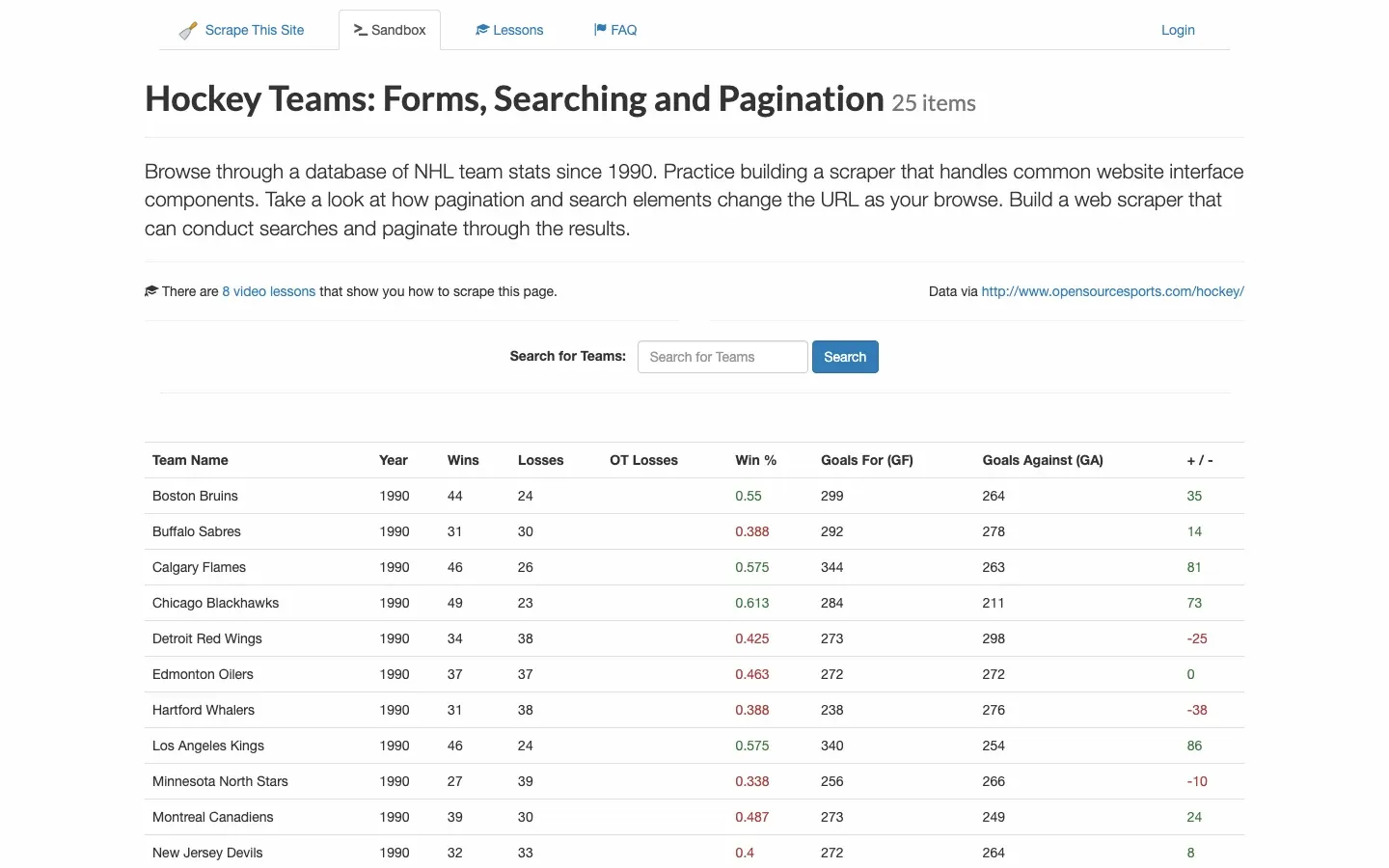
Inspection steps:
- Right-click the table and choose Inspect to locate the outer
<table>element. - Record stable attributes, such as
table.tableand thetr.teamdata rows used in this example. - Use View Page Source or Requests to download the HTML, then search for a visible value such as
Boston Bruins. - Confirm that the value exists in the response HTML rather than only in the rendered DOM shown in the Elements panel.
- Check how many
<td>elements each row contains, along with blank cells,rowspan,colspan, and repeated header rows.
This example does not contain standard <thead> or <tbody> elements, but the headers are stored in <th> cells in the first row, and the data rows have the team class. This is exactly why a parser should not assume that every page follows an ideal table structure.
Method 1: How to Scrape a Web Table with pandas
For a regular static table, pandas.read_html() is the shortest and most practical way to answer how to web scrape a table in Python. It returns a list of DataFrames created from all matching tables on the page.
Do not assume that tables[0] will always be your target table. First narrow the result with attrs, match, or column-name checks, then validate the number and shape of the tables. StringIO lets you pass HTML that has already passed an HTTP status check into pandas without making a second request.
from io import StringIO

import pandas as pd
import requests

URL = "https://www.scrapethissite.com/pages/forms/?page_num=1&per_page=25"
HEADERS = {"User-Agent": "Mozilla/5.0 (compatible; table-tutorial/1.0)"}

response = requests.get(URL, headers=HEADERS, timeout=(10, 30))
response.raise_for_status()

tables = pd.read_html(StringIO(response.text), attrs={"class": "table"})
if len(tables) != 1:
    raise RuntimeError(f"Expected one table, found {len(tables)}")

df = tables[0]
df.columns = [str(column).strip() for column in df.columns]

print(f"HTTP status: {response.status_code}")
print(f"Tables found: {len(tables)}")
print(f"Shape: {df.shape}")
print(df.head(5).to_string(index=False))

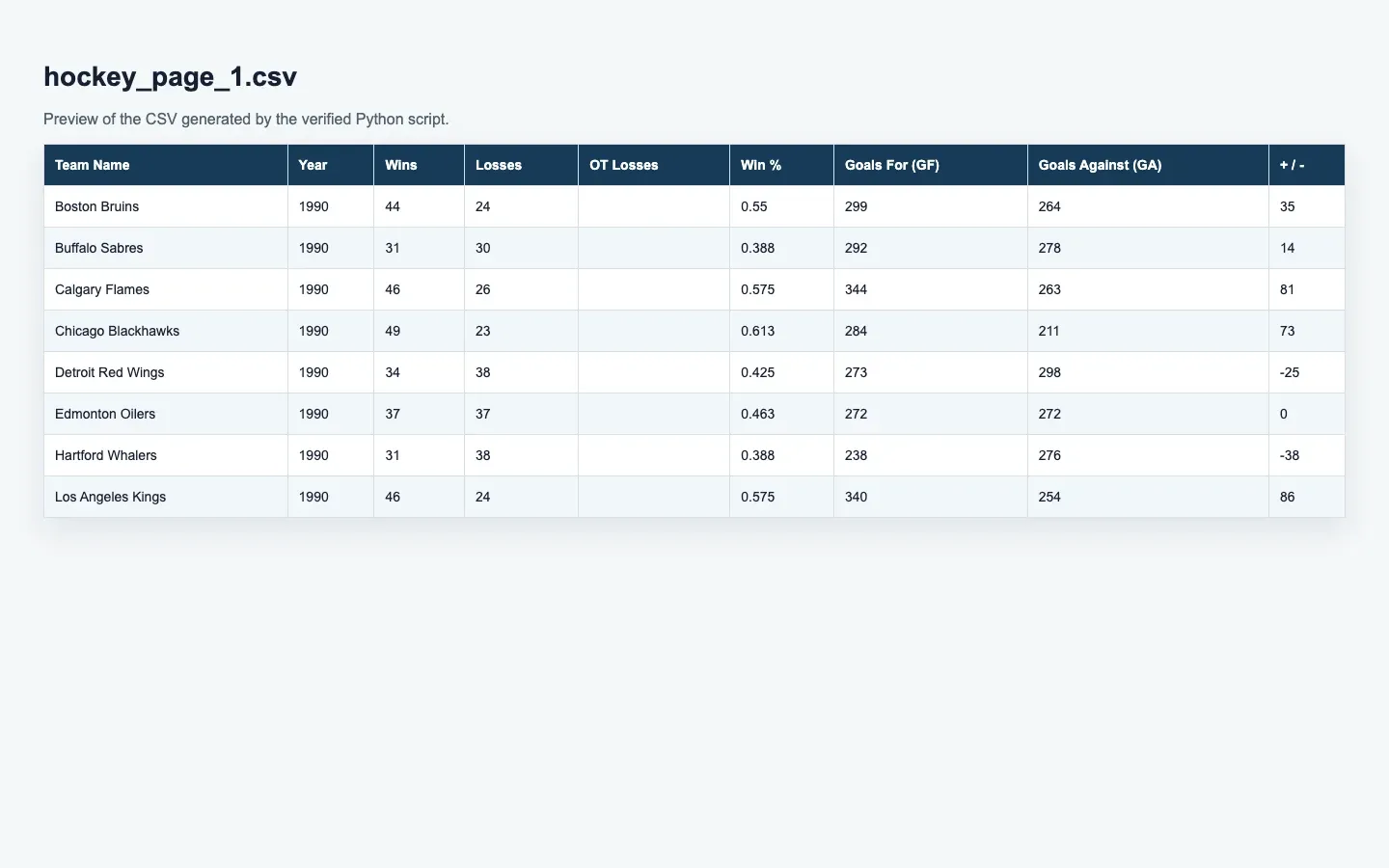
df.to_csv("hockey_page_1.csv", index=False, encoding="utf-8-sig")
print("Saved: hockey_page_1.csv")
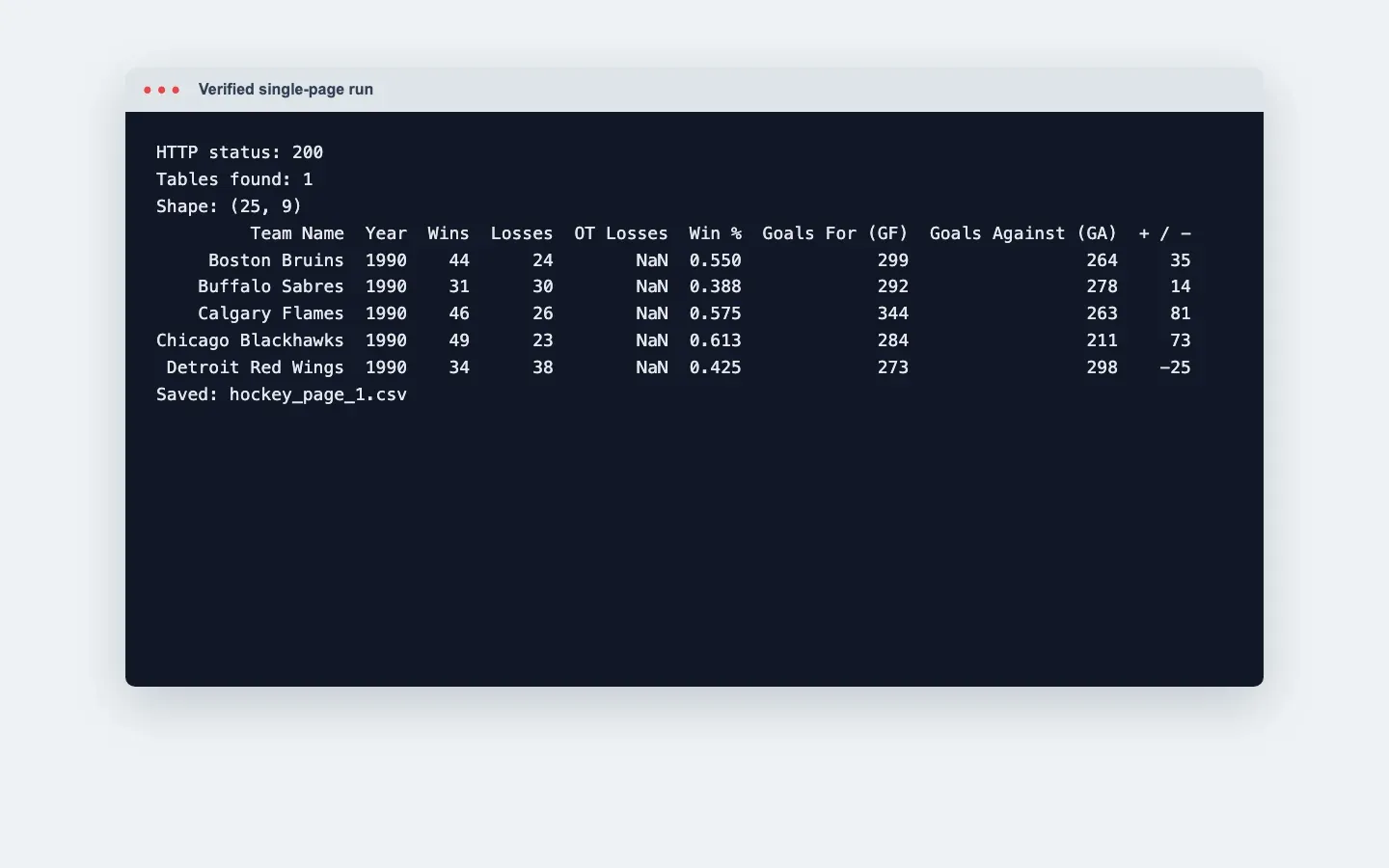
The pandas.read_html documentation explains that the return value is always a list of DataFrames. In this run, the result was HTTP 200, one table, and a shape of (25, 9). Blank values in the OT Losses column were converted to NaN by pandas.
How Do You Clean and Export a Scraped Table?
Extracting cell text is only the first step. A reliable dataset also requires cleaning column names, missing values, number formats, dates, duplicate records, and encoding.
You can continue this example with:
numeric_columns = [
    "Year", "Wins", "Losses", "OT Losses", "Win %",
    "Goals For (GF)", "Goals Against (GA)", "+ / -",
]

for column in numeric_columns:
    df[column] = pd.to_numeric(df[column], errors="coerce")

df["Team Name"] = df["Team Name"].astype("string").str.strip()
df = df.dropna(subset=["Team Name", "Year"])
df = df.drop_duplicates(subset=["Team Name", "Year"])
df = df.sort_values(["Year", "Team Name"], ascending=[False, True])

df.to_csv("hockey_clean.csv", index=False, encoding="utf-8-sig")
df.to_json("hockey_clean.json", orient="records", indent=2)
errors="coerce" converts values that cannot be parsed into missing values, which makes them easier to inspect later. It should not be used as an excuse to silently discard bad data. In production, count missing values before and after conversion and alert on unusual increases.
Method 2: How to Scrape Table Rows with Requests and Beautiful Soup
When the table structure is irregular, you need to skip ad rows, or you need to preserve cell attributes, Requests + Beautiful Soup gives you more control than read_html().
The complete example below parses both headers and data rows and accepts only records whose number of values matches the number of headers. zip(..., strict=True) raises an error immediately if the field counts do not match, preventing misaligned data from silently entering the output file.
import csv

import requests
from bs4 import BeautifulSoup

URL = "https://www.scrapethissite.com/pages/forms/?page_num=1&per_page=25"
HEADERS = {"User-Agent": "Mozilla/5.0 (compatible; table-tutorial/1.0)"}

response = requests.get(URL, headers=HEADERS, timeout=(10, 30))
response.raise_for_status()
soup = BeautifulSoup(response.text, "lxml")

table = soup.select_one("table.table")
if table is None:
    raise RuntimeError("Target table not found")

headers = [cell.get_text(" ", strip=True) for cell in table.select("tr th")]
rows = []
for row in table.select("tr.team"):
    values = [cell.get_text(" ", strip=True) for cell in row.select("td")]
    if len(values) == len(headers):
        rows.append(dict(zip(headers, values, strict=True)))

print(f"Headers: {headers}")
print(f"Rows extracted: {len(rows)}")
print(f"First row: {rows[0]}")

with open("hockey_bs4.csv", "w", newline="", encoding="utf-8-sig") as file:
    writer = csv.DictWriter(file, fieldnames=headers)
    writer.writeheader()
    writer.writerows(rows)
The Requests documentation recommends setting timeouts and checking network errors, while the Beautiful Soup documentation covers CSS selectors, attribute access, and text extraction. This script extracted 25 rows in the verified run, with the first record corresponding to the Boston Bruins in 1990.
How Do You Handle Multiple Tables and Complex Headers?
On pages with multiple tables, select the target using stable attributes, header text, and expected column names. For complex headers, let pandas parse the MultiIndex first, then flatten it according to the business meaning.
When a page contains multiple tables:
tables = pd.read_html(StringIO(response.text))

candidates = [
    table for table in tables
    if {"Team Name", "Year", "Wins"}.issubset(map(str, table.columns))
]
if len(candidates) != 1:
    raise RuntimeError(f"Expected one matching table, found {len(candidates)}")
df = candidates[0]
For a two-level header, try:
df = pd.read_html(StringIO(response.text), header=[0, 1])[0]

df.columns = [
    " ".join(str(part).strip() for part in column if "Unnamed" not in str(part)).strip()
    if isinstance(column, tuple)
    else str(column).strip()
    for column in df.columns
]
Do not manually reconstruct every rowspan and colspan with fixed indexes unless the page structure is extremely stable. First print df.columns and df.head() to confirm how pandas parsed the table, then decide whether to flatten the headers. If different rows contain different numbers of columns, preserve the original HTML sample and stop the export instead of automatically padding the data and continuing.
Method 3: How to Scrape a Paginated Table
For a paginated table, follow the page’s real Next link and maintain both a set of visited URLs and a no-data stopping condition to avoid duplicate pages or infinite loops.
This example has up to 25 rows per page and 24 pages in total. The complete script is:
from urllib.parse import urljoin

import pandas as pd
import requests
from bs4 import BeautifulSoup

START_URL = "https://www.scrapethissite.com/pages/forms/?page_num=1&per_page=25"
HEADERS = {"User-Agent": "Mozilla/5.0 (compatible; table-tutorial/1.0)"}


def parse_page(session: requests.Session, url: str) -> tuple[list[dict], str | None]:
    response = session.get(url, timeout=(10, 30))
    response.raise_for_status()
    soup = BeautifulSoup(response.text, "lxml")

    rows = []
    for row in soup.select("table.table tr.team"):
        cells = row.select("td")
        if len(cells) != 9:
            continue
        rows.append({
            "team": cells[0].get_text(" ", strip=True),
            "year": cells[1].get_text(" ", strip=True),
            "wins": cells[2].get_text(" ", strip=True),
            "losses": cells[3].get_text(" ", strip=True),
            "ot_losses": cells[4].get_text(" ", strip=True),
            "win_pct": cells[5].get_text(" ", strip=True),
            "goals_for": cells[6].get_text(" ", strip=True),
            "goals_against": cells[7].get_text(" ", strip=True),
            "goal_diff": cells[8].get_text(" ", strip=True),
        })

    next_link = soup.select_one("ul.pagination li:not(.disabled) a[aria-label='Next']")
    next_url = urljoin(url, next_link["href"]) if next_link else None
    return rows, next_url


with requests.Session() as session:
    session.headers.update(HEADERS)
    all_rows = []
    url: str | None = START_URL
    page_number = 0
    seen_urls = set()

    while url and url not in seen_urls:
        seen_urls.add(url)
        page_number += 1
        rows, url = parse_page(session, url)
        all_rows.extend(rows)
        print(f"Page {page_number:02d}: {len(rows):2d} rows | total {len(all_rows)}")

df = pd.DataFrame(all_rows).drop_duplicates(subset=["team", "year"])
numeric_columns = [
    "year", "wins", "losses", "ot_losses", "win_pct",
    "goals_for", "goals_against", "goal_diff",
]
for column in numeric_columns:
    df[column] = pd.to_numeric(df[column], errors="coerce")

df = df.sort_values(["year", "team"], ascending=[False, True]).reset_index(drop=True)
df.to_csv("hockey_all_pages.csv", index=False, encoding="utf-8-sig")

print(f"Pages scraped: {page_number}")
print(f"Unique rows: {len(df)}")
print(f"Year range: {int(df['year'].min())}-{int(df['year'].max())}")
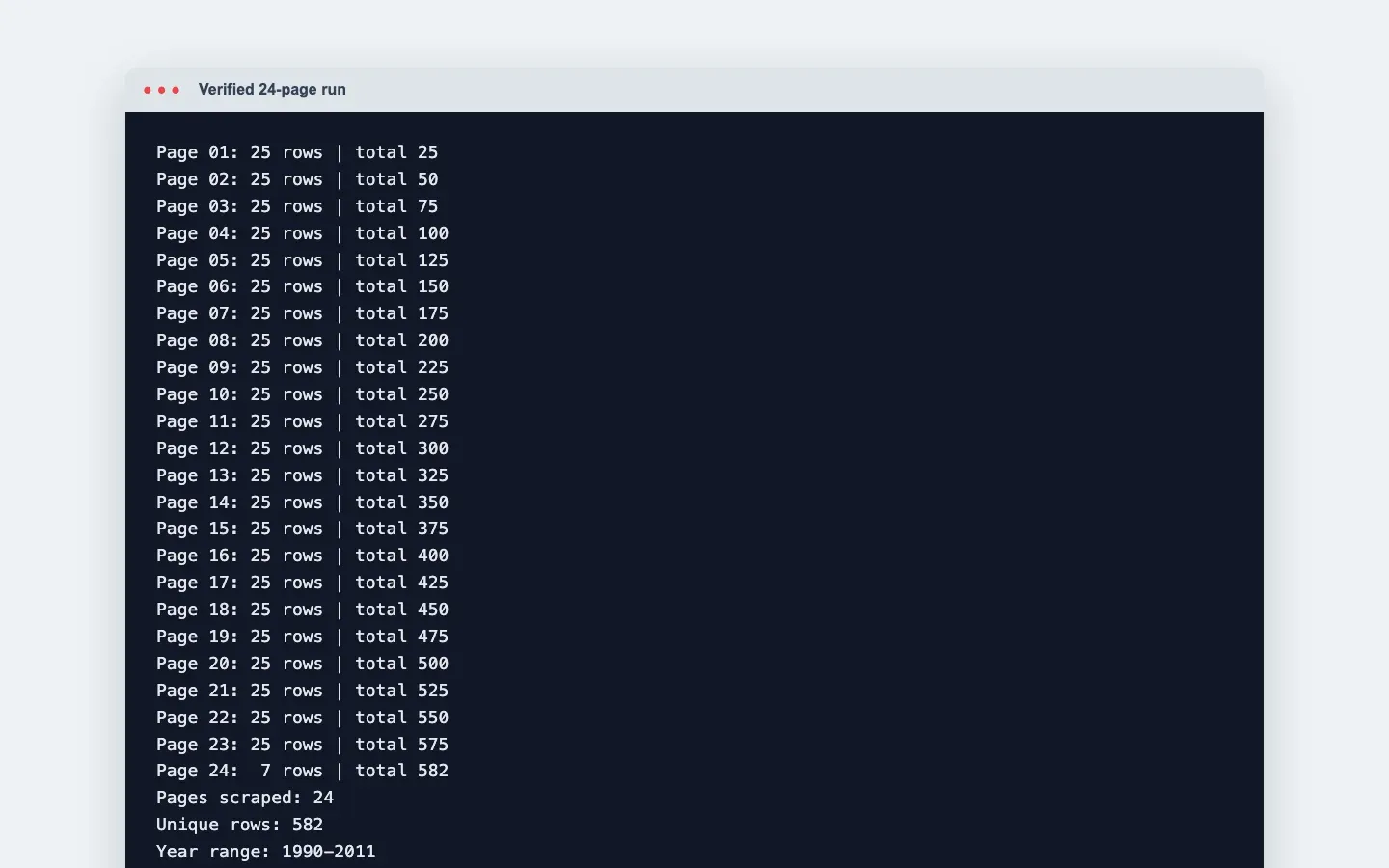
The verified run traversed 24 pages. The last page contained 7 rows, for a total of 582 rows. Deduplicating by team and year still left 582 records, covering the years 1990-2011.
A production workflow should also add request intervals, a maximum page count, a retry limit for failures, and checkpoint files. Stop immediately if the next-page URL has already been visited. If consecutive pages stop producing new primary keys, that should also trigger an alert.
Method 4: How to Scrape a JavaScript-Rendered Table
If the target rows are not present in the initial HTML, first inspect the Network panel for a JSON/XHR endpoint that you are allowed to call. If no stable endpoint exists, use a browser tool such as Playwright and wait for the target rows to appear.
Both Decodo’s table scraping guide and the Playwright auto-waiting documentation emphasize that browser automation should wait for an actionable element or target state rather than relying on a fixed sleep().
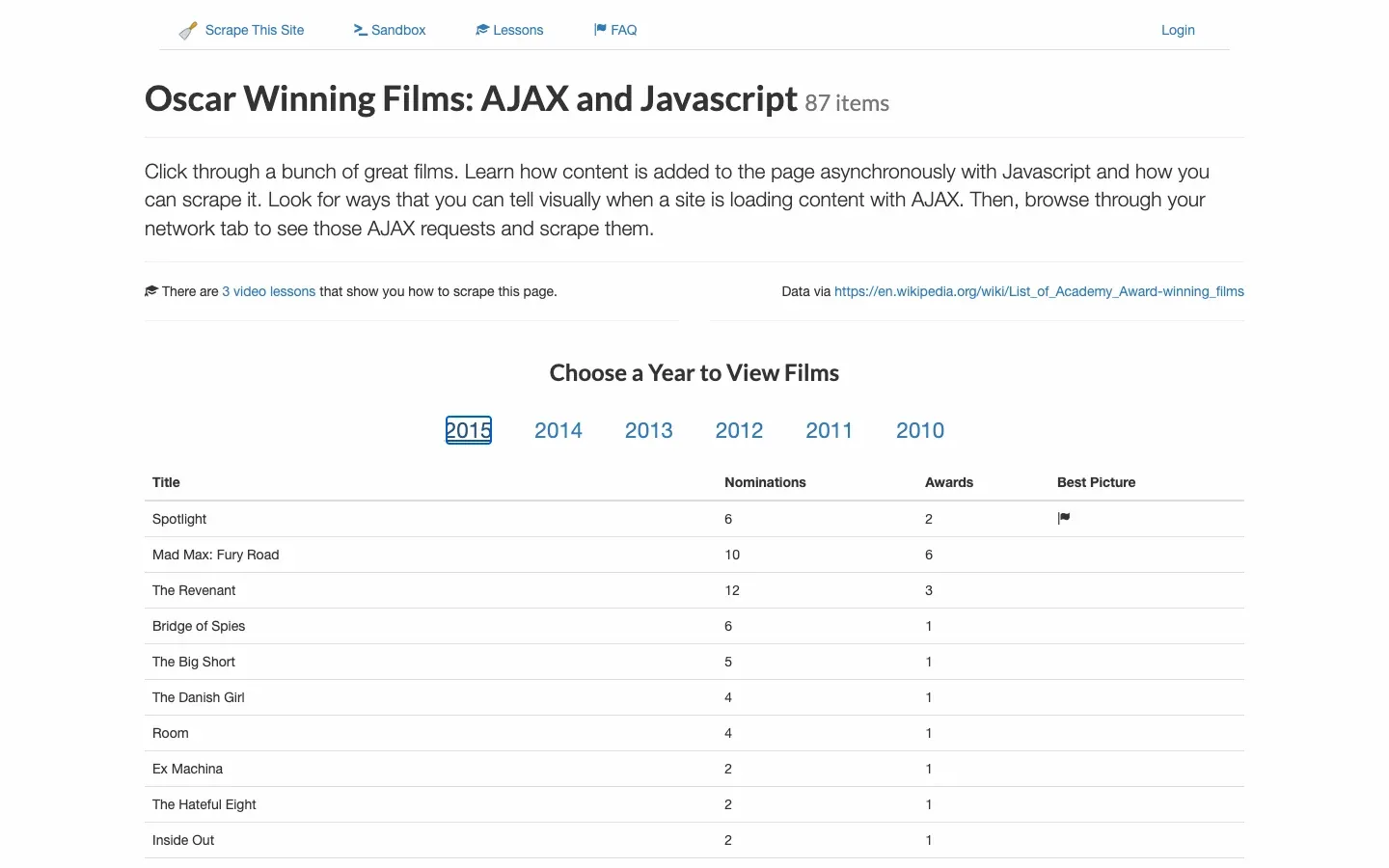
The code below visits the AJAX page on the same practice site, clicks 2015, waits for the first movie row to become visible, and then reads 16 rows. Because the year ID starts with a number, it uses a.year-link[id='2015']; writing #2015 directly would create an invalid CSS selector.
from playwright.sync_api import sync_playwright

URL = "https://www.scrapethissite.com/pages/ajax-javascript/"
CHROME = "/Applications/Google Chrome.app/Contents/MacOS/Google Chrome"

with sync_playwright() as playwright:
    browser = playwright.chromium.launch(headless=True, executable_path=CHROME)
    page = browser.new_page(viewport={"width": 1440, "height": 900})
    page.goto(URL, wait_until="domcontentloaded", timeout=60_000)
    page.locator("a.year-link[id='2015']").click()
    page.locator("table.table tr.film").first.wait_for(
        state="visible", timeout=30_000
    )

    rows = []
    for row in page.locator("table.table tr.film").all():
        cells = row.locator("td").all_inner_texts()
        rows.append({
            "title": cells[0].strip(),
            "nominations": int(cells[1]),
            "awards": int(cells[2]),
            "best_picture": row.locator(
                ".film-best-picture .glyphicon-flag"
            ).count() > 0,
        })

    print(f"Dynamic rows: {len(rows)}")
    print(f"First row: {rows[0]}")
    browser.close()
The Best Picture column displays an icon instead of text, so you cannot determine the value with bool(cells[3].strip()). Instead, check whether the flag icon exists. After that correction, the first record, Spotlight, has best_picture=True.
How to Use Rola IP to Scale Python Table Scraping
When an authorized table-scraping task involves regional differences, request-frequency limits, or a large number of concurrent jobs, you can configure Rola IP at the network layer for Requests or Playwright while keeping the same parsing, validation, and rate-limiting logic.
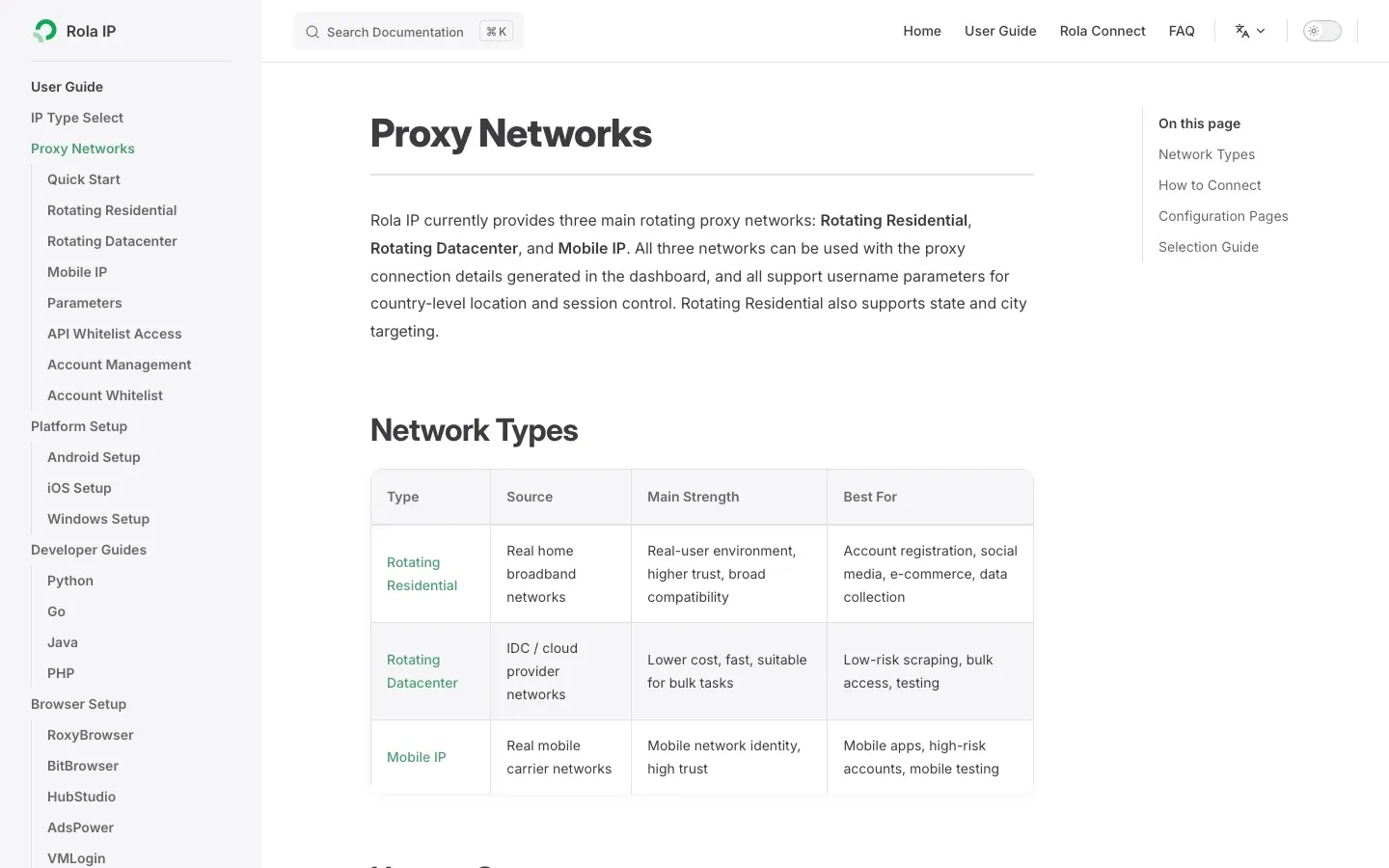
Rola IP currently provides rotating residential, rotating datacenter, static residential/ISP, and mobile proxies. According to the source article’s official-product summary, its residential network covers 190+ countries and regions, includes 80M+ residential IPs, and supports country/city targeting, per-request rotation, sticky sessions, HTTP/SOCKS5, username/password authentication, IP allowlisting, subaccounts, and quota management.
For table scraping, you can choose among them as follows:
- Rotating residential proxies: suitable for public pages across multiple regions and pagination/list tasks where each request can be completed independently.
- Static residential proxies: suitable for fixed outbound allowlists and authorized pages that require longer-lived sessions.
- Rotating datacenter proxies: suitable for lower-sensitivity, high-throughput public tables where cost is a priority.
- Mobile proxies: use them only when table content genuinely changes based on mobile carriers or mobile networks.

Step 1: Generate Connection Details in the Rola IP Dashboard
Choose the proxy type and target region, then copy the Host, Port, Username, and Password. For sticky sessions, set the session duration based on how long one pagination job takes. Independent single-page jobs can rotate per request. The Rola IP proxy network documentation lists the current network types, targeting levels, and session parameters.
Step 2: Put Credentials in Environment Variables
macOS or Linux:
export ROLA_PROXY_HOST="your-gateway-host"
export ROLA_PROXY_PORT="your-port"
export ROLA_PROXY_USERNAME="your-username"
export ROLA_PROXY_PASSWORD="your-password"
Windows PowerShell:
$env:ROLA_PROXY_HOST="your-gateway-host"
$env:ROLA_PROXY_PORT="your-port"
$env:ROLA_PROXY_USERNAME="your-username"
$env:ROLA_PROXY_PASSWORD="your-password"
Do not put real credentials in source code, screenshots, or a Git repository.
Step 3: Connect Through the Proxy in Requests and Parse the Table
import os
from io import StringIO
from urllib.parse import quote

import pandas as pd
import requests

host = os.environ["ROLA_PROXY_HOST"]
port = os.environ["ROLA_PROXY_PORT"]
username = quote(os.environ["ROLA_PROXY_USERNAME"], safe="")
password = quote(os.environ["ROLA_PROXY_PASSWORD"], safe="")

proxy_url = f"http://{username}:{password}@{host}:{port}"
proxies = {"http": proxy_url, "https": proxy_url}

target_url = "https://www.scrapethissite.com/pages/forms/?page_num=1&per_page=25"
response = requests.get(
    target_url,
    proxies=proxies,
    headers={"User-Agent": "Mozilla/5.0 (compatible; table-tutorial/1.0)"},
    timeout=(10, 30),
)
response.raise_for_status()

tables = pd.read_html(StringIO(response.text), attrs={"class": "table"})
if len(tables) != 1:
    raise RuntimeError(f"Expected one table, found {len(tables)}")
print(tables[0].shape)
quote(..., safe="") correctly encodes special characters in credentials. When the target uses HTTPS, the https key in Requests can still point to an HTTP proxy gateway, with the client creating a tunnel through CONNECT. Use the protocol and port provided in the dashboard.
Step 4: Verify the Exit IP Before Running the Full Job
Use an authorized test endpoint or the Rola IP Proxy Checker to verify the country, city, ASN, and protocol, then run only a one-page sample. Confirm that the returned content actually contains the target table before increasing the page count or concurrency. Do not treat HTTP 200 as proof of success: CAPTCHA pages, login pages, and empty templates can also return 200.
Step 5: Use Different Strategies for Different Errors
- 403/429: lower the request rate, check permissions and target-site rules, then consider changing the exit IP.
- 5xx: retry a limited number of times with exponential backoff.
- Table missing: save a response sample and check whether you received a challenge page or whether the site layout changed.
- Column count changed: stop the export and alert instead of writing misaligned data to the database.
- Targeting error: switch to another session in the same region and log the exit information; if the problem persists, contact the provider to confirm inventory.
How Do You Make a Table-Scraping Script Production-Ready?
A production scraper should separate downloading, parsing, validation, storage, and monitoring so that site changes do not silently contaminate your data.
Recommended structure:
- Fetcher: manages Sessions, proxies, timeouts, rate limits, and retries.
- Parser: accepts only HTML or a rendered DOM and outputs a unified schema.
- Validator: checks required columns, column counts, primary keys, ranges, and unusual missing values.
- Exporter: writes to a temporary file, then atomically replaces the production file only after validation succeeds.
- Monitor: records status codes, response sizes, table counts, row counts, elapsed time, and proxy exit information.
Write at least three tests: a parsing test using a fixed HTML fixture, a schema test that must fail when a column is missing, and a deduplication test with repeated data across two pages. When selectors change, tests should fail immediately rather than creating an empty CSV while still reporting that the job succeeded.
Common Errors and Solutions
Most table-scraping failures come from choosing a method that does not match the page type rather than from Python syntax itself.
| Error | Common Cause | Solution |
|---|---|---|
ValueError: No tables found |
The initial HTML has no <table>, the request is blocked, or the selection criteria are wrong |
Save the response and inspect it; for a dynamic page, switch to an API or Playwright |
ImportError: lxml not found |
pandas HTML parser dependency is missing | Run python -m pip install lxml |
| Only the first page is scraped | Front-end pagination or URL parameters are not traversed | Follow the Next link and add a visited-URL set plus stopping conditions |
| Data columns are misaligned | <th> appears in a data row, merged cells exist, or columns are blank |
Read both th and td, and validate the number of cells in every row |
| HTTP 403/429 | Request rate, network reputation, or access rules | Lower the rate, check permission and headers, and use proxies only when needed |
| HTTP 200 but no data | A consent page, CAPTCHA, login page, or empty template was returned | Check the title, table count, key text, and response size |
| Dynamic table is empty | Requests does not execute JavaScript | Look for XHR; otherwise wait for a stable locator in the rendered page |
| Duplicate records | Pagination overlap, a looping Next link, or a rerun of the task | Deduplicate with a business primary key and save the source URL |
Conclusion
The correct answer to how to web scrape a table in Python is not a single fixed library. First identify where the data comes from, then choose the lightest method that you can verify.
Use pandas.read_html() for regular static tables, Requests + Beautiful Soup for irregular structures, follow the real Next link with termination safeguards for pagination, and inspect XHR first for dynamic tables before using Playwright when necessary. Before exporting, validate the status, number of tables, column names, row counts, and business primary keys. When an authorized project expands across regions or to a larger scale, Rola IP can provide residential, datacenter, ISP, and mobile proxies, but parsing, rate limiting, quality checks, and compliance remain the responsibility of the scraping system.