
AutoTrader Scams Guide: How to Verify Car Details and Local Listings

Nov 10, 2026 · Guides · 16 min read
Quick Takeaway
If a seller asks you to pay before you see the car, sends an unfamiliar escrow or vehicle-report link, keeps pushing you to close immediately, or demands a payment method that is hard to recover, pause the transaction and verify everything independently. A listing on AutoTrader does not, by itself, prove that the seller, the vehicle, the title documents, or the payment request is genuine. The services and safety guidance of US AutoTrader.com and UK Auto Trader are not the same, so check against the country site and the specific transaction channel you are using. Ordinary buyers can complete the basic checks below without writing any code. VIN decoders and automated listing alerts are only for first-pass screening and cannot determine fraud on their own.
What Are the Common Signs of an AutoTrader Scam?
The most important warning signs are: a request for payment before you see the car; a seller who refuses to meet or allow an independent inspection; off-platform payment or escrow links; an unusually low price combined with urgent pressure; and inconsistencies between the vehicle, VIN, seller, and title documents. A single signal may have a legitimate explanation; when several appear together, pause the transaction.
| Signal | What it may mean | Suggested action |
|---|---|---|
| Price far below comparable local vehicles | It may be a pricing anomaly or an unusual vehicle condition, or it may be a bait listing | Compare by year, trim, mileage, condition, and region, and insist on seeing the car in person |
| Seller says the car is not local or cannot be viewed | The seller may not actually control the vehicle | Do not pay for shipping, storage, or release fees; verify the vehicle and seller independently |
| A link claims AutoTrader or an escrow partner is holding the funds | The brand name may have been copied onto a phishing page or email | Do not use the link the other party sent; go to the official help page of the relevant country site yourself |
| Seller insists you buy a vehicle report on an unfamiliar website | The site may be collecting card or account details | Choose the report provider yourself and type its address in independently |
| VIN, title documents, seller name, or vehicle details do not match | It may be a data-entry error, or it may involve an identity or ownership problem | Pause payment until the original documents and independent verification resolve the discrepancy |
| Overpayment followed by a request for you to refund the difference | The original payment may be reversed or invalid, and the refund cannot be recovered | Do not refund by another method; ask your bank or payment service to verify the funds |
Check the Domain Before You Open a Link
Look at the hostname in the URL, not just the brand text that appears in it. For example, the hostname of www.autotrader.com.example is autotrader.com.example, not autotrader.com. HTTPS only shows that the connection is encrypted; it does not prove who operates the site. The code below only compares a URL’s exact hostname against a list of official AutoTrader domains. It cannot confirm that a listing is genuine or prove that someone owns the car.
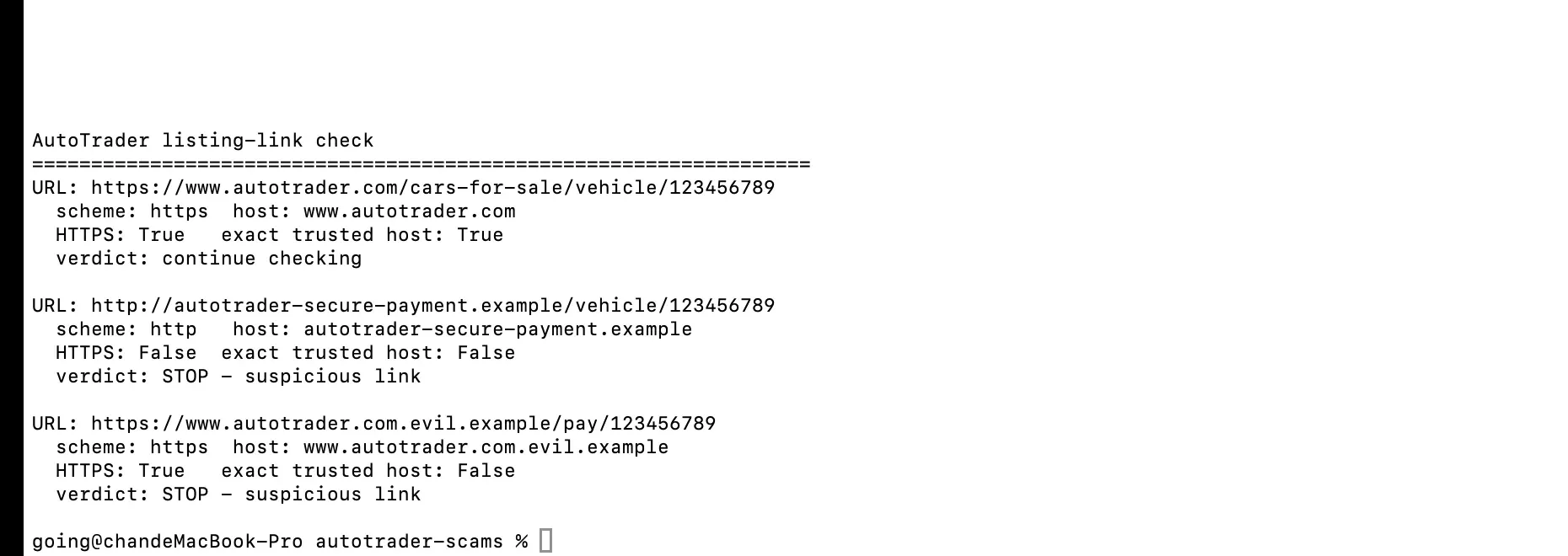
from urllib.parse import urlsplit

TRUSTED_HOSTS = {
    "autotrader.com", "www.autotrader.com",
    "autotrader.co.uk", "www.autotrader.co.uk",
}

def check_link(value):
    try:
        parts = urlsplit(value.strip())
        host = (parts.hostname or "").rstrip(".").lower()
        port = parts.port
        trusted = (
            parts.scheme.lower() == "https"
            and host in TRUSTED_HOSTS
            and port in (None, 443)
            and parts.username is None
            and parts.password is None
        )
        return {"host": host or "(missing)", "trusted_host": trusted}
    except ValueError:
        return {"host": "(invalid URL)", "trusted_host": False}
How Does AutoTrader Protect Buyers?
AutoTrader’s safety guidance and transaction features vary by country and sales method. The safety page on US AutoTrader.com states that the site provides a vehicle listing service, does not own or sell the listed vehicles, is not responsible for shipping, and does not guarantee or manage transactions between buyers and sellers. The page provides FraudWatch contact details and advises users to report cybercrime to the IC3 and local law enforcement. These statements apply only to the US service described on that page and should not be applied to every AutoTrader-branded service in other countries.
The UK Auto Trader Safety and Security Centre describes a different set of transaction channels. Its guidance advises against paying for a vehicle you have not seen, but makes specific exceptions for official Online Order reservations and for remote sales offered by participating advertisers. The page also provides vehicle information checks, protected contact details, and channels for reporting safety incidents. These features and exceptions depend on the specific transaction channel and its terms; a message or link from a seller is not proof that a transaction is protected.
| Market | What the official material says | Buyer verification points |
|---|---|---|
| US: autotrader.com | The safety page describes the service as a vehicle listing platform and states that AutoTrader.com does not buy or sell listed vehicles, is not responsible for shipping, does not guarantee transactions, and does not manage payments between buyers and sellers. It lists [email protected] for suspected scam contacts and directs victims to the IC3 and local law enforcement. | If someone claims AutoTrader is holding funds, offering storage, or guaranteeing the transaction, verify it independently through the official website first. Open the official safety page yourself. |
| UK: autotrader.co.uk | The Safety and Security Centre recommends checking vehicle information, the V5C, MOT history, and recalls. It also describes protected contact details, and notes that some Online Order reservations and dealer remote sales are exceptions to the “do not pay before you see the car” advice. | Compare the VIN and registration details with the V5C, use the official GOV.UK MOT history and recall checks, and confirm whether the specific advert offers Online Order or dealer remote sales. Check the current terms; do not assume every private-seller listing includes the same service. |
Official sources: AutoTrader.com fraud and scam awareness guidance · Auto Trader UK Safety and Security Centre · GOV.UK MOT history check · GOV.UK vehicle recall check.
How Can Ordinary Buyers Verify a Listing Without Writing Code?
Verifying a car does not require proxies, scrapers, or technical tools. Check the following in order; if any key detail cannot be confirmed, pause the transaction.
- Open the listing from the official site. Type the address of the relevant country site yourself or use a saved bookmark. Save the listing URL, the listing ID shown on the page, the price, mileage, date, and screenshots.
- Compare similar vehicles. Look at nearby cars with the same year, trim, and similar mileage and condition. A low price is a reason to ask more questions, not evidence of fraud.
- Reverse-search the vehicle photos. Run a reverse image search on distinctive photos. The same set of photos appearing in other cities, under other sellers, or on different model years deserves further checking. Finding no duplicate photos does not prove the listing is safe.
- Contact the seller independently. Ask about the specific condition of the vehicle and arrange to see it in person. Do not use a phone number or link from an unexpected email to confirm the other party’s identity.
- Check the vehicle and documents in person. Compare the VIN on the car with the title or registration documents, and confirm the seller is the owner or has the right to sell. Arrange an independent inspection before paying.
- Choose the vehicle history report yourself. Do not let the other party push you onto an unfamiliar report website. First confirm who the provider is and which records the report covers; reports may be incomplete and cannot replace an inspection or a title check. In the UK, the official MOT history and recall checks can be part of your verification.
- Confirm the payee and payment terms. The payee, the written agreement, the seller, and the vehicle details should all match. Refuse gift cards, cryptocurrency, wire transfers, or pressure to send a refund to a different account.
- Keep the evidence. Save the original listing, messages, email addresses, phone numbers, payment instructions, receipts, and reports. Do not publish the other party’s personal information in order to warn others.
What Should You Do If You Have Already Paid?
Act immediately, but do not assume a transfer can be reversed. Use the contact details of your trusted bank, card issuer, or payment service to ask whether the payment can be stopped, recalled, or disputed. Then secure any accounts that may have been exposed and preserve the evidence.
- Contact your payment provider immediately. Explain that the payment may involve fraud and ask what can be done for the payment method you used. Do not use phone numbers supplied by the suspected seller.
- Stop any further transfers. Do not pay any so-called insurance, vehicle release, shipping, tax, verification, or refund-processing fees.
- Secure your accounts and cards. If you disclosed a password, one-time code, or card number, change your passwords on the official website, enable multi-factor authentication, and ask the card issuer whether the card should be frozen or reissued.
- Save records before the listing changes. Save screenshots, full email headers where available, URLs, payment confirmations, payee details, and a dated timeline of events.
- Report through official channels. Use the platform’s verified safety contacts and the relevant law-enforcement channels, and keep the report number.
For transactions on US AutoTrader.com, the official safety page lists [email protected] and advises contacting the IC3 and local law enforcement. In the UK, use the safety contact channels published by the official Auto Trader Safety and Security Centre; phishing emails can be forwarded to [email protected] and suspicious text messages to 7726. If you have lost money, GOV.UK directs residents of England, Wales, and Northern Ireland to contact Report Fraud, and residents of Scotland to contact Police Scotland. Reporting helps create a record but does not guarantee that funds will be recovered. See the GOV.UK guidance on reporting phishing and scams for details.
What Can a VIN Decoder Actually Confirm?
A VIN decoder returns vehicle attributes encoded or submitted by the manufacturer. It cannot confirm that the car in front of you is the vehicle that VIN belongs to, prove that the title is clean or that there is no accident or theft record, or show that the seller is honest. Compare the decoded result with the VIN on the car, the title or registration documents, the listing details, and an independent vehicle history check.
NHTSA’s vPIC API can decode a VIN based on information submitted by manufacturers. A successful HTTP request does not mean the VIN passed validation. Check the ErrorCode and ErrorText in the returned record; even if Make, Model, or ModelYear have values, you cannot treat the VIN as validated.
The example below handles network or response errors, API validation errors, incomplete responses, and decoded fields separately, and checks the top-level JSON structure before reading nested content. The sample VIN is a public demo number and does not represent a real listing. An error code of zero means the VIN passed vPIC’s decoding check; it does not mean a real vehicle has been authenticated, and it does not show the vehicle has no adverse history.
import json
import re
import sys
from urllib.error import HTTPError, URLError
from urllib.parse import urlencode
from urllib.request import Request, urlopen

SAMPLE_VIN = "1HGCM82633A004352"

def decode(vin):
    vin = vin.strip().upper()
    if not re.fullmatch(r"[A-HJ-NPR-Z0-9]{17}", vin):
        return "input_error", "VIN must be 17 characters and cannot contain I, O, or Q"

    url = f"https://vpic.nhtsa.dot.gov/api/vehicles/DecodeVinValues/{vin}"
    request = Request(url + "?" + urlencode({"format": "json"}),
                      headers={"User-Agent": "VIN-check-example/1.0"})
    try:
        with urlopen(request, timeout=10) as response:
            if response.status != 200:
                return "request_error", f"HTTP status {response.status}"
            payload = json.load(response)
    except (HTTPError, URLError, TimeoutError, OSError, ValueError, UnicodeError) as exc:
        return "request_or_response_error", str(exc)

    if not isinstance(payload, dict):
        return "response_error", "Top-level JSON value is not an object"
    rows = payload.get("Results")
    if not isinstance(rows, list) or not rows or not isinstance(rows[0], dict):
        return "response_error", "Results is missing or has no usable record"

    row = rows[0]
    error_code = row.get("ErrorCode")
    error_text = row.get("ErrorText")
    if error_code is None or str(error_code).strip() == "" or not isinstance(error_text, str):
        return "manual_review", "ErrorCode or ErrorText is missing"
    codes = re.findall(r"\d+", str(error_code))
    if not codes:
        return "manual_review", f"Unrecognized ErrorCode: {error_code!r}; {error_text}"
    if any(int(code) != 0 for code in codes):
        return "vin_validation_error", f"ErrorCode={error_code}; {error_text}"

    fields = {key: row.get(key) or "(not supplied)"
              for key in ("Make", "Model", "ModelYear", "BodyClass")}
    if any(value == "(not supplied)" for value in fields.values()):
        return "decoded_incomplete_manual_review", f"{fields}; {error_text}"
    return "decoded_fields_only", f"{fields}; {error_text}"

if __name__ == "__main__":
    vin = sys.argv[1] if len(sys.argv) > 1 else SAMPLE_VIN
    status, detail = decode(vin)
    print(f"Status: {status}\nDetail: {detail}")
    sys.exit(0 if status == "decoded_fields_only" else 2)
On November 7, 2026, the public demo VIN 1HGCM82633A004352 returned ErrorCode=0 from vPIC and decoded to fields related to a Honda Accord. After the last digit was changed to 3, the input was still 17 characters, but the API returned ErrorCode=1 and a check-digit error; the response still contained Make, Model, and ModelYear. The code must therefore check business errors first and only then present the decoded fields.
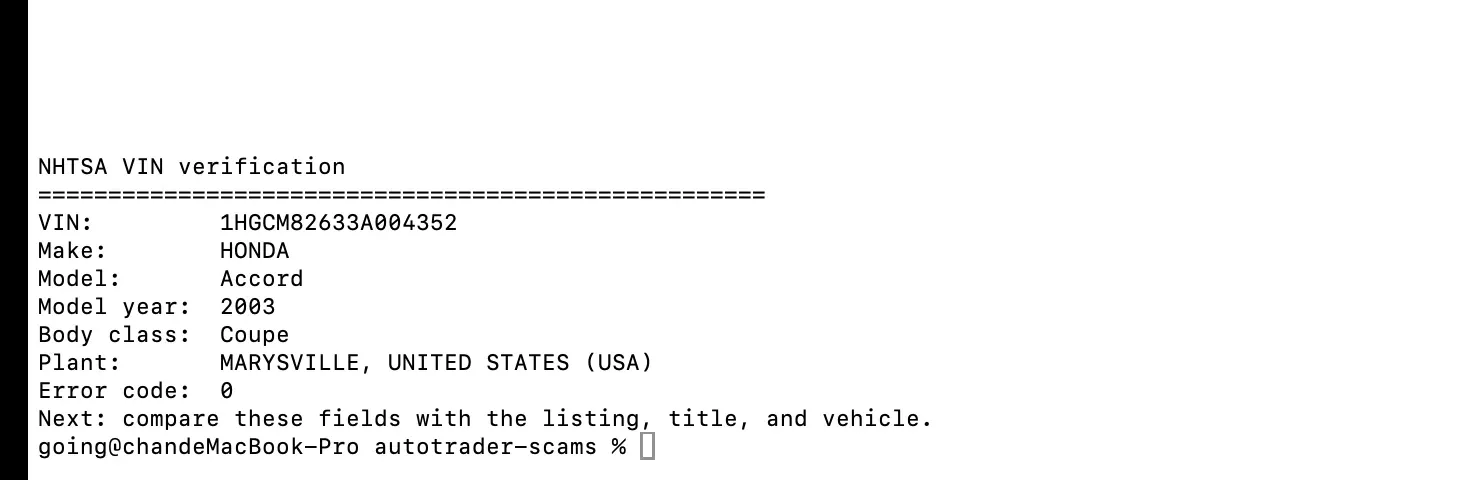
NHTSA references: vPIC Vehicle API and vPIC overview. The API returns vehicle attributes submitted by manufacturers; a decoded result is not proof of title or vehicle history.
How Can Businesses Monitor Local Listings Responsibly?
For dealers, researchers, or risk-control teams, listing analysis can surface records that need manual review, but it cannot establish that a seller has committed fraud. Before you start collecting, confirm the target site’s current terms, the applicable laws, and whether the fields and frequency you plan to use are covered by an API, a license, or written authorization. A proxy only changes network routing; it does not automatically grant permission to collect data, verify vehicles, or bypass access controls.
Define a Minimal Set of Traceable Fields
Start with the fields that let you reproduce and explain every observation:
observed_at_utc, query_region, currency, mileage_unit,
source_type, listing_id, field_missing_reason
Add only the operational fields your authorized workflow actually needs, such as query filters, source URL, model year and trim, price, mileage, dealer path, and collection status. Record the reason a field is empty — for example not_displayed, not_applicable, parse_error, or not_collected — rather than treating all missing values alike. Minimize the retention of personal data.
Separate Collection Errors from Listing Risk Signals
Classify failures before you analyze listings: request_error, rate_limited, blocked, timeout, parse_error, field_missing, and record_observed. Even when a request returns HTTP 200, the page may be an error page or contain incomplete data. A low price, duplicated photos, or a change in dealer information are only leads for review; before escalating, verify the sample, condition, trim, region, currency, and source.
Follow this short workflow:
- Confirm written authorization, the fields you may collect, the request frequency, and the data retention period.
- For each comparison set, fix the query region, currency, mileage unit, model and trim, year range, and condition filters.
- Save the response status, collection time, listing ID, and source type, and record a reason for each missing field.
- Separate access or parsing errors from actually observed listing data before doing any calculations.
- Build a baseline within the same market and currency, standardize the mileage unit, and then send anomalies to manual review.
Record observations only at planned intervals or when a listing changes materially; repeatedly taking quick screenshots of the same unchanged listing may add noise without adding new evidence. Keep observed_at_utc and the local query conditions so reviewers can reproduce the comparison.
The image below shows demo output from 8 synthetic records. The two flagged records only show that the example workflow can produce a review queue; they do not suggest that any real seller or AutoTrader listing has a problem.

What Can a Proxy Do in the Workflow?
The checks above apply to individual buyers who are considering a vehicle. For dealers, market researchers, and automotive data teams, the questions may be different: How is the same type of listing presented in different cities? Do page prices or visible fields change by region? Can a problem on a detail page or lead form be reproduced under the same conditions? This kind of work requires recording the access region, filters, session state, and observation time together, so you can tell whether a difference comes from the market itself or from different test conditions.
In an authorized research or QA project, a proxy can provide a network exit in a specified region and help the team repeat access paths. Rola IP’s AutoTrader proxy solution is built for exactly this kind of automotive-industry workflow: observing local listings and dealer inventory by region, comparing how prices and vehicle information are presented, testing vehicle detail pages and lead forms, and validating automotive data services. It brings region routing and session management into the test environment, so a team can record “where the request came from, what the page returned, and when it was observed” around the same set of query conditions. It does not verify seller identity and does not determine whether a listing is genuine.
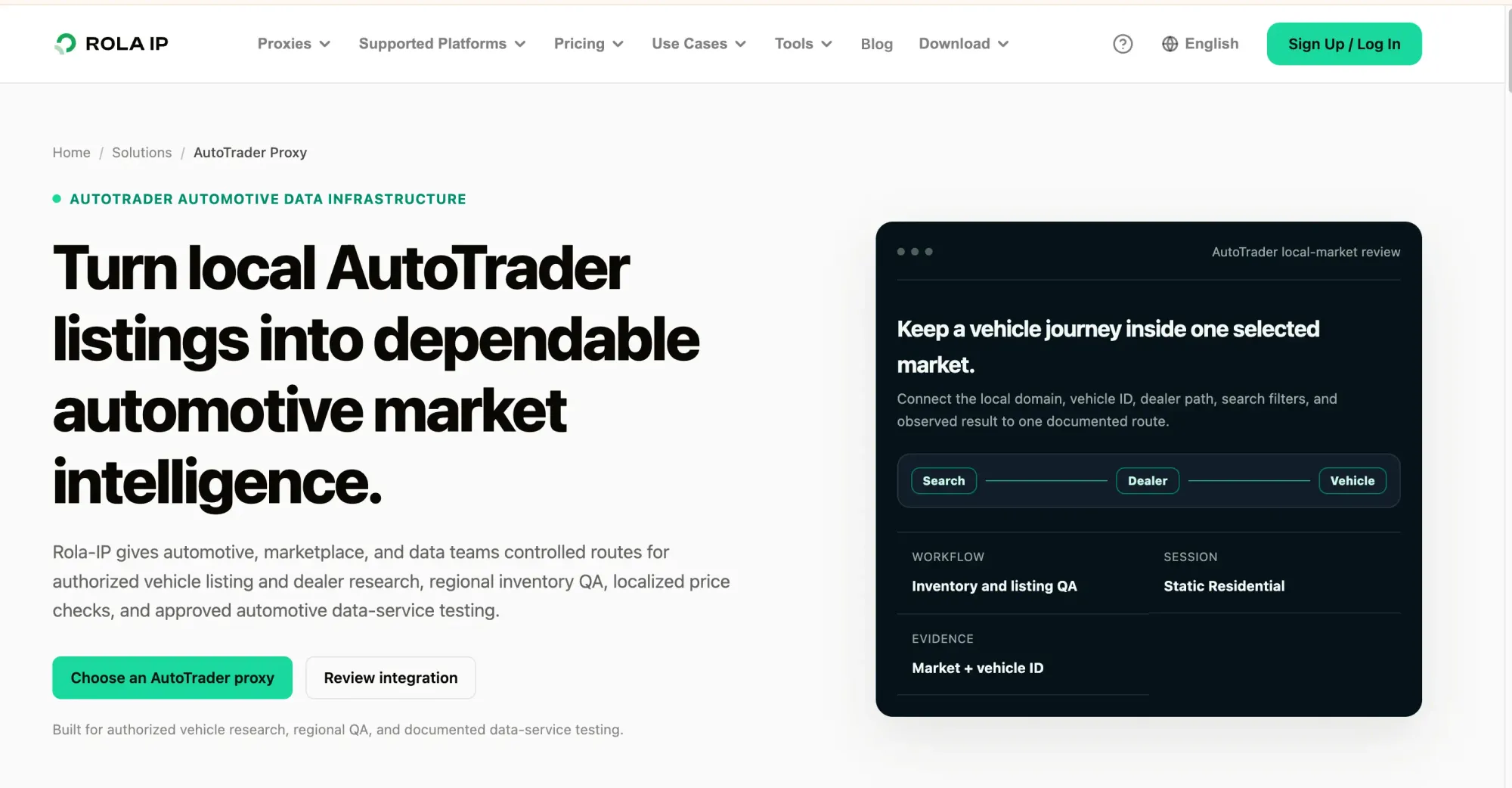
Route choice should be driven by the question you need to answer. If the project samples several approved regions side by side, you can arrange rotating residential routes by region and fix the model, year, currency, and mileage unit so that market differences are not misread as anomalies. If QA staff need to reproduce a particular page or form flow, you can fix the region and use sticky sessions or static residential IPs so the same access path is easier to repeat during testing. Whichever route type you choose, record the region, session strategy, request time, and page state; do not switch exits frequently just to raise request volume, and do not treat rotation itself as a data-quality guarantee.
In practice, a project can build a reviewable workflow in four steps: first, define the approved pages, fields, regions, frequency, and data retention period; second, confirm the target page and test conditions with a small number of requests; third, under fixed filters, record the listing ID, price, model, mileage, source region, and timestamp; and finally, archive rate limiting, access denials, timeouts, and parsing failures separately from the listing fields actually observed. Anomalous records should go to manual review rather than being labeled as fraud directly. If you encounter a CAPTCHA, an explicit refusal, or another access restriction, pause requests and contact the site to confirm permission, or switch to the data interface it authorizes.
If your team is building this kind of research workflow, take a look at the Rola IP solution described above and refer to the AutoTrader scraping tutorial when designing your test steps. Before you start, the team running the project is still responsible for checking the target site’s terms, written authorization, applicable laws, and privacy requirements. A proxy service does not imply endorsement or authorization by AutoTrader and does not guarantee that page data is complete, accurate, or continuously available.
How Do You Connect a Proxy to a Listing Research Workflow?
When you integrate a proxy, you usually do not need to rewrite your collection logic. You can configure the proxy as the outbound connection of your HTTP client, and then treat region, session mode, and query conditions as task configuration. That way the collection code handles requests and parsing while the proxy forwards network requests according to its configuration; responsibilities stay clear, which also makes testing and troubleshooting easier.
Configure the Proxy Connection First
Get the proxy host, port, and authentication details for your plan from the Rola IP dashboard, and choose the region or session settings according to the service documentation. Store the proxy address and credentials in environment variables or a secrets manager; do not write them into source code, screenshots, or logs.
Python’s requests library can use the proxy through its standard proxy parameter:
import os
import requests

proxy_url = os.environ["ROLAIP_PROXY_URL"]

proxies = {
    "http": proxy_url,
    "https": proxy_url,
}

response = requests.get(
    "https://www.autotrader.com/",
    proxies=proxies,
    timeout=20,
    headers={"User-Agent": "AuthorizedResearch/1.0"},
)

print("HTTP status:", response.status_code)
ROLAIP_PROXY_URL should be filled in by you based on the information provided in the Rola IP control panel. Do not print the full proxy address, including the username and password, to the console or commit it to a public repository. Before making actual requests, also confirm that the target page and access method are within the project’s authorized scope.
Build Region and Session into the Task Configuration
If you want to compare several regions, create a separate task configuration for each approved region and record the region, query terms, model year, currency, mileage unit, and collection time. Do not switch only the region in the proxy address while letting other filters change at random; otherwise the results cannot be compared fairly.
If you want to reproduce a detail-page or form problem, keep the region, session, and access steps as consistent as possible, and save the page state and error type at each step. If the service supports sticky sessions or static residential IPs, you can choose according to your testing needs; for region-based sampling, you can evaluate rotating residential routes. Specific capabilities and parameters are subject to Rola IP’s current service documentation.
Validate on a Small Scale Before Production
Before a production run, use a small number of approved requests to validate the proxy connection, page responses, and parsing logic. At a minimum, record the following separately:
- The task region, query conditions, and collection time;
- The request status, response type, and parsing result;
- Failure reasons such as rate limiting, access denial, timeouts, and missing fields;
- The listing ID or other source identifier, to support manual review.
A successful HTTP response does not mean the page content is complete or the data is accurate; a successful proxy connection does not mean the target site has authorized that access method. If you encounter a CAPTCHA, an explicit refusal, or another access restriction, stop sending requests and contact the site to confirm permission, or switch to the data interface it authorizes. A proxy is only responsible for the network path; listing assessment and data verification must still be completed by your business logic and manual review process.
Rola IP’s AutoTrader proxy solution can serve as a starting point for region routing and session support. Before you begin integration, complete the configuration based on the actual parameters in the control panel and the service documentation, and confirm that the project complies with the target site’s terms and applicable requirements.
Conclusion
The key to avoiding an AutoTrader scam is to verify the entire transaction chain: the official website, the seller, the actual vehicle, matching documents, an independent inspection, and the payee. If you have already paid, contact your payment provider immediately and preserve the evidence. When businesses monitor listings, they should use only authorized data, keep records separately for each market, distinguish technical errors from listing anomalies, and send every lead to manual review. A listing’s presence on the platform, a successful VIN decode, or a stable proxy session cannot guarantee that a transaction is safe.