How to Scrape Autotrader with Python and a Third-Party API

Sep 21, 2026 · Guides · 14 min read
To scrape Autotrader listings into CSV, this tutorial uses a third-party collector to retrieve a small US search, then Python to validate the saved JSON and export selected fields. It suits developers who need a small vehicle dataset for permitted analysis. Confirm your project’s permissions before collecting data; access to a demo or API does not establish those permissions.
Quick answer: how do you scrape Autotrader?
- Check the site’s current terms, applicable crawler rules, and your project’s authorization.
- Enter a small search in a third-party Autotrader scraper demo.
- Save the complete JSON response as
demo-response.json. - Run the local Python exporter below; no API key is needed for this conversion.
- Check the CSV’s row count, identifiers, filters, and nullable fields.
Validation scope: On September 20, 2026, we submitted one five-result query through the public demo and saved its complete HTTP200 response (count: 5, partial: false). The Python exporter below successfully processed both the raw response and a redacted copy, producing five rows with five unique IDs in each run. We compared all ten exported vehicle fields with the captured response.
The environment was Windows 10 build 19045, Python 3.12.10, Playwright 1.62.0, Chromium 151.0.7922.34, and PowerShell 5.1. The exporter uses only the Python standard library. Its separate synthetic offline tests also passed. No authenticated production API call or independent vehicle-availability check was performed. Earlier screenshots below remain labeled as historical material.
Is this an official Autotrader API?
No. The Autotrader scraper API used here belongs to QuanticData, a third-party provider. This tutorial does not establish whether an official public US listings API is available, and it does not call an undocumented Autotrader frontend endpoint.
| Route | Role in this tutorial | Limitation |
|---|---|---|
| Third-party public demo | Retrieves a small search and displays JSON | Demo access and behavior can change. |
| Local Python exporter | Reads the saved demo JSON and creates CSV | Does not retrieve or refresh vehicle listings. |
| Authenticated third-party API | Optional route for future automation | Requires an account, a key, permission checks, and separate live validation. |
| Self-managed HTML collector | Outside the main workflow | Requires its own access, parsing, and maintenance work. |
Before you build an Autotrader scraper
Review the Autotrader Visitor Agreement and Autotrader robots.txt for your intended access. During the September 20 review, the agreement URL returned a page-unavailable message, so its current wording could not be verified. The robots file was readable and contained user-agent and path-specific rules; it is not a grant of data rights.
Confirm the legal and contractual basis for your project. Keep the initial collection small, retain only needed fields, and do not use proxies to evade access controls. A third-party account is not proof of permission from Autotrader. This example excludes VINs, contact details, image URLs, and listing URLs from the new CSV.
For the local steps, install Python 3.12 and use a terminal in a writable folder. No third-party Python packages are required. The commands below use PowerShell. Keep the source JSON in that folder and check it for sensitive fields before sharing it.
Step 1: Run a small Autotrader scraper demo
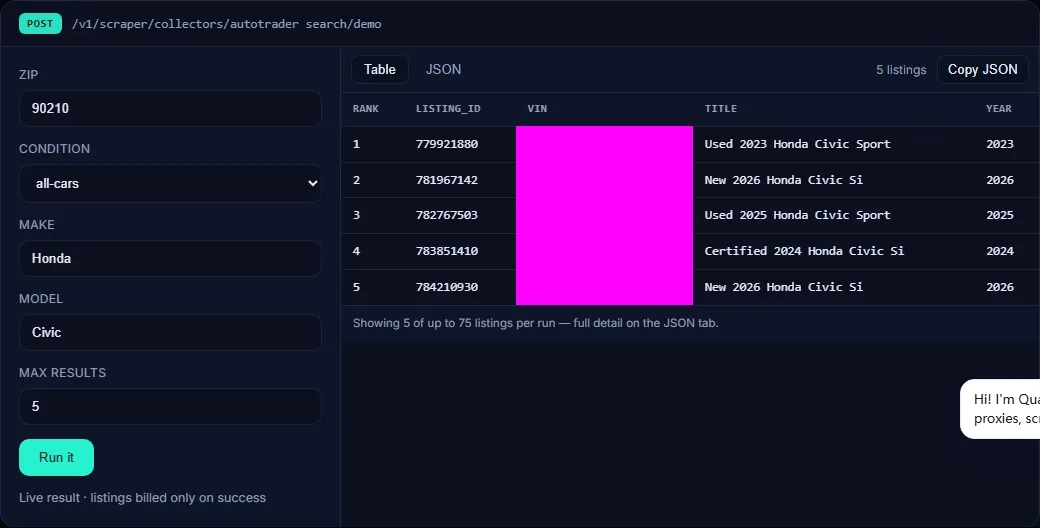
Open the QuanticData Autotrader collector page and find its live demo. For a query matching the supplied capture, enter:
- ZIP:
90210 - Condition:
all-cars - Make:
Honda - Model:
Civic - Maximum results:
5
Click Run it once. If the demo does not finish, stop and check the provider’s status before retrying; do not start a tight request loop. A new run may return different vehicles or no results.
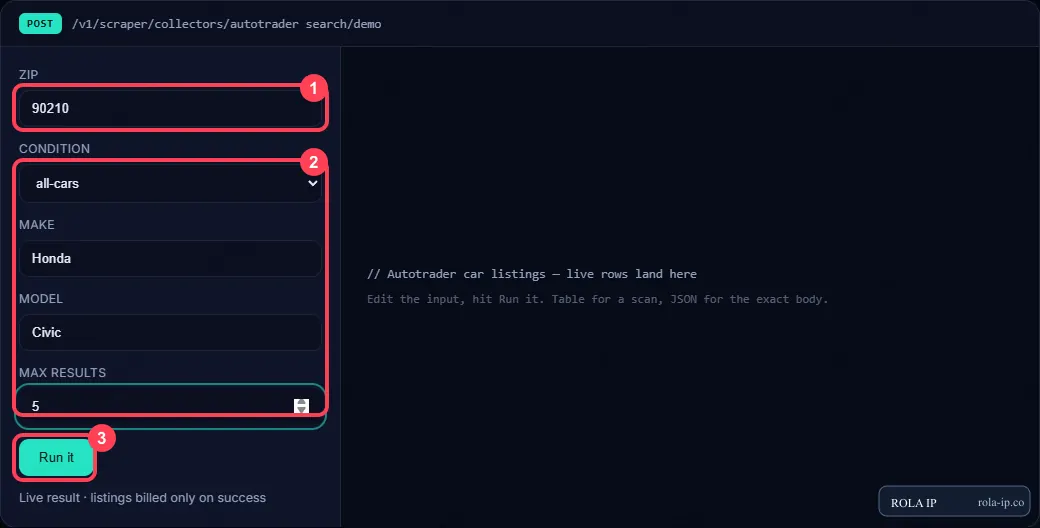
Record the query separately. The supplied capture does not establish that ZIP or every request input was echoed in the response. In the exporter below, query_zip is a user-supplied label, not a verified vehicle location.
Step 2: Check the returned listing rows
The supplied table screenshot displays five distinct listing IDs. With all-cars, results may include new, used, and certified vehicles; a mixture is allowed but not guaranteed.
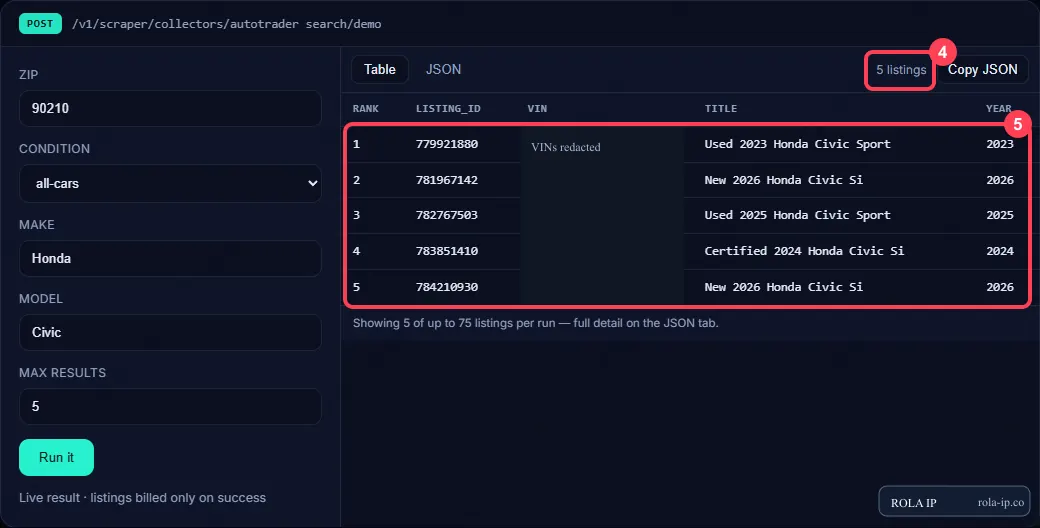
The table and CSV validation screenshots show this historical sample:
| Listing ID | Returned title | Condition | Returned price | Mileage |
|---|---|---|---|---|
779921880 |
Used 2023 Honda Civic Sport | USED | $23,073 | 32,859 mi |
781967142 |
New 2026 Honda Civic Si | NEW | $33,145 | 4 mi |
782767503 |
Used 2025 Honda Civic Sport | USED | $25,280 | 13,345 mi |
783851410 |
Certified 2024 Honda Civic Si | CERTIFIED | $28,813 | 17,829 mi |
784210930 |
New 2026 Honda Civic Si | NEW | $32,690 | 4 mi |
The original capture notes record 2026-09-19T12:22:34.198Z. The CSV screenshot identifies that timestamp as operator-recorded, not returned by the provider. These are historical sample values, not current price quotes or independently verified vehicle availability.
Step 3: Save and inspect the complete JSON
Open the JSON tab. The supplied screenshot shows 200 OK and the first row’s price: 23073, msrp: null, and no_price_label: null. An HTTP success status alone is insufficient: inspect the response fields before exporting.
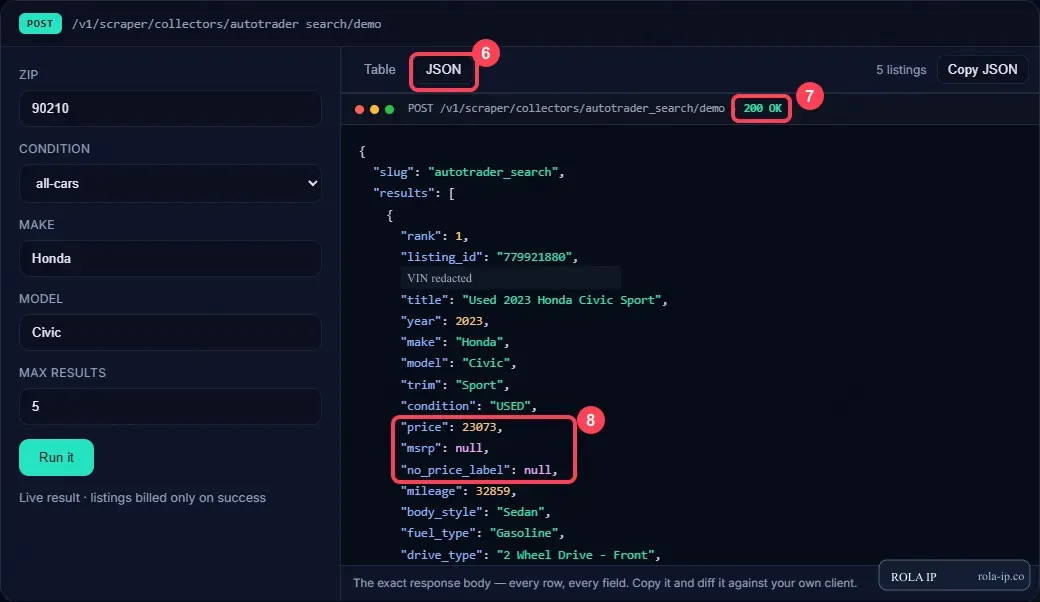
Click Copy JSON, paste the complete response into a text editor, and save it as demo-response.json in UTF-8. Do not copy just the visible portion of the JSON panel.
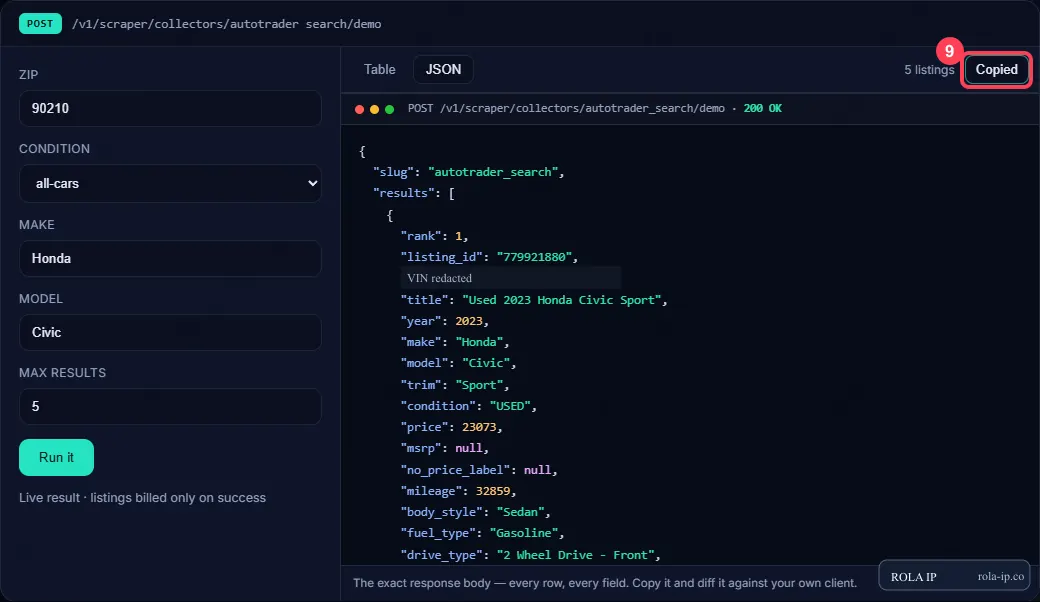
Check these fields in your own saved response:
| Field | Requirement for the exporter |
|---|---|
results |
A top-level array of listing objects, not a production payload wrapper. |
count |
An integer equal to the number of objects. |
partial |
Explicitly false; absent or partial responses are rejected. |
listing_id |
A nonempty, unique string for each row. |
make, model |
Match the inputs supplied to the exporter. |
condition |
NEW, USED, or CERTIFIED for this all-cars example. |
price, msrp, mileage |
Present as finite nonnegative numbers or null. |
The complete response captured on September 20 confirms count: 5 and partial: false; the actual export results are shown in Step 5. Validate your own saved file as well. Do not convert a missing price to zero: a blank price is different from a free vehicle. Preserve no_price_label separately when present.
Step 4: Export the saved JSON with Python
Copy the complete code below into a file named autotrader_export.py in the same folder as the JSON you saved in Step 3. It performs no network requests and requires no API key or downloadable attachments.
The exporter refuses partial responses, empty results, duplicate IDs, mismatched filters, and invalid numeric fields. It accepts fewer than five results if the response otherwise passes validation; five is a maximum, not a guaranteed count. It creates a new CSV and refuses to overwrite an existing file.
"""Validate a saved Autotrader demo response and export selected CSV fields.

Uses only the Python standard library. Does not make network requests.
"""

import argparse
import csv
import hashlib
import json
import math
import sys
from datetime import datetime, timezone
from pathlib import Path


FIELDS = [
    "listing_id", "title", "year", "make", "model", "condition",
    "price", "msrp", "no_price_label", "mileage",
    "query_zip", "exported_at_utc", "source_sha256",
]


def validate(payload, make, model, max_results):
    if not isinstance(payload, dict):
        raise ValueError("Expected a top-level demo JSON object.")
    if payload.get("partial") is not False:
        raise ValueError("Require partial=false; missing or partial results are rejected.")
    rows = payload.get("results")
    if not isinstance(rows, list):
        raise ValueError("Expected top-level results to be a list.")
    count = payload.get("count")
    if type(count) is not int or count != len(rows):
        raise ValueError("Integer count must equal the number of results.")
    if not rows:
        raise ValueError("No results: inspect filters and provider status before exporting.")
    if len(rows) > max_results:
        raise ValueError("Response exceeds the requested maximum.")
    seen = set()
    for index, row in enumerate(rows, 1):
        if not isinstance(row, dict):
            raise ValueError(f"Row {index}: expected an object.")
        listing_id = row.get("listing_id")
        if not isinstance(listing_id, str) or not listing_id.strip():
            raise ValueError(f"Row {index}: require a nonempty string listing_id.")
        listing_id = listing_id.strip()
        if listing_id in seen:
            raise ValueError(f"Row {index}: duplicate listing_id; resolve before exporting.")
        seen.add(listing_id)
        for field, expected in (("make", make), ("model", model)):
            value = row.get(field)
            if not isinstance(value, str) or value.strip().casefold() != expected.casefold():
                raise ValueError(f"Row {index}: {field} does not match the query.")
        if row.get("condition") not in ("NEW", "USED", "CERTIFIED"):
            raise ValueError(f"Row {index}: unexpected condition.")
        for field in ("price", "msrp", "mileage"):
            if field not in row:
                raise ValueError(f"Row {index}: missing {field}; inspect the schema.")
            value = row[field]
            if value is not None and (
                type(value) not in (int, float)
                or not math.isfinite(value) or value < 0
            ):
                raise ValueError(f"Row {index}: {field} must be null or a finite nonnegative number.")
        for field in FIELDS:
            value = row.get(field)
            if value is not None and type(value) not in (str, int, float):
                raise ValueError(f"Row {index}: {field} must be a scalar or null.")
        for field in ("title", "no_price_label"):
            if row.get(field) is not None and not isinstance(row[field], str):
                raise ValueError(f"Row {index}: {field} must be text or null.")
    return rows


def csv_cell(value):
    # CSV quoting alone does not prevent spreadsheet formula interpretation.
    if isinstance(value, str) and value.lstrip().startswith(("=", "+", "-", "@")):
        return "'" + value
    return value


def main():
    parser = argparse.ArgumentParser(description=__doc__)
    parser.add_argument("input", type=Path)
    parser.add_argument("--output", type=Path, default=Path("autotrader-listings.csv"))
    parser.add_argument("--zip", required=True, dest="query_zip")
    parser.add_argument("--make", required=True)
    parser.add_argument("--model", required=True)
    parser.add_argument("--max-results", type=int, default=5)
    args = parser.parse_args()
    try:
        if args.max_results < 1:
            raise ValueError("--max-results must be positive.")
        if not args.make.strip() or not args.model.strip():
            raise ValueError("--make and --model cannot be empty.")
        if len(args.query_zip) != 5 or not args.query_zip.isascii() or not args.query_zip.isdigit():
            raise ValueError("--zip must be five ASCII digits.")
        raw = args.input.read_bytes()
        payload = json.loads(raw.decode("utf-8-sig"))
        rows = validate(payload, args.make.strip(), args.model.strip(), args.max_results)
        digest = hashlib.sha256(raw).hexdigest()
        exported_at = datetime.now(timezone.utc).isoformat()
        # Exclusive creation protects existing exports and the input file.
        with args.output.open("x", newline="", encoding="utf-8-sig") as handle:
            writer = csv.DictWriter(handle, fieldnames=FIELDS)
            writer.writeheader()
            for source in rows:
                row = {field: csv_cell(source.get(field)) for field in FIELDS}
                row["listing_id"] = csv_cell(source["listing_id"].strip())
                row.update(query_zip=args.query_zip, exported_at_utc=exported_at,
                           source_sha256=digest)
                writer.writerow(row)
        print(f"Saved {len(rows)} rows with {len(rows)} unique IDs to {args.output}")
    except (OSError, UnicodeError, ValueError) as exc:
        print(f"Export stopped: {exc}", file=sys.stderr)
        return 1
    return 0


if __name__ == "__main__":
    sys.exit(main())
Run it with the inputs you actually used in the demo:
python --version
python .\autotrader_export.py .\demo-response.json --zip 90210 --make Honda --model Civic --max-results 5
By default, the output is autotrader-listings.csv. To keep an existing export, supply another path with --output new-export.csv. A validation failure prints Export stopped: ... and exits with a nonzero status before creating a CSV. A filesystem failure during writing can leave an incomplete file; do not use it as a successful export.
Success means a zero exit status, the expected CSV header, and matching JSON/CSV counts with unique IDs. It does not establish current vehicle availability, geographic accuracy, or completeness beyond this response. ZIP is recorded from the command; make and model are checked against each returned row.
exported_at_utc records local export time. The script does not invent a source capture time. source_sha256 identifies the exact input bytes but does not prove the data’s origin. Nulls become blank cells, and spreadsheet-formula prefixes in text receive a leading apostrophe; retain the source JSON if exact text fidelity is needed.
What was tested locally?
Before the real-data export, three internal test methods passed on September 20, 2026. They covered command-line export and overwrite protection, rejection of malformed responses, and rejection of invalid JSON without CSV creation. Synthetic cases included duplicate IDs, partial results, wrong filters, numeric strings, booleans, negative prices, and non-finite numbers. The export check also covered blank prices, zero mileage, formula-like text, and omitted VIN/URL fields. These internal checks are separate from the reader workflow; no test-file download is needed.
These synthetic checks validate local processing behavior. The separate September 20 live demo and real-data export are documented below. Neither test establishes authenticated production API behavior or reproduces the earlier historical response.
Step 5: Validate the CSV
September 20 live response and actual export
The new query used ZIP 90210, all-cars, Honda, Civic, and a five-result limit. The client started the request at 2026-09-20T08:42:55.718281Z and received the response at 2026-09-20T08:43:03.121701Z. These are client times, not a provider-supplied vehicle capture timestamp.
The unchanged exporter ran against the complete raw JSON and then a redacted copy. Both commands exited with code 0, wrote five rows with five unique IDs, and produced no stderr output. The redacted copy preserves every row and key; only VIN, image, and listing-URL values are set to null. Those fields are not exported. Each CSV records the hash of its own input file.
The following is an excerpt from the actual PowerShell validation of the new CSV, not simulated output:
Rows: 5; Unique IDs: 5

listing_id title                         condition price mileage msrp  no_price_label
---------- -----                         --------- ----- ------- ----  --------------
779921880  Used 2023 Honda Civic Sport   USED      23073 32859
781967142  New 2026 Honda Civic Si       NEW       33145 4       33145
782767503  Used 2025 Honda Civic Sport   USED      25280 13345
783851410  Certified 2024 Honda Civic Si CERTIFIED 28484 17829
784210930  New 2026 Honda Civic Si       NEW       32690 4       32690
| Recorded check | Actual result |
|---|---|
| Raw-response export | Started at 08:44:35 UTC; exit code 0; no stderr |
| Redacted-response export | Started at 08:44:36 UTC; exit code 0; no stderr |
| Rows and unique IDs | 5 rows and 5 unique IDs in both exports |
| Vehicle-field comparison | All ten exported vehicle fields matched the raw response |
| Null handling | Null prices/labels remained blank; numeric values were preserved |
| Input identification | Each CSV’s source_sha256 matched its own saved JSON |
The complete response, redacted copy, CSVs, and execution logs are retained in the editorial verification record. They are not required downloads: to run the tutorial, save your own complete demo response in Step 3 and copy the full Python code in Step 4. Your results may differ from this dated sample.
The new response contains the same five listing IDs as the historical table, but listing 783851410 has a returned price of $28,484, compared with $28,813 in the earlier capture. Keep each observation with its own date. A live provider response does not prove that upstream values are uncached or that every vehicle remains available.
Check your output
Use PowerShell to inspect your new export:
$rows = @(Import-Csv .\autotrader-listings.csv)
"Rows: $($rows.Count); Unique IDs: $(@($rows.listing_id | Sort-Object -Unique).Count)"
$rows | Select-Object listing_id,title,condition,price,mileage,msrp,no_price_label |
    Format-Table -AutoSize
Compare the values with your complete JSON, including blank prices and price labels. The number of unique IDs must equal the row count. Check $LASTEXITCODE immediately after running the Python exporter; do not mistake an older CSV for the result of a failed run.
The following images document the earlier export supplied with the article. Its columns differ from the replacement script above, and it is not evidence of that script’s output. VINs were redacted in the demo images; brand watermarks and numbered callouts were added during editing.
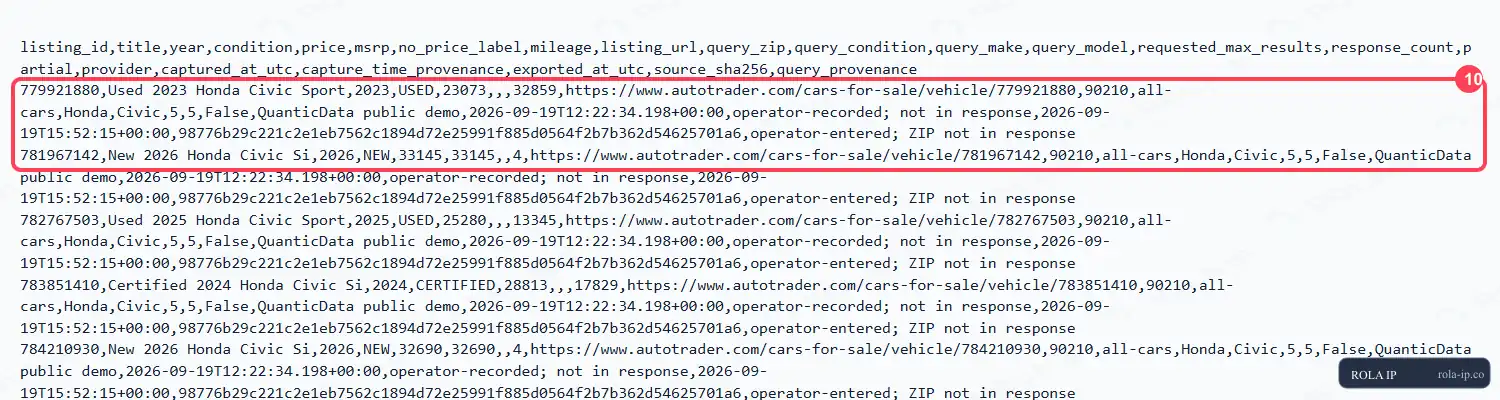
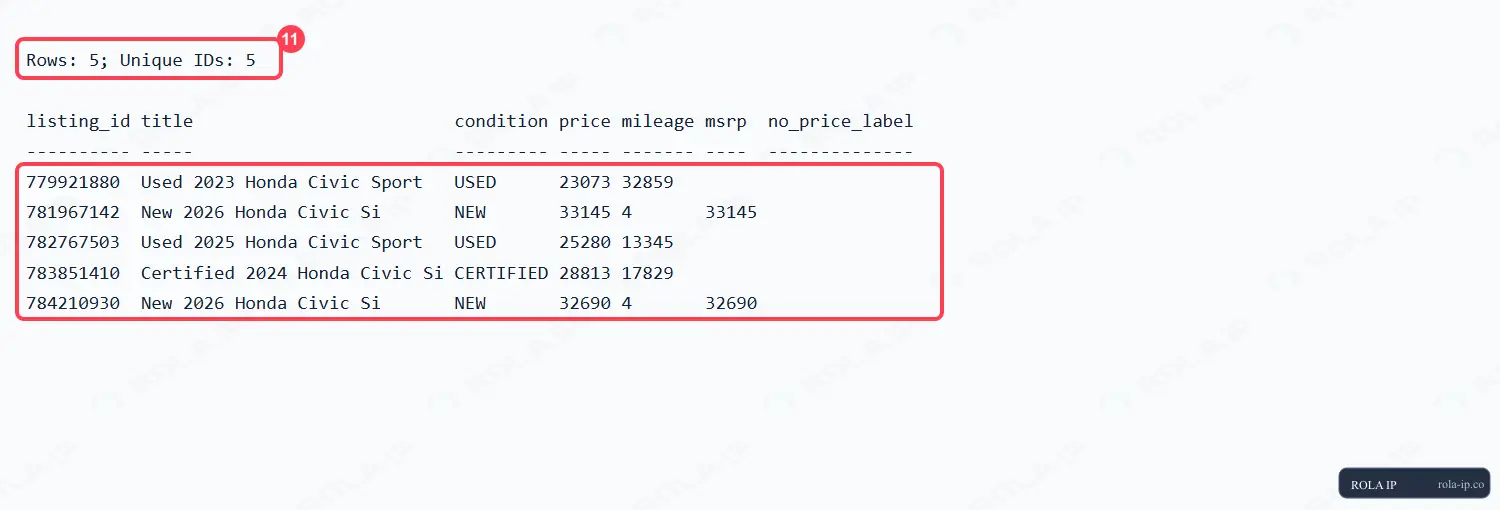
The historical command screenshot displays Rows: 5; Unique IDs: 5 and the five vehicles listed in Step 2. Your current export should match your own response, not necessarily these historical rows.
Useful Autotrader scraper fields
| Field | Meaning and handling |
|---|---|
listing_id |
Listing identifier; duplicates stop this export rather than silently discarding a row. |
title, year, make, model |
Vehicle description; prefer structured fields to parsing titles. |
condition |
Returned NEW, USED, or CERTIFIED category; do not infer it from mileage. |
price, msrp |
Separate displayed price and MSRP; keep null values blank. |
no_price_label |
Preserve the source’s nonnumeric price label when supplied. |
mileage |
Keep missing values distinct from zero; confirm the source’s units for your use. |
query_zip |
Command-line query label, not independently verified listing geography. |
exported_at_utc |
Time the local export was prepared, not upstream capture time. |
source_sha256 |
Hash of the saved JSON bytes for matching files during review. |
Provider responses may contain additional fields, including VINs and images. The example CSV deliberately selects a smaller set; retain other fields only when necessary and permitted.
Can I automate collection through the production API?
The provider documents POST https://api.quanticdata.io/v1/scraper/collectors/autotrader_search/run with Bearer authentication. This is an untested integration outline, separate from the locally tested exporter. See the QuanticData API documentation before implementing it.
Keep credentials in an environment variable or a secret manager. Review current account pricing, rate limits, and authorization before sending a request; do not assume demo access means production usage is free. The documentation checked on September 20, 2026 supports zip, condition, make, model, and max_results inputs and a production payload.results response. A production response cannot be passed unchanged to the top-level demo exporter.
For a production client, define the following behavior before scheduling it:
- Set connection and read timeouts. On network failure, stop and check whether the provider already created a job before repeating a potentially billable POST.
- For
202 Accepted, retain the job reference and use the documentedstatusUrlpolling procedure. Validate the destination before sending credentials, use a finite deadline and poll count, and stop on a terminal failure or deadline. Do not resubmit collection just because it became asynchronous. - For
429, honorRetry-After. The provider documentation describes a delay in seconds. Bound retries and total waiting; if a requested delay exceeds your limit, defer the job rather than retrying early. - Handle non-JSON bodies and error envelopes before reading
payload. Apply the same completeness, filter, ID, and numeric validation to the eventual result. - Record client request start, response receipt, and export times separately. Record upstream capture time only if the provider supplies a documented field.
The local exporter needs no request timeout or retry loop because it never accesses the network. Before publishing a production client as tested, record its actual runtime and dependency versions, request settings, sanitized response, failures, and output.
Why not parse Autotrader HTML with BeautifulSoup?
BeautifulSoup parses the HTML you receive; it does not execute JavaScript. If a page’s listing data is loaded separately, initial HTML alone may be insufficient. Selectors can also change, and an HTTP200 response can contain an error page—as happened when the Visitor Agreement was checked during this revision.
A browser renderer may help with JavaScript-dependent content, but adds runtime and maintenance costs that depend on the site and workload. No performance comparison was run here. The third-party demo is simply the route illustrated in this tutorial, not a proven universally faster or more reliable choice. An undocumented internal endpoint is not automatically a supported public API, and a working request does not establish permission.
Where proxies fit
The local exporter in this tutorial makes no network requests, so it does not use a proxy. Retrieval happens in the third-party demo. If you later build a separate Python API client, a proxy configured on that client would affect its connection to the provider; it would not control the provider’s upstream connection to Autotrader.
For a separate, authorized self-managed collector, a web scraping proxy can help test regional behavior or maintain a required network location. The Python proxy integration guide explains how to configure the network layer. Neither step changes the site’s terms, robots.txt, authentication requirements, or your permission to collect data.
Troubleshooting
| Symptom | Possible cause | Check and action |
|---|---|---|
| Demo hangs or shows an unavailable page | Browser, provider, or upstream failure | Inspect the displayed error; stop the attempt and check service status before a later small retry. |
| JSON decoding fails | Truncated copy, HTML, or wrong encoding | Open the saved file; copy the complete JSON and save as UTF-8. Rerun local export only. |
Missing partial or partial=true |
Incomplete result or changed schema | Inspect the complete response and current schema. Do not change the flag just to pass validation. |
| Empty results | No matches, invalid filters, or upstream issue | Inspect the response and query. No CSV is created; zero rows are not automatically evidence of a provider fault. |
| Duplicate IDs or count mismatch | Duplicate records, truncation, or malformed response | Preserve the input and investigate. The exporter stops; do not silently relabel it as complete. |
| Wrong make/model or numeric type | Filter mismatch or schema change | Compare raw fields and provider documentation before changing validation. |
| Existing CSV | Previous output is already present | Choose a new --output path, then verify the new file. |
| Blank price | Explicit null price in the source | Check no_price_label; preserve blank rather than substituting zero. |
| Production 401 / 403 | Invalid credentials / access denied | Check account permissions and the response; do not assume changing IP fixes it. |
| Production 202 / 429 | Background job / throttling | Follow the bounded job-status and Retry-After handling above. |
| Production timeout or connection failure | Network, DNS, TLS, or provider delay | Diagnose the specific exception and job state before retrying. Keep TLS verification enabled. |
For Python HTTP timeout configuration in a separate production client, see Python Requests timeout. After any correction, repeat the smallest applicable check and confirm the output against the saved response; do not claim recovery without observing it.
Conclusion
This workflow separates retrieval from validation: request a small permitted dataset through a third-party demo, save the complete JSON, then validate and export it locally with Python. Check the resulting CSV against that response. Treat production automation as a separate integration requiring live verification, and keep historical samples distinct from current listing data.