Reddit “Blocked by Network Security”: Troubleshooting Guide

Sep 21, 2026 · Troubleshooting · 14 min read
Quick Answer
Reddit’s “You’ve been blocked by network security” message means an access attempt was denied. It does not identify the exact cause or, by itself, prove an account ban. Save the error, check Reddit Status, and follow any login, verification, or account notice. Next, compare browser behavior and permitted network paths while keeping other conditions consistent. An optional proxy test can help check routing, but a working proxy does not prove that Reddit is accessible or that an account restriction has been removed.
- An account notice or verification request appears: follow Reddit’s recovery or verification instructions first.
- Only an access error appears: start with the browser and network checks below; buying a proxy is not required for these checks.
- You need another permitted comparison path: use the optional Rola IP configuration section and record the gateway, egress, and target-page results separately.
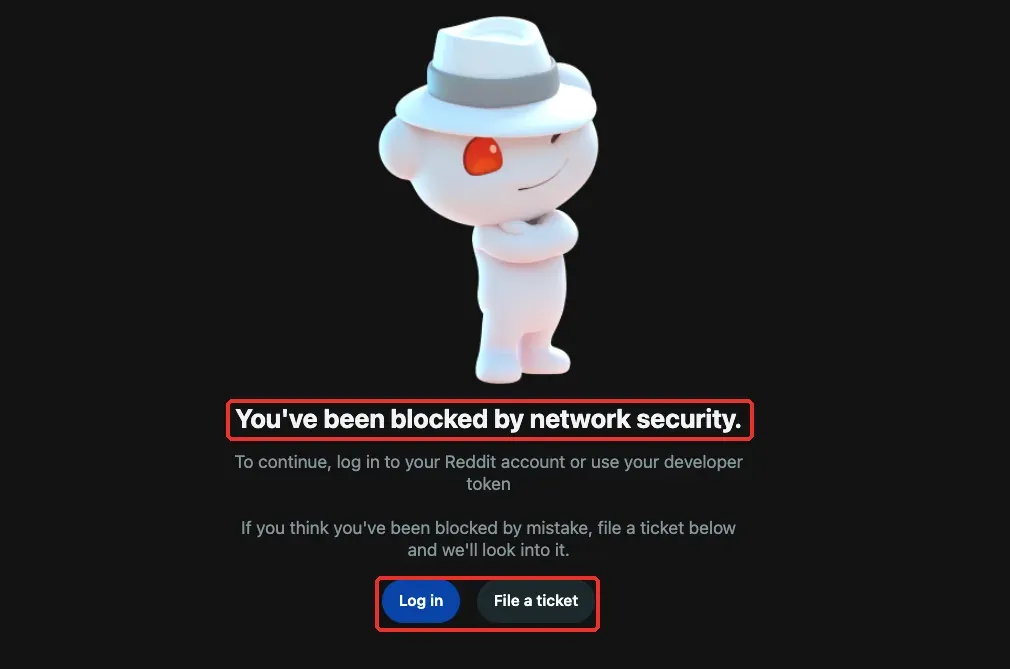
First, Identify What Kind of Restriction You’re Seeing
Before troubleshooting, read the full page carefully and confirm that the address bar really shows reddit.com or an official Reddit Help domain. An account-enforcement notice and a rejected logged-out request require different recovery paths, even when both prevent access.
| Page or Symptom | What to Check First | Recommended Handling |
|---|---|---|
| “You’ve been blocked by network security” | Exact wording, login button, ticket link, and time of occurrence | Check the browser and access path using the steps in this guide |
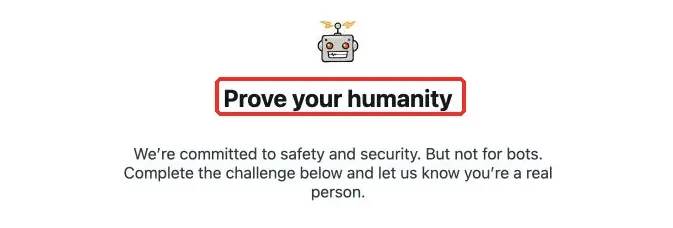
| “Prove your humanity” or another human-verification page | Whether it is an official Reddit page and whether the verification loads correctly | Complete the verification manually as instructed and save details if it fails |
Inbox or banner explicitly says the account is banned or locked |
Enforcement reason, security requirements, and the official notice | Use the appeal or recovery path in the notice |
| You can browse a community but cannot post or comment | Community-ban notice, posting eligibility, or permissions | Review that community’s rules and contact its moderators |
| The browser shows a DNS error or connection timeout | Other websites, DNS, proxy settings, and the local network | Fix the network connection first; do not treat it as the same thing as a Reddit security block |
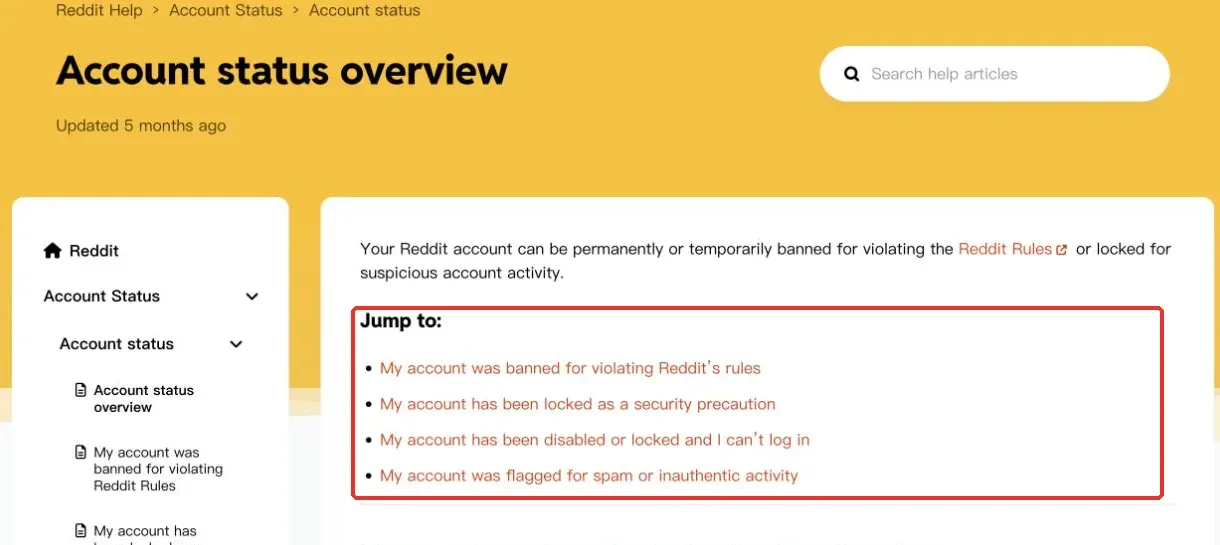
Reddit’s Account status overview distinguishes rule enforcement from security locks. Account enforcement usually comes with an in-product notice, while a community ban is a separate layer. Do not conclude that the account has already been penalized based only on one access-error page.
Why Reddit May Show a Network Security Block
Shared Egress or Changes in the Current VPN Path
A VPN, proxy, company network, or carrier-grade shared egress can put multiple users behind the same public address. Labels such as VPN, Proxy, or ASN from third-party IP-checking tools can help describe the type of egress, but they do not replace Reddit’s own internal decision-making. Even if a third-party tool labels an address as a proxy, that alone does not establish that the label caused this particular block.
If access returns after you disconnect the current VPN, that shows the two connection paths behave differently. The change may involve the egress address, DNS, routing, or connection state. It is not evidence that Reddit has publicly confirmed “this VPN IP is on a blacklist.” There is also not enough basis to promise that residential IPs, dedicated IPs, or any specific protocol will never be blocked.
Browser Session or Extension Interference
Login state, stale site data, script filtering, and browser compatibility are all worth checking separately. An incognito/private window creates a different session condition, but it also changes cookies, and some extensions may still be allowed to run in private mode. Therefore, “it works in incognito” can narrow the troubleshooting scope, but it does not directly identify one extension as the cause.
Service Disruption or a Specific Request Being Rejected
A Reddit service incident, a problem loading a particular page, or a client-side issue can produce similar access failures. Ordinary users do not need to keep refreshing to diagnose the cause. Checking service status and saving the error time and affected URL are usually more useful. Third-party claims such as “it unlocks automatically in a few minutes” or “it recovers after 24 hours” should not be treated as universal promises.
Account Status and Access Problems Can Happen at the Same Time
An account can have an enforcement action or a security lock while a network problem also exists. These possibilities are not mutually exclusive. Whenever an explicit official notice appears, handle that requirement first. A proxy can change the connection path, but it cannot change an account-enforcement decision.
How Do You Troubleshoot Reddit’s Network Security Block?
Step 1: Save the Error and Check Reddit Service Status
Record the time and time zone, the complete error text, the URL you were trying to access, the browser version, whether you were logged in, and whether a VPN or proxy was enabled. Do not begin by deleting cookies or switching through several networks, because that makes the original conditions difficult to reconstruct.
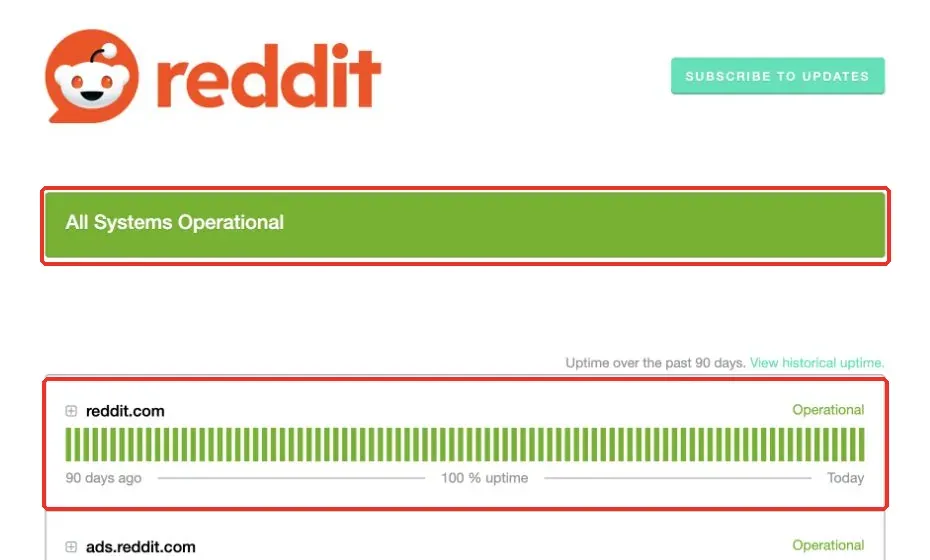
Then open Reddit Status and check the reddit.com component and recent incidents. If you find a matching incident, follow its recovery progress first. A status page that says Operational only means the status page is not currently reporting that incident; it does not rule out a local network problem or an issue affecting one account.
Step 2: Check Login State and Account Notices According to the Page
If the page shown in Figure 1 includes a Log in button, you can log in normally with an existing account on the official Reddit page. If you were already logged in, record that fact first; do not repeatedly log out and back in hoping the result changes. If the page presents a human-verification challenge, complete it manually as instructed and record what happens if it fails to load.
If you see an account banned or locked notice, open the Help, appeal, or recovery route in that message. If only one community prevents you from posting, check that community’s notice first. Do not mix a general network-support ticket, an account-enforcement appeal, and moderator communication into one troubleshooting path.
Step 3: Check One Browser Factor at a Time
Update the browser and restart it first. Reddit recommends using a currently supported browser. Then, on the same network, test one other supported browser and record whether the login state is the same. If only the original browser fails, prioritize troubleshooting that browser.
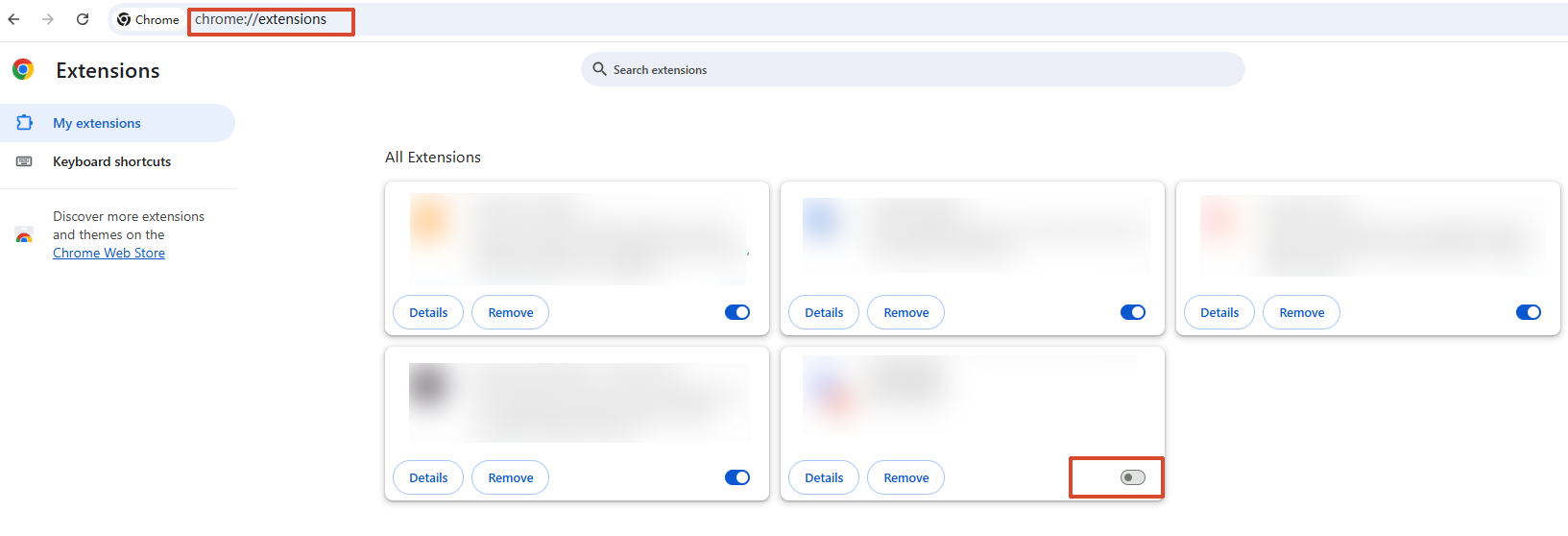
Using Chrome as an example, open menu → Extensions → Manage extensions. Temporarily disable one extension that may affect page scripts or requests, then return to the original URL and test again. If nothing changes, re-enable that extension and move to the next item. Do not disable everything at once and then immediately claim that you found the cause.
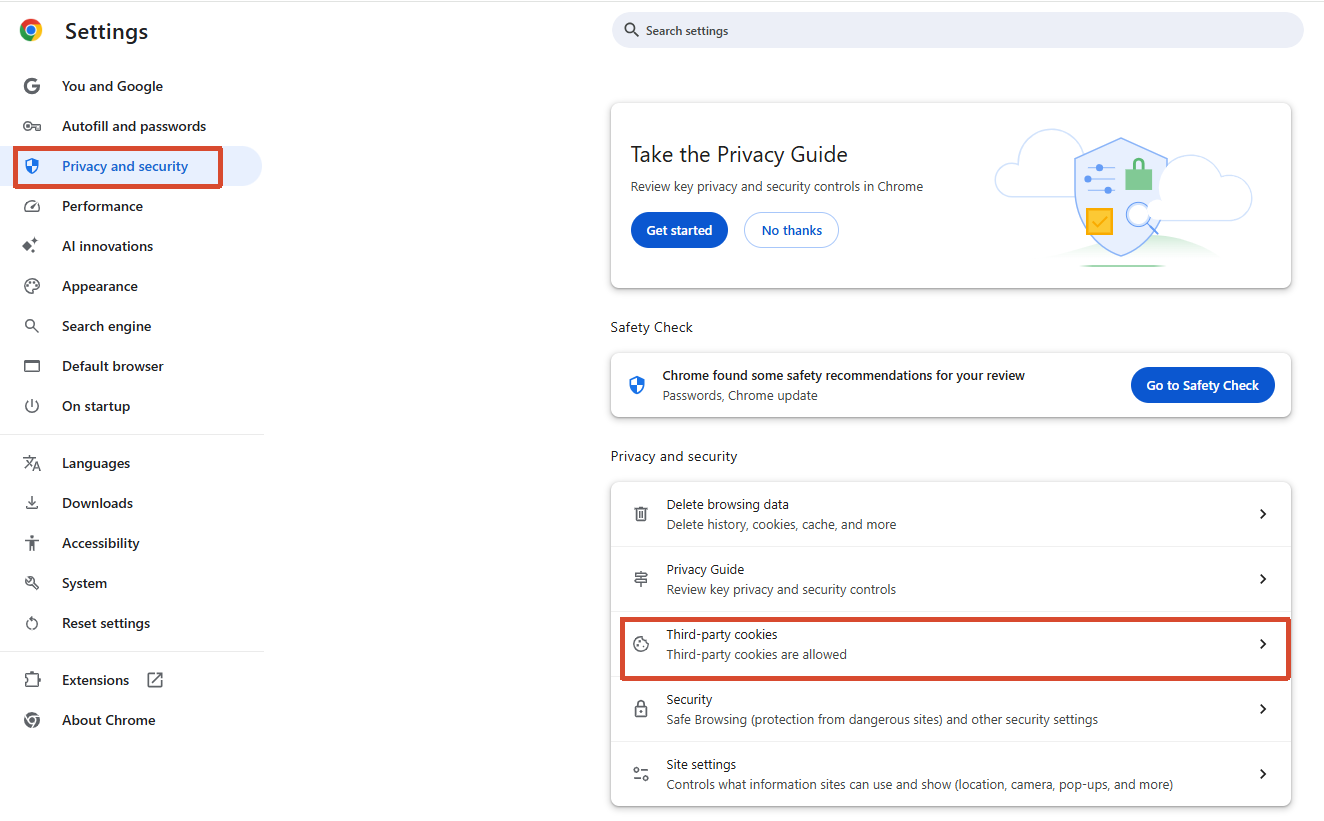
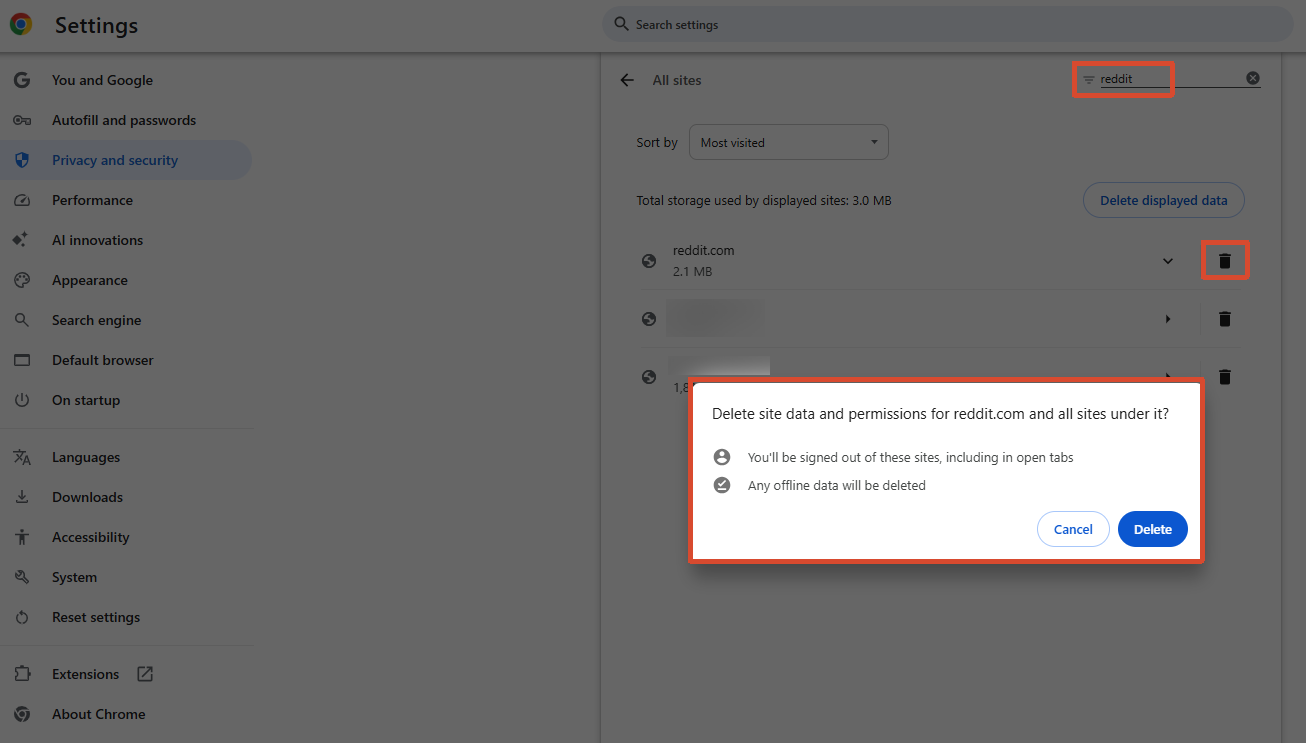
Only if those checks still do not solve the issue should you consider deleting Reddit site data. Follow Google’s delete specific cookies guide, go to Settings → Privacy and security → Third-party cookies → See all site data and permissions, search for reddit, verify the domain, and delete only the relevant entries. This will sign out the related session, so confirm that your password and two-factor authentication method are available first.
Step 4: Compare the Current VPN or Proxy With the Original Connection
If you were not using a VPN or proxy in the first place, skip this subsection. If one was already enabled, first record the client name, selected route, and split-tunneling rules. If direct access through the original network is permitted, temporarily disconnect the current VPN or proxy and compare one attempt using the same device, browser, account, and URL. Then restore the original configuration.
If direct access works but the existing proxy path fails, check that proxy route, rules, authentication, or DNS first. Do not simultaneously change browsers, clear cookies, and switch countries, because you will not know which change was related to the result. On managed corporate or campus devices, ask the administrator to confirm the relevant rules.
Step 5: Compare the Original Network With Your Mobile Hotspot
When there is no account-enforcement action or verification requirement that must be handled first, keep the same computer and browser and compare the original Wi-Fi with your own mobile hotspot. Record which connection fails, what page it returns, and the time of the test. One comparable test is enough; there is no need to rotate through a dozen egress addresses.
| Comparison Result | Next Step | What You Cannot Conclude Directly |
|---|---|---|
| Only one browser fails on the same network | Troubleshoot that browser’s session, extensions, and version | One extension is definitely the only cause |
| Original Wi-Fi fails but the hotspot works | Check the original network’s egress, DNS, and filtering rules | The original public IP has been permanently banned |
| Proxy fails but the original connection works | Check proxy authentication, routing, and split-tunneling rules | Reddit blocks every VPN |
| Different networks show the same account-enforcement notice | Follow the official appeal or recovery notice | Changing IPs will recover the account |
| Multiple browsers and networks all fail | Check service status and submit a complete description of the problem | Every network has been blacklisted by Reddit |
When Should You Test an Additional Network Path?
An additional path can be useful when basic checks have not isolated the problem and a comparison is permitted on your device and network. Complete any account-recovery or verification requirements first. Keep the browser, login state, and target URL consistent.
The optional example below describes Rola IP with Proxifier v4 for Windows and SOCKS5 username/password authentication. You need permission to change the device’s network configuration, a compatible proxy account, and access to the browser’s normal login and two-factor authentication methods.
Validation status: This configuration walkthrough has not been verified end to end for this article. The accompanying images are interface references, not a record of a successful Reddit connection. The supporting Proxifier, Rola IP, Chrome, and ipify documentation was reviewed on September 20, 2026; that date is not a test date. Record your Windows, Proxifier, and browser versions before testing.
Step 1: Get the Four Parameters and Keep the Test Conditions Fixed
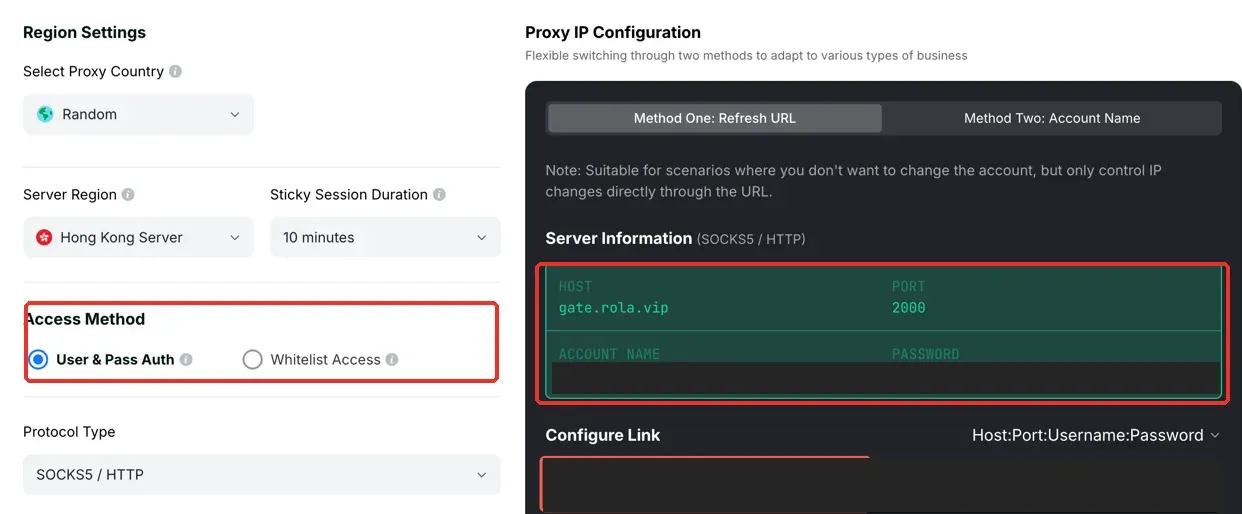
Follow the Rola IP proxy configuration guide to open the selected network’s setup page in your dashboard. Confirm the proxy region, authentication method, and session settings, then copy Host, Port, Username, and Password. All four values must come from the same generated result; this example does not mix username/password authentication with IP allowlisting. Confirm that the current plan supports SOCKS5 before proceeding.
Keep the region and the same session fixed during the test instead of generating a new egress address for every refresh. For dynamic residential networks, use the region and session values generated by the dashboard. The “server region” also does not necessarily equal the final egress country. If a business use case requires keeping one egress for a longer period, you can evaluate static residential proxy options, but the product type does not guarantee that Reddit will accept the connection.
Step 2: Open the Proxy Server List
Before changing Proxifier, save a restorable copy of the current profile and record its rules, Default action, and name-resolution settings. Also record any browser or system proxy settings you will change. Use a separate test profile on a device where direct access for other applications is permitted. If existing applications must retain another proxy route, do not replace that route with the Direct defaults below; use an isolated test environment or ask the administrator.
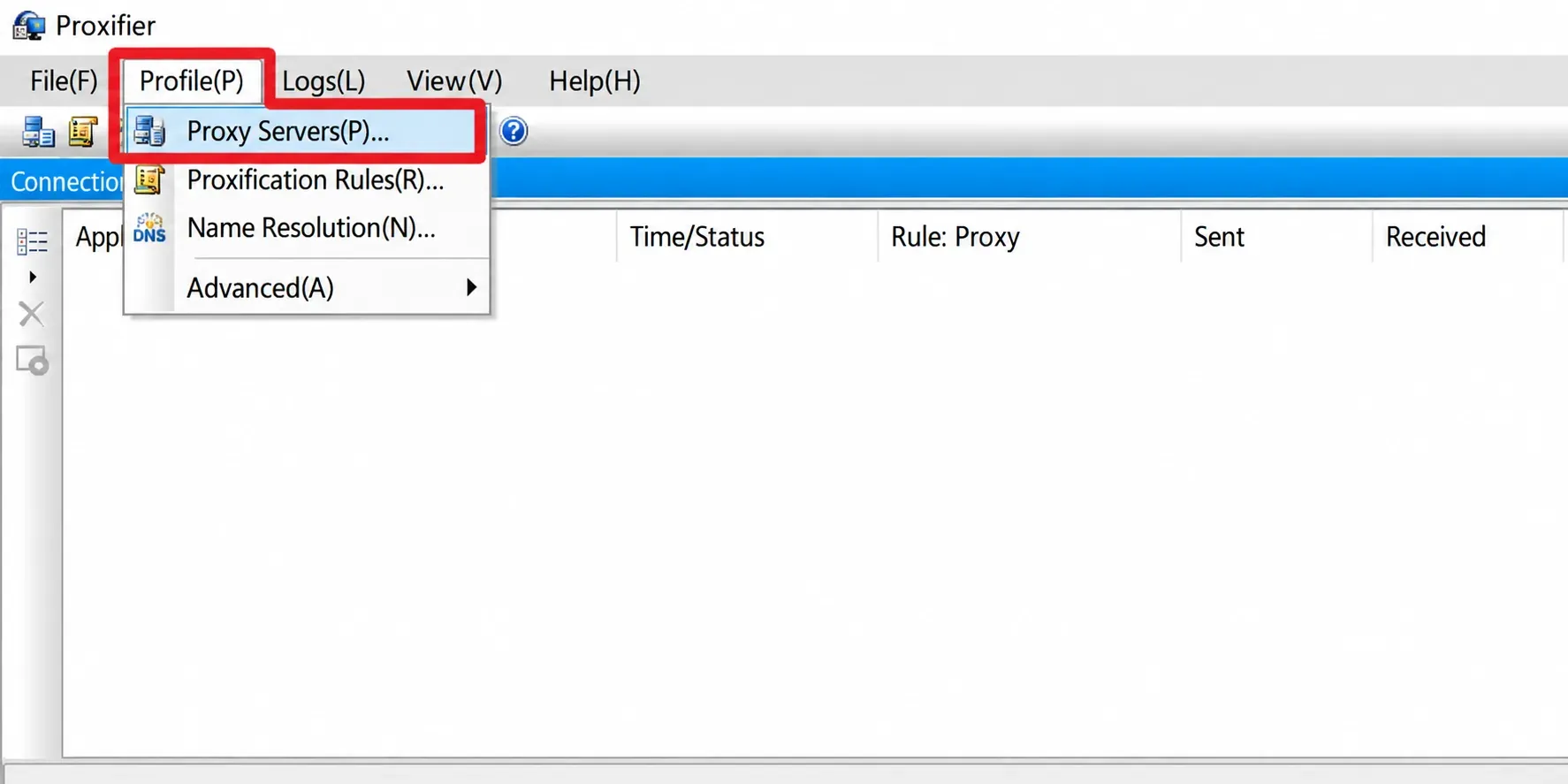
Record the original browser’s connection path before testing. Confirm that the test browser is not simultaneously using another proxy extension or manually configured proxy. Record any setting before disabling it. In Proxifier, click Profile → Proxy Servers.
Step 3: Add a Proxy Server
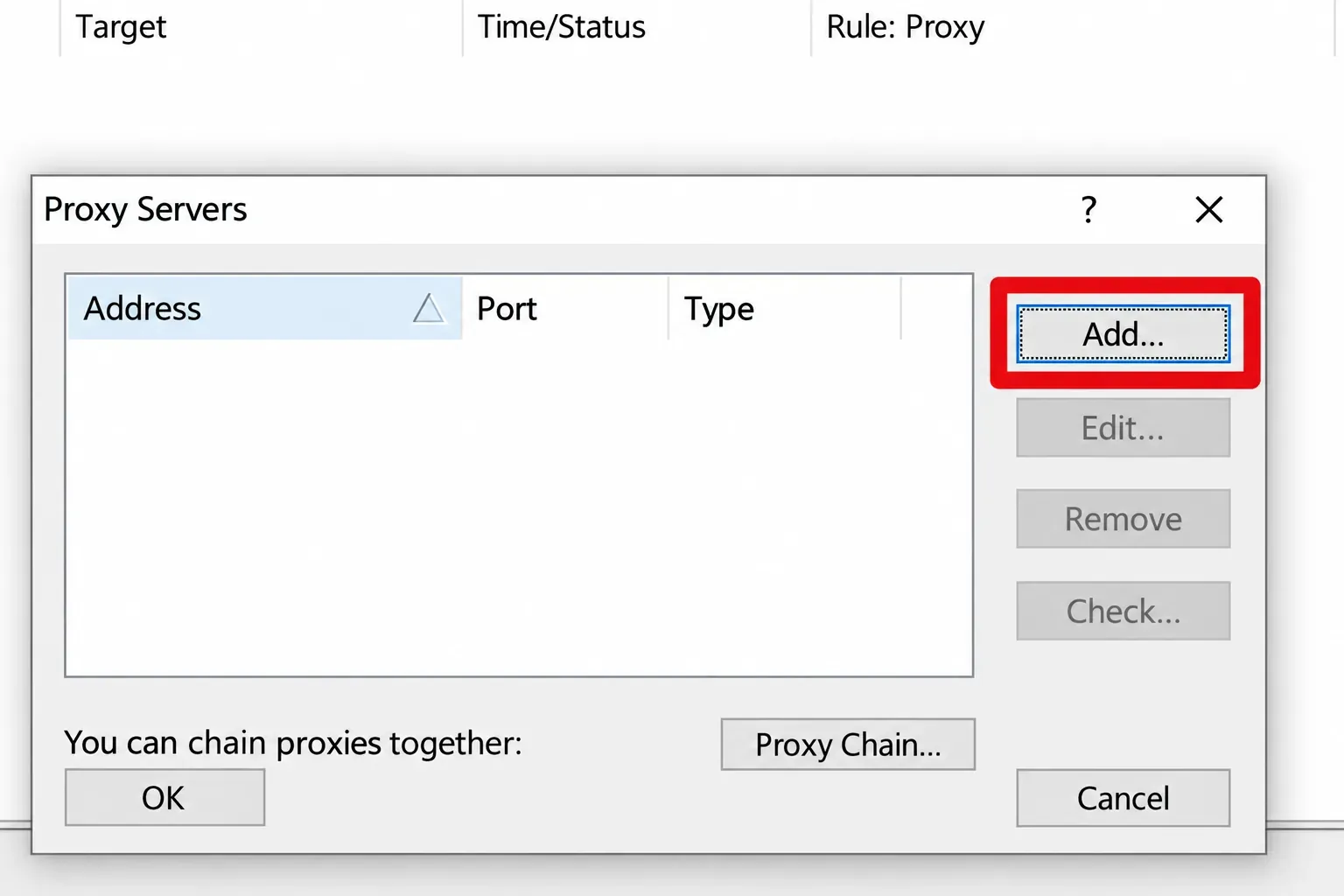
In the Proxy Servers window, click Add. A proxy-parameter form should appear. If the list already contains other proxies, you do not need to delete them; simply keep a recognizable entry for the server used in this test.
Step 4: Enter SOCKS5 and Authentication Information
Enter Host in Address, enter the port in Port, and choose SOCKS Version 5 under Protocol. Enable Authentication, then enter Username and Password. The Address field should not contain a full username/password connection string, and the port should be entered separately. Save after confirming the values.
This example uses SOCKS5 because Proxifier supports username/password authentication for that protocol. If your access method is different, use the protocol that matches the dashboard. The HTTPS option in Proxifier refers to CONNECT-type proxy support; the label alone does not mean the connection to the proxy gateway is protected by TLS. See the Proxifier proxy-server documentation for protocol and authentication options.
| Proxifier Field | Value to Use |
|---|---|
| Address | Host from your generated dashboard result; no credentials or URL scheme |
| Port | Port from that same result |
| Protocol | SOCKS Version 5, if supported by the selected service |
| Authentication | Enable; enter Username and Password from that same result |
This table maps fields only; it contains no tested connection values.
If Proxifier asks whether this server should become the default proxy, this tutorial chooses No, because the next step creates a rule only for the test browser. If the built-in test returns a connection or authentication error, check the parameters, plan status, and account-access restrictions first. Do not record a proxy-gateway error as a Reddit ban.
Step 5: Open the Rule List and Create a Browser Rule
In the separate test profile, click Profile → Proxification Rules, then click Add. Keep Localhost and Default set to Direct in this profile. The browser rule below selects the test proxy; other applications retain direct access in this test environment. These defaults must not overwrite an existing profile’s routing requirements.
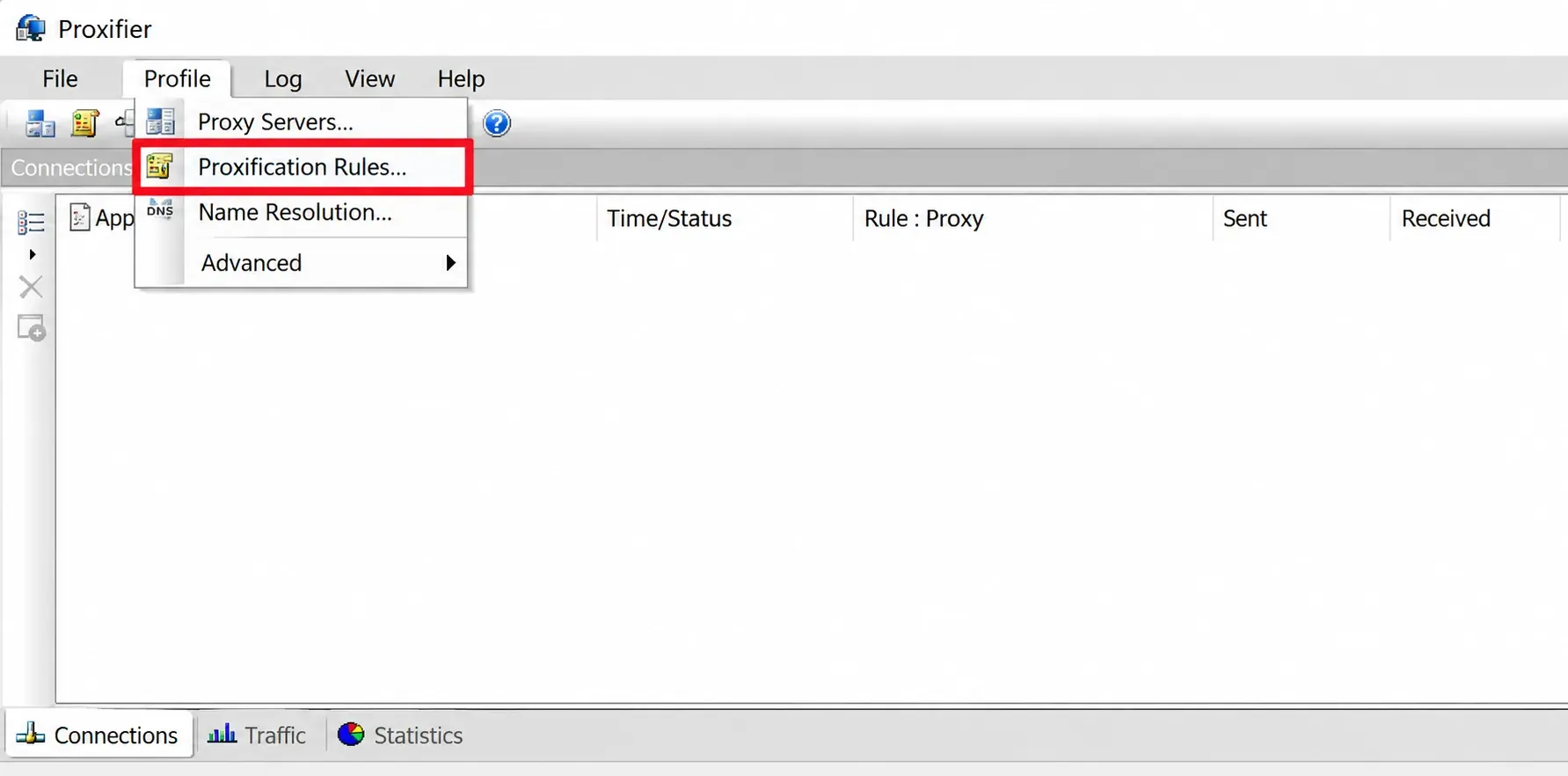
In the new rule, set Name to Rola Reddit Test. Under Applications, click Browse and select the Chrome executable you actually use, or enter chrome.exe. Leave Target hosts and Target ports empty to mean Any. Under Action, choose the SOCKS5 proxy you just saved. This sends that browser’s TCP connections through the proxy, not only reddit.com, so close unrelated tabs during the test.
Step 6: Check Rule Order and Save
In the rules list, keep Localhost above the new browser rule and place the new browser rule before Default. Proxifier matches rules from top to bottom. If an earlier rule already covers the browser, the new rule may never be used. Confirm that the new rule is enabled and that its Action is the selected proxy, then save. The official rule documentation explains matching order and why empty target fields mean Any.
| Order in the Test Profile | Rule | Application | Action |
|---|---|---|---|
| First | Localhost | Any, with the existing loopback targets preserved | Direct |
| Next | Rola Reddit Test | The selected Chrome executable | The SOCKS5 entry you created |
| Last | Default | All remaining connections | Direct |
This is the intended configuration, not a screenshot or log of a completed test. Check your saved values against it.
After saving the rule, close and reopen the test browser so existing connections are not mixed with the behavior of the new rule. Proxifier mainly handles TCP connections, so seeing one TCP log entry does not prove that every protocol and every browser component is covered.
Step 7: Check Where Hostnames Are Resolved
Open Profile → Name Resolution. Record the current option first and decide whether there is actually a local DNS problem. Proxifier’s automatic detection can adjust the resolution method based on network conditions. Only when you specifically need hostnames to be resolved through the proxy should you disable automatic detection, enable Resolve hostnames through proxy, and save.
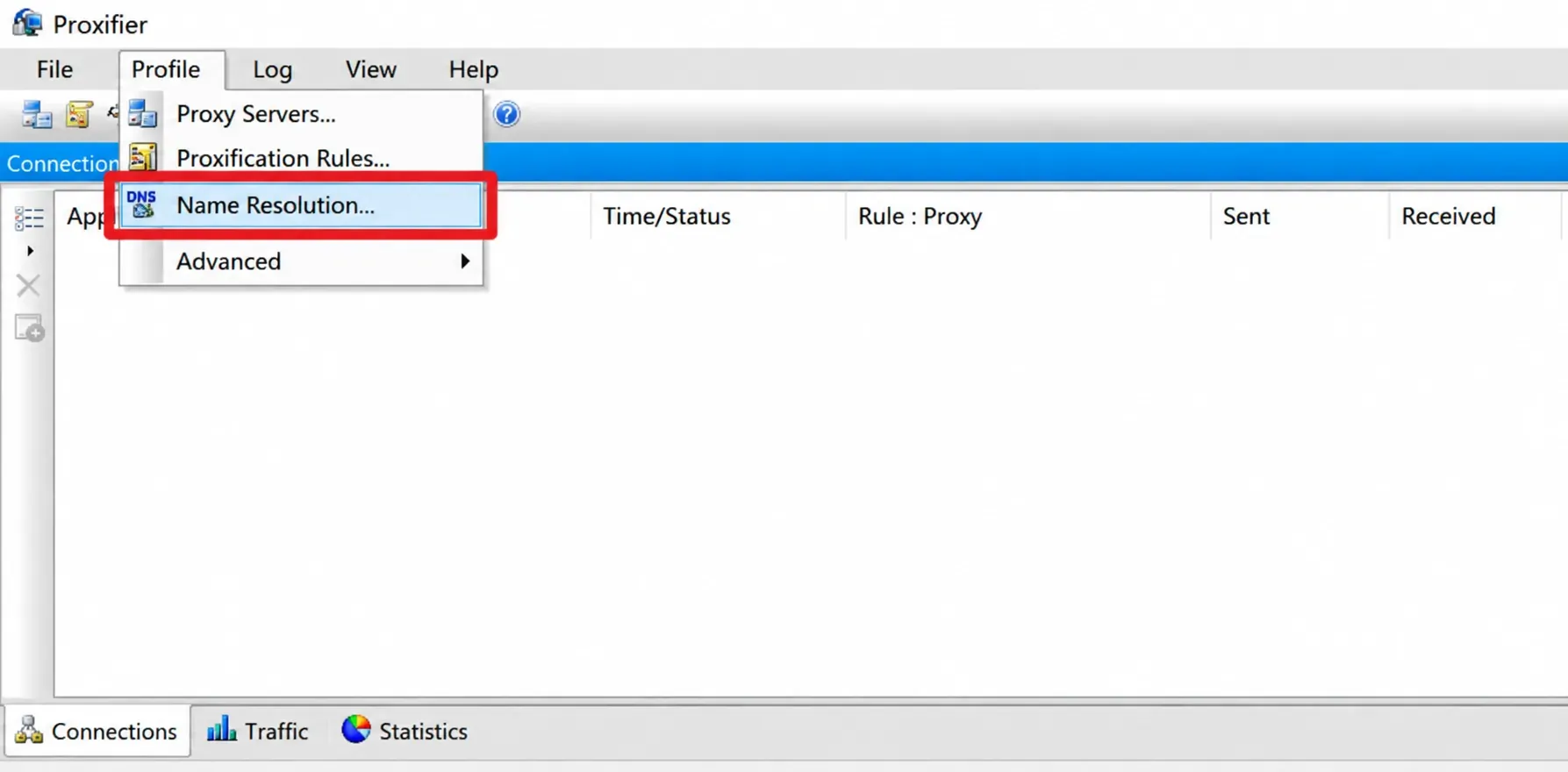
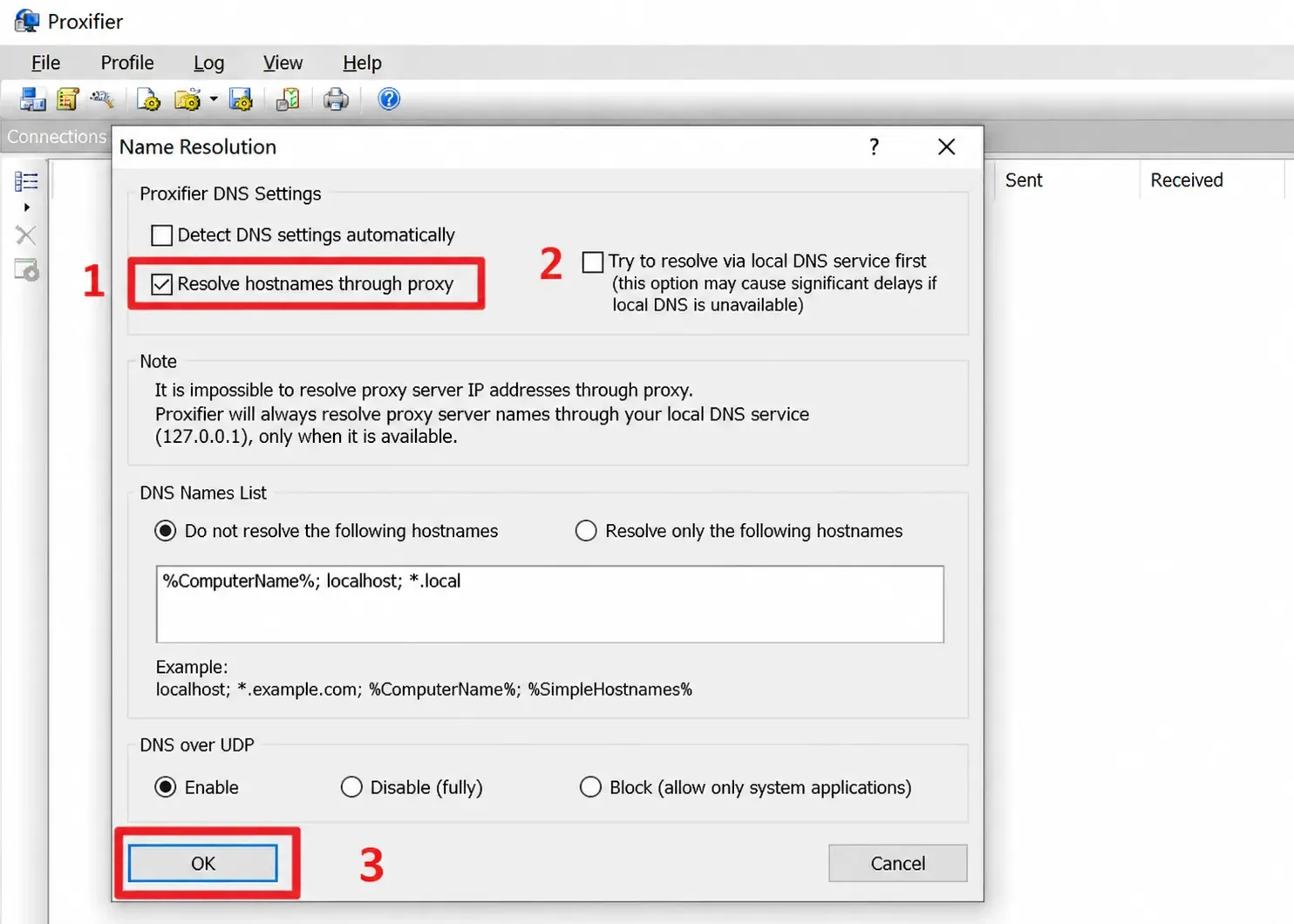
After proxy-side name resolution is enabled, Proxifier may use placeholder addresses that are meaningful only on the local computer. Do not treat them as public egress addresses. IP-address-based proxification rules do not work with this resolution method as they do with normal resolution; review existing rules before changing it. The setting alone does not show that IPv6 or every destination domain follows the same path. See the name-resolution documentation for limitations and exceptions.
Step 8: Check the Egress First, Then Inspect the Reddit Connection
In the same test browser, open the ipify IPv4 endpoint and record the IPv4 egress observed for that request. If you need to observe IPv4 or IPv6 results, also open the ipify dual-stack endpoint; for additional reference, see Rola IP’s IPv4/IPv6 checker. The ipify API documentation distinguishes these endpoints: the second one is not a forced IPv6-only test. An IP change only shows that the egress observed by that specific test request changed.
Then visit the Reddit URL that originally failed and inspect Application, Target, Rule: Proxy, and the connection status in the Proxifier main window. Confirm that the target is the relevant Reddit domain, the application is the test browser, and the matched rule is the one you just created. If the error remains, save the exact wording. If the page loads, record only “accessible under these test conditions” rather than claiming that the proxy “unblocked the account.”
After testing, restore the saved Proxifier profile and every browser or system proxy setting changed for the test. Confirm the original rule order, enabled rules, Default action, and name-resolution settings. Close and reopen the browser, then compare its connection path with the baseline recorded before testing. Disabling the new rule alone is sufficient only if no other original setting was changed.
| Symptom | Check First | Next Action |
|---|---|---|
| Proxy-server connection times out or is refused | Host, Port, local network, and plan availability | Fix the gateway connection before visiting Reddit |
| SOCKS5 authentication fails | Selected protocol, username/password, and account restrictions | Correct the SOCKS5 configuration; this is not an HTTP 407 response or Reddit enforcement |
| HTTP 407 from an HTTP/CONNECT proxy | That proxy’s authentication requirements | Check the HTTP proxy configuration and credentials; do not interpret it as a Reddit account restriction |
| HTTP 403 for the target request | Response wording and the service returning it | Save the response and follow the relevant support route; 403 alone does not prove a permanent IP ban |
| HTTP 429 for the target request | Rate-limit response and Retry-After, if supplied | Stop repeated attempts and respect Retry-After. If absent, follow the service’s guidance; do not rotate IPs to continue retrying |
| DNS lookup fails | Whether the failure concerns the proxy hostname or the target hostname | Check local DNS for the gateway first; review target name resolution separately |
| IP check succeeds but the browser rule shows Direct | Application matching, rule order, and existing connections | Fix the rule and create a new connection |
IP check succeeds but Reddit still shows network security |
Local Proxifier records, the browser-visible Reddit response, session state, and service status | Save the evidence and use the support route shown on the error page |
Reddit shows a banned or locked notice |
Account status and official messages | Follow the notice’s appeal or recovery path |
Do not treat “IP check succeeded,” “proxy connected,” and “the Reddit page is accessible” as the same result. They verify different layers. Recording them separately helps identify where the failure occurs.
How to Submit a Useful Support Request If You Still Cannot Access Reddit
If the error page includes File a ticket, use that route first. The general Reddit support request page can help you choose a problem type. Account enforcement should use the appeal path in the official notice. Ticket forms can change by problem type, so there is no need to copy an old category from another article.
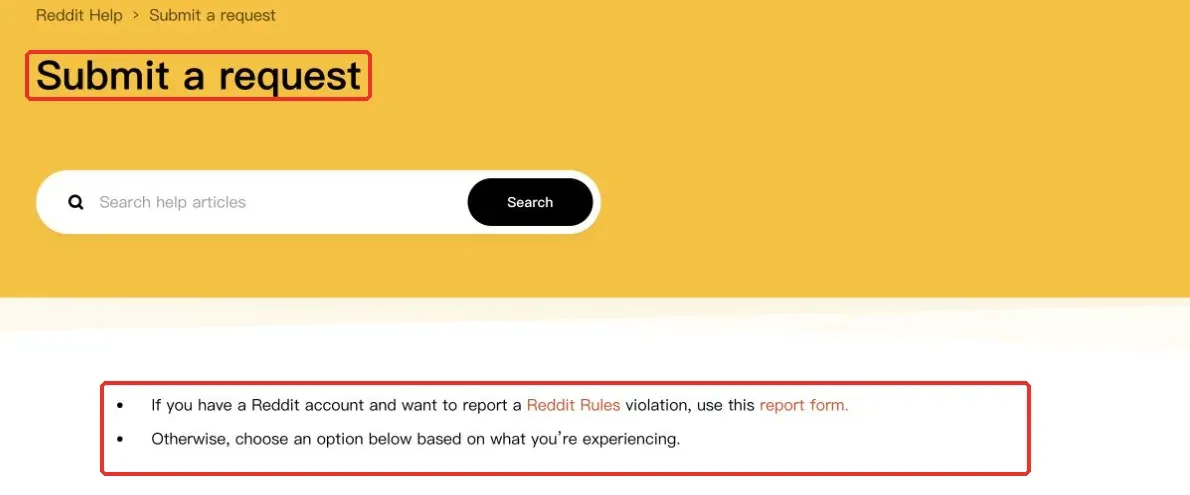
Before submitting, organize the following information: the complete error text and time of occurrence, the affected URL, operating system and browser version, whether you were logged in, whether a VPN or proxy was in use, and what you observed when comparing the original connection, a mobile hotspot, and the proxy path. Screenshots should preserve the error wording and necessary interface details while hiding passwords, verification codes, cookies, and proxy-authentication information. If the official form specifically requests a network address, enter it only through the official channel rather than posting it publicly in comments.
A concise description can follow this structure: “At [time and time zone], the same browser showed [exact error] when visiting [URL]. I checked Reddit Status. The original network result was [observation], and the mobile-hotspot result was [observation]. I am currently [logged in / logged out] and [using / not using] a proxy. The attached screenshot shows the redacted error page.” Include only checks you actually performed; do not invent results.
Conclusion
Start with the message Reddit actually displays. Follow account notices first, then isolate browser and network factors. If you test an additional proxy path, record its routing and the target-page response separately, restore the original configuration, and use Reddit’s support route when the error remains.