
Amazon Affiliate Links Not Working? How to Check and Fix Them

Nov 11, 2026 · Troubleshooting · 11 min read
TL;DR
If an Amazon affiliate link is not working as expected, start with the published page’s original href, then check the destination product, marketplace, Tracking ID, and redirect path. Verify OneLink settings and the relevant Associates reports separately: an accessible product page does not prove attribution, and zero earnings do not prove the link is broken. Use Amazon’s Link Checker only for links created or modified outside Associates Central; if tracking remains uncertain, contact Associates Support with the published page URL.
First, Identify Which Part of Your Amazon Affiliate Link Is Failing
An Amazon affiliate link that is “not working” does not necessarily return a 404 error. A reader might be unable to open the product page, land on a different country’s Amazon marketplace, fail to see the expected Tracking ID, or visit a functioning link while the reports still show no earnings. Start by saving the original href from the published page. Then check the final landing page, product, tracking information, and reports separately. A page loading successfully proves only that it can be accessed; it does not establish whether an order qualifies for commission or whether attribution has been confirmed.
| What you observe | Check first | What you cannot conclude yet |
|---|---|---|
| 404 error, blank page, or unavailable product | Product ASIN, target marketplace, and whether the item is still listed | That your Associate account has been suspended |
| Page opens, but attribution is uncertain | Original href, redirect chain, and Tracking ID for the target marketplace |
That attribution failed simply because the final address bar does not show tag |
| International visitors land on a different country’s Amazon site | OneLink settings, supported destination marketplaces, and browser environment | That the proxy or IP address is malfunctioning |
| Clicks appear but earnings remain zero | Selected marketplace and Tracking ID, report type, qualifying purchases, and account notices | That the link cannot be opened |
Why Do Amazon Affiliate Links Stop Working?
The tag Parameter Was Removed or Changed
Copying a link, editing it manually, CMS redirects, or link-management plugins can modify URL parameters. Read the actual href from the live page first, then compare the redirect path; the text on a button is not necessarily its real destination. Amazon’s official help recommends checking the Store ID or Tracking ID visible in the link URL (commonly carried by the tag parameter). However, Amazon also explains that the Tracking ID does not always need to remain visible in the address bar after the visitor’s initial click for a subsequent sale to be recorded. Therefore, a missing tag in the final address bar alone does not prove attribution failure. If you still cannot verify that a published link is associated with your Associate ID, provide the page URL to Amazon Associates Support. See Amazon’s official explanation of Tracking ID verification.
The Product Page or ASIN Has Changed
Delisted products, temporary stock shortages, variation changes, and product mapping between national Amazon marketplaces can cause visitors to see an unavailable-item message, a similar item, or a different page. Before replacing the product, compare its model, specifications, color or capacity, sales region, and seller. Record a temporarily out-of-stock product separately from an actually broken link. For price snapshots and offer-context checks, consult Rola IP’s Amazon price scraping guide. Pricing and availability checks do not replace verification of affiliate attribution.
OneLink’s Regional Redirect Did Not Behave as Expected
OneLink is Amazon’s regional redirection solution for international traffic. Whether a redirect occurs, and which countries are covered, depends on the marketplace, linked Associate accounts, and current configuration. Amazon’s help pages may change their supported market lists and setup instructions by program and account. Do not assume every link automatically sends visitors to their local marketplace, or that reaching a local Amazon site proves tracking is valid. Start with the official Amazon OneLink guidance.
Social Platforms, Short Links, or Caches Modified the Redirect
Social-network interstitial pages, in-app browsers, short URLs, caches, and front-end scripts can change the route taken by a click. Retest from the published page, the in-app browser, and a standard browser. Compare the original href, the rendered link, and the redirect chain shown in the browser’s Network panel. Amazon prohibits using shortened links in a way that makes their Amazon destination unclear. Third-party short-link services may also differ in OneLink support. Consult the Amazon Associates Linking Requirements.
Clicks Appear but No Commission Is Reported—or You Are Viewing the Wrong Report
Clicks, ordered items, shipped items, and earnings are different metrics. Verify the selected marketplace, Tracking ID, and date range before checking account notifications and the relevant orders and earnings reports. According to the US Amazon Associates help page, Ordered Items and Bounties reports update hourly, with most orders appearing within three hours of placement; the Earnings Report is current through the previous day. These timings describe the US reports on that help page only. Refer to the appropriate dashboard for other marketplaces.
How to Check an Amazon Affiliate Link: A Three-Layer Process
Layer 1: Verify Link Information Using Official Tools
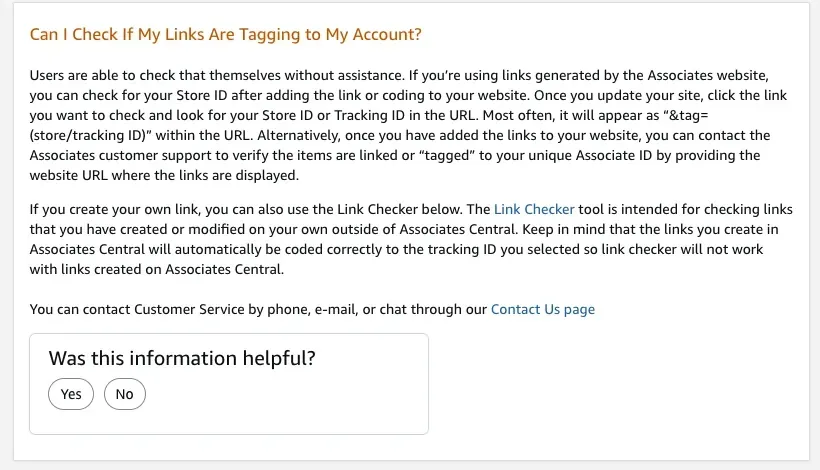
After inspecting the published href as described above, use Amazon Associates’ Link Checker only for links you created or modified outside Associates Central. It is not a general-purpose health check for links generated by Associates Central. If account ownership remains uncertain, send the published page URL to Amazon Associates Support. See Can I Check If My Links Are Tagging to My Account?
Layer 2: Check Obvious URL Structure Issues with a Local Script
The Python example below parses only the URL strings you provide. It makes no requests to Amazon and cannot check whether a product exists, an Associate account is valid, OneLink is configured correctly, or a click generates commission. Its demonstration allowlist covers only amazon.com, amazon.co.uk, and amazon.ca. Other marketplaces are flagged as outside the demo allowlist, not necessarily as broken links. Search pages and unsupported paths are marked as unsupported patterns.
Save the script as check_affiliate_urls.py and run python3 check_affiliate_urls.py. You can also append one or more URLs to the command. If you need an exact comparison with an expected Tracking ID for the same target marketplace, use the --expected-tag argument.
"""Inspect visible Amazon affiliate URL structure; never sends network requests."""

import argparse
import re
from urllib.parse import parse_qs, urlsplit

MARKETPLACES = {
    "amazon.com": "US",
    "www.amazon.com": "US",
    "amazon.co.uk": "UK",
    "www.amazon.co.uk": "UK",
    "amazon.ca": "CA",
    "www.amazon.ca": "CA",
}
ASIN_PATH = re.compile(r"/(?:dp|gp/product)/([A-Z0-9]{10})(?:/|$)", re.I)
EXAMPLES = [
    "https://www.amazon.com/dp/B00008OE6I?tag=demo-20",
    "https://www.amazon.com/dp/B00008OE6I",
    "https://www.amazon.com.evil.example/dp/B00008OE6I?tag=demo-20",
    "https://www.amazon.com/s?k=wireless+mouse&tag=demo-20",
    "https://www.amazon.com/dp/B00008OE6I?tag=demo-20&tag=other-20",
]


def inspect(url, expected_tag=None):
    try:
        parts = urlsplit(url)
        host = (parts.hostname or "").lower().rstrip(".")
        port = parts.port
        if (
            parts.scheme.lower() != "https"
            or port not in (None, 443)
            or parts.username is not None
            or parts.password is not None
        ):
            return "INVALID_URL", host or "-", "-", "-"
        if host == "amzn.to":
            return "CHECK_FINAL_REDIRECT", host, "-", "-"
        if host not in MARKETPLACES:
            return "HOST_NOT_IN_DEMO_ALLOWLIST", host or "-", "-", "-"

        query = parse_qs(parts.query, keep_blank_values=True)
        tags = query.get("tag", [])
        if len(tags) > 1:
            return "AMBIGUOUS_TAG", host, "|".join(tags), "-"
        if not tags or not tags[0].strip():
            return "MISSING_TAG", host, "-", "-"

        match = ASIN_PATH.search(parts.path)
        if not match:
            return "UNSUPPORTED_URL_PATTERN", host, tags[0], "-"
        asin = match.group(1).upper()
        if expected_tag is not None and tags[0] != expected_tag:
            return "TAG_MISMATCH", host, tags[0], asin
        return "STRUCTURE_OK", host, tags[0], asin
    except ValueError:
        return "INVALID_URL", "-", "-", "-"


def main():
    parser = argparse.ArgumentParser(
        description="Inspect visible Amazon affiliate URL syntax without network requests"
    )
    parser.add_argument("urls", nargs="*", help="URLs to inspect; defaults to local examples")
    parser.add_argument(
        "--expected-tag",
        help="optional exact tag to compare for this run; does not verify account ownership",
    )
    args = parser.parse_args()

    print("Amazon affiliate URL structure audit (local parsing only)")
    for url in args.urls or EXAMPLES:
        status, host, tag, asin = inspect(url, args.expected_tag)
        print(f"{status}: host={host}")
        print(f"  tag={tag}  ASIN={asin}")
    print("STRUCTURE_OK does not prove page availability, account ownership, attribution, or commission.")


if __name__ == "__main__":
    main()
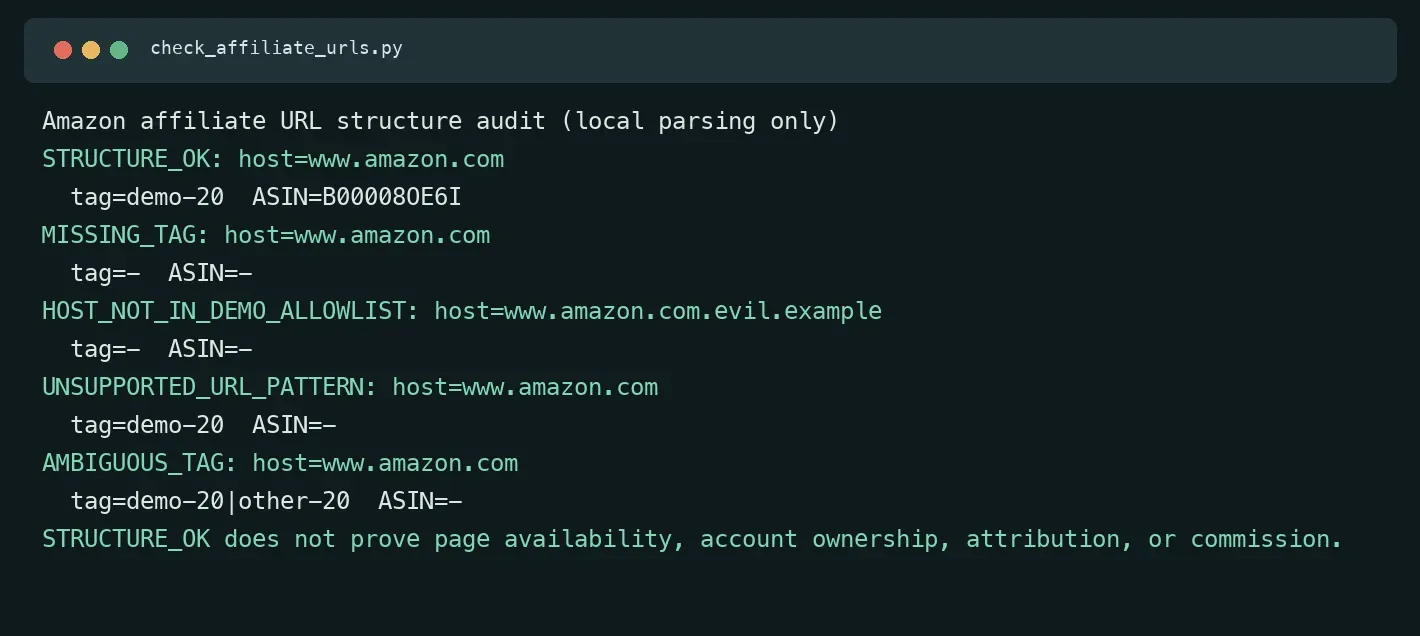
STRUCTURE_OK means only that the URL appears to contain a recognizable ASIN and a single nonempty tag within the marketplaces and URL patterns supported by this example. It does not prove that the product can be purchased, the tag belongs to your account, browser redirects are correct, or commission will be earned. For an amzn.to short link, inspect the final redirect in a browser.
Layer 3: Check the Final Landing Page in the Real Usage Environment
Click a link from the actual published page and record the final marketplace domain, product identifier, page status, and any visible tracking parameters. When testing across regions, log the test date, browser and version, login status, cookies or isolated-session conditions, shipping country/postcode, page language, whether the Amazon app opens, the network exit region observed in the same browser, and the final URL. Keep the same session and network exit throughout the redirect chain whenever possible; avoid switching exits mid-test.
| Record | Information to capture |
|---|---|
| Original link | Full href on the published page, page URL, and whether a short link is involved |
| Test conditions | Date, browser version, sign-in status, language, shipping country/postcode, and app handoff |
| Network conditions | Exit region observed in the same test browser; whether the exit stayed consistent during redirects |
| Final page | Destination marketplace domain, product/ASIN, availability status, and visible Tracking ID (if any) |
| Limits of the conclusion | Mark page access, product match, regional routing, account tracking verification, and commission results separately |
How to Distinguish OneLink Configuration Problems from Regional Page Differences
Check your account configuration first, then document what actually happens in the browser. Amazon’s US OneLink help currently describes Canada and the EU5 markets (United Kingdom, Spain, Germany, France, and Italy), along with setup paths for seven other marketplaces: Japan, Singapore, the Netherlands, Saudi Arabia, Poland, Sweden, and Australia. Actual availability depends on your account and configuration. It also describes redirect preferences such as Exact match, Close match, and Do not redirect. When no exact or similar product can be mapped, the destination may differ. Refer to your current dashboard and the target marketplace’s official instructions. See OneLink supported marketplaces and configuration guidance.
Then verify the source marketplace, destination marketplace, and linked accounts rather than guessing the menu path from memory. Run your test from the same published link and record the destination domain, product mapping, and visible tracking details separately. A successful landing in one environment only confirms that the page was reachable under those conditions. It does not validate the entire OneLink setup or commission attribution.
If you need to compare public product pages from different regions, Rola IP’s Amazon proxy solution can serve as an entry point for regional page QA. Log the network exit region, browser session, and test time. Proxies are used to observe how pages appear from different network locations, not to bypass Amazon’s rules or guarantee affiliate commissions. For initial setup, refer to Rola IP’s residential proxy setup guide.
Clicks but No Earnings? Troubleshoot in This Order
First, confirm that your dashboard is showing the intended marketplace and Tracking ID. Then compare clicks, ordered items, shipped items, and the Earnings Report as distinct categories. Amazon’s US reporting guide states that order-related metrics and earnings reports refresh on different schedules. Do not interpret a temporary zero as a broken link before the data is expected to update. See How To use reports (Amazon Associates).
| Step | What to check | Evidence to keep |
|---|---|---|
| 1 | Confirm the target marketplace, account, and Tracking ID are selected correctly | Marketplace, Tracking ID, and date range |
| 2 | Compare clicks, ordered items, shipped items, and earnings without equating clicks to orders | Actual values in each report |
| 3 | Review qualifying purchases and possible adjustments under the target marketplace’s current rules | Applicable official guidance or dashboard records |
| 4 | Check account notifications and use the marketplace’s own report documentation to understand update timing | Notifications, review time, and report dates |
| 5 | If the discrepancy remains unexplained, contact Associates Support | Published page, original link, Tracking ID, dates, and report discrepancies |
Do not attempt to prove attribution through self-purchases or your own test clicks; use the results actually shown in your dashboard. Under the US Amazon Associates Operating Agreement, commission income is limited to qualifying purchases under applicable program terms. The current policies and commission income statements for the relevant marketplace govern the details. See the Amazon Associates Program Operating Agreement.
Safe Fixes and Retesting Criteria
| Problem | Recommended fix | Passing retest criteria |
|---|---|---|
Original link has a missing or unexpected tag |
Regenerate the link using the relevant marketplace’s Associates tools; confirm the intended Tracking ID | The live page’s href matches the generated link; continued display of tag in the final URL is not used alone to judge attribution |
| Product unavailable or mismatched | Match the exact specifications and target marketplace, then revise the recommendation and product identifier | Product page is accessible in the target region and matches the recommendation |
| Unexpected OneLink landing page | Verify destination market support, account mapping, and product matching, then retest | Each testing condition is documented; account attribution is checked separately with official tools |
| Short link, plugin, or cache rewriting the URL | Isolate the rewriting step in staging or a single-URL rule test; preserve settings and rollback instructions | Retesting from the live page reproduces the initial HTML, rendered DOM, and Network redirect chain |
| Earnings report does not show expected income | Check marketplace, Tracking ID, report type, purchase eligibility, and account notifications | Issue is verified through the dashboard or official support—not through self-purchases |
When troubleshooting plugins, do not automatically disable all link functionality on the production site. Reproduce the issue in a staging copy or with a plugin’s single-rule test. Change one relevant rule at a time, preserve the original settings, and prepare a rollback. Check the initial HTML, rendered links, and browser Network records to identify precisely where the destination changes.
Conclusion
When investigating amazon affiliate links not working, determine whether the problem concerns page access, the target marketplace, the product, tracking information, or reporting. After a fix, retest under the same conditions and save the original href, final page, and dashboard evidence. For regional comparisons, document the network and browser environment; verify account ownership and commission outcomes through the relevant marketplace’s Associates tools, reports, and official support.