
Scrape Google Search Results with Python: API Options

Aug 25, 2026 · Proxy Basics · 16 min read
TL;DR
Use an authorized API to collect structured Google search data. Existing Custom Search JSON API customers can run the Python workflow below, but the service is closed to new customers and has a January 1, 2027 transition deadline. A new project needs a currently supported API or site-search product.
Python developers, SEO analysts, and data teams can use this workflow to turn API responses into structured records. The JSON and CSV outputs include each result’s position, title, URL, snippet, query, language, country context, and retrieval time.
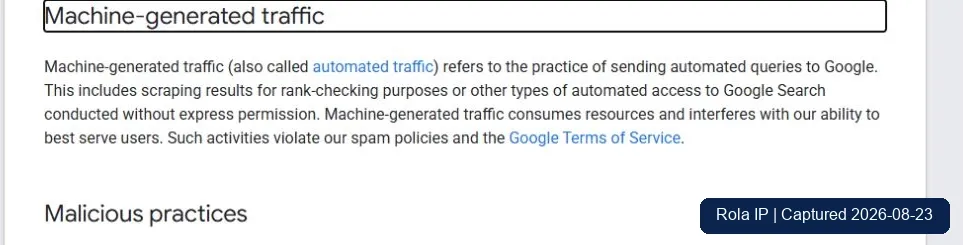
This tutorial does not cover CAPTCHA solving, stealth browser configuration, selector evasion, or proxy rotation against google.com/search. Google classifies automated Search queries without express permission as machine-generated traffic that violates its spam policies and Terms of Service. Its current robots.txt also disallows /search for the general crawler group.
Choose the Result Source Before You Write Code
“Google search results” can refer to several different datasets. They are not interchangeable, so choose the source before designing the pipeline.
| Method | What it returns | Best fit | Main limitation |
|---|---|---|---|
| Direct requests to Google Search HTML | Whatever HTML Google returns to that request | Not the default path in this guide | Google policy and robots rules apply; markup and interstitials are not a stable API contract |
| Browser automation | A rendered page and its current DOM | An expressly authorized browser test where visual state matters | High maintenance; it does not create permission to automate Search |
| Google Custom Search JSON API | Results from a configured Programmable Search Engine | Existing API customers during migration | Closed to new customers; service transition deadline is January 1, 2027 |
| Approved third-party SERP data API | The provider’s normalized representation of supported search features | New projects that need licensed full-web SERP data | Field coverage, location semantics, price, retention, and permissions vary by provider |
| Vertex AI Search | Search across a bounded set of sites or domains | Site search and multi-domain search | Google describes it as an alternative for searching up to 50 domains, not as consumer Google SERP parity |
Google’s official Custom Search overview now says the JSON API is closed to new customers. It recommends Vertex AI Search when the job is searching up to 50 domains and offers a contact path for full-web-search needs. Existing Custom Search JSON API customers have until January 1, 2027 to transition.
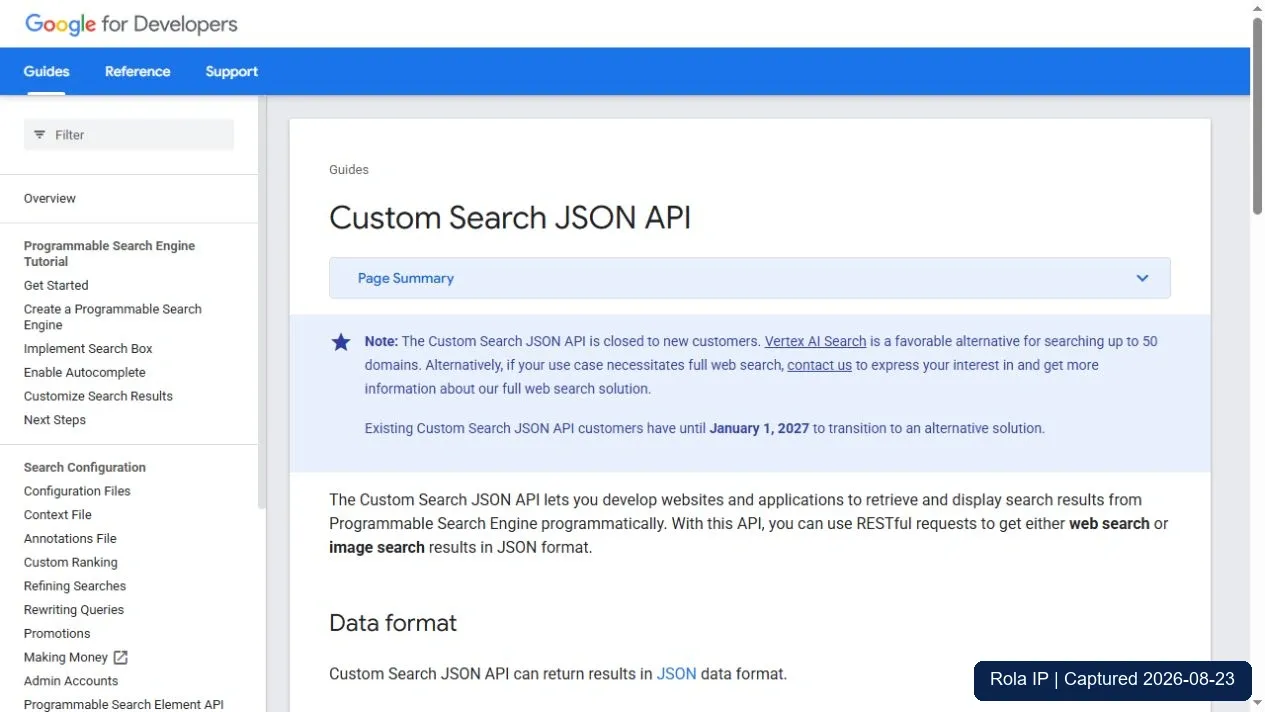
Use that status to choose a path:
- If your organization already has working Custom Search JSON API access, use the tested transformation pattern below while you plan a replacement.
- If you are starting a new project, do not design around obtaining a new Custom Search JSON API account. Evaluate Vertex AI Search for a bounded domain set, contact Google about its full-web-search path, or select a third-party SERP data provider whose terms and data rights match your workload.
- If you only need to search your own site, use a site-search product rather than a consumer-SERP scraper.
Define a Reproducible Pilot
Start with one query and one page. A bounded pilot makes failures diagnosable and avoids confusing scale problems with schema problems.
| Pilot setting | Value used here |
|---|---|
| Environment | Windows 10, Python 3.12.13 |
| Query | residential proxy testing |
| Requested results | 5 |
| Start index | 1 |
| Language context | en |
| Country context | us |
| Timeout | 15 seconds |
| Retry policy | No automatic retry |
| Session policy | One API request; no browser or cookie session |
| Output | google_search_results.json and google_search_results.csv |
| Success gate | At least one unique result with a valid HTTP(S) URL and all required metadata |
The script uses only the Python standard library. No pip install step is required. Its offline fixture path was executed successfully on the environment above. The live API request path was syntax-checked but not called because no API key or existing customer account was available.
Understand the Required API Parameters
For existing customers, Google’s REST documentation requires an API key (key), a Programmable Search Engine ID (cx), and the search query (q). A successful request returns JSON.
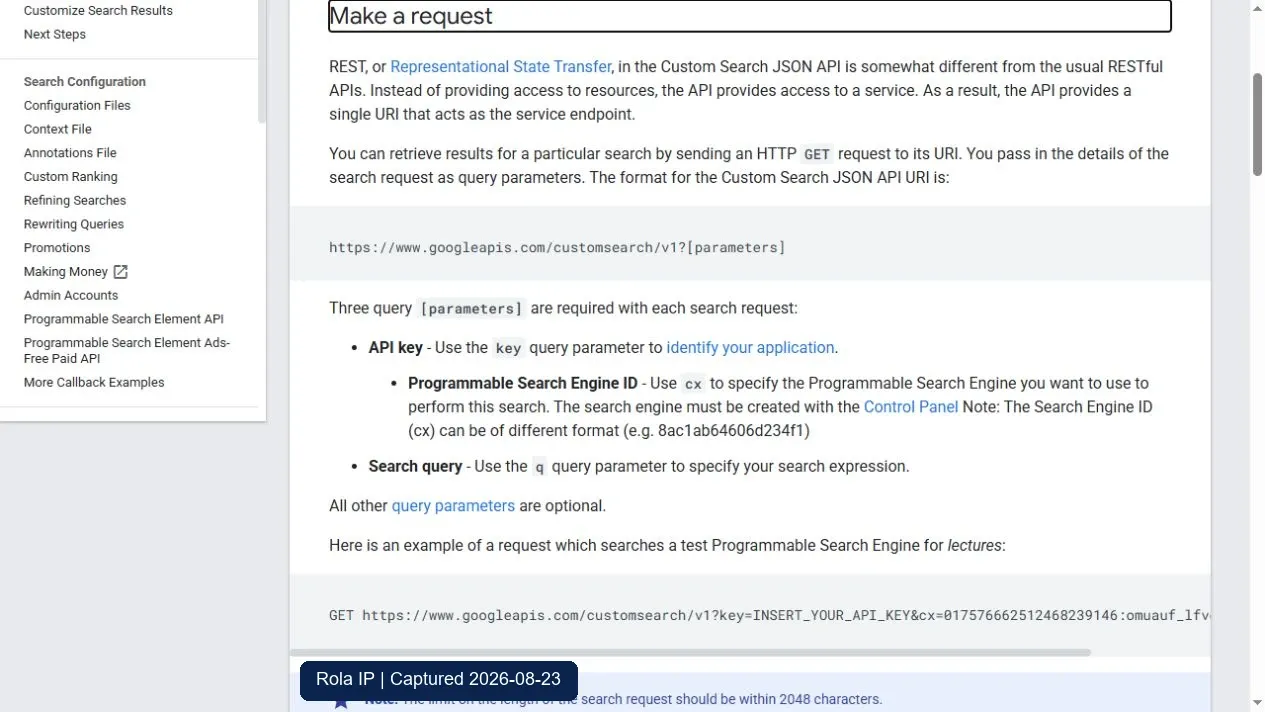
The script also records two localization inputs:
hlsets the user-interface language.glis a two-letter end-user geolocation signal that boosts results associated with that country.
Those parameters describe request context; they do not guarantee that every result originates in the selected language or country. Google’s method reference limits num to values from 1 to 10 and says the API will not return more than 100 results for a query. A request where start + num exceeds 100 produces an error.
Save the Python Script and Fixture
The complete files supplied with this article are:
scrape_google_results.pysample-google-response.json
The fixture uses reserved example domains and contains no real Google result data. It lets you test normalization, validation, deduplication, and export without spending quota or possessing API credentials.
#!/usr/bin/env python3
"""Normalize Google Custom Search JSON API results into JSON and CSV."""

import argparse
import csv
import json
import os
import sys
import urllib.error
import urllib.parse
import urllib.request
from datetime import datetime, timezone
from pathlib import Path

ENDPOINT = "https://customsearch.googleapis.com/customsearch/v1"
CSV_FIELDS = [
    "position", "title", "url", "snippet", "query",
    "language", "country", "retrieved_at",
]


def parse_args():
    parser = argparse.ArgumentParser()
    parser.add_argument("--query", default="residential proxy testing")
    parser.add_argument("--language", default="en")
    parser.add_argument("--country", default="us")
    parser.add_argument("--num", type=int, default=5)
    parser.add_argument("--start", type=int, default=1)
    parser.add_argument("--timeout", type=float, default=15.0)
    parser.add_argument("--fixture", type=Path)
    parser.add_argument("--output-dir", type=Path, default=Path("output"))
    return parser.parse_args()


def validate_args(args):
    if not 1 <= args.num <= 10:
        raise ValueError("--num must be between 1 and 10")
    if args.start < 1 or args.start + args.num > 100:
        raise ValueError("--start and --num must keep the range within 100 results")
    if args.timeout <= 0:
        raise ValueError("--timeout must be greater than zero")


def required_env(name):
    value = os.environ.get(name)
    if not value:
        raise RuntimeError(f"Missing required environment variable: {name}")
    return value


def fetch_live(args):
    params = {
        "key": required_env("GOOGLE_CSE_API_KEY"),
        "cx": required_env("GOOGLE_CSE_ID"),
        "q": args.query,
        "hl": args.language,
        "gl": args.country,
        "num": args.num,
        "start": args.start,
        "safe": "active",
    }
    url = f"{ENDPOINT}?{urllib.parse.urlencode(params)}"
    request = urllib.request.Request(
        url,
        headers={"Accept": "application/json", "User-Agent": "Rola-IP-Tutorial/1.0"},
    )
    try:
        with urllib.request.urlopen(request, timeout=args.timeout) as response:
            if response.status != 200:
                raise RuntimeError(f"Unexpected HTTP status: {response.status}")
            return json.load(response)
    except urllib.error.HTTPError as exc:
        raise RuntimeError(f"API request failed with HTTP {exc.code}") from exc
    except urllib.error.URLError as exc:
        raise RuntimeError(f"API request failed: {exc.reason}") from exc


def load_fixture(path):
    with path.open("r", encoding="utf-8") as handle:
        data = json.load(handle)
    if not isinstance(data, dict):
        raise ValueError("Fixture root must be a JSON object")
    return data


def normalize(data, args):
    request_entries = data.get("queries", {}).get("request", [])
    request_meta = request_entries[0] if request_entries else {}
    start_index = int(request_meta.get("startIndex", args.start))
    items = data.get("items")
    if not isinstance(items, list) or not items:
        raise ValueError("Response contains no result items")

    retrieved_at = datetime.now(timezone.utc).isoformat().replace("+00:00", "Z")
    results = []
    seen_urls = set()

    for offset, item in enumerate(items):
        title = str(item.get("title", "")).strip()
        url = str(item.get("link", "")).strip()
        snippet = str(item.get("snippet", "")).strip()
        parsed = urllib.parse.urlparse(url)
        if not title or parsed.scheme not in {"http", "https"} or not parsed.netloc:
            raise ValueError(f"Result at offset {offset} has no valid title or URL")
        if url in seen_urls:
            continue
        seen_urls.add(url)
        results.append({
            "position": start_index + offset,
            "title": title,
            "url": url,
            "snippet": snippet,
            "query": args.query,
            "language": args.language,
            "country": args.country,
            "retrieved_at": retrieved_at,
        })

    if not results:
        raise ValueError("No valid unique results remained after normalization")

    return {
        "run": {
            "query": args.query,
            "language": args.language,
            "country": args.country,
            "requested_num": args.num,
            "start": args.start,
            "retrieved_at": retrieved_at,
            "source": "fixture" if args.fixture else "google_custom_search_json_api",
        },
        "results": results,
    }


def write_outputs(payload, output_dir):
    output_dir.mkdir(parents=True, exist_ok=True)
    json_path = output_dir / "google_search_results.json"
    csv_path = output_dir / "google_search_results.csv"
    with json_path.open("w", encoding="utf-8") as handle:
        json.dump(payload, handle, ensure_ascii=False, indent=2)
    with csv_path.open("w", encoding="utf-8", newline="") as handle:
        writer = csv.DictWriter(handle, fieldnames=CSV_FIELDS)
        writer.writeheader()
        writer.writerows(payload["results"])
    return json_path, csv_path


def main():
    args = parse_args()
    try:
        validate_args(args)
        data = load_fixture(args.fixture) if args.fixture else fetch_live(args)
        payload = normalize(data, args)
        json_path, csv_path = write_outputs(payload, args.output_dir)
    except (OSError, ValueError, RuntimeError, json.JSONDecodeError) as exc:
        print(f"ERROR: {exc}", file=sys.stderr)
        return 1
    print(f"Validated {len(payload['results'])} unique results")
    print(f"JSON: {json_path}")
    print(f"CSV:  {csv_path}")
    return 0


if __name__ == "__main__":
    raise SystemExit(main())
Python’s urllib.parse.urlencode() converts the parameter mapping into an encoded query string, while urllib.request.urlopen() supports the explicit timeout used by the script. The code never prints the final request URL because it contains the API key.
Test the Transformation Offline First
From the article package directory, run:
python .\scrape_google_results.py `
  --fixture .\sample-google-response.json `
  --output-dir .\output
The expected terminal result is:
Validated 3 unique results
JSON: output\google_search_results.json
CSV:  output\google_search_results.csv
Open the CSV and confirm that its header is exactly:
position,title,url,snippet,query,language,country,retrieved_at
In the JSON output, the top-level run object stores the request context and results contains the normalized rows. Keep those records together. A position or URL without its query, locale inputs, source method, and retrieval time cannot be reproduced.
Fail the test instead of writing an unexplained empty file when:
itemsis absent or empty;- a result has no title;
- a result URL is not HTTP or HTTPS;
- every row is removed as a duplicate;
numis outside the range from 1 to 10; or- the requested range would exceed 100 results.
Run the Live Path Only with Existing API Access
Keep API keys out of the script, source control, screenshots, CSV files, and command-line arguments. The script reads them from environment variables. Environment variables reduce accidental disclosure but are not a secret vault; same-user or privileged processes may still inspect them. Use your organization’s secret manager in production.
In PowerShell, a temporary prompt-based setup avoids placing the key directly in shell history:
$secureKey = Read-Host "Existing Google CSE API key" -AsSecureString
$env:GOOGLE_CSE_API_KEY = [System.Net.NetworkCredential]::new("", $secureKey).Password
$env:GOOGLE_CSE_ID = Read-Host "Programmable Search Engine ID"

python .\scrape_google_results.py `
  --query "residential proxy testing" `
  --language en `
  --country us `
  --num 5 `
  --start 1 `
  --output-dir .\output
Clear the temporary values after the pilot:
Remove-Item Env:GOOGLE_CSE_API_KEY
Remove-Item Env:GOOGLE_CSE_ID
The API’s documented result object includes title, link, and snippet, which the script maps to title, url, and snippet in the normalized output. A successful run still does not prove consumer Google SERP parity. It proves only that the configured Programmable Search Engine returned a valid response for those inputs.
Verify the Output Before You Use It
Check every run before using its output:
- Compare the terminal count with the number of unique rows written.
- Confirm that every row has a position, title, URL, query, locale context, and retrieval time. The snippet may be empty, but the field must exist.
- Accept only absolute HTTP(S) URLs. Reject
javascript:, relative, and malformed values. - Store the source method, query, language, country, start index, requested count, and UTC timestamp.
- Label data from a Programmable Search Engine or third-party API accurately. Call it a browser SERP only when the provider documents that representation and your test confirms it for the stated workload.
For production, add a schema test and retain a redacted sample response. Alert on missing fields or a sudden zero-row result. A status code alone is not enough: 200 OK can still accompany an unexpected or semantically empty payload.
Handle Pagination Without Duplicating Results
The API uses a one-based start index. With 10 results per request, the second batch starts at 11, not 10. Run the next page as a separate command:
python .\scrape_google_results.py `
  --query "residential proxy testing" `
  --language en `
  --country us `
  --num 10 `
  --start 11 `
  --output-dir .\output-page-2
The script deduplicates URLs within a single response. It does not compare separate output folders. When merging pages, use a documented canonical key and preserve each original position and retrieval timestamp. Requests made at different times are separate observations, not one frozen result set.
Troubleshoot Common Failure States
| Symptom | Likely cause | How to verify | Corrective action |
|---|---|---|---|
Missing required environment variable |
Key or engine ID is unavailable to the process | Check only whether the variable exists; do not print its value | Load it from the approved secret source and rerun |
| HTTP 400 | Invalid parameter, range, engine ID, or request combination | Compare num, start, hl, gl, and cx with current official docs |
Correct the input; do not retry unchanged |
| HTTP 403 | API access, project status, billing, restriction, or authorization issue | Inspect the redacted Google error in the Cloud console and account configuration | Fix project/API authorization; changing the exit IP is not the normal remedy |
| HTTP 429 | Quota or rate policy | Check the API dashboard and current quota for the existing account | Stop automatic retries; reduce the schedule or obtain an approved quota path |
Response contains no result items |
The engine returned no items or the payload is not the expected schema | Save a redacted response and inspect queries, spelling, and error fields |
Adjust the query or engine configuration, or record an empty run instead of reporting success |
| Results differ between runs | Time, index state, engine configuration, filters, hl, or gl changed |
Compare complete run metadata | Compare like with like; do not infer a ranking change from unlabelled runs |
| Duplicate URLs | Filtering and canonicalization differ across pages or providers | Compare normalized URLs and source positions | Deduplicate explicitly while retaining provenance |
For a direct Google Search HTML request that returns a 403, 429, CAPTCHA, consent page, or unusual-traffic page, stop. That is not a cue to add stealth plugins, rotate sessions, or increase concurrency. Recheck permission, current terms, robots instructions, and whether an approved API route meets the requirement.
Evaluate an API for a New Project
Because Google Custom Search JSON API is no longer open to new customers, evaluate replacements against the same checklist:
| Dimension | Question to ask |
|---|---|
| Authorization | Do the provider’s terms permit your collection, retention, and downstream use? |
| Result definition | Is the response a consumer SERP representation, site search, or the provider’s own search index? |
| Fields | Are organic title, URL, snippet, position, and requested SERP features documented? |
| Location | What do country, language, city, device, and domain parameters represent? |
| Freshness | Is retrieval live, cached, sampled, or periodically refreshed? |
| Failure contract | Are empty results, partial results, timeouts, and quota errors distinguishable? |
| Pagination | Are offsets stable, and what is the maximum accessible depth? |
| Evidence | Can you store request metadata and a redacted raw response for audit? |
| Security | Can credentials stay in a secret manager and out of URLs, logs, screenshots, and exports? |
| Cost | Is billing based on requests, successful results, pages, features, or compute time? |
Run the same query, locale, result count, schedule, timeout, and validation checks for every provider you compare. Do not declare a winner from mismatched samples.
Cost and Scale Model
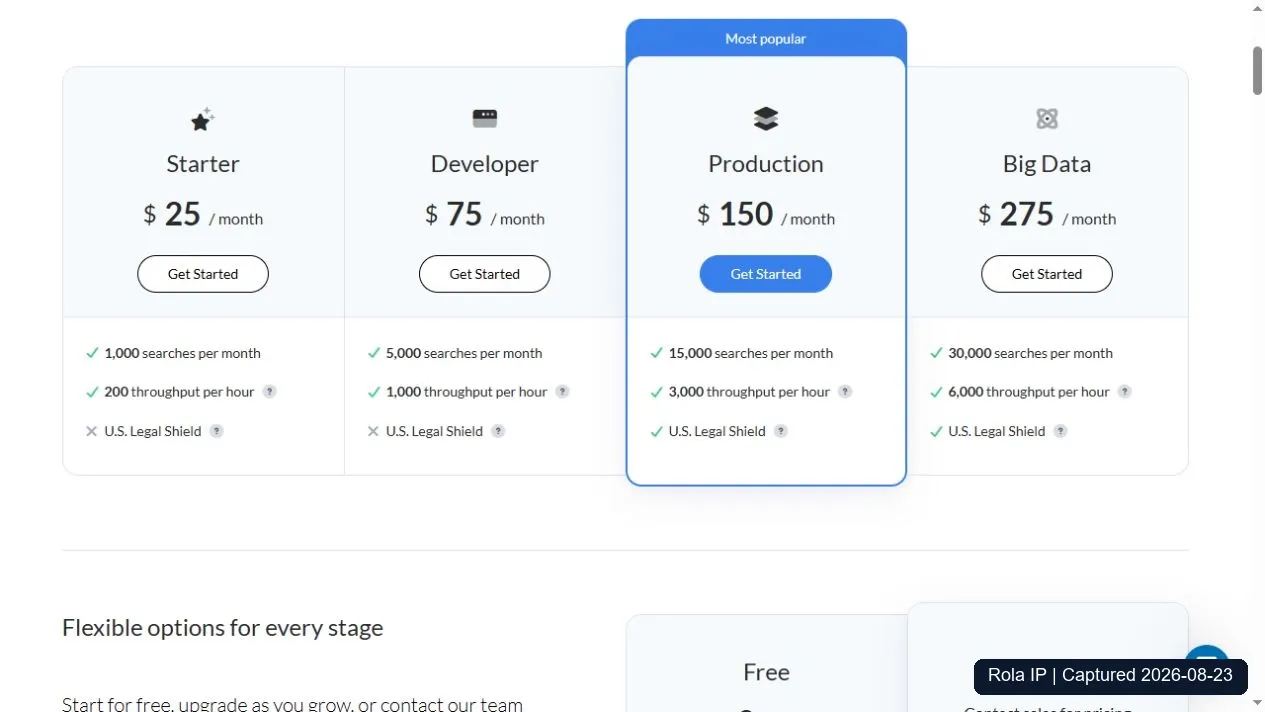
Use one workload for the price comparison: 1,000 distinct US-English desktop web queries, 10 requested organic results per query, no advanced search operators, no paid add-ons such as AI Overview expansion, and one fresh request per query. The figures are public list prices checked August 23, 2026. They exclude taxes, negotiated discounts, unused subscription capacity, and internal engineering labor. Because the services return different datasets, the table compares billing and capacity rather than result parity.
Service and mode |
Normalized provider charge per 1,000 queries |
Results included in the billing unit |
Cache treatment |
Failed or empty request billing |
Published throughput / concurrency |
Maintenance cost |
|---|---|---|---|---|---|---|
Google Custom Search JSON API, paid usage for existing customers |
$5.00; the separate 100-query daily free allowance is not netted into this model |
1 to 10 results per request; up to 100 can be paged, but each page is another request |
No public cache discount is documented in the cited pricing material; budget as if each API request is measured |
Additional terms say a successful request may be charged; the cited material does not define every failure case |
Up to 10,000 queries per day; no public concurrent-request figure is stated on the overview |
Project-specific; include mandatory migration work before January 1, 2027 |
SerpApi Starter, at full use of its included quota |
$25.00 effective rate: $25 per month / 1,000 included searches |
Result count does not change the credit; the pricing FAQ explicitly says a successful response with 100 results or an empty result set counts as one search |
Exact-parameter cache lasts one hour; cached searches are free unless no_cache=true |
Only successful searches count; cached, errored, and failed searches do not. A successful empty set still counts |
200 successful searches per hour on Starter |
Project-specific; measure adapter, schema-monitoring, and incident time |
DataForSEO Google Organic, Standard normal priority |
$0.60 |
One billed SERP includes 10 results; greater depth adds billing units |
A posted task’s results can be retrieved for 30 days without another charge. That is retrieval of the same task, not a published free cache for a new query task |
The task-post documentation says billing occurs when a task is set. The cited docs do not promise that every failed task is free; error-list and webhook-resend endpoints are free |
Up to 2,000 API calls per minute; a Standard POST can contain up to 100 tasks |
Project-specific; include queue polling or webhook operations and reconciliation |
DataForSEO Google Organic, Live mode |
$2.00 |
One billed SERP includes 10 results; greater depth adds billing units |
No cross-request free-cache treatment is stated on the cited pricing page |
Each Live request is chargeable; use the response’s cost and status fields for reconciliation |
Up to 2,000 API calls per minute; one Live task per API call |
Project-specific; simpler request flow than Standard, but still measure monitoring and schema-change work |
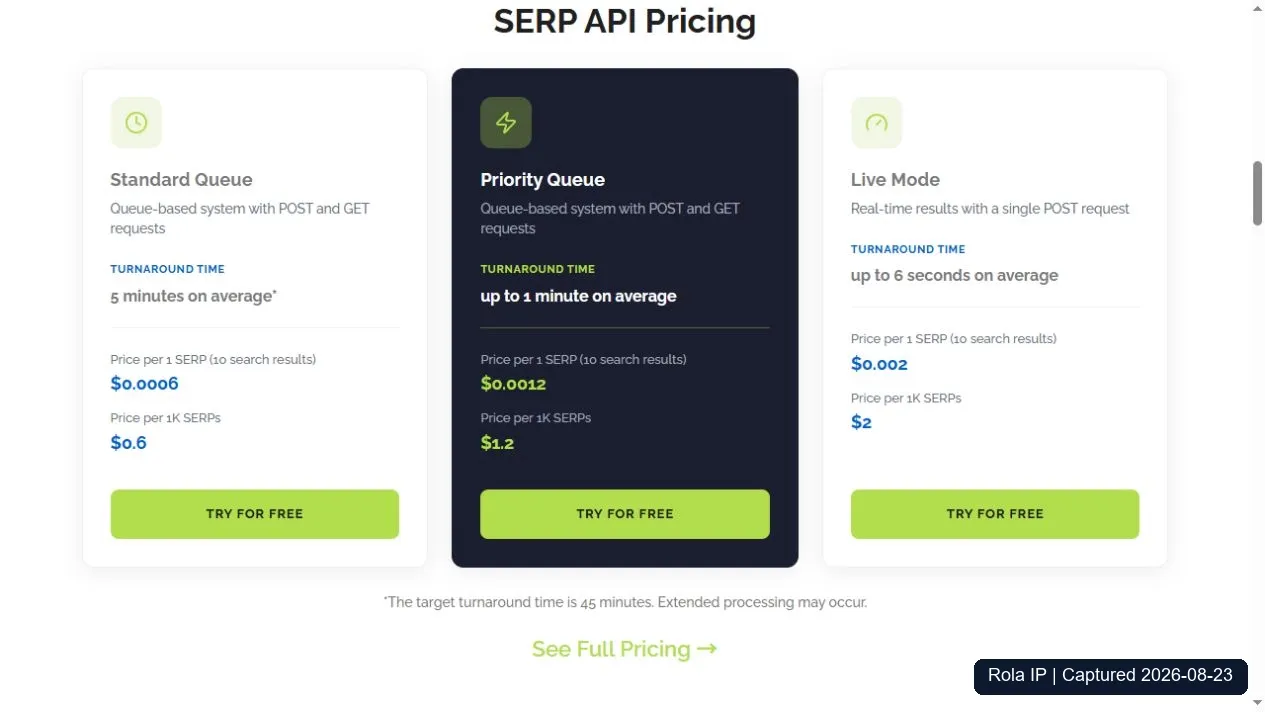
SerpApi public plans, captured August 23, 2026. The effective $25 per 1,000 figure assumes the Starter plan’s full included quota is used; unused searches raise the realized unit cost.
DataForSEO public SERP API pricing, captured August 23, 2026. The displayed prices cover 10 search results per billed SERP and differ by delivery mode.
Provider charges are only one part of cost. Use the same loaded labor rate and evaluation period for every option:
TCO per 1,000 queries = provider charges
                       + infrastructure cost per 1,000
                       + ((setup hours / lifetime queries) * 1,000 * loaded hourly rate)
                       + ((monthly operations hours / monthly queries) * 1,000 * loaded hourly rate)
Record setup hours, monthly incident and schema-maintenance hours, retry or duplicate charges, unused subscription capacity, and storage or observability costs. Maintenance varies by implementation, and the result sources are not equivalent. The available evidence therefore does not support naming a winner.
DataForSEO also lists a $50 minimum deposit, so its $0.60 or $2.00 unit charge differs from the initial cash payment. The SerpApi figure assumes full use of the subscription quota. Published capacity figures describe daily, hourly, or per-minute throughput and may not equal the number of simultaneous requests. Test concurrency under your account terms when the provider does not publish it.
Result Quality Test
A capability checklist cannot show whether a provider reliably returns usable rows. Run the same 15-query set in serp-quality-test-queries.csv against every candidate and enter row-level output in serp-quality-test-results-template.csv. The set covers evergreen technical, commercial, local, migration, and freshness-sensitive intent.
Use one controlled run:
- Finish all providers within the same 30-minute window.
- Request US-English desktop results at depth 10, with SafeSearch and spelling behavior held constant where the APIs expose those controls.
- Decide whether the test measures fresh retrieval or default cache behavior, then apply that decision consistently. Record any provider that cannot match it.
- Use a 15-second client timeout, no automatic retries, and one recorded response per provider-query pair. A retry would change both timing and billing evidence.
- Save a redacted raw response and the exact run timestamp, locale, device, requested depth, status, and billed units. Never store API keys.
- Compare organic rows only. Keep local packs, ads, answer boxes, and AI features in separate feature tables instead of mixing them into organic position.
Normalize URLs conservatively: lowercase the host, remove fragments, and remove only tracking parameters you have explicitly approved. Do not merge different paths merely because they share a domain. Then calculate these metrics:
| Metric | Formula | Interpretation |
|---|---|---|
| Field completeness | Non-empty title, url, and snippet cells / all expected cells across returned organic rows |
Measures whether the response can populate the export schema without null handling |
| Duplicate rate | Repeated canonical URLs / returned organic rows | Reveals wasted rows within the requested depth; retain original positions for audit |
| Empty-result rate | Provider-query pairs with zero valid organic rows / all attempted query pairs | Separates successful-but-empty payloads from useful result sets |
| Pairwise position difference | Mean absolute position difference for canonical URLs shared by two providers | Measures ranking agreement only on overlap; it is not an accuracy score |
| Top-10 overlap | Shared canonical URLs / unique canonical URLs across the two top-10 sets | Shows how much the two result sets agree without requiring a presumed ground truth |
Accuracy requires an independently defined ground truth. Without one, the test measures consistency and agreement. Custom Search JSON API represents a configured Programmable Search Engine, while a SERP provider may represent a consumer results page. Differences can come from the underlying product rather than a parsing defect. This package includes the protocol and templates, but no scores because API credentials were unavailable and the 15-query comparison was not run.
Choose Your Next Step
The next step depends on your current setup.
Existing Google Custom Search JSON API customer
Start the migration. Inventory every cx, query parameter, output field, quota, and downstream consumer. Select a supported replacement, map its schema, run both systems through the 15-query quality test, reconcile cost and failure semantics, and leave enough time for a rollback before January 1, 2027.
New full-web SERP project
Test a supported SERP API. Shortlist providers whose terms permit your use, then apply the Cost and Scale Model and Result Quality Test without changing the workload. Move forward only when field completeness, duplicate rate, empty-result rate, position agreement, throughput, and total cost meet written acceptance thresholds.
Search across your own site or a limited domain set
Evaluate site search. Define indexing, freshness, ranking, access control, analytics, and domain-count requirements. Google currently points to Vertex AI Search for up to 50 domains. Compare it with other site-search products before paying for consumer-SERP representation that the project does not need.
Where Rola IP Fits and Where It Does Not
A proxy changes the network route; it does not grant authorization to automate Google Search. For that reason, this article does not connect Rola IP to google.com/search, and it does not position residential or rotating IPs as a response to a Google block.
Rola IP can be relevant in a separate authorized workflow, such as testing a public site you own from a selected region or routing an approved data-collection client. Its proxy-network guide documents rotating residential, datacenter, and mobile networks. The Python integration reference shows client wiring patterns. Country targeting is available across those rotating networks; state and city controls are limited to rotating residential according to the current documentation.
Those capabilities are conditional technical options, not access guarantees. Target rules, authorization, local network conditions, location inventory, and third-party geolocation can all affect an outcome. If your next project is an authorized, target-neutral proxy test, use the residential proxy setup guide to choose a session model and verify the exit before increasing volume.
Conclusion
A production workflow starts by defining the dataset and choosing a supported source. Validate each response and keep the request context with the exported rows. Existing Custom Search JSON API customers can use the Python workflow in this package while planning migration. New projects should use a currently supported site-search or full-web-search service.
If direct Search HTML is blocked or the rules prohibit automation, stop that method and move to an approved API or licensed data source. CAPTCHA handling and proxy rotation should not be used to keep the same request going.