
Web Scraping With Ruby on Rails: 5 Working Examples

Aug 25, 2026 · Guides · 22 min read
TL;DR
Web scraping Ruby on Rails shouldn’t send requests directly from the Controller. The correct layering is: a Service Object handles fetching and parsing, Active Job handles asynchronous execution and limited retries, Active Record handles unique keys, idempotent writes, and history fields, and the Controller only creates the task or displays the result. For static HTML, prefer Net::HTTP/Faraday + Nokogiri; for dynamic pages, check for an authorized JSON/XHR endpoint first, then consider Ferrum, Selenium, or Capybara.
| Page or Task | First-Choice Tool | Where It Lives in Rails |
|---|---|---|
| Static HTML, known URLs | Net::HTTP/Faraday + Nokogiri | app/services |
| Forms, cookies, ordinary sessions | Mechanize | Service + Job |
| JavaScript rendering | Ferrum or Selenium/Capybara | A dedicated browser worker |
| Bulk, scheduled collection | Active Job + Solid Queue/Sidekiq | app/jobs |
| Idempotent writes and history | Active Record + a unique index | Model / migration |
| Authorized region targeting or a fixed exit | Rola IP | Network client configuration layer |
What Is Web Scraping Ruby on Rails?
Web scraping with Ruby on Rails is the complete workflow — fetching pages, structured parsing, background scheduling, database persistence, and result display — carried out inside a Rails application. Ruby provides HTTP, HTML parsing, and browser automation capability; Rails adds Active Job, Active Record, credential management, logging, monitoring, and an admin interface.
If you only need to scrape a single page and export a CSV once, a plain Ruby script is usually lighter. Rails delivers real engineering value when the task needs to run on a schedule, maintain state, deduplicate, record price history, or be viewed by a back-office team or called by other parts of the business.
What’s the Difference Between Ruby Scraping and Rails Scraping?
| Dimension | Plain Ruby Script | Ruby on Rails Application |
|---|---|---|
| Scope | One-off, a small number of URLs, run from the command line | Ongoing tasks, a database, an admin backend, team collaboration |
| Code entry point | scraper.rb | Service Object + Active Job |
| Data storage | CSV/JSON | Active Record + CSV/object storage |
| Scheduling | cron or manual | Solid Queue, Sidekiq, or a scheduler |
| Failure recovery | Maintain state yourself | Job retries, status fields, unique keys, and logging |
| Deployment cost | Low | Higher, but easier to maintain long-term |
What’s the Complete Workflow for Ruby on Rails Web Scraping?
The full workflow is to define the data contract first, then identify the data source, and only then choose the tool. Follow this order; if any step can’t be verified, don’t let the task continue writing to the production database.
- Define the field contract: decide on the URL, SKU, name, price, currency, availability, region, fetch time, and which fields may be null.
- Check the access boundary: confirm authorization, terms of service, robots.txt, login requirements, request frequency, and data-retention rules.
- Identify the data source: check raw HTML, JSON-LD, embedded page JSON, and Fetch/XHR in that order, and only consider the final browser DOM last.
- Choose the fetching tool: use Net::HTTP/Faraday for static pages; use Mechanize for an ordinary form session; use Ferrum or Selenium when JavaScript must execute.
- Parse and validate: use Nokogiri’s CSS/XPath to parse, and validate the root node, field types, currency, region, and template version.
- Persist and schedule: the Service Object returns structured data, Active Record writes it idempotently, and Active Job controls the queue, retries, and timeouts.
- Monitor and accept: track network success rate and valid-data rate separately, and keep redacted response samples for regression testing.
Key judgment | Decide where the data lives before deciding which gem to use. Launching a browser right away often hides the real data source, adding resource consumption, wait conditions, and deployment failure points.
Is Ruby on Rails Web Scraping Legal?
Whether it’s compliant depends on authorization, the site’s terms, the type of data, request frequency, and applicable law — not on whether you use Ruby or Rails. Being publicly visible doesn’t mean you can freely collect or republish it. robots.txt is a technical declaration, not full legal permission.
- Prefer a site’s public API, data export, or an explicitly authorized page.
- Don’t bypass logins, paywalls, CAPTCHAs, or other access controls; pause the task when you receive an explicit denial.
- Limit concurrency per domain, support
Retry-After, caching, and incremental updates to reduce repeated load. - Avoid collecting personal data unrelated to the business purpose; keep records of source, fetch time, and a deletion process.
- Seek professional legal advice when personal data, copyrighted content, or large-scale republishing is involved.
How Do You Choose a Ruby Web Scraping Tool?
| Need | Recommended Gem/Component | Deciding Factor |
|---|---|---|
| HTTP requests and middleware | Faraday | Need timeouts, retries, adapters, and logging |
| Minimal dependencies | Net::HTTP | Ruby’s standard library — fits controlled requests |
| HTML/XML parsing | Nokogiri | CSS/XPath, fault-tolerant parsing, and mature performance |
| Forms and cookies | Mechanize | Doesn’t execute JavaScript, but maintains an ordinary session |
| Chrome DevTools | Ferrum | Need JS rendering and want something lighter |
| Browser workflow | Selenium + Capybara | Need clicks, explicit waits, screenshots, or a test DSL |
| Task queue | Active Job + Solid Queue/Sidekiq | Async execution, retries, queue isolation |
How Should You Choose Between Faraday, Net::HTTP, and HTTParty?
Rails projects usually default to Faraday, since it organizes timeouts, retries, logging, proxies, and adapters into a testable connection object. Net::HTTP suits simple, minimal-dependency requests. HTTParty has concise syntax, but complex middleware and multi-backend adapter needs are better served by Faraday. All three should still explicitly set timeouts and check status codes.
| HTTP Client | Strengths | Limitations | Best Fit |
|---|---|---|---|
| Net::HTTP | Ruby standard library, no extra gem | Lower-level interface; retries and middleware need to be built yourself | Simple, controlled, dependency-sensitive requests |
| Faraday | Clear middleware, adapters, logging, and test interfaces | Requires an extra gem; more configuration | A long-term-maintained Rails Service |
| HTTParty | Declarative API, quick to pick up | Less scalable than Faraday for complex connection strategies | Small API/HTML clients |
# Gemfile
gem "faraday"
gem "faraday-retry"

connection = Faraday.new(url: base_url) do |f|
  f.request :retry,
    max: 2,
    interval: 0.5,
    retry_statuses: [429, 500, 502, 503, 504]
  f.options.open_timeout = 5
  f.options.timeout = 20
end

response = connection.get(path)
raise "HTTP #{response.status}" unless response.success?
html = response.body
Retries should only apply to connection failures, timeouts, and clearly temporary responses. A 401, 403, a CAPTCHA, a broken selector, or a failed field validation needs to be handled separately — don’t put those into an undifferentiated retry loop.
Faraday’s connection, middleware, and adapter usage are covered in the official Faraday documentation.
What’s the Difference Between CSS Selectors and XPath in Nokogiri?
CSS selectors are closer to front-end styling syntax, and fit HTML with clear class names, attributes, and hierarchy. XPath is better suited to locating content by text, ancestor/sibling relationships, or complex structure. Stability depends on whether the selector expresses business meaning — not on the syntax itself.
| Need | CSS Example | XPath Example |
|---|---|---|
| Product root node | main.product[data-sku] |
//main[contains(@class,"product")][@data-sku] |
| Price attribute | .price[data-currency] |
//*[contains(@class,"price")][@data-currency] |
| Locate by label text | Usually needs further filtering in Ruby | //dt[normalize-space()="SKU"]/following-sibling::dd[1] |
doc = Nokogiri::HTML5(html)

doc.css("main.product").each do |root|
  name = root.at_css("h1.product-title")&.text&.strip
  price = root.at_xpath('.//*[contains(@class,"price")]')&.text&.strip
  raise "missing required product fields" if name.to_s.empty? || price.to_s.empty?
end
Avoid relying on auto-generated long class names, element indexes, or full DOM paths. Prefer data-*, itemprop, stable IDs, and business-field combinations, and keep a fixture test for each page template.
When Should You Scrape JSON, JSON-LD, or XHR Instead of HTML?
When an authorized structured response already contains the fields you need, parsing JSON is usually more stable and resource-efficient than reading the browser DOM. Check in this order: application/ld+json in the page, then an embedded state object, then Fetch/XHR in DevTools Network — don’t guess at undocumented endpoints or bypass authentication.
require "json"
require "nokogiri"

doc = Nokogiri::HTML5(html)
products = doc.css('script[type="application/ld+json"]').filter_map do |node|
  data = JSON.parse(node.text)
  items = data.is_a?(Array) ? data : [data]
  items.find { |item| item["@type"] == "Product" }
rescue JSON::ParserError
  nil
end

product = products.first
offer = product&.fetch("offers", nil)
price = offer.is_a?(Hash) ? offer["price"] : nil
- Cross-check against the price visible on the page to confirm the JSON isn’t a stale cache, a default region, or a tax-exclusive price.
- Log the Content-Type, schema version, and field path; an API returning HTTP 200 can still carry a business-level error.
- Prefer a site’s public API; if an endpoint requires a token, login, or signature, only call it within an explicitly authorized scope.
How Do You Use Mechanize for Forms, Cookies, and Ordinary Sessions?
When a page depends on ordinary HTML forms, cookies, and redirects but doesn’t need JavaScript, Mechanize is usually lighter than a full browser. It can maintain a cookie jar, submit forms, and follow links. If a CAPTCHA, complex front-end components, or WebAuthn are part of the flow, don’t treat Mechanize as a browser substitute.
# Gemfile
gem "mechanize"

agent = Mechanize.new
agent.user_agent_alias = "Mac Safari"
agent.open_timeout = 5
agent.read_timeout = 20

page = agent.get(authorized_search_url)
form = page.form_with(action: /search/)
raise "search form not found" unless form

form.field_with(name: "q").value = "mechanical keyboard"
results_page = form.submit
rows = results_page.search(".result-card").map do |card|
  { name: card.at_css(".title")&.text&.strip,
    url: card.at_css("a")&.[]("href") }
end
Session boundary | Don’t use form automation to bypass a login, a CAPTCHA, or access control. Treat account sessions, cookies, and personal data as sensitive credentials, and log only the necessary redacted diagnostic information.
Forms, cookie jar, and page-navigation interfaces are covered in the official Mechanize documentation.
Environment and Dependency Versions
This article’s static scraping example was actually run on macOS 14.6 (Apple Silicon) with Ruby 2.6.10 and Nokogiri 1.13.8. For a production project, use a still-supported Ruby 3.2+ and a current Rails version, and pin dependencies according to your project’s lockfile.
Hands-On 1: Scrape a Static Product Page with Nokogiri
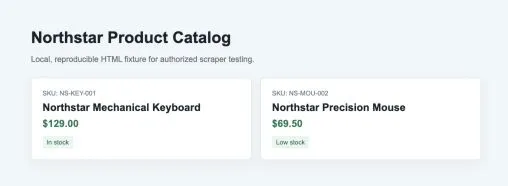
This exercise uses a local product test page to avoid depending on a third-party site that could change. The page contains 2 product cards, each with a SKU, name, price, currency, and availability. The test server only listens on 127.0.0.1.
gem install nokogiri
cd ruby_rails_scraping_test/public
python3 -m http.server 8877 --bind 127.0.0.1
Step 1: Build a Reusable ProductScraper
The Service Object does exactly one thing: turn a URL into a validated array of ProductRow. It explicitly sets connect and read timeouts, checks the HTTP status, parses CSS selectors with Nokogiri, and raises an error when there are no valid products. Monetary values use BigDecimal to avoid Float precision issues.
# frozen_string_literal: true

require "bigdecimal"
require "csv"
require "net/http"
require "nokogiri"
require "uri"

ProductRow = Struct.new(
  :source_url, :sku, :name, :price, :currency, :availability,
  keyword_init: true
)

class ProductScraper
  USER_AGENT = "NorthstarResearch/1.0 (+authorized-local-test)"

  def initialize(open_timeout: 5, read_timeout: 15)
    @open_timeout = open_timeout
    @read_timeout = read_timeout
  end

  def call(url)
    uri = URI.parse(url)
    response = fetch(uri)
    raise "HTTP #{response.code}" unless response.is_a?(Net::HTTPSuccess)

    parse(response.body, uri.to_s)
  end

  private

  def fetch(uri)
    request = Net::HTTP::Get.new(uri)
    request["User-Agent"] = USER_AGENT
    request["Accept"] = "text/html,application/xhtml+xml"

    Net::HTTP.start(
      uri.host,
      uri.port,
      use_ssl: uri.scheme == "https",
      open_timeout: @open_timeout,
      read_timeout: @read_timeout
    ) { |http| http.request(request) }
  end

  def parse(html, source_url)
    doc = Nokogiri::HTML5(html)
    rows = doc.css("article.product").map do |node|
      price_node = node.at_css(".price")
      ProductRow.new(
        source_url: source_url,
        sku: node["data-sku"],
        name: text(node, ".name"),
        price: decimal(text(node, ".price")),
        currency: price_node&.[]("data-currency"),
        availability: text(node, ".stock")
      )
    end
    raise "No valid product records found" if rows.empty?

    rows
  end

  def text(node, selector)
    node.at_css(selector)&.text&.strip
  end

  def decimal(value)
    normalized = value.to_s.gsub(/[^0-9.\-]/, "")
    normalized.empty? ? nil : BigDecimal(normalized)
  end
end

if $PROGRAM_NAME == __FILE__
  url = ARGV.fetch(0, "http://127.0.0.1:8877/products.html")
  rows = ProductScraper.new.call(url)
  CSV.open("products.csv", "w", write_headers: true,
    headers: ProductRow.members) do |csv|
    rows.each do |row|
      values = row.to_h.merge(price: row.price&.to_s("F"))
      csv << ProductRow.members.map { |field| values[field] }
    end
  end
  rows.each { |row| puts "OK #{row.sku} | #{row.name} | #{row.currency} #{row.price.to_s('F')} | #{row.availability}" }
  puts "WROTE #{rows.length} records to products.csv"
end
Net::HTTP’s request, timeout, and proxy classes are covered in the official Ruby Net::HTTP documentation; CSS/XPath parsing is covered in the official Nokogiri tutorial.
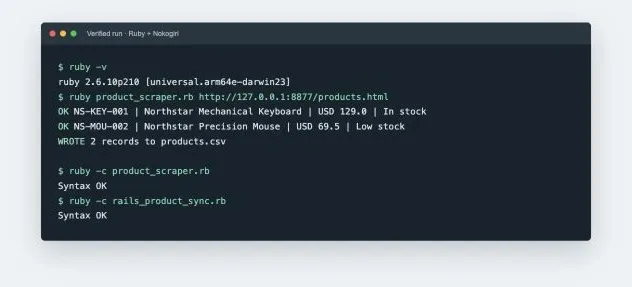
Step 2: Run the Script and Check the Fields
ruby -c product_scraper.rb
ruby product_scraper.rb http://127.0.0.1:8877/products.html
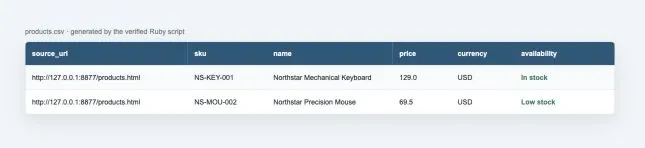
Step 3: Export CSV Without Losing Data Types
CSV suits sample checks and one-off deliverables, but when writing to a database you should keep Decimal, timestamp, and unique-key types intact. Explicitly convert BigDecimal to a plain decimal string before writing CSV; raise an error when rows is empty, to avoid producing a “successful” file that only has headers.
Hands-On 2: Plug the Scraping Logic into a Rails Service Object
In Rails, don’t scrape a page directly inside a Controller, a Model callback, or a View. The Controller can call ScrapeProductCatalogJob.perform_later(url), while the actual networking and parsing logic lives in the Service Object. This lets you test the parser in isolation, and reuse the same service from the command line, a Job, and the admin backend.
# app/services/product_catalog_sync.rb
class ProductCatalogSync
  def initialize(scraper: ProductScraper.new)
    @scraper = scraper
  end

  def call(url)
    now = Time.current
    rows = @scraper.call(url).map do |row|
      row.to_h.merge(
        price: row.price&.to_s("F"),
        scraped_at: now, created_at: now, updated_at: now
      )
    end

    Product.upsert_all(
      rows,
      unique_by: :index_products_on_source_url_and_sku
    )
  end
end
How Do You Save Scraping Results Idempotently with Active Record?
The key to idempotent writes is a database unique index — not a select-then-insert pattern. After creating a unique index on source_url + sku, upsert_all can update the same product on a repeated scrape, avoiding duplicate rows from concurrent Jobs. Price history should live in a separate table — don’t overwrite and lose the change trail.
class CreateProducts < ActiveRecord::Migration[7.1]
  def change
    create_table :products do |t|
      t.string :source_url, null: false
      t.string :sku, null: false
      t.string :name
      t.decimal :price, precision: 12, scale: 2
      t.string :currency, limit: 3
      t.string :availability
      t.datetime :scraped_at, null: false
      t.timestamps
    end

    add_index :products, [:source_url, :sku],
      unique: true,
      name: :index_products_on_source_url_and_sku
  end
end
The parameters and behavior of bulk writes are covered in the Rails upsert_all API.
How Do You Schedule and Retry Scraping Jobs with Active Job?
The Job is responsible for “when to run and what to do on failure” — not for CSS selectors. Only retry connection timeouts, read timeouts, and clearly temporary errors; a broken parser, a 401/403, or an authorization problem shouldn’t be retried indefinitely. Different target domains should use separate queues or rate limiters.
class ScrapeProductCatalogJob < ApplicationJob
  queue_as :scraping

  retry_on Net::OpenTimeout, Net::ReadTimeout,
    wait: :polynomially_longer, attempts: 3

  def perform(url)
    ProductCatalogSync.new.call(url)
  end
end

# Enqueue it, instead of scraping synchronously inside a web request
ScrapeProductCatalogJob.perform_later(catalog_url)
Active Job’s queues, retries, and error handling are covered in the Rails Active Job Guide.
How Do You Scrape JavaScript-Rendered Pages?
First search View Source for the target field, then check DevTools Network’s Fetch/XHR. Nokogiri can only parse the HTML it receives — it doesn’t execute JavaScript. If an authorized JSON response already contains the data, requesting it directly is usually more stable. Only launch a browser when the target field genuinely requires JavaScript, scrolling, or a click to appear.
Hands-On 3: Scrape Delayed-Rendering Products with Ruby + Headless Chrome
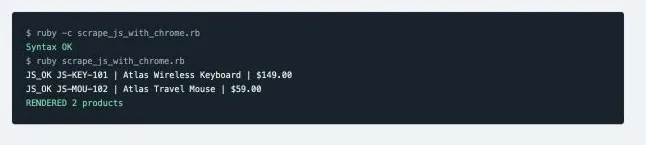
The test page initially only returns Loading products...; JavaScript inserts two article.product elements 700 ms later. The script below launches local Chrome from Ruby, gives the page 2.5 seconds of virtual time, reads the DOM after execution, and hands it to Nokogiri for parsing. It doesn’t depend on Ferrum, and clearly demonstrates the difference between the raw HTML and the final DOM.
# frozen_string_literal: true

require "nokogiri"
require "open3"

url = ARGV.fetch(0, "http://127.0.0.1:8877/dynamic-products.html")
chrome = ENV.fetch(
  "CHROME_BIN",
  "/Applications/Google Chrome.app/Contents/MacOS/Google Chrome"
)

stdout, stderr, status = Open3.capture3(
  chrome,
  "--headless=new",
  "--disable-gpu",
  "--virtual-time-budget=2500",
  "--dump-dom",
  url
)
raise "Chrome failed: #{stderr.lines.last}" unless status.success?

doc = Nokogiri::HTML5(stdout)
rows = doc.css("article.product").map do |node|
  {
    sku: node["data-sku"],
    name: node.at_css(".name")&.text&.strip,
    price: node.at_css(".price")&.text&.strip
  }
end
raise "JavaScript content did not render" if rows.empty?

rows.each { |row| puts "JS_OK #{row[:sku]} | #{row[:name]} | #{row[:price]}" }
puts "RENDERED #{rows.length} products"
ruby -c scrape_js_with_chrome.rb
ruby scrape_js_with_chrome.rb http://127.0.0.1:8877/dynamic-products.html
How Do You Wrap Dynamic Scraping into a Rails Ferrum Service?
A production Rails project can use Ferrum to control the Chrome DevTools Protocol directly. The Service should wait for a specific element, cap the per-page timeout, return a plain Hash, and always close the browser in ensure. Browser tasks need a dedicated queue — they shouldn’t share the same high-concurrency configuration as lightweight HTTP Jobs.
# Gemfile (recommended: pin versions in a supported Ruby 3.2+ project)
gem "ferrum"

class DynamicProductScraper
  def call(url)
    browser = Ferrum::Browser.new(
      timeout: 15,
      process_timeout: 10,
      browser_options: { "no-sandbox": nil }
    )
    browser.go_to(url)
    browser.at_css("article.product", wait: 10)

    rows = browser.css("article.product").map do |node|
      {
        sku: node.attribute("data-sku"),
        name: node.at_css(".name")&.text,
        price_text: node.at_css(".price")&.text
      }
    end
    raise "dynamic product list is empty" if rows.empty?
    rows
  ensure
    browser&.quit
  end
end
How Should You Choose Between Ferrum, Selenium, Capybara, and Watir?
Ferrum uses the Chrome DevTools Protocol directly, and fits lightweight Chrome automation in a Ruby project. Selenium suits multi-browser support and a mature WebDriver ecosystem. Capybara is a workflow DSL that typically runs on top of a driver like Selenium. Watir provides a more Ruby-like interface for browser element interaction. Don’t default to a browser just because a tool has more features.
| Tool | Core Positioning | Strengths | Main Cost |
|---|---|---|---|
| Ferrum | A Chrome DevTools client | Lighter, direct control over the network and page | Chrome/Chromium-centric |
| Selenium | Cross-browser WebDriver | Mature ecosystem, explicit waits, broad compatibility | Heavier driver, resource, and deployment footprint |
| Capybara | A browser workflow DSL | Clear selector and interaction semantics, swappable drivers | Not an independent browser engine |
| Watir | A Ruby-style browser API | Intuitive element location and interaction | Still depends on a browser/WebDriver underneath |
- Only need HTML: go back to Faraday/Net::HTTP + Nokogiri.
- Need a Chrome worker plus network inspection: evaluate Ferrum first.
- Need Chrome, Firefox, Edge, or reuse of an existing test infrastructure: evaluate Selenium.
- The flow involves search, clicks, popups, and screenshots, and you want a test-style DSL: Capybara is clearer.
- Wait for a specific state rather than a fixed
sleep; on failure, save the URL, page type, redacted HTML, and a screenshot.
What’s the Difference Between Scraping One Page and Crawling Multiple Pages?
A scraper extracts data from one known page; a crawler discovers the next batch of URLs from a page and decides which URLs should enter the queue. When you already know all the URLs, batch-scraping directly is enough; only when URLs need to be discovered incrementally — through pagination, category links, or a cursor — do you need a crawler frontier, URL normalization, and persistent deduplication.
| Page Situation | URL Source | Stop Condition | Core Dedup Key |
|---|---|---|---|
| A known list of product URLs | Database/CSV/API | The queue is empty or the deadline is reached | Canonical URL + business SKU |
| Traditional page numbers/Next | a[rel=next] or page-number links |
No next, or max_pages reached |
Seen page URL + SKU |
| Cursor-based API | next_cursor in the response |
Cursor is empty/repeats | Cursor + business ID |
| Infinite scroll | Scroll triggers DOM/XHR | N consecutive rounds with no new items, or an end flag | Business ID, not just the DOM count |
| Discovering in-site links | Page href |
Queue empty, path rules, or budget reached | Canonical URL |
Hands-On 4: Crawl Traditional Pagination with Ruby and Deduplicate Across Pages
The local test directory contains 3 catalog pages. Page 1’s links carry a ref and a fragment; page 2’s carry a utm_source; product PG-002 appears again, duplicated across the first two pages. The full script normalizes URLs, restricts to the same host, follows rel=next, sets MAX_PAGES, and separately maintains seen_urls and seen_skus.
# frozen_string_literal: true

require "net/http"
require "nokogiri"
require "set"
require "uri"

START_URL = ARGV.fetch(0, "http://127.0.0.1:8877/catalog-1.html")
MAX_PAGES = Integer(ENV.fetch("MAX_PAGES", "10"))
TRACKING_KEYS = %w[utm_source utm_medium utm_campaign ref].freeze

def canonicalize(value, base)
  uri = URI.join(base, value)
  uri.fragment = nil
  pairs = URI.decode_www_form(uri.query.to_s)
  pairs.reject! { |key, _| TRACKING_KEYS.include?(key) }
  uri.query = pairs.empty? ? nil : URI.encode_www_form(pairs.sort)
  uri.normalize.to_s
end

def fetch(url)
  uri = URI(url)
  response = Net::HTTP.start(
    uri.host, uri.port, use_ssl: uri.scheme == "https",
    open_timeout: 5, read_timeout: 15
  ) { |http| http.get(uri.request_uri, { "User-Agent" => "AuthorizedCatalogCrawler/1.0" }) }
  raise "HTTP #{response.code} for #{url}" unless response.is_a?(Net::HTTPSuccess)
  response.body
end

start = canonicalize(START_URL, START_URL)
allowed_host = URI(start).host
queue = [start]
seen_urls = Set.new
seen_skus = Set.new
products = []

until queue.empty? || seen_urls.length >= MAX_PAGES
  url = queue.shift
  next if seen_urls.include?(url)
  raise "crawler left allowed host" unless URI(url).host == allowed_host

  seen_urls << url
  doc = Nokogiri::HTML5(fetch(url))
  puts "PAGE #{seen_urls.length} #{url}"

  doc.css("article.product").each do |node|
    sku = node["data-sku"]
    next if sku.to_s.empty? || seen_skus.include?(sku)

    seen_skus << sku
    products << {
      sku: sku,
      name: node.at_css(".name")&.text&.strip,
      price: node.at_css(".price")&.text&.strip,
      source_url: url
    }
    puts "  PRODUCT #{sku} #{products.last[:name]} #{products.last[:price]}"
  end

  next_link = doc.at_css('a[rel="next"]')&.[]("href")
  next unless next_link

  next_url = canonicalize(next_link, url)
  queue << next_url if URI(next_url).host == allowed_host && !seen_urls.include?(next_url)
end

puts "DONE pages=#{seen_urls.length} unique_products=#{products.length}"
ruby -c crawl_catalog.rb
MAX_PAGES=10 ruby crawl_catalog.rb http://127.0.0.1:8877/catalog-1.html
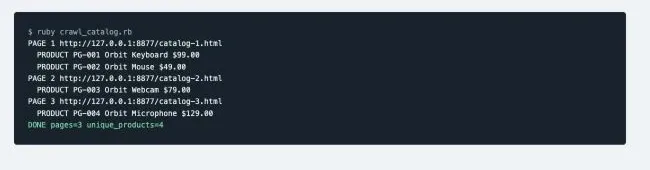
The actual result is 3 pages and 4 unique products. When PG-002 reappears on page 2, it isn’t written a second time. ref, utm_source, and the fragment are stripped, but the code doesn’t casually remove parameters that could change region, sort order, or product variant.
Hands-On 5: Scrape Infinite Scroll with Ruby and Deduplicate by SKU
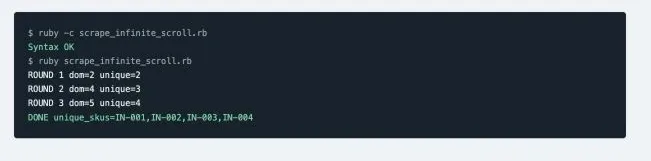
Infinite scroll can’t be handled with a single scrollTo call, and you can’t rely only on comparing page height. The test page appends products in three batches, with IN-002 appearing twice. The script reads the current cards each round, adds their SKUs to a Set, scrolls to the bottom, and waits for either “more DOM cards” or an “end” flag; it also stops after two consecutive rounds with no new SKU.
# frozen_string_literal: true

require "selenium-webdriver"
require "set"

url = ARGV.fetch(0, "http://127.0.0.1:8877/infinite-products.html")
driver_path = ENV.fetch(
  "CHROMEDRIVER_BIN",
  File.expand_path("~/.cache/selenium/chromedriver/mac-arm64/151.0.7922.138/chromedriver")
)

options = Selenium::WebDriver::Chrome::Options.new
options.add_argument("--headless=new")
options.add_argument("--window-size=1280,900")
service = Selenium::WebDriver::Service.chrome(path: driver_path)
driver = Selenium::WebDriver.for(:chrome, options: options, service: service)

begin
  driver.navigate.to(url)
  seen = Set.new
  stable_rounds = 0

  10.times do |round|
    cards = driver.find_elements(css: "article.product")
    before = seen.length
    cards.each { |card| seen << card.attribute("data-sku") }
    puts "ROUND #{round + 1} dom=#{cards.length} unique=#{seen.length}"

    stable_rounds = seen.length == before ? stable_rounds + 1 : 0
    ended = driver.find_element(css: "#sentinel").text == "End of catalog"
    break if stable_rounds >= 2 || ended

    driver.execute_script("window.scrollTo(0, document.body.scrollHeight)")
    Selenium::WebDriver::Wait.new(timeout: 3).until do
      driver.find_elements(css: "article.product").length > cards.length ||
        driver.find_element(css: "#sentinel").text == "End of catalog"
    end
  end

  raise "no products loaded" if seen.empty?
  puts "DONE unique_skus=#{seen.to_a.sort.join(',')}"
ensure
  driver.quit
end
gem install selenium-webdriver
export CHROMEDRIVER_BIN=/path/to/chromedriver
ruby -c scrape_infinite_scroll.rb
ruby scrape_infinite_scroll.rb http://127.0.0.1:8877/infinite-products.html
| Wrong Approach | Why It Fails | Correct Judgment |
|---|---|---|
A fixed sleep before scraping once |
Network and rendering speed are inconsistent | Explicitly wait for an element count, an end flag, or XHR completion |
| Comparing only DOM height | Virtual lists may reuse nodes, and height may not change | Compare new business IDs/SKUs and consecutive stable rounds |
| Deduplicating only in memory | State is lost after a Job restart or across multiple workers | Persist with a Redis/database unique index |
| Scrolling infinitely until an exception | The page may cycle back to the same batch | A triple budget: max_rounds, max_records, deadline |
How Do You Split Multi-Page Discovery and Product Parsing into Jobs in Rails?
A production system should separate “discovering URLs” from “parsing products.” CatalogDiscoveryJob reads pagination at low concurrency and writes normalized URLs to a persistent queue; ProductPageJob handles only a single page and writes idempotently through a database unique index. This way, a single product’s parsing failure doesn’t force the whole catalog to rerun from page one.
class CatalogDiscoveryJob < ApplicationJob
  queue_as :crawler_discovery

  def perform(catalog_url, run_id:)
    result = CatalogCrawler.new.call(catalog_url, max_pages: 20)
    result.product_urls.each do |url|
      ScrapeProductPageJob.perform_later(url, run_id: run_id)
    end
    self.class.perform_later(result.next_url, run_id: run_id) if result.next_url
  end
end

class ScrapeProductPageJob < ApplicationJob
  queue_as :product_pages

  def perform(url, run_id:)
    row = ProductPageScraper.new.call(url)
    Product.upsert_all(
      [row.merge(run_id: run_id, updated_at: Time.current)],
      unique_by: :index_products_on_source_url_and_sku
    )
  end
end
- Seen URLs must be persisted, or the Job will rediscover the same page after a restart.
- Rate-limit the discovery queue and the browser queue separately; share a rate budget for the same target domain.
- Store
parent_url,depth,discovered_at, andrun_idto make it easier to trace a URL’s origin. - Set
max_pages,max_depth,max_records, and adeadlinefor each run; stop as soon as any budget is reached.
How Do You Implement Concurrency, Batching, and Domain Rate-Limiting in Ruby Scraping?
Concurrency suits independent HTTP requests that are waiting on network I/O — it doesn’t mean a browser task should scale to the same numbers. MRI Ruby’s threads can advance other requests while one is waiting on the network, but CPU-intensive parsing is still bound by the GVL. A more reliable approach in Rails is to let the queue control concurrency, and set a separate rate limit for each target domain.
require "thread"

queue = Queue.new
urls.each { |url| queue << url }

workers = Array.new([4, urls.length].min) do
  Thread.new do
    loop do
      url = queue.pop(true)
      ProductScraper.new.call(url)
      sleep 0.5 # Example only: use a domain-level rate limiter in production
    rescue ThreadError
      break
    end
  end
end
workers.each(&:join)
| Task Type | Starting Concurrency Strategy | Must Observe Before Scaling |
|---|---|---|
| Ordinary HTTP | 1–4 workers per domain, start with a small batch | Valid-data rate, 429s, P95, response size |
| Browser tasks | A dedicated queue, usually starting with 1–2 workers | Memory, CPU, crash rate, wait timeouts |
| Database writes | Bulk upsert, cap the batch size | Lock waits, index hits, transaction time |
When using exponential backoff, add random jitter, respect Retry-After, and set max_pages, max_records, and a deadline for a single run. Scale up based on valid records per minute and total cost — not raw request count alone.
How Do You Test, Debug, and Cache a Ruby on Rails Scraper?
The most important thing to test in a scraper is “can a saved response sample reliably parse into the field contract.” Keep network testing and parser testing separate: during development, cache the authorized response first, and let the parser’s unit tests read from a fixture; a smaller set of end-to-end tests then verifies the real network, queue, and database. This way you can still reproduce parsing issues when the page is briefly unavailable.
# spec/services/product_scraper_spec.rb
RSpec.describe ProductScraper do
  it "parses a saved product fixture" do
    html = File.read("spec/fixtures/product_catalog.html")
    rows = described_class.new.send(
      :parse, html, "https://example.test/catalog"
    )

    expect(rows.first).to have_attributes(
      sku: "NS-KEY-001",
      currency: "USD",
      price: BigDecimal("129.00")
    )
  end
end
- Redact fixtures and record
fetched_at, the template name, and the parser version — don’t keep unrelated personal data long-term. - Build failure tests for a missing root node, a challenge page, a soft 404, a currency change, and malformed JSON.
- Cache successful responses in development and replay them offline when changing selectors; production caching must follow your data-retention rules.
- Log
run_id,domain,status,elapsed_ms,template, andvalidation_error— never output cookies, auth headers, or a proxy password. - Monitor
valid_record_rate,required_field_missing_rate, andduplicate_rate, in addition to HTTP success rate.
How Should You Choose Between Ruby, Python, and JavaScript Scraping Stacks?
When a team already has a Rails application, a task queue, and Active Record models, Ruby reduces cross-language operational overhead. Python has a broader ecosystem for data processing, machine learning, and scraping frameworks. JavaScript/TypeScript is closest to the browser runtime and front-end debugging. The choice should be based on team capability and the runtime model — not language popularity.
| Stack | Where It Has an Edge | Trade-off to Consider |
|---|---|---|
| Ruby / Rails | An existing Rails product, background tasks, database workflows | Fewer dedicated scraping frameworks and less of a data-science ecosystem |
| Python | Scrapy, data analysis, ETL, connecting to machine learning | If the main system is Rails, this adds a service boundary and deployment overhead |
| JavaScript/TypeScript | Browser automation, front-end state, and network debugging | CPU-intensive processing and the back-end data model need to be designed separately |
A hybrid architecture is also common: Rails manages tasks, permissions, and results, while a separate Python/Node worker handles specific scraping. It’s only worth splitting when the benefit outweighs the cost of a messaging protocol, deployment, monitoring, and troubleshooting.
How Do You Improve the Reliability of Rails Scraping Jobs?
| Risk | What to Log | Correct Handling |
|---|---|---|
| Connect/read timeout | Exception type, elapsed time, target domain | Limited retries + exponential backoff |
| 429 | Retry-After, queue rate | Pause and lower concurrency for that domain |
| 403/CAPTCHA | Page classification, authorization status | Pause and check permissions — don’t loop through exits |
| 200 but empty fields | Raw response sample, template version | Distinguish JS rendering, a soft 404, and a selector change |
| Duplicate records | Business unique key, run_id | A unique index + upsert_all |
| Anomalous price | Raw text, currency, region | Re-verify before alerting |
Why Might a Rails Scraping Project Need a Proxy?
A proxy is an optional network-routing layer within an authorized workflow — not a tool for bypassing a denial. A proxy has clear value when a project needs to verify publicly displayed prices across regions, provide an auditable exit for different projects, or hold a fixed region and session throughout a paginated flow. If you hit a 403, a 429, a CAPTCHA, or an explicit denial, pause first, verify authorization, and lower your request rate.
Rola IP’s web scraping proxy use case page describes network types and data-collection use cases; the actual target still needs its own authorization check and a small-scale acceptance test.
How Is Rola IP Used for Web Scraping with Ruby on Rails?
Rola IP covers 190+ countries and regions, with 80M+ residential IPs and a 99.9% uptime commitment, and supports country/city targeting, HTTP/SOCKS5, credential and whitelist authentication, per-request rotation, sticky sessions, 3,000+ concurrency, sub-accounts, and traffic quotas.
| Rails Task | Recommended Product | Key Configuration | Acceptance Metric |
|---|---|---|---|
| Region-specific product pages | Dynamic residential | Specify country/city; start with low concurrency | Regional accuracy, valid-data rate |
| Pagination or a multi-step flow | Sticky residential / ISP | Fix the region for the same session | Session-persistence rate, exit stability |
| Open, lightly protected pages | Datacenter proxy | Rate-limit by domain | P95, success rate, cost |
| Mobile display verification | Mobile proxy | Only enable for an explicit mobile need | Page version, region, traffic |
| Multi-team Rails Jobs | Matching product + sub-account | Project-level credentials and quota | Budget isolation, auditing |
For a fixed session, see ISP proxies; for your first integration, see proxy code integration.

Configuring Rola IP in Ruby
- In the Rola IP dashboard, choose the proxy type, target region, and rotation/sticky strategy.
- Create a proxy account or whitelist to get the host, port, username, and password.
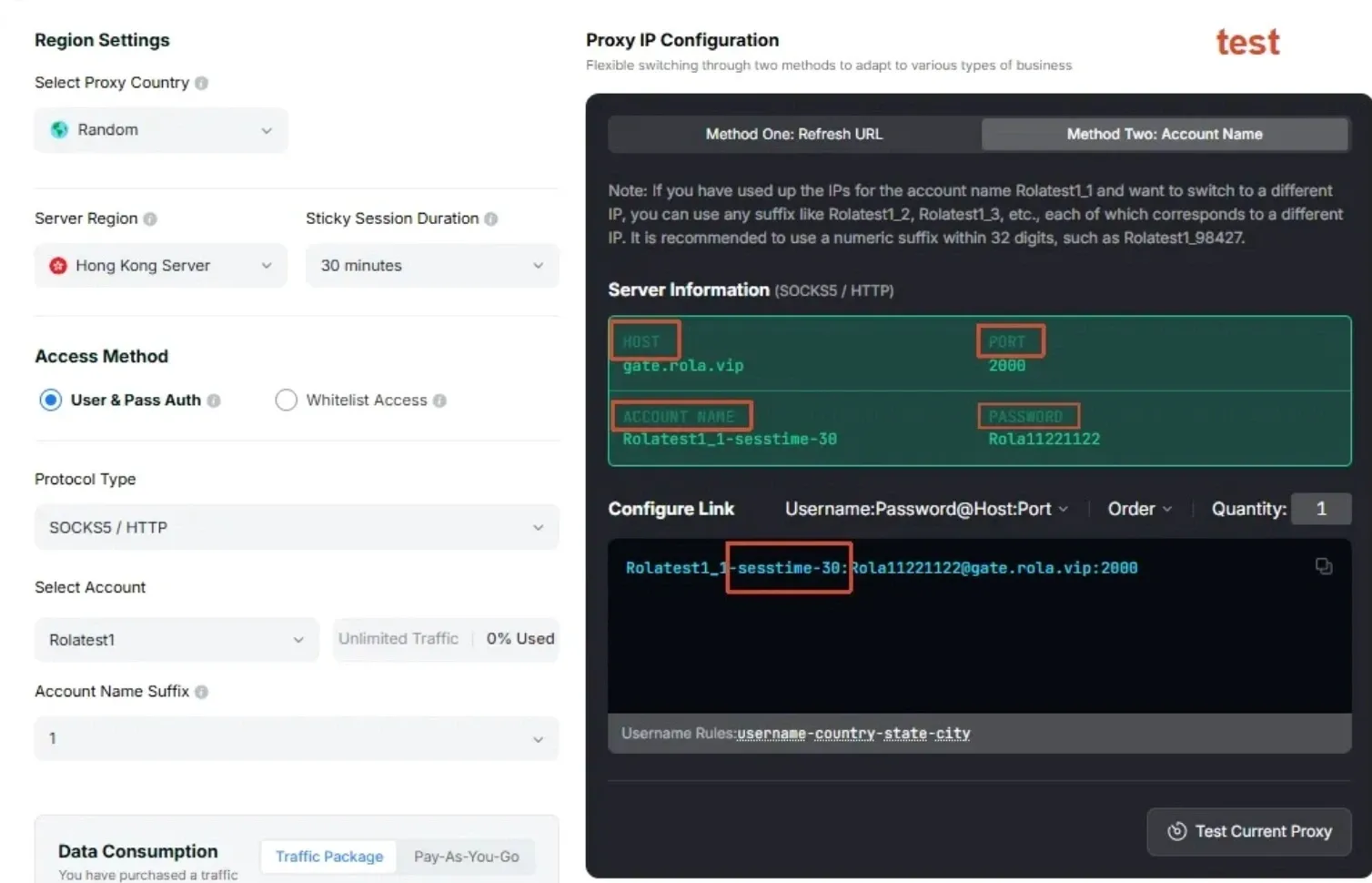
- Store the credentials in Rails encrypted credentials or your deployment platform’s environment variables — not in source code.
- First hit an IP-lookup endpoint to verify the exit and region, then access an authorized test page at low concurrency.
- Log both the network result and valid fields in the body — a changed exit doesn’t by itself mean the scrape succeeded.
# frozen_string_literal: true

require "net/http"
require "uri"

def required(name)
  value = ENV[name]
  raise "Missing required environment variable: #{name}" if value.nil? || value.empty?

  value
end

proxy_host = required("ROLA_PROXY_HOST")
proxy_port = Integer(required("ROLA_PROXY_PORT"), 10)
proxy_user = required("ROLA_PROXY_USERNAME")
proxy_pass = required("ROLA_PROXY_PASSWORD")

uri = URI("https://httpbin.org/ip")
http = Net::HTTP::Proxy(proxy_host, proxy_port, proxy_user, proxy_pass).new(
  uri.host, uri.port
)
http.use_ssl = true
http.open_timeout = 10
http.read_timeout = 30

request = Net::HTTP::Get.new(uri)
response = http.request(request)
raise "HTTP #{response.code}" unless response.is_a?(Net::HTTPSuccess)

puts response.body
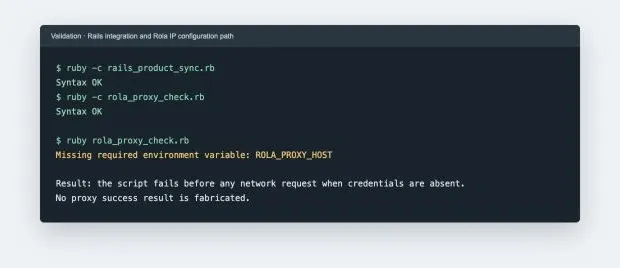
Conclusion
Reliable ruby on rails web scraping isn’t about copying Nokogiri code straight into a Controller — it’s about building a complete chain of “access boundary + page identification + Service Object + Active Job + Active Record + quality monitoring + optional network routing.” This article’s static scraping and CSV export were actually run, and the Rails and Rola IP code passed syntax and failure-path verification. Before going live, run tests in your target project’s supported Ruby/Rails version, and validate with a small, representative, authorized batch of URLs.