
7 Best CAPTCHA Proxies in 2026: Compared & How to Choose

Nov 6, 2026 · Top Picks · 10 min read
The best CAPTCHA proxies for most authorized data-collection projects are rotating residential proxies with controllable sessions, precise location targeting, and a low-cost entry plan. Bright Data is the stronger enterprise choice when a managed Unlocker API matters, while Decodo is easier to trial at low volume. ROLA IP is our top recommendation for teams that want residential, datacenter, and mobile routes plus explicit 1–120-minute session controls.
No proxy can guarantee zero CAPTCHAs. IP reputation is only one input to modern challenge systems; request rate, browser integrity, cookies, account history, and behavior can matter too.
Quick answer: the best CAPTCHA proxy providers
Provider |
Best for |
Relevant proxy choice |
Actual public entry point* |
Main limitation |
|---|---|---|---|---|
ROLA IP |
Flexible network choice and session control |
Rotating residential; mobile when genuinely required |
Residential PAYG at $4/GB |
Target eligibility and fit vary by workflow |
Bright Data |
Enterprise controls and managed unblocking |
Residential, ISP, or Unlocker API |
$4/GB PAYG with current 50%-off offer; $8/GB displayed regular rate |
Promotion and KYC conditions require checking |
Decodo |
Low-cost self-service testing |
Rotating or sticky residential |
$4/GB PAYG + VAT; 3GB monthly plan at $11.25 + VAT |
Published success metrics are not CAPTCHA-specific |
IPRoyal |
Intermittent projects that need non-expiring traffic |
Residential with timed or sticky sessions |
1GB PAYG at $7.35/GB; 10GB PAYG at $5.51/GB |
Small-volume unit price is relatively high |
Oxylabs |
Enterprise proxy and web-access stack |
Residential, ISP, or Web Unblocker |
Starter plan at $30/month; VAT may apply |
Higher minimum commitment than PAYG-first options |
SOAX |
Detailed location selection under one network account |
Residential or mobile |
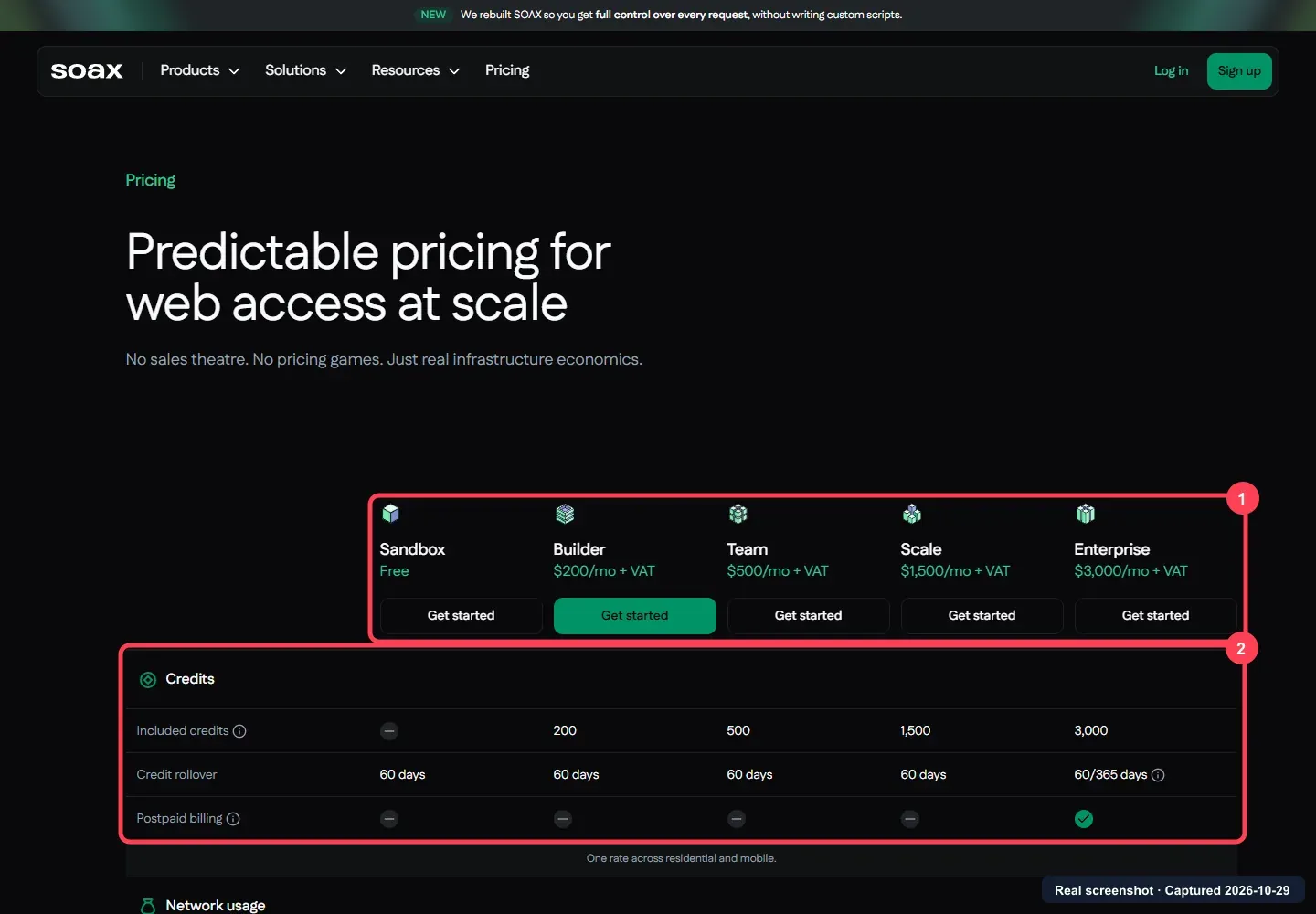
Sandbox has no subscription fee; Builder starts at $200/month + VAT |
Credit pricing and expiry make comparisons less direct |
Webshare |
Budget-conscious monthly pilots |
Rotating residential |
Promotional 1GB plan at $3.50/month |
Some targets are restricted or require KYC |
*Prices were checked against each provider’s official pricing page on November 6, 2026.
What is a CAPTCHA proxy?
A CAPTCHA proxy is a proxy server used in workflows where websites frequently present CAPTCHA challenges. It routes requests through another IP address. The term describes a use case, not a separate proxy protocol or a product that automatically solves CAPTCHAs.
If a shared or heavily used IP contributes to challenges, a suitable proxy may help reduce that IP-related friction. It cannot guarantee fewer challenges: websites also evaluate request rate, browser signals, cookies, and account history. A proxy alone does not solve a CAPTCHA; managed unlockers and scraping APIs are separate products that may handle more of the access workflow.
For example, Cloudflare’s challenge documentation describes several challenge sources, including WAF rules, rate limiting, IP rules, and bot-management signals, while Google’s reCAPTCHA v3 documentation describes a risk score based on interactions and actions.
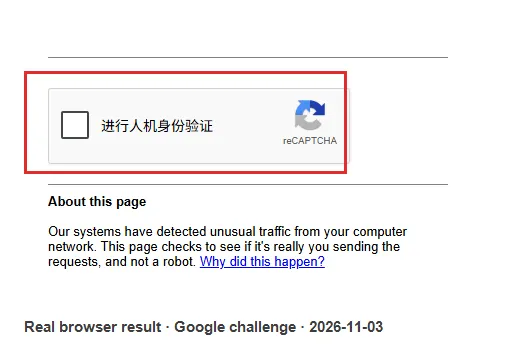
Traditional and invisible CAPTCHA systems differ in how they present or score a challenge; the traditional vs invisible CAPTCHA comparison explains the distinction.
Types of CAPTCHA proxies: which fits your workflow?
The main network types are residential, ISP/static residential, mobile, and datacenter. Rotation and sticky sessions describe how the IP changes or stays in place; they are session settings, not separate network types. The table also includes managed access as an alternative for teams that want more of the workflow handled for them.
| Requirement | Best starting type | Why | Watch out for |
|---|---|---|---|
| Independent public-data requests across regions | Rotating residential | Broad rotation and location selection | Bandwidth cost and inconsistent state if rotated mid-flow |
| Login, cart, or other multi-step authorized session | ISP/static residential or sticky residential | Stable IP identity | Concentrated request rate and endpoint availability |
| Mobile-app or carrier-specific localization | Mobile | Carrier-network view | Higher cost; unnecessary for ordinary web collection |
| Owned site, API, or lightly protected target | Datacenter | Lower cost and fast connections | Easier ASN classification on protected sites |
| Team wants results rather than proxy management | Managed unlocker or scraping API | Provider handles more of the browser/retry stack | Different pricing, data handling, and target policies |
For most buyers, rotating residential is the correct first shortlist—not because it eliminates CAPTCHA, but because it balances IP diversity, location control, and session options. Use sticky mode when related requests share cookies or state.
The 7 best CAPTCHA proxy providers
1. ROLA IP
Why we picked it: ROLA IP places rotating residential, rotating datacenter, and mobile proxy routes under one account. Its documentation explains both per-request rotation and session-based control: a session ID with sessiontime can retain an exit for 1–120 minutes, while -f-1 requests a fresh IP per request. This makes it easier to match network identity to the job instead of rotating blindly.
Best for: authorized web scraping, regional price monitoring, SERP research, and workflows that alternate between independent requests and short stateful sessions.
Main drawback: target eligibility and challenge behavior depend on the destination site and the authorized workflow; the proxy route alone does not determine the outcome.
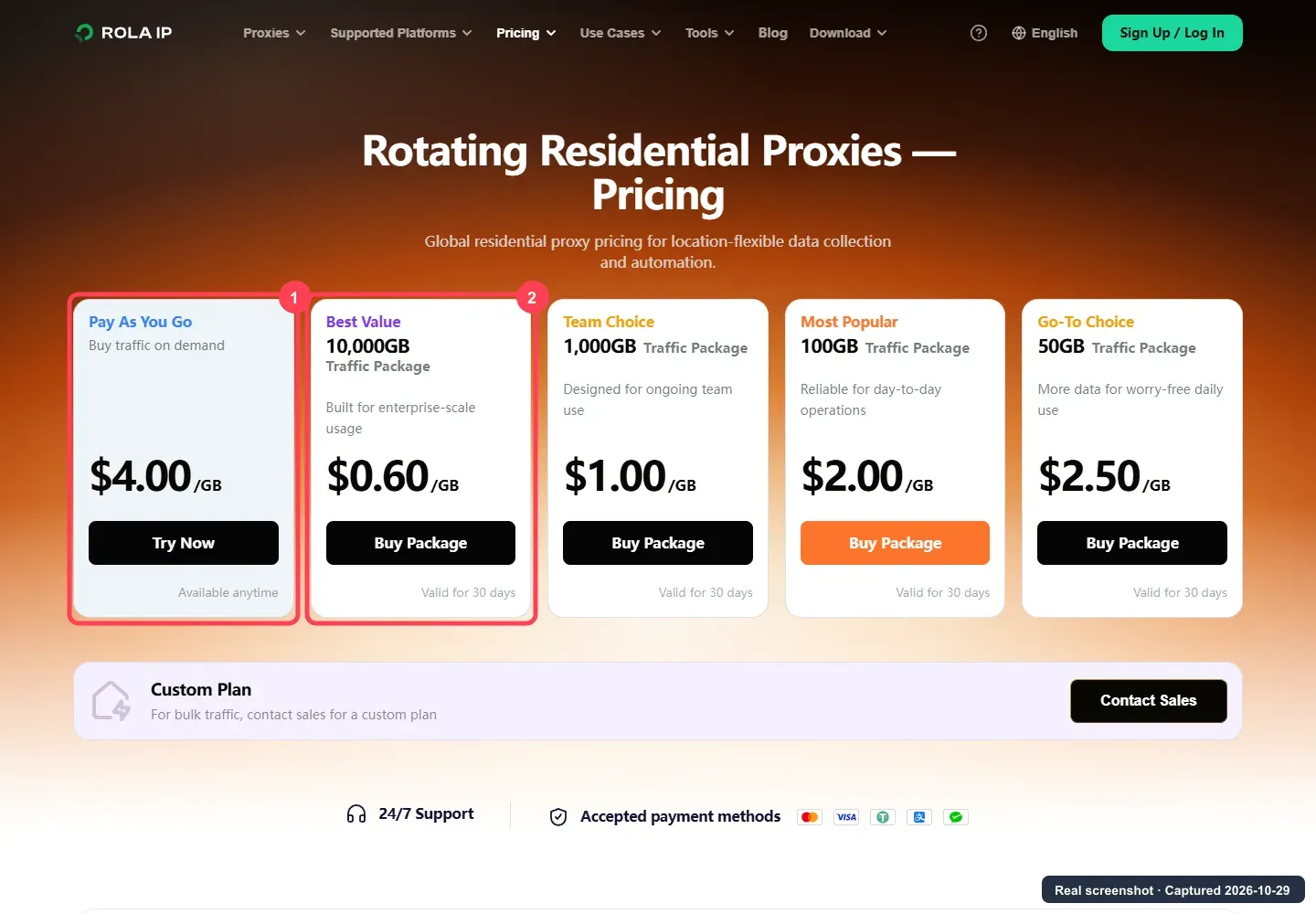
Actual entry cost: public residential proxy pricing starts at $4/GB on PAYG. The advertised $0.60/GB rate requires a 10,000GB package valid for 30 days; unused package traffic does not roll over. Start with PAYG unless usage data justifies a larger commitment.
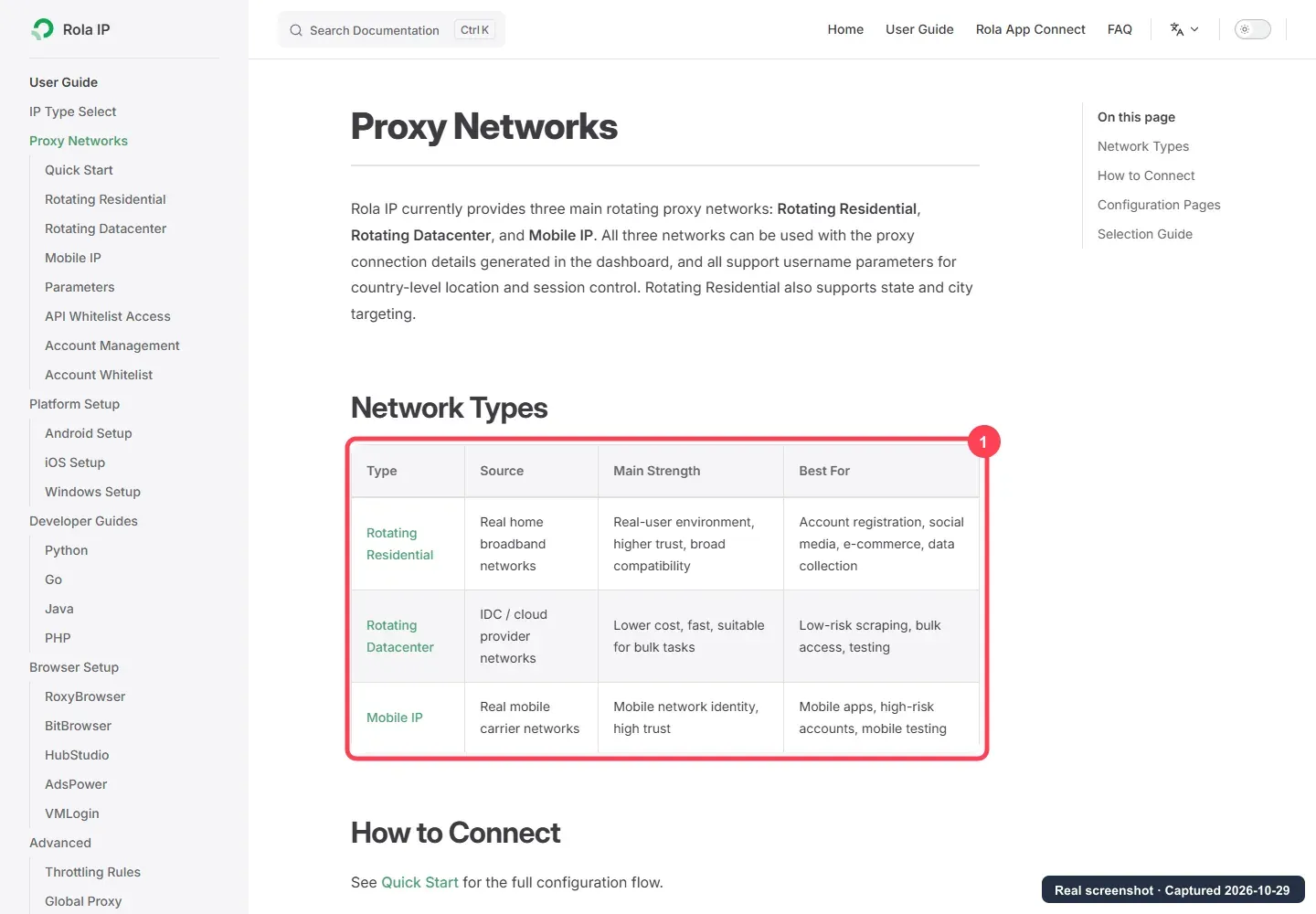
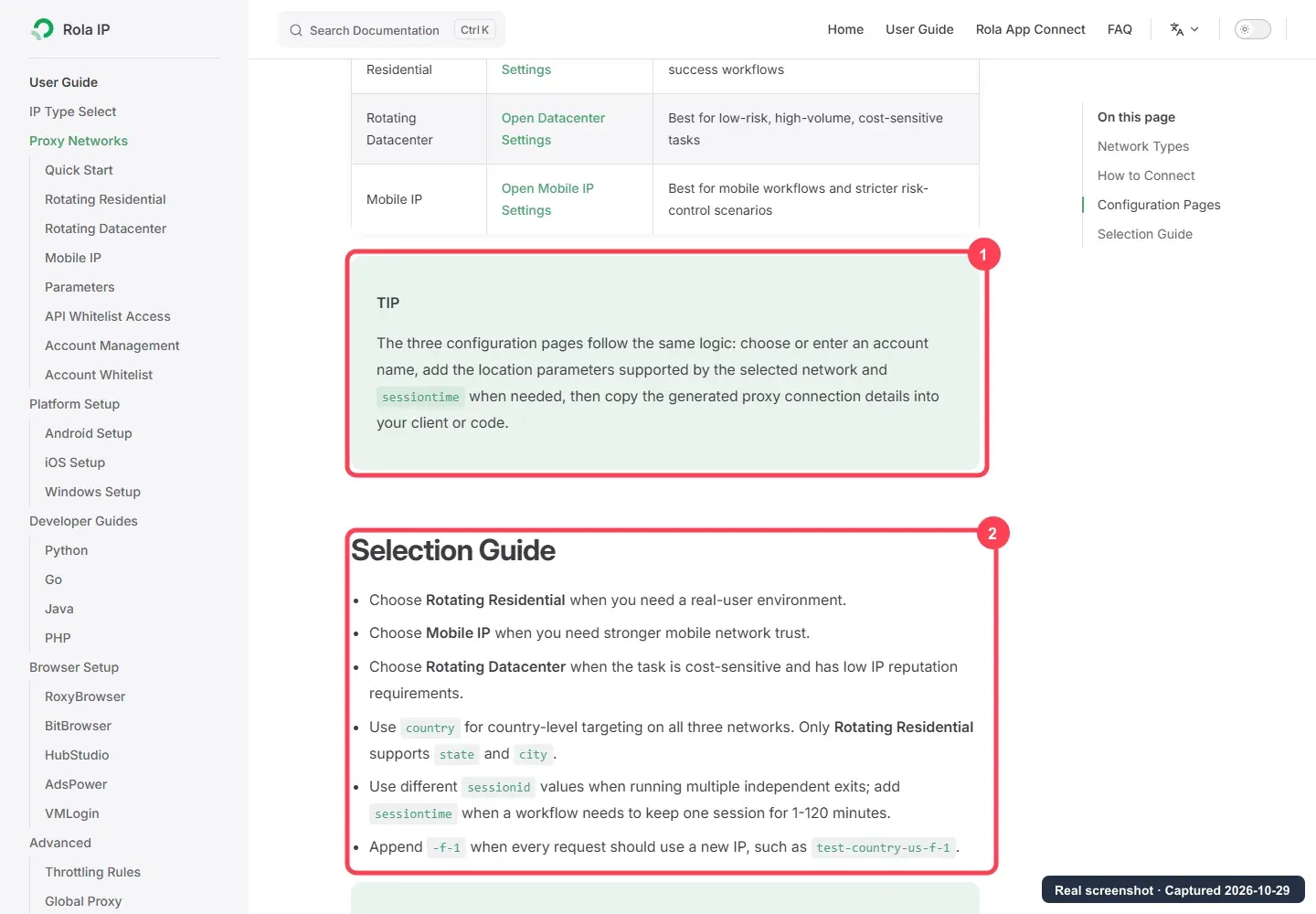
The proxy networks guide documents authentication and session settings. ROLA IP’s web scraping proxy page describes the intended public-data workflow.
2. Bright Data
Why we picked it: Bright Data offers residential, ISP, datacenter, and mobile networks, plus an Unlocker API. The managed product is relevant when a team wants the provider to handle more of the browser, retry, and challenge workflow instead of managing only proxy bandwidth.
Best for: enterprises that need compliance review, granular geo-targeting, spend controls, multiple network classes, or a managed web-access product.
Main drawback: raw residential traffic and Unlocker API requests are different products with different economics. Bright Data also states that residential and mobile customers may need KYC, so procurement is not always instant. Our Bright Data alternatives comparison separates proxy-only options from broader web-access platforms to help you compare the right products.
Actual entry cost: Bright Data’s official residential pricing page displayed PAYG at $4/GB with its current 50%-off offer and $8/GB as the regular displayed rate. The offer is shown for three months; confirm eligibility and renewal pricing at checkout.
3. Decodo
Why we picked it: Decodo combines PAYG access, small monthly plans, HTTP(S)/SOCKS5 support, rotating and sticky sessions, and targeting down to ZIP and ASN where available. The pricing page makes the small-pilot cost unusually clear.
Best for: developers and small teams that want to start with a few gigabytes before committing to an enterprise plan.
Main drawback: Decodo’s published success and response-time figures describe its network as a whole; they do not show the CAPTCHA rate for your particular target.
Actual entry cost: Decodo’s official residential pricing page lists $4/GB PAYG plus VAT, a 3GB monthly plan at $11.25 plus VAT, and a 10GB monthly plan at $35 plus VAT.
4. IPRoyal
Why we picked it: IPRoyal says purchased residential traffic does not expire. It also supports instant rotation, timed rotation, and sticky sessions, which makes it practical for intermittent projects that would waste a 30-day traffic package.
Best for: irregular workloads, seasonal research, and teams that value traffic longevity over the lowest small-plan price.
Main drawback: the smallest PAYG package is more expensive per GB than several alternatives. A requested sticky duration also depends on the residential endpoint remaining available.
Actual entry cost: IPRoyal’s official residential pricing page lists 1GB PAYG at $7.35/GB and 10GB PAYG at $5.51/GB. The displayed $1.84/GB rate requires 10TB on PAYG; subscription pricing is displayed 5% lower.
5. Oxylabs
Why we picked it: Oxylabs sells residential, ISP, datacenter, and mobile proxies alongside Web Unblocker and web-access APIs. Its residential product documents sticky sessions, flexible rotation, geo-targeting, HTTP(S), SOCKS5, and HTTP/3 support.
Best for: organizations that prefer one enterprise vendor for proxy networks, managed unblocking, documentation, and account support.
Main drawback: the public entry commitment is higher than PAYG-first providers, and self-service purchases are described as non-refundable.
Actual entry cost: Oxylabs’ official residential pricing page lists a Starter plan at $30/month, with residential rates starting at $6/GB and VAT potentially applicable. The page also displays a $5 welcome credit.
6. SOAX
Why we picked it: SOAX combines residential and mobile access and documents country, region, city, and ISP targeting; ASN and ZIP controls depend on the plan. Rotation can be per request, timed, error-based, or sticky.
Best for: teams that need detailed location selection and are comfortable managing credits rather than comparing a single universal cash price per GB.
Main drawback: the model is harder to compare with fixed-price traffic packages. Network usage varies by geographic tier, credits expire after 60 days on standard plans, and checkout determines the effective credit economics. See our SOAX review for a broader assessment of its features, pricing, and tradeoffs.
Actual entry cost: SOAX’s official pricing page lists Sandbox with no subscription fee and a paid Builder plan at $200/month plus VAT. Sandbox does not include credits; usage charges still apply.
7. Webshare
Why we picked it: Webshare offers a low promotional entry price, HTTP/SOCKS5 endpoints, and country, state, city, ZIP, and ASN targeting. It is easy to shortlist for a small monthly test.
Best for: price-sensitive self-service users whose intended target is supported by the residential network.
Main drawback: Webshare openly states that some websites are restricted and that certain targets may require KYC. Confirm target eligibility before comparing price or purchasing traffic.
Actual entry cost: Webshare’s official residential pricing page displays a promotional 1GB plan at $3.50/month and a 10GB plan at $27.50/month. The page also displays higher regular prices, so verify the renewal amount.
How to choose the right CAPTCHA proxy provider
Start with your target website, session requirements, and expected usage, then narrow the list to two or three providers. Use these steps before buying a larger plan:
- Confirm support for your target and region.
Check whether the provider permits your intended destination, offers the locations you need, and requires KYC before access. Eliminate any option that cannot support your workflow, regardless of its advertised price. - Match session controls to the task.
For independent requests, look for controllable rotation. For logins or multi-step sessions, check the documented sticky-session duration and what happens if the endpoint disconnects. ROLA IP is worth shortlisting when its documented 1–120-minute session controls fit the job; longer sessions may call for an ISP/static residential option. - Choose a billing model that fits your usage.
For a small pilot, compare ROLA IP or Decodo PAYG with Webshare’s monthly entry plan, including renewal terms. For occasional projects, weigh IPRoyal’s non-expiring traffic against its higher small-volume price. Compare the total amount you expect to spend, including unused or expired traffic, rather than the lowest bulk rate. - Decide how much you want to manage yourself.
If your team can handle sessions, browsers, and retries, compare proxy plans directly. If that work is the bottleneck, evaluate Bright Data’s Unlocker API or Oxylabs’ Web Unblocker separately, using their own pricing and supported-target terms. - Run a small comparison on your actual workload.
Test shortlisted providers with the same permitted targets, regions, request volume, and session settings. Track usable responses, CAPTCHA frequency, 403/429 errors, and total charges. Calculate cost per usable result = total test charges ÷ usable results; a response counts only if it contains the data you need, not merely an HTTP 200 status.
Choose the provider that meets your session and location requirements at an acceptable cost per usable result. Increase your commitment only after the pilot shows it fits your workload; performance on one target does not establish performance on another.
How to avoid unnecessary CAPTCHAs without abusing access controls
“How to avoid CAPTCHA” should mean reducing false positives in an authorized workflow, not defeating a site’s security control.
- Prefer an official API, feed, or approved data export when one exists.
- Confirm the target’s terms, robots directives, and written authorization. Robots rules are not themselves access permission.
- Keep concurrency and request rate within the approved scope; honor HTTP 429 and
Retry-After. - Use one sticky session for related steps, and rotate only between independent jobs.
- Keep IP region, language, timezone, cookies, and account region coherent with the permitted test scenario.
- Cache responses and deduplicate URLs so the workflow makes fewer requests.
- Treat HTTP 200 carefully: challenge pages can also return 200, so validate expected fields or page markers.
- Stop and request access when challenges persist. Do not cycle endlessly through IPs or attempt to defeat a challenge.
Final recommendation
Start with a small traffic allowance and a defined budget. Track valid responses, challenge frequency, and billed traffic, then scale only when the results justify the cost. For a ROLA IP pilot, choose the network and session settings that match your authorized workflow.