
Comparing Traditional and Invisible CAPTCHA Solutions: CAPTCHA vs reCAPTCHA

Jul 28, 2026 · Comparisons · 13 min read
TL;DR
Traditional CAPTCHA asks a person to complete a visible task. Invisible CAPTCHA evaluates risk in the background and can add a challenge only when a request looks suspicious. Google reCAPTCHA supports both approaches. The right choice depends on the action being protected, the acceptable user friction, and the controls applied after verification.
Automated abuse affects forms, registrations, logins, checkout, and APIs in different ways. The practical question is how to deter it without making routine actions harder for legitimate users.
This guide compares traditional and invisible CAPTCHA solutions, explains where Google reCAPTCHA fits, and covers verification failures and use-case selection.
Why Do Websites Need CAPTCHA?
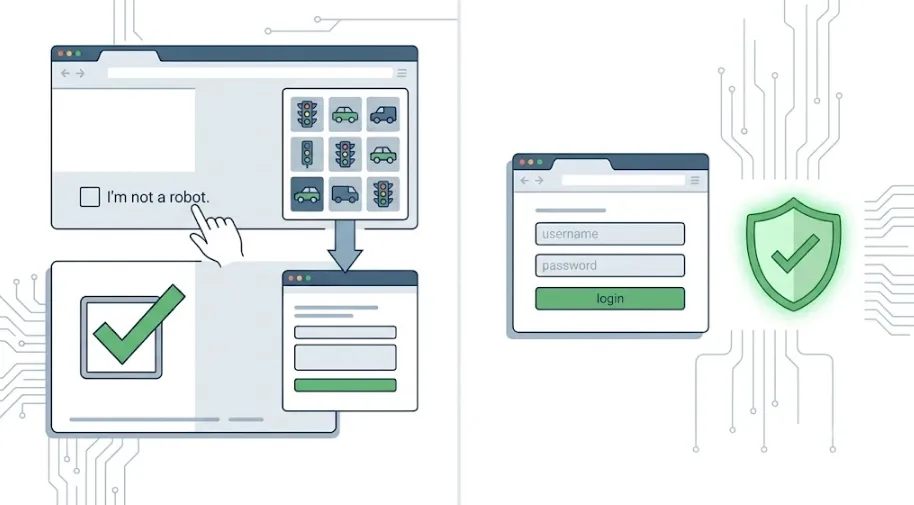
Public endpoints are easy to automate at a scale that manual abuse cannot match. Bots can send spam, create fake accounts, test stolen credentials, claim promotions, or overwhelm an API. CAPTCHA raises the cost of those actions and gives the application a signal for deciding when to allow, slow, or step up a request.
Network and IP reputation can inform a risk decision, but neither is a reason to deploy CAPTCHA or a complete bot signal. Website owners should evaluate the full request context rather than relying on an address alone.
CAPTCHA vs reCAPTCHA: What Is the Difference?
CAPTCHA is the broad category; reCAPTCHA is one Google product family within that category. That distinction matters because a visible checkbox, an image-selection task, a slider, a passive risk score, and an adaptive challenge are implementation choices. They are not separate alternatives to CAPTCHA itself. In this guide, “traditional CAPTCHA” means a visible, user-completed verification challenge rather than a formal product category.
What Is a CAPTCHA?
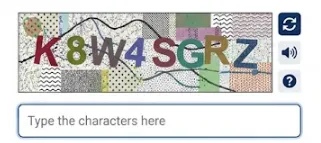
CAPTCHA stands for “Completely Automated Public Turing test to tell Computers and Humans Apart.” In practice, it is a control that helps a service distinguish ordinary user activity from automated or suspicious traffic. Early implementations often used distorted text that people could read but software struggled to interpret. Modern systems may use image or audio tasks, checkboxes, behavioral signals, device and browser context, or a combination of those signals.
A CAPTCHA outcome is an anti-abuse signal, not an identity or authorization decision. Passing a challenge does not prove account ownership or eligibility for a promotion. The server still needs account, session, authorization, rate-limit, and business-rule checks.
Visible challenges are useful when an explicit step-up is acceptable. A public comment form may tolerate a checkbox or image task before accepting a post. The tradeoff is friction: users can abandon a form, struggle on a small screen, or need an accessible alternative. An audio option, keyboard support, clear error copy, and a usable retry path are part of a real CAPTCHA implementation. The WCAG guidance on accessible authentication is a useful baseline when designing that recovery path.
What Is a reCAPTCHA?
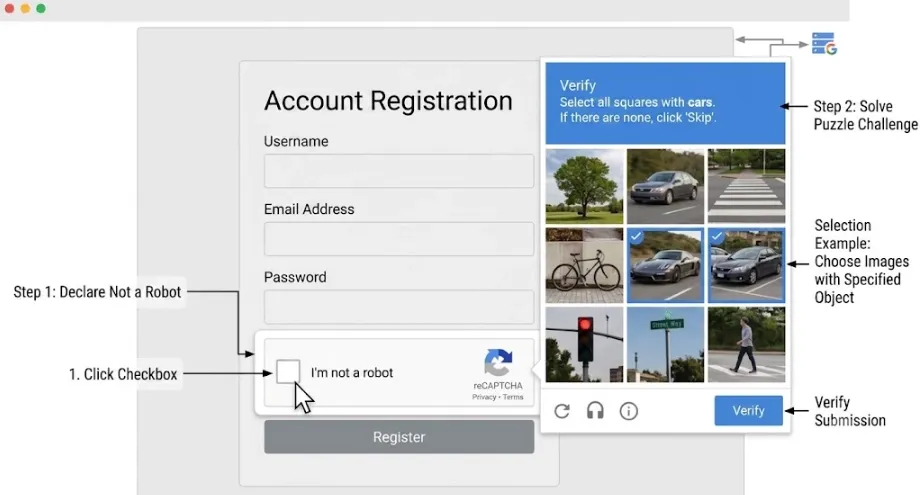
What is a reCAPTCHA? It is Google’s CAPTCHA and bot-detection product family. Google reCAPTCHA includes visible and lower-friction options, so it should not be treated as a synonym for invisible verification. reCAPTCHA v2 can display a checkbox and, when risk is elevated, an image challenge. Invisible reCAPTCHA can run without a persistent checkbox but may still challenge a suspicious user. reCAPTCHA v3 returns a score for a named action and leaves the site owner to decide the response.
“CAPTCHA vs reCAPTCHA” is not a comparison between two parallel technology categories. Teams should assess the verification model, provider, privacy posture, accessibility support, availability, and server-side policy against the risk of the protected action.
A site may choose a self-hosted control, a different vendor, or Google reCAPTCHA. It may also use visible verification on a public form and risk-based verification on login and checkout.
Google retired reCAPTCHA v1, so it is not a choice for new integrations. Current details should be checked against Google’s reCAPTCHA developer documentation before deployment. Product behavior and regional data-processing obligations can change, so security, privacy, and legal owners should review the relevant decisions.
Traditional CAPTCHA Solutions vs Invisible CAPTCHA Solutions: The Key Differences
Traditional CAPTCHA and invisible CAPTCHA solutions both raise the cost of automated abuse. Their main difference is where verification is experienced and how much policy work the site must do after receiving a result. A visible challenge makes the step obvious to the user. Passive or invisible verification shifts more of the decision into server-side risk handling.
| Comparison area | Traditional CAPTCHA | Invisible CAPTCHA |
|---|---|---|
| User interaction | Usually asks for a checkbox, text entry, image selection, audio task, or slider | Usually evaluates the request in the background; may add a challenge for higher-risk traffic |
| Primary output | A completed or failed visible task | A token, score, or adaptive challenge outcome |
| User experience | Clear and explicit, but interrupts the journey | Lower friction for low-risk traffic, but failures may be less obvious |
| Accessibility work | Requires alternatives such as audio, keyboard support, and understandable recovery | Still requires an accessible recovery path; silent rejection is not an accessibility strategy |
| Policy burden | Relatively direct challenge policy, plus monitoring | Requires score thresholds, step-up actions, false-positive analysis, and monitoring |
| Best fit | Low-value forms or explicit step-up checks | Registration, repeat visits, checkout, and other friction-sensitive journeys |
| Privacy review | Depends on the provider and signals processed | Depends on the provider; background signal processing needs clear review and disclosure |
| Direct API protection | Protects only a flow that validates the challenge server-side | Protects only a flow that validates the token server-side |
Start with the protected action, not the vendor name. A public newsletter form may suit a visible challenge and request limits. Registration may benefit from an invisible check plus email verification. Login needs account-aware rate limits, breached-credential controls, MFA, and step-up verification in addition to CAPTCHA.
A score is not a verdict. Define an action for each risk range, then measure completion, confirmed abuse, and false positives. Traditional challenges need the same monitoring: repeated puzzles, load failures, and inaccessible recovery paths can block legitimate users.
How Google reCAPTCHA Fits the Comparison
Google reCAPTCHA spans both visible and low-friction patterns. Understanding the differences between its versions helps teams avoid a common design error: assuming that a client-side widget alone protects the transaction that follows. In every version, the application needs a server-side verification process and an explicit policy for the result.
What Is a reCAPTCHA Test? v2 Checkbox and Image Challenges
A reCAPTCHA test is the risk check a site runs before a protected action such as form submission, login, or content publishing. It is not always an image puzzle. Versions differ in what users see, what the site receives, and how the server must act on the result.
With reCAPTCHA v2, users click the “I’m not a robot” checkbox. Google can present an image challenge when the request appears riskier. This is visible verification, although it can incorporate background assessment before deciding whether to show a puzzle. It works well for actions where an extra user step is understandable, such as a public contact form, a comment form, or an administrative entry point.
Visible verification gives people a clear retry step, but it still needs keyboard support, assistive-technology testing, understandable errors, and a recovery path. The application must verify the token on the server before processing the protected action.
Invisible reCAPTCHA and reCAPTCHA v3
Invisible reCAPTCHA runs without a fixed visible checkbox, usually when a person submits a form or activates a protected control. It does not remove challenges; it defers them until the system decides one is needed. Low-risk users can often continue without seeing a checkbox or puzzle.
reCAPTCHA v3 generally returns a score for an action instead of showing a challenge by default. The application must interpret that score. It may allow the request, slow it down, require email confirmation or MFA, defer it for review, or deny it based on the broader context. Invisible reCAPTCHA can still challenge the user; v3 primarily supplies a risk score for the site to act on.
The browser sends a token with the protected request, and the server validates it with the provider. A score informs a site-controlled decision; it does not decide whether a purchase should proceed or require MFA.
For example, a promotion flow can allow a low-risk authenticated request, ask a medium-risk request to confirm email, and limit repeated attempts. Price, inventory, eligibility, and redemption limits must remain server-side.
| Area | CAPTCHA | Google reCAPTCHA |
|---|---|---|
| Available methods | Varies by provider; may include visible, invisible, and adaptive checks | v2 Checkbox, Invisible reCAPTCHA, v3 scoring, and Enterprise options |
| Provider choice | Self-hosted and multiple-vendor options exist | Google ecosystem and its applicable terms |
| Decision model | Depends on the implementation | Widget/challenge results or a v3 action score, interpreted by the site |
| Privacy posture | Depends on data flows, regions, and contracts | Requires review of Google’s data-processing model and regional requirements |
v2, Invisible reCAPTCHA, and v3: Choosing the Right Model
These options are not simply older and newer versions of the same user experience. v2 makes verification explicit. Invisible reCAPTCHA keeps the check out of the normal flow when possible but can challenge higher-risk users. v3 provides a score that the server uses as one input to a site-defined decision.
Option |
What users usually see |
What the site receives |
Good fit |
Implementation focus |
|---|---|---|---|---|
reCAPTCHA v2 Checkbox |
An “I’m not a robot” checkbox; an image task may follow |
A verification token and challenge result |
Public forms, comments, and administrative entry points |
Accessible alternatives and server-side token validation |
Invisible reCAPTCHA |
No fixed checkbox; a challenge can appear when needed |
A verification token and challenge result |
Registration, form submission, and friction-sensitive flows |
Challenge interruption, token freshness, and retry behavior |
reCAPTCHA v3 |
Usually no visible challenge |
A token and action-specific risk score |
Login, checkout, and promotions that need graded responses |
Action-specific thresholds, step-up rules, and false-positive monitoring |
All three options require a privacy and compliance review of provider data handling, script placement, notice and consent flows, and applicable regional requirements. Invisible and score-based approaches rely more heavily on background signals, so their data flows deserve particular attention. A CAPTCHA result is only a risk signal for one request; it does not replace identity verification, authorization, or transaction rules.
From Browser Event to Server Decision
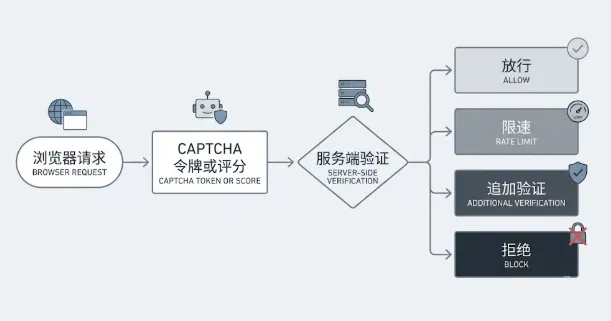
The client-side widget is only the first step. When a protected action occurs, the browser obtains a token and sends it with the request to the application server.
The server verifies the token with the provider, validates expected fields such as hostname and action, then combines the result with account, session, velocity, and business context. The application can allow, rate-limit, step up, or reject the request. A successful browser-side interaction does not authorize the protected action.
This flow also frames verification failures. A failure can occur while the browser generates or submits a token, while the server validates configuration and expected fields, or when the site’s own risk policy evaluates the result.
reCAPTCHA Verification Failed: Causes and Fixes
The message “reCAPTCHA verification failed” describes a result, not a root cause. It can come from a token lifecycle problem, key configuration, a mismatch between the page and the server’s expectations, browser restrictions, network failures, or provider-side service conditions. A useful investigation starts on the server because that is where the security decision should be recorded.
Why Does reCAPTCHA Verification Fail?
reCAPTCHA verification failed errors commonly occur when a token is expired, duplicated, malformed, or submitted too late. They also occur when the site key and secret key belong to the wrong environment, a hostname is not registered, an expected action name does not match, or the server does not verify the token correctly. Script blockers, restricted cookies, privacy settings, connectivity problems, rate limits, and provider outages can also affect the browser flow.
Token handling is a frequent source of trouble. If a page creates a token as it loads and a person submits the form much later, the token may no longer be valid. If a double-click or retry reuses a token, the provider can reject it. Generating a fresh token at the time of submission and preventing duplicate requests is more reliable than creating a token early and hoping it remains usable.
Configuration errors can look similar from the user’s perspective. A staging key deployed to production, a missing hostname entry, or an action string that differs only in spelling can all result in a failed verification. The application should log the provider response, the expected action, the observed hostname, the outcome, and a privacy-appropriate request correlation ID. It should not retain full tokens longer than necessary.
How to Fix reCAPTCHA Verification Failed Errors
To fix reCAPTCHA verification failed errors, validate the token immediately on the server and check every expected field before accepting the protected action. Google’s server-side verification reference describes the verification response and error codes. Keep secret keys in server-side configuration or a secrets manager; they do not belong in client-side JavaScript, source control, or browser-visible configuration.
- Confirm that the site key matches the current environment. Keep development, staging, and production keys separate.
- Generate a fresh token at submission and ensure retries or double submissions do not reuse it.
- Verify the token on the server, then validate the expected hostname and action. For score-based flows, evaluate the score against the policy for that specific action; do not treat a successful provider response as sufficient on its own.
- Record provider error codes and failure patterns by browser, device type, geography, and protected journey. This separates a broad configuration fault from a local compatibility issue.
- Provide an accessible retry or alternate recovery route. Do not make a generic support message the only path forward.
For v3, score thresholds should be tuned with observed traffic and confirmed outcomes. A universal cutoff has little value because customer populations, fraud pressure, devices, and protected actions vary.
Begin in observation mode where feasible, compare score ranges with normal and confirmed abusive events, and test the impact of escalation rules. This approach also helps distinguish a genuine reCAPTCHA verification failed error from a policy choice that is producing too many false positives.
Which CAPTCHA Approach Is Right for Your Use Case?
The right choice can differ across the same application. A contact form and a password-reset endpoint should not inherit identical rules merely because both contain a submit button. The right control reflects the likely abuse method, the financial or operational impact of that abuse, and the harm caused by a false positive.
Evaluate the following dimensions before selecting a model. A lower-friction option is not automatically the right option if the server-side policy, recovery path, or compliance obligations are not in place.
| Evaluation area | Question to answer | Effect on the choice |
|---|---|---|
| Abuse risk and impact | Does a successful automated request create spam, account loss, inventory pressure, or financial loss? | Higher-impact actions need authentication, rate limits, and business checks in addition to CAPTCHA. |
| User friction | Is a visible challenge acceptable for this action, including on mobile? | Low-volume public forms can often tolerate a visible challenge; registration and checkout may need a lower-friction flow. |
| False-positive cost | What happens when a legitimate user is blocked? | Use recoverable step-up actions such as email confirmation or review when a hard rejection is costly. |
| Accessibility and compatibility | Can keyboard and assistive-technology users, or people with restricted browser environments, complete the flow? | Visible challenges need alternatives; invisible flows still need a recovery path for silent failures. |
| Privacy and compliance | Which browser, device, or behavioral signals are processed, and which regional rules apply? | Review data flows, provider terms, hosting regions, notice, and consent before deployment. |
| Operations and recovery | How will the service behave during provider outages, token failures, or abnormal scores? | Add monitoring, alerting, retries, and a documented fallback so CAPTCHA is not a single point of failure. |
| Use case | Recommended approach | Supporting controls |
|---|---|---|
| Contact forms and comments | Visible CAPTCHA with rate limiting, or low-friction verification | Content checks, duplicate detection, moderation, and rate limits |
| Account registration | Invisible CAPTCHA plus email or phone verification | Invitation or activation controls, account velocity rules, and review signals |
| Login and credential stuffing | Risk-based step-up verification | Account-aware rate limits, MFA, breached-credential controls, and session management |
| Password reset and recovery | Adaptive step-up verification | Enumeration resistance, short-lived tokens, notifications, and request limits |
| Checkout, ticketing, and promotions | Invisible verification combined with fraud and velocity controls | Inventory, eligibility, device/account rules, and transactional safeguards |
| APIs and high-value workflows | Authentication and authorization first | API credentials, quotas, server-side business rules, audit logs, and anomaly detection |
A visible challenge is often predictable for a low-volume public form. A low-friction control can better suit registration or repeat-use journeys when email verification, monitoring, and an accessible recovery path are available. Before launch, map every route that can perform the protected action; after launch, use completion, confirmed abuse, false positives, and support contacts to tune the policy.
CAPTCHA Is One Layer of Bot Protection
CAPTCHA helps decide whether a request deserves extra scrutiny. It does not replace authentication, authorization, rate limits, or business rules. High-value actions need layered controls because automation can target an API without loading a browser challenge.
Why Can CAPTCHA Not Stop Sophisticated Bots on Its Own?
Sophisticated bots may use real browsers, distributed requests, human assistance, or exposed APIs. CAPTCHA can add cost and provide a risk signal, but it cannot grant business permissions. Protect logins with password controls, throttling, MFA, and session security; protect transactions with server-side price, inventory, eligibility, and duplicate-claim checks.
How Do Proxy IPs Relate to CAPTCHA?
A proxy IP is an egress IP supplied by a proxy service; the proxy server forwards traffic through it. It does not prove that a request is automated, and it does not prove that a request is trustworthy. Businesses may access a site through a proxy, VPN, or shared egress network, while attackers may use distributed egress points to vary their request sources.
IP reputation, autonomous system number (ASN), geolocation, and short-window request velocity can inform a risk decision, but they should not independently determine whether to show a CAPTCHA or reject a request.
For site operators, IP signals work best alongside account state, session integrity, device and browser context, action velocity, and business rules. Blocking every proxy or shared network can exclude corporate users, campus networks, and privacy-conscious users. Relying on IP reputation alone also does little against automated traffic using real browsers and distributed requests.
Teams that use corporate egress, VPNs, or proxy services for legitimate work may encounter repeated CAPTCHA challenges because of shared-IP history, changing egress geography, or a network change during a session.
They should use access methods permitted by the target site’s terms and protect account and session security. In authorized partner, test, or administrative workflows, a fixed egress arrangement or another formal access path can be agreed with the site operator. CAPTCHA is a service-protection control, not an obstacle to circumvent.
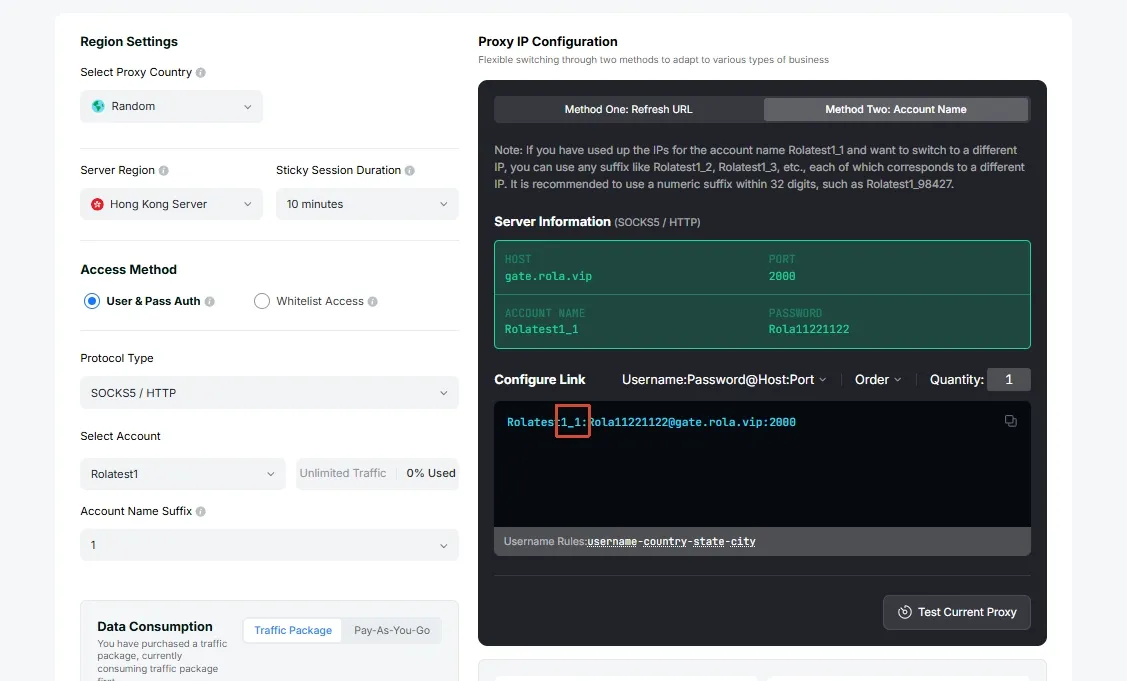
The value of proxy infrastructure depends on whether its egress source, location selection, session settings, and rotation behavior fit the authorized workflow. Rola IP states that its residential proxies cover 190+ countries and regions, offer rotating and static options, and support HTTP and SOCKS5.
Its proxy network documentation also covers network types, locations, sessions, and per-request rotation. These capabilities can help authorized teams configure a network environment for their operational requirements; they do not guarantee that a CAPTCHA will not appear or replace a site’s access rules.
Conclusion
Traditional CAPTCHA is useful when a visible challenge is acceptable, especially for basic forms and explicit step-up verification. Invisible CAPTCHA can reduce friction in registration, checkout, and repeat-use journeys, but it requires deliberate score policies, monitoring, and recovery paths. reCAPTCHA is one CAPTCHA provider with both visible and lower-friction options; it is not a separate technology category.
Match the control to the protected action, validate every result on the server, and measure false positives alongside prevented abuse. Use those results to adjust the policy over time.