Shopee Proxy Selection and Rola IP Setup Guide

Sep 20, 2026 · Comparisons · 22 min read
TL;DR:
Use a Shopee proxy when an authorized task needs a designated exit region or a consistent network route. Choose a fixed IP for longer persistence requirements or a suitable sticky session for a shorter workflow. Configure one access method, verify the exit from the same client, and then test the actual Shopee operation. Browser, system, and Wi-Fi proxy settings affect different traffic. A matching IP location does not grant account permissions or guarantee successful access.
What Is a Shopee Proxy?
A Shopee proxy is a proxy connection used to access Shopee; it is not an account permission provided by Shopee. When enabled, requests that follow the proxy configuration first go to the proxy service and then connect to Shopee through the selected egress. The network egress visible to the platform may change, but your login identity, cookies, browser state, delivery address, and payment conditions do not automatically change with it.
When choosing Shopee proxies, distinguish among a proxy network, a scraping API, and connection-management software. A proxy network supplies IP egress. A scraping API requests or renders web pages for a program. Connection-management software configures how traffic uses a proxy. Purchasing proxy traffic does not give you a product-data API, and installing a client still requires available resources in the target region.
When Does It Make Sense to Use a Shopee Proxy?
If your original network already handles permitted shopping or store operations reliably, there is no need to add another proxy layer. The following scenarios are where a designated egress may be worth considering, provided you confirm the business need and platform permissions before purchase.
Keep the Network Egress Consistent for Store Operations
For store work that is authorized by the platform, a fixed egress can help a team keep connection settings consistent and make anomalies easier to troubleshoot. It does not replace account authorization. Whether multiple people or multiple stores may be operated in a certain way should be determined by the platform rules.
Compare Product Pages Across Different Markets
For authorized regional verification, you can select an egress in the corresponding country and compare product presentation and delivery information on the target site. When comparing results, keep the seller, variation, login state, and delivery region consistent; otherwise, a price difference may not be caused by network location.
Check Coupons and Store Purchase Flows
When testing your own store or another activity you are authorized to verify, you can check the flow step by step: store homepage → product variation → coupon or bundle offer → checkout entry. During one test, keep the egress, account, delivery region, and product conditions unchanged, and record where an offer first changes. Verifying the entry points and display is enough; you do not need to place an order or make a payment merely to prove that the proxy works.
Assign a Specific Egress to an Authorized Data Task
If you already have data-access permission and need a designated network egress, a proxy can be part of the program’s connection configuration. Where the data comes from and how many requests are allowed are still determined by API permissions and site rules. A proxy itself does not provide a product database.
Using Singapore as an example, the Shopee Terms of Service place restrictions on monitoring or copying content without prior written consent and also prohibit multi-account activity associated with violations. Public visibility does not mean unrestricted bulk collection is permitted. For integrations involving your own store data, evaluate officially authorized APIs and seller tools before calling internal endpoints discovered in a browser.
How to Choose the Right Shopee Proxy
Start by choosing between a fixed IP and a sticky session according to how long the task lasts, then confirm the region, authentication method, and budget. Do not choose only by the advertised IP-pool size or unit price.
For continuous operations within the same promotion, prioritize keeping the network and session consistent. Separate regional research tasks can be assigned separate egresses. Plan switching points around task boundaries rather than changing IP addresses on every page click.
Choose the Proxy Type Based on the Task
A sticky session attempts to retain the same egress for a configured period. A static IP is a fixed address assigned by the product. A short verification task may use a sticky session, but a 10-minute sticky session should not be treated as a fixed IP for several weeks. For a logged-in business session, changing IP on every request should not be the default strategy either.
| Shopee Task | Resource to Evaluate First | Session and Usage Notes |
|---|---|---|
| Store and promotion-flow verification | Static residential IP in the target region | Keep the same egress for one complete flow and check the resource validity period |
| Authorized product and price research | Dynamic residential proxy | Assign an egress by site or independent task; retain the session when continuous access is required |
| Open Platform API testing | Dynamic datacenter proxy | Confirm API authorization, IP allowlisting, and rate-limit rules first |
| Mobile network-condition testing | Mobile proxy | Verify the region and carrier; this does not replace a real mobile-device environment |
These are starting points for testing, not guarantees of passing Shopee’s risk controls. If an API requires source-IP allowlisting, use a fixed egress that meets that requirement instead of enabling frequent rotation merely because the proxy product supports it. A mobile proxy changes the network egress; it does not turn a desktop browser into a mobile device.
Confirm Target-Country Availability and Client Compatibility
Before purchase, confirm that resources are available in the target country and check which proxy protocols and authentication methods your client supports. For a static proxy, check the address validity period and replacement policy. For dynamic residential proxies, check session duration and what happens when a node becomes unavailable. A provider supporting a protocol does not mean every browser supports every authentication form for that protocol.
Compare Costs Using Actual Usage
You can estimate the proxy cost per successful task by dividing the proxy cost for the batch by the number of tasks completed successfully. With traffic-based products, include images, scripts, and retry traffic loaded by the browser. For example, if each page check averages 2 MB, 1,000 checks use about 2 GB before retries and other traffic. Your real budget should use your own measured average usage.
When budgeting static products by validity period, also account for the number of resources, idle time, and maintenance cost. Unlimited traffic does not mean the target site allows unlimited requests, and dedicated does not guarantee that an IP has never been used or will never trigger verification. Before scaling resources, confirm that a small workload is stable in the same region and client.
What Proxy and Management Features Does Rola IP Provide?
Rola IP’s Shopee proxy solution divides use cases into product and seller research, promotion verification, price observation, and authorized API testing, and lists regional entry points for Singapore, Indonesia, Malaysia, Thailand, the Philippines, and Vietnam. Identify the target market and task first, then confirm that the relevant product has usable resources there.
Fixed Egress and Dynamic Residential Resources
Rola’s ISP proxies are intended for tasks that need a persistent fixed egress. The product materials list dedicated IPs, an address that stays fixed during the valid period, unlimited traffic during that period, and HTTP and SOCKS5 support. For teams that regularly handle store operations, a fixed egress can help preserve a consistent network baseline. Exact regional inventory, validity periods, and plan constraints still need to be confirmed before purchase.
Rola’s residential proxies provide dynamic residential egress and are intended for authorized scenarios that require selecting different countries or assigning independent task sessions. The brand materials list coverage in more than 190 countries and regions, more than 80 million residential IP resources, and country- and city-level targeting. Global pool size does not mean every Shopee market has the same capacity at all times, and city-level support should be checked for the specific product and available resources.
Integration and Team Management
Rola IP’s API and multi-language integration examples can help teams connect proxies to programs, while subaccounts and traffic quotas can help allocate and audit usage by project. When connecting from mainland China, you can test the effect of the provider’s route optimization on connection time and timeout frequency at a small scale. Confirm the features and regional inventory of the selected plan before purchase.
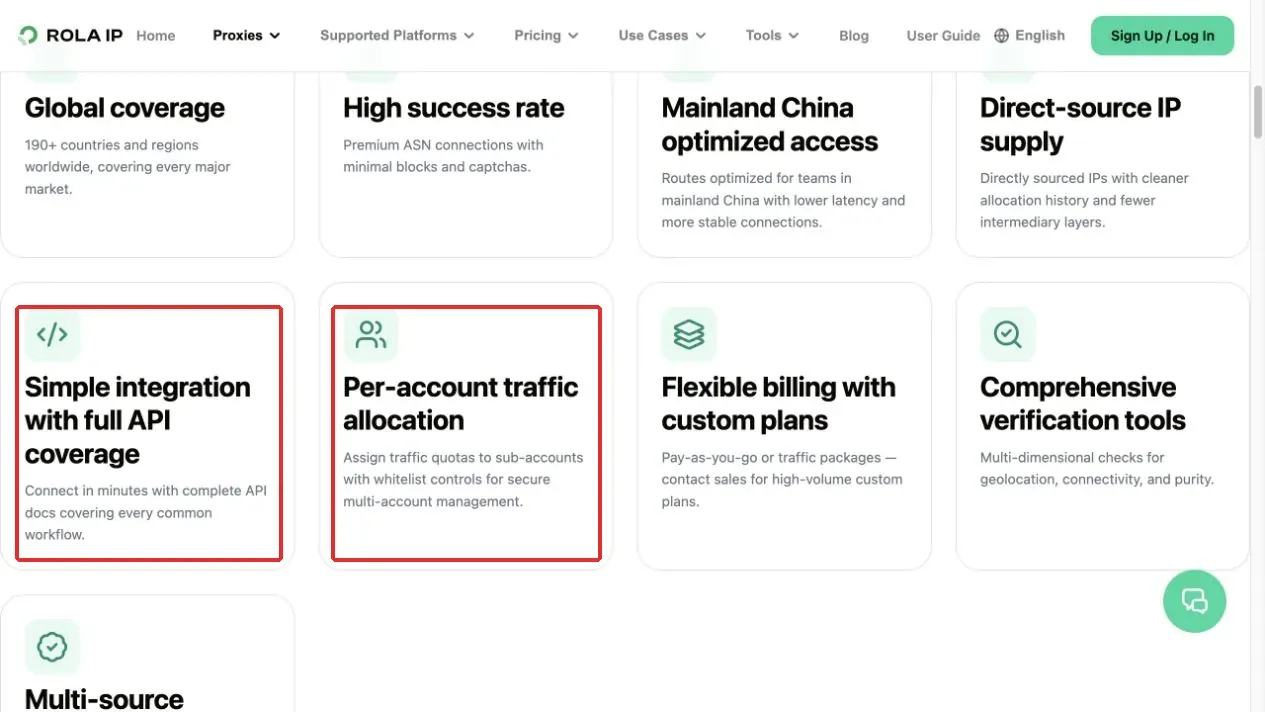
Figure 1. Rola IP API integration and per-account traffic allocation features.
For team use, subaccounts and quotas can be assigned by project, while designated staff maintain credentials and regional configurations. Rola’s API, quota management, and multi-language integration capabilities can reduce manual distribution of connection information, but they do not replace business authorization, log redaction, or incident handling. The final choice should be based on usability and total cost for the actual task, not a generic ranking score.
What to Prepare Before Configuring a Shopee Proxy
Record the existing proxy configuration before making changes. If the device is company-managed, ask the administrator whether changing the egress is allowed. Do not disable corporate security software or a required VPN on your own. Rola Connect changes the system proxy setting rather than only one Shopee tab, so other applications that follow the system proxy may also be affected.
Confirm the Site and Egress Country Before Configuration
For Singapore work, open Shopee Singapore first. For Thailand work, use Shopee Thailand. The proxy country should match the region defined by the task, but merely changing the IP while continuing to browse another country’s site does not make the result a local-market page.
For example, when checking the Indonesian market, first confirm that the target is shopee.co.id, then choose a resource for that region. Do not simply replace the Singapore task’s egress with an Indonesian one while continuing to use the old site and delivery conditions. Record the country name, target domain, and browser configuration name together so the test can be reproduced later.
Similarly, Server Region in a client may describe the access gateway location, while Country or Country/Region describes the selected resource’s egress region. A Hong Kong access gateway and a Singapore egress are not contradictory. Do not infer the final egress country from the gateway name.
Record the Current Browser and Product Conditions
Before a regional verification, record the site, browser, login state, delivery region, and check time. When checking a product, also record the product link, seller, variation, and quantity. Keeping these conditions unchanged is necessary before you can reasonably judge whether a difference is related to the network.
Do not identify a sample only by its product title. Products with the same name can be sold by different sellers and may have different variations. Save the product ID, store or seller identifier, variation, and original link together. During a promotion, also record the coupon threshold, whether the coupon has been claimed, bundle conditions, and the time and time zone. Use the same sample ID for screenshots and notes so that a price decision can be traced later.
A product-card minimum price, the price of a selected variation, the price after a coupon, and the checkout total are different metrics. After changing countries, even the same product name may correspond to another seller, currency, or delivery option. Proxy geolocation by itself does not prove that a local buyer can purchase at the displayed price.
| Check Item | How to Record a Singapore Task | Common Misinterpretation |
|---|---|---|
| Site | shopee.sg |
Changing only the IP without changing the site |
| Egress country | Expect Singapore and verify the egress separately | Treating the gateway region as the egress region |
| Session | Same browser and same login state | Comparing an incognito window with a logged-in window |
| Product conditions | Same seller and variation | Treating the lowest displayed price as the selected-variation price |
| Delivery conditions | Keep the selected delivery region unchanged | Attributing delivery restrictions to proxy failure |
Confirm the Authentication Method and Protect Credentials
With IP allowlisting, you usually register the client’s public egress that connects to the proxy gateway, not the purchased proxy egress itself. If the office egress changes, verify the allowlist again. Username/password authentication is useful for clients that connect from different networks, but credentials should be stored in trusted tools rather than public screenshots, shared documents, or command lines containing passwords.
Configure Country and Session Parameters for Dynamic Residential Proxies
Static proxies and dynamic residential proxies are different products. Do not append dynamic parameters to a static proxy address. With dynamic residential products, generate the target-country and session parameters in the dashboard first, then provide the complete connection information to the selected client.
For a dynamic residential connection, obtain the product-supported Host, Port, protocol, and authentication information from the dashboard. The Host should not contain a protocol prefix, username, or password, and the Port must match the protocol. Entering an HTTP port into a SOCKS5 client generally will not work just because the username is correct.
According to Rola’s proxy parameters, parameters are carried in the username, sessionid uses a suffix after the base account name, and sessiontime is measured in minutes with a range of 1-120. A Singapore egress username can follow this structure; use your own account name when configuring it:
ACCOUNT_sp01-country-sg-sessiontime-10
Replace ACCOUNT with the base account name. sp01 is the session identifier kept unchanged for this task, country-sg selects Singapore, and sessiontime-10 requests a 10-minute sticky session. Prefer the complete username generated by the dashboard and verify that the actual egress matches the requirement. A session can still be interrupted when node availability changes.
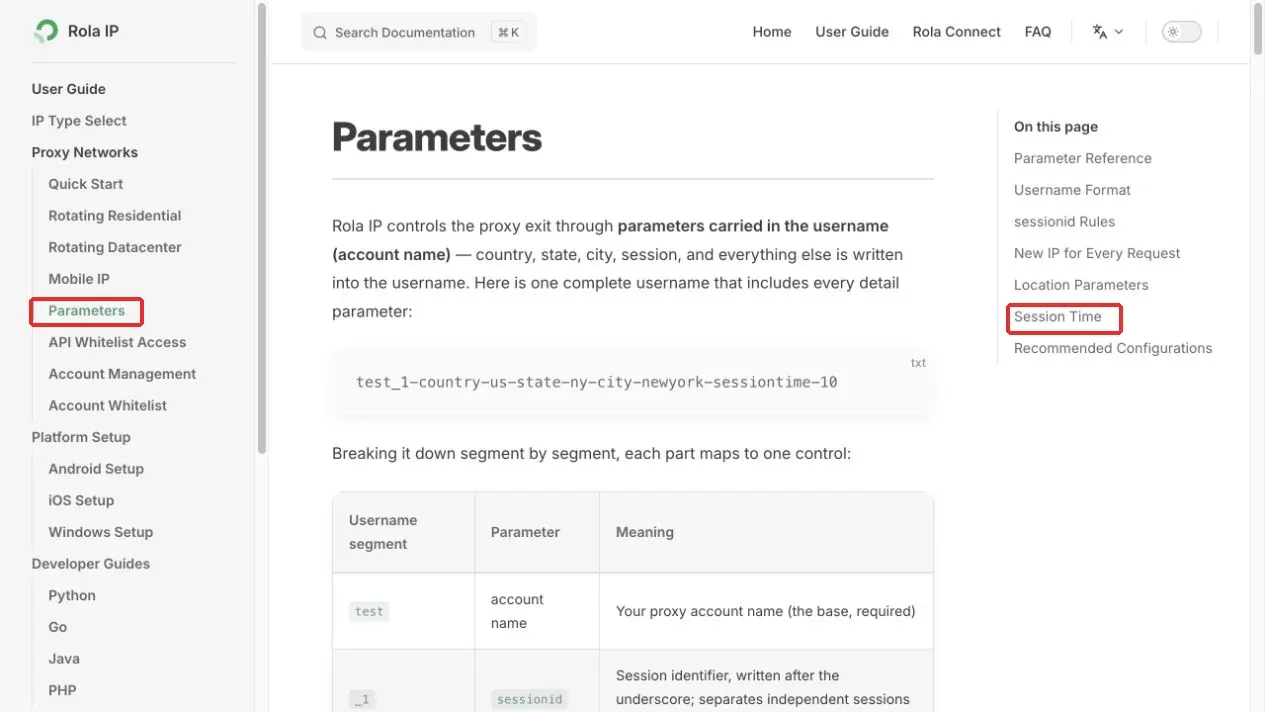
Figure 2. Rola IP country and session parameter documentation.
Country parameters select resources in a designated region only when the product supports that region and usable nodes are available. Username parameters for dynamic residential proxies cannot simply be appended to a static proxy address. When a logged-in session needs continuity, use a fixed egress or an appropriate sticky-session duration rather than rotating the IP on every request.
Browsers and scripts have their own connection settings. Configuring a proxy in Python does not mean Chrome is using the same proxy. A phone’s Wi-Fi proxy does not mean mobile data or every app is proxied. Verify each client separately instead of using one program’s success as proof for another.
HTTP, HTTPS, and SOCKS5 names also describe different parts of the connection path. When the target uses HTTPS, that normally means TLS is used between the client and the target. Building a CONNECT tunnel through an HTTP proxy does not by itself mean the authentication path from the client to the proxy gateway is protected by TLS. SOCKS5 is not an encryption protocol either. For sensitive business use, verify that the proxy access method provides the transport protection you require, keep certificate verification enabled, and do not install untrusted root certificates.
How to Configure a Shopee Proxy on Windows
If you already have a static resource, you can use Rola Connect. If you have an HTTP proxy Host and Port, you can use Windows manual proxy settings. Choose one method rather than having Rola Connect, a manual proxy, and a browser extension all modify the connection at the same time. The Windows system proxy affects applications that follow that setting; it is not a VPN that automatically covers the entire computer.
Method 1: Connect a Static Proxy with Rola Connect
Step 1: Get the Client from the Official Documentation
Open system proxy with Rola Connect, review the getting-started instructions under Overview & Start, and use the Rola Connect download entry in the documentation. After downloading, verify the source and follow the installer. Do not download a similarly named client from an unknown tutorial or third-party file-sharing site.
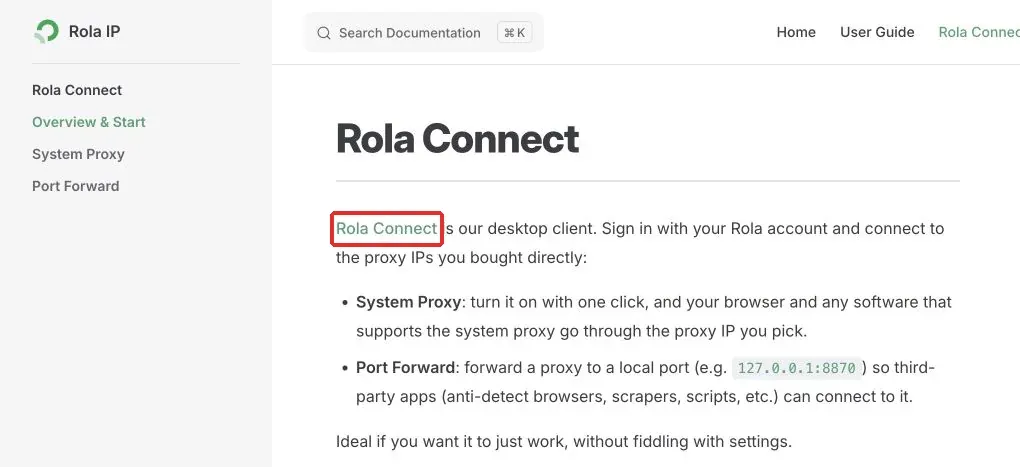
Figure 3. Rola Connect download entry for the Windows client.
Step 2: Sign In and Confirm the Static Proxy for the Target Region
Sign in to the client with your own Rola account and view existing static residential resources under the Static RESI IP tab. Check Country/Region and Remaining time first, then confirm the row you intend to use. If there are no resources, verify the account and purchased product before treating the empty list as a Shopee problem.
For a Singapore task, choose a resource whose Country/Region is Singapore and confirm its remaining validity. Figure 4 shows where to check the Singapore row; after signing in, use the resource list in your own account.
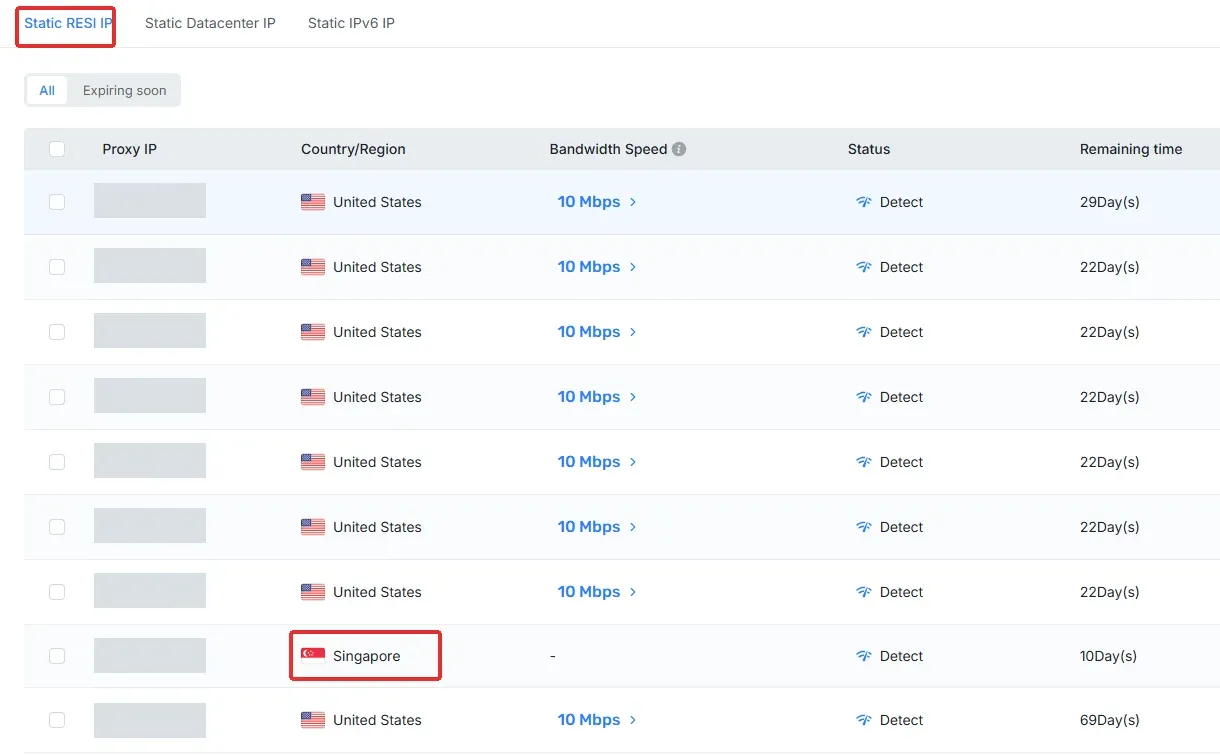
Figure 4. Finding a Singapore resource in the static residential proxy list.
Step 3: Enable System Proxy for the Selected Row
Find the System Proxy switch on the right side of the target resource row, enable it, and check the status at the top. The official instructions call for only one system-proxy egress to be enabled at a time. Before switching to another resource, confirm that changing the egress is appropriate for the business operation, and avoid repeated changes during a sensitive workflow.
The Local Proxy shown at the top is a local forwarding endpoint, such as a port after 127.0.0.1, while Proxy Info shows upstream egress information. 127.0.0.1 is not a Singapore public IP and is not a proxy address to enter on another computer. Use the local port currently displayed by the client rather than copying an example port.

Figure 5. System Proxy switch and connection status. The official example uses a U.S. resource; select a Singapore row for a Singapore task.
If you want only one program to use the proxy, you can use the client’s Port Forward mode and configure that program to connect to the designated local port. This mode must be configured inside the program and does not automatically take over other applications’ connections.
Method 2: Add a Proxy Manually in Windows Settings
This method applies to an HTTP proxy endpoint supported by the product. Windows Settings does not provide a universal username/password field, so successful credential authentication may still depend on the browser. If authentication repeatedly fails, use the compatible browser-extension method in the next section. The entry point is also described in Microsoft’s Windows proxy guide.
Step 1: Open Proxy Settings
Press Win + I, then go to Network & internet → Proxy. You can also search for Proxy settings from the Start menu. In Windows 11, click Set up or Edit under Manual proxy setup. Windows 10 usually shows the manual proxy form directly.
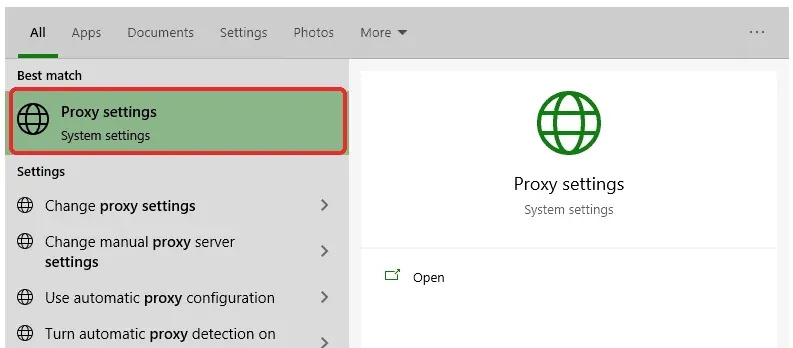
Figure 6. Opening proxy settings from Windows Search. Windows 10 interface example.
Step 2: Enter the Address and Port and Save
Switch Use a proxy server to On. Enter the hostname or IP supplied by Rola in Address and the matching HTTP port in Port. Do not enter the username, password, or a complete connection string in Address. Sites in the exception list bypass the proxy, so do not put the target Shopee domain there. Verify the fields and click Save.
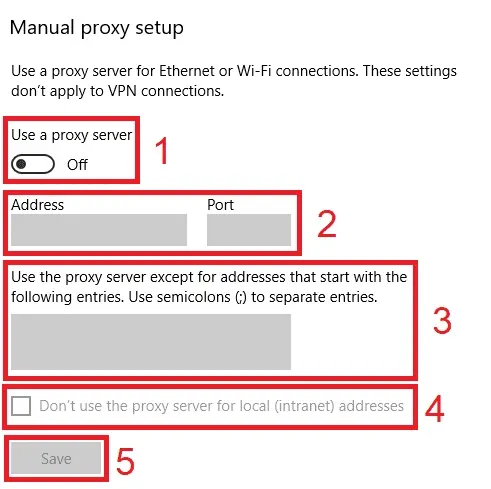
Figure 7. Manual proxy switch, address, port, exception list, and Save location. The switch in the screenshot is still Off and must be enabled before filling the fields.
If the browser displays a proxy-authentication dialog afterward, enter the Rola proxy username and password, not your Shopee password. When using IP allowlisting, first register the current access network’s public IP in the allowlist settings supported by the product. SOCKS5 parameters cannot be placed directly into this HTTP form. After saving, continue to the testing section below to check the egress.
Configure a Shopee Proxy Only in the Browser with an Extension
If only the browser needs to use Rola, one option is FoxyProxy Standard. Install it from the official FoxyProxy extension page. Confirm the developer is Eric Jung and follow the browser store’s installation prompts. The screenshots below are from the developer’s version 8.1 interface; the current layout may differ slightly. The preset servers shown in the screenshots are not Rola resources. The extension controls browser connections and does not automatically proxy other software.
Step 1: Open Settings and Add a Proxy
Click the FoxyProxy icon in the toolbar, open Options, then choose Proxies → Add. Give the new configuration an easy-to-recognize name such as Rola Singapore. Do not enable multiple proxy-controlling extensions at the same time.
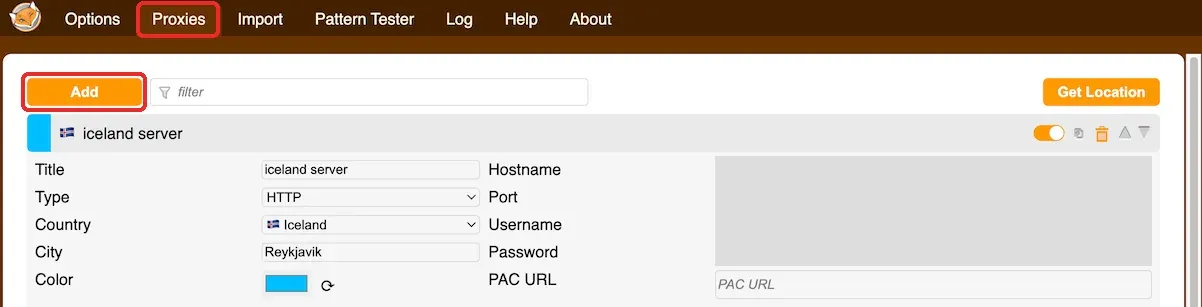
Figure 8. Adding a new configuration on the Proxies page. Connection fields in the public example are redacted.
Step 2: Enter the Rola Connection Information
Choose Type according to the protocol provided by the dashboard. Enter the gateway and port in Hostname and Port, and enter the corresponding authentication information in Username and Password, then save. The Country label is only for organizing the configuration; it does not replace Rola’s country parameter. A target page using HTTPS also does not mean Type must be HTTPS. Here, Type describes the proxy access protocol.

Figure 9. Locations of the proxy protocol, hostname, port, and authentication fields.
Chrome does not support SOCKS5 username/password authentication through this extension. If you need that authentication form, use a compatible Firefox configuration or an HTTP endpoint supported by the product. See the official FoxyProxy help for the limitation.
Step 3: Enable the Configuration and Check the Request Scope
For an initial test, use a browser dedicated to testing, select the Rola proxy you just saved, and let that browser’s page requests use it before opening an egress-check page. If you need site-specific switching, add a matching rule under that proxy and select Proxy by Patterns from the toolbar menu.
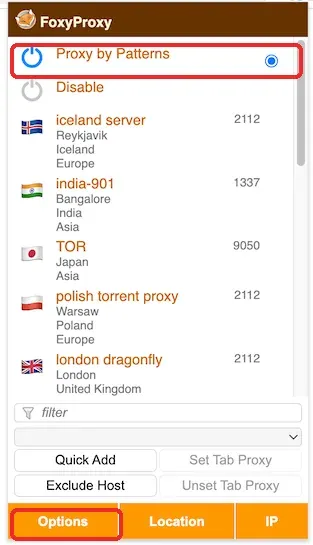
Figure 10. Choosing Proxy by Patterns or a saved proxy from the toolbar menu.
With the current Match type, you can enter *://*.shopee.sg/* for Singapore or *://*.shopee.co.th/* for Thailand. Use Pattern Tester to confirm that the actual URL matches before saving and enabling the rule. Other rule types use different syntax, so do not mix them.
Using only *.shopee.com will not cover all regional domains. A page may also request images and interfaces from other domains. Check the extension log for the actual requests and add explicit domains as needed rather than assuming that matching the main page means every request is matched. If the IP-checking site is not covered by the rule, it may still use a direct connection. Make the diagnostic request use the same configuration, then check the Shopee request log as well.
Configure a Shopee Proxy on Android Wi-Fi
This method applies to the HTTP proxy setting of a specific Wi-Fi network. It does not take over mobile data and does not guarantee that the Shopee app or every application follows the setting. The screenshots below show a real Android settings path. Different brands may use labels such as Internet, Connections, or Modify network.
Step 1: Open the Current Wi-Fi Details
Open the phone settings, go to Wi-Fi, connect to the network you want to use, then tap the gear icon or network name beside the current network. On some phones, you may need to press and hold the network and choose Modify network.
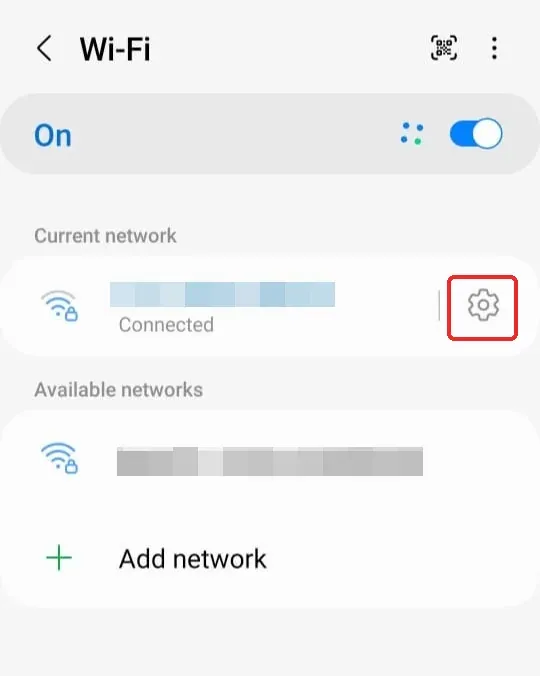
Figure 11. Opening the settings for the connected Wi-Fi network.
Step 2: Find the Proxy Option
Expand the advanced settings or choose to show more options, then find Proxy. Do not change DHCP under IP settings. The proxy hostname belongs in the proxy form, not in the phone’s static-IP configuration.
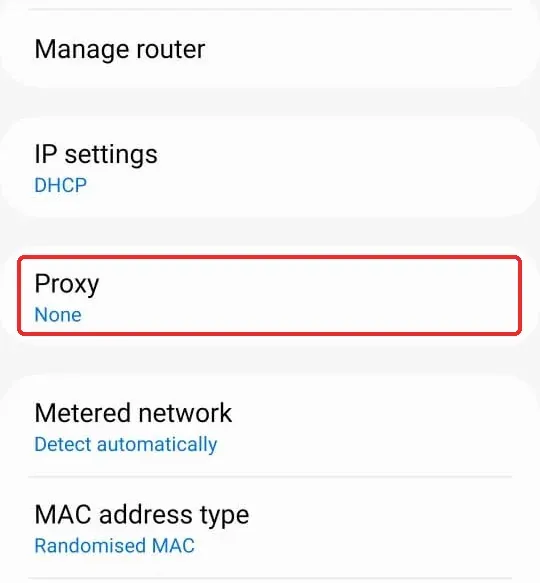
Figure 12. Opening the Proxy option in the network details.
Step 3: Select Manual Proxy
Change Proxy from None to Manual. Auto-config is for an automatic configuration script and is not where you directly enter a Host and Port.
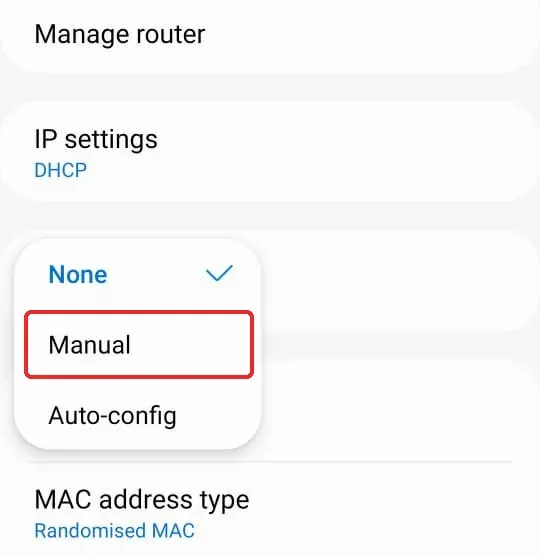
Figure 13. Selecting Manual proxy configuration.
Step 4: Enter the Host and Port and Save
Enter Rola’s HTTP proxy host in Proxy host name and the matching port in Proxy port. Bypass proxy for is the bypass list; do not add a Shopee domain unless you specifically intend to bypass the proxy for it. Save or confirm according to the phone interface, then use the same phone browser for the egress check.
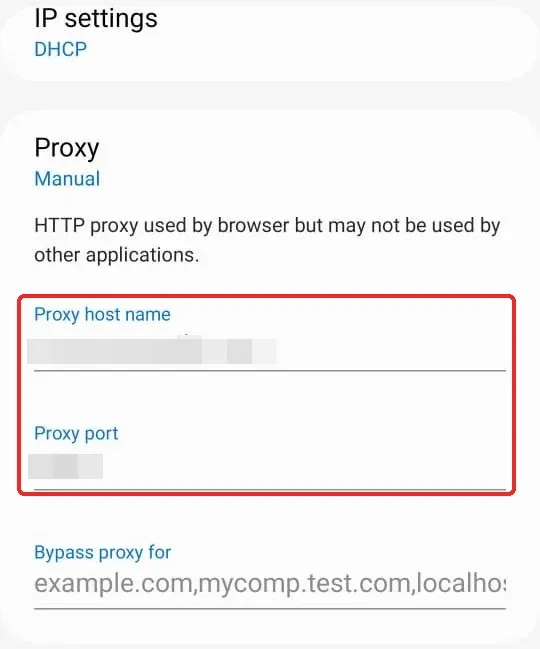
Figure 14. Entering the HTTP proxy hostname and port.
This Wi-Fi form usually has no username and password fields, so do not put a complete user:password@host string in the hostname field. If the product supports it, you may allowlist the current Wi-Fi network’s public egress; otherwise, first confirm that the browser can complete proxy authentication. If the browser does not support the required authentication or you need SOCKS5, use a trusted compatible client instead. Saving the form does not prove that the proxy connection is working.
If you need to proxy mobile data or an individual app, separately verify the client’s traffic scope, authentication support, and any VPN conflicts. Other access methods are described in the Rola Android connection documentation.
How to Test Whether a Shopee Proxy Is Working
After configuration, perform two separate checks: first confirm that the browser’s egress matches what you expect, and then confirm that the target operation on Shopee can actually be completed. Passing the egress check does not mean store functionality is automatically available.
Step 1: Check the Browser Egress IP and Region
Using the same browser that you will later use for Shopee, open an HTTPS egress-check page such as IPinfo, as described in the official client documentation. Compare the displayed egress with the resource selected in the client and verify the country information. If a geolocation database reports a different region, keep the time and data source and ask the provider to verify it rather than assuming Shopee has identified the region incorrectly.
Before enabling the proxy, record the original network egress in the same browser. After enabling it, reopen the same HTTPS checking page and record the egress and country. With a dynamic proxy, the access-gateway IP and final egress are usually different values; verify the assigned egress instead of expecting it to equal the Host. If the IP does not change, check extension mode, bypass rules, and cache first. A shared egress is also possible, so this one observation alone is not enough to declare the proxy broken.
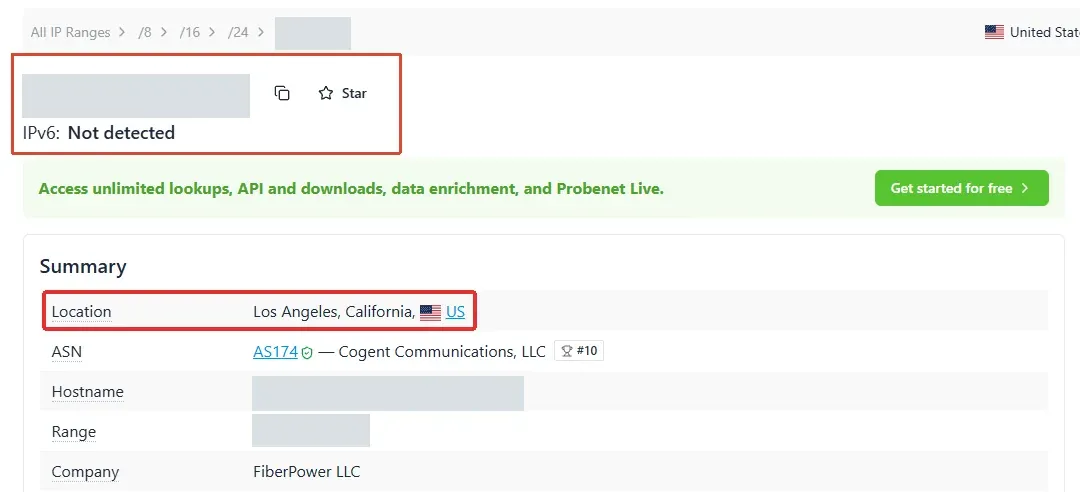
Figure 15. Checking the egress country and region in IPinfo.
A single checking page reflects only that request. It cannot prove that every Shopee subrequest or application uses the same path. If the checking page says IPv6 was not detected, that also does not prove the whole system has no IPv6 traffic. If the browser uses a proxy extension, separate settings, or bypass rules, verify its actual routing further.
Step 2: Open the Target Site and Check the Actual Operation
After the egress check, open the site that matches the task and first confirm that the page loads normally. If login is required, log in only on the official site. Do not enter your Shopee password into a proxy-authentication dialog. Proxy credentials authenticate with the proxy service, while Shopee credentials authenticate with Shopee; they are separate authentication steps.
Figure 16 shows a verification timeout encountered while opening the Singapore site. Timeout Error means the verification was not completed. That message alone does not prove that the account is banned or the IP is permanently blocked. Handle the verification according to the page instructions instead of repeatedly switching proxies.
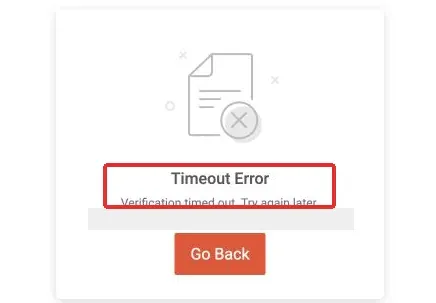
Figure 16. Shopee Singapore showing a verification timeout message: Timeout Error.
If a CAPTCHA or account-security prompt appears, stop repeated refreshes and IP changes and let the account owner complete the permitted verification as instructed by the platform. If there is an explicit account restriction, use the official recovery process first. Do not continue network testing to “prove” an enforcement action that the platform has already explicitly communicated.
A page showing a local language or redirecting to another site does not by itself prove that geolocation succeeded or failed. Language, cookies, account state, and delivery settings can also affect the display. Record the egress country, target domain, exact product conditions, and actual operation result separately. A CAPTCHA does not mean the configuration steps can be skipped, and a verification page should not be presented as a screenshot of successful normal access.
How to Tell Whether a Promotion Verification Is Complete
For a store you are authorized to check, first save the product variation and price before applying an offer. Then check whether an eligible coupon is displayed correctly, and finally verify the currency and delivery information at the checkout entry. Record the result or exact error at each step. Do not attribute an unmet coupon condition, delisted product, or unavailable delivery option to the proxy. After the test, retain the site, product ID, seller, session method, campaign period, timestamp, and observations.
Step 3: Record Stability and Usage
For store operations, recording session interruptions, reauthentication, timeouts, and unusual prompts is more useful than measuring latency once. For authorized data tasks, track the number of valid business results rather than only HTTP 200 responses: login pages, verification pages, and error-information pages can also return 200.
What to Do If the Proxy Connection Fails or Shopee Cannot Be Accessed
First determine whether the failure occurs at the proxy connection, target-site access, or account-verification stage. An error code is only one clue; also consider where the error came from and the client logs. Do not see any 403 and immediately conclude that “Shopee blocked the proxy IP.” Before submitting logs, hide credentials, full IP addresses, cookies, and personal information.
| Symptom | Check First | Handling |
|---|---|---|
| Proxy connection times out or is refused | Host, Port, protocol, and resource validity | Recheck against the dashboard; do not keep switching regions continuously |
| HTTP proxy returns 407 | Proxy authentication and allowlist requirements | Verify the proxy username/password; do not enter the Shopee password |
| SOCKS authentication fails | Whether the client supports that authentication method | Use a compatible access method; do not apply HTTP error-code assumptions to SOCKS |
| IP check passes but Shopee is abnormal | Target page, proxy rules, and site restrictions | Save the message and check whether target traffic actually matches the proxy rule |
| Page requests verification or shows a timeout | Whether the verification flow was completed | Stop repeated requests and follow the official verification flow |
| Account suspension or restriction is shown | Platform notice | Use the official appeal or recovery channel |
| Country differs from expectation | Country parameter, resource, and geolocation database | Ask the provider to verify; changing the page language is not enough |
| Access still fails after the proxy is disabled | Original system proxy and PAC configuration | Restore the confirmed original settings and contact an administrator if necessary |
For an authorized programmatic integration, pause when you receive 429 according to the server’s instructions and review your total request volume. Requests from multiple egresses to the same site still contribute to overall traffic. For 403 or an explicit restriction, do not default to infinite retries and automatic rotation. When store data is needed, evaluate application integration and the authorization scope through Shopee Open Platform rather than assuming an interface can read all data from any seller.
How to Disable the Proxy and Restore the Original Network
Disable Rola Connect
Return to the location shown in Figure 5 and turn off the enabled System Proxy. The official documentation describes turning it off as returning to a direct connection. If the device originally used a corporate proxy or PAC file, do not rely only on the switch turning gray; check whether the original configuration must be restored. Reopen the original work page to confirm that the network matches the previous setup, then exit the client.
Disable the Windows Manual Proxy
Return to Settings → Network & internet → Proxy, turn off Use a proxy server, and save. If the device originally used a corporate PAC or another proxy, restore the recorded original configuration rather than deleting everything. Reopen a normal work page to confirm connectivity.
Disable the Browser-Extension Proxy
Choose Disable from the FoxyProxy menu and check whether any other extension or system proxy remains active. Disabling one extension does not mean the entire computer is back to a direct connection; use the original network configuration as the reference.
Disable the Android Wi-Fi Proxy
Return to the Proxy menu for the same Wi-Fi network, change Manual to None, and save. This changes only that Wi-Fi configuration. If another proxy or VPN client is also active, disable it separately or restore its original setting. Finally, recheck the connection in the original browser.
Conclusion
Choose a Shopee proxy around the task’s required region, connection duration, and client support. A fixed exit can support longer persistence needs, while a suitable sticky session may cover a shorter workflow. Rotate between independent tasks only when changing the route will not compromise the comparison or interrupt required session state.
With Rola IP, confirm the selected product’s regional availability, protocol, authentication, and session settings before configuring one access method. Check the exit from the same client, then verify the actual Shopee page or authorized store operation. Keep network observations separate from product, delivery, and account conditions: a matching IP location is not proof of successful access.
Start with a small, documented test and compare completed tasks, interruptions, and total traffic before expanding usage. Preserve the original network settings so you can restore them afterward, and follow Shopee’s official verification or recovery process when required.