
Midjourney Product Photography: Create Better Images Without Faking the Product

Nov 9, 2026 · Guides · 12 min read
TL;DR
- Midjourney’s current default model is V8.2, not V6. The V8.2 Edit Model replaces older V7 Omni Reference workflows for current creation and editing.
- Start with a channel-specific brief, then describe the product, surface, lighting, camera angle, and a small set of parameters.
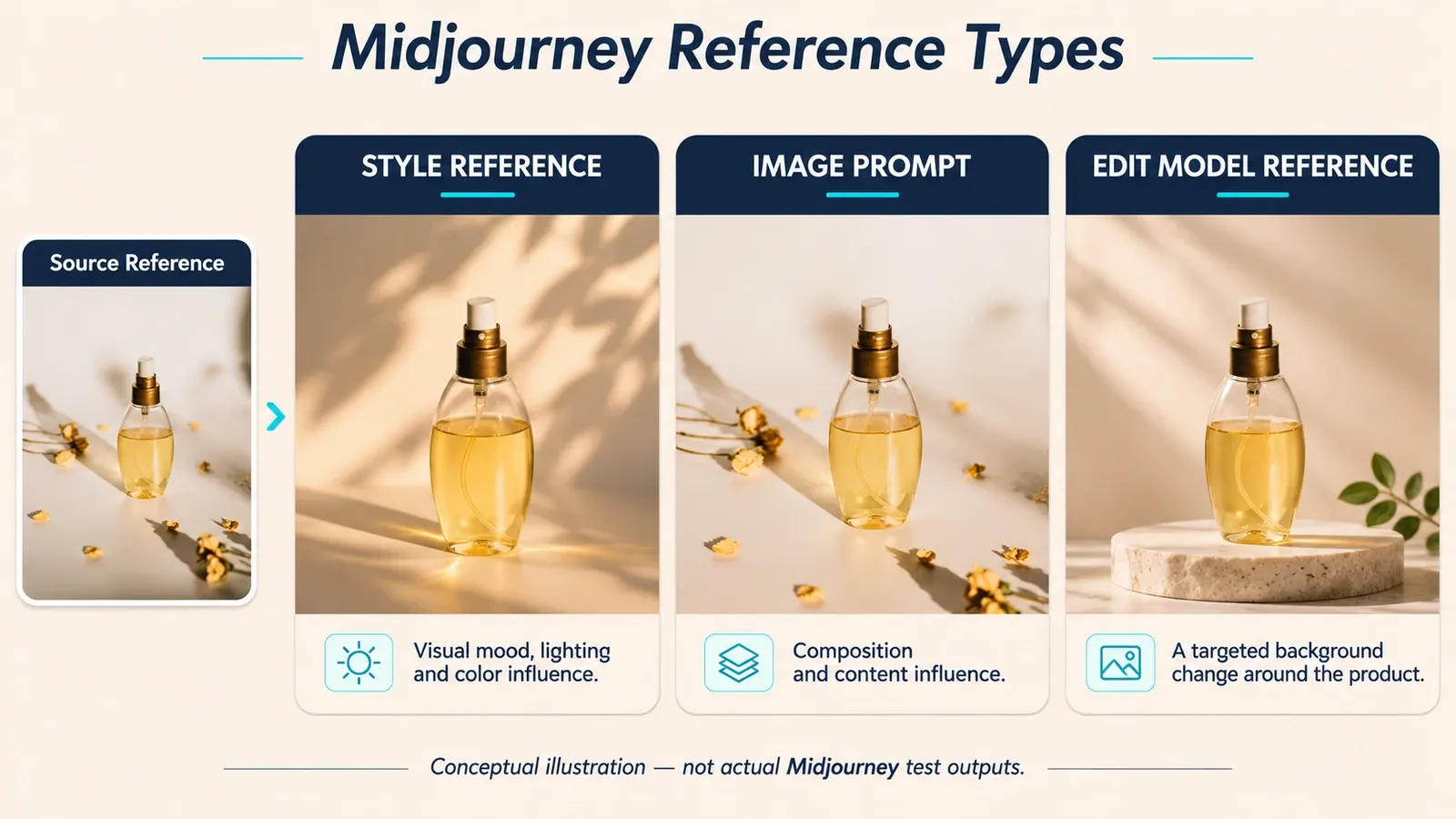
- Use a Style Reference for visual mood, an Image Prompt for compositional influence, and the Edit Model for targeted changes or multiple uploaded sources.
- Treat every generated product as a new interpretation. An uploaded source improves direction but does not guarantee exact product identity.
- For catalog and marketplace images, preserve the real product pixels whenever accuracy is essential. Generate the scene, then composite or edit around the approved product image.
- A Midjourney proxy is a network routing layer for authorized regional QA or a controlled team environment. It does not grant access, authorize automation, prevent account action, or replace Midjourney’s terms.
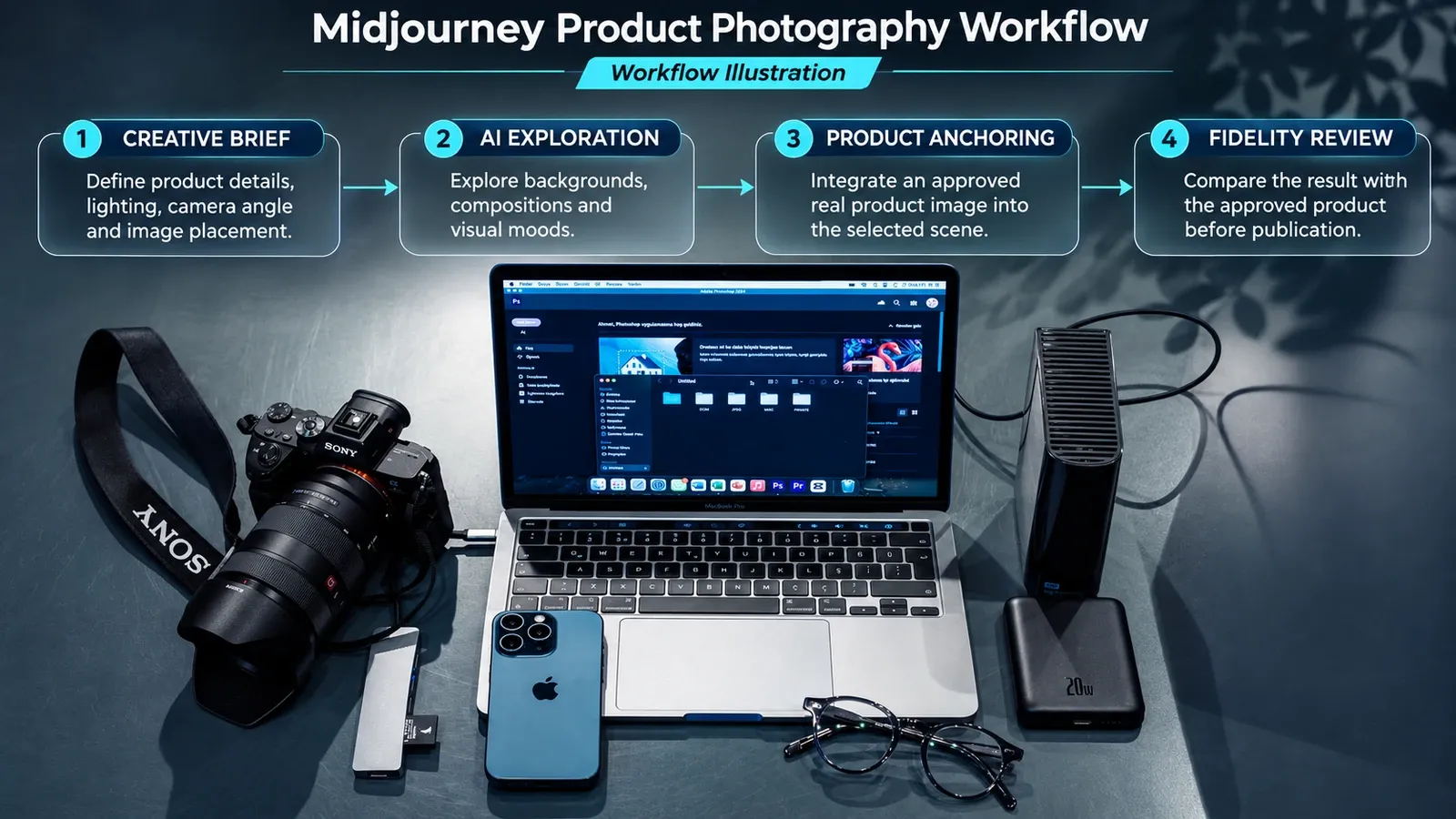
Where Midjourney AI Product Photography Fits
Midjourney is strong when the assignment rewards visual invention:
- campaign concepts and moodboards;
- lifestyle settings and editorial scenes;
- lighting and color-direction studies;
- background plates for later compositing;
- social images where a stylized interpretation is acceptable;
- early client alignment before a physical shoot or product-anchored production stage.
It is a weaker primary system for a large catalog that needs the same SKU, camera rules, product dimensions, review history, and output template repeated across hundreds of images. Dedicated product-photo tools tend to begin with an uploaded product and preserve it as the subject. Midjourney generates or edits a visual interpretation, so a beautiful frame can still contain a changed cap, misspelled label, extra port, different gemstone count, or impossible reflection.
Midjourney’s own Image Prompts documentation says references guide new creations rather than copy them exactly. That single sentence should shape the entire production process.
How to Use Midjourney for Product Photography
1. Write the acceptance criteria before the prompt
Choose the destination first. A square product tile, a 4:5 social creative, and a wide landing-page hero need different crops and negative space. Record:
- the channel and required aspect ratio;
- whether the image represents the exact product or only a concept;
- details that may not change, such as logo, finish, proportions, controls, and included accessories;
- the intended lighting and visual mood;
- the person responsible for comparing the output with the approved SKU.
This prevents a common failure: the team approves an attractive image and only later notices that it cannot be cropped for the placement or that the product is subtly wrong.
2. Use the current model and current controls
The official Version page lists V8.2 as the current default and says it became the default on July 24, 2026. V8.2 introduced the current Edit Model for source-guided creation and image editing. Old tutorials built around --v 6, V7 Omni Reference, or a Discord-only workflow can still offer composition ideas, but their interface and parameter advice should not be copied without checking compatibility.
You can work on the Midjourney website or in Discord. The website makes it easier to assign an upload as an Image Prompt, Style Reference, or Edit Model reference and to use the visual Editor. Discord remains useful when a team already works there, but it requires image URLs and parameter syntax for more actions.
Current website path
The current web workflow begins on Midjourney’s Create page:
- Open Create and find the Imagine bar.
- Click the image icon to open the uploads panel. Upload the approved product or visual reference; Midjourney currently documents a 10 MB maximum file size.
- Drag the upload into the control that matches the job: Attach to prompt for an Edit Model reference, Style Reference for look and feel, or Image Prompt for content and composition guidance.
- Type the product photography brief in the Imagine bar. Keep exact pack copy, certifications, and offer claims out of the generated image.
- Open Settings and choose the aspect ratio, model, SD or HD size, Raw mode, stylization, and variety required for the placement. Availability can depend on the current model and plan.
- Submit the prompt. In the creation feed, review the prompt text, parameters, and uploaded sources shown beside each result before choosing a direction.
- For a targeted change, open the selected image and use Quick Edit or Open Editor. Mask only the region that may change, then recheck the entire product after the edit.
- Save the selected output together with its prompt, model version, reference files, parameters, reviewer, and approval date. This record matters when the same campaign needs another crop or revision.
If the interface labels change, use the current Creating on Web guide rather than relying on an older screenshot.
3. Build a short photography brief
The official Prompt Basics guide recommends clear, relatively short descriptions. For product work, a practical order is:
[product form and material] + [surface and background] + [lighting source and direction] + [camera angle and focus] + [parameters]
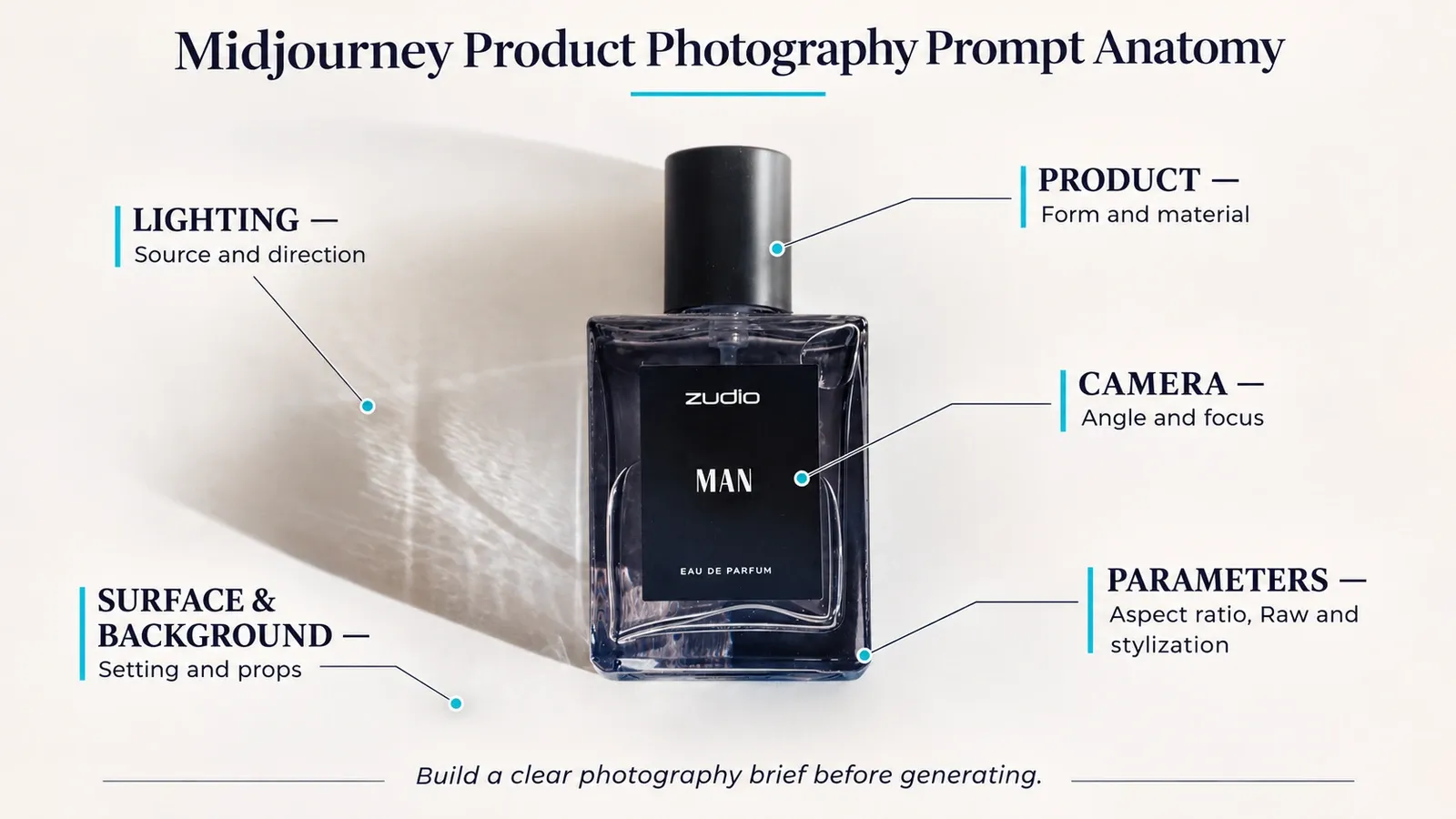
Start with nouns that affect the physical read of the object. “Matte black 30 ml glass dropper bottle” gives the model more useful direction than “beautiful premium skincare.” Then describe a real lighting setup, such as a large softbox at 45 degrees camera-left with white fill camera-right. Add one camera view and one depth-of-field choice.
Parameters belong at the end. Use --ar for composition, --raw when you want less of Midjourney’s default creative styling, and a modest --s value when a literal product read matters. Treat any numeric preset as a starting point, because parameter behavior can change between versions.
4. Choose the right reference type
Midjourney currently offers three reference paths that matter for product work:
| Reference | Best use | Important boundary |
|---|---|---|
| Style Reference | Reusing color, texture, lighting, and visual mood | It captures style, not the identity of the object |
| Image Prompt | Influencing composition, content, and colors in a new creation | It inspires a new image rather than copying the source exactly |
| Edit Model reference | Making written changes, combining up to four references, inpainting, or outpainting | Stronger control still requires comparison with the real product |
The Style Reference guide recommends keeping the text prompt simple and avoiding style words that fight the reference. The Edit Model guide documents up to four references and targeted editing in V8.1 and V8.2.
There is no reliable “no-prompt” shortcut that removes the need for art direction and review. Even with uploaded images, the team still chooses the reference type, scene, crop, lighting, and acceptance criteria. The fastest workflow is the one with the fewest ambiguous decisions, not the fewest typed words.
5. Iterate one variable at a time
Keep the product description and core camera view stable while changing one variable, such as the background surface or key-light direction. Save the prompt, model version, references, aspect ratio, and approved result together. A seed can help controlled experiments, but it is not a guarantee that every detail will stay fixed across model versions or major prompt changes.
Review a small contact sheet before spending time on high-resolution outputs. Reject directions that fail the product-identity check, then refine the two or three that remain.
6. Preserve the real product for commerce-critical images
For a marketplace hero image, a product detail page, or any visual that promises “this is what ships,” the safest workflow is often:
- photograph or render the approved product accurately;
- remove or mask the original background without changing the product;
- generate background and lighting concepts in Midjourney;
- composite the real product into the selected scene;
- match shadow, reflection, color temperature, and perspective;
- compare the final image with the physical SKU and channel requirements.
The Midjourney Editor can preserve visible parts of an uploaded layer while regenerating transparent areas, but the exported image still needs a human fidelity review. Do not assume that a masked product, label, or logo remained untouched simply because the edit looked plausible at first glance.
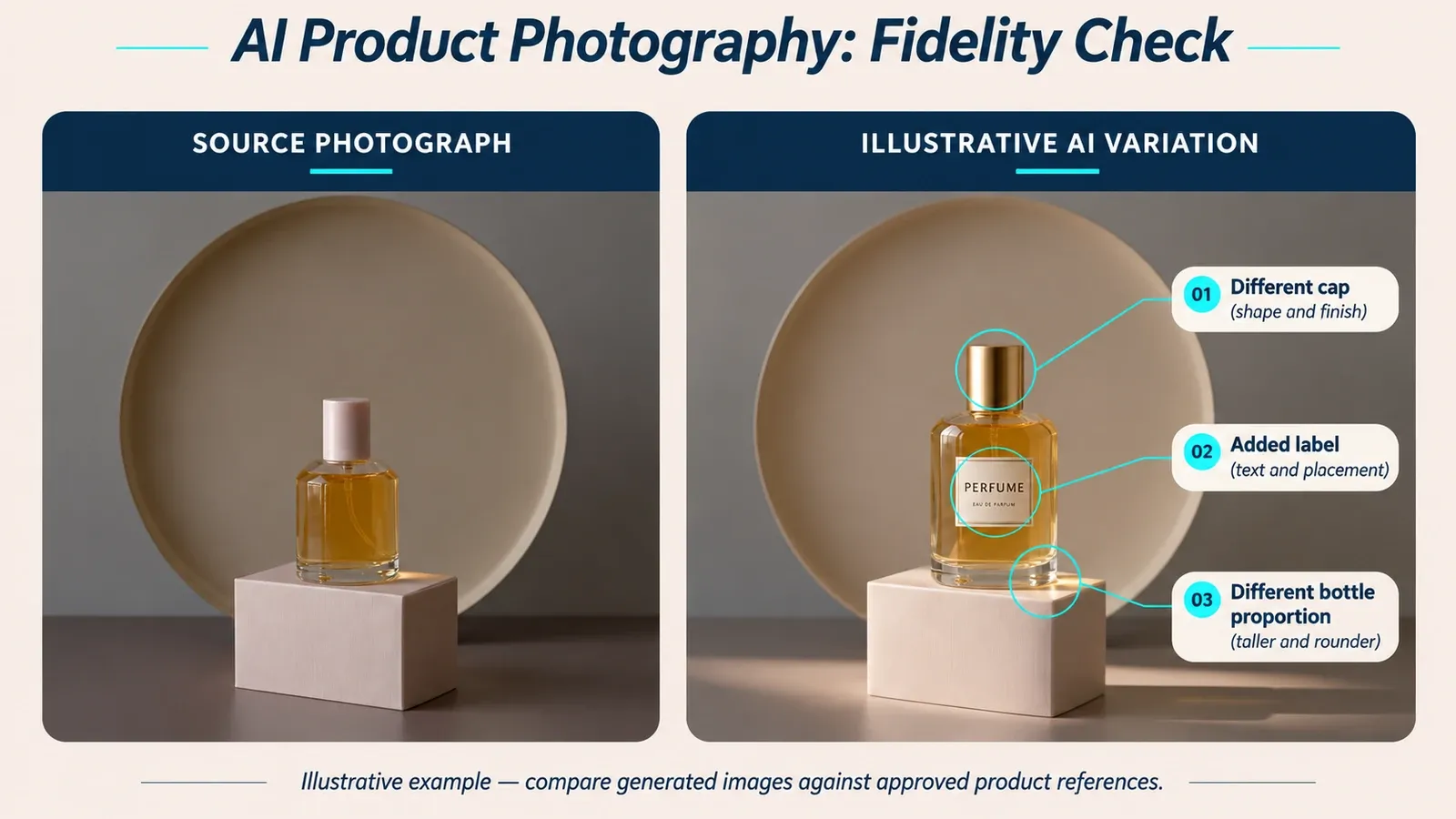
7. Run a SKU fidelity gate
Do not let the person who generated the image be the only approver. The SKU owner, product marketer, or another reviewer who can access the approved source image should complete a side-by-side check at 100% zoom.
| Check | What to compare | Reject the asset when |
|---|---|---|
| Logo and pack copy | Spelling, type placement, certification marks, ingredients, and legal lines | Text is invented, moved, omitted, or unreadable |
| Shape and proportions | Silhouette, cap height, button position, screen size, seams, and relative dimensions | The product could be mistaken for another variant |
| Color and material | Approved color reference, finish, transparency, grain, and metal or fabric behavior | Hue, gloss, or material identity changes |
| Components and accessories | Port count, controls, stones, straps, cables, inserts, and included items | A part is added, removed, duplicated, or substituted |
| Light and physics | Contact shadow, reflection direction, refraction, perspective, and product grounding | The scene makes the real product physically implausible |
| Channel placement | Required crop, safe area, background rule, negative space, and export dimensions | The approved product is cropped or the channel rule is missed |
Record one of three outcomes: approved, revise, or concept only. “Concept only” assets can guide a later shoot or composite, but they should not enter a commerce feed as a representation of the exact SKU.
Three Midjourney Product Photography Prompts
These prompts are starting points for current V8.2 work. Replace the bracketed details and attach an appropriate reference when product identity matters.
Skincare studio image
[matte white 30 ml ceramic serum bottle] on a honed limestone slab, warm grey seamless background, large softbox at 45 degrees camera-left, white fill camera-right, straight-on 85 mm product photograph, crisp label plane, soft contact shadow --ar 4:5 --raw --s 75
Consumer electronics hero
[compact graphite wireless speaker] centered on a dark acrylic surface, cool blue gradient background, narrow rim light behind the product, soft frontal fill, three-quarter view at eye level, sharp controls and edge detail, generous negative space on the left --ar 16:9 --raw --s 60
Beverage campaign concept
[clear citrus sparkling-water bottle] on wet pale stone, small droplets and sliced citrus in the background, hard morning sunlight from upper right, subtle bounce fill, low three-quarter camera angle, crisp bottle with shallow background focus --ar 4:5 --raw --s 100
Do not ask Midjourney to invent text, certification marks, ingredients, or performance claims that appear on a sellable product. Add verified copy later in a controlled design file.
When a Midjourney Proxy Is Relevant
A Midjourney proxy can be relevant when an authorized team needs a documented network route for regional quality assurance, public-web research, or a controlled connection from a supported client. It is network infrastructure, not a Midjourney feature.
Keep its role narrow:
- route only the application or browser traffic that has been intentionally configured;
- record the test market, time, route, and session behavior;
- use a stable session when a legitimate multi-step review must keep the same network context;
- test DNS, proxy authentication, HTTPS reachability, and browser behavior separately;
- keep proxy credentials out of prompts, screenshots, source code, and ordinary logs.
Rola IP’s Midjourney proxy solution for authorized regional QA describes a network-routing option for approved testing. A proxy remains a route, not permission from Midjourney or a substitute for the platform’s supported browser flow.
For device-level setup, follow the macOS proxy settings guide before testing Midjourney. Confirm whether the setting applies system-wide or only to a particular browser or application; otherwise, a successful test may be using a different route than the one you intended.
Diagnose the response before changing the IP
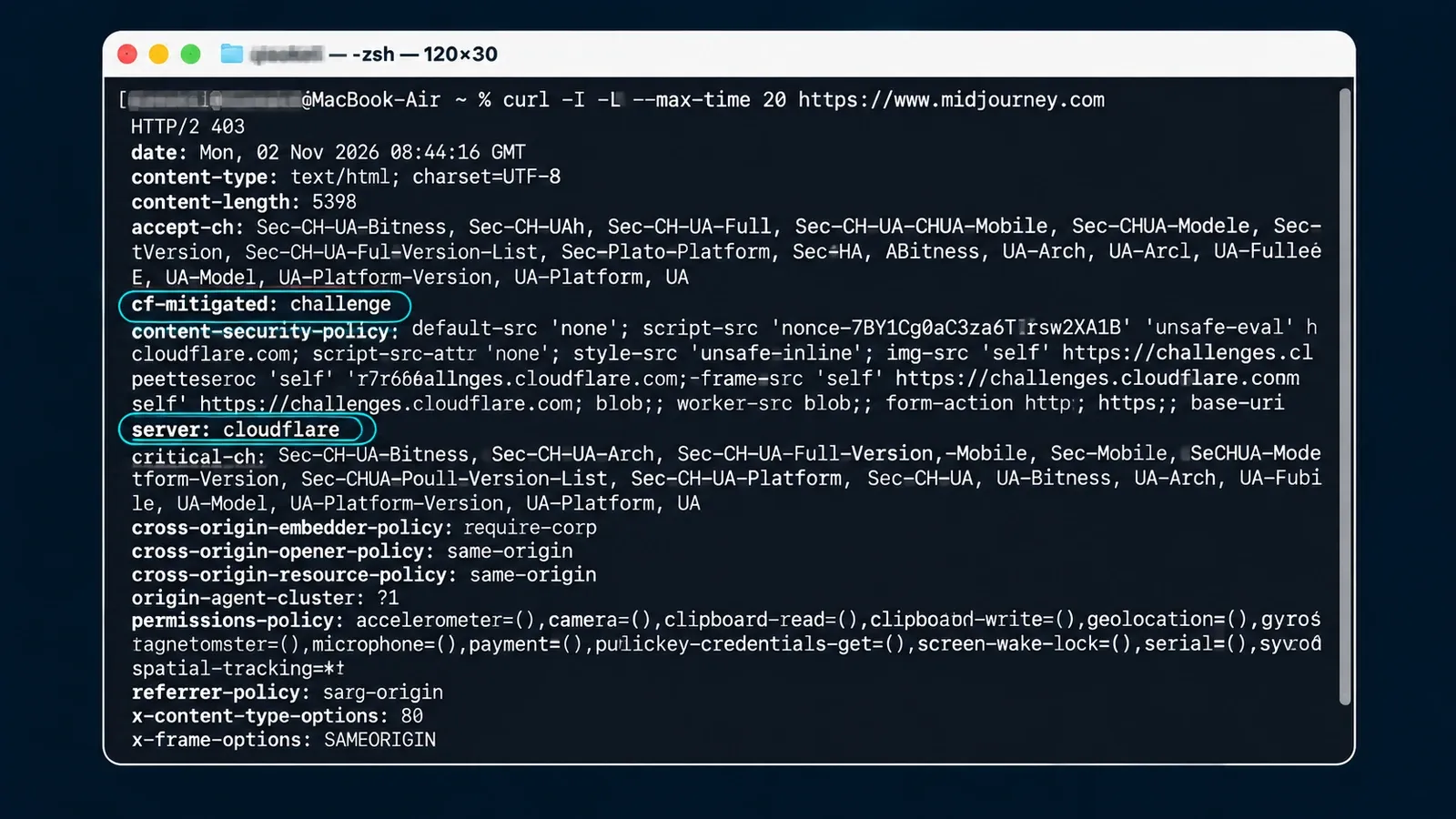
The following direct connectivity check was recorded on November 4, 2026. It was a reachability diagnostic, not a proxy benchmark and not a logged-in Midjourney test.
curl --noproxy '*' -I -L --max-time 20 https://www.midjourney.com
| Test field | Recorded value |
|---|---|
| Time | November 4, 2026, 02:59:12 UTC; 10:59:12 China Standard Time |
| Environment | macOS 26.3.1, Apple silicon host; cURL 8.7.1 with HTTP/2 support |
| Route | Direct request forced with --noproxy '*'; proxy environment variables were unset and macOS reported no configured system proxy |
| Location scope | No geographic proxy target; client timezone was Asia/Shanghai, and physical egress location was not independently geolocated |
| Timeout and retries | 20-second maximum; zero retries |
| Success criterion | Resolve the host, complete the TLS connection, and receive HTTP response headers within 20 seconds |
| Observed result | HTTP/2 403, cf-mitigated: challenge, server: cloudflare, content-type: text/html; charset=UTF-8 |
The host resolved and returned a Cloudflare browser challenge. This proves that the destination answered this one direct command-line request. It does not prove an account ban, a regional block, browser availability, page usability, or that changing the exit IP will solve the issue. Cookies, request identifiers, and other transient headers were omitted from the published excerpt.
HTTP/2 403
date: Wed, 04 Nov 2026 02:59:12 GMT
content-type: text/html; charset=UTF-8
content-length: 5398
cf-mitigated: challenge
server: cloudflare
x-content-type-options: nosniff
x-frame-options: SAMEORIGIN
Use this troubleshooting order:
- Open Midjourney in a supported browser on the direct connection.
- If direct access works, test the approved proxy route in the same browser and profile.
- If the proxy fails before the destination responds, check host, port, protocol, authentication, and DNS behavior.
- If a PHP application owns the routed request, use the cURL proxy configuration in PHP guide to confirm application-level settings without logging credentials.
- After the route works, use the proxy speed test to separate connection performance from application or account behavior.
- If the destination returns a challenge, complete only the normal browser flow permitted by the platform. Do not automate or bypass it.
- If the account shows a restriction, use Midjourney’s support process. Changing an IP does not change account status or grant permission.
Midjourney’s current Terms of Service state that one user may use a registered account, each user may have only one account, and automated tools may not access or generate through the service. A proxy must never be presented as a way to evade those rules, extend plan limits, or prevent enforcement.
A Practical Production Decision
Use the workflow that matches the approval burden, not the one with the most novel output.
| Decision factor | Midjourney alone | Midjourney plus real-product composite | Product-anchored catalog system or conventional shoot |
|---|---|---|---|
| Concept and mood exploration | Strong fit | Strong fit | Usually more production than the idea stage needs |
| Exact SKU identity | Weak fit without independent reconstruction | Stronger because approved product pixels remain authoritative | Strong fit when the process is built around the real product |
| Background and lighting freedom | High | High, with extra compositing work | Depends on the system or shoot plan |
| Large catalog consistency | Requires strict templates and review | Possible, but compositing effort grows with volume | Usually the clearest fit for repeatable catalog output |
| Human review | Required | Required for product, composite, and scene | Required for product accuracy and channel compliance |
Use Midjourney alone when the image is exploratory, conceptual, or clearly stylized. Use Midjourney plus a real product cutout when the scene can be invented but the SKU must remain exact. Choose a product-anchored catalog system or a conventional shoot when repeatability, dimensions, labels, review history, and channel compliance matter more than open-ended visual exploration.
The best workflow is not the one that generates the most images. It is the one that makes the approval decision obvious.