
Best MCP Servers for AI Tools: A Practical 2026 Guide

Aug 28, 2026 · Comparisons · 9 min read
TL;DR
Start with one read-focused MCP server for one repeatable task. GitHub MCP is a practical choice for repository context, Context7 for current library documentation, Playwright MCP for controlled browser testing, Firecrawl for authorized web research, Sentry for issue triage, Supabase for project-scoped data work, and Notion or Slack for workspace knowledge. Add write-capable tools only after documenting approval, logging, data handling, revocation, and rollback.
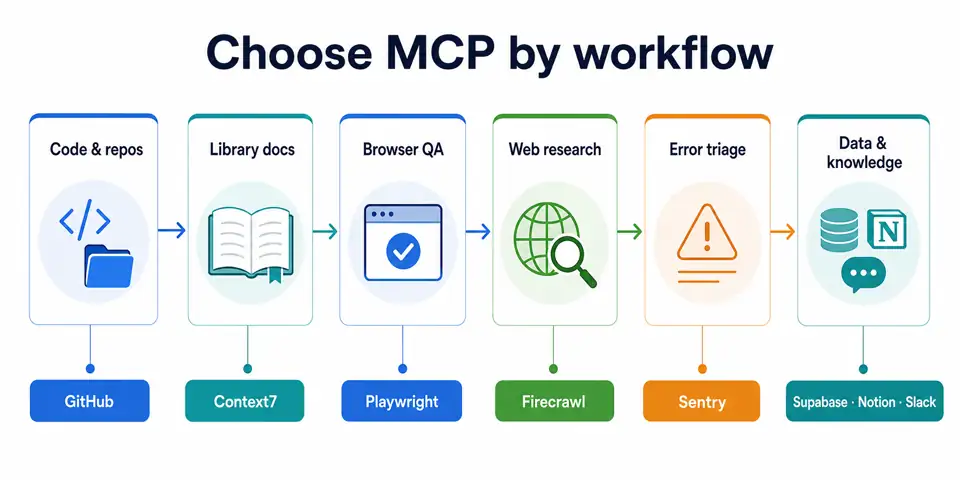
How This Comparison Was Assessed
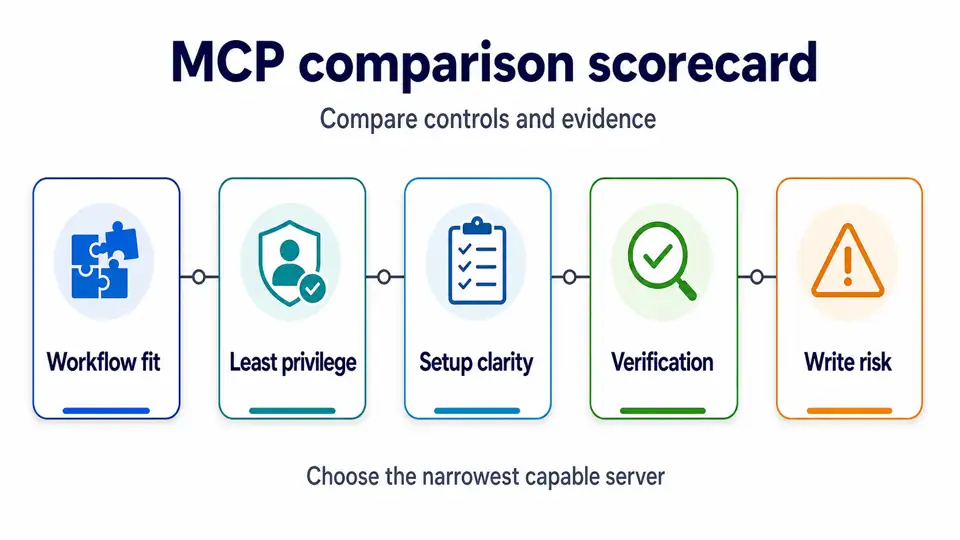
This is a documentation-based editorial assessment, not a load, latency, adoption, or security benchmark. The labels summarize official setup and capability documentation reviewed on 2026-08-28. They do not represent measured uptime, success rate, pricing, throughput, market share, or an independent security audit.
| Assessment lens | What it examines | Why it matters |
|---|---|---|
| Setup clarity | Whether the official docs show a supported connection path | Faster setup reduces risky improvisation. |
| Least-privilege options | Read-only modes, project scoping, OAuth, or restricted tool groups | Agents should receive only needed authority. |
| Workflow focus | How directly the tool supports one repeatable job | Narrow tools usually create less unnecessary context. |
| Verification support | Source links, logs, issue context, or reproducible output | Agents still need reviewable evidence. |
| Write-risk exposure | The degree to which normal use can change external state | Higher risk is not bad; it requires stronger approvals. |
The assessments below are decision aids, not performance claims. “High” write risk means a server can take consequential actions if a user authorizes it; it does not mean the server is inherently unsafe. Connection options, permissions, and tool availability must be rechecked in the linked official documentation on the publication date.
Comparison: Representative MCP Servers by Job
The “recommended use” labels are editorial fit statements for the workflow shown below. They are not an objective market ranking, performance test, or vendor endorsement.
MCP server |
Recommended use |
Documented connection model |
Least-privilege starting point |
Verification evidence |
Write risk |
Editorial fit |
|---|---|---|---|---|---|---|
GitHub MCP |
Repository search, issues, and PR workflows |
Remote or local, client-dependent |
Read-oriented toolset and minimal repository permissions |
Commits, issues, and PR artifacts |
Medium to high |
A practical start for teams with clear repository boundaries. |
Context7 MCP |
Current library and framework documentation |
Remote, client-dependent |
Keep use focused on documentation retrieval |
Cited documentation paths |
Low |
Useful for reducing stale API assumptions during coding. |
Playwright MCP |
Browser QA, accessibility inspection, exploratory automation |
Local or self-hosted, client-dependent |
Isolated browser, allowed hosts, test accounts |
Repeatable browser state and test output |
Medium |
Useful for controlled test environments, not open-ended browsing. |
Firecrawl MCP |
Authorized web research and structured page extraction |
Hosted service |
Approved domains and limited tool access |
Preserved source URLs and retrieved text |
Low to medium |
Useful when the task needs clean web context. |
Sentry MCP |
Error investigation and production debugging |
Hosted or local, client-dependent |
Restricted organization, project, and read scope |
Issues, events, releases, and traces |
Low to medium |
Useful when the question begins with a production symptom. |
Supabase MCP |
Scoped data work and project diagnostics |
Remote or local, documentation-dependent |
read_only=true, one project reference, limited feature groups |
Query results, migration records, and logs |
High without restrictions |
Useful when read access can answer the question. |
Notion MCP |
Internal knowledge search and controlled page updates |
Hosted remote |
OAuth limited to the connected workspace and approved AI apps |
Target page and change history |
Medium |
Useful when durable team knowledge lives in Notion. |
Slack MCP |
Operational context and approved communication actions |
Hosted remote |
Restricted channels; separate read from sending workflows |
Channel, thread, and final action |
Medium to high |
Useful for current context, not as durable documentation. |
Quick Recommendations
| If your agent needs to… | Start with | Add only when needed |
|---|---|---|
| Understand a codebase and propose a fix | GitHub MCP + Context7 | Sentry MCP for active incident context |
| Test a local web app | Playwright MCP | GitHub MCP for issue or PR follow-up |
| Research approved public web sources | Firecrawl MCP | A domain-restricted browser workflow |
| Diagnose a data-backed app | Supabase MCP in read-only mode | Sentry MCP for runtime errors |
| Turn internal decisions into a brief | Notion MCP or Slack MCP | GitHub MCP if technical artifacts are involved |
1. GitHub MCP for Repository-Aware AI Workflows
GitHub’s official MCP server is a practical starting point for teams whose work already lives in issues, pull requests, code, and Actions. Its main advantage is traceability: an agent’s useful output can be checked against a repository, a commit, a PR diff, or an issue discussion rather than treated as an ungrounded suggestion. Remote and local connection options are documented, but exact authentication and host support differ by MCP client. GitHub’s setup guide should be the implementation source of truth on the publication date.
Choose it when: the agent needs to summarize a codebase, locate ownership, inspect issues, draft a fix, or help a reviewer connect a change to repository context.
Do not start with broad write access. Create a separate read-oriented configuration for investigation. Enable issue, branch, or pull-request actions only after a human review step is defined. Repository tokens, organization policy, and toolset configuration determine the real permission boundary.
2. Context7 MCP for Current Documentation Lookup
Context7 is useful when code agents repeatedly need current package documentation rather than whatever version happened to appear in a training corpus. Its client documentation describes remote connection options that can use a CONTEXT7_API_KEY; verify the current setup requirements before enabling it. Context7’s client guide documents the connection model.
Choose it when: your agent needs version-aware examples for frameworks, SDKs, or libraries before it writes code.
Key limitation: documentation retrieval is evidence, not runtime proof. Store the CONTEXT7_API_KEY in an approved secret manager, limit where the MCP configuration is used, and keep the workflow focused on documentation retrieval. Ask the agent to name the package version, cite the documentation it used, and run your project’s own tests.
3. Playwright MCP for Controlled Browser Testing
Microsoft’s Playwright MCP server exposes browser automation through structured accessibility snapshots rather than requiring a vision model to click pixels. That makes it useful for exploratory tests, accessibility-oriented inspection, and durable browser workflows in a controlled environment. Its official project documents current runtime, client configuration, host, origin, file-access, and browser-profile controls; recheck those requirements before setup. Review the Playwright MCP README before exposing a browser session.
Choose it when: the task has a known test environment, approved URLs, test accounts, and a reviewer who can inspect results.
Key limitation: browser automation can create large tool outputs and can act on external systems. Restrict allowed hosts, keep it isolated from personal browser profiles, and never treat it as permission to access logged-in services or bypass a website’s controls.
4. Firecrawl MCP for Authorized Web Research
Firecrawl is a strong fit when an agent needs to search, scrape, crawl, map, or extract clean content from approved public sources. Its server is aimed at turning web pages into agent-usable context, rather than controlling a local browser. Firecrawl documents its MCP capabilities and client setup in its MCP server guide.
Choose it when: the output needs a source URL, clean text, or structured data from permitted pages.
Key limitation: a technical capability is not a collection right. Define permitted domains, request limits, data retention, and a stop condition for 401, 403, 429, paywalls, login walls, or terms that prohibit the intended use. If an authorized workflow needs geographically consistent public-page QA, use a web scraping proxy only as a network configuration layer—not as a way to defeat access controls.
5. Sentry MCP for Error Triage
Sentry MCP is deliberately focused on developer and debugging workflows rather than every possible Sentry feature. That focus makes it valuable during incident investigation: an agent can relate an exception, stack trace, release, and issue history before proposing a code change. Sentry’s MCP project describes the scope and supported integration paths.
Choose it when: a team needs to convert noisy production symptoms into a bounded debugging hypothesis.
Key limitation: production telemetry can include sensitive paths, user context, and business metadata. Scope the organization and projects, redact what the model should not receive, and verify the agent’s diagnosis against the original issue before changing code or closing an alert.
6. Supabase MCP for Scoped Data and Backend Work
Supabase MCP connects an AI client with projects, database operations, logs, branches, and documentation search. It is one of the clearest examples of why MCP selection must begin with permissions: the official docs expose read_only=true, project scoping, and feature-group controls. Supabase’s MCP documentation is explicit that connecting an LLM to a project has security implications.
Choose it when: an engineer needs schema context, a safe query, logs, or database diagnostics without switching interfaces.
Key limitation: do not enable account, database-write, or deployment tools as a default. Start with read_only=true, a single project_ref, and only the feature groups required for the task. Require a reviewed migration for schema changes and separately verify row-level security, backups, and rollback behavior.
7. Notion MCP for Workspace Knowledge
Notion MCP is a hosted server that can connect compatible AI tools to a Notion workspace through OAuth. It is useful for finding project notes, producing a draft PRD, turning research into a report, or updating an approved planning page. Notion’s official overview describes both read and write use cases and emphasizes that access follows the connected workspace. See Notion’s MCP overview.
Choose it when: your team’s durable knowledge is already managed in Notion and the final deliverable should live there.
Key limitation: knowledge systems can contain stale, private, or conflicting pages. Limit workspace access, validate source-page ownership and freshness, and require a human confirmation before publishing, moving, or deleting pages.
8. Slack MCP for Operational Context
Slack MCP is useful when an agent must search conversations, locate a decision, summarize an incident thread, or take a permitted communication action. Slack describes the server as a way for compatible clients to search Slack content and perform actions on a user’s behalf. Slack’s MCP overview explains the client-server distinction and the available workflow direction.
Choose it when: the answer depends on current operational conversation that has not yet been formalized elsewhere.
Key limitation: Slack messages are not automatically authoritative. Use them to find the owner, original decision, or next question; then cross-check the result against a ticket, change log, repository, or approved document before acting.
What to Use for Web Data, Market Research, and Monitoring
For agent workflows that collect permitted public information, separate the MCP server from the network layer. Firecrawl or a browser server may handle extraction and interaction; your application should still enforce allowed domains, robots and terms review, rate limits, authentication boundaries, and retention. This separation makes the workflow easier to audit.
For ongoing public-source work such as approved competitor tracking, price research, or regional QA, document the data owner, collection purpose, and stop conditions first. A provider selected for proxies for market research can support an authorized connectivity requirement, but it does not give an agent extra rights to collect or redistribute content. For SEO visibility checks, residential proxies for SEO monitoring belong in the same constrained, auditable category.
A Safer Selection and Rollout Method
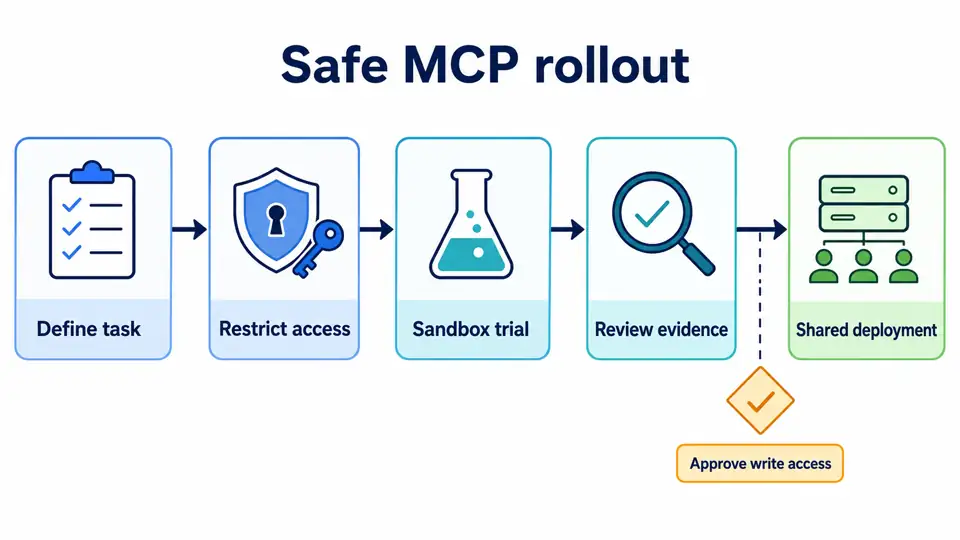
Do not install a long list because an MCP directory ranked it highly. Use a small trial that answers one business question.
- Name the job. For example: “Find the source of this Sentry error,” not “make the coding agent smarter.”
- Choose the narrowest server. Use Context7 for documentation, not a browser agent; use read-only Supabase for a data question, not an unrestricted database tool.
- Map authority before configuration. List the user identity, project or workspace, permitted data, write actions, approval owner, retention period, and rollback procedure.
- Limit tool exposure. Disable tool groups that do not serve the trial. Fewer available actions reduce accidental scope expansion and unnecessary context consumption.
- Test known and forbidden cases. Include a known-answer task, a request that must be refused, a stale-source task, and a request that would change data without approval.
- Record evidence. Save source URLs, issue IDs, query identifiers, PR links, or test results with the final decision.
- Promote only after review. Move from a personal or sandbox configuration to a shared configuration only when authentication, logging, ownership, and removal steps are documented.
Minimal Acceptance Checklist
| Check | Pass condition |
|---|---|
| Identity | The server connection uses a named account, service identity, or documented OAuth grant. |
| Scope | The agent can access only the intended project, repository, workspace, or domain set. |
| Evidence | A reviewer can trace the answer to a source, issue, query, or browser result. |
| Change control | Write actions require an explicit approval point or produce a reviewable draft. |
| Failure handling | Timeouts, permission denials, and tool errors are shown rather than hidden. |
| Removal | The team can revoke tokens, disconnect the server, and delete temporary data. |
Common Selection Mistakes
| Symptom | Likely cause | How to verify | Safer fix |
|---|---|---|---|
| The agent has too many irrelevant tools | Every popular server was enabled | Inspect available tool schemas and context use | Disable unrelated servers and tool groups. |
| The agent returns confident but stale code | Documentation was not current or was not cited | Compare the response with official docs and project lockfiles | Add Context7 or official docs; run project tests. |
| A database agent can modify too much | Project and write scopes were enabled by default | Inspect server URL, tool groups, and credentials | Use read-only and a project-scoped configuration first. |
| Browser tasks behave unpredictably | The target, profile, or host rules are too broad | Check allowed hosts, browser context, and logged actions | Use test accounts, isolated profiles, and a fixed host allowlist. |
| Research output lacks provenance | URLs and retrieval results were discarded | Ask for a source list and inspect it | Require source URLs and save the retrieval record. |
| A remote tool requests broad OAuth access | Convenience setup hid the authorization scope | Review the consent screen and vendor docs | Decline, reduce scope, or use a sandbox workspace. |
Conclusion
MCP server selection should follow workflow, not popularity. Start with a narrow, evidence-friendly server; grant the least authority that can complete the task; and make every consequential action reviewable. GitHub, Context7, Playwright, Firecrawl, Sentry, Supabase, Notion, and Slack can each be valuable, but none should receive more access than its specific job requires.