
Web Scraping Expedia with Python: Hotel Data to CSV

Oct 15, 2026 · Guides · 19 min read
Web scraping Expedia starts with choosing a data source for the hotel listings, availability, and prices you need. This tutorial builds a Python Expedia scraper workflow that gets hotel IDs from a destination, joins hotel names with room rates, and exports JSON and CSV. It uses Expedia Rapid for the data pipeline and shows where Rola IP fits into regional website checks.
Run the included sample first to create a hotel-price spreadsheet without credentials. With a Rapid account, the same script can retrieve a region’s properties, fetch their hotel details, and request rates for your selected dates.
Key Takeaways
- Use Geography to find hotel IDs, Content for hotel details, and Shopping for rates and availability.
- Export hotel names with dates, occupancy, currency, refundability, and a consistent price field.
- Start with one room and a small property batch; the example selects up to 10 properties by default.
- Use a proxy when a regional website check needs a controlled network origin. Rapid’s point-of-sale parameters are a separate control.
- Keep one session across related steps, verify the exit before collecting, and measure useful records rather than request counts.
What Will Your Expedia Scraper Export?
The local example produces this hotel-rate row:
Hotel |
Property ID |
Stay |
Guests |
Inclusive stay total |
Currency |
Refundability |
|---|---|---|---|---|---|---|
Example City Hotel |
19248 |
Nov 10–12, 2026 |
2 adults, 1 room |
342.00 |
USD |
refundable |
The JSON and CSV also include the room and rate IDs, other available totals, country code, language, processing time, source, and query hash. An error file records unavailable properties or incomplete rates. The sample destination, hotel names, and prices are illustrative.
This structure supports hotel price monitoring, availability research, and comparisons between equivalent offers. A row represents a room rate for a stay, so one hotel can produce several rows. It does not represent a confirmed booking or an average nightly rate.
Expedia Scraping: API or Browser?
Choose the method that matches the data you need and the access available to your integration.
| Method | Useful when | What you get | Main requirement |
|---|---|---|---|
| Expedia Rapid APIs | Building a hotel catalog, availability tool, or partner rate workflow | Structured property details and rates | Rapid account and enabled API products |
| Licensed data feed | Running recurring analysis over an agreed dataset | Bulk records on a delivery schedule | A feed agreement covering the needed fields |
| Browser automation | Checking how a permitted hotel page renders for a region or session | Visible page content and display behavior | Permission to automate the page; maintained selectors |
The walkthrough below uses Rapid because the property IDs, hotel details, and price fields can be joined explicitly. Browser collection needs a different parser and may show different offers from a partner API. The comparison of API access and browser scraping explains the maintenance trade-offs.
Use the access method and data covered by your partner agreement and Expedia’s Terms of Service.
Which Expedia Data Comes from Each API?
| Stage | Endpoint | Fields used in this tutorial |
|---|---|---|
| Destination catalog | GET /v3/regions/{region_id} |
Region’s property_ids |
| Hotel details | GET /v3/properties/content |
property_id and name |
| Availability and prices | GET /v3/properties/availability |
Rooms, rates, refundability, occupancy prices, unavailable reasons |
The Rapid API specification documents these endpoints and their response shapes. Content returns an object keyed by Property ID; Shopping returns an array of property results. The script joins them using that ID rather than relying on array order.
Expedia’s Shopping documentation specifies up to 250 properties and no more than eight rooms per Shopping request. Shopping does not supply static names, star ratings, or geography. This tutorial maps one room; a multi-room integration must also preserve room multiplicity when the same occupancy appears more than once.
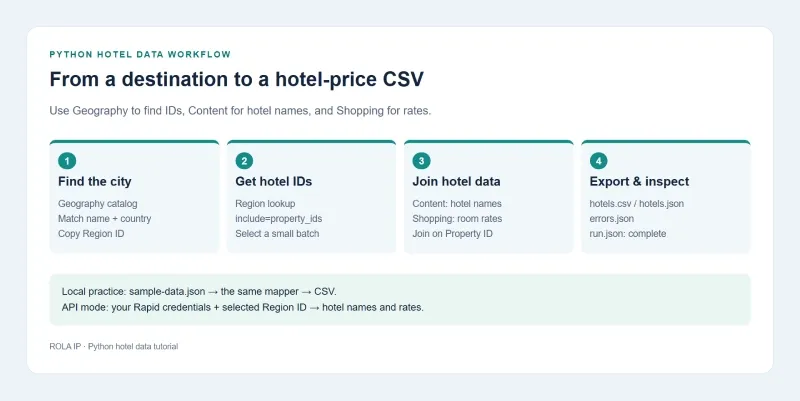
Follow the destination-to-CSV workflow, or start with the included local sample.
How to Scrape Expedia with Python
To scrape Expedia data into a hotel-price spreadsheet, follow the steps below: run the local sample, configure Rapid access, select a destination, and export its hotel names and rates. The example uses Python 3.12.10 and HTTPX 0.28.1 on Windows 10, with the same mapping and export functions for local data and API responses.
Step 1: Install HTTPX
Create a project directory and virtual environment:
mkdir expedia-hotels
cd expedia-hotels
python -m venv .venv
Activate it in PowerShell:
.\.venv\Scripts\Activate.ps1
Or in macOS/Linux Bash:
source .venv/bin/activate
Install the dependency:
python -m pip install httpx==0.28.1
Step 2: Save the sample destination, hotels, and rates
Save the following as sample-data.json in your project directory. It contains two hotel IDs, their names, one available rate, and one unavailable-property result. The three sections model the Geography → Content → Shopping flow. You can leave this sample unchanged for the local exercise; Step 6 shows how to obtain IDs for your own destination.
{
  "region": {
    "id": "SAMPLE-REGION",
    "name": "Sample destination",
    "property_ids": [
      "19248",
      "824739"
    ]
  },
  "content": {
    "19248": {
      "property_id": "19248",
      "name": "Example City Hotel"
    },
    "824739": {
      "property_id": "824739",
      "name": "Example Park Hotel"
    }
  },
  "shopping": [
    {
      "property_id": "19248",
      "status": "available",
      "rooms": [
        {
          "id": "ROOM-QUEEN",
          "room_name": "Example Queen Room",
          "rates": [
            {
              "id": "RATE-REFUNDABLE",
              "status": "available",
              "current_refundability": "refundable",
              "occupancy_pricing": {
                "2": {
                  "totals": {
                    "exclusive": {
                      "request_currency": {
                        "value": "310.00",
                        "currency": "USD"
                      }
                    },
                    "inclusive": {
                      "request_currency": {
                        "value": "342.00",
                        "currency": "USD"
                      }
                    },
                    "property_inclusive": {
                      "request_currency": {
                        "value": "350.00",
                        "currency": "USD"
                      }
                    }
                  }
                }
              }
            }
          ]
        }
      ]
    },
    {
      "property_id": "824739",
      "score": 12345,
      "unavailable_reason": {
        "code": "adults_exceed_threshold",
        "data": "2"
      }
    }
  ]
}
Step 3: Save the complete hotel scraper
Save this code as expedia_hotels.py beside the JSON file. Without --api, it reads the sample. In API mode, it looks up properties for a Region ID or uses the Property IDs supplied on the command line, retrieves hotel names, and fetches rates.
import argparse
import csv
import hashlib
import json
import os
import re
import time
from datetime import date, datetime, timezone
from decimal import Decimal, InvalidOperation
from pathlib import Path
from uuid import uuid4

import httpx

ROOT = Path(__file__).resolve().parent
SEARCH = {
    "checkin": "2026-11-10", "checkout": "2026-11-12",
    "currency": "USD", "country_code": "US", "language": "en-US",
    "occupancy": ["2"], "rate_plan_count": "1",
    "sales_channel": "website", "sales_environment": "hotel_only",
    "include": ["rooms.rates.current_refundability", "unavailable_reason"],
}


def nonempty(value, field):
    if not isinstance(value, str) or not value.strip():
        raise ValueError(f"missing or invalid {field}")
    return value


def property_ids(values):
    if not isinstance(values, list) or not values:
        raise ValueError("property_ids must be a non-empty list")
    return list(dict.fromkeys(nonempty(v, "property_id") for v in values))


def get_json(client, base, path, params):
    timestamp = int(time.time())
    key, secret = os.environ["RAPID_API_KEY"], os.environ["RAPID_SHARED_SECRET"]
    signature = hashlib.sha512(f"{key}{secret}{timestamp}".encode()).hexdigest()
    headers = {
        "Authorization": f"EAN APIKey={key},Signature={signature},timestamp={timestamp}",
        "Accept": "application/json", "Accept-Encoding": "gzip",
        "User-Agent": "HotelDataTutorial/2.0",
    }
    response = client.get(base + path, params=params, headers=headers)
    if response.status_code == 429:
        raise RuntimeError(f"Rate limited; Retry-After={response.headers.get('Retry-After', 'not supplied')}")
    if response.status_code in (401, 403):
        raise RuntimeError(f"Rapid access failed: HTTP {response.status_code}")
    response.raise_for_status()
    return response.json()


def load_data(args):
    search = json.loads(json.dumps(SEARCH))
    if len(search["occupancy"]) != 1:
        raise ValueError("this example maps one room per search")
    if not args.api:
        if args.property_ids or args.region_id:
            raise ValueError("use --api with --property-ids or --region-id")
        sample = json.loads((ROOT / "sample-data.json").read_text(encoding="utf-8"))
        ids = property_ids(sample["region"]["property_ids"])
        search["property_id"] = ids
        return sample["content"], sample["shopping"], search, "sample", len(ids)

    checkin, checkout = date.fromisoformat(search["checkin"]), date.fromisoformat(search["checkout"])
    if checkin <= date.today() or checkout <= checkin:
        raise ValueError("set future checkin and later checkout dates in SEARCH")
    base = os.environ.get("RAPID_BASE_URL", "https://test.ean.com/v3").rstrip("/")
    if base not in {"https://test.ean.com/v3", "https://api.ean.com/v3"}:
        raise ValueError("unsupported Rapid endpoint")
    with httpx.Client(timeout=httpx.Timeout(30, connect=10), trust_env=False) as client:
        if args.region_id:
            if not re.fullmatch(r"[0-9]+", args.region_id):
                raise ValueError("region-id must be a numeric Expedia Region ID")
            region = get_json(client, base, f"/regions/{args.region_id}", {
                "language": search["language"], "include": "property_ids",
            })
            ids = property_ids(region["property_ids"])
        elif args.property_ids:
            ids = property_ids([v.strip() for v in args.property_ids.split(",")])
        else:
            raise ValueError("API mode needs --region-id or --property-ids")
        total = len(ids)
        search["property_id"] = ids[:args.limit]
        content = get_json(client, base, "/properties/content", {
            "language": search["language"], "supply_source": "expedia",
            "property_id": search["property_id"],
        })
        shopping = get_json(client, base, "/properties/availability", search)
    source = "rapid_production" if base == "https://api.ean.com/v3" else "rapid_test_endpoint"
    return content, shopping, search, source, total


def money(node, currency):
    value = Decimal(str(node["request_currency"]["value"]))
    if not value.is_finite() or value <= 0:
        raise ValueError("price must be finite and positive")
    if node["request_currency"]["currency"] != currency:
        raise ValueError("response currency differs from search currency")
    return value


def map_hotels(content, shopping, search, source):
    if not isinstance(content, dict) or not isinstance(shopping, list):
        raise ValueError("expected Content object and Shopping array")
    occupancy, = search["occupancy"]
    context = json.dumps(search, sort_keys=True, separators=(",", ":"))
    query_hash = hashlib.sha256(context.encode()).hexdigest()
    captured = datetime.now(timezone.utc).isoformat()
    rows, errors, seen = [], [], set()
    expected = set(search["property_id"])
    for prop in shopping:
        pid = "unknown"
        try:
            if not isinstance(prop, dict):
                raise ValueError("property must be an object")
            pid = nonempty(prop.get("property_id"), "property_id")
            if pid not in expected:
                raise ValueError("response property was not requested")
            if pid in seen:
                raise ValueError("duplicate response property")
            seen.add(pid)
            if prop.get("status") != "available":
                reason = prop.get("unavailable_reason") or {}
                code = reason.get("code", "not provided") if isinstance(reason, dict) else "invalid reason"
                raise ValueError(f"unavailable: {code}")
            hotel = content[pid]
            if not isinstance(hotel, dict):
                raise ValueError("hotel content must be an object")
            name = nonempty(hotel.get("name"), "hotel name")
            if hotel.get("property_id") != pid:
                raise ValueError("Content property ID mismatch")
            rooms = prop.get("rooms")
            if not isinstance(rooms, list) or not rooms:
                raise ValueError("rooms must be a non-empty array")
        except (KeyError, TypeError, ValueError) as exc:
            errors.append({"property_id": pid, "error": str(exc)})
            continue
        for room in rooms:
            try:
                if not isinstance(room, dict):
                    raise ValueError("room must be an object")
                rid = nonempty(room.get("id"), "room_id")
                rates = room.get("rates")
                if not isinstance(rates, list) or not rates:
                    raise ValueError("rates must be a non-empty array")
            except ValueError as exc:
                errors.append({"property_id": pid, "error": str(exc)})
                continue
            for rate in rates:
                try:
                    if not isinstance(rate, dict):
                        raise ValueError("rate must be an object")
                    rate_id = nonempty(rate.get("id"), "rate_id")
                    if rate.get("status") != "available":
                        raise ValueError("rate unavailable")
                    totals = rate["occupancy_pricing"][occupancy]["totals"]
                    exclusive = money(totals["exclusive"], search["currency"])
                    inclusive = money(totals["inclusive"], search["currency"])
                    broader = money(totals["property_inclusive"], search["currency"]) if "property_inclusive" in totals else None
                    if inclusive < exclusive or (broader is not None and broader < inclusive):
                        raise ValueError("totals need review: inconsistent price order")
                    rows.append({
                        "property_id": pid, "hotel_name": name,
                        "room_id": rid, "rate_id": rate_id,
                        "refundability": rate.get("current_refundability", "unknown"),
                        "checkin": search["checkin"], "checkout": search["checkout"],
                        "occupancy": occupancy, "currency": search["currency"],
                        "exclusive_total": str(exclusive), "inclusive_total": str(inclusive),
                        "property_inclusive_total": str(broader) if broader is not None else None,
                        "country_code": search["country_code"], "language": search["language"],
                        "processed_at_utc": captured, "source": source,
                        "mapper_version": "2.0.0", "query_hash": query_hash,
                    })
                except (KeyError, TypeError, ValueError, InvalidOperation) as exc:
                    errors.append({"property_id": pid, "room_id": rid, "error": str(exc)})
    for pid in sorted(expected - seen):
        errors.append({"property_id": pid, "error": "property absent from Shopping response"})
    return rows, errors


def csv_value(value):
    # Keep spreadsheet applications from interpreting text fields as formulas.
    if isinstance(value, str) and value.lstrip().startswith(("=", "+", "-", "@")):
        return "'" + value
    return value


def export(rows, errors, search, source, available_ids):
    run_id = datetime.now(timezone.utc).strftime("%Y%m%dT%H%M%S") + "-" + uuid4().hex[:8]
    output = ROOT / "output" / run_id
    output.mkdir(parents=True, exist_ok=False)
    for filename, data in [("hotels.json", rows), ("errors.json", errors)]:
        (output / filename).write_text(json.dumps(data, indent=2), encoding="utf-8")
    fields = list(rows[0]) if rows else ["property_id", "hotel_name", "rate_id", "currency"]
    with (output / "hotels.csv").open("w", newline="", encoding="utf-8-sig") as stream:
        writer = csv.DictWriter(stream, fieldnames=fields)
        writer.writeheader()
        writer.writerows({k: csv_value(v) for k, v in row.items()} for row in rows)
    manifest = {"status": "complete", "source": source, "query": search,
                "catalog_id_count": available_ids, "selected_id_count": len(search["property_id"]),
                "valid_rates": len(rows), "issues": len(errors)}
    (output / "run.json").write_text(json.dumps(manifest, indent=2), encoding="utf-8")
    return output


def main():
    parser = argparse.ArgumentParser()
    parser.add_argument("--api", action="store_true")
    group = parser.add_mutually_exclusive_group()
    group.add_argument("--property-ids")
    group.add_argument("--region-id")
    parser.add_argument("--limit", type=int, default=10)
    args = parser.parse_args()
    if not 1 <= args.limit <= 250:
        parser.error("--limit must be between 1 and 250")
    content, shopping, search, source, total = load_data(args)
    rows, errors = map_hotels(content, shopping, search, source)
    output = export(rows, errors, search, source, total)
    print(f"Source: {source}")
    print(f"Selected properties: {len(search['property_id'])} of {total}")
    print(f"Valid hotel rates: {len(rows)}; issues: {len(errors)}")
    print(f"Output: {output}")


if __name__ == "__main__":
    main()
The mapper accepts only non-empty property, room, and rate IDs. It checks that hotel names match the requested properties and that every price uses the requested currency. For this comparison workflow, inconsistent total ordering is sent to the error file for review. A malformed rate is isolated so other valid rates can still be exported.
Step 4: Run the local example and open the CSV
python expedia_hotels.py
The sample run returns:
Source: sample
Selected properties: 2 of 2
Valid hotel rates: 1; issues: 1
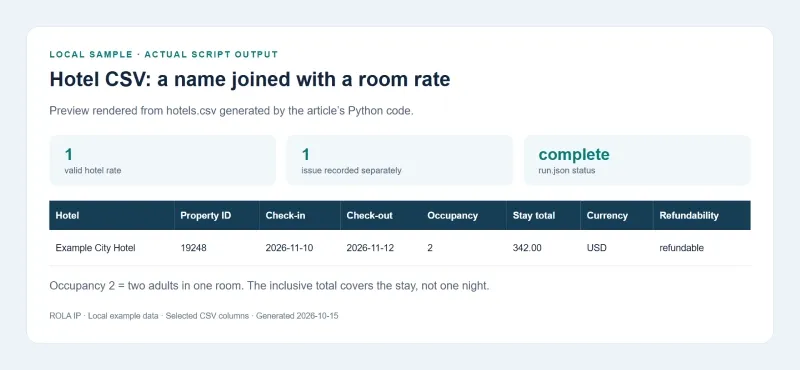
Selected columns from the local example’s generated CSV.
The final line prints a new output directory for that run. Open the files inside it:
| File | What to inspect |
|---|---|
hotels.csv |
Hotel names, dates, prices, currency, and refundability in a spreadsheet |
hotels.json |
The same records with their original text values |
errors.json |
Unavailable properties, missing data, and invalid price records |
run.json |
Completed-run status, source, full query, selected property count, and record counts |
The sample’s error file contains adults_exceed_threshold for property 824739. It is an unavailable-inventory result, not a failure to parse the available hotel.
Each export goes to its own directory, so it does not overwrite an earlier run. Use a directory containing run.json with status: complete; an interrupted export may leave an incomplete directory. The mapper records processed_at_utc, which is when it processed the response, rather than claiming that sample data was fetched at that time.
Step 5: Connect your Rapid account
Rapid Lodging signs the concatenation of your API key, shared secret, and Unix timestamp with SHA-512. The same timestamp goes into the authorization header. The script implements this format using Expedia’s signature authentication reference.
Set your credentials in the terminal. PowerShell:
$env:RAPID_API_KEY = 'your_api_key'
$env:RAPID_SHARED_SECRET = 'your_shared_secret'
$env:RAPID_BASE_URL = 'https://test.ean.com/v3'
macOS/Linux Bash:
export RAPID_API_KEY='your_api_key'
export RAPID_SHARED_SECRET='your_shared_secret'
export RAPID_BASE_URL='https://test.ean.com/v3'
Edit SEARCH in the script with future check-in/check-out dates and your desired occupancy, currency, country code, and language. Keep credentials in environment variables. The API client uses trust_env=False so unrelated system proxy settings do not silently change the route.
If you already have a Property ID from your integration, replace YOUR_PROPERTY_ID below and run a small request. Otherwise, continue to Step 6 to find hotels by destination.
python expedia_hotels.py --api --property-ids YOUR_PROPERTY_ID --limit 1
This command makes Content and Shopping requests against the selected environment; it does not create a booking. The script defaults to Expedia’s test host. For an enabled production integration, change RAPID_BASE_URL to https://api.ean.com/v3. Files are labeled rapid_test_endpoint or rapid_production so they can be kept separate from local samples.
This workflow uses ordinary endpoint responses, rather than Shopping’s canned test headers. Expedia’s test-request guide explains that canned responses are static and may reference properties unrelated to the request. Such responses are useful for endpoint checks, but should not be joined to an independently fetched hotel catalog as if they were actual query results.
Step 6: Get hotel IDs from a destination
A city name is not a Shopping property_id. First find the city’s Region ID, then let the script retrieve its hotel IDs. You do not need to collect hotel IDs manually or replace the local JSON sample to run API mode.
Find the Region ID for a city
Use Expedia’s Rapid API Explorer or your integration’s authenticated API client to make a Geography request. Use the same account, endpoint environment, and signature authentication as in Step 5.
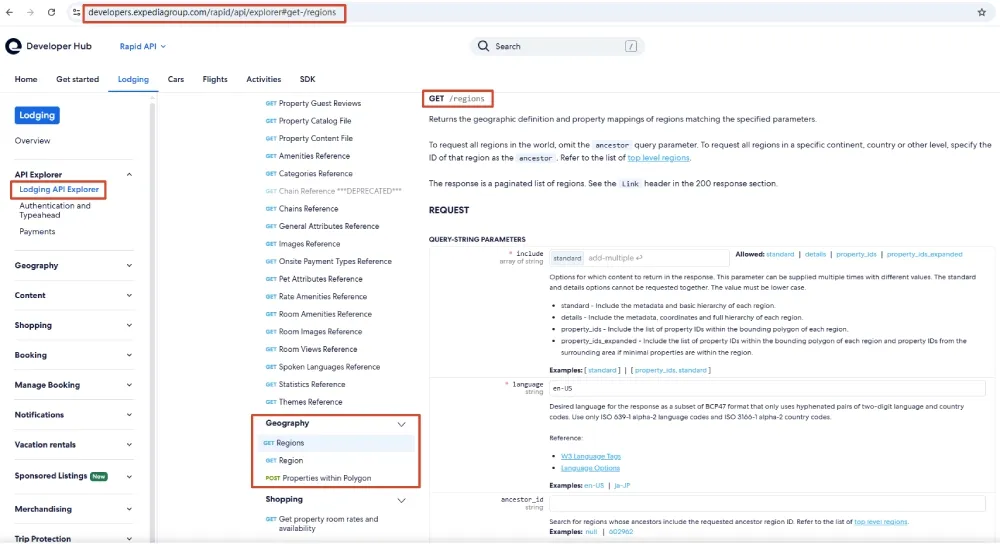
In the Lodging API Explorer, open Geography → Regions to configure the destination catalog request.
-
Choose
GET /v3/regions. Setlanguage=en-US,include=standard, andcountry_codeto the destination’s two-letter country code. Setlimit=100to start with a manageable page. -
Send the request. For a US destination, the request path is:
/v3/regions?language=en-US&include=standard&country_code=US&limit=100 -
Search the returned region objects for the city’s
name. Checkname_full,country_code, andtypeto distinguish cities with the same name and a city from its wider vicinity. Copy the selected object’sid—this is the Region ID, not a hotel ID. -
If the city is absent from that page, follow the response’s
Linkheader URL markedrel="next"without changing its query parameters. Authenticate each request and continue until you find the destination or there is no next page. Searching only the first page does not search the whole catalog. For repeated use, save the region catalog and search it locally by city name and country.
The documented endpoint filters regions by geography; it does not provide a free-text city=Chicago search parameter. Start with the country filter, then match names in the returned catalog. If your integration already has a destination-to-Region-ID table, use that instead.
Retrieve hotels and export their rates
Replace YOUR_REGION_ID with the ID you selected:
python expedia_hotels.py --api --region-id YOUR_REGION_ID --limit 10
For example, the API specification uses 178309 for Chicago and vicinity:
python expedia_hotels.py --api --region-id 178309 --limit 10
The script calls GET /regions/{region_id} with include=property_ids, selects the first 10 hotel IDs, fetches their Content records, and joins the returned Shopping rates with the hotel names. Open hotels.csv in the output directory printed by the command. Use run.json to confirm the selected IDs and query, and errors.json to inspect hotels without an accepted rate. If the region has no mapped properties, choose the appropriate nearby or wider region from the catalog and run it again.
The limit is a request-size cap, not a hotel ranking. run.json records both the number of IDs in the region response and the number selected. For larger catalogs, split the remaining IDs into batches of at most 250 and keep the comparison parameters unchanged. Cache permitted hotel details separately from frequently changing rates.
Step 7: Set occupancy and inspect the exported fields
Each occupancy value describes one room:
| Search | Parameter value |
|---|---|
| Two adults | 2 |
| One adult and an eight-year-old child | 1-8 |
| Two adults and children aged nine and three | 2-9,3 |
For the last example, set "occupancy": ["2-9,3"] in SEARCH. The mapper reads the matching occupancy key in the response. It handles one room per search; requesting several rooms requires additional allocation logic rather than just duplicating exported rows.
For price monitoring, compare rows with the same dates, occupancy, rate conditions, currency, and price field. Keep run.json with each CSV so you can reconstruct the request.
Which Hotel Price Should You Compare?
The stay total and nightly price answer different questions. Rapid’s totals object describes the price for an occupancy over the requested stay.
| Total | Meaning | Sample amount |
|---|---|---|
exclusive |
Excludes taxes and fees | 310.00 USD |
inclusive |
Includes taxes and fees, but excludes property-collected fees such as resort fees and mandatory property taxes/fees | 342.00 USD |
property_inclusive |
Includes taxes, fees, and property-collected fees | 350.00 USD |
These definitions come from the Totals schema in the Rapid specification. The three amounts describe one offer with different inclusions.
Use request_currency consistently. Property-collected amounts can have a different billable_currency, so combining the two can create a false comparison. A missing property-inclusive total stays empty in the export. Before booking, use the appropriate Price Check flow rather than treating an earlier CSV price as a final quote.
When Does an Expedia Scraper Need Proxies?
A proxy is useful when your task depends on the network origin of a website visit. Examples include checking regional hotel-page displays or keeping search and hotel-detail steps on one exit. An ordinary Rapid integration can use a direct connection: its country_code specifies the traveler’s point of sale, while language selects localized content.
| Task | Network/session choice | What to hold constant |
|---|---|---|
| Retrieve Rapid rates for a point of sale | Direct API connection is sufficient unless your network policy requires otherwise | API parameters and credentials |
| Compare permitted website displays across countries | A country-targeted proxy for each test group | Dates, guests, currency, locale, and account state |
| Search, then inspect a hotel in the same flow | One sticky session and the same browser context | Exit, cookies, and search parameters |
| Run unrelated, stateless checks | Separate sessions; rotation only between independent jobs | Request limits and comparison conditions |
For regional website checks, Rola IP’s travel fare proxy options provide a relevant starting point. Use a small test group before expanding to more properties. Changing an IP does not repair API credentials, product access, or a mismatched query.
Configure a Rola IP session for a regional check
In the Rola dashboard, select the proxy country, optional state/city, session duration, and authentication method before copying the generated configuration.
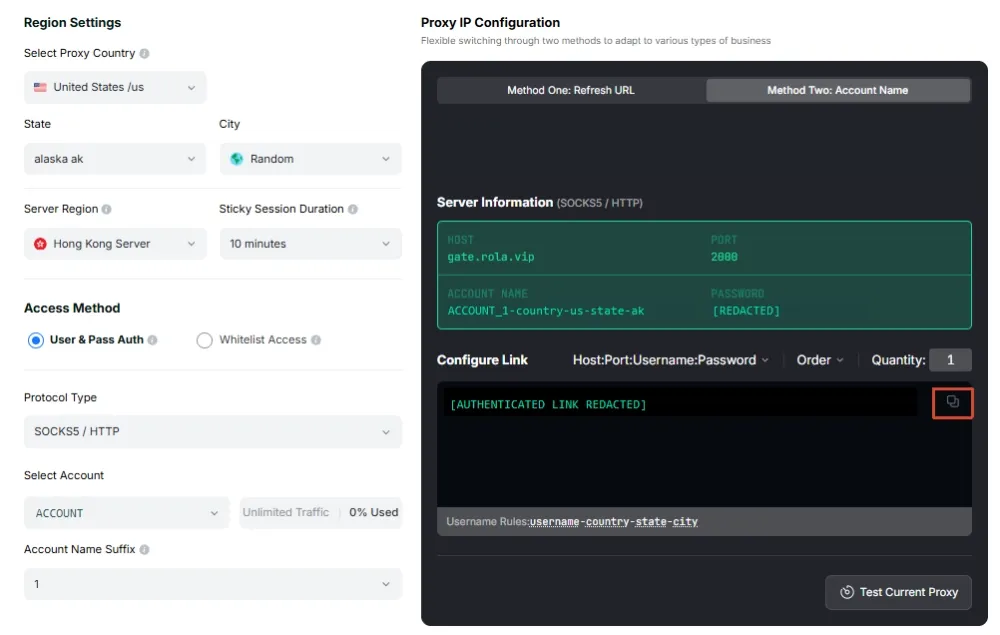
The dashboard example selects a US exit in Alaska and a 10-minute session.
Start with the gateway and credentials generated for your Rola account. The current proxy parameter reference places the session ID after an underscore in the account name. For rotating residential accounts, its example pattern is:
ACCOUNT_hotel01-country-us-sessiontime-10
Here hotel01 identifies the session, country-us requests a US exit, and sessiontime-10 requests a 10-minute session. Keep the same username across related requests. Session persistence is a request to retain the exit, so verify it during your workflow rather than treating it as a guarantee.
Rola’s parameter documentation specifies session durations of 1–120 minutes. Country targeting is available across its rotating residential, rotating datacenter, and mobile networks; state/city parameters are specific to rotating residential. Use the exact account marker and gateway from your dashboard for the selected network.
For unrelated jobs that need a new exit on each request, the documented residential pattern is ACCOUNT-country-us-f-1. Avoid per-request rotation between a search and its detail view. The guide to sticky vs rotating proxies explains when each session model fits.
Verify the route with HTTPX
Set three variables using values from the dashboard. ROLA_PROXY_USERNAME should contain the full parameterized username, not just the base account name.
PowerShell:
$env:ROLA_PROXY_SERVER = 'http://YOUR_GATEWAY:YOUR_HTTP_PORT'
$env:ROLA_PROXY_USERNAME = 'ACCOUNT_hotel01-country-us-sessiontime-10'
$env:ROLA_PROXY_PASSWORD = 'your_proxy_password'
macOS/Linux Bash:
export ROLA_PROXY_SERVER='http://YOUR_GATEWAY:YOUR_HTTP_PORT'
export ROLA_PROXY_USERNAME='ACCOUNT_hotel01-country-us-sessiontime-10'
export ROLA_PROXY_PASSWORD='your_proxy_password'
Save the following as check_rola.py. It uses HTTPX’s proxy= argument and keeps the password out of the proxy URL and printed output. This configuration follows the HTTPX proxy documentation; an HTTP proxy can tunnel HTTPS requests while retaining an http:// gateway URL.
import ipaddress
import os
import sys

import httpx


def check_route():
    proxy = httpx.Proxy(
        os.environ["ROLA_PROXY_SERVER"],
        auth=(os.environ["ROLA_PROXY_USERNAME"], os.environ["ROLA_PROXY_PASSWORD"]),
    )
    exits = []
    with httpx.Client(proxy=proxy, timeout=15, trust_env=False) as client:
        for _ in range(2):
            response = client.get("https://api.ipify.org?format=json")
            response.raise_for_status()
            exits.append(str(ipaddress.ip_address(response.json()["ip"])))
    print(f"Exit IP: {exits[0]}")
    if exits[0] != exits[1]:
        raise RuntimeError("exit changed between checks")
    print("Same exit observed in two requests.")
    return exits[0]


if __name__ == "__main__":
    try:
        check_route()
    except (httpx.HTTPError, KeyError, ValueError, RuntimeError) as exc:
        # Do not expose proxy credentials in exception output.
        print(f"Route check failed ({type(exc).__name__}). Check gateway, credentials, and session settings.")
        sys.exit(1)
Run:
python check_rola.py
A successful check prints the exit IP and confirms that two requests observed the same address. Use an IP geolocation lookup to confirm the requested country, then record the exit and check time with your regional test. Two matching requests verify that brief observation; longer flows should also check the exit at the end.
This check verifies network routing. Use the same gateway, full username, and session settings in your permitted collection client, and keep browser cookies within the same context. Keep this website experiment separate from the direct Rapid script so you can tell whether a difference comes from API parameters or network origin.
Start with a measurable regional pilot
Use two country groups, a small fixed property list, one room setup, and identical dates. Within each group, retain one session for each search/detail sequence. Record:
- Country requested and observed exit location.
- Dates, occupancy, currency, language, and account/login state.
- Price field, refundability, fees, and capture time.
- Valid records, errors, retry count, and billed traffic from your usage records.
Calculate traffic per valid record = billed traffic ÷ valid records. Estimate the next batch as traffic per valid record × planned records, then apply your account’s billing unit and current rate. Stop when a batch reaches the budget or error threshold you set before the run. API calls, browser resources, and retries can have very different traffic costs, so measure your own workflow.
Ready to compare regional hotel displays? Choose a Rola IP country/session setup, run the route check, and collect one small group before scaling. When you have a measured traffic estimate, compare it with the current residential proxy pricing and account billing terms. Keep the configuration only if it meets your location, session, data-quality, and cost requirements.
Troubleshooting Missing Expedia Data and Request Errors
| Symptom | Check first | Fix and retest |
|---|---|---|
| Rapid 401/403 | Key, signature timestamp, endpoint, product permissions | Correct the failing condition; repeat one small request |
| Proxy 407 | Gateway authentication and full parameterized username | Correct proxy credentials; rerun the route check |
| 429 | Retry-After and account request limits |
Pause for the specified interval before a later retry; reduce concurrency |
| Timeout or connection error | Whether failure occurs on direct Rapid access or the proxy route | Test each layer separately; keep bounded timeouts |
| Zero CSV rows | errors.json, occupancy key, Content names, and rate status |
Fix the specific mapper/input issue or select different inventory |
| Different prices | Dates, guests, currency, fees, refundability, point of sale, and session | Repeat with equivalent conditions, changing one variable at a time |
| Unexpected exit change | Session username, duration, and use of -f-1 |
Keep the same session settings through the related steps and verify again |
The API example stops on request failure instead of retrying invisibly. For scheduled jobs, use a small retry budget for transient connection/5xx failures and honor Retry-After on 429. Do not loop on authentication failures.
To check record isolation locally, temporarily replace the sample’s available hotel’s rooms array with 1. The result should be zero valid rates and two issues. Restore the sample afterwards. Missing IDs, non-finite amounts such as NaN, and inconsistent price totals also go into the error file.
Put the Hotel Data to Work
Start with the local sample, inspect the hotel-name and rate join, then run one small Rapid batch for your own dates. Keep the completed-run manifest and errors with the CSV so every comparison has an explainable input and outcome.
For regional website checks, add Rola IP at the network layer: choose the country, retain a session through related steps, verify the exit, and measure traffic per valid record. That gives you a practical basis for expanding collection without confusing network settings, search parameters, and price differences.