Web Scraping vs API: Key Differences and When to Use Each

Sep 3, 2026 · Comparisons · 11 min read
Web scraping vs API is a choice between interfaces. An official API returns provider-defined structured data and may support reads, writes, and events. Web scraping converts permitted HTML, rendered DOM, or embedded page data into records. Use a suitable official API when it meets the field, access, licensing, freshness, and volume requirements; use scraping for permitted page-only observations. Many pipelines combine both at the field level.
Scope: This guide covers official, internal, and scraping APIs; direct scraping; hybrid workflows; and AI extraction. It does not cover bypassing authentication, CAPTCHAs, rate limits, paywalls, or access controls. Permission and technical feasibility are separate decisions.
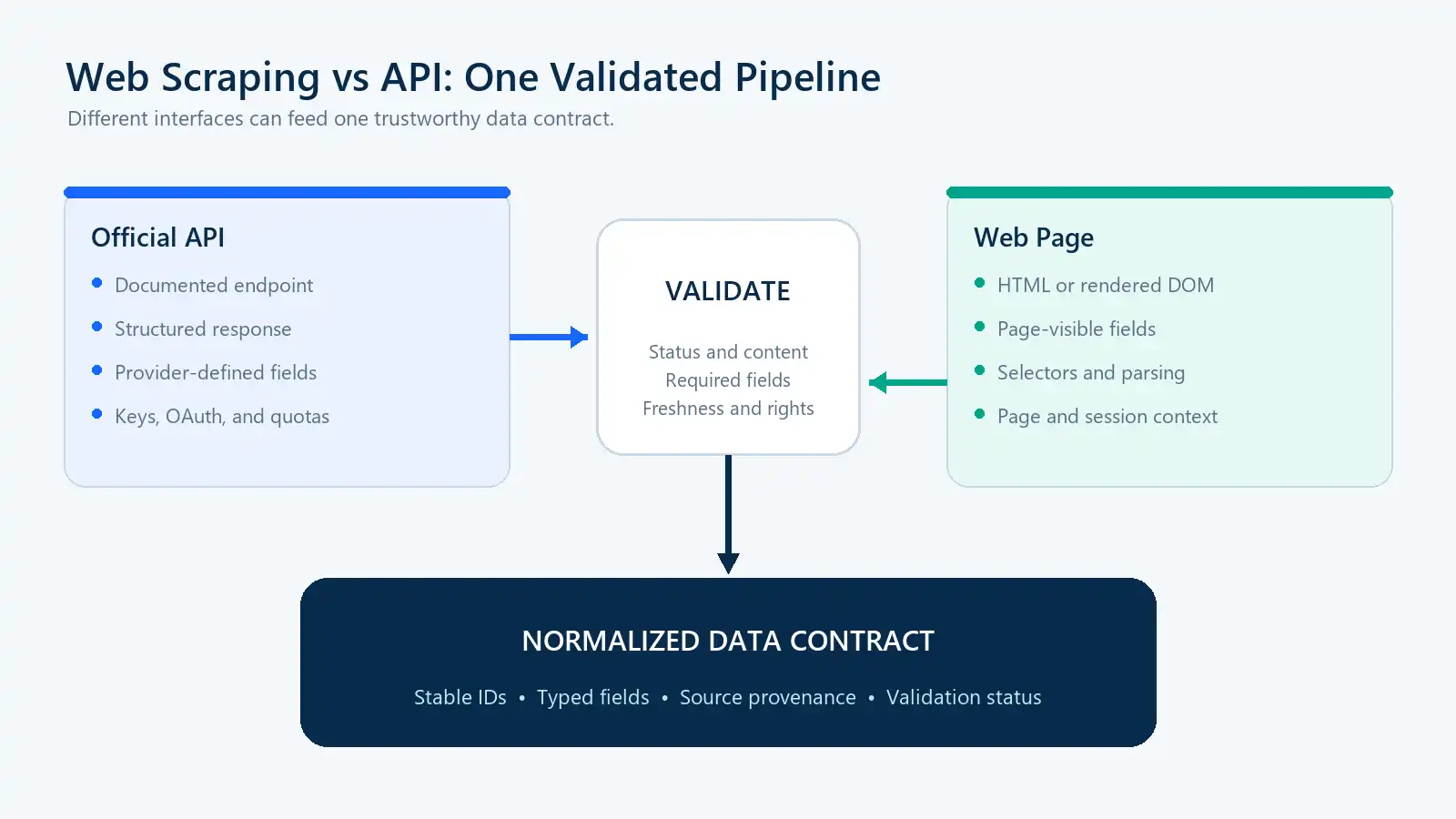
APIs and webpages are different inputs; both still need validation before their records reach downstream systems.
Web Scraping vs API at a Glance
| Factor | API | Web scraping |
|---|---|---|
| Interface | Designed for programs | Designed for human-facing pages |
| Typical format | JSON, XML, or another documented media type | HTML, rendered DOM, attributes, or embedded data |
| Coverage | Fields and records exposed by the provider | Permitted information available through the page flow |
| Stability | Often documented and versioned | Affected by markup, navigation, and rendering changes |
| Authentication | API key, OAuth, or another supported scheme | Public access or an authorized browser session |
| Delivery and actions | Request/response, webhooks, events, and supported writes | Page observation, normally through polling |
| Performance | Usually a smaller payload for equivalent data | May require full HTML or browser rendering |
| Scaling | Controlled by documented quotas and plans | Controlled by infrastructure, target capacity, and access rules |
| Maintenance | Authentication, version, and contract changes | Selectors, rendering, pagination, monitoring, and repairs |
| Cost | Subscription, licensing, or usage fees | Engineering, compute, browsers, routing, and maintenance |
| Best fit | Stable, supported integrations | Page-only observations or multi-source collection |
The word suitable matters. A clean JSON response is not useful if it omits a required field, arrives too late, cannot be licensed for the intended use, or is unavailable to the project. Likewise, a value visible in a browser is not automatically appropriate to collect or reuse.
What Is the Difference Between Web Scraping and an API?
Both can deliver structured records. The difference is the consumed interface, who controls its contract, and who operates the collection layer.
What Is an API?
An application programming interface defines how software requests data or performs supported operations. A documented HTTP API may specify endpoints, authentication, pagination, schemas, errors, webhooks, and deprecation rules; OpenAPI provides a language-independent description format.See the OpenAPI Specification for the standard format used to describe HTTP APIs.
The provider controls the contract. It may expose a stable product ID while omitting a regional promotion, and may restrict access, storage, or redistribution.
What Is Web Scraping?
Web scraping maps page content into records. Static pages may need only an HTTP client and parser; dynamic pages may require an authorized Playwright or Selenium workflow. The collector owns selectors, pagination, missing-field rules, and page validation.
Official APIs, Internal APIs, and Scraping APIs
The term “API” is used for several materially different things:
| Interface | Provider | Intended use | Main limitation |
|---|---|---|---|
| Official source API | Data owner | Supported programmatic access | Provider controls fields, plans, and permissions |
| Internal website API | Website frontend | Powering the website interface | May be undocumented, temporary, or restricted |
| Web scraping API | Third-party extraction provider | Operating website collection behind an API | Still depends on target pages and permitted use |
| Direct scraper | Your engineering team | Custom HTTP or browser extraction | You own the complete operational stack |
A JSON or GraphQL request in developer tools is not automatically a public API; it may use short-lived tokens or exist only for the site’s frontend. A scraping API starts webpage extraction through an API-shaped interface.
Who Operates Each Layer?
Calling all three options an “API” hides where engineering responsibility actually sits.
| Responsibility | Direct scraper | Web scraping API | Official source API |
|---|---|---|---|
| Target fetching and rendering | Your team | Usually the provider | Source provider |
| Page parsing | Your team | Provider, customer rules, or both | Not applicable to the consumer |
| Proxy routing, when needed | Your team | Usually the provider | Normally unnecessary |
| Output validation | Your team | Shared responsibility | Your team |
| Upstream change response | Your team | Shared responsibility | Provider versions the interface; you migrate |
| Infrastructure scaling | Your team | Provider | Provider, within your quota |
| Vendor dependency | Infrastructure choices | Extraction vendor | Source API provider |
A managed scraping API reduces browser, routing, and maintenance work but not responsibility for permission or data quality. Direct scraping offers control while leaving queues, retries, storage, monitoring, and repairs to your team.
API vs Scraping: Seven Differences That Matter
1. Data Coverage
An API exposes provider-selected fields; pages may add promotions, offers, reviews, regional inventory, or rankings. Choose a permitted source per field. For example, use an API for product identity and a page for a time-stamped market observation.
2. Data Structure and Validation
Valid JSON can still be incomplete, stale, or semantically changed. A scraper can likewise export a full CSV after a selector starts capturing the wrong price. Both paths need count, completeness, uniqueness, freshness, and sample checks. Monitor records, not only request status.
3. Reliability and Change Management
APIs can change versions, authentication, access, or quotas. Scrapers can break when markup, state, or navigation changes, and may receive 200 OK for the wrong page. Use contract tests for APIs; use fixtures, selector tests, page-type checks, and failure evidence for scrapers.
4. Speed and Scalability
For equivalent fields, an API is often smaller and avoids DOM construction; browsers add CPU, memory, bandwidth, and synchronization. Actual speed still depends on network location, caching, pagination, and workload. APIs face quotas; scraping faces infrastructure, source-capacity, pacing, and access constraints.
5. Pull, Push, and Write Operations
APIs may push changes through webhooks or events and perform supported writes. Scrapers normally observe page state and poll for changes. Use official APIs for payments, orders, account changes, and other transactions; browser automation is not an equivalent replacement. For read-only monitoring, compare API polling, webhooks, and permitted page collection against the freshness requirement.
6. Total Cost per Validated Record
Compare the cost of complete, fresh, valid records—not API subscription price against raw scraper requests:
Cost per validated record =
total monthly collection cost / validated records delivered
Include API licensing and overages; include scraper development, browsers, routing, monitoring, failures, QA, and repairs. Incorrect records are not economical.
7. Authentication, Licensing, and Compliance
API authentication does not remove license limits on caching, retention, display, or redistribution; public visibility does not grant unlimited collection rights. Review the source, data, method, use, contract, and applicable rules. Keep credentials out of code, screenshots, and logs. If access is refused, stop and investigate.
API or Web Scraping: A Two-Gate Decision Framework
Apply two hard gates before comparing convenience or cost.
Gate 1: Is the Method Permitted?
Check the source’s API license, website terms, and applicable crawler directives such as the Robots Exclusion Protocol (RFC 9309), along with data sensitivity, authentication boundaries, storage requirements, intended downstream use, and applicable contracts or law. If a method does not pass this gate, remove it from consideration.
Gate 2: Does It Reliably Provide Every Required Field?
Define the schema before selecting a tool:
Required: product_id, current_price, currency, availability
Optional: description, image_url, promotion_badge
An option that cannot supply every required field is not a complete solution. It may still be one component of a hybrid pipeline.
Score the Remaining Options
The following weights are a configurable starting point, not a universal standard. Score each remaining option from one to five and adjust the weights to the actual business risk.
| Criterion | Default weight |
|---|---|
| Required-field coverage | 30% |
| Reliability and continuity | 20% |
| Data freshness | 15% |
| Total cost | 15% |
| Maintenance capacity | 10% |
| Scalability fit | 5% |
| Time to production | 5% |
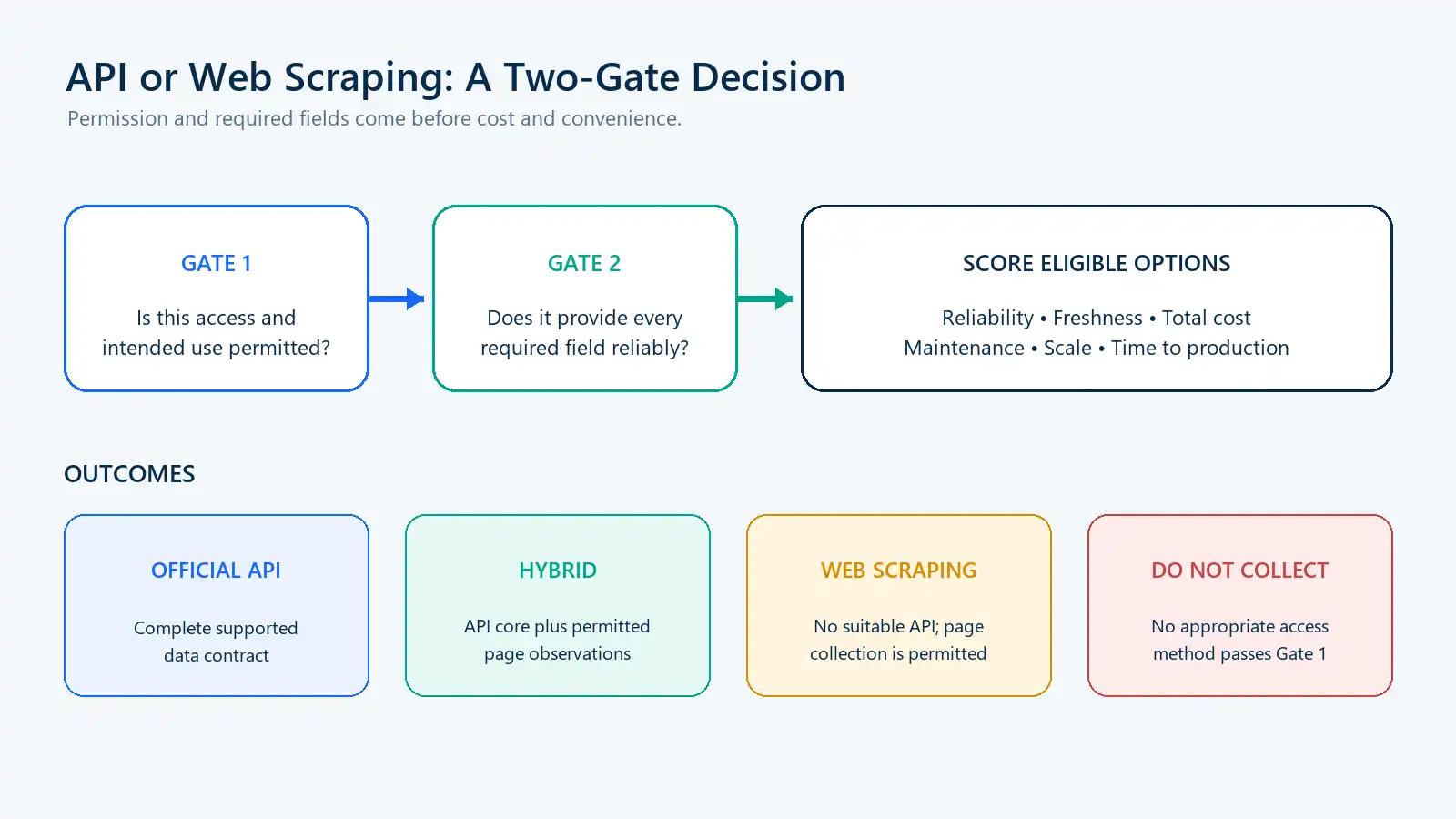
Permission and required fields are gates; only eligible methods enter the weighted comparison.
The likely outcomes are:
| Situation | Recommended approach |
|---|---|
| A supported API provides every required field | Official API |
| An API provides stable core records but misses page observations | Hybrid |
| No suitable API exists and permitted page data is sufficient | Direct web scraping |
| Browser and parser operations exceed the team’s maintenance capacity | Managed web scraping API |
| No method passes the permission gate | Do not collect |
Worked Example: Retail Price Monitoring
Assume a team requires product ID, currency, availability, and the promotion-adjusted price displayed to shoppers. The official API is permitted but omits the displayed promotion price, so it fails Gate 2 as a standalone solution. After reviewing the permitted page workflow, the remaining options are scored with the weights above.
| Candidate | Gate result | Illustrative weighted score | Decision |
|---|---|---|---|
| Official API alone | Fails required-field gate | Not scored | Use only as a component |
| Direct scraper | Passes both gates | 3.6/5 | Complete but maintenance-heavy |
| Managed scraping API | Passes both gates | 4.2/5 | Faster operational start |
| API plus permitted page observations | Passes both gates | 4.4/5 | Preferred for this example |
These scores are an example of the method, not a benchmark or universal recommendation. A team with stronger scraper operations or different commercial terms could reach a different result.
Common Use Cases
| Use case | Preferred starting point | Why |
|---|---|---|
| Payments, orders, and account changes | Official API | Requires supported authenticated writes |
| Multi-retailer price monitoring | Hybrid | Stable IDs may come from APIs; displayed prices may require permitted page observations |
| Public directory or market research | Direct scraper or scraping API | One complete cross-source API often does not exist |
| Internal application integration | Official or approved internal API | Controlled authentication and a stable contract |
| Regional page observations | Authorized scraping with suitable routing | The page may legitimately vary by location |
Build a Hybrid API-and-Scraping Workflow
A hybrid pipeline should combine fields deliberately rather than merge two blobs and hope they agree.
| Field | Preferred source | Conflict rule |
|---|---|---|
| Stable product ID | Official API | Never overwrite it with page text |
| GTIN and specifications | Official API | Fill from the page only when an approved rule allows it |
| Displayed price | Webpage observation | Store with seller, region, and collection time |
| Availability | Both | Preserve source-specific observations separately |
| Promotion badge | Webpage | Treat it as time-sensitive |
| Search position | Webpage | Store with the query and result context |
Every important value should carry source, collection time, region or session context, schema or parser version, validation status, and a conflict rule. An API outage must not automatically trigger a scraper that has never been reviewed for access, field compatibility, or data quality.
Test API and Web Scraping Against the Same Data
To compare implementation behavior without depending on a changing external website, the downloadable project starts a local ThreadingHTTPServer. It serves the same synthetic product through two endpoints:
/api/products/1001 -> application/json
/products/1001     -> text/html
The comparison is intentionally narrow. It measures payload bytes, parsing path, required-field completion, output equality, and failure detection. It does not claim that a real API will always be faster or smaller than a real webpage.
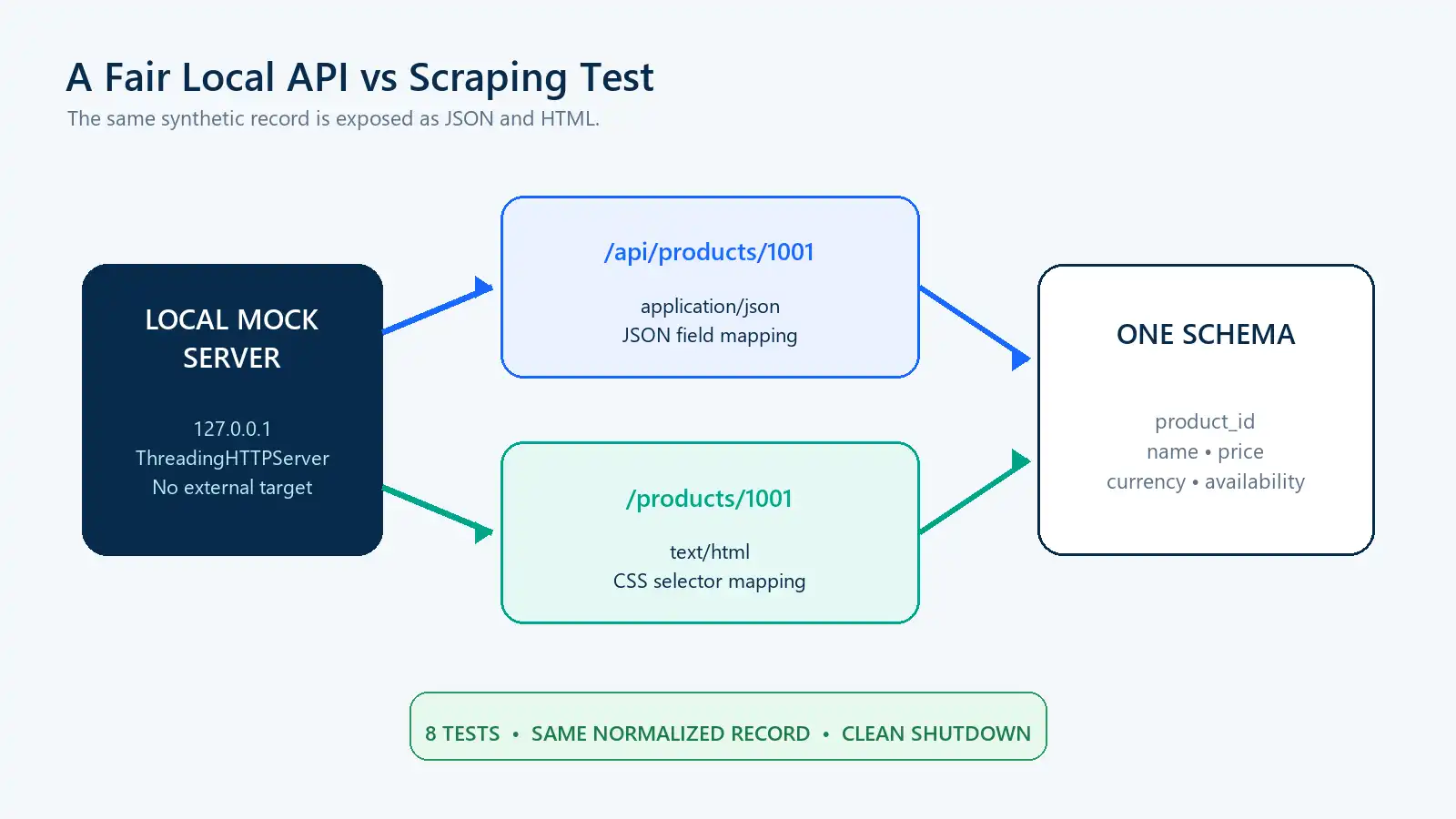
One synthetic source record makes the API and scraping paths comparable without contacting a live target.
Set Up the Project
On Windows PowerShell:
py -3.12 -m venv .venv
.\.venv\Scripts\Activate.ps1
python -m pip install -r requirements.txt
python compare_methods.py
python -m unittest -v
On macOS or Linux:
python3.12 -m venv .venv
source .venv/bin/activate
python -m pip install -r requirements.txt
python compare_methods.py
python -m unittest -v
Requests provides the session, timeout, response, and status-handling layer. Beautiful Soup maps the HTML fixture. The API path first requires application/json and then maps named fields:
response = session.get(url, timeout=(3.0, 10.0))
validate_status(response)

if "application/json" not in response.headers.get("Content-Type", "").lower():
    raise UnexpectedContentTypeError("Expected application/json")

raw = response.json()
record = normalize_product({
    "product_id": raw.get("id"),
    "name": raw.get("name"),
    "price": raw.get("price"),
    "currency": raw.get("currency"),
    "availability": raw.get("availability"),
})
The scraping path validates HTML before it applies source-specific selectors:
soup = BeautifulSoup(response.text, "html.parser")
product = soup.select_one("main.product[data-product-id]")
price_node = soup.select_one(".current-price[data-currency]")

if product is None or price_node is None:
    raise SchemaChangedError("Required product markup is missing")
Both paths produce this normalized record:
{
  "availability": "in_stock",
  "currency": "USD",
  "name": "Authorized Demo Travel Mug",
  "price": 19.99,
  "product_id": "DEMO-1001"
}
The verified local result was:
verification_scope=local_mock_server
external_site_tested=false
api_response_bytes=133
html_response_bytes=364
api_parser=json_mapping
html_parser=css_selectors
required_fields_complete=true
schema_equal=true
tests_run=8
tests_passed=8
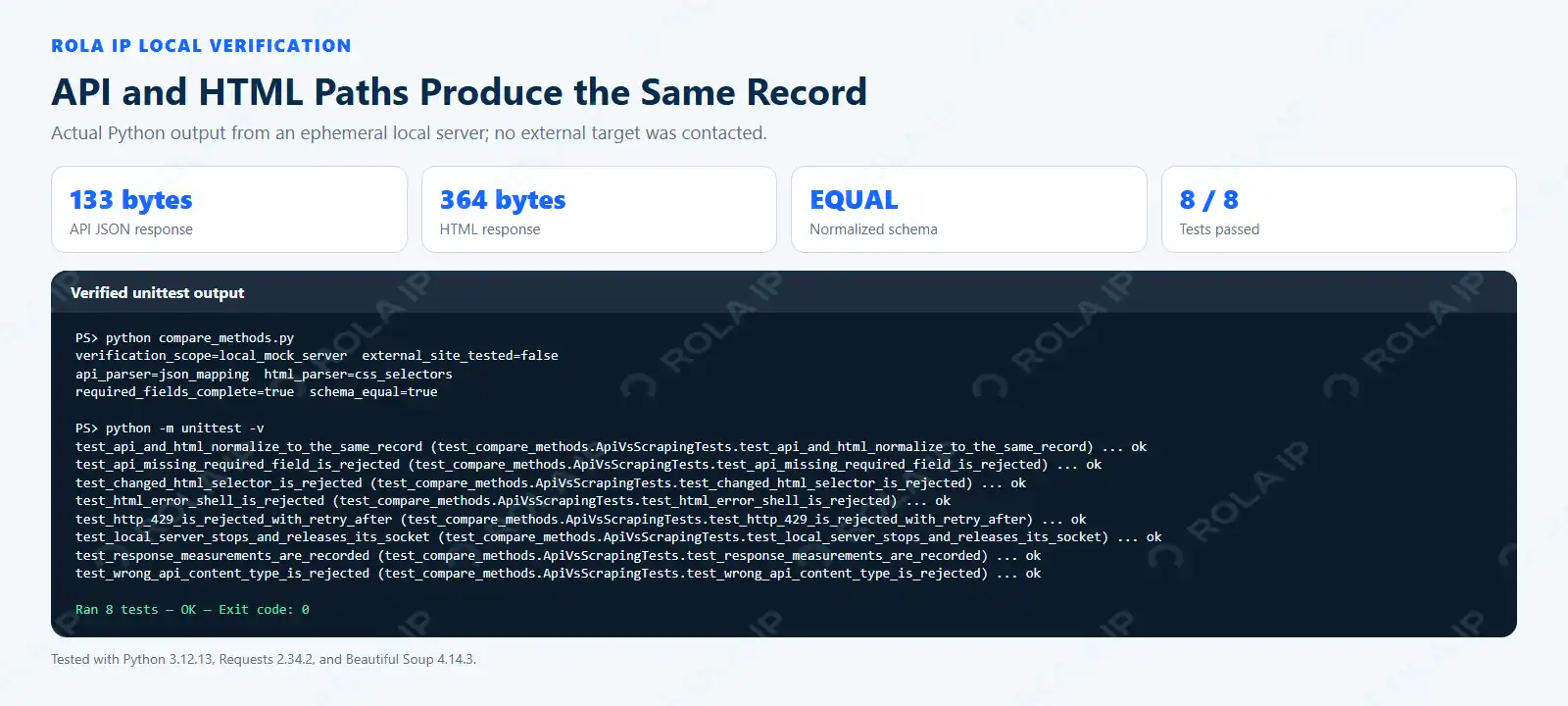
The watermarked screenshot comes from the actual local run. It proves the comparison and failure paths, not external-site performance.
How APIs and Scrapers Fail in Production
The most useful distinction is not that one method fails and the other does not. It is how the failure becomes visible.
| Failure | API behavior | Scraping behavior | Required control |
|---|---|---|---|
| Authentication failure | 401 or 403 |
Login, consent, or denial page | Stop and verify access |
| Rate limiting | Documented quota or 429 |
429, throttling, or challenge |
Bounded pacing and logging |
| Schema change | Versioned field change | Selector or DOM failure | Contract and fixture tests |
| Missing records | Pagination or permission issue | Broken navigation or repeated cursor | Record-count validation |
| Invalid content | Error JSON or wrong media type | 200 OK with the wrong page |
Content and required-field checks |
| Source retirement | Endpoint deprecation | Page removal or redesign | Monitoring and migration plan |
The local suite tests equal normalized output, response measurements, a missing API field, changed HTML markup, HTTP 429 with Retry-After, an incorrect API content type, an HTML access-denied shell, and clean server shutdown. Production monitoring should add valid-record rate, required-field completion, duplicates, freshness, failed-request rate, and cost per validated record.
Where Rola IP Fits—and Where It Does Not
An official API should normally be used through its supported authentication and quota model. Changing IPs is not an appropriate way to evade an API limit. Network routing becomes relevant in an authorized scraping layer when the same public page legitimately varies by country or city, independent collection jobs require controlled rotation, or a multi-page flow requires a stable session.
In that situation, a web scraping proxy can be kept separate from parsing so the schema remains unchanged when the route changes. A residential proxy may suit permitted location-sensitive observations, while a sticky session can preserve one exit through a stateful sequence. The exact host, port, authentication, and parameter format should come from the account configuration.
Rola IP does not repair an expired API key, an invalid selector, an incorrect schema, or missing permission. It also does not turn an internal endpoint into a public API. Keep live credentials in environment variables, verify the exit separately, and never include the proxy URL or password in a screenshot.
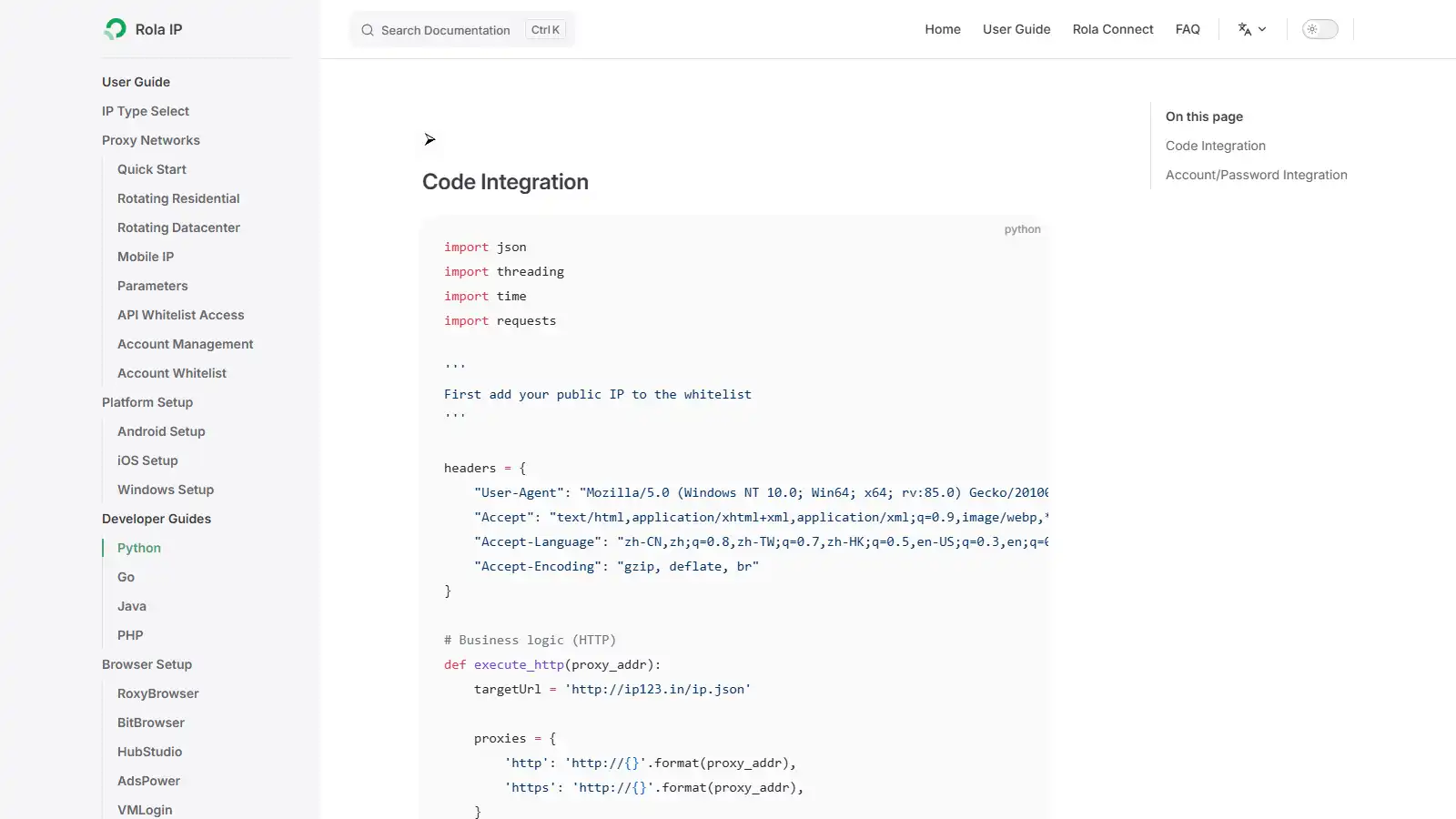
The official documentation shows the current Python integration context; account credentials must remain private.
Does AI Change the Web Scraping vs API Decision?
AI changes how a page can be interpreted; it does not change whether the source is an API or a webpage. An AI extractor that reads a rendered page is still performing web scraping and remains subject to the same access, source-quality, and usage questions.
AI vs Traditional Web Scraping Differences
| Factor | Traditional scraping | AI-assisted scraping |
|---|---|---|
| Extraction | CSS, XPath, and deterministic rules | Model-based interpretation |
| Determinism | High for a fixed input | Lower and model-dependent |
| Stable pages | Efficient | Often unnecessary |
| Layout variation | Requires selector updates | May adapt to some variation |
| Cost | Usually lower per page | Adds model or token cost |
| Validation | Explicit rules | Requires schema and confidence checks |
| Best role | Primary parser for stable sources | Assistance or a controlled fallback |
For stable page structures, traditional rules are cheaper to test and easier to reproduce. AI can classify unusual pages, map irregular text, or propose selector repairs, but a schema-valid answer can still assign the wrong meaning to a field.
Production Controls for AI Extraction
Use deterministic parsing as the primary path for stable pages and route only approved exceptions to AI. Store the input evidence, model and prompt versions, output, and validation result. Apply type, range, currency, required-field, and cross-field rules after inference; send low-confidence or contradictory records to review. Re-test representative fixtures before changing a model or prompt.
AI does not grant access, authenticate a client, decide whether collection is permitted, or convert a website into an official API. Its output should never silently overwrite a validated API value merely because it looks plausible.
Choose the Data Source at Field Level
Start with permission and required fields, then compare freshness, reliability, maintenance, scale, and cost per validated record. Prefer a suitable official API; use permitted scraping for missing page observations. Combine sources only with field provenance and conflict rules, and validate records rather than trusting request success.