
How to Scrape Yelp with Python: A Practical Yelp Scraper Guide

Aug 21, 2026 · Guides · 14 min read
Quick Answer: How to Build a Yelp Scraper in Python
If you want to scrape Yelp with Python, start with the Yelp Places API for structured business data such as names, categories, ratings, addresses, coordinates, and review counts. Use Python Requests to call the API, normalize the response, and export the records to CSV.
If the API does not provide a field you are authorized to collect from public pages, use a separate web-scraping workflow with Requests or Playwright, parse stable structured data such as JSON-LD where possible, and keep request pacing, retries, and data validation under control. Rola IP can be added when the project genuinely requires controlled residential network egress or regional testing.
This guide provides two complete paths. The official API path is suited to reliably obtaining structured business data, while the authorized web path can supplement public-page fields and use Rola IP to manage network egress and sessions. If your project requires full review text, images, author profiles, or commercial republication, you must separately assess Yelp’s terms, copyright, personal-information considerations, and data licensing.
Before Writing a Yelp Scraper, Answer These Three Questions
What Data Can You Collect from Yelp?
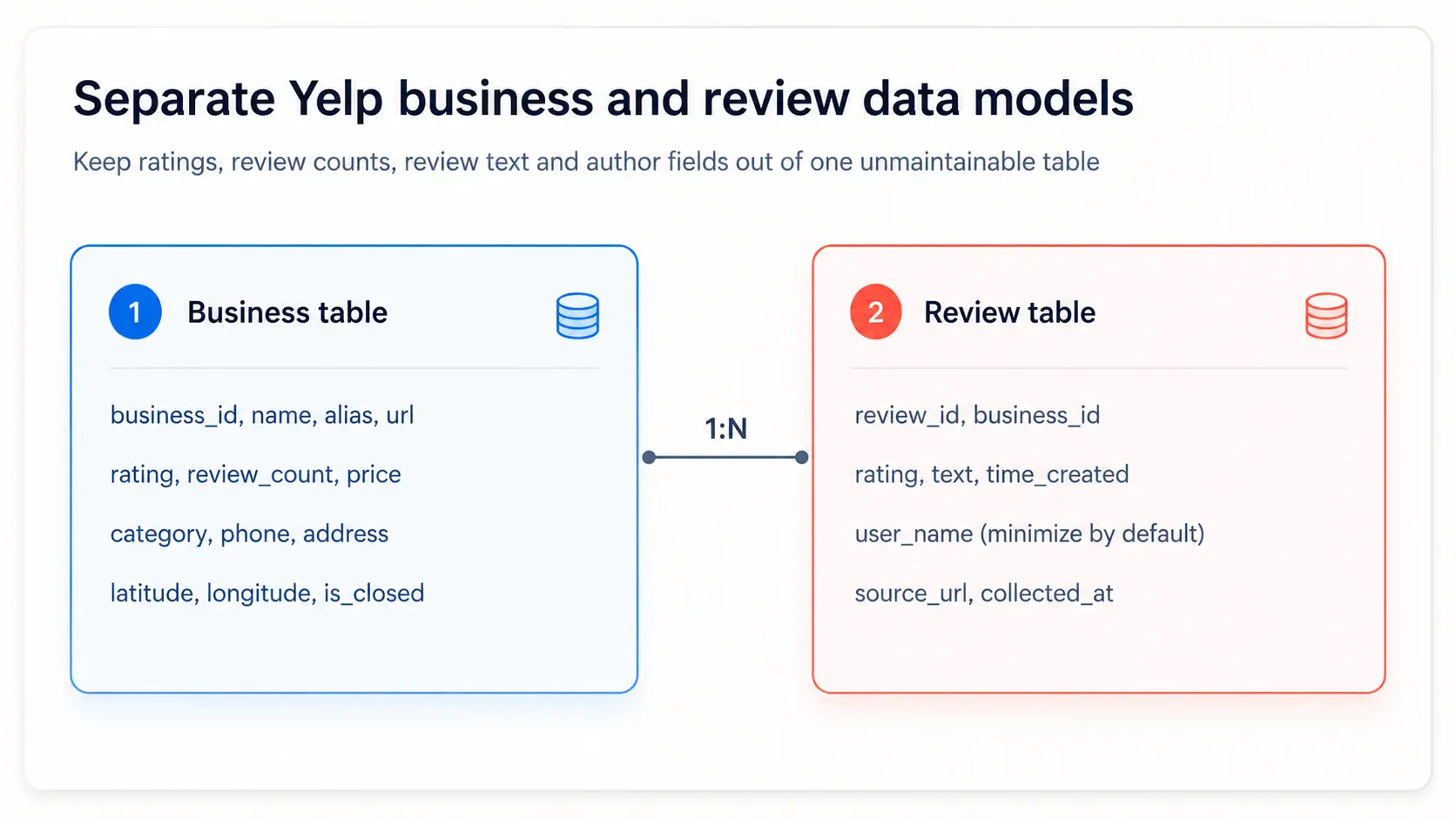
Yelp data can be divided into business information, aggregate metrics, and user-generated content. Business information includes names, categories, addresses, phone numbers, operating status, and geographic coordinates. Aggregate metrics include ratings, review counts, and price levels. User-generated content includes review text, author information, images, and timestamps. These three categories have different licensing, copyright, and update-frequency considerations, so they should not be collected in the same way by default.
Yelp Places API or Direct Web Scraping?
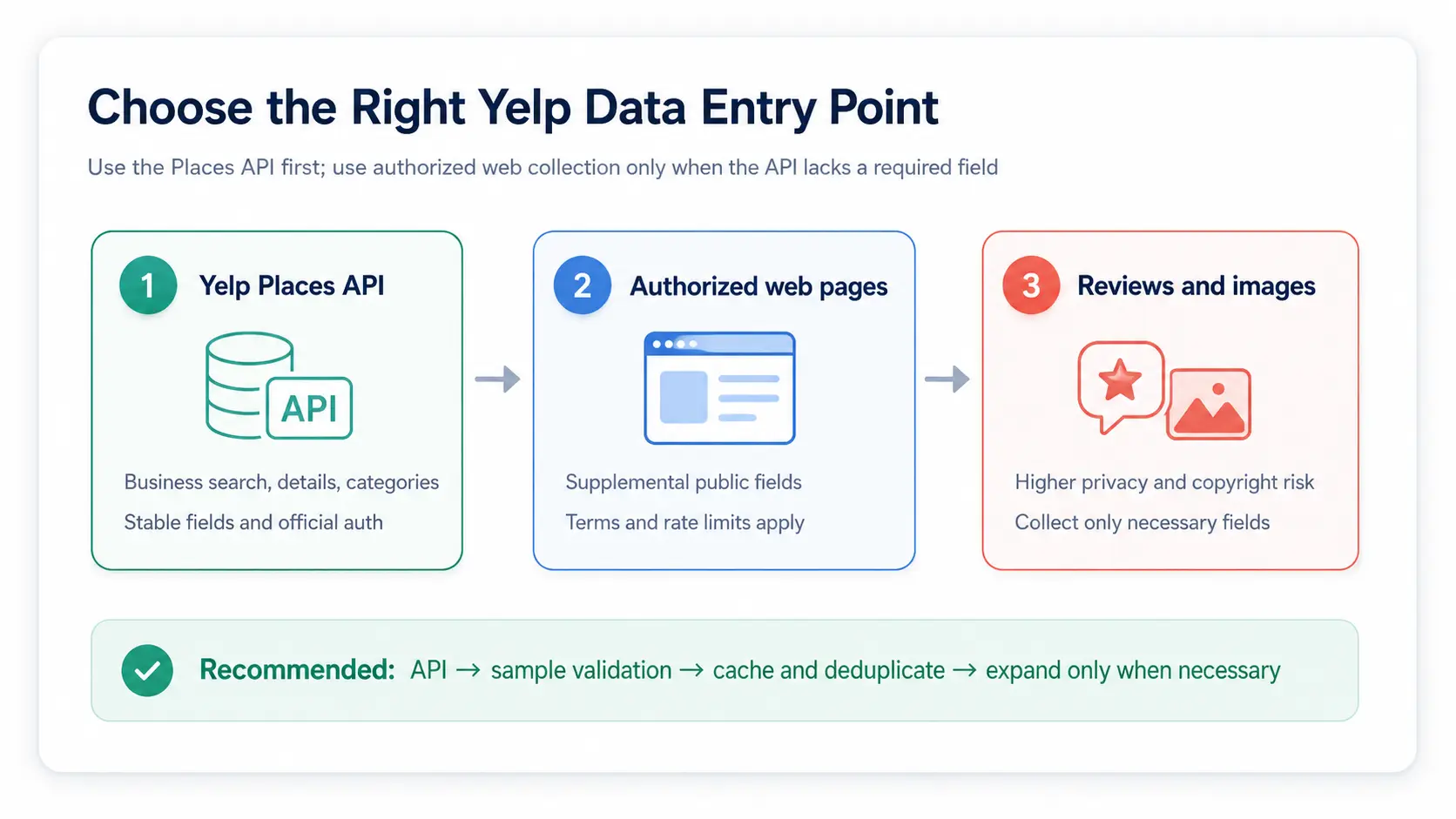
Use the Yelp Places API first. Its fields are stable, authentication is clearly defined, and quotas, caching, and error handling are easier to manage. Web collection should be used only for necessary fields that are unavailable through the API, and only with authorization and in compliance with current terms and robots directives.
Why Is Scraping Yelp Reviews Riskier?
Reviews are user-generated content and may involve copyright, author names, personal experiences, and other personal information. The fact that a review page can be viewed without logging in does not mean its content can be copied, retained indefinitely, or republished without restriction. Before building a Yelp review scraper, define the minimum fields you need, retention periods, de-identification methods, and the intended use.
Is It Legal to Scrape Yelp Data?
There is no single answer that applies to every jurisdiction and use case. Public accessibility does not mean unrestricted copying. Website terms, API terms, copyright, privacy, database rights, and the intended use can all affect the risk profile. Yelp’s Terms of Service expressly protect Yelp Content and restrict copying, publishing, modifying, redistributing, or exploiting it without explicit authorization.
Before you begin, review Yelp’s current Terms of Service, API terms, and the target page’s robots.txt. High-risk, commercial, or large-scale projects should be reviewed by legal and privacy teams.
Method 1: Build a Yelp Scraper in Python with the Yelp Places API
The simplest Python Yelp scraper starts with the Yelp Places API. It gives you structured business search and business detail data without relying on fragile page selectors. In this section, you will use Python Requests to search Yelp businesses, handle pagination, normalize fields, and export the result to CSV.
Official getting-started resource: Yelp Places API Getting Started. After creating an app and obtaining an API key, store the key in an environment variable.
Step 1: Create an Environment and Install Requests
python -m venv .venv
# macOS / Linux
source .venv/bin/activate
# Windows PowerShell: .venv\Scripts\Activate.ps1

python -m pip install --upgrade pip
python -m pip install requests
Step 2: Set the Yelp API Key
# macOS / Linux
export YELP_API_KEY="YOUR_YELP_API_KEY"

# Windows PowerShell
$env:YELP_API_KEY="YOUR_YELP_API_KEY"
Step 3: Search for Businesses and Handle Pagination
import os
import time
import requests

API_BASE = "https://api.yelp.com/v3"
API_KEY = os.environ["YELP_API_KEY"]

session = requests.Session()
session.headers.update({
    "Authorization": f"Bearer {API_KEY}",
    "Accept": "application/json",
})

def search_businesses(term, location, max_results=100):
    rows = []
    limit = 50
    for offset in range(0, max_results, limit):
        response = session.get(
            f"{API_BASE}/businesses/search",
            params={"term": term, "location": location,
                    "limit": min(limit, max_results - offset),
                    "offset": offset},
            timeout=(5, 30),
        )
        response.raise_for_status()
        payload = response.json()
        batch = payload.get("businesses", [])
        rows.extend(batch)
        if len(batch) < min(limit, max_results - offset):
            break
        time.sleep(0.3)
    return rows

businesses = search_businesses("coffee", "New York, NY", 100)
print(f"received {len(businesses)} businesses")
Step 4: Normalize Fields and Save to CSV
import csv

def normalize_business(item):
    location = item.get("location") or {}
    coordinates = item.get("coordinates") or {}
    return {
        "business_id": item.get("id"),
        "name": item.get("name"),
        "rating": item.get("rating"),
        "review_count": item.get("review_count"),
        "price": item.get("price"),
        "categories": "|".join(
            c.get("alias", "") for c in item.get("categories", [])
        ),
        "address": ", ".join(location.get("display_address") or []),
        "latitude": coordinates.get("latitude"),
        "longitude": coordinates.get("longitude"),
        "url": item.get("url"),
    }

rows = [normalize_business(item) for item in businesses]
with open("yelp_businesses.csv", "w", newline="", encoding="utf-8-sig") as fh:
    writer = csv.DictWriter(fh, fieldnames=rows[0].keys())
    writer.writeheader()
    writer.writerows(rows)
print(f"saved {len(rows)} rows")
Method 2: How to Use the Yelp API to Get a Limited Review Sample
The Yelp Reviews endpoint can return a limited sample of reviews for a business, but it is not a downloader for the complete review history. If you need all reviews, contact Yelp first to discuss authorization or data-partnership options rather than assuming that a pagination parameter is available.
def get_review_sample(business_id):
    response = session.get(
        f"{API_BASE}/businesses/{business_id}/reviews",
        params={"limit": 20, "sort_by": "yelp_sort"},
        timeout=(5, 30),
    )
    response.raise_for_status()
    payload = response.json()
    return payload.get("reviews", [])

review_rows = []
for business in businesses[:10]:
    for review in get_review_sample(business["id"]):
        user = review.get("user") or {}
        review_rows.append({
            "review_id": review.get("id"),
            "business_id": business["id"],
            "rating": review.get("rating"),
            "text": review.get("text"),
            "time_created": review.get("time_created"),
            "user_name": user.get("name"),
            "source_url": review.get("url"),
        })
    time.sleep(0.3)

print(f"received {len(review_rows)} review samples")
When saving reviews, retain business_id and source_url, and decide whether user_name is truly needed for your use case. Sentiment analysis usually does not require permanently storing author information.
Method 3: Build a Python Yelp Web Scraper with BeautifulSoup
When you are authorized to collect fields from public Yelp pages that are not available through the API, build the parser as a separate Python web-scraping path. Start with stable structured data such as JSON-LD, then use BeautifulSoup only for the additional fields you actually need. Avoid making random CSS class names the core contract of the scraper.
import json
from bs4 import BeautifulSoup

def extract_jsonld_business(html):
    soup = BeautifulSoup(html, "html.parser")
    candidates = []
    for node in soup.select('script[type="application/ld+json"]'):
        try:
            payload = json.loads(node.string or "")
        except json.JSONDecodeError:
            continue
        items = payload if isinstance(payload, list) else [payload]
        for item in items:
            if isinstance(item, dict) and item.get("@type") in {
                "LocalBusiness", "Restaurant", "FoodEstablishment"
            }:
                candidates.append(item)
    if not candidates:
        raise ValueError("business JSON-LD not found; save a snapshot for review")
    item = candidates[0]
    rating = item.get("aggregateRating") or {}
    address = item.get("address") or {}
    return {
        "name": item.get("name"),
        "rating": rating.get("ratingValue"),
        "review_count": rating.get("reviewCount"),
        "street": address.get("streetAddress"),
        "city": address.get("addressLocality"),
        "phone": item.get("telephone"),
        "url": item.get("url"),
    }

# response = fetch_authorized_page(AUTHORIZED_YELP_URL)
# row = extract_jsonld_business(response.text)
If JSON-LD does not contain the business data you need, do not automatically iterate through every script tag or execute unknown scripts. Save a de-identified snapshot, record the page type, and manually confirm whether the page layout changed or challenge content was returned.
Method 4: Add Rola IP for Larger Authorized Yelp Scraping Projects
When your authorized Yelp scraping project needs controlled regional exits, sticky sessions, or a larger residential IP pool, add Rola IP at the network layer after the Python scraper itself is working. Keep parsing, pagination, deduplication, validation, and stop conditions inside your Python application.
For this type of task, you can first review Rola IP residential proxies and then connect using the parameters generated in the dashboard.
What Can Rola IP Provide for Yelp Data Projects?
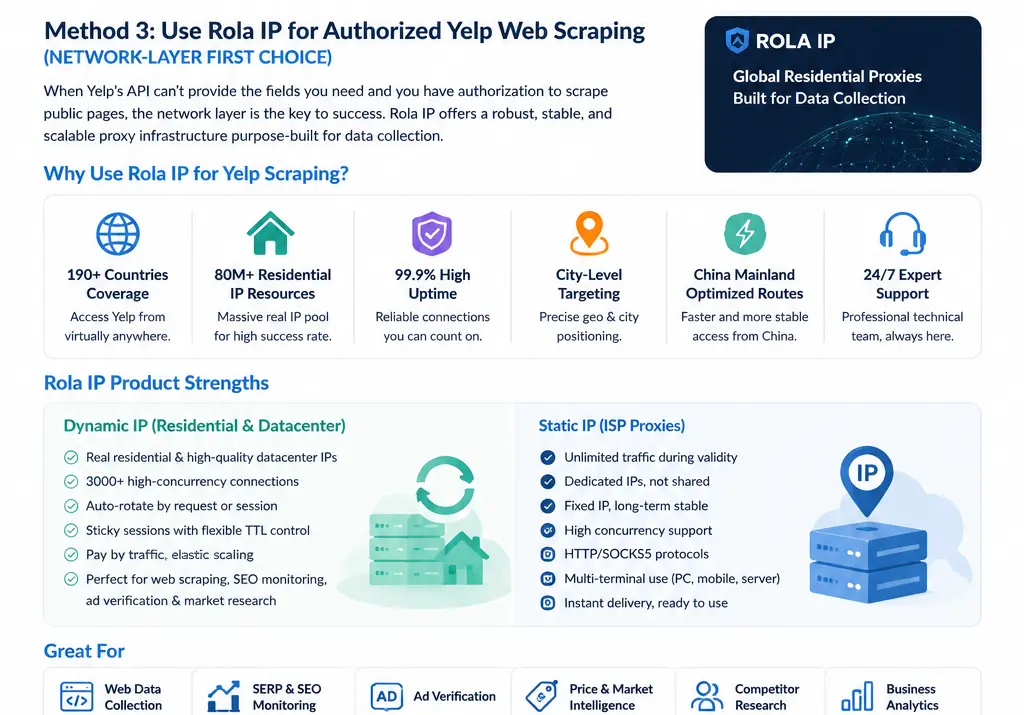
Rola IP covers more than 190 countries and regions, provides a pool of 80+ million residential IPs, and offers 99.9% high availability. It also supports country- and city-level targeting, optimized routes for access from mainland China, and IP/network-environment testing tools. For teams that need to verify how public Yelp pages appear in different regions, keep the exit region consistent, or collect data across multiple markets, these capabilities can be managed centrally at the network layer.
-
Dynamic IPs: Provides genuine residential and high-quality datacenter IP resources, supports 3,000+ high-concurrency connections, can rotate automatically by request or session, and supports sticky sessions and IP lifetime controls. Traffic-based billing makes it easier to scale elastically with collection volume.
-
Static IPs: Provides dedicated, fixed, long-term egress IPs with unlimited traffic during the validity period. This is suitable for validation tasks that genuinely require a fixed IP, persistent sessions, or long-term environmental consistency.
-
Protocols and integration: Supports HTTP/SOCKS5, fast API integration, and multilingual code examples. Authentication can use username/password, IP allowlisting, or a combination, making it convenient to integrate with servers, browsers, and automation programs.
-
Team and scale management: Supports subaccounts and traffic quotas, bulk purchasing, enterprise customization, and 24/7 professional technical support.
Rotating Residential Proxies or Static Residential Proxies?
Most authorized Yelp data-collection tasks are better suited to rotating residential proxies because business pages are independent of one another and often require exits assigned by country or city. For continuous pagination or multi-step operations on the same business, use a sticky session to keep the same IP until the task is complete, then rotate afterward.
Static residential proxies provide fixed, dedicated IPs with unlimited traffic during the validity period. They are better suited to internal workflows that require a long-term fixed exit, a persistent login state, or stable allowlisting. They are not the default choice: if a task only reads public business pages, rotating residential proxies are usually more flexible and make it easier to control cost based on actual traffic.
What Is Rola IP Responsible for in a Yelp Scraping Workflow?
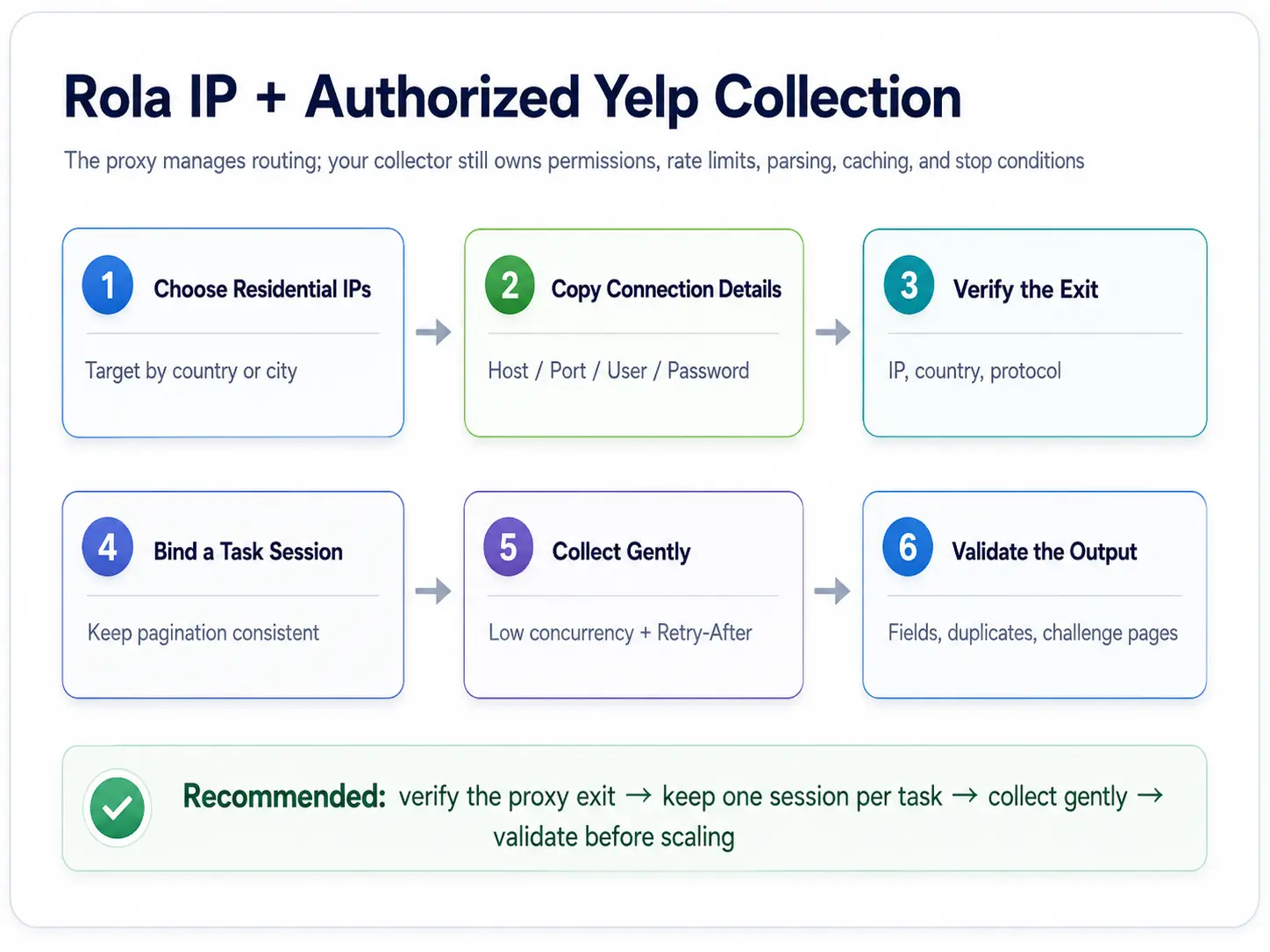
Rola IP provides configurable network egress, geographic targeting, and session continuity. The collection program is still responsible for access permissions, request pacing, Retry-After handling, HTML or JSON-LD parsing, caching, deduplication, and stop conditions. A proxy does not automatically repair broken selectors and should not be used to bypass login requirements, CAPTCHA, or other access controls.
Step 1: Copy Connection Parameters from the Dashboard
In the Rola IP dashboard, select rotating residential proxies and copy the Host, Port, Username, and Password. For the first connection, use the base account. After confirming connectivity, add proxy parameters such as country, city, sessiontime, or f-1 as needed. Keep a sticky session for continuous pagination, while stateless business-detail tasks can rotate between jobs.
Use the rotating residential proxy setup as the reference for parameter formats.
Step 2: Install Proxy Dependencies and Set Environment Variables
python -m pip install "requests[socks]" beautifulsoup4

# macOS / Linux: replace with the actual values from the dashboard
export ROLA_PROXY_SCHEME="socks5h"
export ROLA_PROXY_HOST="PROXY_DOMAIN"
export ROLA_PROXY_PORT="PORT"
export ROLA_PROXY_USERNAME="account-country-us"
export ROLA_PROXY_PASSWORD="YOUR_PASSWORD"
Step 3: Verify the Exit IP and Region
import os
from urllib.parse import quote
import requests

scheme = os.getenv("ROLA_PROXY_SCHEME", "socks5h")
proxy_url = (
    f"{scheme}://{quote(os.environ['ROLA_PROXY_USERNAME'], safe='')}:"
    f"{quote(os.environ['ROLA_PROXY_PASSWORD'], safe='')}@"
    f"{os.environ['ROLA_PROXY_HOST']}:{os.environ['ROLA_PROXY_PORT']}"
)
proxies = {"http": proxy_url, "https": proxy_url}

response = requests.get("http://ip123.in/ip.json", proxies=proxies,
                        timeout=(10, 30))
response.raise_for_status()
print(response.json())
Python projects can also refer to the Python proxy integration documentation.
Step 4: Build a Controlled Web Requester
The requester below does not attempt to solve CAPTCHA and does not retry 403 responses indefinitely. It is intended only for authorized public pages and uses Retry-After, content type, and challenge markers to decide whether to back off or stop. Replace the target URL with a Yelp page you are authorized to access.
from email.utils import parsedate_to_datetime
from datetime import datetime, timezone
import random
import time

BLOCK_MARKERS = ("captcha", "verify you are human", "access denied")

def retry_after_seconds(value):
    if not value:
        return None
    if value.isdigit():
        return max(0, int(value))
    try:
        dt = parsedate_to_datetime(value)
        return max(0, int((dt - datetime.now(timezone.utc)).total_seconds()))
    except (TypeError, ValueError, OverflowError):
        return None

def fetch_authorized_page(url, max_attempts=4):
    headers = {
        "User-Agent": "AuthorizedResearchClient/1.0 ([email protected])",
        "Accept-Language": "en-US,en;q=0.9",
    }
    with requests.Session() as session:
        for attempt in range(max_attempts):
            response = session.get(url, headers=headers, proxies=proxies,
                                   timeout=(10, 30))
            if response.status_code == 429:
                wait = retry_after_seconds(response.headers.get("Retry-After"))
                time.sleep((wait if wait is not None else 2 ** attempt)
                           + random.uniform(0, 0.5))
                continue
            if response.status_code in (401, 403):
                raise PermissionError(f"access rejected: HTTP {response.status_code}")
            response.raise_for_status()
            lower = response.text.lower()
            if any(marker in lower for marker in BLOCK_MARKERS):
                raise RuntimeError("possible challenge or soft block detected")
            return response
    raise RuntimeError("maximum attempts reached")
Method 5: How to Scrape Yelp Reviews
When answering how to scrape Yelp reviews, you must distinguish between a limited API review sample and the full review list on web pages. The former can be obtained through the official Reviews endpoint; the latter should be collected with a Yelp review scraper only when Yelp has explicitly authorized it.
What Fields Should Authorized Review Collection Save?
- Required fields: review_id, business_id, rating, text, time_created, source_url.
- Optional fields: language, response status, and a minimized author identifier.
- Not recommended to save by default: avatars, locally cached images, or additional profile information from author pages.
How Should You Handle Pagination, Duplicates, and Review Updates?
Use review_id as the primary key and retain collected_at and source_url. During pagination, record visited URLs and page cursors. Stop when you encounter duplicate primary keys, empty pages, challenge pages, or an abnormal drop in review counts. Do not use endless pagination as proof that you have collected every review.
import hashlib
from datetime import datetime, timezone

def stable_review_key(review):
    if review.get("review_id"):
        return review["review_id"]
    raw = "|".join([
        str(review.get("business_id") or ""),
        str(review.get("time_created") or ""),
        str(review.get("text") or ""),
    ])
    return hashlib.sha256(raw.encode("utf-8")).hexdigest()

deduped = {}
for review in review_rows:
    review["collected_at"] = datetime.now(timezone.utc).isoformat()
    deduped[stable_review_key(review)] = review

print(f"kept {len(deduped)} unique reviews")
When Do You Need Playwright or RoxyBrowser?
Upgrade to a browser only when you have authorization to collect data from web pages and the target fields must be rendered with JavaScript or confirmed through manual interaction. Playwright is suitable for repeatable automated testing; RoxyBrowser is useful for isolating browser environments and manually verifying that page region and session state are consistent. Neither should be used to bypass CAPTCHA or account restrictions.
When you need an isolated browser environment, use the RoxyBrowser proxy settings, enter the proxy generated in the Rola IP dashboard into the corresponding fields, and first visit an IP-check page to verify the exit.
If Requests can reliably retrieve the authorized data you need, or if the API already satisfies the field requirements, there is no need to introduce a browser. Browsers add costs in memory, rendering, fingerprint consistency, and page-wait time.
How to Turn a Yelp Scraper into a Maintainable Data Pipeline
Define Field Contracts and Failure Samples
Define required fields, data types, unique keys, and acceptable null ratios for both the business and review tables. When parsing fails, save a de-identified HTML sample, the status code, and the final URL; do not log only “scraping failed.”
Caching, Incremental Updates, and Deduplication
Business details change slowly and can be cached by business_id. Ratings and review counts can be refreshed incrementally based on business requirements, while reviews should be deduplicated by review_id. Set a reasonable refresh window for the same URL to avoid redundant requests.
Monitor Valid Data, Not Just Successful Requests
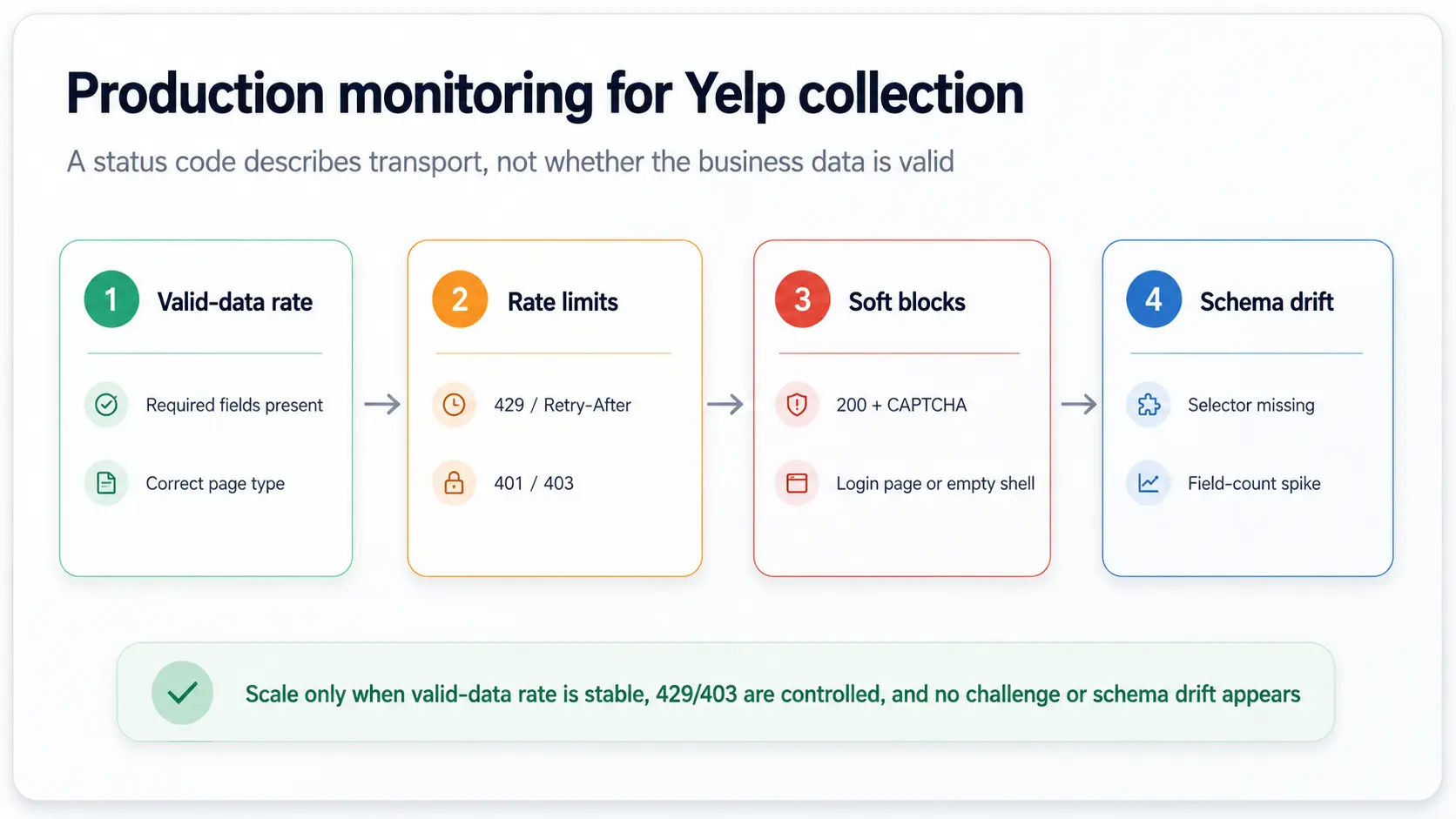
- Valid-data rate: The percentage of records with all required fields present and the correct page type.
- 429/403 and Retry-After: Used to identify rate-limit or permission issues.
- Soft-block rate: HTTP 200 responses that contain a CAPTCHA, login page, or empty template.
- Schema drift: Sudden changes in selectors, JSON-LD types, or field counts.
- Cost per valid record: Number of requests, proxy traffic, browser time, and manual maintenance time.
Common Mistakes: Why Do Yelp Scrapers Still Fail?
| Bad Practice | Problem | Better Approach |
|---|---|---|
| Scrape web pages by default | Ignores the official API and permission boundaries | Evaluate the Yelp Places API first |
| Treat HTTP 200 as success | Challenge pages can also return 200 | Validate the final URL, required fields, and challenge markers |
| Change IP on every request | Breaks pagination and cookie continuity | Bind a sticky session to each business task |
| Retry 403 indefinitely | Permission problems are not fixed by retries | Stop the task and check authorization |
| Rely only on random CSS classes | Parsing breaks immediately after a redesign | Prioritize JSON-LD and field contracts |
| Save all author information | Increases privacy and compliance risk | Keep only business-required fields |
| Launch a browser by default | Higher cost and a larger failure surface | Use Playwright or RoxyBrowser only when API/Requests are insufficient |
Conclusion
A reliable Yelp scraper in Python should start with the simplest data source that meets the requirement. Use the Yelp Places API for structured business data, build a separate authorized web-scraping path when additional public-page fields are necessary, and export normalized records to CSV or your downstream data store. Add proxy routing only after the Python scraper, parsing, pagination, and validation logic are working correctly.
For review data, a limited API sample and the complete review list on web pages are two different problems. Teams should define boundaries around copyright, personal information, and republication, collect only the minimum fields required by the business, and measure the Yelp data pipeline by its valid-data rate rather than by request volume.