
n8n vs OpenClaw: Architecture Comparison and Hybrid Webhook Guide

Sep 3, 2026 · Comparisons · 15 min read
n8n vs OpenClaw: the short answer
Use n8n when steps, inputs, outputs, retries, and side effects are known. Use OpenClaw when the goal is clear but the agent must choose the path. Use both when OpenClaw interprets and n8n validates and executes. Start with one safe, authenticated pilot before adding production credentials.
| Task shape | Default fit | Why | Main risk |
|---|---|---|---|
| Scheduled API sync, notification, data mapping, or approval flow | n8n | The graph, triggers, branches, credentials, retries, and execution history are explicit | A rigid flow needs maintenance when inputs or APIs change |
| Open-ended research, multi-step tool selection, or conversational assistance | OpenClaw | The agent can interpret a goal, maintain context, and choose among permitted tools | Nondeterministic actions, prompt injection, and broad permissions |
| Natural-language request that must end in a controlled business action | n8n + OpenClaw | OpenClaw handles interpretation; n8n validates, approves, and executes | Duplicated side effects or an unsafe trust boundary between systems |
This comparison treats upstream OpenClaw as a project, not as a managed host. It also avoids the outdated claim that n8n cannot build agents: current n8n documentation lists an Agent feature in Preview, with availability and self-hosted limitations that should be checked against the version you deploy. n8n’s agent documentation was checked on September 3, 2026.
This is an architecture comparison, not a claim that either tool is universally better. Choose n8n when steps and side effects are known, OpenClaw when an agent must select permitted tools, and a hybrid when an agent should interpret a request before n8n validates and executes it.
What n8n and OpenClaw actually control
n8n is a workflow automation platform. Its core object is a workflow graph: a trigger starts nodes, data is transformed, conditions route it, and connected services perform actions. The platform supports cloud and self-hosted deployment paths and is designed to connect applications through APIs. Its official documentation is the right source for current node behavior and hosting details.
OpenClaw is a personal AI assistant that runs across a user’s devices and chats. The upstream project describes a Gateway that connects models, tools, channels, and optional companion apps. Its core object is an agent session: the model receives a goal and context, then decides which configured capability to use next. Read the OpenClaw project overview and upstream repository when separating the project from third-party hosting offers.
The useful shorthand is “workflow-first versus agent-first,” but it is incomplete. n8n now exposes agent behavior as a first-class capability, while OpenClaw can be reached through authenticated HTTP surfaces. The practical question is more precise:
Can you define the steps and acceptable outputs before the run, or must the system discover part of the path while it runs?
That question predicts where control, state, credentials, approvals, and logs should live.
This comparison reflects the official documentation reviewed on September 3, 2026. Preview features, version requirements, pricing, and hosting limitations may change, so verify them against your deployed versions before deciding.
n8n installation and run requirements
The comparison is only useful when the deployment assumptions are explicit. Use this standalone checklist before importing the example or granting any production permission.
| Component | Minimum check before the pilot | Evidence to record |
|---|---|---|
| n8n runtime | Use n8n Cloud or a self-hosted instance. Record the deployed version, hosting mode, database, project, and whether the workflow is Draft or Published. | n8n version, project name, hosting mode, publish state |
| OpenClaw runtime | Use the upstream project with a supported Node.js runtime and an authenticated model-provider path. Treat managed hosts as separate products. | OpenClaw version, provider, channel or host |
| Node.js | The current OpenClaw guide lists Node.js 22.22.3+, 24.15+, or 25.9+, with Node 26 recommended. Recheck the live guide before installation. |
node --version, documentation check date |
| Credentials | Create one test-only Header Auth credential in n8n. Keep OpenClaw and model/API secrets outside prompts, source files, exports, and screenshots. | Credential name only, secret-manager location |
| Webhook | Confirm POST, the exact path, authentication mode, response node, timeout, and caller allowlist. |
Sanitized path, auth mode, response status |
| Network | The bundled POC uses 127.0.0.1. An external worker needs authorized egress and independent exit-IP or regional behavior checks. |
Region, exit-IP result, request rate |
| Safety controls | Test dry-run mode, an approval flag, an idempotency key, bounded retries, and a structured failure response before any side effect. | Test IDs, outcomes, cleanup time |
n8n vs OpenClaw: side-by-side decision matrix
| Dimension | n8n workflow | OpenClaw agent | Hybrid boundary |
|---|---|---|---|
| Control loop | Graph execution with configured nodes and branches | Model-driven reasoning loop over permitted tools | Agent proposes intent; workflow validates and acts |
| Predictability | High when inputs, expressions, and dependencies are fixed | Lower; output and tool order can vary with context and model | Improve it with schemas, idempotency, approval, and bounded retries |
| State and memory | Workflow data and execution records; agent features add sessions and memory | Gateway sessions, channels, skills, and configured memory | Keep business state in a system of record; pass only task context |
| AI role | One step, decision point, or agent can sit inside a larger workflow | The agent is the primary interpreter and tool selector | Reasoning stays separate from credentialed side effects |
| Tools | Connectors, HTTP requests, code, sub-workflows, and services | Tools, skills, browser, files, channels, and plugins | Expose a narrow n8n webhook or API as one tool |
| Schedules | Native workflow triggers; n8n also documents agent schedules | A schedule can start an agent task in supported deployments | Let n8n own recurring execution when auditability matters |
| Deployment | n8n Cloud or self-hosted, subject to feature/version limits | Local-first Gateway on a host with a model-provider API key | Isolate the Gateway from the public workflow plane |
| Credentials | Attached to nodes/tools and managed in the n8n project | Model, channel, browser, exec, and skill credentials depend on configuration | Keep secrets in the executor; never give the agent a production secret store |
| Audit and approvals | Execution history, draft/publish behavior, and approval controls are documented for agents | Logs and controls depend on Gateway, channel, tool, and host setup | Record request ID, decision, approval, execution result, and error |
| Failure behavior | Explicit retries and error branches can be tested | Agent may retry, change tools, or interpret an error differently | Set a timeout, one retry at most for the pilot, and an idempotency key |
| Cost unit | n8n defines an execution as a complete workflow run; plan terms change | Model/API calls, host, skills, browser use, and maintenance vary | Budget both the orchestration run and model/tool usage |
The n8n agent overlap matters
Version-sensitive note — checked September 3, 2026: Current n8n documentation describes agents as autonomous assistants with a model, instructions, tools, skills, channels, schedules, memory, and optional knowledge bases. The page lists agents from self-hosted version 2.32.3 (Beta), notes that queue mode is not supported for agents yet, and says self-hosted Enterprise support is not ready. Availability and behavior can change; compare the deployed version with the live documentation before production rollout.
The same documentation says one agent turn counts as one execution and that agent and workflow runs share the plan’s execution quota. Check the live n8n plans and pricing page for current limits instead of copying a price table from a comparison blog.
Choose n8n when the process is known
n8n is usually the more predictable starting point when a process can be expressed as explicit steps and schemas. Examples include importing rows on a schedule, normalizing fields, checking a threshold, requesting approval, and sending a notification. The work may include AI, but the AI step does not need to own the whole control loop.
Use this checklist:
- Define the trigger and input schema.
- Map the deterministic transforms and branches.
- Attach the least-privilege credentials to the specific nodes that need them.
- Add error handling, retry limits, and an observable failure route.
- Put human approval before a payment, deletion, account change, or public message.
- Store the execution ID and business idempotency key with the result.
For example, a support workflow can classify a message with an AI node, map the result to a fixed ticket schema, check the confidence threshold, and wait for approval before changing a customer record. The graph remains responsible for what happens next. For scheduled search-visibility checks, see the residential proxies for SEO monitoring use case as a separate network consideration, not as a substitute for workflow controls.
The limitation is not that n8n is “non-AI.” It is that a workflow still needs a maintained path. Unexpected browser state, missing fields, changing API responses, and ambiguous requests require explicit fallbacks or a separate agent layer. If you use the current n8n Agent feature, treat Preview status and self-hosted version limits as a release gate, not a footnote.
Choose OpenClaw when the goal is clear but the path is not
OpenClaw fits tasks such as “research these sources, compare the findings, and ask me before sending a summary,” where the system must decide how to search, what context matters, and which permitted tool should run next. Its channels, Gateway, skills, browser, files, and model-provider configuration make it a more natural conversational control surface than a long list of fixed branches.
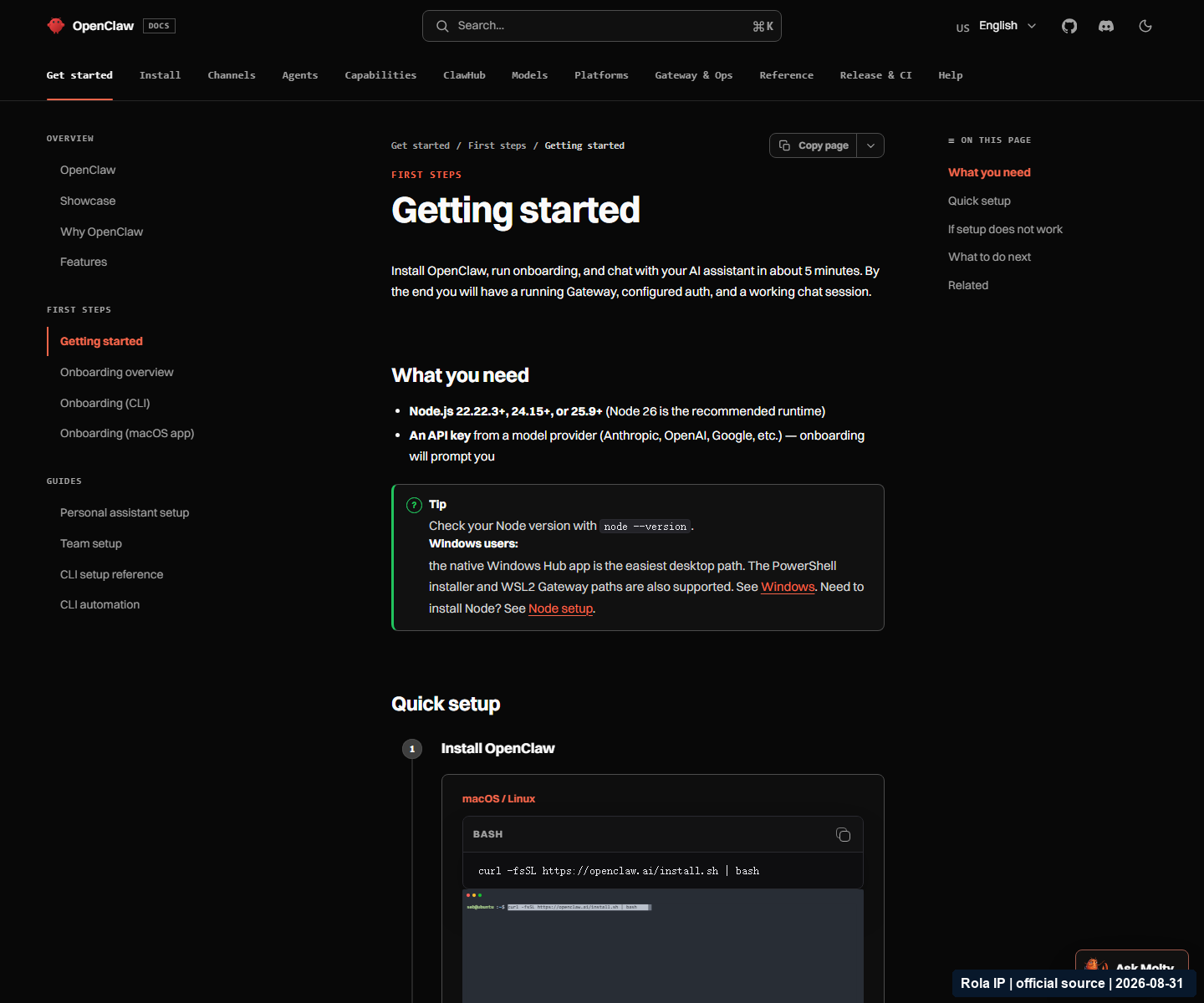
As checked on September 3, 2026, the official getting-started page lists Node.js 22.22.3+, 24.15+, or 25.9+, with Node 26 recommended, plus an existing Claude Code or Codex CLI login or a provider API key. It documents Windows support, onboarding, openclaw gateway status, and openclaw dashboard. The page is version-sensitive; recheck the OpenClaw getting-started guide before publishing an installation command.
OpenClaw’s flexibility creates a larger security decision. The official OpenClaw security guidance calls out Gateway exposure, who can message the bot, prompt injection, tool scope, credentials, browser access, exec access, and third-party skills or plugins. Its sandboxing guidance says sandboxing can reduce blast radius but is not a perfect boundary because the Gateway remains on the host. Treat every web page, email, file, and message as untrusted input until your policy says otherwise.
Before allowing an agent to browse, execute commands, or write to business systems, define:
- which channels and senders are allowed;
- which tools are read-only and which can cause side effects;
- which directories, hosts, and domains are reachable;
- where a human must approve the action;
- how sessions, logs, credentials, updates, and rollback are managed.
Use OpenClaw and n8n together with a small contract
The most useful hybrid pattern is not “connect everything to everything.” It is a narrow trust boundary:
- OpenClaw receives the user’s goal and returns a typed intent.
- n8n validates the intent against an allowlist.
- n8n performs the approved, credentialed action.
- n8n returns a fixed response.
- OpenClaw explains the result without inventing a success state.
Proof of concept: one harmless request
Use a dry-run support-message classifier or a test webhook that writes nothing to production. Do not begin with email sending, customer updates, purchases, deletion, or a logged-in browser. The pilot should use one request, one deployment, a 10-second HTTP timeout, no more than one retry, and a fixed idempotency key that you can replay safely.
For a local-only check, start hybrid-poc-fixture.mjs with a temporary POC_FIXTURE_SECRET. In a second terminal, set N8N_WEBHOOK_URL to http://127.0.0.1:8787/webhook/openclaw-hybrid-poc, copy the same local-only value into N8N_WEBHOOK_SECRET, and run hybrid-poc.mjs. The fixture returns accepted for a valid request, rejects a wrong secret, and detects a replayed request_id; it does not log the secret or request body. Stop the fixture and clear the temporary environment values after testing.
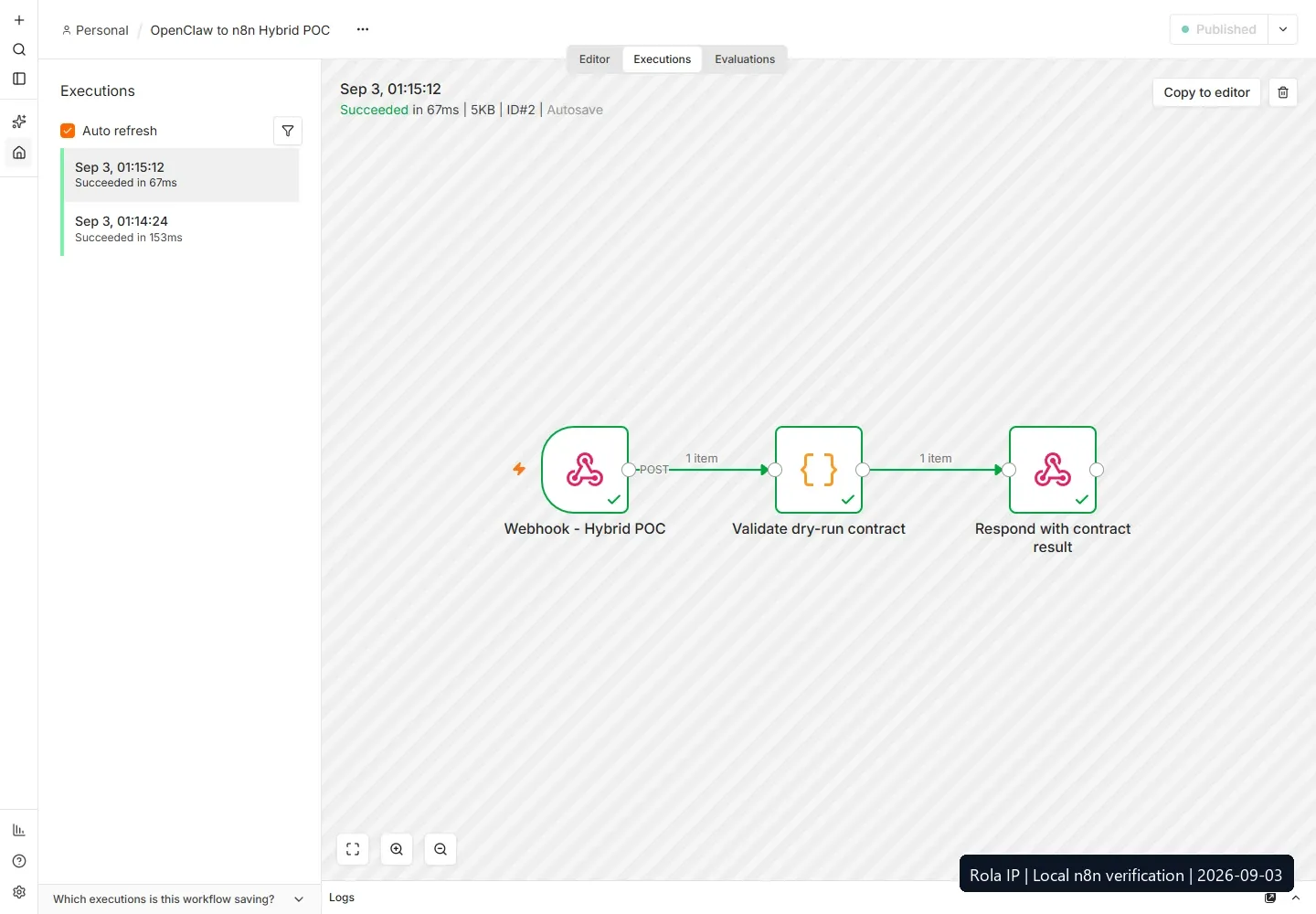
Real n8n UI capture from a loopback-only n8n 2.37.7 instance, captured September 3, 2026. It shows two successful executions and the three workflow nodes. The instance used only a temporary local QA account and test credential; this is runtime evidence, not an online production page, uptime claim, or benchmark.
The request contract can be this small:
| Field | Type | Required rule |
|---|---|---|
request_id |
string | Unique per business request and reused on a replay |
intent |
enum/string | Allowlisted value such as classify_support_message |
input |
object | Contains only the minimum data needed for the dry run |
constraints |
object | Includes dry_run: true, item limits, and an optional region |
approval_required |
boolean | true for anything with a side effect |
source |
string | Identifies the caller, such as openclaw-hybrid-poc |
Return an object with the same request_id, a status such as accepted, completed, or rejected, a structured result when successful, and a non-secret error_code when not. A response should never claim success merely because a webhook received a request.
On the n8n side, import [n8n-hybrid-poc-workflow.json]into a non-production project. Create or assign the Header Auth credential named Hybrid POC Header Secret with header name x-webhook-secret ; the export contains no secret. Confirm the Webhook node uses POST , the path openclaw-hybrid-poc, Header Auth, and response mode Using Respond to Webhook Node. Keep it inactive while reviewing. The exact n8n node labels and authentication options can vary by release, so verify them in your instance before going live.
The client in [hybrid-poc.mjs] reads the endpoint and secret from environment variables, sends a dry-run payload, enforces a timeout, and checks the response shape. The package also includes [hybrid-poc-fixture.mjs], [n8n-hybrid-poc-workflow.json], the [hybrid-poc-runbook.md], and a sanitized [live n8n run record]. The client and fixture pass node --check validation. On September 3, 2026, I imported the workflow into an isolated n8n 2.37.7 instance, published it, and sent a valid authenticated request to its loopback webhook. n8n returned HTTP 200 with status: accepted,dry_run: true, and side_effects: false; a wrong Header Auth value returned HTTP 403, and an invalid intent returned rejected / invalid_contract. The instance listened only on 27.0.0.1 and used a temporary QA account and local placeholder secret. This is live local runtime evidence, not a production deployment, online uptime claim, or benchmark.
Run these verification cases:
- Valid request: one completed or accepted object with the same request_id.
- Wrong secret: a rejected request with no downstream action.
- Unknown intent: a rejected request with an allowlist error.
- Same request_id twice: the local fixture rejects the replay with duplicate_request_id; the exported n8n workflow validates the contract but does not provide durable deduplication, so add an idempotency store before production side effects.
- Delayed response: the client times out without claiming success.
- Malformed response: the client fails closed and records a schema error without exposing the secret.
The [OpenClaw Webhooks plugin documentation]describes the reverse direction as well: a trusted external system such as n8n can call authenticated HTTP routes. Its create_flow and run_task operations manage TaskFlow records; they do not themselves start an agent turn. Do not treat installing the plugin as a complete n8n integration.
Cost, hosting, and maintenance: compare the unit of work
n8n cost depends on whether you use Cloud or self-hosting, the current plan, execution quota, storage, and operations work. Its pricing page defines an execution as one complete workflow run, regardless of the number of steps or data processed. Current agent turns share the workflow execution quota according to the agent documentation.
OpenClaw does not have one universal cost line for the upstream project. Budget for the host, model-provider/API usage, channels, browser sessions, skills or plugins, storage, updates, backups, and the operator who reviews permissions and failures. Managed OpenClaw providers may publish their own prices, but those prices are not upstream OpenClaw pricing.
For a fair pilot, record the same workload on both paths: one input, one region, the same model where possible, the same timeout, the same retry policy, the same approval rule, and the same success definition. Measure completion, schema-valid responses, duplicate side effects, operator interventions, model/tool calls, and time to diagnose a failure. Do not call one system cheaper from an unmatched demo.
Cost measurement template
Copy this table into a spreadsheet or issue before running the comparison. Keep the sample, region, timeout, retry rule, approval point, and success definition identical across paths.
Run ID |
Tool path |
Inputs |
Model/API calls |
Workflow executions |
Host |
Browser minutes |
Human minutes |
Retries |
Duplicate side effects |
Outcome |
Estimated cost |
|---|---|---|---|---|---|---|---|---|---|---|---|
001 |
n8n / OpenClaw / hybrid |
Record the currency and pricing date beside the sheet. Calculate estimated cost from the current n8n plan or hosting bill, model/API usage, browser or proxy usage where authorized, and operator time. Treat diagnosis time and duplicate side effects as operational cost, not as footnotes.
Security checklist for both architectures
Use this as a release gate. n8n also publishes a security audit guide for reviewing an instance and its exposed surface:
- Keep the OpenClaw Gateway private or behind authenticated access. Limit who can message it.
- Give the agent the fewest tools and domains needed for the task. Start read-only.
- Keep n8n webhooks authenticated and rate-limited. Do not rely on a hard-to-guess URL as authentication.
- Separate model credentials, workflow credentials, browser profiles, and proxy credentials.
- Require approval for money movement, deletion, account changes, external messages, and other irreversible actions.
- Treat web pages and emails as untrusted content that may attempt indirect prompt injection.
- Use sandboxing as blast-radius reduction, not as a complete host-isolation guarantee.
- Set short timeouts, bounded retries, idempotency keys, and an explicit failure response.
- Review logs for request IDs and outcomes, not tokens, passwords, cookies, or raw sensitive payloads.
- Use environment variables only as a safer injection path, not as a secret vault; same-user or privileged processes may still inspect them. Clear pilot values and move production secrets to an approved secret manager.
Where proxies fit in web and regional data workflows
n8n and OpenClaw are orchestration choices; they do not make a web collection task authorized or reliable by themselves. Before connecting either system to a website, confirm that you have permission, identify whether the target is static HTML or JavaScript-rendered, decide whether login/cookies are allowed, and set a conservative request rate. Do not use the architecture to bypass access controls, CAPTCHAs, paywalls, or target-site rules.
Proxy routing is an optional network component for an authorized external worker. It does not make n8n or OpenClaw a scraper, grant access to a restricted service, or justify bypassing logins, CAPTCHAs, paywalls, 403 responses, or 429 limits.
If a legitimate external worker needs proxy routing, keep that worker separate from the agent’s reasoning layer. The worker can be invoked by n8n or OpenClaw with a narrow request and return normalized data. For a regional market-research workflow, review the proxies for market research use case separately from the orchestration choice. For an authorized web-data task, a web scraping proxy may be one external-worker component, while the proxy networks guide documents the available network categories. Rola IP documents country targeting for these networks, while state and city targeting are available for Rotating Residential; availability and target compatibility still need to be verified.
Use session continuity for a short, authorized stateful flow and per-request rotation only for authorized, stateless requests that the target rules permit; do not use rotation to evade 403, 429, login, or account limits. Before integration, check the exit IP, requested country, response status, and target authorization. For stateless work, run a low-volume test before scaling. Neither option guarantees access, a particular third-party location result, account safety, or scraping success.
The proxy is therefore a conditional external-worker component, not a native n8n/OpenClaw integration claim. Configure secrets in the worker, verify the route independently, and pass only the result needed by the workflow or agent.
A measurable next step
Start with 3 authorized URLs and verify the response, region, and data quality before scaling. Then check the route in the Rola IP Proxy Checker and record the result beside the run ID. Track template_download, code_copy, proxy_checker_click, and rola_signup_click as separate events so a download, implementation action, tool click, and registration are not counted as the same conversion.
| Event | Fire when | Minimum metadata |
|---|---|---|
template_download |
A reader downloads the n8n JSON or evidence template | content_id, page path |
code_copy |
A reader copies the client or fixture command | code_id, page path |
proxy_checker_click |
A reader opens the Proxy Checker after the three-URL test | url_count, run_id |
rola_signup_click |
A reader opens the registration flow | source_event, page path |
A practical decision test before you commit
Write down three real tasks and score each answer:
| Question | If “yes” | If “no” |
|---|---|---|
| Can the steps and output schema be written before the run? | Start in n8n | Consider OpenClaw or a hybrid |
| Can every side effect be named and approved? | Put it behind a workflow node or controlled tool | Do not grant the capability yet |
| Do retries need to be identical and auditable? | Prefer n8n as the executor | Add idempotency, logs, and a bounded pilot |
| Must the system choose tools while researching? | Add an agent layer | Keep the workflow deterministic |
| Does the task need region-specific web data? | Use an authorized external worker and verify proxy behavior | Do not add a proxy just because an agent is involved |
The recommended proof is small: one harmless input, one authenticated request, one accepted response, one rejection test, and one replay test. Record the deployed n8n version, OpenClaw version, model provider, hosting mode, allowed tools, timeout, retry count, approval point, response schema, and cleanup action. Scale only when the results are repeatable and the trust boundary is explainable.
Troubleshooting n8n vs OpenClaw implementations
| Symptom | Likely cause | Verify | Fix |
|---|---|---|---|
Webhook returns 401 or 403, or no execution appears |
Secret/header mismatch, inactive workflow, or wrong URL | Check the endpoint, auth configuration, and sanitized request ID | Rotate the pilot secret, activate the correct workflow, and test with one known-good request; expect the exact status code to vary by auth layer |
| The same request creates two actions | Retry or agent replay has no idempotency control | Search execution logs by request_id |
Deduplicate before side effects and return an explicit replay status |
| OpenClaw follows instructions found on a page | Untrusted content influenced the agent | Review the tool trace and source content | Isolate untrusted text, narrow tools/domains, and require approval |
| n8n Agent features are missing | Preview rollout, version, module, Enterprise, or queue-mode limitation | Compare the instance version and current official docs | Use a normal workflow with a bounded AI step or follow the current self-hosted setup path |
| The proxy connects but the result is wrong | Target is dynamic, region is not reflected, or session state is mismatched | Check rendered content, exit IP, cookies, and response headers | Use an authorized browser-capable worker, preserve or rotate sessions intentionally, and lower the rate |
| Client times out but the workflow finishes later | Timeout is shorter than the downstream action | Compare client, webhook, and execution timestamps | Return an accepted state, poll by request ID, or use a queue rather than claiming failure |
Conclusion: match control to the task
n8n is the default when you can define the process. OpenClaw is the candidate when you can define the goal but not every step. A hybrid is often the most practical architecture: let the agent interpret, then make a narrow n8n workflow validate, approve, execute, and report.
Start with one low-risk proof of concept. Require one valid response, one rejected request, and one safe replay before adding production credentials or side effects. If regional web data is part of the task, confirm authorization first, then test the external worker and its proxy behavior independently. The decision is not “which tool is smarter”; it is “which layer should be allowed to decide, and which layer should be allowed to act?”