
Web Scraping Yellow Pages with Python: Workflow and HTML Demo

Oct 16, 2026 · Guides · 23 min read
TL;DR:
This guide explains how to adapt a Python web scraping workflow to Yellow Pages pages that you are authorized to access. It covers permission checks, URL and pagination inspection, response handling, selector mapping, rate limits, deduplication, and CSV export. The included project uses fictional local HTML for reproducible testing and produces 10 businesses from 12 cards.
All code and sample inputs are included on the end of this page: Appendix A contains the three Python programs, Appendix B contains the URL lists and run order, and Appendix C contains the three HTML pages. Save each code block under its stated filename. The sample businesses, addresses, and phone numbers are fictional; the detail URLs use example.com.
What Can You Analyze with Yellow Pages Business Data?
Business-directory analysis can help compare observed listings by location or category, identify repeated records, and find missing contact fields. Retain sources so that a colleague can trace each exported record back to its input page.
| Field | Source in the sample | Use |
|---|---|---|
| business_id / name | Card attribute and title | Identify records and detect duplicates |
| category | Category label | Count listings by category |
| city / state / address | Location fields | Group locations without mixing same-name cities across states |
| phone_raw / phone | Original text and normalized value | Retain the input while checking formatting |
| listing_url | Business-name link | Preserve the supplied detail link |
| sponsored / source_file | Card attribute and downloaded filename | Identify sample sponsored cards and trace input files |
These counts describe the input pages, not market size or market share. Search filters, directory coverage, advertising placement, and collection time can all affect a real directory sample.
Web Scraping Yellow Pages: A Python Guide
This guide has two parts: an authorized real-site adaptation workflow and a local reproducible project. The local project has three programs—a local HTTP server, a page downloader, and an HTML parser—so a network failure can be distinguished from a field-mapping problem.
Before You Request a Real Page
Use this sequence for a real directory source that you are permitted to access:
- Confirm the site’s terms, robots guidance, API availability, and the permitted collection and reuse scope. Do not bypass login, CAPTCHA, access controls, or rate limits.
- Record the exact search URL, pagination method, language or location filters, and retrieval date. Begin with one page and a low request rate.
- Send a request with explicit connection and read timeouts. Inspect the status code and content type before parsing; a 200 response may contain a login, verification, or JavaScript shell instead of listings.
- Save the permitted HTML and a manifest containing the requested URL, final URL, status, timestamp, and content hash. Inspect the saved page to map the current card and field selectors.
- Validate a small sample of names, locations, phone text, and detail links manually before adding pagination. Stop the batch on 403 or 429 and follow any documented retry guidance.
- Keep raw fields and source references, then deduplicate and export only the data needed for the authorized purpose. The local project below demonstrates these checks without contacting a live directory.
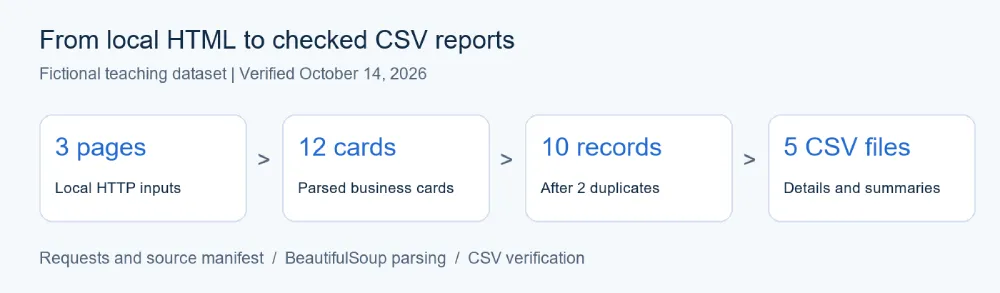
Figure 1 | Workflow diagram for the supplied fictional dataset.
Step 1 | Prepare the Environment and Project
Verified on October 14, 2026: Windows 10 build 19045, Python 3.14.4, Requests 2.33.1, and BeautifulSoup 4.14.3. Validation used the supplied fictional HTML over localhost, one request at a time, with no proxy. The expected extraction totals appear in Step 4, and Step 6 includes a reproducible HTTP 429 check.
Create a folder named project with an html subfolder. Save the three programs from Appendix A in project, the two URL lists from Appendix B in project, and the three HTML blocks from Appendix C in project/html. Open a terminal in project and create a virtual environment. The verified installation uses Python 3.14.4; compatibility with other versions is not part of this example’s test results.
# Windows PowerShell
python -m venv .venv
.\.venv\Scripts\python.exe -m pip install requests==2.33.1 beautifulsoup4==4.14.3
On macOS or Linux, create the environment with python3 -m venv .venv, activate it with source .venv/bin/activate, and install with python -m pip install requests==2.33.1 beautifulsoup4==4.14.3. The remaining examples use python; in PowerShell, use .\.venv\Scripts\python.exe in place of python to select the project environment without changing execution policy.
project/
  serve_pages.py
  fetch_pages.py
  yellowpages_pipeline.py
  urls.txt
  rejected_urls.txt
  html/
    approved_directory_page_1.html
    approved_directory_page_2.html
    approved_directory_page_3.html
Step 2 | Request Pages and Save HTML
Start the server in one terminal, then run the downloader in another. Keep both terminals in the project folder.
# Terminal 1
python serve_pages.py --port 8765

# Terminal 2
python fetch_pages.py --urls urls.txt --origin http://127.0.0.1:8765 --out-dir downloaded
The URL file contains three local page addresses. The downloader validates every URL against the chosen origin before making any request, disables automatic redirects, and uses a one-second interval between requests. Its (5, 15) timeout specifies connection and read timeouts, not a total batch deadline. Set --delay to the interval appropriate for a permitted source; the default is a demonstration setting, not a site’s rate-limit allowance.
Only HTTP 200 HTML responses are saved. Streaming reads stop when the decoded body would exceed 2,000,000 bytes; an oversized page is not saved. This is an application-level body limit, not an exact cap on network bytes. HTTP 403 or 429 ends the current batch after recording the response, and no automatic retry is attempted.
Each run requires a new or empty output directory. For a second run, use a different directory name, such as --out-dir downloaded-2. The parser uses the successful filenames in that run’s http_manifest.csv, avoiding unrelated old HTML files.
The manifest records the requested and final URL, status, Content-Type, saved filename, SHA-256 hash, and retrieval timestamp. Compare the saved file’s hash with the recorded value when checking whether an input has changed. The hash alone does not establish the authenticity of the source.
Step 3 | Parse Business Fields
The sample uses article.result for business cards, .business-name for names, .categories for category labels, .locality for city/state, .phones for phone text, and .street-address for addresses. These are sample selectors, not a claim about the current YellowPages.com layout.
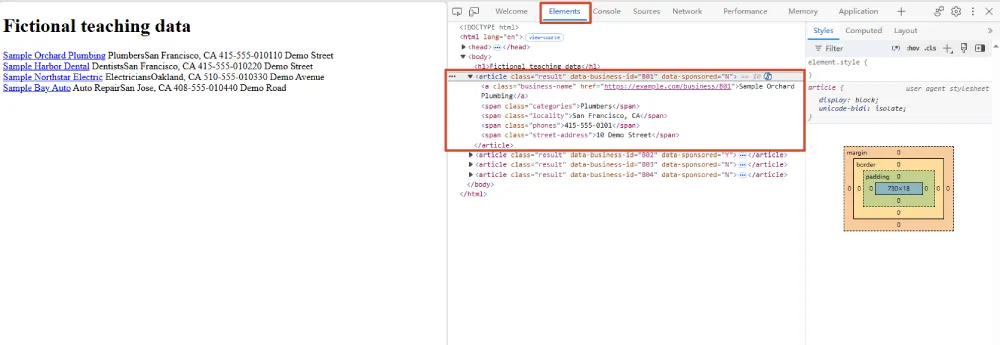
Figure 2 | Inspecting the local fictional page to map a listing container and its fields. These are sample selectors, not verified YellowPages.com selectors.
for card in soup.select("article.result"):
    name = field(card, ".business-name")
    category = field(card, ".categories")
    location = field(card, ".locality")
    phone_raw = field(card, ".phones")
    phone = normalize_phone(phone_raw)
The helper functions are included in the complete parser in Appendix A. For another parsing walkthrough, see this BeautifulSoup Python example.
Phone normalization formats ten-digit numbers as AAA-BBB-CCCC and removes a leading 1 from eleven-digit inputs. It preserves the original text in phone_raw; values outside that pattern get an empty normalized field. This is formatting, not validation that a number is assigned or reachable, and it does not handle extensions or international numbering plans.
When adapting to another permitted source, inspect a saved page, update the card and field selectors, resolve relative detail links against the page URL if needed, and verify a small sample manually. Supply the permitted pagination URLs in the input file; this example does not discover a live site’s pagination automatically. An error is raised only when no matching business cards are found across all selected input files; an empty individual page should be reviewed separately.
Step 4 | Deduplicate and Export CSV
python yellowpages_pipeline.py --input-dir downloaded --out-dir results
The parser uses a business ID when one is present. Otherwise, it combines normalized name, city, state, and street address. Records with an incomplete fallback identity remain separate for manual review, rather than being merged on name alone. Missing names or cities are excluded with a reason. Stable IDs are assumed to identify records within one source; combining multiple directories requires a source namespace or a reviewed matching strategy.
The verified sample yields:
HTML files: 3 | Cards: 12
Unique businesses saved: 10
Duplicates removed: 2
Missing phone: 1
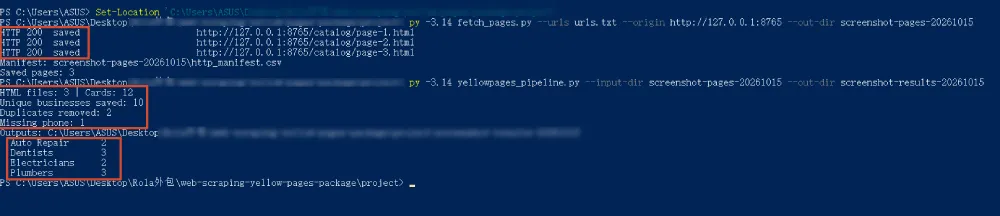
Figure 3 | Actual localhost retrieval and CSV export for the three fictional pages in Appendix C. The screenshot uses separate screenshot output directories; the counts match the example above.
| Output file | Contents | Check |
|---|---|---|
| businesses.csv | Retained business fields, including raw phone text | 10 records in this sample |
| excluded.csv | Duplicate or incomplete records and reasons | 2 duplicates in this sample |
| categories.csv | Count per category | Counts sum to 10 |
| cities.csv | Count per city and state | Same-name cities in different states remain separate |
| city_category.csv | Count per city, state, and category | Counts sum to 10 |
All five files use UTF-8 with a byte-order mark and include column headers. source_file joins an exported business to the manifest’s saved_file, which contains its retrieval URL and timestamp. The supplied duplicate policy retains the first matching record; it does not reconcile conflicting values across duplicate cards.
Step 5 | Check Counts in a Spreadsheet
Import results/businesses.csv using Excel’s Data → From Text/CSV, or open it in LibreOffice Calc. Import phone and identifier columns as text. For untrusted real-world inputs, treat text beginning with formula characters as text during import; this example writes the extracted values without spreadsheet-specific formula sanitization.

Figure 4 | The ten retained fictional records. One record has no normalized phone number; raw values are retained for review.
To build a pivot table from city_category.csv, use state and city as row fields, category as the column field, and Sum of count as the value. Counting the rows instead would count summary groups, not businesses.
The expected category totals are shown below. They sum to the ten retained businesses, not to all twelve input cards.
| Category | Retained businesses |
|---|---|
| Auto Repair | 2 |
| Dentists | 3 |
| Electricians | 2 |
| Plumbers | 3 |
Check excluded.csv for two duplicate records and businesses.csv for one empty normalized phone field. Compare a few exported names, addresses, and raw phone values with the HTML in Appendix C.
Step 6 | Test Failure Handling
With the demonstration server still running, you can also inspect the stop behavior directly:
python fetch_pages.py --urls rejected_urls.txt --origin http://127.0.0.1:8765 --out-dir rejected-run
That list contains a 429 URL followed by a normal page. The manifest contains only the first request, with stopped_http_429; the second URL is not requested. Keep this failure demonstration separate from the three-page extraction run.
| Symptom | What to check | Program behavior or next action |
|---|---|---|
| HTTP 403 | Permission, authentication, source requirements | Record response and stop batch; resolve access before a new run |
| HTTP 429 | Source rate limits and any Retry-After guidance | Record response and stop batch; reschedule only at a permitted frequency |
| HTTP 503 or 404 | Availability or incorrect URL | Record and skip that response; inspect before retrying |
| HTTP redirect | Intended destination and permission scope | Do not follow automatically; review the URL |
| HTTP 200 but no business cards | Body content, rendering, selectors | Parser raises an error when no cards are found |
| Existing output directory | Earlier run files | Choose a fresh output directory |
| Empty normalized phone | Raw text and numbering format | Preserve phone_raw and review manually |
For additional context on 503 Service Unavailable, review possible causes before scheduling another attempt. For connection and read timeout settings, see the Python Requests timeout guide.
How to Adapt the Scraper to a Real Yellow Pages Website
Once the local run works, use the same downloader and CSV pipeline with your permitted directory source. The work is in mapping the real URLs and HTML to the parser’s fields. No live YellowPages.com collection or proxy run is included in the recorded results.
1 | Inspect a Search Page and Its Pagination
Open a permitted category-and-location search in your browser. Record the exact URL and filters so that each page belongs to the same query. Follow the next-page link once and compare its destination with the first URL: pagination may use a query parameter, a path segment, or a client-side request. Copy the actual destinations instead of guessing a page-number format.
Create approved_urls.txt in the project folder with one permitted page URL per line. Begin with one URL, then add a second page after confirming its contents. The downloader accepts one origin per batch, where the origin is the scheme, hostname, and optional port. A redirect to a different hostname requires review and an updated URL list; redirects are not followed automatically.
2 | Fetch One Page and Check What Was Returned
Replace https://approved.example below with the origin of your permitted source. Run these commands from the project folder with its Python environment:
$env:CONFIRMED_DATA_PERMISSION = 'yes'
python fetch_pages.py --urls approved_urls.txt --origin https://approved.example --out-dir real-pilot --delay 2
Use .\.venv\Scripts\python.exe instead of python in PowerShell if the environment is not activated. The two-second delay is an example; set it to the source’s permitted interval. The confirmation variable records your decision and does not establish permission.
Inspect real-pilot/http_manifest.csv first. A usable pilot response must be recorded as saved, with HTTP 200 and HTML content. Open the saved file in a text editor and search for a business name visible in the browser. If the name is missing, inspect the response for a login screen, verification page, or JavaScript shell. Browser-rendered listings are not necessarily present in the HTML returned to Requests; use a permitted API or a separately designed browser workflow if required.
3 | Map Actual Listing Fields to the Parser
In browser developer tools, inspect a listing’s name and move upward to the element containing that listing’s fields. Find a selector that matches every listing card once, then test it against the saved HTML. Select fields relative to each card so that a name from one business cannot be paired with a phone from another.
Update extract_page() in yellowpages_pipeline.py using the following mapping. These are the current sample values to replace, not verified YellowPages.com selectors:
| Parser input | Sample selector or attribute | What to check on the real page |
|---|---|---|
| Listing container | article.result |
One element per listing, including the intended sponsored/organic scope |
| Business name and detail link | a.business-name |
Visible name and actual href |
| Category | .categories |
Whether there is one category or several; define how multiple values are stored |
| City and state | .locality |
The sample splits at the last comma; change this for a different location format |
| Phone text | .phones |
Preserve original text; the supplied normalization is for North American ten-digit numbers |
| Street address | .street-address |
Keep separate from city/state for fallback duplicate matching |
| Stable listing identifier | data-business-id |
Use a source-provided stable ID if present; do not invent one from page position |
| Sponsored status | data-sponsored |
Adapt only when an explicit source label exists; do not infer organic status from a missing sample attribute |
If a detail link is relative, resolve it against the page’s retrieval URL with Python’s urllib.parse.urljoin. Use the manifest to associate saved_file with its URL. The supplied parser preserves links as written, so this requires adapting the parser before exporting a real source with relative links. If a field is unavailable, leave it empty or add an explicit unknown value rather than inventing data.
4 | Validate the Pilot, Then Add Pages
After adapting the parser, export the pilot:
python yellowpages_pipeline.py --input-dir real-pilot --out-dir real-pilot-results
Compare a few records against the saved page: name, category, city/state, raw phone, address, and detail link should belong to the same listing. Compare the number of extracted cards with the intended listings on each page. A nonempty batch can still contain a page with zero matches; the current parser raises an error only when the combined input produces no cards.
Once the pilot passes, add the remaining permitted pagination URLs and retrieve them into a fresh directory. Watch for repeated pages, duplicate listings across pages, and unexpected changes in card counts. Keep category and city totals tied to the collected query, not to the entire market. If a request returns 403 or 429, the downloader records it and stops; review access or rate-limit requirements before starting a new batch. It does not automatically wait for or apply Retry-After.
Where Rola IP Fits in an Authorized Directory Workflow
For a project that needs a managed network exit, proxy configuration belongs in the HTTP request layer. HTML parsing and CSV analysis remain the responsibility of BeautifulSoup and the local pipeline. Select an exit and session configuration that fits the permitted source and the connection details available to your account.
In this script, --use-env-proxy enables Requests to read proxy environment settings; otherwise session.trust_env is False. The local commands above omit this flag and connect directly. For connection and authentication examples, see the Python Requests proxy guide.
For an external source you are allowed to use, create approved_urls.txt with the permitted URLs and replace the placeholders below. The example uses an HTTPS destination and an HTTP proxy URL. Keep credentials out of source files and shared logs; percent-encode reserved characters in username and password components when constructing a proxy URL.
# macOS / Linux: replace placeholders with your connection details
export HTTPS_PROXY="http://USERNAME:PASSWORD@HOST:PORT"
export CONFIRMED_DATA_PERMISSION=yes
python fetch_pages.py --urls approved_urls.txt --origin https://approved.example --out-dir external-run --use-env-proxy --delay 2
For PowerShell, set the corresponding environment variables with $env:HTTPS_PROXY = 'http://USERNAME:PASSWORD@HOST:PORT' and $env:CONFIRMED_DATA_PERMISSION = 'yes', then run the same command with the project’s Python executable. Choose the interval based on the source’s requirements. The confirmation flag records your decision to proceed; it does not determine permission.
This is the configuration path for a separate external run. The reported results above were measured locally without a proxy. A proxy changes the connection path; it does not grant data-use permission or guarantee access through CAPTCHAs or rate limits.
Conclusion
A useful directory workflow retains provenance, distinguishes retrieval errors from parsing errors, and checks the exported records. The supplied project demonstrates those steps on a reproducible fictional dataset, with explicit stop behavior for 403/429 and city/state-aware summaries. Start with the sample, then adapt field mappings and request settings to a source you are permitted to use.
Appendix A | Complete Python Programs
Save each complete program below in your project folder as UTF-8 text. Install the two pinned packages in Step 1, then save the input lists from Appendix B and the HTML pages from Appendix C before running the commands. The Python code blocks can be copied directly; retain their indentation.
A1 | Local Sample Server
Save as serve_pages.py.
"""Start a local HTTP server for reproducible, permission-controlled pages."""
from __future__ import annotations
import argparse
from http.server import BaseHTTPRequestHandler, ThreadingHTTPServer
from pathlib import Path

BASE = Path(__file__).resolve().parent / 'html'

class DirectoryHandler(BaseHTTPRequestHandler):
    def do_GET(self):
        route = self.path.split('?', 1)[0]
        if route.startswith('/catalog/page-') and route.endswith('.html'):
            number = route.removeprefix('/catalog/page-').removesuffix('.html')
            if number in {'1', '2', '3'}:
                path = BASE / f'approved_directory_page_{number}.html'
                content = path.read_bytes()
                self.send_response(200)
                self.send_header('Content-Type', 'text/html; charset=utf-8')
                self.send_header('Content-Length', str(len(content)))
                self.end_headers()
                self.wfile.write(content)
                return
        if route in {'/status/403', '/status/429', '/status/503'}:
            status = int(route.rsplit('/', 1)[-1])
            self.send_response(status)
            self.send_header('Content-Type', 'text/plain; charset=utf-8')
            self.end_headers()
            self.wfile.write(f'HTTP {status}: request not available'.encode())
            return
        self.send_error(404, 'Route not found')

    def log_message(self, fmt, *args):
        print('HTTP access: ' + fmt % args, flush=True)


def main():
    ap = argparse.ArgumentParser()
    ap.add_argument('--port', type=int, default=8765)
    args = ap.parse_args()
    print(f'Local permitted directory: http://127.0.0.1:{args.port}/catalog/page-1.html', flush=True)
    ThreadingHTTPServer(('127.0.0.1', args.port), DirectoryHandler).serve_forever()

if __name__ == '__main__':
    main()
A2 | Page Retrieval and Stop Handling
Save as fetch_pages.py.
"""Retrieve one permitted origin; stop the batch on HTTP 403 or 429."""
from __future__ import annotations
import argparse
import csv
import hashlib
import os
import time
from datetime import datetime, timezone
from pathlib import Path
from urllib.parse import urlparse
import requests

COLUMNS = ('requested_url', 'final_url', 'status', 'content_type',
           'saved_file', 'sha256', 'retrieved_utc', 'outcome')
MAX_BYTES = 2_000_000

def fetch(urls_file: Path, out_dir: Path, origin: str,
          proxy_env: bool = False, delay: float = 1.0):
    parsed_origin = urlparse(origin)
    if (parsed_origin.scheme not in ('http', 'https') or not parsed_origin.netloc
            or parsed_origin.username or parsed_origin.path not in ('', '/')
            or parsed_origin.query or parsed_origin.fragment):
        raise ValueError('Origin must contain only scheme, host and optional port')
    if delay < 0:
        raise ValueError('Delay must be nonnegative')
    expected = (parsed_origin.scheme, parsed_origin.netloc)
    urls = [s.strip() for s in urls_file.read_text(encoding='utf-8').splitlines()
            if s.strip() and not s.lstrip().startswith('#')]
    if not urls:
        raise ValueError('No URLs supplied')
    # Validate the whole batch before sending any requests.
    for url in urls:
        parsed = urlparse(url)
        if (parsed.scheme, parsed.netloc) != expected or parsed.username:
            raise ValueError('URL outside approved origin or contains credentials')
    if out_dir.exists() and any(out_dir.iterdir()):
        raise ValueError('Output directory must be new or empty; use a fresh run directory')
    out_dir.mkdir(parents=True, exist_ok=True)
    report = []
    with requests.Session() as session:
        session.trust_env = bool(proxy_env)
        for i, url in enumerate(urls, 1):
            if i > 1:
                time.sleep(delay)
            row = dict.fromkeys(COLUMNS, '')
            row.update(requested_url=url, retrieved_utc=datetime.now(timezone.utc).isoformat(timespec='seconds'))
            try:
                with session.get(url, timeout=(5, 15), allow_redirects=False, stream=True) as response:
                    row.update(final_url=response.url, status=str(response.status_code),
                               content_type=response.headers.get('Content-Type', ''))
                    if response.status_code in (403, 429):
                        row['outcome'] = f'stopped_http_{response.status_code}'
                    elif 300 <= response.status_code < 400:
                        row['outcome'] = 'redirect_not_followed'
                    elif response.status_code == 200 and 'text/html' in row['content_type'].lower():
                        content = bytearray()
                        for chunk in response.iter_content(65536):
                            if len(content) + len(chunk) > MAX_BYTES:
                                row['outcome'] = 'skipped_size_limit'
                                break
                            content.extend(chunk)
                        else:
                            filename = f'page_{i:02d}.html'
                            (out_dir / filename).write_bytes(content)
                            row.update(saved_file=filename, sha256=hashlib.sha256(content).hexdigest(), outcome='saved')
                    else:
                        row['outcome'] = 'skipped_non_html_or_status'
            except requests.RequestException as exc:
                row['outcome'] = 'connection_error_' + type(exc).__name__
            report.append(row)
            print(f"HTTP {row['status'] or '-':>3}  {row['outcome']:<26} {url}")
            if row['status'] in ('403', '429'):
                break
    with (out_dir / 'http_manifest.csv').open('w', encoding='utf-8-sig', newline='') as f:
        writer = csv.DictWriter(f, fieldnames=COLUMNS)
        writer.writeheader()
        writer.writerows(report)
    print('Manifest:', out_dir / 'http_manifest.csv')
    print('Saved pages:', sum(r['outcome'] == 'saved' for r in report))
    return report

def main():
    p = argparse.ArgumentParser(description=__doc__)
    p.add_argument('--urls', type=Path, default=Path('urls.txt'))
    p.add_argument('--out-dir', type=Path, default=Path('downloaded'))
    p.add_argument('--origin', default='http://127.0.0.1:8765')
    p.add_argument('--use-env-proxy', action='store_true')
    p.add_argument('--delay', type=float, default=1.0)
    args = p.parse_args()
    if args.origin not in ('http://127.0.0.1:8765', 'http://localhost:8765'):
        if os.environ.get('CONFIRMED_DATA_PERMISSION') != 'yes':
            p.error('Confirm permission before setting CONFIRMED_DATA_PERMISSION=yes')
    fetch(args.urls, args.out_dir, args.origin, args.use_env_proxy, args.delay)

if __name__ == '__main__':
    main()
A3 | Parsing, Deduplication, and CSV Reports
Save as yellowpages_pipeline.py.
"""Read local business-directory HTML and create structured CSV reports.

The workflow reads HTML files already available on disk. It does not
contact a website. Only process content you are allowed to use.
"""

from __future__ import annotations

import argparse
import csv
import re
from collections import Counter
from pathlib import Path

from bs4 import BeautifulSoup


FIELDS = [
    "business_id", "name", "category", "city", "state",
    "phone_raw", "phone", "address", "listing_url", "sponsored", "source_file",
]


def field(node, css: str) -> str:
    """Return text from one matching element; otherwise an empty string."""
    element = node.select_one(css)
    if element is None:
        return ""
    return element.get_text(" ", strip=True)


def normalize_phone(text: str) -> str:
    """Format recognizable North American 10-digit phone numbers."""
    digits = re.sub(r"\D", "", text)
    if len(digits) == 11 and digits.startswith("1"):
        digits = digits[1:]
    if len(digits) != 10:
        return ""
    return f"{digits[:3]}-{digits[3:6]}-{digits[6:]}"


def extract_page(path: Path) -> list[dict[str, str]]:
    """Extract business cards from one locally saved HTML file."""
    html = path.read_text(encoding="utf-8")
    soup = BeautifulSoup(html, "html.parser")
    records = []

    for card in soup.select("article.result"):
        name_link = card.select_one("a.business-name")
        location = field(card, ".locality")
        city, separator, state = location.rpartition(",")

        record = {
            "business_id": card.get("data-business-id", "").strip(),
            "name": field(card, ".business-name"),
            "category": field(card, ".categories"),
            "city": city.strip() if separator else location.strip(),
            "state": state.strip() if separator else "",
            "phone_raw": field(card, ".phones"),
            "phone": normalize_phone(field(card, ".phones")),
            "address": field(card, ".street-address"),
            "listing_url": (
                name_link.get("href", "").strip()
                if name_link else ""
            ),
            "sponsored": (
                "Yes" if card.get("data-sponsored") == "Y"
                else "No"
            ),
            "source_file": path.name,
        }
        records.append(record)

    return records


def save_csv(path: Path, columns: list[str], records: list[dict]):
    """Write Excel-compatible UTF-8 CSV with a header row."""
    with path.open("w", encoding="utf-8-sig", newline="") as f:
        writer = csv.DictWriter(f, fieldnames=columns)
        writer.writeheader()
        writer.writerows(records)


def run(input_dir: Path, out_dir: Path) -> dict[str, int]:
    """Parse, deduplicate, summarize, and export local HTML records."""
    manifest = input_dir / "http_manifest.csv"
    if manifest.exists():
        with manifest.open(encoding="utf-8-sig", newline="") as f:
            names = [row["saved_file"] for row in csv.DictReader(f)
                     if row["outcome"] == "saved"]
        if any(Path(name).name != name for name in names):
            raise ValueError("Invalid filename in manifest")
        html_files = [input_dir / name for name in names]
    else:
        html_files = sorted(input_dir.glob("*.html"))
    if not html_files:
        raise ValueError(f"No .html files in {input_dir}")

    candidates = []
    for path in html_files:
        candidates.extend(extract_page(path))

    if not candidates:
        raise ValueError("No business cards found; inspect the HTML and selectors")

    kept = []
    excluded = []
    seen = set()

    for record in candidates:
        # Incomplete fallback identities stay separate for manual review.
        identity = tuple(" ".join(record[k].casefold().split())
                         for k in ("name", "city", "state", "address"))
        key = (("id", record["business_id"]) if record["business_id"] else
               ("address", *identity) if all(identity) else ("unresolved", len(kept)))
        if not record["name"] or not record["city"]:
            excluded.append({**record, "reason": "missing essential field"})
        elif key in seen:
            excluded.append({**record, "reason": "duplicate"})
        else:
            seen.add(key)
            kept.append(record)

    kept.sort(key=lambda r: (r["city"], r["category"], r["name"]))
    category_counts = Counter(r["category"] for r in kept)
    city_counts = Counter((r["city"], r["state"]) for r in kept)
    cross_counts = Counter(
        (r["city"], r["state"], r["category"]) for r in kept
    )

    out_dir.mkdir(parents=True, exist_ok=True)
    save_csv(out_dir / "businesses.csv", FIELDS, kept)

    category_rows = [
        {"category": name, "count": count}
        for name, count in sorted(category_counts.items())
    ]
    save_csv(
        out_dir / "categories.csv", ["category", "count"],
        category_rows,
    )

    city_rows = [
        {"city": city, "state": state, "count": count}
        for (city, state), count in sorted(city_counts.items())
    ]
    save_csv(out_dir / "cities.csv", ["city", "state", "count"], city_rows)

    cross_rows = [
        {"city": city, "state": state, "category": category, "count": count}
        for (city, state, category), count in sorted(cross_counts.items())
    ]
    save_csv(
        out_dir / "city_category.csv",
        ["city", "state", "category", "count"], cross_rows,
    )
    save_csv(out_dir / "excluded.csv", FIELDS + ["reason"], excluded)

    summary = {
        "files": len(html_files),
        "cards": len(candidates),
        "saved": len(kept),
        "duplicates": sum(
            r["reason"] == "duplicate" for r in excluded
        ),
        "missing_phone": sum(not r["phone"] for r in kept),
    }

    print(f"HTML files: {summary['files']} | Cards: {summary['cards']}")
    print(f"Unique businesses saved: {summary['saved']}")
    print(f"Duplicates removed: {summary['duplicates']}")
    print(f"Missing phone: {summary['missing_phone']}")
    print(f"Outputs: {out_dir.resolve()}")
    for category, count in sorted(category_counts.items()):
        print(f"  {category:<16} {count}")

    return summary


def main() -> None:
    parser = argparse.ArgumentParser(
        description="Authorized business directory HTML -> CSV"
    )
    parser.add_argument(
        "--input-dir", type=Path, default=Path("html")
    )
    parser.add_argument(
        "--out-dir", type=Path, default=Path("results")
    )
    args = parser.parse_args()
    run(args.input_dir, args.out_dir)


if __name__ == "__main__":
    main()
Appendix B | Input Lists and Execution Order
urls.txt contains:
http://127.0.0.1:8765/catalog/page-1.html
http://127.0.0.1:8765/catalog/page-2.html
http://127.0.0.1:8765/catalog/page-3.html
rejected_urls.txt contains:
http://127.0.0.1:8765/status/429
http://127.0.0.1:8765/catalog/page-1.html
# Terminal 1, from the project folder
python serve_pages.py --port 8765

# Terminal 2, using the project environment
python -m pip install requests==2.33.1 beautifulsoup4==4.14.3
python fetch_pages.py --urls urls.txt --origin http://127.0.0.1:8765 --out-dir downloaded
python yellowpages_pipeline.py --input-dir downloaded --out-dir results
python fetch_pages.py --urls rejected_urls.txt --origin http://127.0.0.1:8765 --out-dir rejected-run
Use new output directory names for later retrieval runs. In PowerShell, replace python with .\.venv\Scripts\python.exe after creating the virtual environment in Step 1. On macOS or Linux, activate that environment first. Check the resulting counts against Steps 4 and 5.
Appendix C | Complete Sample HTML Inputs
Save the following three blocks as UTF-8 files in project/html. Each page contains four fictional cards; two businesses appear on more than one page. The three pages therefore yield twelve cards and ten retained businesses. These fixtures exercise the sample selectors in Appendix A.
C1 | Page 1
Save as html/approved_directory_page_1.html.
<!doctype html>
<html lang="en">
<meta charset="utf-8">
<title>Synthetic directory sample</title>
<h1>Fictional teaching data</h1>
<article class="result" data-business-id="B01" data-sponsored="N">
<a class="business-name" href="https://example.com/business/B01">Sample Orchard Plumbing</a>
<span class="categories">Plumbers</span>
<span class="locality">San Francisco, CA</span>
<span class="phones">415-555-0101</span>
<span class="street-address">10 Demo Street</span>
</article>
<article class="result" data-business-id="B02" data-sponsored="Y">
<a class="business-name" href="https://example.com/business/B02">Sample Harbor Dental</a>
<span class="categories">Dentists</span>
<span class="locality">San Francisco, CA</span>
<span class="phones">415-555-0102</span>
<span class="street-address">20 Demo Street</span>
</article>
<article class="result" data-business-id="B03" data-sponsored="N">
<a class="business-name" href="https://example.com/business/B03">Sample Northstar Electric</a>
<span class="categories">Electricians</span>
<span class="locality">Oakland, CA</span>
<span class="phones">510-555-0103</span>
<span class="street-address">30 Demo Avenue</span>
</article>
<article class="result" data-business-id="B04" data-sponsored="N">
<a class="business-name" href="https://example.com/business/B04">Sample Bay Auto</a>
<span class="categories">Auto Repair</span>
<span class="locality">San Jose, CA</span>
<span class="phones">408-555-0104</span>
<span class="street-address">40 Demo Road</span>
</article>
</html>
C2 | Page 2
Save as html/approved_directory_page_2.html.
<!doctype html>
<html lang="en">
<meta charset="utf-8">
<title>Synthetic directory sample</title>
<h1>Fictional teaching data</h1>
<article class="result" data-business-id="B05" data-sponsored="N">
<a class="business-name" href="https://example.com/business/B05">Sample City Plumbing</a>
<span class="categories">Plumbers</span>
<span class="locality">Oakland, CA</span>
<span class="phones">510-555-0105</span>
<span class="street-address">50 Demo Avenue</span>
</article>
<article class="result" data-business-id="B06" data-sponsored="N">
<a class="business-name" href="https://example.com/business/B06">Sample Mission Dental</a>
<span class="categories">Dentists</span>
<span class="locality">San Jose, CA</span>
<span class="phones">
</span>
<span class="street-address">60 Demo Road</span>
</article>
<article class="result" data-business-id="B07" data-sponsored="N">
<a class="business-name" href="https://example.com/business/B07">Sample Maple Auto</a>
<span class="categories">Auto Repair</span>
<span class="locality">San Francisco, CA</span>
<span class="phones">415-555-0107</span>
<span class="street-address">70 Demo Street</span>
</article>
<article class="result" data-business-id="B08" data-sponsored="N">
<a class="business-name" href="https://example.com/business/B08">Sample Westline Electric</a>
<span class="categories">Electricians</span>
<span class="locality">Oakland, CA</span>
<span class="phones">510-555-0108</span>
<span class="street-address">80 Demo Avenue</span>
</article>
</html>
C3 | Page 3
Save as html/approved_directory_page_3.html.
<!doctype html>
<html lang="en">
<meta charset="utf-8">
<title>Synthetic directory sample</title>
<h1>Fictional teaching data</h1>
<article class="result" data-business-id="B09" data-sponsored="N">
<a class="business-name" href="https://example.com/business/B09">Sample Valley Plumbing</a>
<span class="categories">Plumbers</span>
<span class="locality">San Jose, CA</span>
<span class="phones">408-555-0109</span>
<span class="street-address">90 Demo Road</span>
</article>
<article class="result" data-business-id="B10" data-sponsored="N">
<a class="business-name" href="https://example.com/business/B10">Sample Summit Dental</a>
<span class="categories">Dentists</span>
<span class="locality">San Francisco, CA</span>
<span class="phones">415-555-0110</span>
<span class="street-address">100 Demo Street</span>
</article>
<article class="result" data-business-id="B01" data-sponsored="N">
<a class="business-name" href="https://example.com/business/B01">Sample Orchard Plumbing</a>
<span class="categories">Plumbers</span>
<span class="locality">San Francisco, CA</span>
<span class="phones">415-555-0101</span>
<span class="street-address">10 Demo Street</span>
</article>
<article class="result" data-business-id="B02" data-sponsored="Y">
<a class="business-name" href="https://example.com/business/B02">Sample Harbor Dental</a>
<span class="categories">Dentists</span>
<span class="locality">San Francisco, CA</span>
<span class="phones">415-555-0102</span>
<span class="street-address">20 Demo Street</span>
</article>
</html>