
BeautifulSoup Python Example: From Product Page Parsing to Pagination and Proxy Integration

Sep 4, 2026 · Guides · 13 min read
TL;DR
A reliable beautifulsoup python example should break web scraping into request handling, response validation, HTML parsing, field extraction, URL normalization, pagination, data validation, and storage rather than showing only a single soup.find() line.
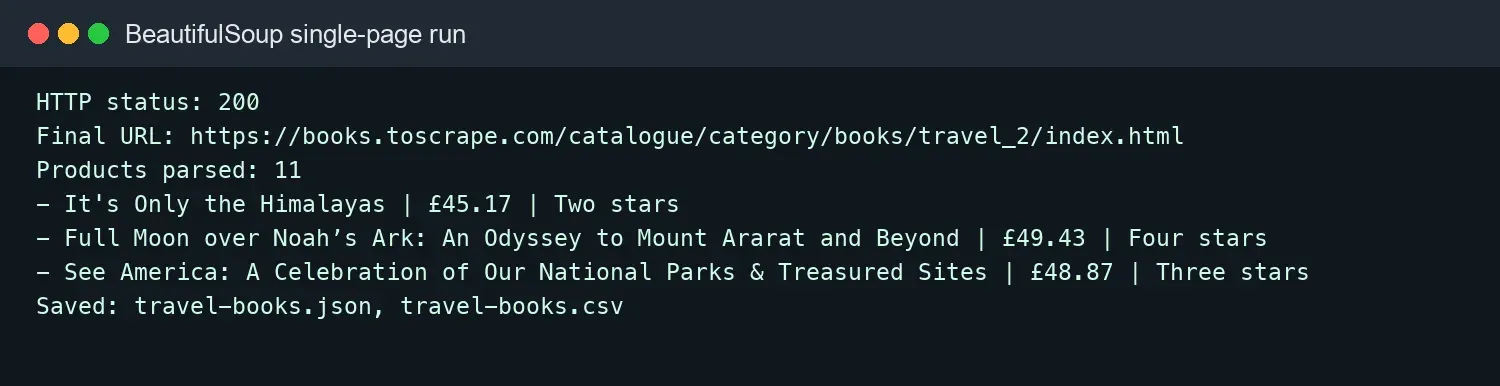
This tutorial uses the English practice site Books to Scrape and extracts product titles, prices, availability, ratings, product links, and image links before saving the results as CSV and JSON. The complete code was rerun in a Python 3 environment: the Travel category page returned HTTP 200 and 11 products were parsed; the first two pages produced 40 records and 40 unique product URLs.
Beautiful Soup only parses HTML. It does not send network requests or execute JavaScript. Requests handles the HTTP layer. For dynamic pages, first check for an authorized JSON/XHR endpoint; use Playwright or Selenium only when browser rendering is genuinely required.
What Is Beautiful Soup in Python?
Beautiful Soup is a Python HTML/XML parsing library. It converts markup into a searchable document tree so developers can extract data by tag, attribute, CSS selector, or node relationship.
The Beautiful Soup official documentation describes it as a tool for pulling data out of HTML and XML. It can tolerate some malformed markup and can work with Python’s built-in html.parser, lxml, or html5lib.
Beautiful Soup does not download pages. A typical workflow is:
- Requests sends a request to a URL you are authorized to access.
- Check the status code, final URL, Content-Type, and response body.
- Beautiful Soup builds the parse tree.
- Use
find(),find_all(),select(), orselect_one()to locate nodes. - Extract text and attributes, then clean, validate, deduplicate, and store the data.
What Can BeautifulSoup Do, and What Can It Not Do?
Beautiful Soup is good at parsing data that already exists in the response HTML, but it cannot execute JavaScript, manage request retries, or automatically solve access-permission problems.
| Task | Beautiful Soup alone? | Recommended component |
|---|---|---|
| Parse server-rendered HTML | Yes | BeautifulSoup |
| Extract text and attributes | Yes | get_text(), get(), selectors |
| Repair some malformed markup | Yes, parser-dependent | lxml or html5lib |
| Download a page | No | Requests or HTTPX |
| Execute JavaScript | No | Playwright or Selenium |
| Crawl many URLs and schedule jobs | No | Scrapy or a custom queue |
| Rotate approved proxy sessions | No | HTTP client plus a proxy provider |
If data visible in the browser is missing from response.text, changing Beautiful Soup selectors will not solve the problem. First inspect the browser developer tools Network panel to determine whether the content comes from the initial HTML, a JSON request, or JavaScript computation.
BeautifulSoup, Scrapy, or Selenium: Which Should You Choose?
For small to medium tasks involving static HTML, start with Requests + Beautiful Soup. Use Scrapy for large-scale URL scheduling. Use browser automation only when JavaScript must be executed.
Beautiful Soup has a low learning curve and works well for parsing individual pages or integrating extraction into an existing Python application. Scrapy provides queues, concurrency, deduplication, pipelines, and middleware, making it more suitable for continuous crawling. Selenium and Playwright can run a real browser, but they consume more resources and require element waits and browser lifecycle management.
ScrapingBee’s BeautifulSoup tutorial also separates requesting, parsing, pagination, and export. Oxylabs’ parsing tutorial further explains that dynamic elements require browser rendering. Tool choice should depend on how the page works, not on which library is supposedly “stronger.”
Environment and Dependency Versions
This tutorial requires Python 3.10 or later, Requests, Beautiful Soup 4, and an HTML parser. A virtual environment is recommended so you do not pollute the system Python installation. Type annotations such as list[str] and str | None require Python 3.10+ when used exactly as shown here.
python3 -m venv .venv
source .venv/bin/activate
# Windows PowerShell: .venv\Scripts\Activate.ps1
python -m pip install --upgrade pip
python -m pip install requests beautifulsoup4 lxml
python -c "import requests, bs4, lxml; print(requests.__version__, bs4.__version__, lxml.__version__)"
The complete code in this article uses html.parser, so it can run without lxml. Installing lxml lets you compare parsing speed and error-tolerance behavior. The project structure is:
beautifulsoup-demo/
├── scrape_books.py
├── scrape_pages.py
├── travel-books.csv
└── travel-books.json
Step 1: Inspect the Target Product Page and Fields
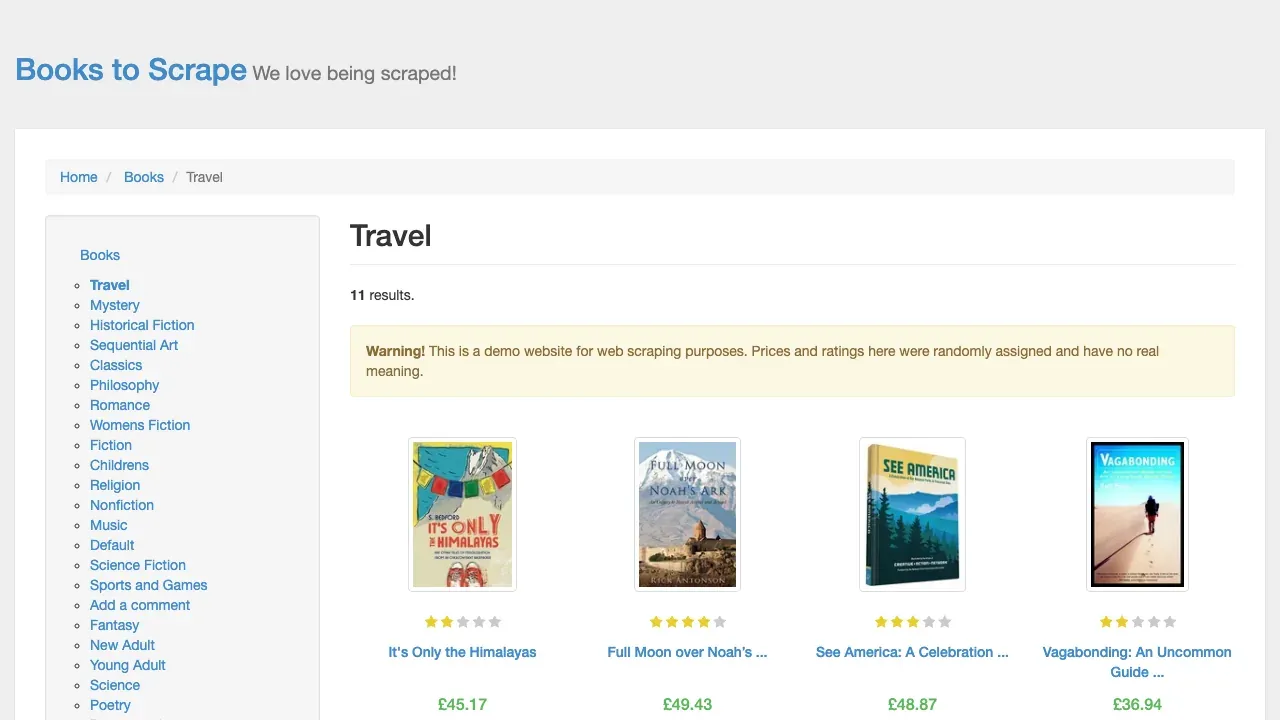
Before writing selectors, confirm the record container, field tags, attributes, and next-page link in both the rendered page and the HTML.
This tutorial uses the Books to Scrape Travel category. The page explicitly states that it is a demo website for web scraping, and its product prices and ratings have no real commercial meaning, making it suitable for stable, low-risk practice.
Each product is inside article.product_pod:
- Title: the
titleattribute ofh3 a. - Price: text from
p.price_color. - Availability: text from
p.instock.availability. - Rating: the
classonp.star-rating. - Product URL: the
hrefonh3 a. - Image URL: the
srconimg.
Step 2: Build a Reliable Requests Session
A reliable request layer should set an explicit User-Agent, connection and read timeouts, limited retries, and call raise_for_status() for non-2xx responses.
from requests import Session
from requests.adapters import HTTPAdapter
from urllib3.util.retry import Retry


def build_session() -> Session:
    retry = Retry(
        total=3,
        backoff_factor=0.5,
        status_forcelist=(429, 500, 502, 503, 504),
        allowed_methods=frozenset({"GET"}),
        respect_retry_after_header=True,
    )
    session = Session()
    session.headers.update({
        "User-Agent": "BeautifulSoupTutorial/1.0 (+educational test)"
    })
    session.mount("https://", HTTPAdapter(max_retries=retry))
    return session
timeout=(10, 30) means a 10-second connection timeout and a 30-second read timeout. Do not omit timeout, because a network problem can otherwise leave the task hanging for a long time. The Requests timeout documentation also notes that Requests does not time out automatically by default. For a practical Python-specific explanation of timeout and connection handling, see Python Requests timeout.
Step 3: Create a BeautifulSoup Object
After fetching and validating the response, pass response.text and the parser name to BeautifulSoup().
from bs4 import BeautifulSoup

url = "https://books.toscrape.com/catalogue/category/books/travel_2/index.html"
session = build_session()
response = session.get(url, timeout=(10, 30))
response.raise_for_status()

content_type = response.headers.get("Content-Type", "")
if "text/html" not in content_type.lower():
    raise RuntimeError(f"Expected HTML, received: {content_type}")

response.encoding = response.apparent_encoding or "utf-8"
soup = BeautifulSoup(response.text, "html.parser")
Checking Content-Type before parsing helps prevent JSON, CAPTCHA pages, or binary files from being treated as HTML. You should also record response.url, because relative URLs must be resolved against the final URL after redirects.
How Should You Choose a BeautifulSoup Parser?
Start with html.parser. Choose lxml when you need higher speed, and choose html5lib when you need HTML5-style error recovery that more closely resembles browser behavior.
| Parser | Installation | Strength | Trade-off |
|---|---|---|---|
html.parser |
Built into Python | No extra dependency | Usually slower than lxml |
lxml |
pip install lxml |
Fast and widely used | External compiled dependency |
html5lib |
pip install html5lib |
Browser-like error recovery | Slowest option |
Different parsers may repair missing closing tags differently, which can change the node structure. Production projects should pin the parser and its version and write tests for important HTML samples. ScrapFly’s BeautifulSoup guide provides additional detail on parser backends, CSS selectors, and selective parsing.
What Is the Difference Between find, find_all, select, and select_one?
find() and select_one() return the first matching node, while find_all() and select() return multiple matches. The first pair uses Beautiful Soup arguments or a CSS selector as different expression styles.
# First matching tag
first_card = soup.find("article", class_="product_pod")

# All tags matching name and class
all_cards = soup.find_all("article", class_="product_pod")

# First CSS selector match
first_title = soup.select_one("article.product_pod h3 a")

# All CSS selector matches
all_prices = soup.select("article.product_pod p.price_color")
CSS selectors are convenient for expressing parent-child relationships, multiple classes, and attribute conditions. find_all() is useful when you need functions, regular expressions, or limit. You can mix both styles, but keeping a consistent selector style within a project reduces maintenance cost.
Step 4: Extract Product Name, Price, Availability, Rating, and Links
A field-extraction function should check whether nodes exist, normalize whitespace, and use urljoin() to convert relative links into absolute URLs.
from urllib.parse import urljoin


def parse_rating(classes: list[str]) -> str | None:
    known = {"One", "Two", "Three", "Four", "Five"}
    return next((item for item in classes if item in known), None)


def parse_listing(html: str, page_url: str) -> list[dict[str, object]]:
    soup = BeautifulSoup(html, "html.parser")
    records = []

    for card in soup.select("article.product_pod"):
        title_link = card.select_one("h3 a")
        price = card.select_one("p.price_color")
        stock = card.select_one("p.instock.availability")
        rating = card.select_one("p.star-rating")
        image = card.select_one("img")

        if not all((title_link, price, stock, rating, image)):
            continue

        records.append({
            "title": title_link.get("title", "").strip(),
            "price": price.get_text(strip=True),
            "availability": " ".join(stock.stripped_strings),
            "rating": parse_rating(rating.get("class", [])),
            "product_url": urljoin(page_url, title_link.get("href", "")),
            "image_url": urljoin(page_url, image.get("src", "")),
        })

    return records
get_text(strip=True) works well for simple text. When a tag contains multiple text fragments, " ".join(node.stripped_strings) is better at preventing words from being glued together. Use get() for attributes so a missing attribute does not immediately raise a KeyError like dictionary indexing would.
After parsing, validate the record count. Otherwise, a redesign, login page, or broken selector can cause the script to quietly save an empty file.
products = parse_listing(response.text, response.url)
if not products:
    raise RuntimeError("No products parsed; selectors may have changed")

print(f"HTTP status: {response.status_code}")
print(f"Final URL: {response.url}")
print(f"Products parsed: {len(products)}")

for product in products[:3]:
    print(
        f"- {product['title']} | {product['price']} | "
        f"{product['rating']} stars"
    )
Step 5: Save the Data as CSV and JSON
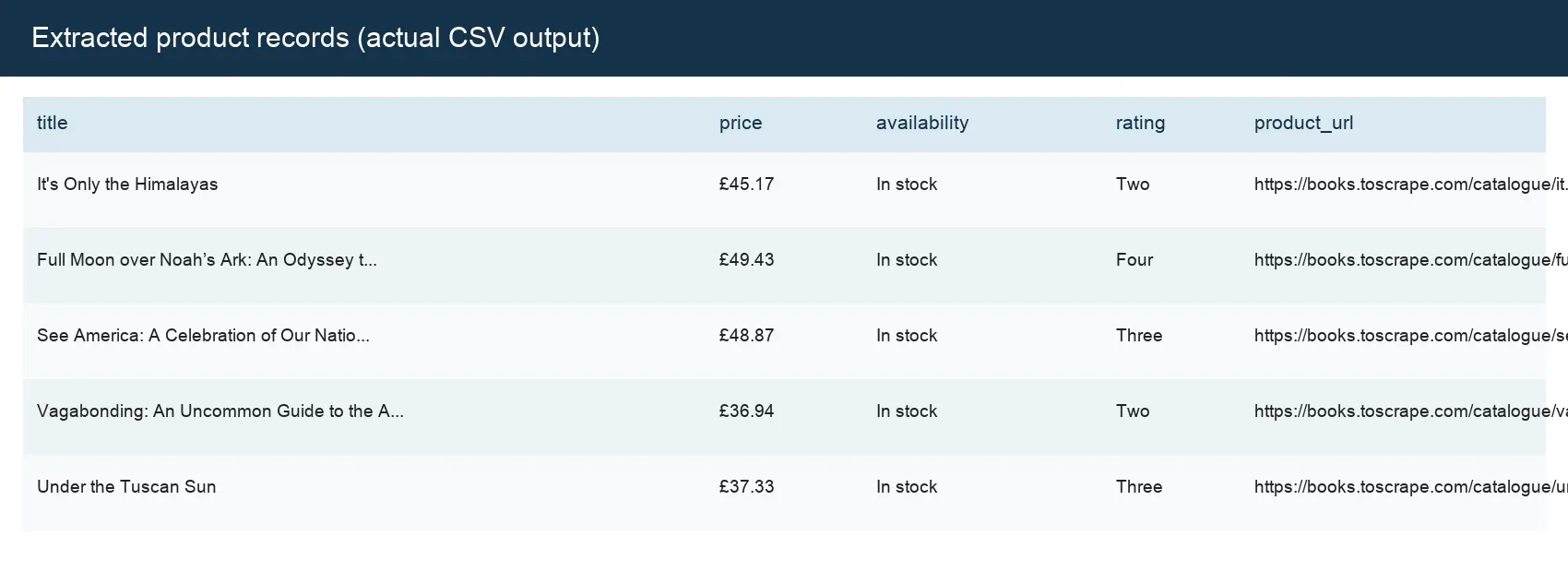
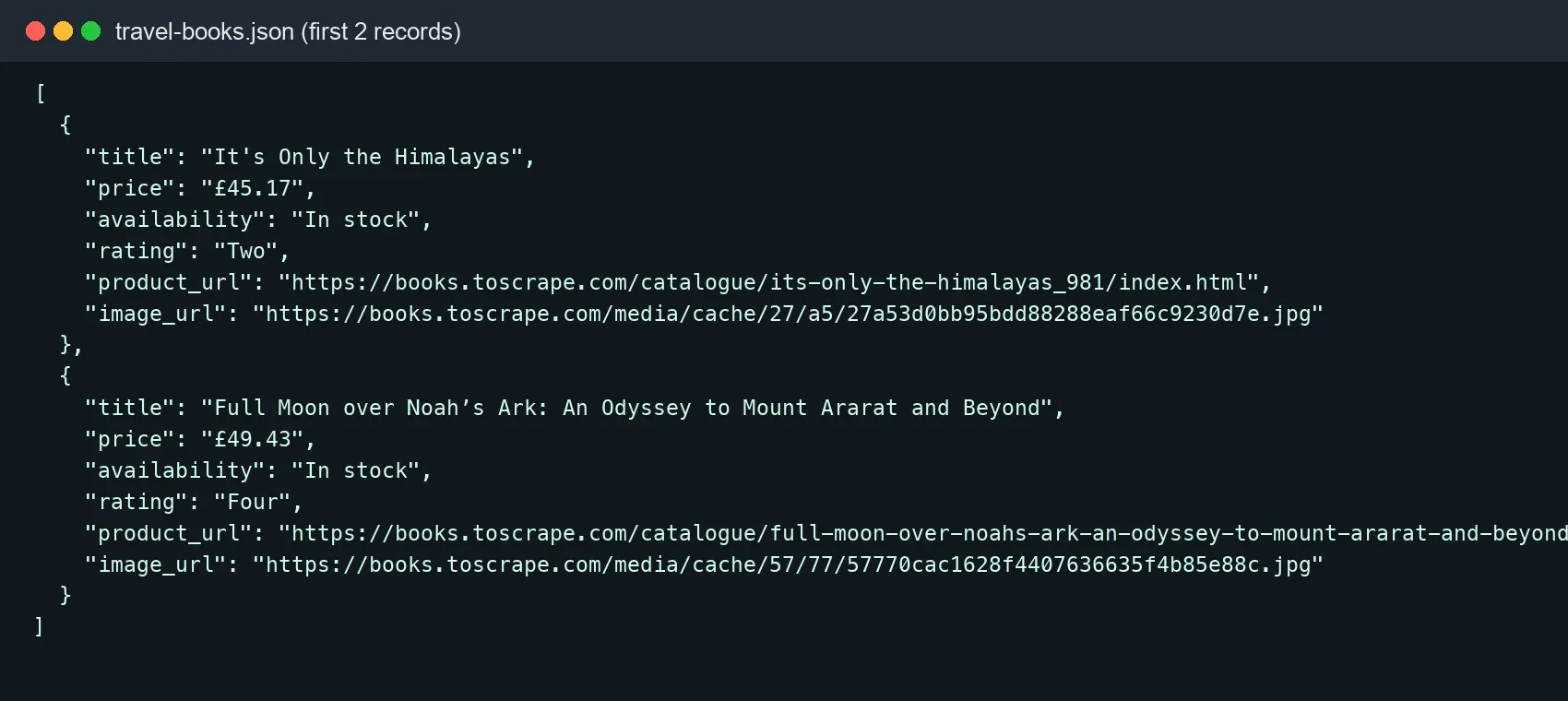
CSV works well for spreadsheet tools and data exchange. JSON is better when you want to preserve types, nested structures, or API-oriented workflows.
import csv
import json

with open("travel-books.csv", "w", newline="", encoding="utf-8-sig") as file:
    writer = csv.DictWriter(file, fieldnames=products[0].keys())
    writer.writeheader()
    writer.writerows(products)

with open("travel-books.json", "w", encoding="utf-8") as file:
    json.dump(products, file, ensure_ascii=False, indent=2)
utf-8-sig can reduce encoding problems when a Chinese-language Windows Excel installation opens a CSV file. ensure_ascii=False keeps readable Unicode characters in JSON. Make sure the list is not empty before writing, or products[0] will raise IndexError; the previous step already performs that check.
Step 6: Handle Pagination with BeautifulSoup
Pagination should read the real Next link, use urljoin() to resolve relative addresses, keep a set of visited URLs, and enforce a maximum page count.
from urllib.parse import urljoin

START_URL = "https://books.toscrape.com/catalogue/page-1.html"


def scrape_pages(max_pages: int = 2) -> list[dict[str, str]]:
    session = build_session()
    url = START_URL
    seen: set[str] = set()
    records: list[dict[str, str]] = []

    for page_number in range(1, max_pages + 1):
        if url in seen:
            raise RuntimeError(f"Pagination loop detected: {url}")
        seen.add(url)

        response = session.get(url, timeout=(10, 30))
        response.raise_for_status()
        response.encoding = response.apparent_encoding or "utf-8"
        soup = BeautifulSoup(response.text, "html.parser")

        cards = soup.select("article.product_pod")
        for card in cards:
            link = card.select_one("h3 a")
            price = card.select_one(".price_color")
            if link and price:
                records.append({
                    "title": link.get("title", "").strip(),
                    "price": price.get_text(strip=True),
                    "url": urljoin(response.url, link.get("href", "")),
                })

        next_link = soup.select_one("li.next a")
        if not next_link:
            break

        url = urljoin(response.url, next_link.get("href", ""))

    return records
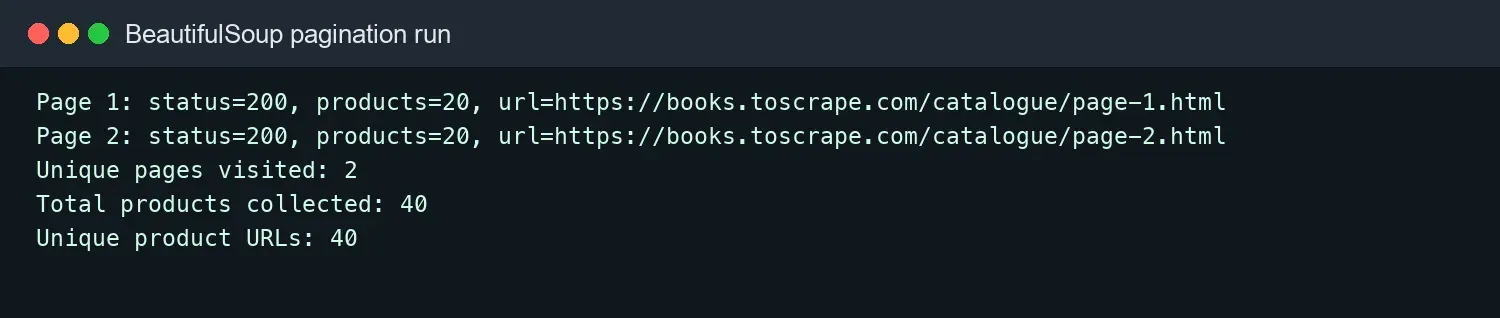
For this run, max_pages was set to 2. Two pages were actually visited, each with 20 products, for a total of 40 records. Deduplicating by absolute product URL still produced 40 records, so there were no duplicates within the example range.
How Do You Traverse the DOM Tree and Handle Missing Fields?
A stable parser should not assume that every node exists. Use parent-child relationships, sibling relationships, and explicit defaults to handle page differences.
card = soup.select_one("article.product_pod")
if card is None:
    raise RuntimeError("Product card not found")

parent = card.parent
first_child = card.find("h3")
next_element = first_child.find_next_sibling() if first_child else None
safe_text = next_element.get_text(" ", strip=True) if next_element else None
When a key field is missing, it is better to log an error and keep a sanitized HTML sample than to immediately continue. For critical fields such as price and a unique ID, you can fail the record. For optional fields such as ratings, you can store None. Field-level rules are easier to monitor than filling every missing value with an empty string.
How Do You Parse Tables, Lists, and Attributes?
When parsing repeated structures, first select the row or card and then find fields inside that record. This avoids misalignment between multiple lists on the same page.
rows = []
for row in soup.select("table tbody tr"):
    cells = [cell.get_text(" ", strip=True) for cell in row.select("th, td")]
    if cells:
        rows.append(cells)

links = [
    urljoin(response.url, anchor["href"])
    for anchor in soup.select("main a[href]")
]
The CSS attribute selector a[href] only matches links that have an href, so anchor["href"] is safe in this case. If the selector does not guarantee that the attribute exists, use anchor.get("href") and check the return value.
How Can You Reduce Memory and Parsing Overhead?
When a page is large and you only need a small subset of tags, use SoupStrainer to parse only the target area. As scraping volume grows, move toward streaming pipelines and task queues.
from bs4 import BeautifulSoup, SoupStrainer

only_products = SoupStrainer("article", class_="product_pod")
soup = BeautifulSoup(response.text, "lxml", parse_only=only_products)
The effect of parse_only can vary between parsers such as lxml and html.parser, so measure parsing time and memory against real HTML. Do not sacrifice selector clarity for tiny performance gains; network waiting time is often more expensive than parsing.
Why Can’t BeautifulSoup Scrape JavaScript Content?
Beautiful Soup only parses the HTML returned by the server. It does not execute page scripts, so content inserted later by JavaScript will not automatically appear.
Use this diagnostic sequence:
- Open View Source in the browser and check whether the data is already in the initial HTML.
- Look in Network > Fetch/XHR for an authorized endpoint that returns JSON.
- If the endpoint can be called directly within your permissions, prefer Requests to retrieve the JSON.
- Use Playwright or Selenium only when front-end scripts truly must execute.
- After browser rendering completes, you can pass
page.content()ordriver.page_sourceto Beautiful Soup for parsing.
WebScraping.AI’s Beautiful Soup guide also highlights the boundary where the browser shows content but Beautiful Soup sees an empty result on JavaScript-driven pages. Do not use random sleep() calls to guess when loading is complete; wait for a specific element or network response.
How Should You Handle Timeouts, 429, 403, and Parsing Failures?
Network errors, HTTP restrictions, and parsing errors are three different failure classes and should be logged and handled separately.
- Connection timeout or temporary 5xx: retry a limited number of times with exponential backoff.
- 429: respect
Retry-Afterand reduce request rate and concurrency. - 401/403: check permissions, identity, the endpoint, and terms of service; do not retry indefinitely.
- HTTP 200 but zero records: inspect the final URL, Content-Type, page title, and selectors.
- Missing fields: log field error rates, keep test samples, and update parser tests.
- CAPTCHA or login page: stop treating it as a product page and move the case into a manual or authorized workflow.
Set a request interval for each domain and cache responses that rarely change. Good scraping engineering starts by reducing unnecessary requests rather than sending every failure into proxy rotation.
How Do You Add Rola IP to a BeautifulSoup Python Example?
When a project is authorized for cross-region public-page validation or scaled collection, Rola IP can act as the network exit for Requests; Beautiful Soup still only handles HTML parsing.
Rola IP provides a web scraping proxy use case and offers residential, ISP/static residential, mobile, and datacenter networks. A dynamic residential proxy can rotate per request or use a sticky session; multi-step workflows that need a fixed exit can evaluate ISP/static residential. For exact country, city, session, and rotation fields, follow the English proxy parameters documentation.
Integration steps:
- In the Rola IP dashboard, choose the proxy type, country or city, and session mode.
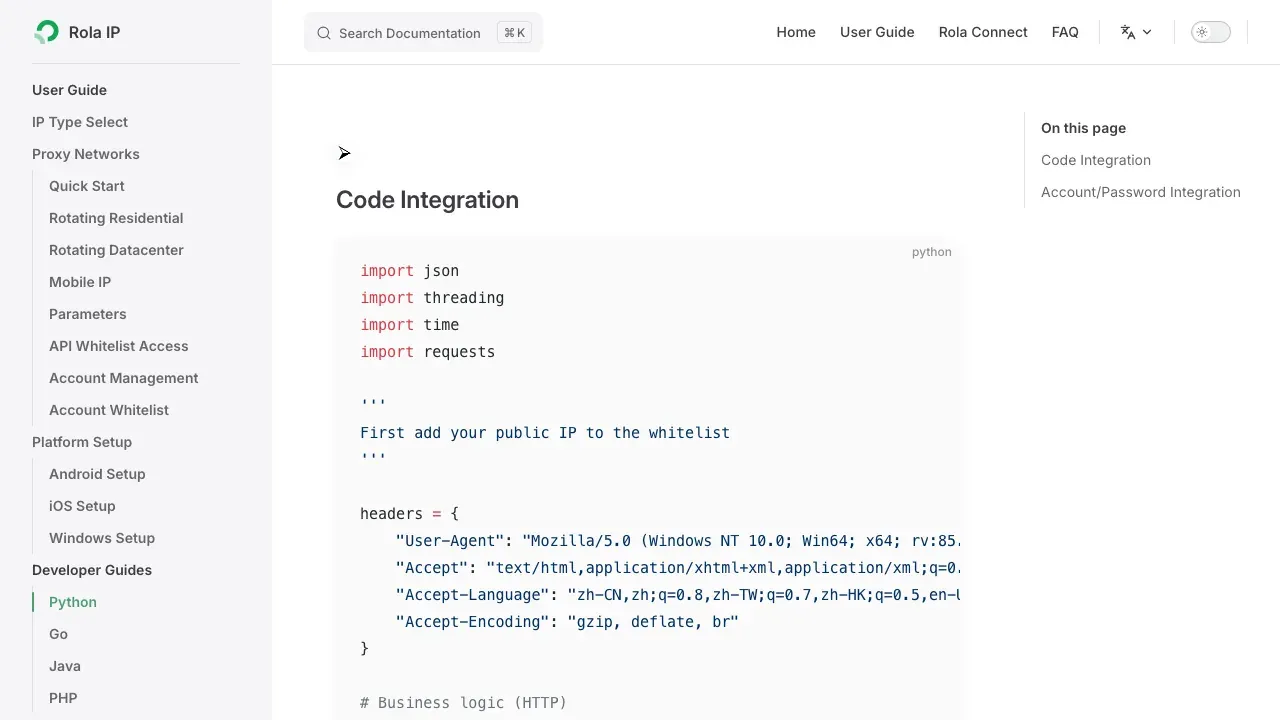
- Follow the English Python proxy integration documentation to obtain the host, port, username, and password.
- Store credentials in environment variables rather than source code or screenshots.
- First use an authorized IP-check endpoint to confirm the exit location, then test a small number of target URLs.
- Record success rate, location accuracy, P95 latency, traffic usage, and cost per complete record.
export ROLA_PROXY_HOST="proxy.example"
export ROLA_PROXY_PORT="12345"
export ROLA_PROXY_USERNAME="your_username"
export ROLA_PROXY_PASSWORD="your_password"
import os
from urllib.parse import quote


def rola_proxy_url() -> str:
    required = [
        "ROLA_PROXY_HOST", "ROLA_PROXY_PORT",
        "ROLA_PROXY_USERNAME", "ROLA_PROXY_PASSWORD",
    ]
    missing = [name for name in required if not os.getenv(name)]
    if missing:
        raise RuntimeError(f"Missing environment variables: {', '.join(missing)}")

    user = quote(os.environ["ROLA_PROXY_USERNAME"], safe="")
    password = quote(os.environ["ROLA_PROXY_PASSWORD"], safe="")
    host = os.environ["ROLA_PROXY_HOST"]
    port = int(os.environ["ROLA_PROXY_PORT"])
    return f"http://{user}:{password}@{host}:{port}"


proxy_url = rola_proxy_url()
session = build_session()
session.proxies.update({"http": proxy_url, "https": proxy_url})

response = session.get(
    "https://example.com/authorized-public-page",
    timeout=(10, 30),
)
response.raise_for_status()
products = parse_listing(response.text, response.url)
The https key can still use an http:// proxy address because Requests uses an HTTP CONNECT tunnel for HTTPS targets. If the dashboard provides a SOCKS5 endpoint, install requests[socks] and use socks5h:// so DNS resolution happens through the proxy.
How Do You Test That a BeautifulSoup Parser Will Not Break After a Site Redesign?
Save a small HTML fixture and assert the record count, key fields, and URLs. This can reveal selector changes before deployment.
First save a response that has already been validated as a local fixture. Do not put cookies, tokens, or personal data in the test file:
from pathlib import Path

fixture_path = Path("tests/fixtures/travel-page.html")
fixture_path.parent.mkdir(parents=True, exist_ok=True)
fixture_path.write_text(response.text, encoding="utf-8")
from pathlib import Path


def test_parse_listing() -> None:
    html = Path("tests/fixtures/travel-page.html").read_text(encoding="utf-8")
    page_url = (
        "https://books.toscrape.com/catalogue/category/"
        "books/travel_2/index.html"
    )

    rows = parse_listing(html, page_url)
    assert len(rows) == 11
    assert rows[0]["title"] == "It's Only the Himalayas"
    assert rows[0]["price"] == "£45.17"
    assert rows[0]["product_url"].startswith("https://")
Fixtures should come from authorized pages and have cookies, tokens, email addresses, and personal data removed. Unit tests should not access the live website every time, because network variability makes parser tests unstable. A live smoke test can run separately with a limited request rate.
BeautifulSoup Production Checklist
Before deployment, check access permission, request reliability, parsing quality, data storage, and monitoring together.
- You have reviewed
robots.txt, terms of service, APIs, and data permissions. - User-Agent, connection/read timeouts, rate limits, and limited retries are configured.
- Status code, final URL, Content-Type, and page identity are validated.
- All relative URLs are processed with
urljoin(). - Missing critical fields trigger alerts instead of silently writing empty data.
- Pagination has a visited-URL set and maximum page count.
- CSV/JSON use explicit encodings, and databases have unique keys.
- Logs do not contain passwords, cookies, tokens, or proxy credentials.
- Proxy location, sticky-session behavior, and rotation strategy match the task.
- HTML fixtures, parser tests, failure samples, and selector-change alerts are in place.
Conclusion
This beautifulsoup python example demonstrates the complete flow from page inspection, reliable requests, DOM parsing, and field extraction to CSV/JSON export, pagination, and proxy integration. Beautiful Soup works best as the parsing layer rather than as a tool expected to handle downloading, JavaScript execution, scheduling, and access control by itself.
In the verified run, the Travel page produced 11 products, and the first two pages produced 40 unique product URLs. When applying the same structure to another authorized website, replace the URL and selectors, keep response validation and tests, verify data completeness on a small sample, and only then scale the task gradually.