
How to Do Naver SEO: A Step-by-Step Tutorial

Oct 19, 2026 · Guides · 14 min read
TL;DR
This Naver SEO tutorial takes one Korean search task from research to measurement. You will choose a Korean query, inspect the actual Naver results, decide whether the job belongs to your website or a Naver-owned channel, verify your external site in Naver Search Advisor, check crawl access, optimize one Korean page, and create a repeatable observation record.
You need permission to manage the website, access to the relevant Naver account, and a Korean-language reviewer. A Korean proxy is optional and belongs only in a test that specifically requires a Korean network route. Completing the workflow does not guarantee indexing or a particular ranking.
Before you start: access, tools, and outputs
Use a website and account that you are authorized to manage. Do not practice by adding verification files to a client site without approval or by publishing promotional posts through accounts that do not disclose the brand relationship.
Prepare the following:
- the preferred HTTPS website host and permission to edit its DNS, HTML, or server files;
- the URL of one Korean page you can create or improve;
- a Naver account that can access Search Advisor;
- a Korean-language reviewer who can judge query meaning and natural phrasing;
- desktop and mobile browser test cases;
- a worksheet for the query, visible result modules, page changes, and dated observations;
- optional Korean network access only when location is a variable in the research question.
The outputs are a query-to-channel decision, a reviewed site property, one optimized Korean asset, and a repeatable SERP observation.
Step 1: Map one Korean query to the right Naver channel
1.1 Choose one user task, not a translated keyword list
Start with a specific customer action. Examples include choosing a product size, comparing two product types, finding a nearby store, or checking reviews of a named model. Then ask a Korean reviewer for the wording a real user would use.
The examples below demonstrate the method. They are not claims about current search volume or live rankings.
| Illustrative Korean query | Task to validate | What to inspect on Naver | Possible asset after validation |
|---|---|---|---|
| 러닝화 추천 | Compare running shoes | Comparison formats, Shopping, Blog, and web results | A comparison page or a distinct Blog article |
| 러닝화 사이즈 고르는 법 | Choose the correct size | Tutorials, brand guides, videos, and discussions | A Korean sizing tutorial with original measurements |
| 강남 러닝화 매장 | Find a store in Gangnam | Place, maps, local listings, and store pages | An eligible listing plus an accurate store page |
| 브랜드명 모델명 후기 | Evaluate a named model | Review sources, result modules, and disclosure quality | A transparent product explanation or independent review |
Collect close variants from native-language input, customer questions, on-site search, Naver autocomplete, and tools you are permitted to use. Treat autocomplete as a wording lead, not proof of demand.
Naver DataLab can compare relative interest over a selected period. Its Search Trend API defines ratio as a relative value whose maximum in the selected intervals is 100; it is not absolute monthly search volume. Keep DataLab results separate from advertising-keyword metrics and label each tool, date range, filter, and unit. See the Naver Search Trend API documentation.
1.2 Inspect the exact query on desktop and mobile
Search the exact Korean phrase. Record ads separately from organic results, then list every visible module and content type on the first screen. Repeat on mobile rather than assuming a desktop resize represents the mobile result.
For each observation, save:
- exact query text and intended task;
- date, time zone, device, browser, and viewport;
- signed-in or signed-out state;
- visible modules in their observed order;
- recurring publishers and content formats;
- the first relevant external website result, if one appears.
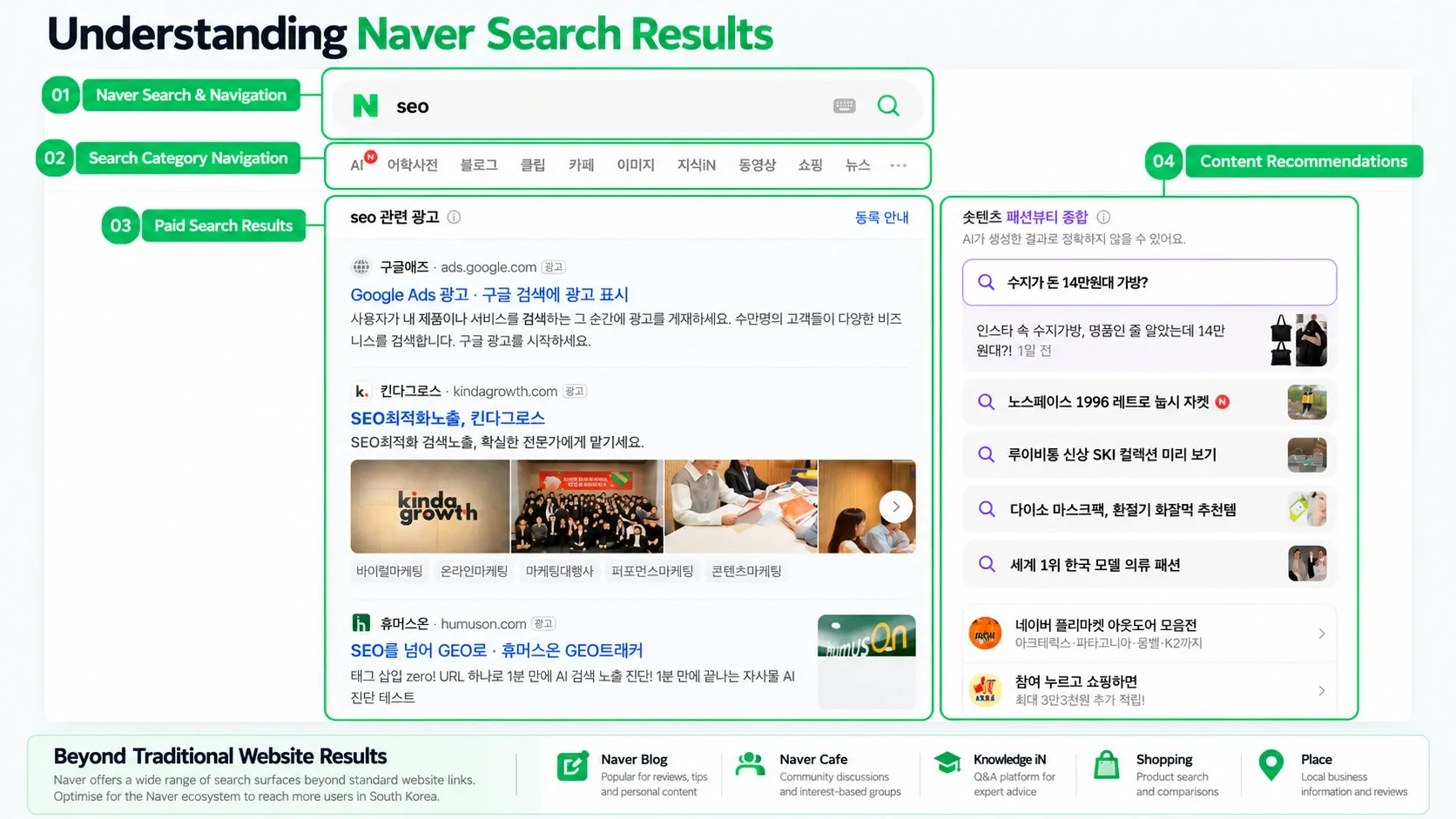
1.3 Make the channel decision
Give each asset one job. If a detailed external guide answers the task well and web results are visible, create or improve the website page. If Blog posts dominate a research-oriented query, plan a distinct Blog asset. Use Place for an eligible local business task and Shopping for a qualified product-search task. Do not open every channel or copy the same article across them.
Complete this worksheet before writing:
| Field | Your entry |
|---|---|
| Primary Korean query | Exact query, reviewed by a Korean speaker |
| User task | What the searcher is trying to complete |
| Observed modules | Actual modules from the dated desktop and mobile checks |
| Primary asset | Website page, Blog post, Place listing, Shopping asset, or another justified format |
| Supporting asset | Optional; must have a different purpose |
| Success signal | Published URL plus a dated, repeatable observation |
Expected result: one Korean query is assigned to one primary content task. If the live result does not support a Naver-native asset, record “none” instead of forcing one.
If the decision is unclear: narrow the query, compare desktop and mobile, and ask the Korean reviewer whether two phrases express the same task. Do not resolve uncertainty by producing duplicate pages.
Step 2: Verify your external site in Naver Search Advisor
Search Advisor helps an authorized site owner diagnose discovery and indexing inputs for an external website. Verification proves control of a site property; it does not prove that a page has been crawled, indexed, or ranked.
2.1 Add the preferred host
- Sign in to Naver Search Advisor with the account that should manage the property.
- Add the preferred HTTPS host that users and canonical URLs resolve to. Check whether the production site uses
wwwor the root domain before continuing. - Select an ownership-verification method offered in the current interface.
- Place the required verification material through the approved site workflow. Keep it reachable after verification if the selected method requires continued access.
- Complete verification and save a dated record of the property, method, and resulting status. Remove account identifiers from any screenshot shared outside the team.
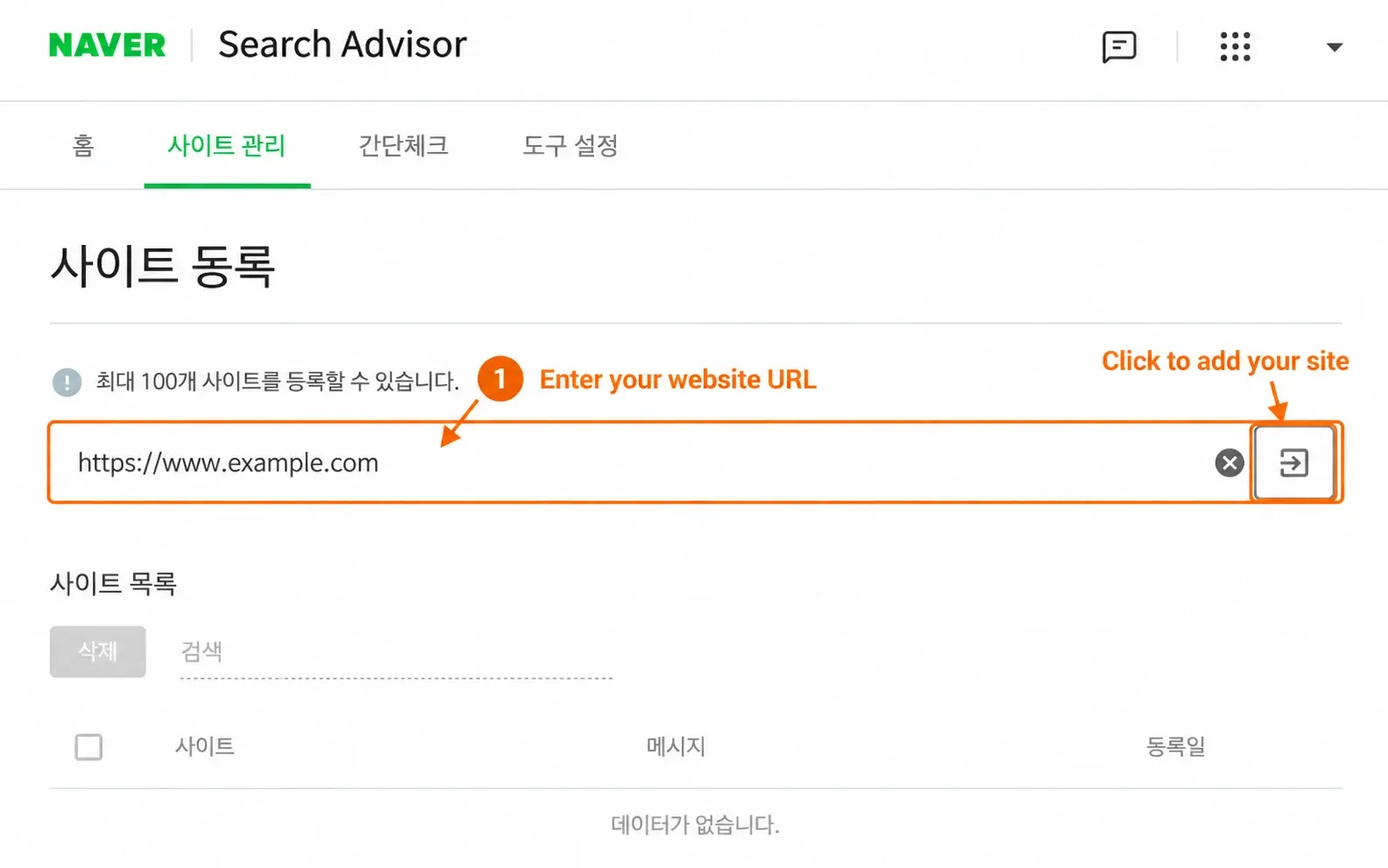
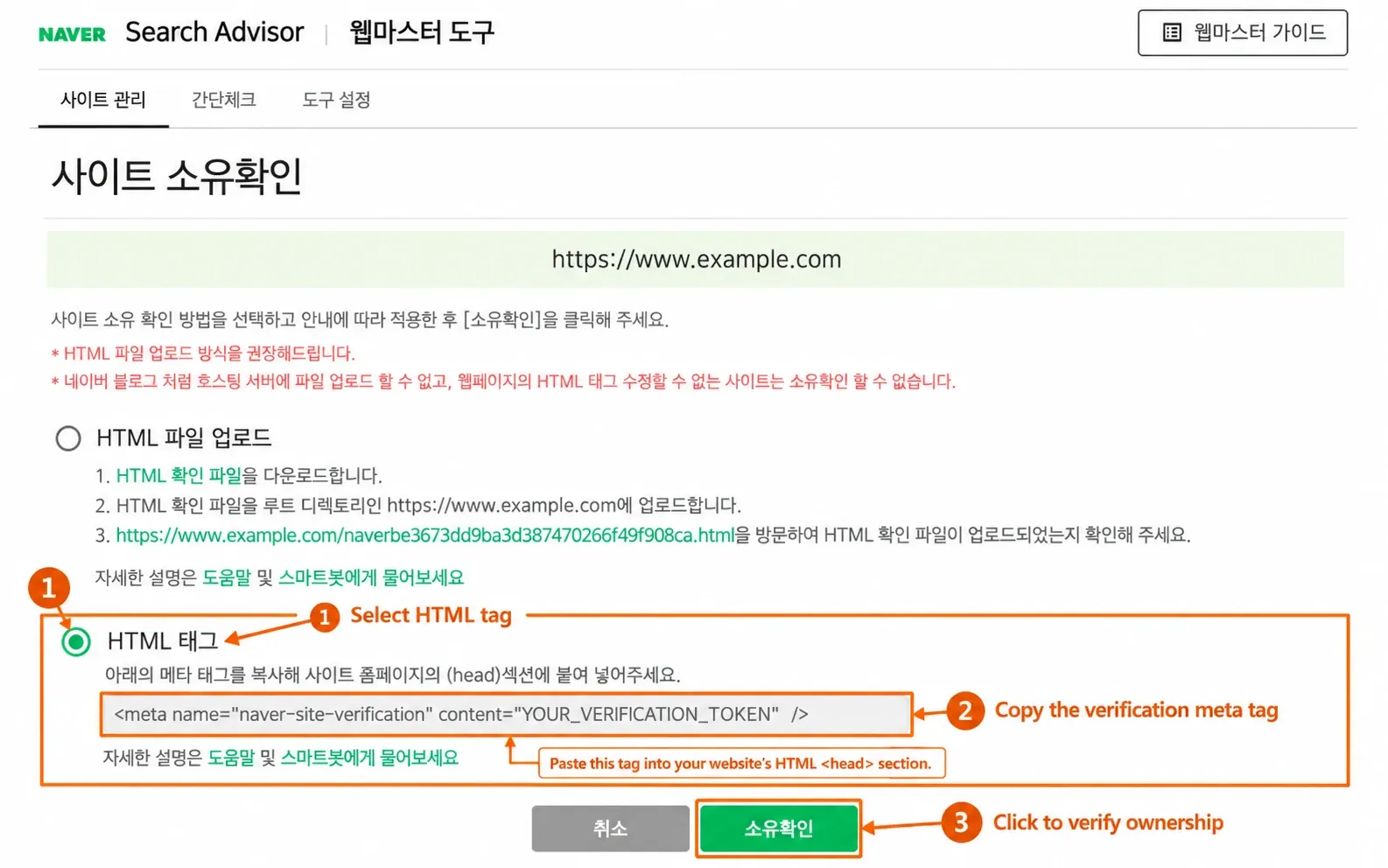
Naver currently documents HTML-file upload and a verification meta tag placed in the page <head>. The exact host must match, and the verification material must be available without relying on JavaScript, a meta refresh, or a browser cookie. Interface wording can change, so follow the method displayed in the current account and consult Naver’s site registration and ownership guide.
2.2 Separate the four states
Use these labels in your project notes:
| State | What it proves |
|---|---|
| Ownership verified | The account demonstrated control of the property |
| Crawl access available | Naverbot can request a public URL and required resources |
| Indexed | Naver has included a URL in its searchable index |
| Visible for the target query | The URL or native asset appeared in the defined observation |
Expected result: the correct HTTPS property appears as verified in the authorized account, and the team has saved the verification method and date.
If verification fails: check that the selected host exactly matches the deployed verification material, confirm redirects do not send the verifier to another host, and verify that the file or tag is publicly reachable. Capture the exact error and use the current interface guidance before changing methods.
Step 3: Check crawl access and submit the sitemap
3.1 Test the public endpoints first
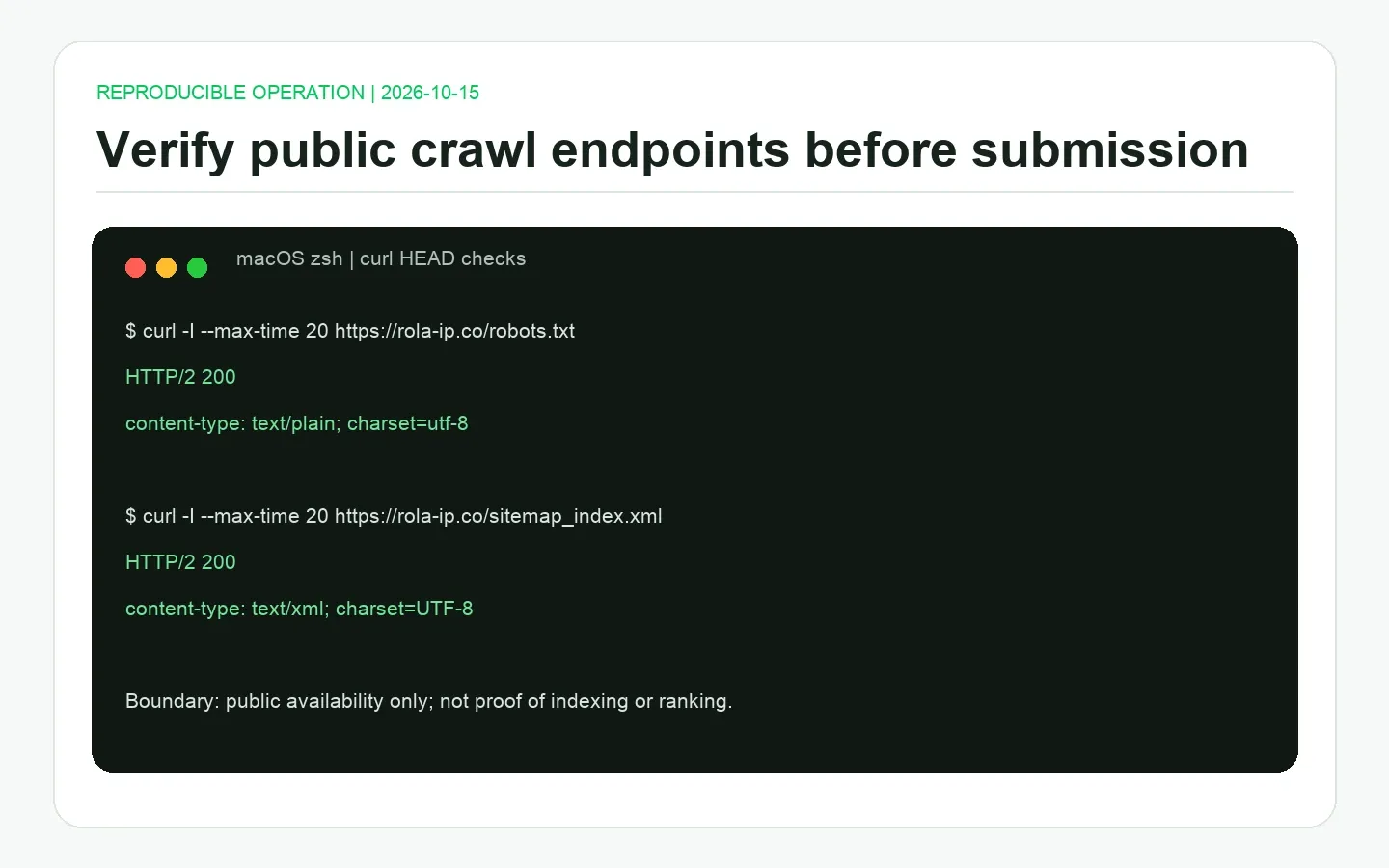
Before submitting anything, verify that the public robots.txt and sitemap endpoints respond as intended. On macOS, Linux, or Windows Subsystem for Linux with curl installed, run:
export SITE_ORIGIN="https://www.example.com"

curl -I --max-time 20 "$SITE_ORIGIN/robots.txt"
curl -I --max-time 20 "$SITE_ORIGIN/sitemap.xml"
Replace the example origin and sitemap filename with the authorized production values. Do not include private staging hosts, credentials, tokens, or internal addresses in shared output.
For robots.txt, look for a successful response and a plain-text content type. For the sitemap, expect a successful response and XML content. A redirect may be intentional, but follow it and confirm the final URL. A 401, 403, 404, HTML error page, DNS failure, or timeout needs investigation before submission.
To save response bodies for inspection and follow redirects, see the guide to downloading files with curl. The -I checks above retrieve headers only; they do not validate the robots.txt rules or sitemap XML.
The operation shown below was run in macOS zsh on October 15, 2026. Rola’s public robots.txt and sitemap index both returned HTTP 200 with the expected content types. This proves public availability at that time, not indexing or ranking.
3.2 Review access and indexing inputs
Open the important page in a signed-out browser and inspect these items:
- the final response is the intended public page, not an error or login screen;
robots.txtdoes not unintentionally block the page or resources needed to understand it;- the page does not contain an unintended
noindexinstruction; - redirects and the preferred URL are consistent;
- the page is reachable through normal internal links;
- meaningful text is present in HTML and not available only inside images;
- required CSS and JavaScript resources can be fetched.
Naver’s robots.txt guidance explains root placement, crawler access, response handling, and sitemap declarations. Its resource and link guidance covers resources and discoverable links.
3.3 Submit the discovery inputs and one priority URL
In the verified Search Advisor property, submit the production XML sitemap through the current submission area. Add RSS only when it represents the site’s publishing workflow. Then run the available site diagnostics and record the report name, submission time, and current state.
For a newly published or substantially updated priority page, the current webmaster workflow also provides a web-page collection request. Open the site’s request area, choose the web-page collection option, and submit the canonical public landing URL. Naver says processing can take from at least one day to several weeks, so do not resubmit the same URL every day. See the official collection-request guidance.
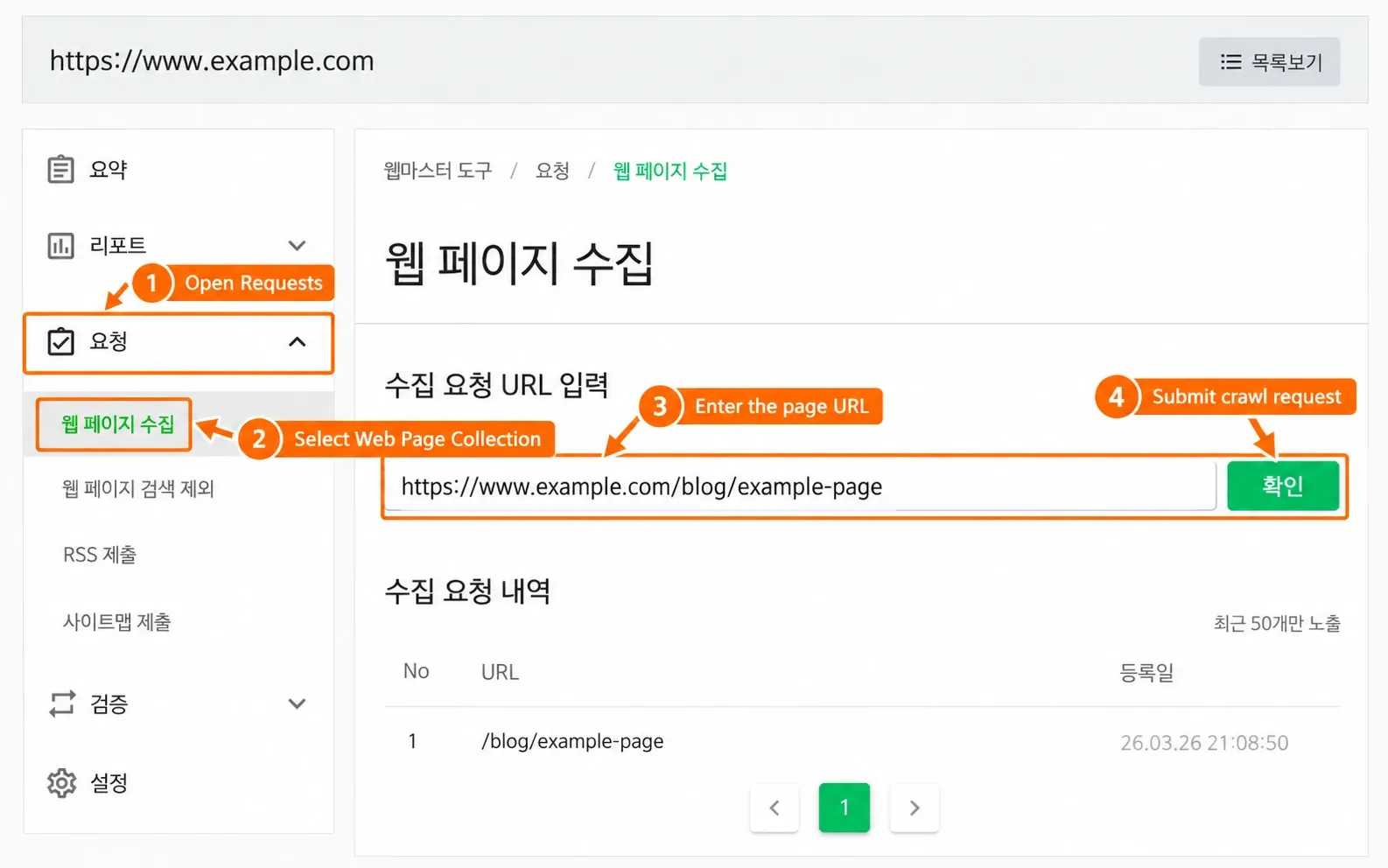
Expected result: the sitemap or priority URL is accepted for processing and the public endpoints remain accessible. Submission does not prove that the URL has been crawled, indexed, or ranked.
If a submitted URL remains absent: check whether it is in the production sitemap, internally linked, publicly accessible, free of unintended exclusion signals, and useful enough to deserve indexing. Fix a confirmed issue, then wait for a later report instead of repeatedly resubmitting an unchanged URL.
Step 4: Optimize and publish one Korean page
Return to the user task from Step 1. Do not translate an English page sentence by sentence. Build the Korean page around the chosen task, the proof the reader needs, and the format observed on Naver.
For the teaching example 러닝화 사이즈 고르는 법 (“how to choose a running-shoe size”), a page brief could look like this:
| Page element | Practical requirement |
|---|---|
| Title | Name the exact sizing task and the brand or category only when relevant |
| H1 | Confirm the page’s single purpose in natural Korean |
| Opening answer | Give the first usable sizing action before background explanation |
| Main steps | Show measurements, fit checks, model-specific limits, and return/exchange conditions where accurate |
| Original evidence | Use owned measurements, diagrams, or authorized product information |
| Images | Add descriptive alt text; do not place essential instructions only in an image |
| Internal links | Link to the next relevant size, model, store, or support decision |
| Mobile review | Check legibility, controls, tables, and image cropping on an actual mobile test case |
Use a unique title and description that accurately summarize this page. Keep one clear main heading, descriptive subheadings, readable HTML content, and crawlable links. Naver’s SEO basic guide supports accurate titles, descriptions, headings, and image alternatives.
Before publication, have the Korean reviewer check terminology, spacing, examples, calls to action, and any culturally specific explanation. Confirm that the page’s language, preferred URL, redirects, and internal links are internally consistent. Do not present local hosting or a Korean CDN as a ranking requirement; measure performance first and solve observed problems.
Expected result: the page is live at the intended URL, answers the selected task in natural Korean, is accessible from a normal internal link, and passes the public crawl checks from Step 3.
If the page renders poorly: compare the raw HTML and browser-rendered page, check inaccessible resources and client-side dependencies, and fix the visible content or delivery issue before requesting another review.
Step 5: Create a distinct Naver-native asset only when needed
Use the Step 1 observation. The website can hold the durable sizing method while a Blog post documents a transparent fitting demonstration. If the query emphasizes Place or Shopping, prioritize an accurate eligible listing or product asset instead. Do not reuse the same title, text, images, and call to action.
In Cafe and Knowledge iN, use authorized accounts, answer the question first, and disclose the brand relationship. Never fabricate conversations or pose as an independent customer.
Expected result: the native asset has a documented purpose that differs from the website page, and its published or skipped status is recorded.
If you cannot explain the difference in one sentence: skip the additional asset and improve the primary page first.
Step 6: Run a repeatable Naver SERP check
Create a baseline after publication, then repeat the same observation after a meaningful review interval. A valid check can show no target result. Keep that outcome; discarding it would bias the record.
Use this observation row:
| Field | Value to record |
|---|---|
| Query and task | Exact Korean query and intended user action |
| Time and device | Date, time zone, OS, browser, viewport, desktop or mobile |
| State | Signed in/out, language, filters, and personalization conditions you can control |
| Network route | Direct connection or a separately verified route; redact public IPs from shared reports |
| Result | Module, paid/organic label, position within the module, title, and landing URL |
| Comparison | Previous observation under the same conditions and the one variable changed |
Track metrics that match their evidence source:
| Metric | Definition | Evidence source |
|---|---|---|
| Module presence rate | Valid observations containing the target module divided by all valid observations in the same cohort | Dated SERP records |
| Position within a module | Observed position inside a named module, with paid and organic separated | Screenshot or approved observation record |
| Discovery and indexing | The specific status available for the verified external site | Search Advisor report, named and dated |
| Qualified visits and conversions | Naver-referred visits and agreed business events under a documented attribution method | Your analytics and conversion system |
| Native-channel performance | Metrics supplied by the relevant Naver channel | The corresponding channel report |
Optional: control for a Korean network route
Use a Korean route only when network origin is part of the test. First save a direct-connection baseline. Then configure an approved client with parameters from the applicable product panel or documentation, verify the observed exit using a service such as Rola’s what is my IP tool, and repeat the same query with the other conditions unchanged.
Rola’s Naver proxy workflow describes the task scope for authorized portal QA. If the plan specifically requires a Korean exit, review the available Korean proxies and validate one route before interpreting differences.
Broader teams can use residential proxies for SEO monitoring as a separate infrastructure reference.
A proxy changes the network route. It does not improve rankings, erase cookies or account history, grant collection permission, or represent every user in Korea. If authentication fails, the exit is unexpected, requests time out, or Naver presents a restriction, stop the test and fix the documented configuration or reduce the scope. Do not treat IP rotation as permission to continue through a platform control.
If the proxy returns HTTP 407, use the proxy authentication troubleshooting guide to check the endpoint, authentication method, and credentials. A proxy authentication failure is separate from a Naver account login problem.
Expected result: another reviewer can reproduce the query conditions and understand exactly what appeared. “No target result observed” is a complete result when the record is valid.
Step 7: Diagnose a missing page without guessing
Treat access, crawling, indexing, visibility, and conversion as different stages. Use the symptom to choose the next check.
| Symptom | Evidence to inspect | Action | Recheck |
|---|---|---|---|
| Site verification fails | Exact error, selected host, and verification material | Correct the host or deployment using a currently supported method | Repeat verification and save the resulting status |
| robots.txt or sitemap fails | Final HTTP status, content type, redirect target, DNS, and server logs | Restore a public text/XML response at the intended URL | Repeat the endpoint check before submission |
| Sitemap is accepted but a page is absent | Sitemap entry, internal links, page response, exclusion signals, and latest report | Fix only a confirmed technical or content problem | Record the later status with its date; do not invent a deadline |
| Page is indexed but absent for the query | Query intent, module mix, language quality, asset type, and competing pages | Improve relevance or choose the channel supported by the observed SERP | Repeat the defined observation after a meaningful interval |
| Observations differ | Query, device, account state, time, filters, and network route | Align conditions and change one variable at a time | Keep both records and describe the remaining uncertainty |
| Traffic rises but conversions do not | Landing page, event definition, attribution window, and audience task | Check whether the page answers the intended business need | Compare the same qualified events, not raw visits alone |
Do not use C-Rank or D.I.A. as a universal troubleshooting score. Their current scope and weighting are not a public formula for every Naver surface. Practical diagnosis should return to observable evidence: query intent, Korean clarity, original information, source credibility, crawl state, channel fit, and business outcomes.
What to review over the next 90 days
- First 30 days: finish site verification, crawl checks, one query map, one optimized page, and the baseline observation.
- Days 31–60: review Search Advisor reports, correct confirmed issues, and publish a distinct native asset only if the query evidence supports it.
- Days 61–90: repeat the same observation, compare qualified traffic and conversions, and update the page where evidence shows a mismatch.
Ninety days is a maintenance window, not a ranking promise.
Conclusion
Start with one Korean page and a dated baseline. Use the next review to address the first confirmed issue, then compare results under the same conditions.
Disclosure: This article is published by Rola IP. Product links describe Rola’s own proxy services. Check current product documentation and use proxies only for authorized, compliant workflows.