
Facebook Page Scraper Guide to Page Details and Proxies

Oct 16, 2026 · Guides · 12 min read
TL;DR
Choose a Facebook Page scraper by its input and output schema. Start with a few authorized URLs and keep billing limits separate from runtime limits. Before accepting the export, check that each record matches an expected Page, contains the required fields, explains missing values, and can be parsed in the chosen format. Add Rola IP when the selected tool supports an external proxy and the workflow needs a controlled exit. Pause at access restrictions and schedule recurring work only after the pilot passes these checks.
What a Facebook Page scraper collects
Page metadata describes a business or organization: its Page URL, name, category, description, and displayed website or business details. Write down the fields your report actually needs and make those the acceptance criteria for the pilot.
When comparing Facebook Pages scrapers, inspect a sample record and its field definitions before evaluating proxies or export formats. If you scrape Facebook data for a business directory, for example, prioritize verified Page identity and the business fields needed by that directory.
Fields can be unavailable, localized, or absent from a particular view. Store an unavailable value as null and record why it is missing when known. A missing follower count is not zero. Source text such as an abbreviated engagement count should be preserved before any numeric conversion.
Choose one collection route
Choose the route that fits your access permissions and maintenance needs. The walkthrough uses a managed Page details actor; API and custom browser workflows have different setup requirements.
| Route | Suitable use | Output to verify | External proxy control |
|---|---|---|---|
| Meta Pages API | Projects meeting current app and Page access conditions | Fields available to the authorized request | Evaluate separately; often unnecessary |
| Managed Page details actor | Authorized Page metadata collection | Page records and export fields | Check the exact actor before purchasing |
| Custom browser workflow | Projects needing browser and network control | Fields implemented by the application | Configurable in supported clients |
Consult Meta Pages API documentation before choosing the API. Confirm the version, Page relationship, token, permissions, fields, and pagination for the intended app before implementation.
Review Meta’s guidance on authorized and unauthorized scraping and the applicable automated data collection terms. Public visibility does not itself authorize automated collection or republication. Establish the permitted scope before running a job, and keep private profiles and restricted content outside it.
Match the proxy to the workflow
Rotating residential proxies for independent jobs
For independent browser jobs, compare rotating residential proxies and configure a supplier session duration that fits the run. The product page reviewed on October 15, 2026 describes country targeting and sticky sessions. Confirm the session options and lifetime available with your selected package before implementation.
Keep the same exit for the document and follow-up requests in one browser job. A Playwright browser context does not pin an exit IP by itself. The provider’s session parameters and their lifetime control stickiness, and the exit should be checked at appropriate job boundaries. Rotation between independent jobs does not override target restrictions. For a comparison of session behavior, see sticky sessions vs rotating proxies.
Static residential proxies for continuity
If repeated authorized runs require the same network address, review static residential proxies and the terms of the specific plan. Stable assignment can simplify troubleshooting and session continuity. Confirm duration, location, authentication, bandwidth, and connection limits for the selected plan before budgeting.
Where Rola IP fits
Rola IP provides proxy connectivity for a compatible collection workflow. The application remains responsible for requesting permitted data, extracting fields, enforcing stop limits, validating records, and storing results. Its web scraping proxy offering is relevant to that network layer; a proxy subscription does not establish that a managed actor accepts external credentials.
During the pilot, measure traffic cost per validated record, connection stability, and exit consistency. Set the collection rate according to the permitted workflow and observed target responses.
How to scrape Facebook pages for Page details
Work through one small, authorized input list from setup to export. Keep its actor build, settings, and source records together so failures can be traced to a specific run.
Step 1 Confirm the actor and authorized URLs
Open apify/facebook-pages-scraper, confirm its current description and schema, and record the actor ID and build used for your pilot. Use these identifiers when comparing runs or reporting a field change.
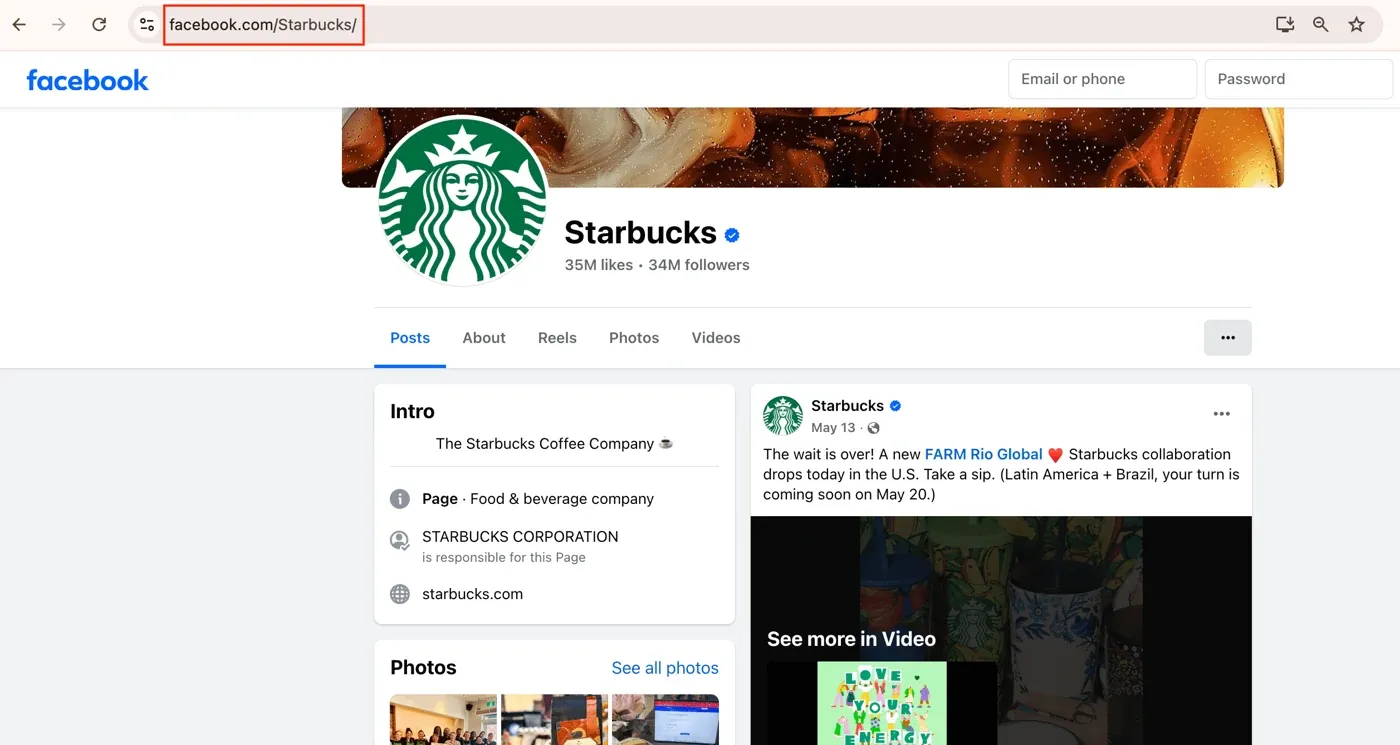
The published example uses https://www.facebook.com/Starbucks/, https://www.facebook.com/TheCocaColaCo/, and https://www.facebook.com/McDonalds. For your pilot, substitute approved target URLs, remove tracking parameters, and deduplicate the input list.
Step 2 Review the input and proxy settings
Enter approved Page URLs in the actor’s Page URL input. In the historical interface, the field is labeled Start urls. Confirm that the selected tool returns Page details and inspect whether it requires any additional inputs for the current build.
The actor input schema reviewed October 15, 2026 lists startUrls as a required array of URL objects and specifies Pages rather than personal profiles. Each array entry supplies a Page URL, so check the URL type and remove duplicate entries before submission.
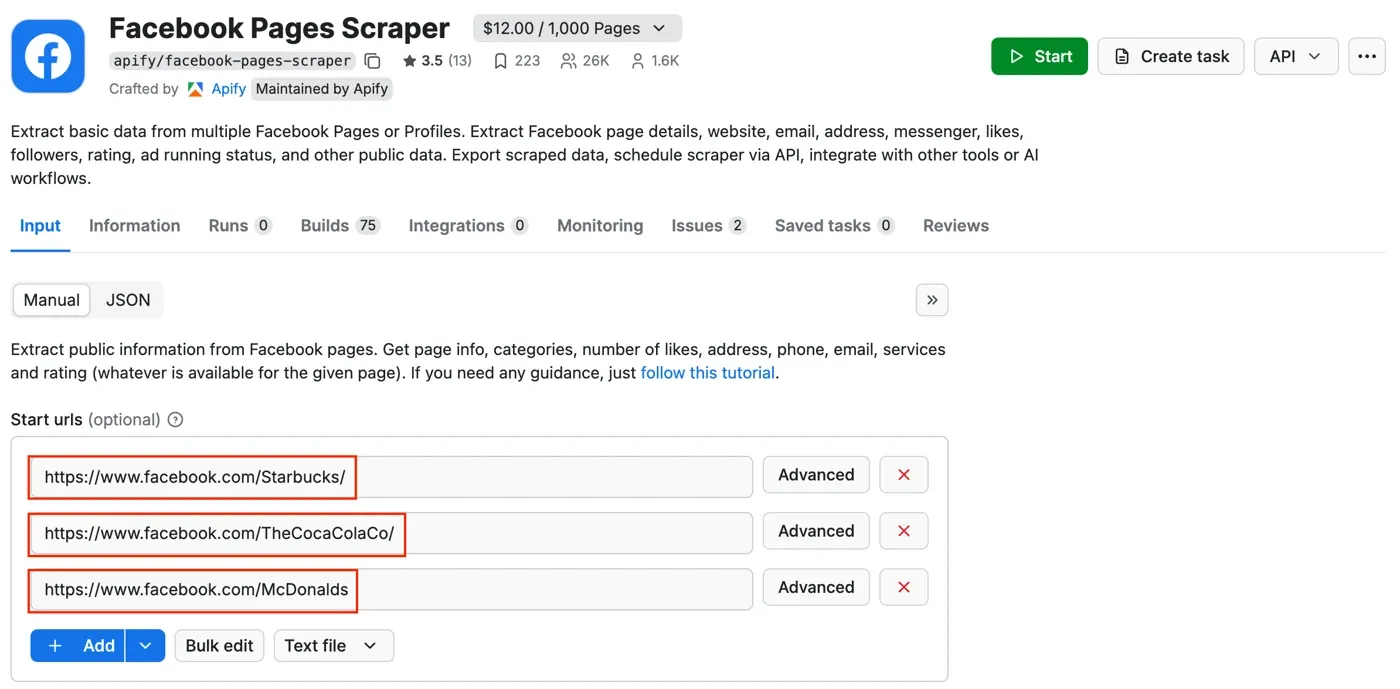
Do not enter Rola credentials unless the actor explicitly supports a custom proxy configuration. Its network may be managed internally. If external proxy controls are unavailable, evaluate a compatible integration rather than assuming that purchasing a separate proxy changes this actor’s routing.
Step 3 Set billing and runtime controls separately
Figure 3 shows Maximum charged results, a billing-related setting. It does not establish an independent wall-clock, scroll, or network-request limit. The historical screenshot also shows a timeout value of zero; do not copy that value as a bounded runtime configuration.
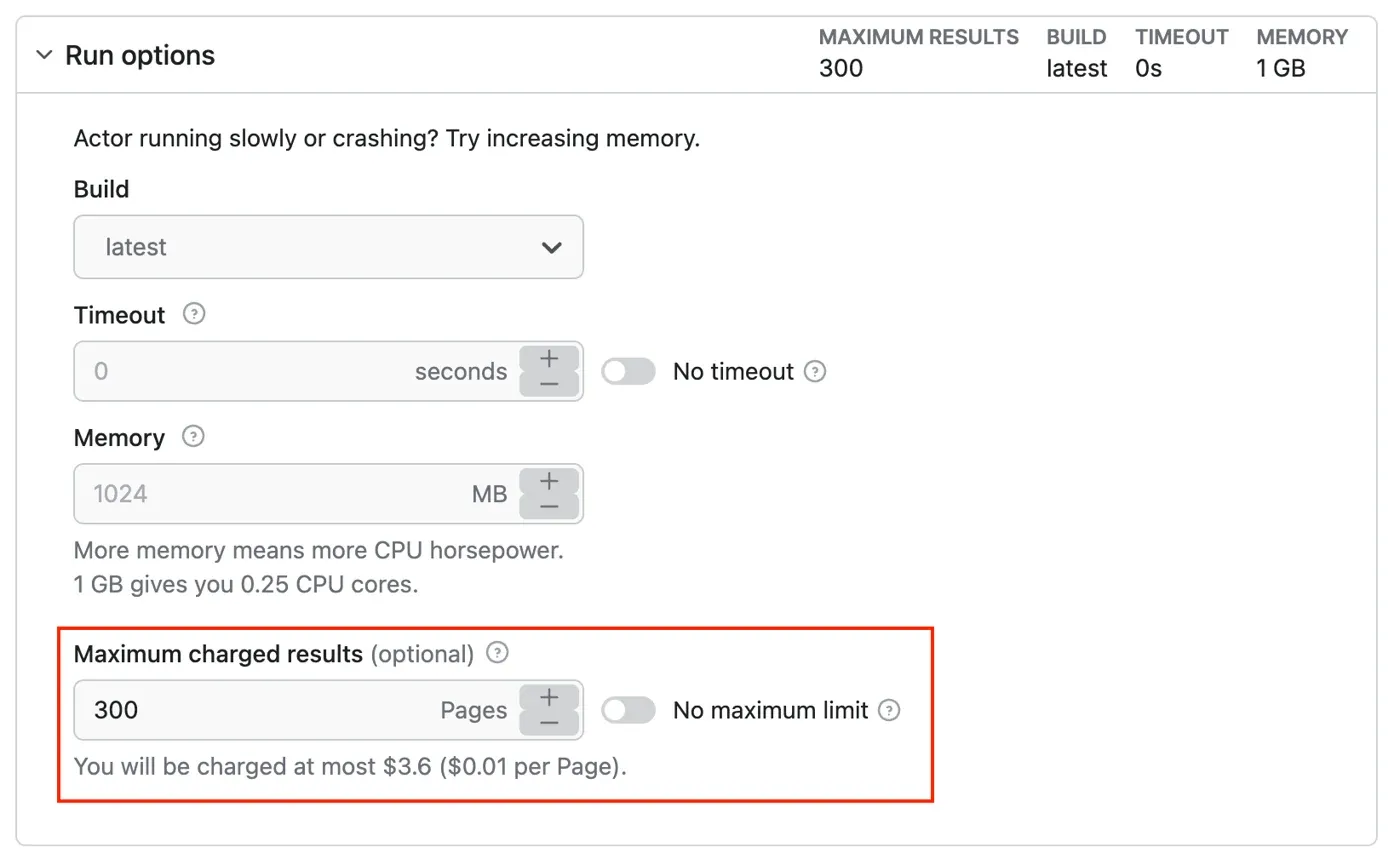
For a proposed pilot, use a small approved URL list, set a finite timeout through the current tool’s supported controls, and define what happens if the timeout expires. In a custom browser job, also bound navigation time, scrolling, and retries. Record the configured limits alongside the run ID. Stop and review any login wall, checkpoint, or access restriction.
Step 4 Run and inspect Page records
Start the actor and record its run ID and build. When it finishes, inspect the dataset and account for every input URL: validated, unavailable, or failed. Preserve the failure reason instead of silently dropping a Page.
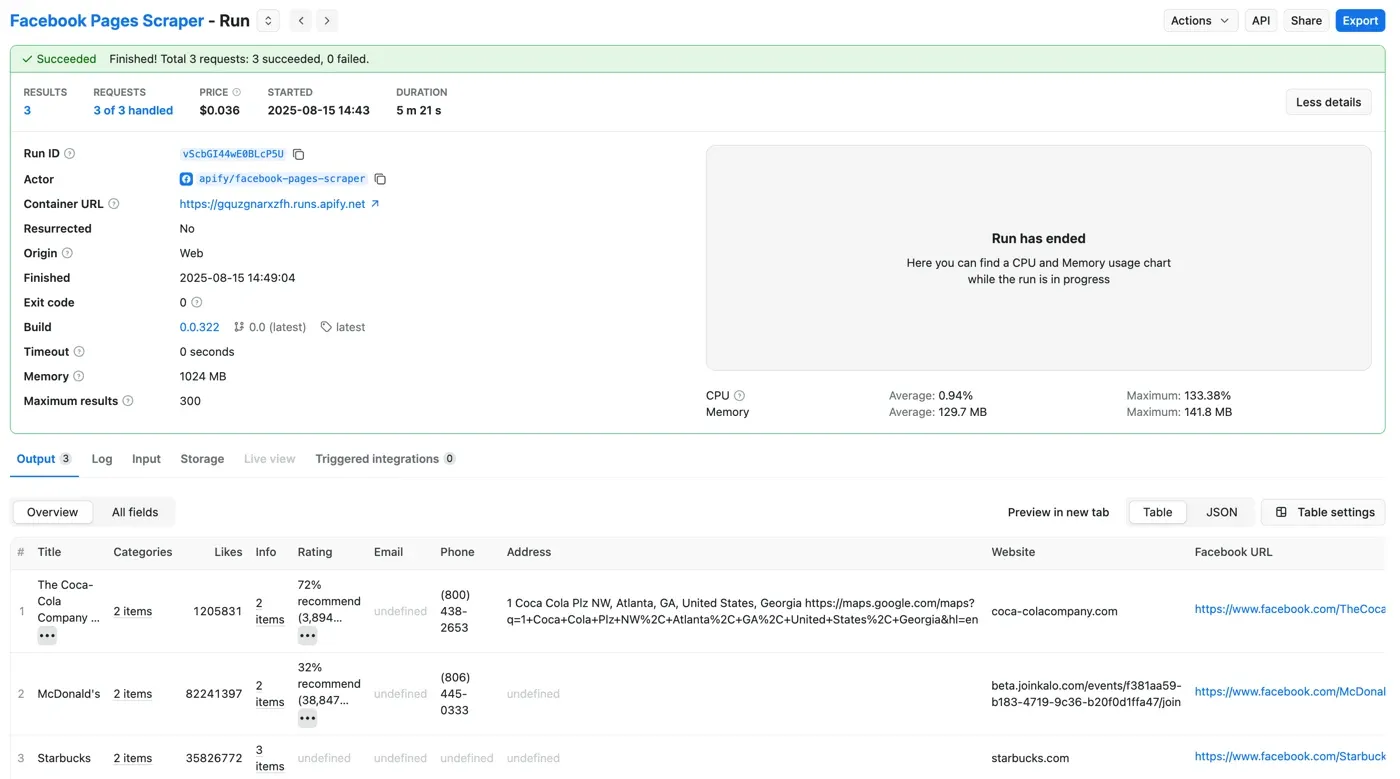
Accept the run only after these four checks pass:
- Page match: the exported URL or stable Page ID corresponds to an expected input; investigate redirects or mismatched entities.
- Required fields: each record contains the fields defined for the report, with the expected types.
- Explained gaps: required values that are unavailable remain null with a reason, such as source unavailable or field absent; parser failures are recorded separately.
- Parseable export: the downloaded JSON parses into the expected structure, or the CSV opens with consistent columns and encoding. Compare a parsed record with its source Page.
Step 5 Export the required fields
Select JSON for nested records, or CSV and Excel for flat reporting when supported by the current tool. In the historical export dialog, the View selection affects which fields may be included; inspect the export itself rather than assuming that a preview contains everything.
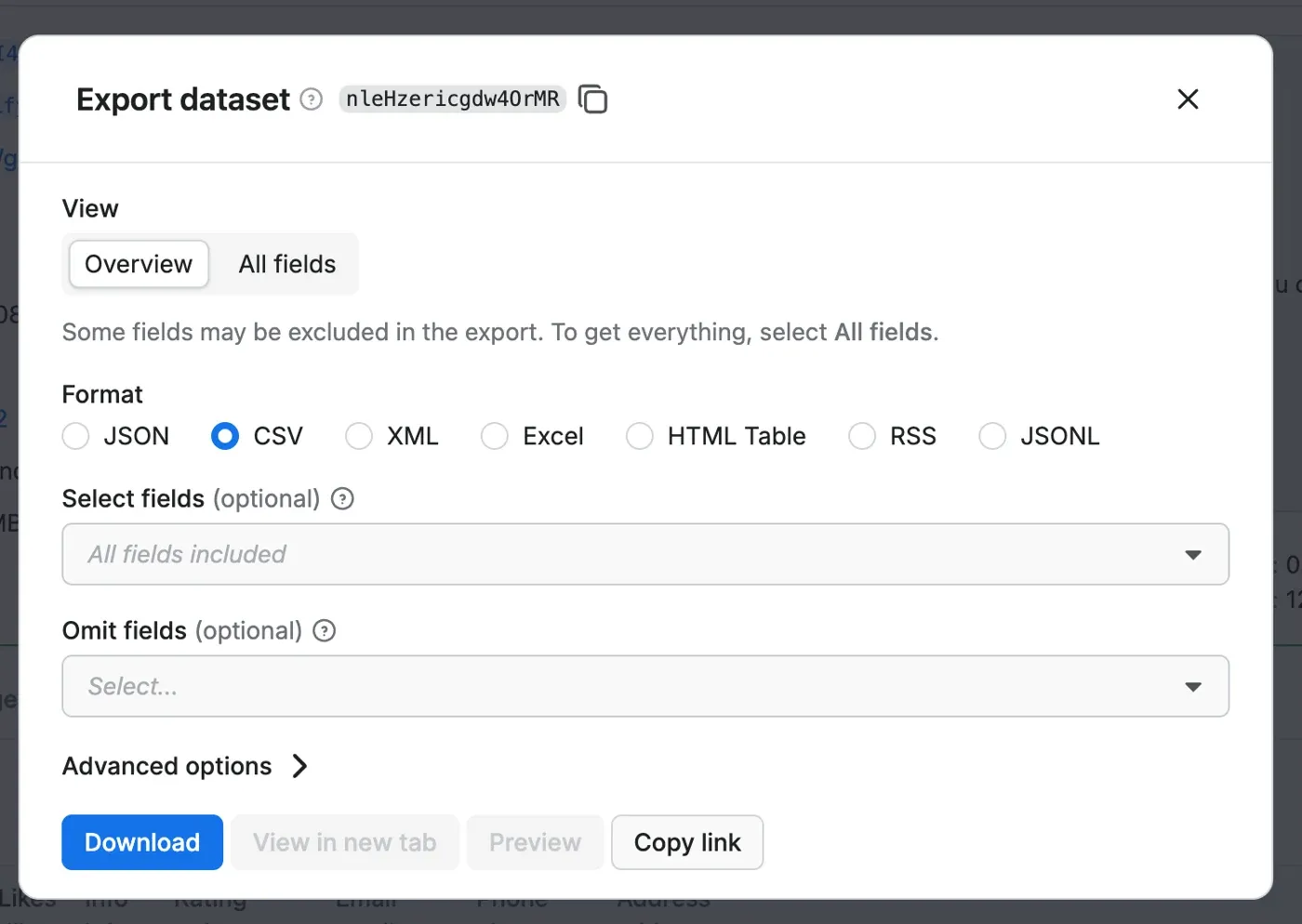
Keep the source export alongside the normalized dataset. Record observation time during collection in ISO 8601 UTC; preserve it separately from export time. Keep source timestamp text when its precision is uncertain.
Step 6 Validate the schema before scheduling
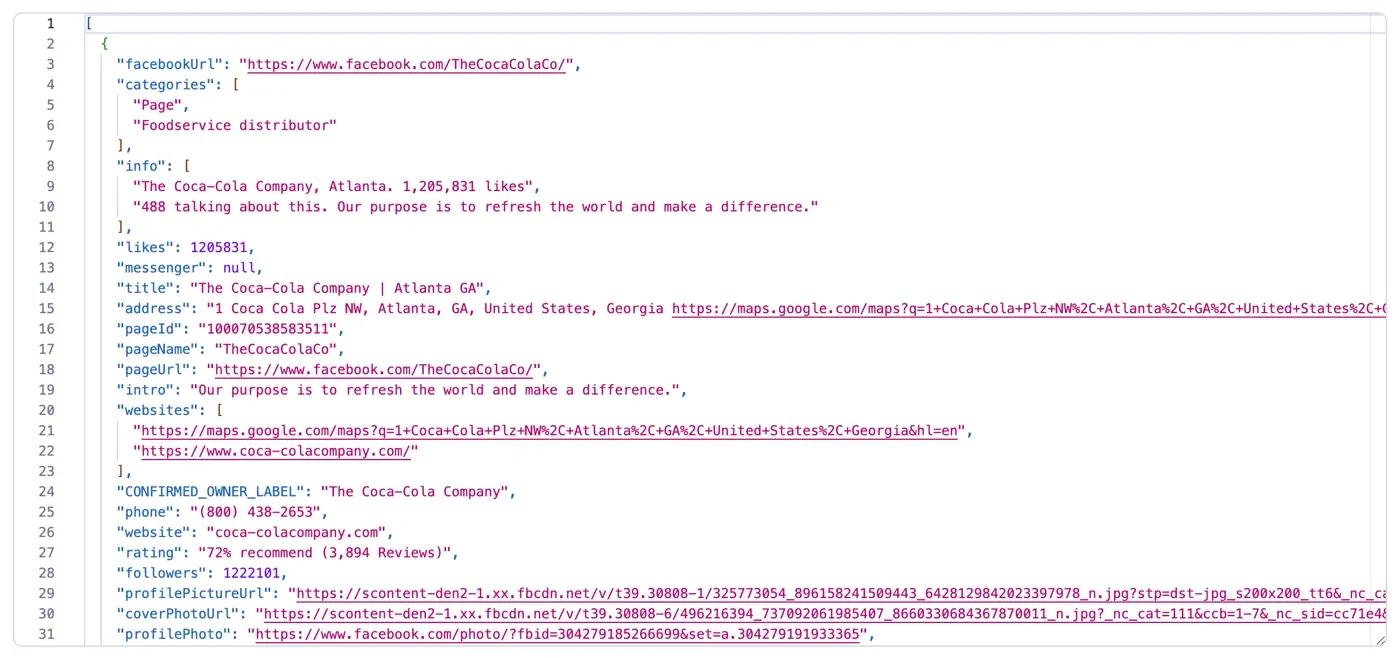
{
  "facebookUrl": "https://www.facebook.com/TheCocaColaCo/",
  "pageName": "TheCocaColaCo",
  "title": "The Coca-Cola Company | Atlanta GA"
}
For this excerpt, a reviewer can check the Page URL against the corresponding input, confirm that all three values are strings, and parse the JSON. To assess a new run, apply the same checks to its downloaded file and every required field. Deduplicate by normalized Page URL, preserve timestamped snapshots for changing values, and report attempted, validated, and failed Pages separately.
Map Page fields for reporting
Use the following normalization contract to map the fields found in your validated export. Keep the handle and display title separate, and add observation time, validation status, and missing reasons in your own pipeline.
| Page field | Type | Mapping or interpretation |
|---|---|---|
| page_url | string | Validated source Page URL; historical source key facebookUrl |
| page_handle | string or null | Source pageName; preserve the Page handle |
| page_title | string or null | Source title; preserve the displayed Page title |
| category | array or null | Preserve source categories when supplied |
| source_field | object | Mapping from normalized fields to actual export keys |
| observed_at_utc | string or null | Actual observation time in ISO 8601 UTC; never backfill from download time |
| status and missing_reason | string and string or null | Application validation result and reason for unavailable required data |
To collect text from Facebook posts, choose a separate posts tool and validate stable post URLs or IDs, source publication times, and collection observation times. A Page details export supplies the parent business information; it does not replace those post records.
Check a custom browser proxy connection
Use this optional connection check when building your own browser workflow. Copy the gateway and authentication values for your selected product, following the Python proxy integration guide. For a managed actor, first confirm that it accepts an external proxy.
In a local development environment, install your approved Playwright release and Chromium. Record the exact Python, Playwright, browser, and OS versions with the result. Then save the Python block below as proxy_check.py. The PowerShell commands prompt for credentials without putting a password literal in the command history:
python -m pip install playwright
python -m playwright install chromium
$env:ROLA_PROXY_SERVER = Read-Host 'Proxy scheme host and port'
$proxyCredential = Get-Credential -Message 'Rola proxy credentials'
$env:ROLA_PROXY_USERNAME = $proxyCredential.UserName
$env:ROLA_PROXY_PASSWORD = $proxyCredential.GetNetworkCredential().Password
try {
    python proxy_check.py
    if ($LASTEXITCODE -ne 0) { throw 'Proxy check failed' }
    python -m pip freeze > requirements-environment.txt
} finally {
    Remove-Item Env:ROLA_PROXY_SERVER -ErrorAction SilentlyContinue
    Remove-Item Env:ROLA_PROXY_USERNAME -ErrorAction SilentlyContinue
    Remove-Item Env:ROLA_PROXY_PASSWORD -ErrorAction SilentlyContinue
    Remove-Variable proxyCredential -ErrorAction SilentlyContinue
}
requirements-environment.txt captures installed package versions. Retain it alongside the actual run record; dependency capture alone is not workflow validation. Environment variables remain accessible to processes with appropriate privileges, so run this in a controlled local session.
import asyncio
import ipaddress
import json
import os
from urllib.parse import urlsplit
from playwright.async_api import async_playwright

async def check_proxy():
    server = os.environ["ROLA_PROXY_SERVER"]
    parsed = urlsplit(server)
    if parsed.scheme != "http" or not parsed.hostname or not parsed.port:
        raise ValueError("Use an authenticated HTTP gateway with a port")
    proxy = {
        "server": server,
        "username": os.environ["ROLA_PROXY_USERNAME"],
        "password": os.environ["ROLA_PROXY_PASSWORD"],
    }
    async with async_playwright() as p:
        browser = await p.chromium.launch(proxy=proxy, timeout=30000)
        try:
            page = await browser.new_page()
            response = await page.goto(
                "https://api.ipify.org?format=json",
                wait_until="domcontentloaded", timeout=30000,
            )
            if response is None or not response.ok:
                raise RuntimeError("IP echo returned no successful response")
            payload = await response.json()
            if not isinstance(payload, dict) or not isinstance(payload.get("ip"), str):
                raise ValueError("IP echo must return an object with an IP string")
            exit_ip = ipaddress.ip_address(payload["ip"])
            print(json.dumps({"check": "passed", "exit_ip": str(exit_ip)}))
        finally:
            await browser.close()

asyncio.run(check_proxy())
The Playwright network guide documents proxy configuration. Use an authenticated HTTP gateway for this example; check client support separately if your product requires SOCKS5. Missing environment variables, invalid gateway values, timeouts, unsuccessful responses, malformed JSON, or an invalid IP field fail the check. Fix the reported error before proceeding to a collection job.
After the check passes, compare the returned exit privately with a direct request to verify routing. Redact the address in shared screenshots if needed. Check its country separately with a trusted service, and sample the exit at job boundaries to verify the required session lifetime. Then validate target access and Page fields in the authorized collection workflow.
Diagnose the failing layer before retrying
Use the following checks to separate proxy connection, target response, and extraction failures. Each retest criterion is an acceptance condition. Keep credentials and sensitive output out of shared logs.
| Symptom | Verify | Action | Retest criterion |
|---|---|---|---|
| Proxy hostname DNS failure | Resolve the gateway host with Resolve-DnsName | Correct the host or resolve local DNS/network issues | Gateway resolves; then test its connection |
| Proxy connection refused | Test-NetConnection with the gateway host and port | Check port, endpoint status, and firewall rules | TCP connection opens; then test authentication |
| Connection timeout | Separate hostname resolution from TCP connection checks | Check route, firewall, endpoint, and bounded connection timeout | Connection completes within the configured budget |
| Read or navigation timeout | Establish whether connection succeeded but response or content stalled | Inspect timing and required content; use a finite deadline | Required response and fields arrive before the deadline |
| Proxy HTTP 407 | Inspect the authentication failure at the proxy layer | Correct credentials or approved whitelist configuration | Proxy authenticates against a permitted test endpoint |
| Target HTTP 403 or checkpoint | Inspect the target response and intended access permission | Pause and review the access route | Access is permitted again; no exit-rotation workaround |
| Target HTTP 429 | Inspect status and Retry-After where supplied | Pause and respect the indicated wait and rate policy | Approved low-rate request succeeds without continued throttling |
| Accessible Page with missing fields | Compare content, locale, source view, and parser mapping | Separate unavailable source values from parser errors | Required entity and fields validate, with missing reasons |
A browser navigation timeout can combine several stages; classify it using the underlying connection checks rather than assuming it is always a read timeout. A successful TCP probe is not proof of valid credentials or target access. After fixing one layer, retest that layer before restarting the whole job.
Record the pilot before scaling
For a small authorized pilot, record the date and timezone, operating system, exact tool and build, Python and browser versions where used, proxy product and protocol, and target authorization scope. Record requested fields, finite runtime limits, retry policy, success criteria, elapsed time, traffic consumed, validated records, and failures with causes.
Capture a short sequence of redacted screenshots with the run record: the input and finite timeout, run ID and build, a source record beside its field mapping, and the export validation result. Keep dates and field names legible and hide credentials and unnecessary personal details. Retain the underlying export for repeat checks; screenshots document the visible evidence, while parsing must be checked against the downloaded file.
Conclusion
A useful Facebook Page scraper starts with a precise dataset definition and a tool that actually returns it. For Page details, verify the actor, enter authorized URLs, set independent billing and runtime controls, and inspect the exported Page records before scheduling recurring work.
Rola IP can supply the network connection when your chosen workflow supports an external proxy. Choose rotating residential sessions for independent jobs or a suitable static product for continuity, then validate the configured route and the resulting data separately. Reliable collection depends on a permitted source, bounded execution, and records you can trace back to their origin.