
AliExpress Product Scraper: Parse Saved HTML with Python

Oct 14, 2026 · Guides · 15 min read
An AliExpress product scraper needs to identify the requested product before exporting its price. This Python guide shows how to parse Product JSON-LD from saved HTML, validate the product URL, title, listed price and currency, and export matching records to CSV. It includes copyable code for a complete parser and eight synthetic HTML examples, plus illustrated Excel steps for checking the results.
Key takeaways:
- Match the Product’s
urlor@idto the requested item; a seller SKU is not a reliable substitute for the platform’s product ID. - Accept one
Offerwith a finite, nonnegative price. Keep missing ratings blank and unknown availability separate from out-of-stock records. - Run the examples offline first. For your own pages, use HTML you are permitted to process; an optional request command is provided separately.
1. Prepare Python and Save the Parser
Create a working folder and save the complete code below as article_ali_scraper.py. The example generator and local pipeline are included in the next section, so you can reproduce the workflow directly from this article.
The local examples were verified on October 13, 2026, using Windows 10 build 19045, Python 3.12.10, Requests 2.34.2 and Beautiful Soup 4.15.0. These examples use constructed product records to make field validation repeatable.
python --version
python -m pip install requests==2.34.2 beautifulsoup4==4.15.0
The parser expects an HTTPS URL in the form https://www.aliexpress.com/item/PRODUCT_ID.html, with a numeric ID and no tracking parameters. It accepts aliexpress.com and www.aliexpress.com. Search pages, review pagination, carts and checkout data are outside this example’s scope.
Save this code as article_ali_scraper.py:
"""Strict Product JSON-LD parser and optional, bounded AliExpress fetcher."""
import argparse
import csv
import json
import os
import re
import sys
import tempfile
from datetime import datetime, timezone
from decimal import Decimal, InvalidOperation
from pathlib import Path
from urllib.parse import urljoin, urlsplit

import requests
from bs4 import BeautifulSoup

FIELDS = ['product_id', 'title', 'currency', 'price', 'availability', 'rating',
          'review_count', 'processed_at_utc', 'input_url', 'final_url', 'source_kind']
REDIRECTS = {301, 302, 303, 307, 308}


def product_id_from_url(url, expected_id=None):
    try:
        u = urlsplit(url)
        valid_host = u.hostname in {'aliexpress.com', 'www.aliexpress.com'}
        valid_port = u.port in (None, 443)
    except (ValueError, TypeError):
        raise ValueError('invalid product URL') from None
    match = re.fullmatch(r'/item/([0-9]+)\.html', u.path)
    if (u.scheme != 'https' or not valid_host or not valid_port or u.username
            or u.password or u.query or u.fragment or not match):
        raise ValueError('use an HTTPS aliexpress.com /item/ID.html URL without query or fragment')
    pid = match.group(1)
    if expected_id is not None and pid != expected_id:
        raise ValueError('redirect or Product identity mismatch')
    return pid


def has_type(obj, wanted):
    types = obj.get('@type', [])
    if isinstance(types, str):
        types = [types]
    return isinstance(types, list) and any(t in {wanted, 'https://schema.org/' + wanted,
                                                'http://schema.org/' + wanted} for t in types if isinstance(t, str))


def walk(node):
    if isinstance(node, dict):
        yield node
        for value in node.values():
            yield from walk(value)
    elif isinstance(node, list):
        for value in node:
            yield from walk(value)


def candidate_matches(item, requested_id):
    identities = []
    for key in ('url', '@id'):
        value = item.get(key)
        if not value:
            continue
        if not isinstance(value, str):
            return False
        # A fragment may identify the Product entity within its own page.
        try:
            identities.append(product_id_from_url(value.split('#', 1)[0]))
        except ValueError:
            return False
    # Never equate a seller SKU with the marketplace's product ID.
    return bool(identities) and all(pid == requested_id for pid in identities)


def numeric(value, label):
    if isinstance(value, bool):
        raise ValueError(label + ' must be numeric')
    try:
        number = Decimal(str(value))
    except (InvalidOperation, ValueError):
        raise ValueError(label + ' must be numeric') from None
    if not number.is_finite() or number < 0:
        raise ValueError(label + ' must be finite and nonnegative')
    return format(number, 'f')


def parse_product(html, input_url, final_url=None, source_kind='saved_html'):
    requested_id = product_id_from_url(input_url)
    final_url = final_url or input_url
    product_id_from_url(final_url, requested_id)
    soup = BeautifulSoup(html, 'html.parser')
    # These are sample stop markers, not a universal challenge detector.
    visible = soup.get_text(' ', strip=True).lower()
    if any(marker in visible for marker in ('slide to verify', 'verify you are human',
                                             '请拖动下方滑块完成验证')):
        raise ValueError('verification page returned')
    candidates = []
    for script in soup.find_all('script', attrs={'type': 'application/ld+json'}):
        try:
            data = json.loads(script.string or script.get_text(), parse_float=Decimal)
        except (json.JSONDecodeError, TypeError):
            continue
        candidates.extend(n for n in walk(data) if has_type(n, 'Product')
                          and candidate_matches(n, requested_id))
    if len(candidates) != 1:
        raise ValueError('requested Product identity is missing or ambiguous')
    product = candidates[0]
    title = product.get('name')
    if not isinstance(title, str) or not title.strip():
        raise ValueError('product title is missing')
    offer = product.get('offers')
    if isinstance(offer, list) and len(offer) == 1:
        offer = offer[0]
    if (not isinstance(offer, dict) or not has_type(offer, 'Offer')
            or has_type(offer, 'AggregateOffer') or 'lowPrice' in offer or 'highPrice' in offer):
        raise ValueError('a single Offer with one price is required')
    price = numeric(offer.get('price'), 'price')
    currency = str(offer.get('priceCurrency', '')).strip().upper()
    if not re.fullmatch('[A-Z]{3}', currency):
        raise ValueError('currency must contain three ASCII letters')
    availability = str(offer.get('availability', '')).rstrip('/').rsplit('/', 1)[-1]
    if availability not in {'InStock', 'OutOfStock'}:
        availability = 'Unknown'
    rating = product.get('aggregateRating', {})
    rating = rating if isinstance(rating, dict) else {}
    optional = {}
    for key, output in [('ratingValue', 'rating'), ('reviewCount', 'review_count')]:
        value = rating.get(key)
        optional[output] = ''
        if value is not None and value != '':
            try:
                parsed = numeric(value, key)
                if key != 'reviewCount' or Decimal(parsed) == Decimal(parsed).to_integral_value():
                    optional[output] = parsed
            except ValueError:
                pass
    return dict(product_id=requested_id, title=title.strip(), currency=currency,
                price=price, availability=availability, **optional,
                processed_at_utc=datetime.now(timezone.utc).isoformat(timespec='seconds'),
                input_url=input_url, final_url=final_url, source_kind=source_kind)


def fetch_product(url, session):
    requested_id = product_id_from_url(url)
    current = url
    for hop in range(6):
        with session.get(current, timeout=(10, 20), allow_redirects=False, stream=True) as response:
            if response.status_code in REDIRECTS:
                if hop == 5 or not response.headers.get('Location'):
                    raise ValueError('redirect limit exceeded or Location missing')
                target = urljoin(current, response.headers['Location'])
                product_id_from_url(target, requested_id)
                current = target
                continue
            if response.status_code == 429:
                raw = response.headers.get('Retry-After', 'not supplied')
                hint = ''.join(c for c in raw if c.isprintable())[:100]
                raise ValueError('HTTP 429; stop. Retry-After: ' + hint)
            if response.status_code != 200:
                raise ValueError('HTTP ' + str(response.status_code) + '; stop current request')
            chunks, size = [], 0
            for chunk in response.iter_content(65536):
                size += len(chunk)
                if size > 5_000_000:
                    raise ValueError('HTML exceeds 5 MB limit')
                chunks.append(chunk)
            html = b''.join(chunks).decode(response.encoding or 'utf-8', errors='replace')
            return parse_product(html, url, current, source_kind='online_response')
    raise ValueError('redirect limit exceeded')


def safe_cell(value):
    text = str(value)
    # Protect spreadsheet users from formula-like untrusted product titles.
    return "'" + text if text.lstrip().startswith(('=', '+', '-', '@')) else value


def write_csv(path, rows, fields=FIELDS):
    path = Path(path)
    path.parent.mkdir(parents=True, exist_ok=True)
    name = None
    try:
        with tempfile.NamedTemporaryFile('w', encoding='utf-8-sig', newline='',
                                         dir=path.parent, delete=False) as f:
            name = f.name
            writer = csv.DictWriter(f, fieldnames=fields)
            writer.writeheader()
            writer.writerows({key: safe_cell(row[key]) for key in fields} for row in rows)
        os.replace(name, path)
    finally:
        if name and os.path.exists(name):
            os.unlink(name)


def main():
    parser = argparse.ArgumentParser(description=__doc__)
    parser.add_argument('url', help='HTTPS product-detail URL, without tracking parameters')
    parser.add_argument('--html', type=Path, help='parse saved HTML without any network request')
    parser.add_argument('--output', type=Path, default=Path('product.csv'))
    parser.add_argument('--authorized', action='store_true', help='confirm permission for an online request')
    args = parser.parse_args()
    try:
        if args.html:
            row = parse_product(args.html.read_text(encoding='utf-8'), args.url)
        else:
            if not args.authorized:
                parser.error('online requests require --authorized; use --html for offline parsing')
            with requests.Session() as session:
                row = fetch_product(args.url, session)
        write_csv(args.output, [row])
        print('Wrote 1 record to ' + str(args.output))
    except requests.RequestException as exc:
        print('STOP: ' + type(exc).__name__ + '; check connection, proxy and credentials locally', file=sys.stderr)
        return 1
    except (ValueError, OSError) as exc:
        print('STOP: ' + str(exc), file=sys.stderr)
        return 1
    return 0


if __name__ == '__main__':
    sys.exit(main())
2. Run the Saved-HTML Examples and Export CSV
Save the following two scripts in the same working folder. First, save this as build_examples.py:
"""Create eight explicitly synthetic parser fixtures; no network requests."""
import json
from pathlib import Path

EXAMPLES = [
    ('USB-C 7-in-1 Hub', 'USD', '24.90', 'InStock', '4.6', 328),
    ('Portable Laptop Stand', 'USD', '19.50', 'InStock', '4.5', 217),
    ('Compact Cable Organizer', 'USD', '8.25', 'InStock', None, None),
    ('Travel Packing Cubes', 'EUR', '17.30', 'InStock', '4.2', 84),
    ('Foldable Travel Bottle', 'EUR', '11.80', 'OutOfStock', None, None),
    ('Desk Cable Clips', 'EUR', '5.40', 'InStock', '4.1', 63),
    ('Adjustable Desk Lamp', 'JPY', '2480', 'InStock', '4.7', 105),
    ('Canvas Pencil Case', 'JPY', '780', 'OutOfStock', None, None),
]


def build():
    folder = Path(__file__).parent / 'saved_html'
    folder.mkdir(exist_ok=True)
    manifest = []
    for i, (title, currency, price, stock, rating, count) in enumerate(EXAMPLES, 100000001):
        url = f'https://www.aliexpress.com/item/{i}.html'
        product = {'@context': 'https://schema.org', '@type': 'Product', 'url': url,
                   'name': title, 'offers': {'@type': 'Offer', 'price': price,
                   'priceCurrency': currency, 'availability': 'https://schema.org/' + stock}}
        if rating is not None:
            product['aggregateRating'] = {'@type': 'AggregateRating', 'ratingValue': rating, 'reviewCount': count}
        html = '<!doctype html><html lang="en"><meta charset="utf-8"><title>Synthetic fixture</title><body><h1>Synthetic parser fixture; not a marketplace capture</h1><script type="application/ld+json">' + json.dumps(product) + '</script></body></html>'
        (folder / f'{i}.html').write_text(html, encoding='utf-8')
        manifest.append({'file': f'{i}.html', 'url': url, 'source_kind': 'synthetic_fixture'})
    (folder / 'manifest.json').write_text(json.dumps(manifest, indent=2), encoding='utf-8')
    print('Created 8 synthetic HTML fixtures; no marketplace requests were made.')


if __name__ == '__main__':
    build()
Then save this as run_local_pipeline.py:
"""Parse the delivered synthetic HTML and export CSV summaries."""
import json
from collections import Counter
from pathlib import Path
from article_ali_scraper import parse_product, write_csv


def main():
    root = Path(__file__).parent
    folder = root / 'saved_html'
    manifest = json.loads((folder / 'manifest.json').read_text(encoding='utf-8'))
    rows = [parse_product((folder / entry['file']).read_text(encoding='utf-8'),
                          entry['url'], source_kind=entry['source_kind']) for entry in manifest]
    write_csv(root / 'product_fields.csv', rows)
    summaries = []
    for currency in sorted({r['currency'] for r in rows}):
        counts = Counter(r['availability'] for r in rows if r['currency'] == currency)
        summaries.append(dict(currency=currency, in_stock=counts['InStock'],
                              out_of_stock=counts['OutOfStock'], unknown=counts['Unknown'], total=sum(counts.values())))
    write_csv(root / 'currency_availability_summary.csv', summaries,
              ['currency', 'in_stock', 'out_of_stock', 'unknown', 'total'])
    (root / 'product_fields.json').write_text(json.dumps(rows, indent=2), encoding='utf-8')
    for row in rows:
        print(f"{row['product_id']} | {row['currency']} {row['price']} | {row['availability']}")
    print('Wrote 8 synthetic records to product_fields.csv')
    for item in summaries:
        print(item)


if __name__ == '__main__':
    main()
Run these commands from that folder:
python build_examples.py
python run_local_pipeline.py
The first command creates eight clearly labeled synthetic HTML fixtures in saved_html/. The second reads their manifest, parses each file through parse_product(), and writes:
| Output | Contents |
|---|---|
product_fields.csv |
Eight product records, including input/final URLs, processing timestamps and source type |
currency_availability_summary.csv |
Counts by currency and availability, including an unknown category |
product_fields.json |
The same parsed records in JSON for further processing |
The sample contains three USD records, three EUR records and two JPY records.
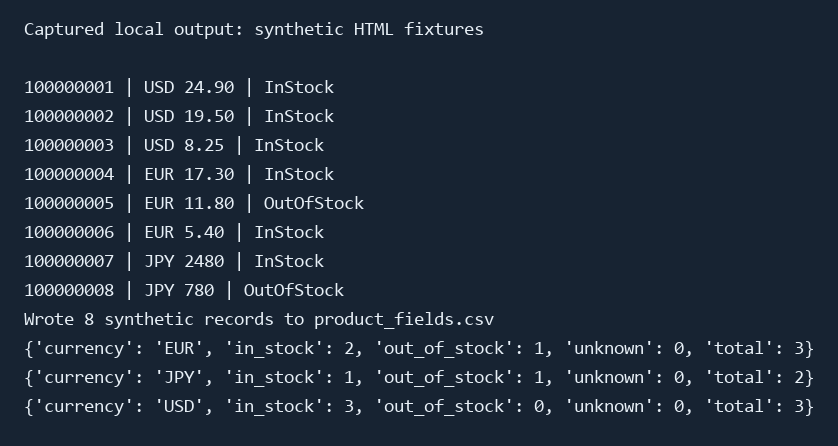
Figure 1. Rendered text from the local pipeline’s captured output on October 13, 2026. The records come from the eight synthetic HTML files generated by the code above.
Check Your Own Saved HTML
Open your UTF-8 HTML file in a text editor and search for application/ld+json. Check that it contains a Product whose url or @id identifies your item and whose offers contains one Offer with price and priceCurrency. The parser reads this saved content without running JavaScript. If the required structure is absent, inspect how the page was saved before changing the extraction rules.
To process the file, replace PRODUCT_ID with the numeric ID from its product URL:
python article_ali_scraper.py "https://www.aliexpress.com/item/PRODUCT_ID.html" --html saved-product.html --output product.csv
With --html, the script makes no network requests. A successful run exits with code 0, prints Wrote 1 record, and updates the specified CSV. A validation failure exits with code 1 and leaves an existing output file unchanged.
3. How Does the Parser Match the Requested Product?
The parser reads <script type="application/ld+json"> blocks and searches JSON objects, arrays and @graph structures for a Product. Its @type may be a string or a list of types. Invalid JSON blocks are skipped; a page with no unique matching Product is rejected.
Identity comes from the Product object’s url and/or @id. At least one must identify the requested /item/ID.html page. If both are present, both must agree. A fragment such as #product is allowed on the structured-data identifier. The parser does not infer identity from a product name, recommendation card or seller SKU.
This function call uses the complete implementation in Section 1:
from pathlib import Path
from article_ali_scraper import parse_product

html = Path("saved_html/100000001.html").read_text(encoding="utf-8")
record = parse_product(
    html,
    "https://www.aliexpress.com/item/100000001.html",
    source_kind="synthetic_fixture",
)
print(record["product_id"], record["currency"], record["price"])
For the generated fixture, the output is 100000001 USD 24.90. Keep this example offline: its URL is an identity value for the constructed fixture.
Unresolved JSON-LD references, multiple matching Product objects and unsupported identity formats need a parser extension based on the actual saved page structure. The example rejects them rather than selecting an arbitrary object.
4. Which Fields Are Accepted?
| Field | Rule | Missing or invalid value |
|---|---|---|
product_id |
Match the requested product URL | Reject the record |
title |
Require a nonempty Product name |
Reject the record |
price |
Read one Offer.price using decimal arithmetic; reject negative or nonfinite values |
Reject the record |
currency |
Normalize to three uppercase ASCII letters | Reject the record |
availability |
Map InStock and OutOfStock explicitly |
Use Unknown for absent or other states |
rating / review_count |
Read optional aggregateRating fields; require finite nonnegative values and a whole review count |
Leave blank |
processed_at_utc |
Record the time the parser processed this input | Do not treat it as the page’s original capture time |
input_url / final_url |
Store the requested URL and, for online requests, the validated landing URL; saved-HTML mode defaults final_url to input_url |
Reject a supplied landing URL that does not match the requested product |
source_kind |
Distinguish fixtures, saved HTML and online responses | Preserve the input’s provenance |
Schema.org defines the price and currency properties on Offer. The three-letter check in this project validates format only; it does not prove that a code belongs to the ISO 4217 currency list. Add a current currency allowlist if your application requires that stricter check.
The parser accepts a single Offer object or a one-element list containing that Offer. It rejects multiple offers, AggregateOffer, and lowPrice/highPrice ranges. These are deliberate rules for producing one listed price per record, not a claim that all other Schema.org structures are invalid.
JSON decimal numbers are decoded directly into Decimal, avoiding an intermediate binary floating-point conversion. Decimal strings are also accepted. The CSV uses fixed-point decimal text, so scientific notation may be expanded. For saved HTML, keep the original capture URL and time separately: the default final_url does not verify the file’s redirect history.
A listed price is also different from a checkout total. Variants, delivery destination, promotions, shipping and taxes may change the amount. For comparisons, record the selected variant, market, delivery destination and page capture time separately. The proxy exit IP does not establish those values.
5. Check the Results in Excel
Import product_fields.csv into Excel using Data → From Text/CSV. Preserve product_id as text to avoid rounding long identifiers, and keep empty ratings blank. Create two sheets named Product Fields and Summary. To follow the illustrated layout, place headers in row 4 of Product Fields and the eight records in rows 5–12. Use columns A–H for product ID, title, currency, listed price, availability, rating, review count and processed time. Keep the remaining provenance fields to the right. The Python commands generate the CSV and JSON files; you create the Excel sheets using the steps and formulas below.
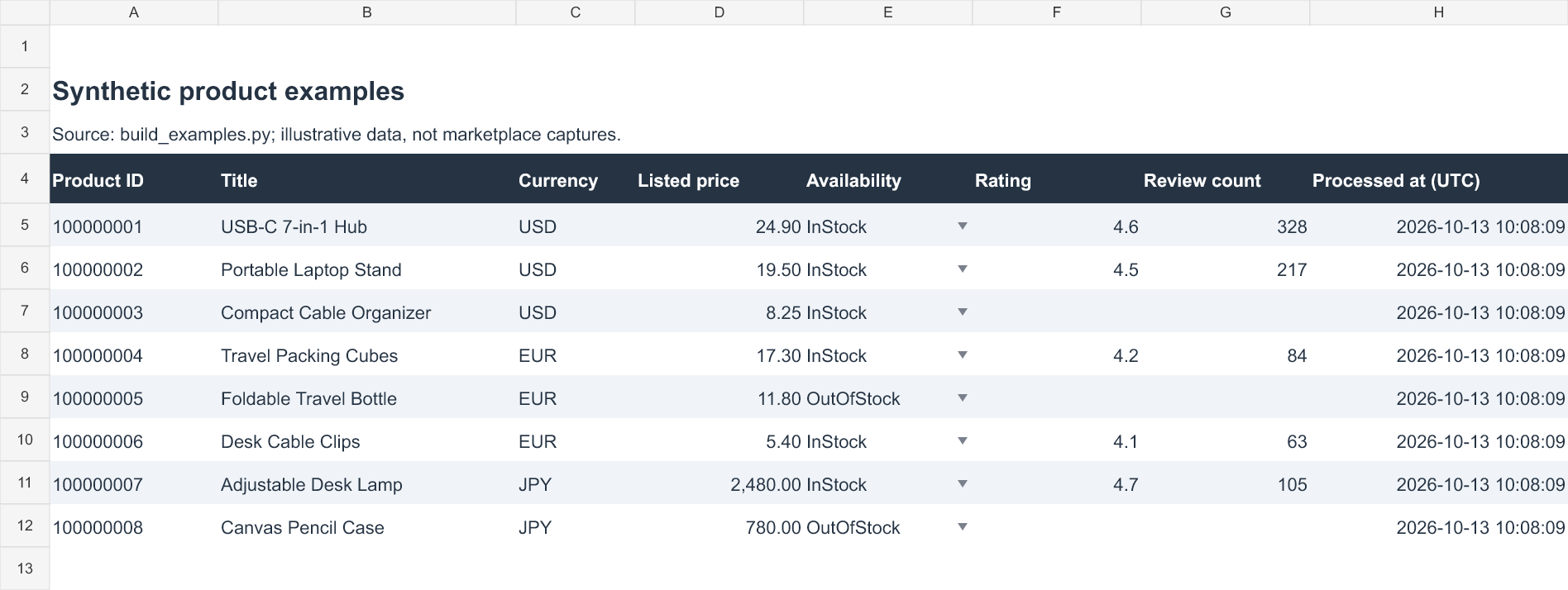
Figure 2. Example Excel layout for the eight generated records. Empty ratings remain blank; the screenshot shows the field arrangement used by the formulas below.
Count Products by Currency and Availability
In this layout, the sample data occupies rows 5–12. Currency is in column C and availability is in column E of Product Fields. On Summary, put Currency, In stock, Out of stock, Unknown and Total in A4:E4, then USD, EUR and JPY in A5:A7. In B5, calculate the in-stock count:
=COUNTIFS('Product Fields'!$C$5:$C$12,$A5,'Product Fields'!$E$5:$E$12,"InStock")
For C5 and D5, use the same formula with "OutOfStock" and "Unknown" respectively. Put =SUM(B5:D5) in E5 and fill B5:E5 down through row 7. Use =SUM(B5:B7) in B8 and fill across to E8 for the totals. The sample totals are six in stock, two out of stock and zero unknown. A missing or unrecognized availability value is mapped to Unknown during parsing; it is never silently counted as out of stock.
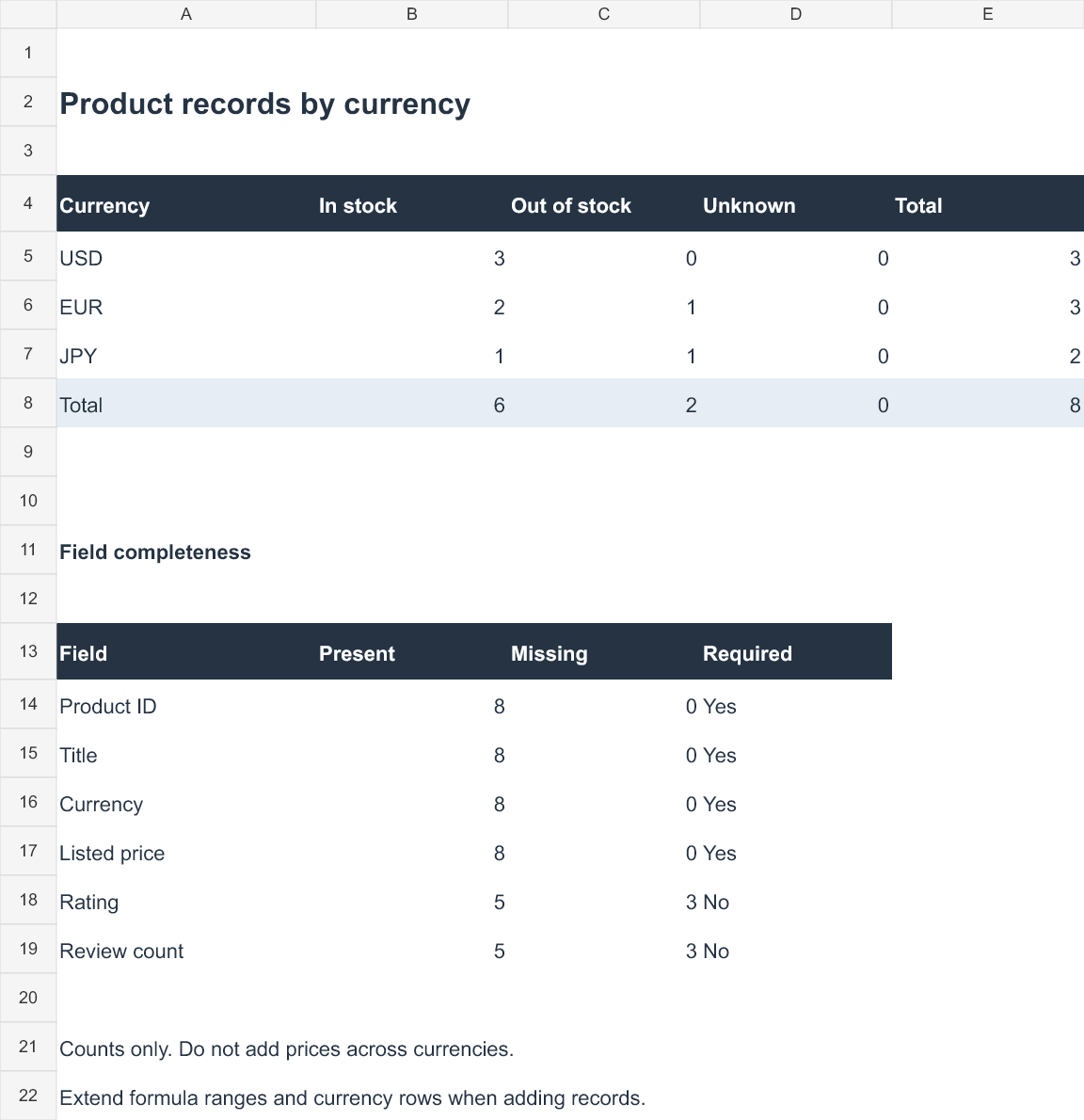
Figure 3. Example summary of the eight generated records, including field completeness. Values are record counts; prices in different currencies are not added together.
When adding records, extend the bounded formula ranges and add any new currencies to the summary. When replacing CSV data manually, keep availability values consistent with InStock, OutOfStock and Unknown. To prevent inconsistent entries, select E5:E12 on Product Fields and use Data → Data Validation → List with InStock,OutOfStock,Unknown.
Check Required Fields Without Replacing Missing Values with Zero
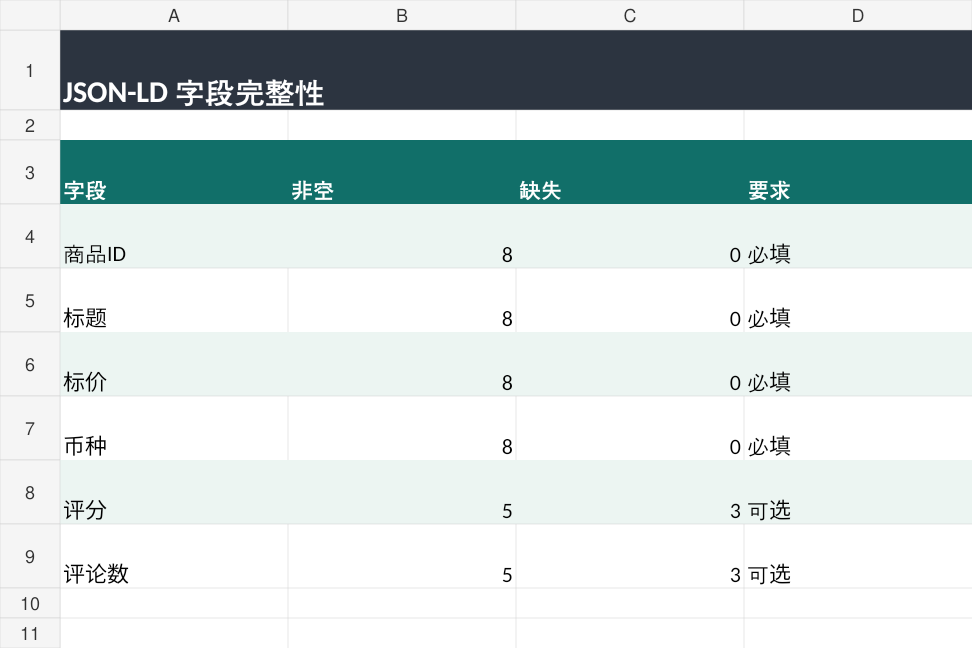
All eight sample records contain IDs, titles, currencies and prices. Five have a rating and review count; three leave those optional fields blank. For the rating column, this formula counts missing entries:
=COUNTBLANK('Product Fields'!F5:F12)
For the completeness summary shown in Figure 3, the present count for ratings is =ROWS('Product Fields'!F5:F12)-COUNTBLANK('Product Fields'!F5:F12). Repeat the missing/present formulas for columns A–D and G to check the other fields. A genuine numeric zero remains a value. For larger research datasets, group comparable records by currency, variant, market and capture period before calculating price statistics.
6. Test Failure Paths Before Reusing the Parser

Before using your own data, run the eight examples and compare their row counts with Figure 1. On a copy of one generated HTML file, change its price to "NaN" or change its Product URL to a different item ID, then run the single-file command from Section 2. The script should exit with code 1 and leave an existing CSV unchanged. Restore the input before the next check. Deleting availability should produce Unknown; omitting optional ratings should leave them blank. These checks exercise the parser locally without contacting AliExpress.
| Symptom | Check | Action |
|---|---|---|
| No unique matching Product | Product url / @id, duplicate objects and HTML contents |
Inspect the saved page; do not borrow recommendation data |
| HTTP200 but no usable data | Login/verification content and final URL | Stop; a successful HTTP status alone is insufficient |
| Price missing or a range | Offer structure and selected variant | Reject the record or design a separate variant-aware parser |
| HTTP403 | Permission and page access conditions | Stop the current request |
| HTTP429 | The reported Retry-After and request frequency |
Stop, then schedule any permitted later request accordingly |
HTTP407 or ProxyError |
Proxy credentials, protocol, host and port | Check locally without exposing passwords |
| Connection/read timeout | Network route and response progress | Diagnose the failure before another attempt |
The pipeline prepares all records before replacing the main CSV. Each CSV is written through a temporary file and os.replace; the JSON file is written directly. The three outputs are not one atomic transaction. Check timestamps and row counts when reviewing a run. Formula-like product titles are escaped with a leading apostrophe when writing CSV so spreadsheet applications do not interpret them as formulas.
7. Optional: Request an Authorized Product Page
The saved-HTML workflow above can be used without a proxy or live requests. If your task permits fetching a product page, the same parser can be applied to its response:
python article_ali_scraper.py "https://www.aliexpress.com/item/PRODUCT_ID.html" --authorized --output online-product.csv
Replace PRODUCT_ID with your actual target ID. Before sending the request, check the site’s current access rules and the permission applicable to your task. The --authorized flag records your choice to proceed; it does not obtain permission from the platform.
The request layer allows at most five redirects, each to the same product on an allowed host. It uses a 10-second connection timeout, a 20-second read timeout and a 5MB decoded-response limit. Read timeouts measure waiting for data, not a total task deadline. HTTP errors stop the command without automatic retries. On HTTP429, it reports Retry-After and exits.
Requests retrieves the response HTML and does not execute JavaScript. If the required Product data is absent, the command rejects the response; it does not solve challenges or manufacture missing fields. Successful parsing depends on the response actually containing a supported, matching Product object.
8. Where Does Rola IP Fit into This Workflow?
When an authorized research task requires a particular network exit, Rola IP Rotating Residential Proxies provides a residential connection option with country targeting and sticky sessions. A stable exit can be useful during a product-detail check, while the parser continues to handle identity and field validation separately. Market, variant, delivery destination and currency still need to be recorded explicitly.
Requests supports the HTTPS_PROXY environment variable, as described in its official proxy documentation. Use the connection parameters issued by your dashboard. For a macOS/Linux shell:
export HTTPS_PROXY="http://USERNAME:PASSWORD@HOST:PORT"
For Windows PowerShell:
$env:HTTPS_PROXY = "http://USERNAME:PASSWORD@HOST:PORT"
Replace every uppercase placeholder. Percent-encode reserved characters in the username or password when constructing the proxy URL. Avoid saving real credentials in shared scripts, terminal captures or command-history exports. NO_PROXY may exclude hosts from proxy routing, so check the program’s actual exit before relying on it.
For authentication and connection setup, see Python Requests proxy. For the difference between PowerShell’s own settings and a Python process launched from it, see Windows PowerShell set proxy.
An HTTP503 response can come from the target site, a CDN or the proxy chain. Identify the source before changing configuration; the 503 Service Unavailable guide covers that diagnosis. Changing an exit IP does not resolve account restrictions, session state or page-structure differences by itself.
Conclusion
Start with the copyable code and generated HTML examples to understand the identity checks, Offer rules and CSV format. Then apply the same parser to product HTML you are permitted to process, retaining source and capture details for meaningful comparisons. Use the illustrated Excel layout to check completeness and count records by currency before building price analyses.