
Error Code 520: Causes, Diagnosis, and Practical Fixes

Aug 31, 2026 · Troubleshooting · 10 min read
TL;DR: Cloudflare Error 520 means the edge received an empty, malformed, or otherwise unparseable origin response. Visitors should retry once, test a private window, and send the Ray ID and UTC time to the site owner. Administrators should correlate logs, compare proxied and authorized origin tests, then inspect crashes, firewall decisions, request headers, HTTP/2, and capacity. A proxy change is diagnostic only and cannot repair a failing origin.
What Does Error Code 520 Mean?
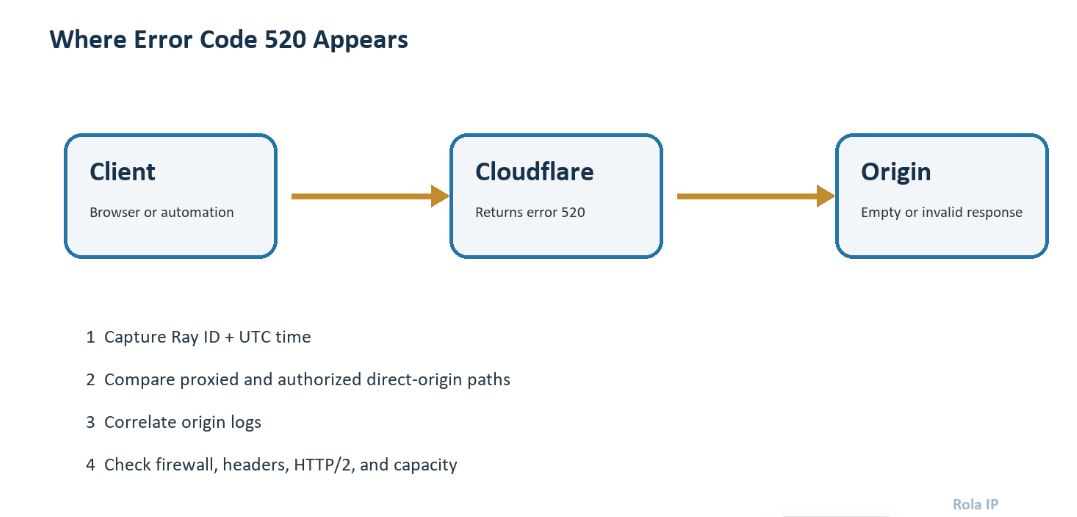
A normal proxied request follows this path:
Client → Cloudflare edge → origin server → Cloudflare edge → client
Cloudflare expects the origin to return a syntactically valid HTTP response. If the origin sends no status line, closes the connection before sending headers, returns malformed headers, or produces another unexpected response, Cloudflare may show a 520 error page instead of forwarding the origin response.
This distinction matters. A 521 usually indicates that the origin refused Cloudflare’s connection. A 522 points to a connection timeout, while a 524 means Cloudflare connected but the origin did not complete the response within the allowed time. Error code 520 is broader: the connection may have existed, but the result was unusable. See Cloudflare’s official 5xx error documentation for the current definitions.
Quick diagnosis table
| Symptom | Likely cause | How to verify | First corrective action |
|---|---|---|---|
| Every URL returns 520 | Origin crash, web-server failure, or broad firewall rule | Check health monitoring and origin logs at the Ray ID timestamp | Restart only the failed service after identifying the error |
| One route or action returns 520 | Application exception, plugin failure, or route-specific response corruption | Reproduce the exact URL and inspect application logs | Fix or roll back the affected code or plugin |
| Only logged-in users fail | Oversized cookies or authentication middleware | Compare incognito and authenticated requests; measure request-header size | Remove stale cookies and reduce cookie/header payload |
| Only Cloudflare-proxied traffic fails | Cloudflare IP ranges blocked or origin protocol mismatch | Compare proxied request with an authorized direct-origin request | Correct firewall allowlists or protocol settings |
| Automation fails intermittently | Rate pressure, unstable sessions, blocked egress IP, or origin overload | Log status, Ray ID, egress IP, retry count, and latency | Reduce concurrency, add backoff, and stabilize the request identity |
What Causes a 520 Error Code?
1. The application crashes or returns an empty response
An uncaught exception, exhausted worker pool, killed PHP process, or failed upstream service can close a connection before a valid status line and headers are written. Cloudflare then has nothing usable to forward. Look for application errors, out-of-memory events, worker exits, upstream resets, and container restarts at the same UTC timestamp as the failed request.
2. A firewall blocks or interrupts Cloudflare
The origin sees Cloudflare’s edge IP, not the visitor’s address. A host firewall, WAF plugin, fail2ban rule, rate limiter, or hosting security layer can therefore block legitimate Cloudflare traffic. Allowlisting must use Cloudflare’s current published IP ranges and should be applied at every layer that filters inbound traffic. Avoid copying an old list from a blog post.
3. Request headers or cookies are too large
Cloudflare documents request headers exceeding 128 KB, often because of excessive cookies, as a possible trigger for Error 520 in its official troubleshooting guide. Large authentication cookies, duplicated analytics cookies, or application-added headers can push a request over that limit. The failure may affect only signed-in users or a particular browser profile, which is why an incognito comparison is useful.
4. The origin sends malformed HTTP
Custom servers, reverse proxies, and middleware can generate invalid status lines, conflicting Content-Length and Transfer-Encoding headers, illegal header characters, or a header block that ends incorrectly. Test the origin response at the byte and header level rather than assuming a page that “works locally” is standards-compliant.
5. HTTP/2 is misconfigured at the origin
Cloudflare can use HTTP/2 when connecting to an origin if the relevant setting is enabled. A partially compatible server, proxy, or load balancer may reset streams or return invalid responses. Cloudflare’s Error 520 guidance recommends temporarily disabling HTTP/2 to Origin when the origin announces support but does not correctly handle the protocol. Treat this only as an isolation step; update or correct the origin stack before re-enabling the feature.
Why Does Error Code 520 Appear Only for Logged-In Users?
Error code 520 may affect only logged-in users when authentication cookies or middleware produce an oversized or malformed request. Compare the same URL in a private window and an authenticated session, then measure request-header size and inspect the authentication layer. Remove stale cookies and reduce unnecessary cookie payloads instead of broadly increasing limits. Correlate both tests with the Cloudflare Ray ID and origin logs before changing production settings.
6. The origin is overloaded or closes idle connections
CPU saturation, memory pressure, connection limits, too few application workers, or mismatched keep-alive settings can produce intermittent empty responses. A restart may hide the symptom briefly, but capacity graphs and service logs are needed to find the real constraint.
How to Fix Error Code 520 as a Website Visitor
Visitors cannot repair the origin server, but they can determine whether the failure is transient or tied to their request state.
- Reload once after a short pause. One retry can clear a brief origin or network interruption. Repeated rapid refreshes may add load and are not a diagnosis.
- Open the URL in a private window. If it works there, oversized or corrupted site cookies may be involved.
- Clear cookies for the affected site only. Clearing all browser data is unnecessary and signs you out elsewhere.
- Try another network or device. This helps identify an IP-specific security rule, but it does not prove that Cloudflare itself is faulty.
- Record the full URL, UTC time, and Ray ID. Send these details to the site owner. The Ray ID appears on Cloudflare’s error page and lets operators correlate the request with logs.
If the same URL fails in multiple browsers and networks, stop retrying and contact the website. Only its operator or hosting provider can inspect the origin.
How to Diagnose and Fix HTTP Error 520 as a Site Owner
Step 1: Capture evidence before changing anything
Record the affected URL, HTTP method, UTC timestamp, user state, Cloudflare Ray ID, and whether the failure is intermittent. Export a HAR file if the problem depends on a browser action, but remove cookies, authorization headers, and personal data before sharing it.
Also request Cloudflare’s trace endpoint from the affected client:
curl -sS https://example.com/cdn-cgi/trace
Replace example.com with the affected hostname. The output identifies connection details useful for support; it does not expose the root cause by itself.
Step 2: Correlate the request with origin logs

Search the web-server, application, reverse-proxy, container, and system logs for the same timestamp. Normalize everything to UTC before comparing events. Useful signals include upstream prematurely closed connection, worker termination, segmentation faults, out-of-memory kills, TLS alerts, connection resets, and security-rule blocks.
For Nginx on Linux, a focused search can look like this:
sudo journalctl -u nginx --since "2026-08-26 10:15:00 UTC" \
  --until "2026-08-26 10:17:00 UTC"
Adapt the service name and time window to your environment. On managed hosting, use the provider’s log viewer and include the Ray ID when escalating.
Step 3: Compare Cloudflare and direct-origin behavior safely
Use an authorized machine and the known origin IP. Keep the correct Host header and SNI name so the origin routes the request to the intended virtual host:
curl --verbose --resolve example.com:443:203.0.113.10 \
  https://example.com/affected-path -o /dev/null
203.0.113.10 is a documentation-only address; replace it with your origin IP. Do not publish or share a protected origin address. If the direct request fails too, focus on the application and origin stack. If direct access succeeds while the proxied request fails, inspect firewall allowlists, Cloudflare-facing TLS, Workers or rules, and origin HTTP/2.
Temporarily setting a DNS record to “DNS only” can also isolate Cloudflare, but it exposes the origin and changes production traffic. Prefer the single-client curl --resolve test. If a DNS-only test is unavoidable, schedule it, restrict access, document the change, and restore the proxy immediately afterward.
Step 4: Inspect the response and request headers
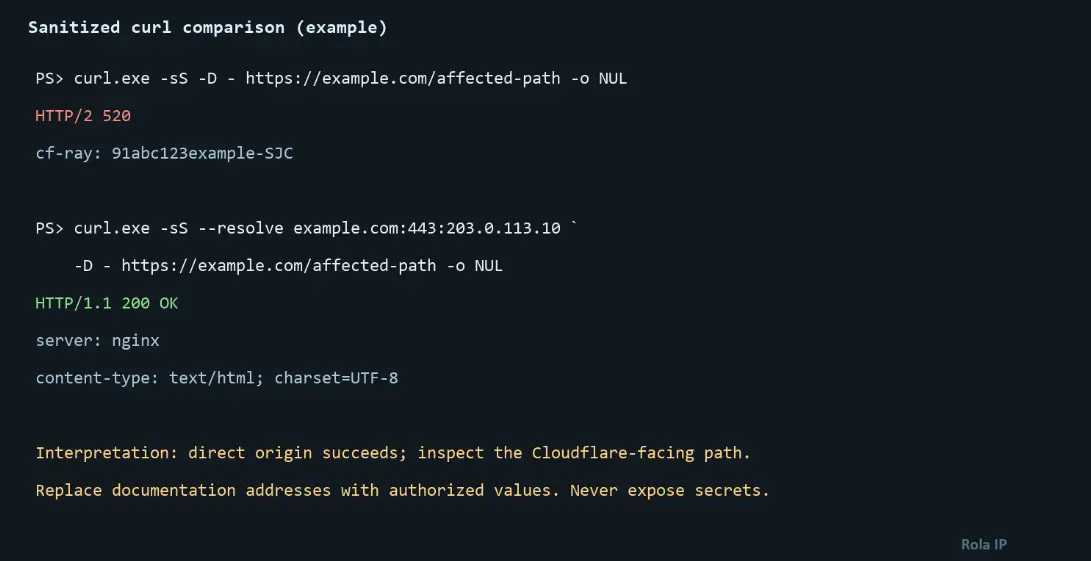
Fetch headers from both paths and compare them:
curl -sS -D proxied-headers.txt -o /dev/null https://example.com/affected-path
curl -sS --resolve example.com:443:203.0.113.10 \
  -D origin-headers.txt -o /dev/null https://example.com/affected-path
Check for an absent status line, duplicate or illegal headers, contradictory body-length headers, and unusually large cookies. If only authenticated traffic fails, sign out or use a clean browser profile, then audit which component creates each cookie. Reduce cookie scope and payload rather than merely raising server limits.
Step 5: Audit firewall and security controls
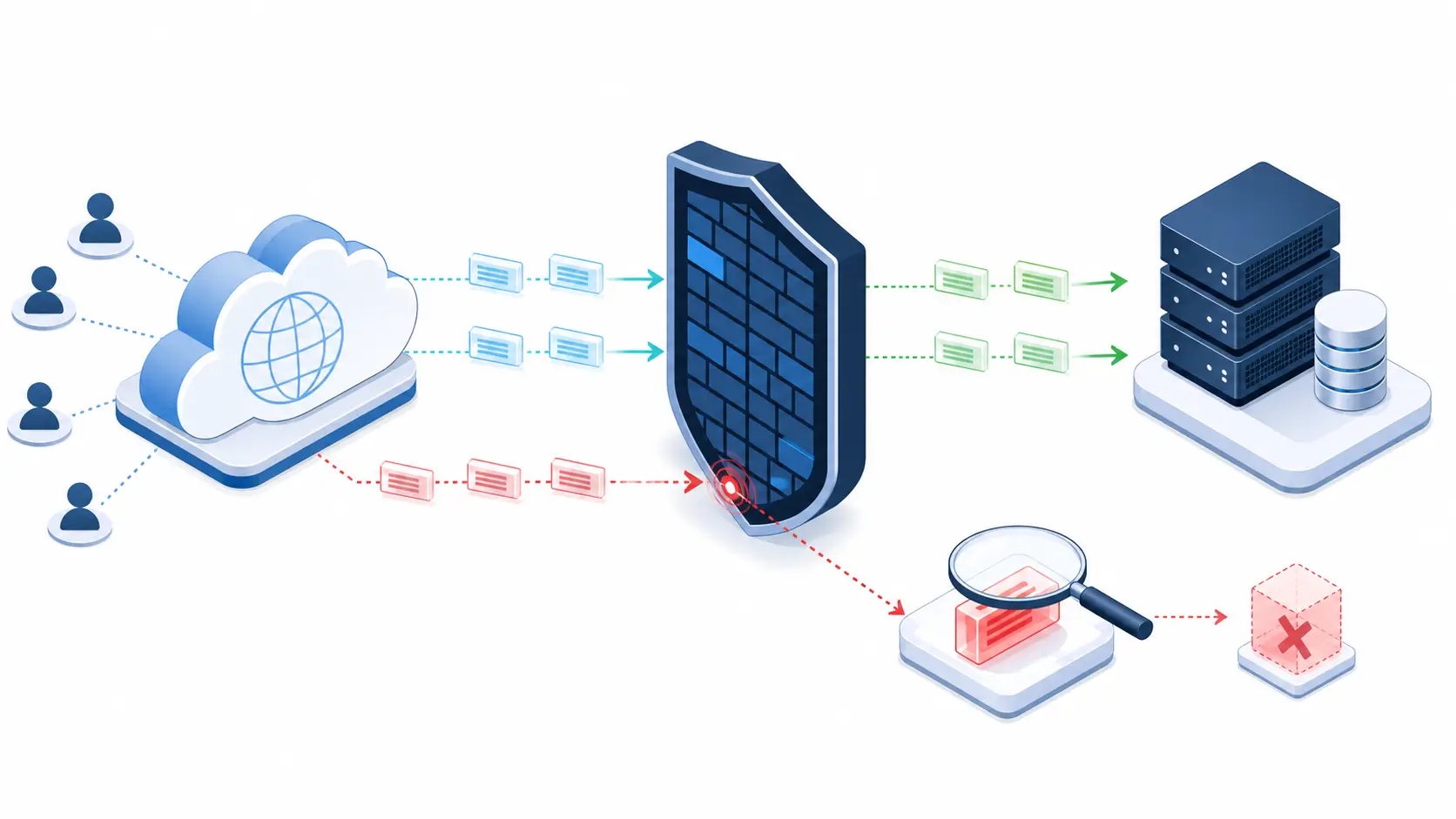
Confirm that current Cloudflare IP ranges are allowed through the network firewall, host firewall, load balancer, web application firewall, and security plugins. Search deny logs for the exact timestamp. Do not disable the firewall broadly. Create the narrowest rule that permits Cloudflare to the required service ports and keep the origin restricted from arbitrary public access where possible.
If security middleware blocks a route because of a false positive, identify the rule ID and create a route- or parameter-specific exception. A global WAF bypass trades one outage for a security exposure.
Step 6: Test origin HTTP/2 and connection settings
If logs show stream resets or the problem started after a proxy, load balancer, or web-server upgrade, temporarily disable Cloudflare’s HTTP/2-to-origin option and retest the same URL. Also compare keep-alive timeouts across Cloudflare, the load balancer, Nginx or Apache, and the application server. The upstream layer should not silently close a reused connection while another layer expects it to remain valid.
Step 7: Check capacity and recent changes

Overlay the 520 timeline with CPU, memory, open connections, worker utilization, database latency, and deploy events. Roll back the smallest suspected change when evidence points to a release. If workers are saturated, reduce expensive request work, add capacity, or move long-running jobs out of the request path. Simply increasing timeouts can make overload worse.
Step 8: Verify the fix
Repeat the exact failing request in three conditions: through Cloudflare, directly to the origin from an authorized client, and with a clean cookie state. Confirm a valid status code, stable response headers, and no matching origin errors. Then watch the Cloudflare 5xx rate and origin error rate for at least one normal traffic cycle.
Handling 520 Errors in Scrapers and Automation
Automation may classify 520 as a retriable origin-side signal, but retries need limits. When a Cloudflare response provides Retry-After, honor it; otherwise use exponential backoff with jitter, cap the attempts, and stop retrying when a route fails consistently. Log the URL, attempt number, Ray ID, latency, and egress IP. Never interpret a new proxy IP as proof that the origin problem is fixed. Cloudflare’s structured error response documentation describes retry guidance for Cloudflare-generated 5xx responses.
Request identity still matters. An overloaded origin or security layer may react differently to high concurrency, unstable cookies, or frequently changing addresses. For authorized web-data workloads, a web scraping proxy can distribute legitimate traffic, while proxy throttling rules help keep request rates within a controlled envelope. If a workflow depends on a login or multi-step transaction, use a stable session instead of rotating on every request.
Rola IP can provide an alternative egress path for authorized automation tests. Depending on the selected product and current configuration, session and location controls may help determine whether a 520 response varies by request identity or network path; the current product-specific options are documented in Rola IP’s proxy network guide. A proxy cannot repair a crashed application, malformed origin response, or Cloudflare configuration error. Confirm the selected exit with a proxy checker and compare controlled requests before drawing a conclusion.
A conservative Python retry pattern is:
import random
import time
import requests


def fetch_with_backoff(url: str, attempts: int = 4) -> requests.Response:
    for attempt in range(attempts):
        response = requests.get(url, timeout=(5, 30))
        if response.status_code != 520:
            response.raise_for_status()
            return response

        if attempt == attempts - 1:
            response.raise_for_status()

        delay = min(30, 2 ** attempt) + random.uniform(0, 0.5)
        time.sleep(delay)

    raise RuntimeError("unreachable")
This example is suitable for Python 3.10+ with Requests 2.x. It retries only received 520 responses, applies bounded backoff, and still raises an error after the final attempt. It does not handle DNS failures, connection resets, timeouts, or Retry-After. Use this pattern only for idempotent requests, or when the application supplies an idempotency key. Production code should also enforce a global retry budget and comply with the target site’s terms and access policies.
How to Prevent Future 520 Errors
- Monitor origin 5xx responses, connection resets, worker saturation, and Cloudflare 5xx rates separately.
- Keep application, reverse-proxy, and security software updated through tested releases.
- Validate HTTP responses in staging, including large cookies and authenticated routes.
- Synchronize Cloudflare IP allowlists from the official source and audit every filtering layer.
- Use health checks that exercise a real application dependency, not only a static file.
- Load-test expected concurrency and enforce queues or rate limits before workers saturate.
- Preserve request IDs across Cloudflare, the reverse proxy, and the application for correlation.
- Review keep-alive, proxy, and application timeouts as one system after infrastructure changes.
When to Contact Hosting or Cloudflare Support
Contact the hosting provider when logs show worker crashes, resource exhaustion, network resets, or server configuration failures you cannot change. Contact Cloudflare after you have reproduced the problem, verified the origin and firewall configuration, and ruled out a hosting issue.
Prepare the affected URL, UTC timestamp, Ray ID, sanitized /cdn-cgi/trace output, and two sanitized HAR files when requested—one with Cloudflare enabled and one from a controlled bypass test. Include the relevant origin-log excerpt. Never send passwords, cookies, authorization headers, API keys, or an origin IP in a public ticket.
Final Checklist
Start with evidence: URL, time, Ray ID, request state, and origin logs. Compare the proxied path with an authorized direct-origin request, then inspect application failures, firewall decisions, header size and syntax, HTTP/2 behavior, and capacity. Apply one narrow change at a time and repeat the original request to verify recovery. For automation, reduce concurrency and use bounded backoff; use proxy rotation or sticky sessions only when testing shows that request identity is part of the failure.