
Proxies and VPNs: Key Differences and Which to Choose

Oct 26, 2026 · Proxy Basics · 12 min read
Proxy vs. VPN: Quick Answer
TL;DR: Proxies and VPNs can route traffic through an intermediary and change the public Internet Protocol (IP) address a destination sees. A virtual private network (VPN) typically encrypts traffic between your device and a VPN gateway. A forward proxy routes requests from configured applications. Proxies suit workflows requiring separate exits or session control; VPNs suit encrypted device connectivity. Exact capabilities vary by service and configuration.
Start with the basics below, then compare SOCKS5, residential exits, and the requirements of scraping and automation.
At a Glance
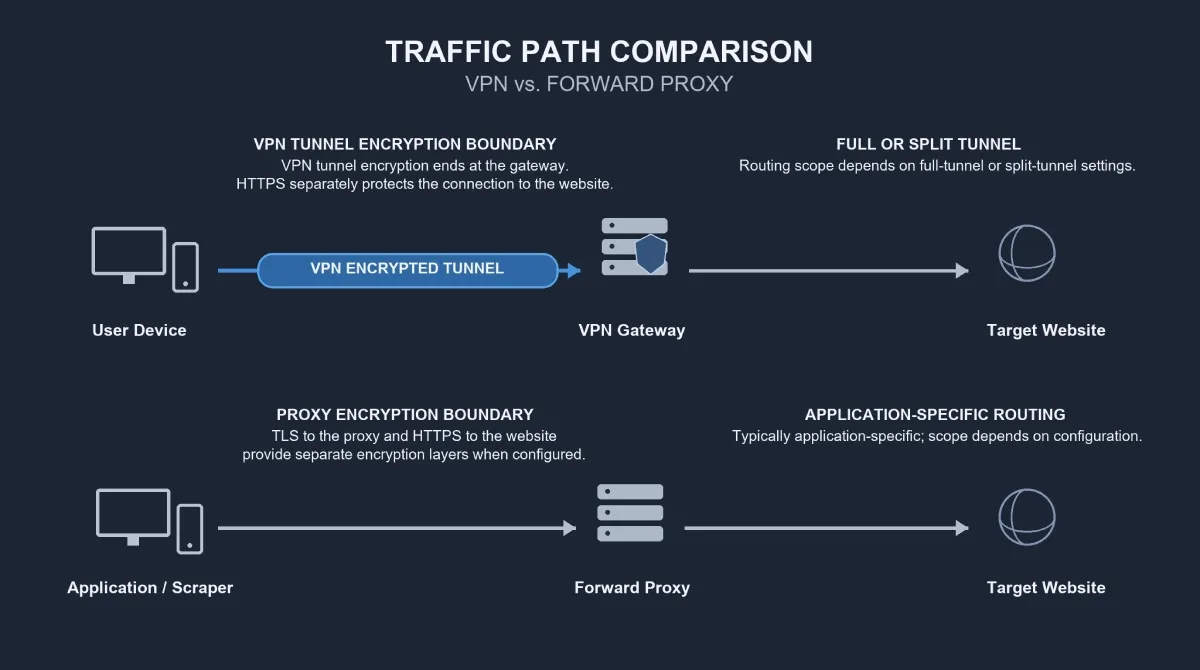
The difference between proxy and VPN starts with routing scope and encryption boundaries. A commercial VPN usually supplies an encrypted tunnel for traffic selected by device routing. A forward proxy handles traffic sent through it by an application or client. Proxy encryption depends on the transport and application protocol; changing an exit IP does not automatically protect every connection.
For browsing on an untrusted network, a trusted VPN can protect routed traffic on the local path. For regional research or authorized automation, a proxy service may provide multiple exits, location targeting, and session controls. SOCKS5 describes a connection protocol; residential describes an exit IP source. Neither term alone establishes privacy, speed, or access to a website.
For collection work, compare usable output rather than connection speed alone. Define a valid result, test representative targets and locations, and measure retries, transferred data, throughput, and cost. A persistent browser session also needs persistent application state. The right choice follows those requirements: a VPN for encrypted connectivity, a proxy for controlled application exits, or both when the workflow needs both functions.
What Are VPNs and Proxies?
What Is a VPN?
A VPN creates an encrypted connection between a device or network and a VPN gateway. For typical commercial internet VPN services, the path is:
Device -> encrypted VPN tunnel -> VPN gateway -> destination
Destinations normally see the gateway’s public IP for traffic routed through it. A full tunnel sends most selected device traffic through the VPN; split tunneling routes only specified traffic through it. Exceptions and exclusions depend on the client, operating system, and configuration. A VPN therefore does not necessarily carry every connection.
A commercial internet VPN primarily provides an alternative internet route. An organization-managed VPN often provides access to private company systems. The access purpose differs even when both use encrypted tunneling.
The VPN tunnel ends at the gateway. Hypertext Transfer Protocol Secure (HTTPS) separately protects application traffic between the client and website when used correctly. For example, a VPN does not turn a plain HTTP connection beyond the gateway into an encrypted website connection. Microsoft’s VPN routing documentation explains full and split tunnel routing in Windows.
What Is a Proxy?
A proxy is an intermediary that handles requests between a client and a destination. This article covers forward proxies, which make outbound requests toward websites on behalf of a user or application. Reverse proxies generally sit in front of servers and receive incoming requests.
Configured browser, scraper, or application -> forward proxy -> destination
Application-specific routing is common, but broader routing is possible with system settings or additional tooling. Configuring one browser does not establish how another program connects.
Proxy terminology describes three independent dimensions:
- Protocol: Hypertext Transfer Protocol (HTTP) proxying, Transport Layer Security (TLS) connections to a proxy, or SOCKS5.
- Exit IP source: datacenter, residential, or Internet Service Provider (ISP)-associated/static residential.
- Session behavior: rotating or sticky; continuity and duration depend on the service.
A residential service may support SOCKS5 and offer both rotating and sticky sessions. These labels describe different properties of the same service, rather than mutually exclusive product categories.
Proxy vs. VPN: Key Differences
Forward proxy services compared with typical commercial VPN services
| Comparison point | Forward proxy services | Typical commercial VPN services |
|---|---|---|
| Traffic routing | Configured client traffic; broader routing needs suitable tooling | Traffic selected by device or network routing, often a full tunnel |
| Encryption | Depends on proxy transport and application protocol | Encrypts routed traffic between client and gateway |
| Privacy | Changes the source IP for proxied requests; provider practices and application tracking matter | Protects routed traffic on the local path; provider practices and application tracking matter |
| IP and session control | Pools, separate exits, rotation, or sticky sessions may be available | Gateway selection is common; simultaneous exits and session controls vary |
| Location selection | Country or finer targeting depends on service and inventory | Country or city selection depends on provider |
| Performance | Exit quality, route, load, client, and target determine results | Gateway quality, route, load, tunnel, and target determine results |
| Common billing | Per GB, per IP, or subscription | Subscription; dedicated IPs may cost extra |
| Typical fit | Application routing, regional research, and controlled exits | Encrypted device connectivity, browsing, and remote access |
Encryption and Privacy: What Each Tool Actually Protects
HTTPS through a SOCKS5 proxy can protect application content even though SOCKS5 does not itself encrypt payloads. These protections operate at different layers. An HTTPS destination does not automatically encrypt the proxy negotiation, proxy credentials, or every item of connection metadata.
TLS to a proxy protects the client-to-proxy connection. HTTPS to the destination protects the application connection through the intermediary. The curl TLS certificate documentation distinguishes certificate verification for HTTPS proxies from verification for destination servers. Both connections require appropriate configuration.
A VPN protects routed traffic between the client and gateway on an untrusted local path. HTTPS remains necessary for application protection beyond that gateway. Both proxies and VPNs introduce a provider whose logging, security, and operating practices matter.
Neither guarantees anonymity. Signing into the same account or retaining the same cookies can link visits across different IPs. Browser characteristics and behavior can also contribute to tracking.
Speed and Cost: Compare the Actual Workflow
Neither proxies nor VPNs are inherently faster in every setup. Geographic distance, congestion, gateway load, target behavior, and client configuration all affect performance.
Browsing speed also differs from collection performance. A quick verification page does not help a price-monitoring task that needs a product price. Useful comparisons include the locations needed, simultaneous exits, transferred data, retries, and operating effort. The worked example below shows how to compare cost using valid results.
VPN vs SOCKS Proxy
Proxy is an umbrella term; SOCKS5 is a specific protocol. The practical choice is whether to route a supported application through a chosen exit or encrypt routed device traffic through a VPN. Application support, Domain Name System (DNS) routing, and encryption boundaries determine whether either option meets the requirement.
SOCKS5 does not itself encrypt application payloads. A VPN encrypts traffic between its client and gateway. SOCKS5 can be supplied through datacenter, residential, or ISP endpoints; the protocol does not establish IP origin or reputation.
Application Support, DNS, and Authentication
Browser, command-line, and library support differ, including support for proxy authentication. SOCKS5 defines Transmission Control Protocol (TCP) connections and a User Datagram Protocol (UDP) ASSOCIATE command. Actual UDP handling depends on both client and service, as distinct from the protocol’s available commands. These mechanisms are specified in RFC 1928.
DNS may be resolved locally or through the proxy. In clients that recognize it, such as curl, socks5h:// requests proxy-side hostname resolution. This syntax is not universal. The curl SOCKS5 hostname option documents that client’s behavior.
A practical setup check covers four points:
- Client support: protocol, supported traffic, and required features.
- Authentication: compatibility with the provider’s accepted method.
- DNS routing: where names are resolved and whether that matches the requirement.
- Failure behavior: whether a failed proxy causes an error, retry, or direct fallback.
Client-specific setup instructions matter. For curl, the official options above explain configuration; browsers require their own checks. Features such as Web Real-Time Communication (WebRTC) may follow separate network paths depending on the browser and settings. SOCKS5 support alone does not establish that all browser traffic uses the proxy.
Residential Proxy vs VPN
SOCKS5 describes how a client connects; residential describes the source of an exit IP. Residential proxies and VPNs are often compared because both can change the address a website sees, although they describe different dimensions. Some VPNs offer residential exits, and some proxy products include encrypted transport.
The buying question is whether location control, session continuity, sourcing, and usage costs make a residential proxy service suitable for the actual workflow.
Exit IPs, Locations, and Session Continuity
Residential services use exits associated with residential networks. Commercial VPNs commonly use hosted gateways. Neither label guarantees how a target classifies or accepts a connection.
Rotating residential services differ from static ISP proxies. ISP-associated addresses may operate on server infrastructure rather than household devices. A sticky session attempts to retain an exit for a period, subject to provider limits and exit availability. It is not automatically equivalent to a dedicated static IP.
Location labels also need practical validation. A provider may label an exit as belonging to one city while a target uses a different location database. Account preferences, language, cookies, and delivery settings may influence returned content independently of IP location.
Evaluate sourcing transparency, allocation model, available inventory, and session guarantees separately. For regional collection, a residential service is worth evaluating when residential exits and selectable markets meet the task’s requirements; the label alone does not establish suitability.
Pricing and Cost per Successful Result
Residential services commonly bill per GB, VPNs commonly charge subscriptions, and ISP services may charge per IP or bandwidth allowance. Exceptions exist.
A valid result should contain the required data from the correct target region, without a substituted login, block, or verification page. Define that result before comparing prices:
Cost per valid result = total workflow cost / number of valid results
Total workflow cost includes traffic charges, allocated subscription or IP fees, and attributable operating costs. When infrastructure and maintenance are excluded, call the metric provider cost.
Hypothetical example: $30 of provider charges for 10,000 valid results equals $3 per 1,000 valid results, before infrastructure and maintenance. This is arithmetic, not a Rola price or performance claim.
Retries, large response bodies, and interrupted sessions can raise effective cost even when the advertised unit rate is low.
Which Should You Choose?
Choose a VPN for encrypted device connectivity. Choose a proxy service when the task needs application-specific exits, multiple locations, or explicit session control. A small task may work with an existing connection and require no new service.
| Task | Starting option | Main requirement or qualification |
|---|---|---|
| Browse on public Wi-Fi with an encrypted tunnel | VPN | Trusted provider, correct routing, and HTTPS |
| Access private corporate systems | Organization-managed VPN | Approved access and organization requirements |
| Route one supported application’s traffic | Compatible forward proxy | Protocol, authentication, and DNS support |
| Run a small collection test in one region | Existing connection, VPN, or proxy | Determine whether a different exit is needed |
| Collect public pages at sustained volume | Managed proxy service if exit management is needed | Validate data, request rate, concurrency, and target behavior |
| Compare regional prices or search results | Geo-targeted proxy service | Verify target-visible location and localization settings |
| Maintain an authorized browser session | Dedicated/static ISP exit or suitable sticky session | Exit stability, duration, and persistent application state |
| Collect from less restrictive targets on a budget | Datacenter proxy if an intermediary is needed | Test access, throughput, and effective cost |
| Secure operator access and manage collection exits | VPN plus proxies | Verify routing and the exit each destination sees |
When to Use a VPN and Proxy Together
A VPN can secure operator access to private infrastructure while proxies control outbound collection exits. Whether the client-to-proxy connection travels through the VPN depends on routing, split tunneling, and where the collection client runs.
For correctly proxied requests, a destination normally sees the proxy exit. Combining tools adds routing decisions, possible latency, and configuration work. It is useful when the workflow has both connectivity and exit-management requirements.
How to Choose a Proxy for Scraping and Automation
Start with Location, Session Duration, and Concurrency
Selection follows this sequence: target and required location -> session continuity -> expected concurrency and traffic -> IP source and rotation -> budget. Before selecting an exit, define the collection unit and validation rules. The guide to scraping data from a website with Python covers common collection approaches and a safe proxy pilot.
Rotation helps distribute independent requests, but can disrupt a workflow that depends on a consistent exit. Changing IPs between login and subsequent account actions may introduce a new network context while the application expects continuity. A stable exit with preserved cookies and storage better matches that requirement.
Check protocol support, authentication, connection limits, session behavior, inventory, and integration guidance. IP rotation does not replace request pacing or session management. Account restrictions, cookies, browser characteristics, rate limits, and behavior-based checks can still affect results.
Example 1: Compare Product Prices Across Regions
A team collecting public product prices needs exits in each market, correct currency and locale, and enough continuity to complete each regional visit. Geo-targeted proxies are a starting option; datacenter or residential exits can be chosen using measured target behavior and cost.
Validation covers region, currency, product variant, and required fields. Cookies and language settings should be controlled because they can alter localization. An exit IP alone does not establish how the site interprets the market.
Example 2: Maintain an Authorized Browser Session
Permitted account automation may need a stable exit, persistent cookies and storage, and sufficient session duration. A dedicated/static ISP exit or a suitable sticky session can be evaluated against those needs.
Validation covers login continuity, reauthentication frequency, and what happens when an exit disappears. IP continuity cannot guarantee an active application session: authentication expiry and the target’s own policies still apply.
How Do You Compare Proxy Services Fairly?
A representative pilot compares valid output under the same workload and counting rules. Measure valid-result rate, valid results per unit time, transferred data, retries, and cost per valid result. Add 95th-percentile latency (p95) when slower responses affect completion time.
Valid-result rate = valid results / attempted collection units.
Document whether an attempted unit means a logical page collection or each network request, and how retries are counted. Use the same definition across services.
Test representative targets, locations, session lengths, and concurrency. One successful request cannot establish capacity at sustained load. Once requirements are clear, the Rola IP documentation provides a destination for reviewing integration options alongside the pilot findings.
Common Mistakes and Practical Checks
- Rotating during a persistent session: align exit behavior with session duration and preserve intended application state.
- Assuming an IP change resets identity: accounts, cookies, browser settings, and behavior can link activity across exits.
- Counting every HTTP 200 as success: validate expected fields and distinguish verification or error pages from usable data.
- Retrying every failure identically: classify failures, bound retries, apply backoff, and honor
Retry-Afterwhen supplied. Its meaning is defined in HTTP Semantics. - Ignoring connection limits or exit availability: test realistic load and define behavior when an endpoint fails.
- Exposing credentials or weakening transport security: protect secrets, retain certificate validation, and use supported access controls.
Review provider logging and IP sourcing. Collection also requires attention to applicable law, access permissions, site terms, and personal data minimization. Relevant robots.txt guidance can communicate crawler preferences, but is not legal permission. The Robots Exclusion Protocol explicitly distinguishes its rules from access authorization.
Find the Right Proxy Setup with Rola IP
The choice between proxies and VPNs follows the job: encrypted connectivity, controlled exits, or both. For regional collection, evaluate a residential proxy service against the locations, session behavior, protocol, and traffic volume your workflow requires. Use pilot results to assess suitability.